Although Microsoft continues to add new features to OneDrive to enhance the user experience, the company is not shy about removing something that users don’t use much. According to a blog post from the company, the ability to upload files to OneDrive directly from URLs is precisely one of those features that not many users benefit from, so it has proceeded to remove it.
Uploading files to OneDrive directly from URLs is currently available as a preview for OneDrive Personal. However, due to low usage and high maintenance costs, Microsoft will no longer support this feature starting on March 29, 2024.
According to Microsoft, the feature may stop working at any time and without prior notice after the indicated date. The change does not affect the files you uploaded to OneDrive from URLs, which will continue to exist after March 29 unless you delete them, of course.
Although the abandonment of the functionality of uploading files from URLs may disappoint some users, Microsoft will release next month several useful AI features for OneDrive, including allowing Copilotto investigate files to answer queries and make document summaries.
Microsoft just pulled the curtain back on the shiny, new version of OneDrive. And guess what? It’s designed to gel even more seamlessly with the rest of Microsoft’s star-studded lineup, including those Microsoft 365 favorites like Teams and Outlook.
Microsoft is dubbing this revamp as “the future of file management.” And, oh boy, the Copilot-branded AI tools are stepping into the spotlight across the entire platform. Fancy, right?
Considering the mind-boggling trillions of files already chilling on OneDrive, Microsoft’s game plan is clear: make life a tad easier for all of us, whether we’re hustling at work or just sharing that hilarious cat meme with friends. So, gear up for a smoother, smarter file-sharing experience!
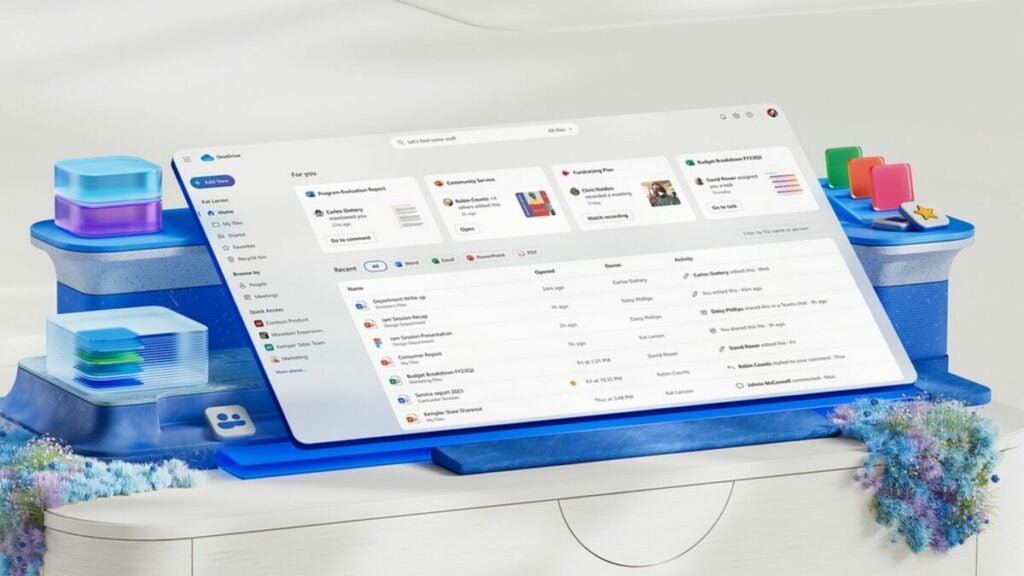
OneDrive is getting a fresh coat of paint after what feels like eons. This revamp is all about making it vibe with the rest of Microsoft’s family, showcasing a snazzier and clearer user interface.
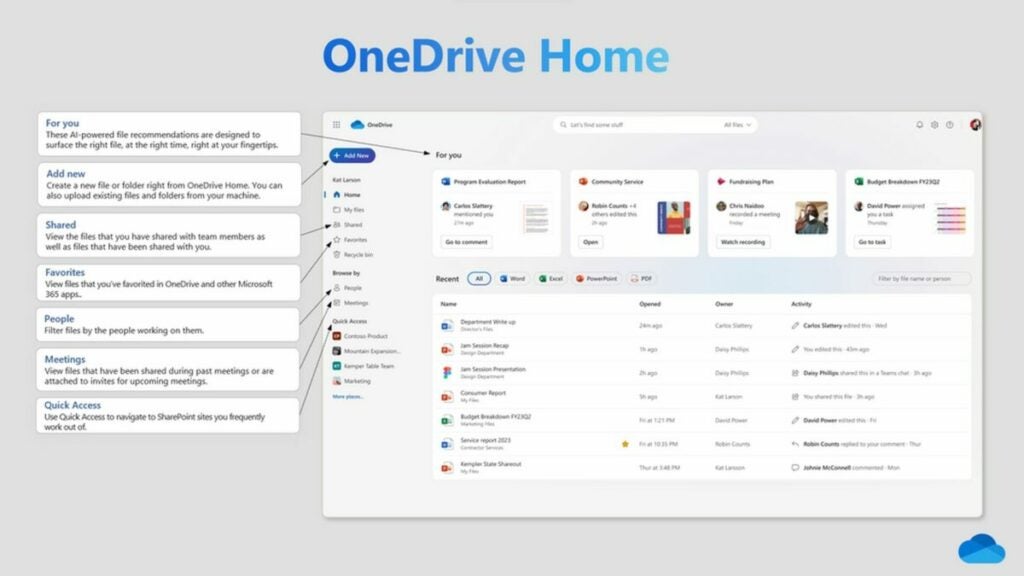
While there are some nifty layout changes, the core OneDrive experience remains your old pal. You’ll still see familiar signposts like Home, For You, and Shared. But here’s where it gets exciting: ever remembered who shared a file with you but drew a blank on its name? The new People view has got your back. And for those who live in meetings (virtual high-five?), the Meetings view is your new hub for all those recordings and attachments.
Microsoft’s also trimmed down the number of clicks needed to share files. We’ve all felt that click-fatigue, especially as cloud platforms kept adding more sharing options. But that’s old news now!
And the fun doesn’t stop there. Soon, you’ll be able to jump directly into a wider range of apps, not just the usual Microsoft 365 suspects. Plus, OneDrive’s getting even cozier with Teams and Outlook, where most of us end up sharing files anyway.
Now, here’s the cherry on top: thanks to some AI magic sprinkled system-wide, you can now “ask open-ended questions related to an individual file or get a summary of the content” across both OneDrive and SharePoint. And yes, there’s a treasure trove of other Copilot-branded tools waiting in the wings.
New OneDrive features at a glance
The revamped OneDrive effortlessly brings all your created and shared files right to your fingertips.
With the features listed below, now available in OneDrive:
OneDrive Home: The home experience on OneDrive for Web has been spruced up, ensuring you can quickly access your files, no matter their location within your organization.
For you: Positioned at the pinnacle of the OneDrive home page, this section uses AI wizardry to offer timely file recommendations, ensuring you always have essential files within easy reach.
Meetings view: This feature displays both upcoming and past meetings, complete with meeting recordings and shared files. Whether shared via chat or within the meeting invite, you’ll find everything neatly organized here.
People view: Can’t recall a file’s name but remember the sharer? No worries! This view sorts your files based on your collaborators, making file retrieval a breeze.
Shared view: This is your one-stop hub for all files shared with you, irrespective of the sharing method or the sharer. It’s the perfect spot to revisit collaborative files.
Colorful folders: Add a personal touch by customizing your folder colors, ensuring organization is both efficient and fun.
Favorites: Never lose track of crucial files again. Mark any file as a favorite, and it’ll be readily accessible from your Favorites list across platforms like OneDrive, Teams, File Explorer, Microsoft 365 apps, and beyond.
Shortcuts: Need quick access to shared files or those in team locations? Create a shortcut in your OneDrive. It’s the perfect way to consolidate files for projects, no matter where they originally reside.
Simplified sharing: Sharing’s never been this easy! With a more intuitive design and fewer clicks, sharing files and copying links is a breeze.
Cloud storage apps like Dropbox, Google Drive, and Microsoft’s OneDrive have revolutionized how we work and collaborate with teams that could be spread out across the globe. Even still, however, they are far from sexy and are often seen as just boring file storage apps. As OneDrive is approaching its 15th birthday, Microsoft is giving it a facelift and adding some new features that probably won’t, but then again just might make the app a little cooler in the eyes of the world. Let’s take a look.
In a blog post celebrating the evolution of OneDrive up to its 15th anniversary, Microsoft has released details about a new OneDrive landing page, which should make it easier to stay on top of your work.
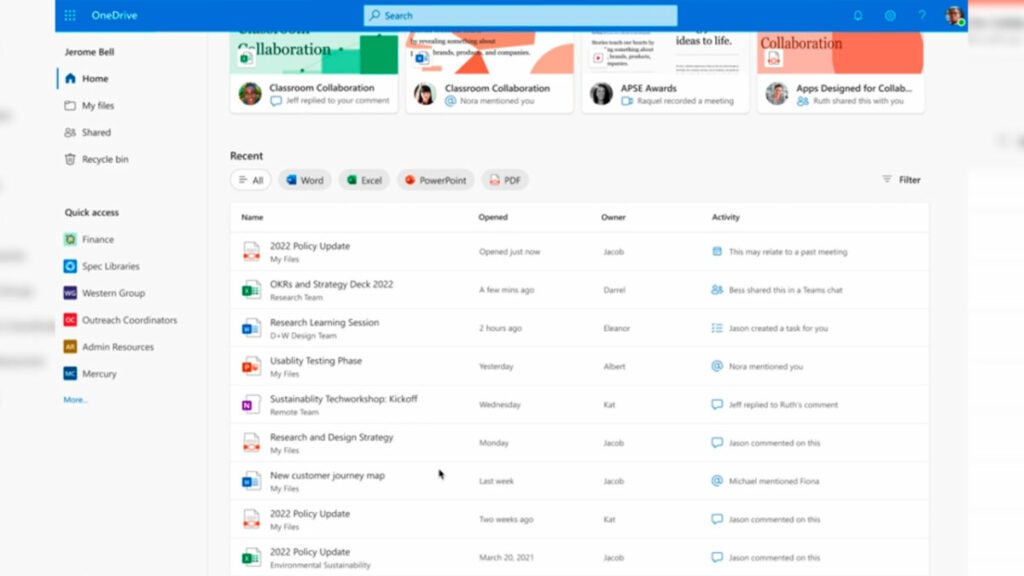
When the update rolls out, instead of arriving on the My Files tab when you head over to OneDrive you will land on a new landing page called OneDrive Home. The new homepage will look a little like the homepage for Microsoft 365, which is Microsoft’s subscription version of its Office productivity suite, which can also be accessed online. OneDrive Home will contain a list of all your files and the default view will show them based on how recently you used them. You will of course be able to filter your files and reorder them based on a number of recognizable criteria such as file type including Word doc, Excel spreadsheet, PowerPoint presentation, and PDF document.
According to the blog post announcing the update, the new OneDrive Home landing page isn’t ready to roll out just yet. Instead, Microsoft plans to roll out the new look and much more user-friendly OneDrive Home in the “coming months”.
In other recent Microsoft OneDrive News did you know that Microsoft is trying to move in on Instagram’s space by implementing a Photo Story feature in OneDrive?
Instagram Stories offer users a great way to keep their friends, family, and followers up to date with all their goings-on. The feature has become hugely popular on the app, and it seems that Microsoft has been taking note and looks set to introduce a similar feature to one of its apps too. You will never believe which app though. Microsoft is bringing an Instagram Stories-like feature to OneDrive. Yes, you read that right, OneDrive.
In a Microsoft Tech Community blog post, the software giant has released details of what it is calling OneDrive photo story, a feature it says is powered by innovation and built on trust.
The new feature, whichMicrosoft is currently testing offers users a way to stay connected with loved ones, offering you the chance to share all the moments you have saved on your OneDrive with a unique inner circle. The feed will be invite-only, and your friends and family will be able to comment, like, and react to your pots.
Microsoft’s Catherine Feldman, who penned the blog post announcing the new feature describes it like this:
“Photo story brings all your memories into a private, invitation-only feed that you can share with family and friends, and it supports comments, reactions, and notifications to spur authentic interactions through photos that people actually care about. The feature is available now in beta in Australia on the OneDrive mobile app for Android and iOS, and from your favorite web browser. We plan to roll out the new feature in the U.S. and other regions later this year, as we continue to listen to customer feedback, and develop and improve feature capabilities.”
The feature is currently being tested in Australia, but there are plans to expand its availability. Interestingly, you don’t need a paid Microsoft 365 account to access the new feature either as it is available to users of the free OneDrive basic account, as well as OneDrive Standalone 100GB, Microsoft 365 Personal, and Microsoft 365 Family subscribers.
This is an interesting move from Microsoft, and we will be watching to see how it develops. A more intimate and dare we say more serious version of Stories could be a popular proposition, especially considering many users have family subscriptions to Microsoft 365. It really could go nowhere though, so we’ll be playing close attention. If you are happy enough just using Instagram Stories, check out our guide to the best filters for Instagram Stories.
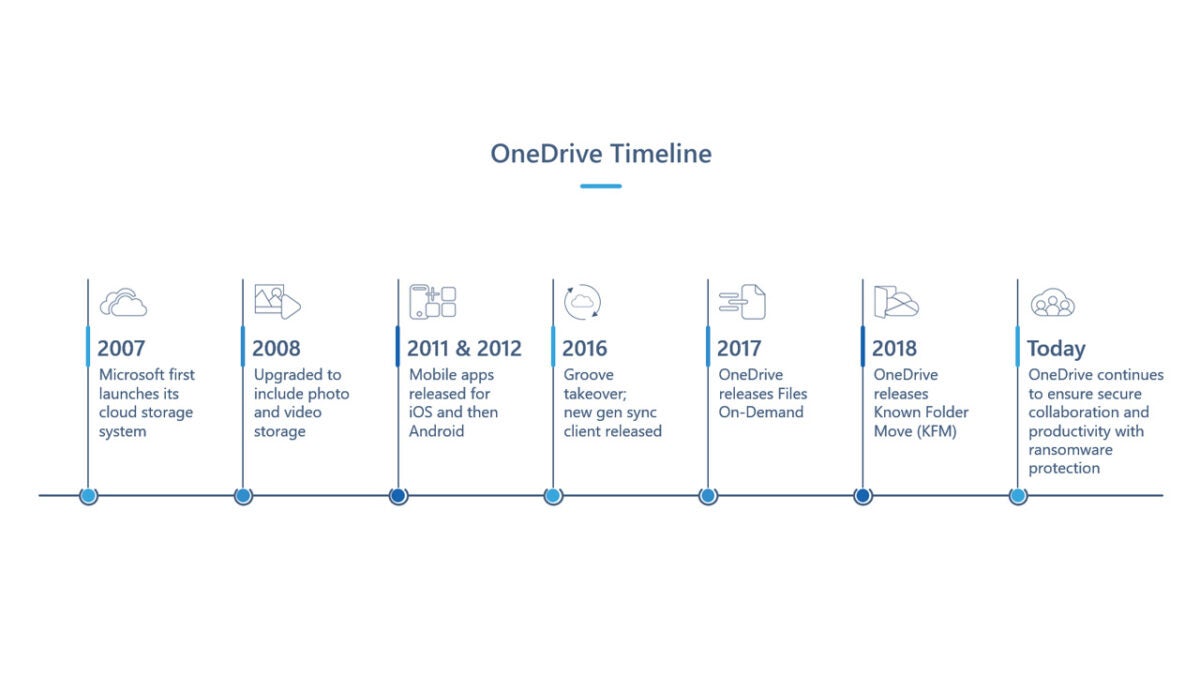
Microsoft’s rebranded OneDrive service launched today with storage bonuses and a new Android app. The company was forced to rename its SkyDrive service after a trademark dispute. If you are already a SkyDrive user, you won’t need to worry about changing anything as the rebranding will just show up in your existing SkyDrive apps and services.
If you’re new to OneDrive, the service now offers users the ability to earn more storage like Dropbox. Each friend you refer to OneDrive will net you an additional 500MB or storage with a limit of 10 referrals. You can earn 3GB of additional storage if you download the OneDrive app for Android, iOS, or Windows Phone and enable the automatic camera backup feature. Every photo you take will automatically be uploaded to your OneDrive if this feature is enabled.