Sick of typing in a password? The newest Windows 10 lets you break free.
Microsoft is about to allow you to ditch the password.
The company is testing the possibility of allowing you to sign in with your Windows Hello Face, Fingerprint, or PIN.
Right now, the option is only available to a small segment of the Windows Insider program. To ditch the password in Windows 10, go to Settings > Accounts > Sign-in options, and select “On” under “Make your device passwordless.”
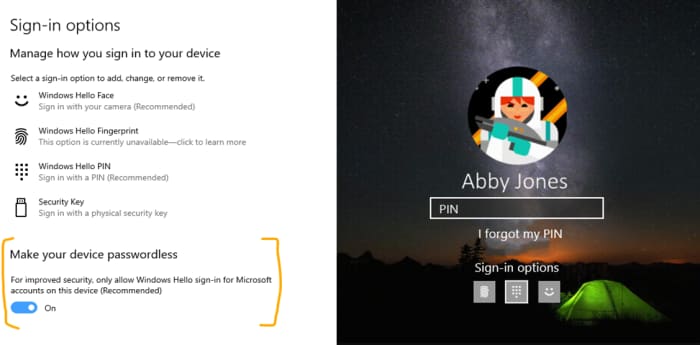
If you don’t have Windows Hello set up, Microsoft will walk you through the process the next time you go to sign in. Is a PIN really more secure than a password? Here’s what Microsoft has to say:
Author: Ben Bowman
{
"de-DE": "",
"en-US": "Ben Bowman is an Emmy Award-winning journalist who led Softonic.com's editorial team in 2018 and 2019. Before joining Softonic, he was the Head of Content for Curiosity.com and a news producer for NBC, Fox, and CBS. He is an award-winning filmmaker and director of sketch and improv comedy, and a contributing writer for the Pitch comedy app.",
"es-ES": "",
"fr-FR": "",
"it-IT": "",
"ja-JP": "",
"nl-NL": "",
"pl-PL": "",
"pt-BR": "",
"social": {
"email": "ben.bowman@softonic.com",
"facebook": "",
"twitter": "https://twitter.com/BowmanInc",
"linkedin": "https://www.linkedin.com/in/benbowman/",
"web": "https://bowmaninc.weebly.com/"
}
}
View all posts by Ben Bowman