Surf the web and listen to music, non-stop

foxytunes.gifTwo of the most common activities when sitting in front of a computer are browsing the web and listening to music. So what about joining both of them into one single interface? If you’re a Firefox user, now you can. The only thing you need is FoxyTunes.

This handy extension allows you to control your audio player right from the browser’s window. This means that you can actually play, stop, forward or rewind your music without even leaving Firefox interface. FoxyTunes doesn’t take up any screen space, as it’s seamlessly integrated in the browser’s status bar and also lets you choose which buttons to display and which ones to hide. Plus, the extension features a Web search tool with which you can look up information about your favorite artists and songs.

Finally, in case you’re wondering whether your player will work with FoxyTunes or not, rest assured that the most popular ones like iTunes, Winamp and Windows Media Player are covered, along with XMPlay, JetAudio, Musicmatch Jukebox, Sonique, MediaMonkey, Quintessential Player and several others.

Photoshop Lightroom beta to expire

LightroomAdobe have announced the first commercial release of Photoshop Lightroom 1.0 meaning beta users will have to pay-up or do without the program from February 28. Up until now, the photographic software has only been available in a free downloadable beta version but now users will have to pay $199 to continue using it ($299 after April 30th). Those hoping it will be released in the next version of Creative Suite will be disappointed as Adobe have officially confirmed that it won’t.

The new version offer various improvements featuring more import options and a new and improved metadata browser that offers faster access to information tags. Photographers can also filter through large collections with an advanced keyword tools library and color labels that have a new pick/reject system.

There’s also a new handy feature for making virtual copies and snapshot tools for providing multiple versions of the same image for comparison without touching the originals.

Finally, you’ll also have more control over saturation, hue and luminance with advanced brushes for making the most detailed of changes possible. Adobe also claim that more cameras are now supported including Nikon and Pentax brands.

Mouse gestures in IE

bluee.pngIt’s nice to see that now that Internet Explorer is starting to lose its stranglehold of the browser market, the software is finally embracing some of the standards and ideas pioneered by its rivals. Thanks to the extensibility of the latest version of IE, users of the Microsoft browser can now pimp their software to add new features and customization.

Mouse gestures were one of the innovative features introduced by Opera a few years ago, allowing its users to steer the web using nothing but a few flicks of their wrist. Thanks to the Mouse Gestures plug-in for IE, you can now execute commonly-performed tasks by drawing a simple symbol on the screen. The application includes functions such as user-defined actions and mouse trails, plus support for tabbed browsing. Once you’ve tried it you’ll probably wonder why on Earth you bothered wading through menus and toolbars for so long. You never know, if developers keep producing IE plug-ins as cool as this one, we might see a few Firefox users welcoming that big ‘e’ back to their desktop.

Protecting your kids online

Child ControlThere’s plenty of talk about how vulnerable PCs are to attack online but there’s increasing concern over the amount of X-rated and violently explicit material kids are exposed to on the internet. There are various options for worried parents or teachers to protect minors from such material. Online options include Google’s Safesearch and iKeepsafe which make sure potential harmful sites don’t make it past your IP address.

However, if you’ve been left unimpressed by these efforts, there a few downloadable options too that may prove more effective. One example is Child Control which allows you to set time limits on internet surfing time, logs sites that have been viewed and blocks specific IP addresses that are known to host adult material. You can even customise it to notify you by e-mail when sites specified by yourself have been accessed.

Another option is Child Protector Pro which has less features but allows you to create tailored profiles for each of the children who use the computer. This useful tool means that you can specify limits according to who is using the computer instead of excluding all sites to everyone who uses it. It also can’t be uninstalled from your PC without the admin password so there’s no danger of curious minds circumventing it.

Of course, what you consider unsuitable for your child is a subjective matter. However, with adult sites becoming increasingly sophisticated in how they spam or target users, these simple programs give you at least some peace of mind.

Joost for Intel Macs

joost1.pngFor those of you lucky enough to be registered to beta-test the impressive Joost, you may be interested to know that there’s now a MacOS (Intel) version available for download. Initial responses to this latest version suggest that despite a small number of font-rendering issues, the Mac version of Joost is just as good as the Windows version. Indeed, according to some Mac users, it’s even better… just because it’s running on a Mac.

Of course, the only way to be sure is to test both versions so you can be sure that insideTonic will have a complete comparison online within a couple of days. We’re also planning a special giveaway of invitations to the beta project! In the meantime, you can always apply for the beta at the Joost homepage.

Ten handy web apps

worldwideweb.jpgDuring the last few months we’ve witnessed the progressive development of web applications as a perfectly valid alternative to traditional desktop software. Online bookmark managers, photo organizers, word processors and so on have entered the flow of our daily tasks to such an extent that some people have definitely switched to them and forgotten about downloading and installing apps.
Whilst it’s positive to have different alternatives when deciding which software to use, we always run the risk of getting too involved with those eye-catching Web 2.0 style web apps. And then, if our Internet connection goes down, we’ll have nothing to do except wait for the router lights to turn green again.

While we’re still connected, here’s a list of ten online applications we thought you might find useful. Feel free to try them and decide if they’re good enough to replace your current desktop tool.

  1. Helipad: flexible web notepad
  2. Traineo: online weight loss and fitness tracker
  3. Picnik: edit photos online in your browser
  4. Extratasty: share cocktail recipes online
  5. Comeeko: create your own comic photo strips
  6. Bubbl.us: mind mapping online application
  7. Meebo: instant messaging everywhere
  8. Ninjawords: ultra-fast dictionary
  9. Imagination at work: free-hand drawing
  10. Buxfer: track shared expenses online

Watch TV on the Internet with TVU Player

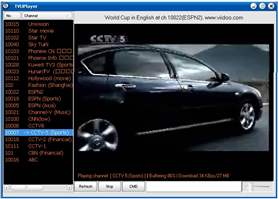
tvu-player-1.pngThanks to the constant improvement of broadband connections, watching TV over the internet is now possible. The current trend is to use Peer to Peer (P2P) technology to stream media quickly to consumers. TVU Player allows you to watch major cable channels over the internet, by sharing your bandwidth with other users.

TVU Player usually streams around 20 different channels, from a large American sports network to the major Chinese television channel and you can watch everything from gossip to movies or sports. TVU Player is extremely simple to use, you only have to double click on the channel of your choice, wait a few minutes for it to buffer, and start watching. Refreshing every now and then lets you check whether new channels are on offer.

TVU Player is a bit unstable, so you shouldn’t be surprised if it fails to initialize or if the channel you are watching tends to lag. If very few people are connected to the same channel you might get poor streaming quality, but if you are watching a popular program there should be a good number of peers sharing the load and the transmission will flow. Always remember to check the number of peers before watching a channel.

Continue reading “Watch TV on the Internet with TVU Player”

FastStone Image Viewer vs. XnView

xnviewfaststone-logos.jpgApart from Picasa‘s indisputable first position among image viewers, there’s a very interesting competition in the Top Downloads list for this category on Softonic. Two of the most powerful candidates are FastStone Image Viewer and XnView, two popular image viewers that share many features but also have certain differences. Let’s analyse both of them in depth.

When launching both programs, the first noticeable difference is their interface. Whilst XnView looks very much like Windows Explorer, with a tree-like structure on the left and the selected folder’s contents on the right, FastStone Image Viewer uses a neatly designed interface that you can customize with skins. Both programs use thumbnails to display photos and ALT text windows to show detailed information about each picture.
Continue reading “FastStone Image Viewer vs. XnView”

Don’t panic over lost Office passwords

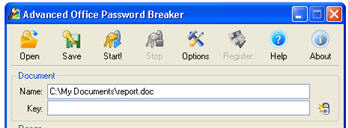
passwordPicture the situation. You’re working on a top-secret presentation in Powerpoint and you want to protect it from prying eyes with a password. Days later and just minutes from completion, you go to open your masterpiece to realise that you’ve totally forgotten the password…

There are many password recovery programs out there but they won’t work with Microsoft Office for security reasons. That’s where Advanced Office Password Recovery (AOPR) can come in useful by searching for any passwords you’ve used to protect documents created in Office. This includes Word, Excel, Access (including user-level passwords and owner info), Outlook, PowerPoint and even lesser known extensions such as Project, Money, Visio, Publisher and OneNote.

An added bonus is that being Microsoft specific, it can also reset the Internet Explorer Content Advisor password. The program works by conducting “brute” attacks through backdoors (often the dictionary, apparently) and searching for decrypted Office files.

Note that there are two editions – Home and Professional – the latter allows you to unlock passwords in more Office components basically. In the test version, the unlock features are limited so if you are desperate to access a document, it’s advisable to upgrade.

Rip HD DVDs with the new AnyDVD HD Beta

anydvd.gifSlysoft recently released a Beta (version 6.1.2.0) of its AnyDVD application, which will remove copy protection and regional codes (what they call “on the fly remastering”) for HD-DVD and AACS. In our full review of Anydvd we already touted its discretion and simplicity, and enjoyed how you can “watch the DVD at the same time” as it is being ripped by the program. No doubt this Beta will attract the interest of avid DVD users, however they’ll have to make sure they’re machines are up to the task. On the Slysoft forum there’s a thread on what hardware is recommended to play back your ripped HD DVDs.

Even though the announcement was widely relayed over the Internet it hasn’t spawned much controversy. Toshiba has kept quiet over the release of the AnyDVD Beta, which will rip its very own HD DVDs. It is widely expected that once AnyDVD comes out of Beta it will also be able to rip Blu Ray DVDs too. We’ll see then if the news sparks more controversy in the DVD world.