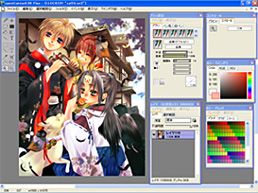
 I’ve always been fond of drawing applications. The possibility to give your creativity total freedom without wasting paper and pencils is just too good to be resisted by an amateur painter like me. And OpenCanvas is certainly one of the best options when moving on from real hair brushes to digital design.
The installation process takes only a few minutes, after which you can begin drawing right away. OpenCanvas features a simple friendly interface, even for first-time users. Also, note that if you’re used to Photoshop, you’ll find OpenCanvas extremely familiar, as it follows the same basic guidelines: a large working area with floating windows displaying tools, settings, color palette and so on. In fact, many of the app’s keyboard shortcuts are the same as in Photoshop: B for brush, M for selecting an area, V for moving it, Ctrl + D to deselect it, the spacebar to move around your picture, Ctrl + plus or minus sign to zoom in or out, etc.
Continue reading “Cultivate your artistic abilities”
 What do you get if you cross Manga animation with a blistering martial arts fighting game? Super Dragon Ball Z. This classic arcade fighting game is based on the retro MUGEN graphics engine and will appeal to anyone who likes Street Fighter or Double Dragon.
 Given that Softonic (and, for that matter, iT) is based in Barcelona, it should come as no surprise that we attended the 3GSM World Congress which came to a close today.
 Health is definitely one of our most important worries in life. It’s the first thing you ask for when beginning a new year, when having a baby, when meeting a three-wish lamp genie. It’s therefore worth remembering that you can also use your computer to help take care of your health.
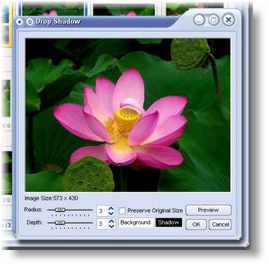 Anyone who works with images on a regular basis will be familiar with the default image viewer of Windows, and also with its very limited scope for doing anything meaningful. There is a healthy selection of alternatives but FastStone Image Viewer has come to our attention as one that deserves to be singled out not only because it is free but also because it brings to the table a strong combination of speed, usability and versatility.
 Before
  Valentine’s Day is back once again, bringing a celebration that you either hate or love. Some people complain about losing the real meaning of this day and turning it into just another
  As USB sticks and other flash memory drives increase in storage capacity, so does their popularity as software repositories. Many applications have developed special versions for these devices, usually known as “portable”. One of them is CCleaner Portable.
 There’s nothing like Flash to add that extra piece of class to a presentation. Unfortunately, Abobe Flash is not exactly the easiest program to get to grips with. Fortunately, Softonic has a number of programs which will make the job easier for you.