Top 10 Flash alternatives

clipboard01.jpgWhile sites built with Flash may always be to everyone’s liking, when you stumble across sites such as Viva Voodoo! you remember why it’s become a popular platform. The authoring tool gives you the power to conjure up spell-binding animations, games and immersive online applications. As connection speeds improve, Flash sites are able to load much quicker, making it now a truly viable alternative to HTML and CSS.

Of course, it takes hours of practice and dedication to be able to develop truly gripping Flash sites, and the cost of the Adobe app often puts people off. However, you shouldn’t be dissuaded from working with Flash because there are plenty of alterative programs that let you create animations without having to learn Flash itself. While these apps don’t contain nearly as many creative tools as the Flash authoring tool, they certainly allow you to design eye-catching presentations and animations.

1. Trendy Flash Site Builder: create professional quality Flash sites
2. KoolMoves: produce animated pages and banners
3. Flash Slideshow Maker: make animated photo slideshows
4. Amara Flash Photo Animation: transform your pictures into Flash animations
5. Selteco Flash Designer: Flash animation creator with effects templates
6. Amara Flash Slideshow Builder: produce captivating photographic slideshows
7. Zinc: build Flash-based desktop animations
8. Wondershare Flash Album Studio: apply cool themes and music to your photos
9. Text-Osterone: more than 200 animated text effects using Flash
10. Instant Demo: Screen cam creates Flash with MP3 sound

Clearer ideas with ConceptDraw MindMap

conceptdraw.jpgMany work tasks involve brainstorming sessions and sharing ideas with each other in order to achieve the final goal. However, having too many people involved in a project may lead to confusion and failure. It’s essential to stay organized and follow a clear road, knowing exactly at which stage of the process you are, what other people’s tasks are and what lies ahead of you all.

This is exactly what you can do with ConceptDraw MindMap: capture ideas and create handy, colourful diagrams with them that help you organize your team, your projects and your work.

After a very easy installation, we face the toughest part: getting to use the program. In fact, ConceptDraw has a quite steep learning curve and takes time and effort to be managed properly. But you shouldn’t take this as a downside, as you can count on the program’s thorough help system and a series of really helpful video tutorials available on ConceptDraw’s website, which we strongly recommend you to watch.
Continue reading “Clearer ideas with ConceptDraw MindMap”

The evolution of email

email.jpgGoogle has finally opened Gmail to the public, which means that you no longer need an invitation to open up an account. Gmail has thus become one of the largest webmail services in the world, not only in terms of users, but also in terms of storage space. Starting at 1 GB per user during its first year, Gmail is now constantly increasing its storage space by the second. Google say they plan to keep on doing so as long as they have enough space left on their servers.
However, more long in the tooth Internet users know email wasn’t always so advanced. There was a time when webmail didn’t even exist and messages were managed through classic email clients like Eudora or Outlook Express. Email was physically downloaded and stored on your PC, so that you could only check it from home unless you left copies on the mail server. Besides, limited-bandwidth connections made it very difficult, not to say impossible, to send or receive oversized email messages.

Then, web-based email finally appeared, with Hotmail as one of its biggest representatives. Hard to believe though it sounds, Hotmail offered only 2 MB of storage space which were increased up to 250 MB in July 2004, only three months after Gmail’s launch. Nowadays, following the fashionable web apps trend, there’s a large variety of webmail services you can choose from, with online access from anywhere, large numbers in storage space, spam filters and a lot more of features.

Email has naturally evolved from being a somewhat useful desktop application to one of the fastest, most effective online communication tools. It’s totally integrated in our daily lives, to such an extent that it feels just natural to ask your friends for their email address instead of their phone number. After more than 40 years of history, we’re eager to see what email has to offer in the following decades.

By the way, in case you’re wondering, we’ll remain faithful to our Gmail accounts.

Google Desktop vulnerability exposed

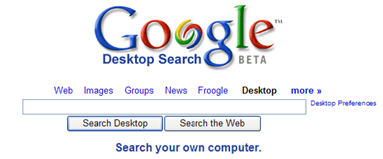
googledesktop2.jpgGoogle has been prompted into releasing fixes for Google Desktop after it was discovered the popular search utility was vulnerable to intruders. The holes were discovered by a PC security firm who highlighted a script vulnerability that could allow hackers to browse through the entire contents of a hardrive.
Google Desktop uses the same indexing technology as applied by its search engine – it trawls through every single document on a PC to enable users to perform a Google search on their own computer. However, the security firm said that there is a specific weak point in the integration between Google Desktop and Google’s online search engine. They claimed that any hacker could have also circumvented a firewall or anti-virus package to exploit the vulnerability.

“A fix was developed quickly, and users are being automatically updated with the patch,” Google said in a statement. “In addition, we have another layer of security checks to the latest version of Google Desktop to protect users from similar vulnerabilities in the future.”

The specific problem is a feature in Google Desktop which allows users to place ‘Desktop’ as one of the drop down choices on the Google home page search bar. Although the option is convenient, it immediately opens a backdoor between the contents of your PC and the internet.

Although I’m a big fan of Google products, I’ve never been keen on Google Desktop for precisely this reason. I don’t like the thought of anything trawling through my hardrive that can then send that information to a third party. Although they’ve patched it, Google should give users better warning on this type of risk when installing Goolge Desktop. Obviously, the safest thing is to not install it at all and stick to Windows inbuilt search function even if it hasn’t got Google’s amazing search power behind it.

Quickly make a backup of all your files

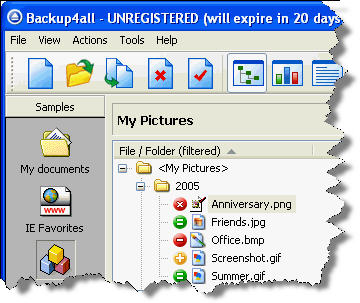
b.jpgYou probably never really go through the hassle of backing-up your documents regularly. Unfortunately, if one day you lose all those critical files, you’ll be the only one to blame. Creating backups is far from thrilling, but should never be overlooked, no matter how reliable you think your PC is.
Backup4all makes copy creation a breeze by automating the whole process. The key is to properly setup your backups so that the application takes care of it all for you. When you launch the program, simply select the files or folders you’ll need to backup. You can create individual backup profiles with a description, an icon and scheduling when Backup4all should save a copy. Set up filters to specify the type of file, the date and size of documents to save. Enable sounds and email alerts to notify you if a backup is successful or not.

Continue reading “Quickly make a backup of all your files”

Joost signs Viacom deal

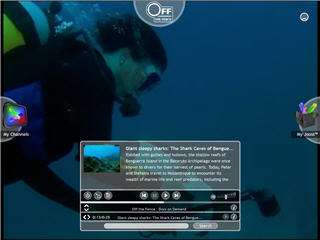
joost3.jpgIt looks like YouTube has a real fight on its hands if it wants to pursue commercial programming. The forthcoming online video service Joost has announced it has signed a deal with media giants Viacom to provide full length TV programming. The deal with cover content from MTV, BET and Paramount Pictures film studio.

The agreement will come as a big blow to YouTube who has been hounded by Viacom to remove its material from the site. Earlier this month, Viacom requested around 100,000 clips from its networks to be removed from the site. No financial details are available but Viacom have promised to provide thousands of hours of free programming mainly aimed at younger Joost users. Examples will include Beavis and Butthead and Punk’d.

Joost (formerly known as The Venice Project) has been designed by the creators of Skype and is currently still in beta form and only available to those who sign up at its website and are invited to test it. It claims it will offer secure ‘piracy-proof’ content when it is finally released later this year.

Considering that Joost has not even officially been released yet, this deal indicates just how ambitious its makers are. However, it may be unwise of YouTube to enter into a commercial war with Joost. The best thing about YouTube is that it offers not programming but the best clips and snippets from TV around the world. There are already several P2P apps that offer channel streaming such as TVU Player that carry programming from the big networks but these are unlicensed and as such, somewhat unreliable. Joost runs the risk of simply offering more of the same while YouTube should stick to what it does best – letting users upload all those TV snapshots and archived footage that you can spend hours searching through.

Boulder Dash rocks!

boulder-dash.jpgWhile kids in the 80s would concoct all manner of excuses why their homework was late, teachers were almost certainly aware that the real culprit behind the laxness was Chuckie Egg or Jet Set Willy. For me, my own education killer was Boulder Dash, or Repton, as it was known on the Acorn Electron, which I owned at the time (only the posh kids in our town got Commodore 64s).

For the benefit of those who spent their childhoods doing schoolwork, the object of the game was to steer your little critter around a labyrinth full of rocks, collecting diamonds and other booty along the way, while fighting off hoards of nasty beasties. Whether you’re a fan of the original or a newcomer to the game, the highly addictive Boulder Dash provides a faithful recreation of the game that is one of the very few computer games ever to be ported from home computers to arcades (as opposed to the other way around). Be warned though, you may have to start plundering your little book of excuses for not turning up to work again.

Skype Pro released

skype-logo.jpgThe world’s most famous VoIP company, Skype, has launched a “Pro subscription deal” primarily aimed at business users or phone addicts. The new deal includes a “low monthly subscription of €2” and “zero cents per minute calls to domestic landlines in 15 countries in Europe.”
It clearly looks like Skype wants its users to trash their landline and go VoIP all the way. However, while local calls will cost you nothing, keep in mind that there will be a 3.9 cents connection fee on every call. To entice customers to sign up, Skype will offer, among other things, various discounts on VoIP phones, a 5€ Skype credit and free SKype Voicemail. European users are surely hoping that Skype’s next move will be to offer their Unlimited deal, which was launched in North America in December, and offers free SkypeOut calls for a yearly fee of $14.95.

Flickr had a massage

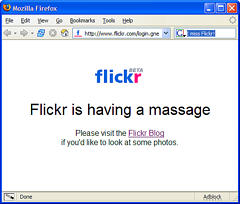
flickr.jpgYesterday quite a few Flickr users had the fright of their lives when they thought their photos were lost forever. A technical issue, carefully explained today on Flickr’s blog, made the Flickr database serve random photos when Flickr users clicked on thumbnails, about 1/7th of the times. So, instead of your own personal photos, you could get just about anyone else’s.
Fortunately, Flickr engineers and technicians rapidly took control of the problem. After being offline for a few hours, Flickr was back to normal again, nonfunctional servers were restarted and every photo returned to its rightful owner.

Besides the basically anecdotal side to this story, one starts wondering about the degree of reliability offered by online services. With an ever-growing range of online services, we’ve ended up entrusting many websites with our data: personal photos, confidential e-mails, our most inner thoughts explained on a blog. It’s a bit daunting to realize just how much of your digital life is stored on servers located around the world and controlled by people you don’t even know.

In any case, I personally think there’s no reason to fret. I believe big companies like Flickr realize that the material that users upload is invaluable to them and they do their best to protect and secure it. I just trust them. Otherwise, I wouldn’t even think of storing my photos on their site. Would you?

Check your PC into rehab

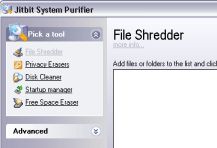
syspurifier1.jpgIf things continue the way they have been recently then we’ll soon have more celebrities in rehab than in the outside world. It’s not just hedonistic pop stars that need to get themselves clean though. Chances are, your PC is currently bloated with loads of unnecessary files that are causing a major health risk, slowing down your machine and exposing it to security breaches. Rather like a digitized rehab clinic, Jitbit System Purifier helps speed up your PC, protect your privacy by getting rid of obsolete files and deleting traces of your online activity.

There are four main actions available in Jitbit System Purifier: File Shredder to quickly erase unwanted files, Privacy Erasers to delete traces of your Internet activity, Disk Cleaner to remove temporary files from your drive, and Startup Programs to clean up the launching process of your PC. Each tool fared well in our tests and performed their tasks fairly quickly. We appreciated being able to carry out all of these tasks simultaneously, considerably reducing the time you spend cleaning up your PC. There wasn’t any problem running other applications while Jitbit is doing its job either. The Startup Programs option was particularly useful to find programs that we didn’t want to launch automatically.

Continue reading “Check your PC into rehab”