Trying out Windows Media Player 11

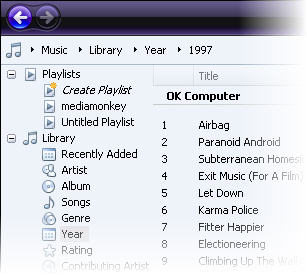
wmp11.jpgWith Windows Media Player (WMP) 11 Microsoft aims to counter iTunes’ dominance. The interface has been beefed-up, usability has been enhanced and Microsoft has worked at turning its flagship media application into a full multimedia center, linked to online stores and compatible with mobile devices. We take a look at its new features.

The first thing that will strike you when you start up WMP 11, is the complete revamp of the interface. No more deep blue, the whole application is now dark and shiny and you can customize it by selecting a hue of your choice. The left side is a drop down pane for your library, the centre displays your lists and the right side is used to create playlists which you can rip, burn or sync with a mobile device.

Compared to version 10, we feel that Microsoft actually made an effort to simplify the whole interface and give you more ways to browse through your media list, whether by using the drop down menu or the quick rollout line on the top left. The “play” and “previous” and next” buttons are now nested at the bottom of the interface and have a jazzy glow whenever you roll over them. Microsoft has finally succeeded in integrating a good search function into its WMP interface. As you type the name of an artist or title the application will bring up the results in the main window.

Continue reading “Trying out Windows Media Player 11”

LoginControl vs. Any Password

padlock.jpgAs soon have you turned on your computer, you need passwords of all kinds to check your email, to write on your blog, to log into your favourite IM application… dozens of passwords which end up being hard to remember, especially if you follow computer security advice like having different passwords for different services and not using your dog’s name or your birthday.

Fortunately you can always get hold of a password manager. This app stores all those tricky words securely so that you only need to remember one single password, the one that grants you access to the program. Here at Softonic we have quite a few password managers, but today we’ll focus on two of the most popular options: LoginControl and Any Password.
Continue reading “LoginControl vs. Any Password”

Working together with Goplan

goplan-1.pngNowadays it seems like working in a team is just as easy to do online as it is when you’re all in the same office. Basecamp has set the benchmark for collaborative Web services, and it’s no surprise that rival sites are now springing up. The latest, Goplan, allows teams and individuals to collaborate through tasks, file management, real-time chat, online calendaring, and many other features.

Rather handily, the app allows users to choose which features to activate for each project, making for an unclutted environment in the user interface. In an effort to ensure maximum uptime (a problem Basecamp users often complain about) Goplan takes advantage of Amazon’s EC2 (Elastic Compute Cloud) and its S3 (Simple Storage Service).

In terms of pricing, the service compares well to 37signals’ Basecamp, with a personal account offering 12 projects and 100MB of storage for $10/month. The monster unlimited plan is $100/month with unlimited projects and 8GB of storage. Fear not though, for lighter users, there’s a free package facilitating two projects and up to 5Mb of online storage. We noticed, however, that Goplan doesn’t offer a free trial of its meatier products like the 37signals range does. Nevertheless, the launch of Goplan represents yet another step forward in the evolution of remote working.

Zimbra to offer next generation e-mail

zimbraFollowing hot on the heels of Abobe’s Apollo announcement last week, Zimbra has launched Alpha testing of its new Zimbra Desktop e-mail application that works both online and offline. The open source application has been developed using Ajax meaning it works on Windows, Mac and Linux and could prove a powerful competitor to Microsoft Exchange and Outlook.

Zimbra are hailing Zimbra Desktop as ‘the next generation leap forward for Web 2.0 applications’. It means that when you are out of your home or office without an internet connection, you can continue working with your e-mail as normal. This includes writing emails, adding new appointments and editing documents. When you re-connect, the changes will be automatically synchronised with Zimbra’s servers. It also plans to offer integrated instant messaging in the final version.

In addition, Zimbra promise a variety of aesthetic improvements to e-mailing such as better overall usability in the form of conversation views and tags with faster searches adept at dealing with huge e-mail volumes. One other cool feature of Zimbra Desktop is the ability to change the skin of the client to that of a company brand. So for example, the interface can be customised to feature company logos and colours.

For business users who are constantly on the move, Zimbra could prove a killer app. Although Outlook features online Webmail, its integration into desktop Outlook is poor and particularly bad in Firefox which offers far fewer options. If Zimbra can successfully integrate this application across multiple platforms, it may well be onto one of Web 2.0’s big success stories.

This first release is the Alpha version with a Beta scheduled for this summer which will also work with POP servers. The final release is due at the end of this year.

Free antivirus apps part 2: Avast! Home

a.jpgFor the second part of our five part series on the best free antivirus applications, we’ll take a look at Avast! Home. Another renowned name in the security scene, Avast! Home is superficially known for its brushed metal, media player-like interface. In our tests, Avast! used up 36 MB of system RAM, slightly more than AVG, but nothing to get alarmed at. Using the default settings, the standard scan was fairly quick and clocked in at 56 minutes. But with only 89,510 elements scanned, it checked considerably fewer files than AVG. While AVG did not pick up anything, Avast! Home detected 6 different pieces of potential malware on our machine. We liked how Avast! Home gave us an ample choice of actions: repair, delete, deny access, move, chest, and scan. When you dig in the Avast! settings, you’ll find features like exclusion list, which can be quite useful to refine your scan, or alerts on malware you can send to friends via email or IM. With new malware appearing every second, we don’t really believe this function is of much use. The only real annoying thing with Avast! Home is that, although it’s free, you’ll need to register once a year or so, just as a formality, to keep using it.

Avast! Home test results:

  • Uses up 36 MB of memory
  • Full scan time: 0:56:38
  • Scanned objects: 89,510
  • Frequent updates and large virus database
  • You need to register once a year
  • Handy exclusion list to target your scan
  • Send warning alerts to others via email or IM

Free antivirus apps part 1: AVG

Cute free online games for the weekend

games.gifA couple of weeks ago we presented you with a Top 10 list featuring the most addictive and fun online games on the Internet. I’m sure many of you tried them out and got hooked on at least one or two.
Well, if you think that was all, you’re wrong. Today we bring another free online game pack for you to test and enjoy during the weekend. This time they all belong to the same author, Ferry Halim, and they’re all conveniently organized under a single page: the Orisinal game collection.

From platform-based scrolling adventures to simple ability tests to prove your speed with the mouse, you’ll find many different types of game to play and have fun with. You’ll find the necessary information (objective of the game, keys for movement and hints for higher scores) at the beginning of each game. All of them are tastefully designed and display cute graphics – indeed, Ferry Halim is a professional digital designer.

Review: Digital TV 2050

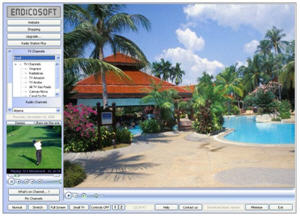
Digital TV 2050Bucking the trend of Asian P2P TV apps flooding the software world is Digital TV 2050 which offers an English interface and hundreds of channels from around the world. First launched in 2005, it was actually one of the first such programs on the scene and despite the rather basic presentation, it actually delivers channels quickly, in real-time although the selection available leaves something to be desired.
After installing Digital TV 2050, don’t be put off by the dated interface and the confusing advertising on the right. The advert relates to the developer EndicoSoft but the pictures of high rise buildings and luxury apartment interiors give you the impression that they’re trying to sell you property. You’re presented with a huge screen with channel list and various internet links (mainly to the developer) running down the lefthand side and along the bottom.

Before you can start to watch any channels, you need to register with the developer which requires nothing more than your name, country and e-mail address to which your registration code is instantly sent. Enter this code in the box on the top left, click ‘activate’ and you’re ready to choose a channel. Until you do this, even though you have full access to the program, you won’t be able to watch a single channel.

Continue reading “Review: Digital TV 2050”

Review: ePodCast Creator

epodcast.jpgA few years ago, if you wanted to broadcast your own radio show you would have needed all manner of antennas and radio equipment, along with a licence (or the guts to transmit without one). Nowadays anyone can become a radio star thanks to the rise of podcasting technology. With the major media players now joining cutting-edge tech sites in the podcasting revolution, there’s plenty of competition around, so producing a broadcast that sounds slick and professional is essential.

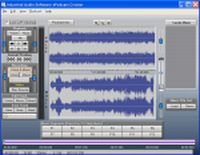
As its name suggests, ePodCast Creator has been specifically designed for users who want to make their own online audiocasts. The application allows you to create, edit and manage podcasts on the fly, with a set of tools that let you record and mix audio from a variety of sources.

We like the way the program embraces the spirit of podcasting by keeping things pretty straightforward. Unlike many audio-editing applications, the interface is clean of clutter and consists of clearly -labelled playback and record panels, along with two timelines displaying the waveforms for the cast’s voice and music. Thanks to the ‘Music Segments’ menu, you get instant access to the music clips you’ve imported, which can either be dragged and dropped onto the timeline, or accessed via hotkeys.

Continue reading “Review: ePodCast Creator”

Identifying foreign languages with Polyglot

polyglot.jpgObviously it’s great that the Web is such a global resource and is open to people from all over the world, but with so many languages in use online, things can get a little confusing at times. If you’re anything like us then you’ve surely stumbled across an interesting looking site when searching for something, only to be presented with pages of text written in a strange language.

Of course, there are plenty of translation services around, such as Google Translate and Babelfish, but what if you can’t even work out what the language is in the first place and everything looks like it’s written in Klingon? Install Polygot on your PC and you’ll never have this problem again. This language recognition tool is able to automatically recognize the language in which a piece of text, a phrase, or, in some cases, a single word, is written. Polygot can currently pinpoint 432 different languages and dialects, helping you to hone your skills at spotting Khoekhoegowab from Kwanyama.

The only downside is that the application doesn’t provide any translation itself, leaving you to copy and paste the text into a separate translation tool. Aside from Google Translate and Babelfish, there are some decent stand-alone apps about that perform well. Our favourite is probably Babylon Pro, for its sheer range of available languages (over 50 at the last count) and the fact that it can instantly translate any word or phrase you mouse over on a web page or a document. Used in tandem with Polyglot, you should never have to miss out information from foreign-language websites again.

Create your own blog

clip1.jpgEver thought about starting a blog? Many people do. According to Technorati, more than 175,000 new blogs are started every day, but they don’t say how many of those actually keep on being updated a couple of weeks after the first post. The hassle of maintaining a blog and finding new topics to talk about is what hinders most people from joining the blogosphere. But, we’d like to encourage you to give it a try. Blogging is fun and easy, and we’ll show you why.

First, note that there are two main options for blog publishing: you can either host the blog in your own web server or let it be hosted by the blogging service you use. The latter is probably the best option for beginners, as it doesn’t involve dealing with FTP transfers and server configuration.

Continue reading “Create your own blog”