 A few months after Vista’s release some users haven’t made the change yet. Whatever your reason for sticking to XP may be, here’s a perfect way to enjoy the best of both systems. VistaMizer applies an eye-catching Vista appearance to your XP computer, modifying the Explorer shell, wallpaper, icons and more than 300 other elements. Give your PC a brand new Vista look, for free!
Month: May 2007
Power to the people – weekly roundup
We may not stop to appreciate it, but nowadays computer users have much more freedom and control over the software we use. There once was a time when we were spoon fed software and had to work within the constraints of what the developers provided in their applications. Now though, we can bolt on all manner of widgets, plug-ins and extensions to our apps to inject more power.
This week on insideTonic, we’ve unearthed some sizzling add-ons that open the door to new features within some of our favourite programs. Browsing with Firefox will never be the same again since Tom came across Hyperwords, an ingenious extension that allows you to access a range of commands by selecting a word on a web page; ranging from Googling the word to performing in-line translations, as well as facility for instantly blogging the text.
Cyril was busy going back to his retro gaming roots, and explains how to turn Firefox into a Pong console using nothing more than a simple extension. Meanwhile, Nick brought news of a Messenger Live add-on that lets you view IM chats directly on your desktop, providing a classic example of the benefits of customizing your apps to suit your own needs.
It seems people are simply not prepared to play into the hands of money-hungry software developers any more, as staff and students from Imperial College in London have proved by rebelling against their school’s policy of using expensive proprietary software in favour of open source solutions. Even Microsoft may be cottoning on to the fact that users don’t like to be unnecessarily bankrolling gigantic tech corporations. The Redmond firm has kindly agreed to donate a portion of the ad revenue they make when users chat through its i’m service to a number of worthy causes.
New version of Rapidweaver
 Rapidweaver is an intuitive WYSIWYG editor only for Mac. You can use it to create your own blog and add podcasting, RSS or tags. At the same time, a simple structure means that you don’t have to go digging into code to get everything right. The latest version, 3.6.0, brought a lot of significant changes, among which a sleeker interface that will immediately attract basic users. Here’s what you can expect in this new release:
- Customizable theme styles
- Drag and drop snippets of code anywhere on your page
- Flickr photo sharing
- New transitions, background effects and Ken Burns effect
- New upload client to view your files easily
- Multiple tag and category support
- 8 different list styles
In 3.6.0, it seems that the developer has made a real effort to simplify the whole interface and make it more attractive for beginners. We found it really easy to store and upload files and to customize any part of our blog, whether changing color, theme or adding effects. If you want to get into blogging, and want to have control over the design, Rapidweaver is a good place to start before getting closer to HTML or CSS.
Facebook announces software venture
 Facebook has announced plans for a major makeover with the intention of becoming a software operating system for various Web 2.0 applications. According to Reuters, the social networking site says it has made deals with up to 65 partners to develop applications including Microsoft and Amazon. It also includes deals with photo sharing site Photobucket, multimedia presentation site Slide, music discovery site iLike, instant messaging site Twitter and VOIP sites Jajah and Jaxtr.
The company says it wants to move away from being solely a website and become a ‘platform’ upon which other applications are based. The applications will work both internally within Facebook and externally as stand-alone products. Facebook’s 23-year-old CEO, Mark Zukerberg, said in his announcement:
Until now, social networks have been closed platforms. Today, we’re going to end that.
Founded in 2004, Facebook now has 24 million users and is growing at around 3 percent per week. It still remains second to MySpace in terms of popularity although this is a real statement of intent to change that situation. An example of what to expect is Facebook’s ‘Book Review’ service, developed alongside Amazon which allows members to write reviews, share what they have written and buy the books on Amazon.com.
Mobile theme: Arora for Sony Ericssons
 Remember those cool Sony Bravia ads where millions of coloured balls bounced down San Francisco streets, or paint exploded all over a Glasgow tower block? Well this is your chance to introduce a riot of colour to your Sony Ericsson cellphone! OK, so it’s not an official Sony image, but it’s beautiful all the same. Brighten up your Sony Ericsson cellphone with this gorgeous theme.
Warzone 2100: Futuristic RTS
 Good videogame ideas usually give rise to further adventures after the original one. This is the case of Warzone 2100, a free game based on the classic Earth 2150 that has been developed by a group of enthusiastic fans. Enjoy all the elements of true real-time strategy set in a futuristic environment as you improve your technology and plan battle strategies in your way to rebuilding the world.
Never miss another show: TV Forecast
 Can’t get enough of all those TV series? Having trouble choosing between Lost, Grey’s Anatomy and House? TV Forecast is a handy little widget to keep up with the schedule of your favorite TV shows. The widget will list all upcoming new episodes and clicking on the name will take you directly to the tv.com page of your series. The widget features the name of the latest episode and date and time of broadcast. You can also set the time zone when your series will be played.
Ten alternatives to Dreamweaver
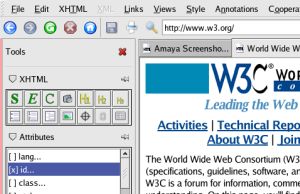 While many web developers are heralding the latest version of Dreamweaver as the greatest editor of all time, the more financially-challenged members of the design community are left sighing in frustration. Adobe has certainly made its mark on the program in this first release since the company acquired the product from Macromedia, offering much tighter integration with Photoshop, Illustrator and Flash, as well as improved Ajax support. However, the software giant shows no signs of reneging on its quite ludicrous pricing policy, commanding $200 dollars for an upgrade, or $400 for the full product which puts it out of reach for many budding web designers.
The key benefit of Dreamweaver is the way it allows you to create pages within both a visual and a code-based environment, which eases the learning curve of mastering complex code, while still giving you precise control over your pages. Thankfully though, there are plenty of cheaper (and in some cases, free) alternatives to the program that offer a combination of a GUI and a text editor. Top of the pops is Amaya, an open source app created by the W3C, which allows you to design and code within a flexible environment while adhering closely to web standards. Here’s our run-down of the top freeware and shareware web page editors on Softonic:
1. Amaya – Easy-to-use HTML Editor
2. WebXselerator – Create rich data-oriented web sites
3. DHE Editor Site Builder – Excellent and easy-to-use development visual editor
4. CoffeeCup HTML Editor – Intuitive two-in-one HTML editor
5. Spider Writer – Powerful editor suporting many formats
6. HTMLPad – Sophisticated all-in-one HTML, CSS, JavaScript and XHTML editor
7. Web Builder Deluxe – Generate HTML pages from your database
8. Araneae – Simple, yet powerful multi-language coding editor
9. VisualScript XML – Program XML more easily through a visual interface
10. Alleycode HTML Editor – Quicker and better web programming
Instant messaging direct to your desktop
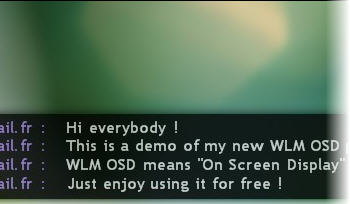 If you’ve got lots of MSN Live Messenger contacts and sometimes find yourself drowning in multiple conversation windows, then help is at hand. ‘Windows Live Messenger On Screen Display‘ is a great little extension which delivers messages directly to your desktop instead.
You’ll be surprised at how much easier this makes life. Instead of flicking through between conversation windows, the chats appear as horizontal strips across your desktop. You can see instantly at a glance what everyone is saying without even touching MSN Live Messenger. Unfortunately, it doesn’t allow you to reply but you can at least keep track of conversations in one go.
To install it, make sure you’ve closed Windows Live Messenger first. Once you’ve downloaded and installed the plugin, re-open Messenger, go to ‘Tools’ and click ‘Addins’. Simply browse to the location where you installed the plugin and select the WLM_OSD_Plugin.dll. Don’t forget to activate the plugin via the status menu and away you go!
Hyperwords: the ultimate extension?
 Among the multitude of add-ons available for Firefox, there are a handful which change the way you browse the web permanently (Greasemonkey, AdBlock, PONG, etc). Hyperwords definitely deserves a place on that list for the way it adds interactivity to any word on any web page. The plugin works simply: select any word or block of text and you’re immediately offered a menu which lets you pick a command to use with that selection.
The list of commands is pretty impressive, ranging from Google searches to in-line translations to a sort of ‘Blog This’ functionality. These functions are individually available in a multitude of plugins, but Hyperwords brings them all (and a lot more besides) into one simple menu. It also avoids siding with just Google sites by offering a wide range of sources and web apps to choose from.
It has already been backed by some pretty big names but if you’re still not convinced, try out the demo page before installing. I reckon that this could be the best extension I’ve ever tried, in terms of the way it opens up the web in such a simple, usable way. Hyperwords rules.