 At the moment, Google Reader seems to be the best feed reader out there. You can add as many tags as you want to a feed, search for subscriptions inside the reader and preview posts without having to open them. You can’t beat Google search capabilities.
Here’s a tip for those of you that have decided to make the switch from Firefox Live Bookmarks to Google Reader. We’ve found a little Firefox extension, OPML Support, that will give Export/Import capabilities to the Firefox Bookmarks Manager for OPML files. It’s fairly easy to transfer your Firefox Live Bookmarks to your Google Reader, just follow these steps:
- Install the OPML Support extension and restart your Firefox
- In Firefox, click ‘Organize Bookmarks’ in the Bookmarks tab at the top – this opens up the Bookmarks Manager
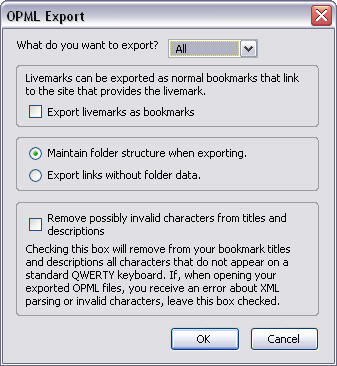
- In the Bookmarks Manager, click ‘File’, ‘Export’, then ‘OPML’-this will open up the OPML Support window
- At the top, where it says ‘What do you want to export?’ you should select Livemarks
- Don’t click ‘Export livemarks as bookmarks’
- If you want to use Firefox folder names as tags in Google reader, select ‘Maintain folder structure when exporting’. If you choose ‘Export links without folder data’ you’ll have to tag all your imported links in Google Reader
- It’s a good idea to click the box ‘Remove possibly invalid characters from titles and descriptions’ – this will clean up your feed titles a bit
- Click OK and select a good location to save the Export file
Ok, that’s all you need to do in Firefox. Now open up your Google Reader and click on the ‘Import/Export’ tab in ‘Settings’. All you’ll have to do is browse for the OPML file and upload it. Depending on whether you’ve kept the folder structure while exporting or not, you probably will have to do a bit of cleaning up, erasing tags, moving your new feeds in categories and deleting obsolete ones. After that you’re set to go with Google Reader!

 Wouldn’t your Mac look cool if you could use your screensaver as a wallpaper? Wallsaver is a very simple, one click application that serves exactly this purpose. You can set your screensaver as wallpaper in one click and restore it to the original background simply by pressing restore. If you really like your screensaver, you shouldn’t have to wait a few minutes to enjoy it. Set up Wallsaver and you’ll be able to enjoy it all the time.
 Lara Croft commemorates her 10th birthday and invites you to join the celebration with a new action-packed adventure: Tomb Raider Anniversary. Help Lara explore ancient settlements in Peru, Greece, Egypt and other mysterious lands while searching for the mythical Scion and fighting dangerous supernatural creatures. Only the fittest will survive!
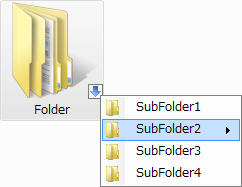 It seems that nowadays, it’s all about the tabs. Whether it’s tabbed browsing in Firefox or Internet Explorer or adding tabs to your favourite programs, everyone is tabbed-up. And why not? Tabs save having multiple windows open and you can easily keep tabs on what you’ve got open at any moment. One thing however that sorely lacks this function is Windows Explorer, but fear not – there is a solution.
 While nowadays most of the chatting you do doesn’t require downloading a client, some of you may still prefer to have the application on your PC, just to have your contacts and chat history available, even when you’re offline. About 10 years ago, everybody seemed to be on MSN, but since then new alternatives have emerged and old competitors have made significant improvements. Let’ see if we can convince you to ditch MSN for one of these other IM clients.
 With digital cameras offering more and more megapixels, resizing photos becomes almost a compulsory task before attempting to publish or send any of them by email. VSO Image Resizer provides you with a quick, easy way to resize your images, either one by one or in batches. You can also rename files, insert watermarks and create copies.
 Moody gives you the chance to organize your music library according to your moods. Whether calm, happy or sad, associate a feeling to a song in iTunes. Then all you have to do is select your mood in Moody and the program will automatically play all the songs that correspond to it. You can even combine moods and set tags to particular songs.
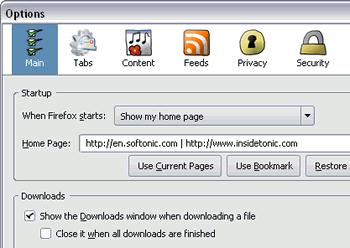 Firefox 3 continues to grow quickly and steadily. Only a month after the last Alpha release, Mozilla developers have scheduled the
  YouTube