 Geophoto gives you a chance to organize your photos based on the places they were taken or correspond to. This application will let you tag your photos onto the corresponding locations on Google Earth. What’s more you can add tags and comments to your pictures, share them on online communities or enjoy them as a slideshow. Geophoto gives you a different perspective of your best shots and a new way to organize your photo library.
Month: May 2007
Apply an ageing effect to your photos
Although Photoshop is often used to optimize images, you can also use it to apply just the opposite effect: transform your bright digital pictures into a good old-fashioned, retro style image. This brief tutorial will show you how.
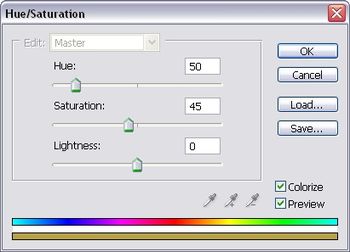
1. Grab the picture you want to apply the effects to, click on the Adjustment layer button at the bottom of the Layers palette and select Hue/Saturation.

2. Move the sliders until you get a color similar to a sepia tone that you like.
DoD: FreeRip MP3
 As its own name suggests, FreeRip MP3 is a CD ripper, which means that it extracts tracks from any audio CD and saves them in several digital formats, so that you can enjoy your music anywhere! FreeRip MP3 also converts music files from one format to another, supports ID3 tagging and displays extended information about your favorite artists.
Keep your PC cool this summer
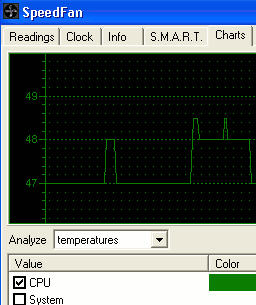 Does your PC have a fan which sounds like a 747 taking off or are you worried that your hard drive is over heating? If you thought there was nothing you could do to control this little component, then you were wrong. There are a number of handy utilities out there that can help you monitor both your PC’s temperature and fan.
One of the best is Speedfan which monitors the temperature levels of your CPU and hard drives and warns you if they reach a critical level. It can change your fan speed accordingly but note that this only works depending on the type of sensor chip and hardware inside your PC. This has the added bonus of not only preventing meltdown, but reducing noise and power consumption of your PC. Speedfan can even control fans that are connected to external motherboards and hard drives that support S.M.A.R.T.
If it’s just monitoring that you’re interested in, then you can’t do much better than Everest Ultimate Edition which goes way beyond Speedfan in terms of the amount of information it provides about your system. This program is particularly useful if you’re testing your PC under different conditions as it can perform benchmark tests on your CPU and hard disks, measuring their temperature along the way.
Play PONG in Firefox
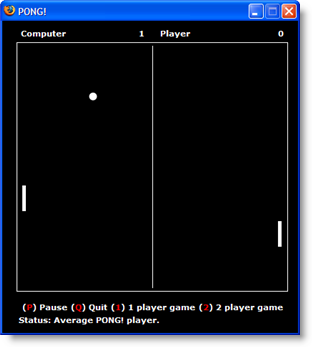 How many of you have actually played PONG, one of the first video games ever invented? This table tennis game developed by Atari in 1972 revolutionized gaming by offering actual animated graphics and real time user reaction (yes, that’s what you call moving the bar around to hit the ball). PONG was a massive hit back in the day and is still venerated by true gamers as one of the ultimate classics of gaming.
Thanks to Captain Caveman, you can now install the PONG! Multiplayer extension to your Firefox browser. The extension is available from your toolbar and opens up a pop up Firefox window. PONG’s controls are super simple: The space bar releases the ball and you use the up and down arrows to move your bar. PONG includes four different game speeds, of which we don’t recommend trying “super insane” unless you’re feeling hyperactive.
The multiplayer feature, where you can supposedly play and chat online with other users, sounded exciting, but didn’t seem to work real well. You might have a hard time connecting with other people who have the extension installed on their Firefox.
PONG! Multiplayer extension is an excellent add-on to have on your Firefox browser, especially when you feel like taking a break.
Gmail doubles attachment size to 20 MB
 In what almost seems a retort to Elena’s post yesterday about e-mail etiquette, Google has today upgraded Gmail to support attachments of up to 20 MB. Previously hovering around 10 MB, the upgrade will be really useful for people who want to share small files privately and quickly. As Elena pointed out, it can be something of a nuisance when someone sends you a message with a huge file attached – and it’s worth remembering that many e-mail providers will reject a message that large.
The upgrade affects all Gmail accounts, including Google Apps. We also figure that the Gmail Drive shell extension will now support sending files of up to 20 MB to your account, rendering that Google hack 100% more handy!
Zoho Notebook goes live
 Today sees the public launch of Zoho Notebook, which promises to usher in a new era of online content colloboration. The free service has been in private beta for a while but is now available to the masses, and looks set to knock Google Notebook off its perch as the online note-taker of choice. The Web app lets you gather together content of different types, including text, images, audio and video.
You can embed content of any kind from multiple applications, including Zoho’s own range of office tools. There are a host of collaborative features that allow you to share your notebooks (or certain ‘pages’ of it) with others, as well as tracking changes. With facilities for embedding RSS, Flash, JavaScript and HTML, Zoho Notebook takes things a stage further than Google Notebook, which is essentially just a clipping and pasting tool. We would compare the program more to Microsoft’s desktop note-taker, OneNote. On the surface Zoho as more to offer than the MS solution, such as sharing and versioning. Ultimately though, Zoho will face the age-old problem of convincing the corporate world to ditch their tried-and-trusted office suites in favour of a product from a relatively unknown start-up.
DoD: You Control iTunes
 You Control: iTunes cunningly gives you access to iTunes directly from your menu bar. If you have a very large music library and are tired of opening and minimizing your iTunes window you can use this program instead. You Control can be customized by choosing the type of buttons that appear on the menu bar and setting hot keys for quick iTunes access.
Top 10 rules for good email etiquette
 Today I received an email with a huge picture attached to it which caused me problems to read the message itself, as it completely messed up my browser window. It wasn’t really a problem about the downloading speed (which was an issue in the modem era but not any more) or file size (solved thanks to Gmail’s ever growing storage capacity) but in any case this message reminded me of how important is to stick to certain etiquette rules when communicating with other people by email. Here’s our particular Top 10 in the hope that you always remember them and put them into practice!
- First of all, do not forget the subject line. Make it a meaningful sentence also, as it helps a lot to organize messages for people with overcrowded inboxes.
- Remember to say hello and goodbye, specially when you’re writing a formal email. A little politeness goes a long way.
- If you’re going to send an attached file, add it to the message prior to start writing. It will save you lots of “oops forgot the file” subsequent emails, believe me.
- Try reducing the size of attached files when possible. Use ZIP files and resize images to more convenient measures.
- Do not write your whole message in caps. This is regarded as yelling on the Internet and it’s very uncomfortable to read.
DoD: Adobe Dreamweaver CS3
 Now featuring support for AJAX and more, this state-of-the-art web editor allows you to design and maintain websites and online apps from beginning to end, working either in a raw source code environment or an easy visual interface for the not so geeky audience. Use it alongside other Adobe tools such as Photoshop and enjoy a perfectly integrated workflow with professional results.
Download Adobe Dreamweaver (part of the Creative Cloud suite) here.