Organize your contacts online with Plaxo

Plaxo logoIf you’re the sort of person that likes to keep their contacts neatly organized and haven’t tried Plaxo yet, then it’s worth checking out version 3.0, which has been launched today. Although the Web-based contact management tool has come under criticism in the past for its slow loading times and inability to import data from IM clients, this latest update seems to be moving the PIM service in the right direction.

New features in the Web app include find-as-you-type searching and click-to-call buttons in the address book section, as well as a new calendar section that integrates Yahoo weather alongside your schedule. Of particular note is the new content sharing system, ‘Pulse,’ which allows you subscribe to your friend’s content feeds as well as create your own feeds by pulling in data from popular web services. At the moment those services are limited to Flickr photos, Amazon wish lists and blog feeds, but we could see this evolving into a decent mash-up tool in the future. Either way, it certainly looks like Plaxo will be leading the way in online contact management in the coming months.

Top Icy Tower cheats and hints

Harold The HomeboyWe reckon that there’s no better way to waste an afternoon than with a game of Icy Tower. The addictive platformer starring the energetic little scamp, Harold The Homeboy is more enjoyable than just about any other past-time you care to mention as far as I’m concerned. However, if you’re struggling to make big scores in the game, it can be a little frustrating. Luckily, there are a number of things you can do to help you and Harold out. While insideTonic could never condone cheating, here are a few little hints we’ve picked up to help you out should you choose to read them:

  • Get some air – Making running jumps is a sure-fire way to hit big scores. Start running from one end of the block to the other and at the end press space bar. This makes Harold jump about five floors in a single jump but takes lots of practice.
  • Go up in the world – Create a copy of the game file “tower.cfg” into the game folder and rename the file to “debug.me” Press [Up] while playing the game and you will go up through the floors.
  • Do some training – There aren’t that many official ‘cheats’ for Icy Tower but the independently-built Icy Tower Trainer certainly helps you out a bit with three extra modes. Unfortunately the download is only in German but once installed you can just press F10 to activate ‘Fun Mode’ or F11 to switch on ‘Replay Mode’.
  • Seek professional help – Icy Tower junky Mizi Mace has put together a rather lovely set of eBooks that walk you through the game and give you further helpful advice on succeeding. You might also want to check out our own guide to pimping your Icy Tower character.

Top 5 WordPress plugin roundup

WordPress logoInsideTonic is proud to be powered by WordPress and the reason we like it so much is because it’s so customisable. There are tons of cool plugins and extensions and most of them are designed by aficionados. Sometimes this can cause compatibility issues between themes and versions but here’s a roundup of some of the best top five compilations out there.

JohnTP offers a great top 5 for increasing the number of comments on your blog including:

Show Top Commentators – Encourages comments by awarding points
Brian’s Threaded Comments – See exactly which comment has been replied on
Subscribe to Comments – Allows people to keep track of further comments

The Performancing blog suggests top 5 essential must have plugins including:

WordPress Database Backup – Backup your blog in a click
iMax Width – Sets a standard size for all uploaded images
aLinks – flexible plugin that automatically generates links within your blog posts

Finally, unCommon Knowledge suggest their top five including two of my favourites – Akismet and Google Sitemaps:

Google Sitemaps – Get your blog picked-up by Google more easily
Akismet – Stops your comments getting spammed – essential!
Permalink Redirect – Give your blog posts more logical link URIs

Minimize your Mail.app

minimail.jpgMiniMail is a nifty little plugin for Apple Mail that only shows you the new messages you’ve received in your Mail.app. The program hovers on your desktop and allows to quickly click through new messages. It also features buttons to carry out all the normal Mail functions. To activate MiniMail, all you have to do is click the green zoom button in your Apple Mail interface.

Stay safe with SuperAntispyware

SuperAntiSpywareDownloading from the Internet can be a risky activity if you don’t take the necessary security measures, that is, scanning everything with your anti-virus and having a specific application like SuperAntispyware to avoid other threats. This complete tool finds and removes spyware, trojans, worms, hijackers and other kinds of malware that may infect your PC as you browse web pages and download files and applications.

YouTube launches mobile phone service

youtubemobileMobile phone users can at last enjoy the world’s most popular video file sharing website on their phones. YouTube Mobile has finally been launched as a super-streamlined version of the original site. The videos can be streamed on any phone that can view RTSP/3GP files with H263/AMR. Note that as yet, it does not work on Windows Mobile 5 or Palms.

The site itself is very sparse with a random selection of short clips running down the side of the page. You can sort them by various categories including Most Viewed, Featured and Top Rated. There is however an initial warning before entering the site warning that the service could put a severe dent in your mobile bill! It states:

YouTube Mobile is a data intensive application. We highly recommend that you upgrade to an unlimited data plan with your mobile service provider to avoid additional charges.

This is not the first time YouTube clips have been available on mobiles. Previously, the company had exclusive deals with Verizon in the USA and Vodafone in the UK but this is the first time they’ve stepped out alone. However, this new service is quite disappointing at the moment. The amount of clips is extremely limited and only a tiny fraction of the main site’s videos are on there. Searches for your favourite clips will invariably find no results and most of the clips are no longer than 3 minutes long. Once all the content has been made available, this is surely going to be one of the most visited mobile sites out there.

Interview: HiPiHI, a 3D digital world from China

HiPiHiDubbed almost everywhere as the “Chinese Second Life”, HiPiHi is a virtual world, currently still in private Beta, that aims to emulate the success of its American counterpart. HiPiHi allows users to fully create and customize their character, meet new users and interact in an open world. The world is expected to have its very own economy and will allow users to have their property and businesses. The screens we saw of the application are very impressive and many users have signed up for a tryout already.

We recently had the chance to talk to Cindy Jiang, head of marketing at HiPiHi, to understand a bit more what HiPiHi is about and how it aims to attract users.

What are the social networking aspects and tools of HiPiHi? How can users interact in HiPiHi?

HiPiHi is a platform, which can offer a totally interactive, immersive and open-ended experience for users to create, inhabit and govern a new world of their own design. So it is also natural to be a social networking platform. Just like in real life, communication is the basic part of your life in the virtual world. The users can exchange their ideas through the online chatting tools (only text for now). They can also send messages to each other both online and offline.

How is it different to Second Life?

HiPiHi does have some similarities with SL. However, the fundamental difference is that we are targeting different values and cultures. A virtual world is not just a 3D environment, but a complicated social system involving relationships, policies etc. HiPiHi was born in China, and we really hope it can embrace Chinese culture. We also believe functionality will be better in HiPiHi than in SL. For example, HiPiHi will make creativity a much simpler process by using pre-fabricated objects, and there will also be advanced setting for users to build customized objects for trading.

Continue reading “Interview: HiPiHI, a 3D digital world from China”

Create your own cartoons

Shrek 3A famous frog once said that it wasn’t easy being green, but loveable Ogre Shrek has blown this theory out of the water by topping the box office charts in the third installment of the movie of the same name. Shrek’s popularity highlights the public’s appetite for CG movies and follows a long line of DreamWorks success stories. If you fancy trying your hand at a spot of cartoon-making then head for Softonic’s animation section, which contains tons of tools for both beginners and advanced animators. Here’s the pick of what’s showing there at the moment:

How to manage your portable devices easily

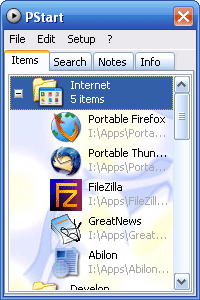
PStart windowOne annoying aspect of Windows is that it assigns drive letters to portable devices but then fails to locate them if the drive letter changes. This means that all your shortcuts to your portable devices suddenly stop working even if the device is attached.

One way round this is use PStart which uses relative paths instead of absolute ones. It conveniently allows you to create a start menu for all of your portable applications so you can sort them into groups such as Games, Multimedia, Telephony, Internet devices etc. You can add components manually or ask PStart to perform an automatic search for connected USB devices.

If you use external devices regularly, then this is an essential utility. I’m constantly connecting USB devices, especially to my laptop, and this has saved a lot of messing around with Windows updating device paths etc. However, if you only connect the odd device every so often, such as an external hard drive, then it’s probably more hassle than it’s worth. With more and more downloads such as Firefox, Thunderbird and CCleaner increasingly available as portable apps, this is certainly one utility that could become increasingly important in the software world.

Copy and paste in a snap

jumpcut.jpgJumpcut is a clever little program that remembers everything you’ve cut and copied throughout the day. Think of it like having the history of your clipboard available at any time. The program fits right into your menu bar and can be activated by way of hotkeys. If you work alot with text Jumpcut should definitely lighten your work load.