 When you delete a file from your PC, it doesn’t really disappear: the system marks that space as reusable and that’s all. So if you want to be sure your files are deleted beyond any possibility of recovery, use Inferno. This tool erases files and overwrites the data several times to make sure they’re effectively deleted forever.
Month: July 2007
Play ping-pong on your PC
 If you own a Nintendo Wii then your life is about to get much, much better. Rockstar has just announced that it will release its Table Tennis game on the console later this year. Having played the impeccable XBox 360 version, I’m very excited about the prospect of a Wii version and all the frantic arm swinging that’s sure to accompany it.
Since the days of Pong, table tennis has been a sport that has translated well to computer format. If you can’t wait until September for the Nintendo release then don’t worry because there are lots of cool PC ping-pong games kicking about. Table Tennis Pro is one of the most realistic you’ll find, allowing you to knock the ball around in a 3D environment. If you’re looking for a free option then check out Cannon Smash, which emulates the real strategies of a game of table tennis. By the time Rockstar’s version comes out you’ll be ready to take on all comers.
The PC workout for that teenie weenie bikini
 Worried about bearing all your wobbly bits on the beach this summer? Well quick, we’ve still got time. Just because you’re stuck in the office all day doesn’t mean you can’t get the workout your body demands. Here at Softonic we like nothing better than crowding round a computer and burning our toxins to a spot of yoga. We’ve found these lovely ladies to work out with. They make you feel healthier just by watching them. And it’s funny – you know laughter’s one of the best ways of shedding calories?
We have everything you need to drop those pounds including a yoga kit, a personal iWorkout for the more physical among you, natural healing therapies if you prefer your exercise with nuts and oils and a fitness assistant to make sure every kilojoule is accounted for. Only problem is you might have to buy a new swimsuit. Yes you’re going to look that good, friend.
Google launch SketchUp 3D blog
 Good news for 3D design fans. The huge success of Google’s 3D modelling software SketchUp has prompted the company to launch a blog dedicated to the latest developments surrounding it. The blog features tutorials, tips and tricks, trivia, user stories and even jobs with the SketchUp team.
SketchUp has revolutionised 3D design by bringing complex 3D modelling to users with no prior knowledge of how to do so. Thousands of designs that have been uploaded by users can be seen at the online warehouse. Most recently, SketchUp has been integrated into Google Earth via the 3D warehouse layer so that users can explore cities with realistic 3D buildings.
The application has become so big that the company have recently released the first edition of “SketchUp for Dummies” to help users get the most out of the program.
How to create a coloring book with Photoshop
Now that kids are on holiday you need to come up with new ideas to keep them entertained during the summer. While video games may be a good option, it’s also nice to go back to old pastimes like coloring books. And you don’t even have to buy them: you can create them yourself with Photoshop!
1. First, select your image and create a copy of the background layer by hitting Ctrl+J
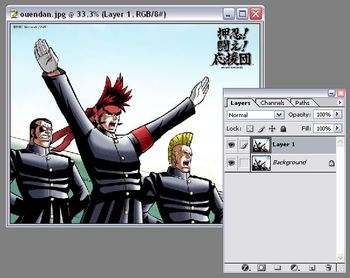
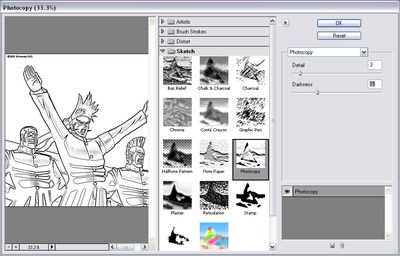
2. Then go to Filters > Sketch > Photocopy and adjust the Details and Darkness sliders. Try to keep the first one as low as possible, just to see the outlines you want to keep in your drawing.
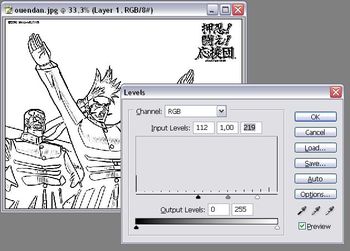
3. Once done, press Ctrl+L and adjust the image’s levels. The left arrow enables you to darken lines, while the white arrow will erase any traces left in the blank parts of the drawing.
4. Repeat the process with a bunch of pictures and you’ll have a custom coloring book for your children!

10 apps to manage office paperwork
 Nobody really enjoys handling paperwork and losing time sending documents. However this is a reality of the office you can’t escape. If you have a good fax machine, photocopier and scanner set up you can normally handle your files well.
You can also make sure that you’re equipped with the right software to improve the way you handle your paperwork and get all the repetitive tasks automated. We’ve gathered up 10 solid applications that you can use to send, receive and scan documents from your office desk.
- FineReader – Quickly recognizes, converts and edits documents
- PC-Telephone – Turns your PC into a complete fax machine
- CallCenter – Handle all your fax and voicemail from this app
- EasyScan – Simple to use application to edit and scan images
- PMView Pro – This image viewer and converter has advanced printing abilities
- Comombo – An excellent fax/scanner/photocopier for those on the go
- 1st Fax Extractor – Collect and manage fax and phone numbers
- Pocket Tools – Check faxes on your Pocket PC
- PageSender – Fax or email anything you can print from your Mac
- FaxCenter – This program makes it really easy to send and receive faxes on your Mac
An open source solution to special effects
 Special effects packages such as Avid Liquid usually cost hundreds of dollars but there’s one open source solution out there which gives you major studio power in a free package. Jashaka is not only free but it makes morphing and animation remarkably easy for beginners. It’s packed with tutorials and it’s even got it’s own player – Jahplayer – with which you can monitor your creations as you edit.
For morphing in particular, it’s incredibly powerful at taking your clips and allowing you to drag, twist and assimilate them with other images in realtime. The animator is also relatively easy to use although it requires a lot more patience (and isn’t half as fun as playing around with the morphing module). Jashaka accepts almost all video formats and has recently been updated to include huge HDTV files.
Be aware however that Jashaka is still under development and you may find it prone to frequent crashes and bugs. It also doesn’t support non-linear editing as yet although that should become a reality in future releases, making this a free special effects package to be reckoned with.
Export feeds from Google Reader
I’m a fan of Google Reader, but that doesn’t mean I can’t test other RSS readers. In fact, I love trying new applications and seeing if I can find anything better than the one I use. I’m not afraid of change and luckily enough, Google Reader enables you to export your feeds in a very easy way. Simply follow these steps and you’ll be ready to test any RSS viewer you want.
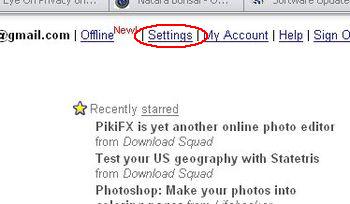
1. Sign in your Google account to access Reader, and click on Settings
2. Once inside Settings, click on Import/Export
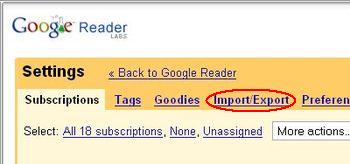
3. Now click on the link Export your subscriptions as an OPML file

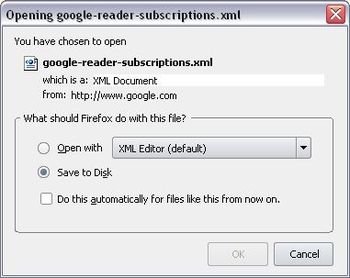
4. A save dialog will open for you to save the XML file in your hard drive. Then the only thing left is importing this file into your new RSS viewer.
Obviously, you can also access this same option inside Settings to import your feeds from any other RSS viewer into Google Reader. Easy as pie!
Create your own keyboard shortcuts in Mac
 Keyboard Maestro will allow you to create all sorts of keyboard actions that you can set to do anything you like on your Mac. The program features a Program and Windows Switcher to quickly access elements you use most often. We like how easy it is to set up and use new keyboard shortcuts. If you’re looking for a way of quickly increasing your productivity, Keyboard Maestro is a good solution.
SlideShare now has sound
 For fans of SlideShare, today’s news that the service is opening up the possibility to synchronise audio files with all slide show presentations might bring a sigh of relief rather than a great hurrah.
The YouTube-style site has been building up a community of users since it began allowing people to upload PowerPoint or Open Office presentations last October. Content ranges from show reels of holiday snaps, baby pics and business presentations. But until now it has all been done in silence.
Well at last SlideShare is going to be available in stereo. Users can synch the audio for their presentations or simply upload an MP3 of a recorded speech. SlideShare is already a great resource but it’s always frustrating watching pictures without sound. Unless it’s a James Blunt video. This addition should really get the service rocking.