Run Windows software without Windows

ReactOS could spark a revolutionThere are plenty of people in this world who hate Windows but feel shackled to the OS because it’s the only platform that will run most programs. Up to now, if you’re running Linux or Mac OSX you needed to boot Windows separately every time you wanted to use a Windows app. The times they are a changing, however, and ReactOS is working on an invention that will allow you to run any Windows program without using the Microsoft Operating System.

It’s still in Alpha stage at the moment but we reckon this could be the first Windows clone to make it big. The market is crying out for an open source product like this and it’s incredible no one has done it so far. Until the release of the Beta you could always run a virtual machine to simulate Windows, but this will only work on the MS Operating System.
Alexa launch official Firefox toolbar

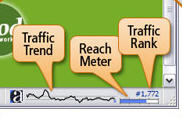
Sparky screenshotTo celebrate 10 years of Alexa, the company have released an official toolbar for Firefox. The application – called Sparky – makes tracking website rankings easier and has several useful features.
One of them is ‘Sparkline’ which is a small condensed traffic history graph and gives a quick overview of whether your site is moving up or down. There’s also a new ‘Reach Indicator’ which provides a qualitative view of whether a site’s rank is good or bad. In addition, there’s a ‘Related Links’ button which provides up to 10 related links in the browser’s file, edit and view menu.

Previously Firefox users were restricted to the SearchStatus toolbar for Alexa rankings. However, note that this official release does send information to Alexa’s servers to monitor traffic so if you’re worried about privacy, install it with caution.

Browse the web with the latest version of Maxthon

MaxthonDespite being sometimes criticised for using Internet Explorer’s web engine, the truth is that Maxthon offers great functionality and efficiency to browse the web. It also features interesting extra tools like an ad blocker, a screen capture tool, tabbed navigations and support for mouse gestures, and can be extended with plug-ins.

45 free design applications

The Gimp is a great free design programIf you’re seriously thinking about getting into design you probably think you’ll have to dish in a good amount of money into the right applications. But while software like Adobe’s Photoshop and Flash, ZBrush or 3Ds are excellent, their price tag is not accessible to anyone.

So can you still be penny-less and work with good design programs? We recently came upon this list of 45 freeware design apps on snap2objects, which proves that you don’t need to spend a dollar to cover your designing needs. We could easily single out The Gimp, Paint.net, Inkscape, or Google Sketchup as top notch applications, but you should really scan the list as it contains many more lesser known but noteworthy alternatives for image editing, illustration, 3D modeling & CAD, fonts, Flash, animation, and authoring.

In March, James also covered what he believed were the top 10 image editors, although unfortunately, most of them are not for free.

How to switch easily between networks

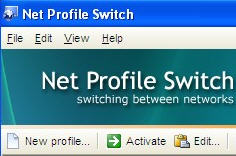
Net Profile Switch screenshotIf you’re constantly moving between networks or changing PC’s, you’ll know what a pain it is to keep reconfiguring your connection settings. There’s nothing worse than having to reconfigure your DNS, SMTP and IP settings every time you log onto a new network.

One solution is to use a network configuration switcher like Net Profile Switch. This allows you to change your settings literally at the flick of a switch. With simply one click, your network settings can be changed according to your location. This includes information about your IP address, DNS and Default Gateway. This is great, for example, if you work between one office with a static IP address and another one with a static address. It also allows you to change web browser proxy settings, change network drive mappings, default printer settings and SMTP servers for email software.

If you are regularly on the move with a laptop or have to visit different clients regularly, then using this program will save many lost hours of productivity due to configuration issues.

Get your Mac full of paint with Paintbrush

Paintbrush for MacPaintbrush is an adaptation of Microsoft Paint for Mac. Although not as sophisticated as Photoshop it offers loads of tools, brushes and effects to make nice drawings. This intuitive program is ideal for kids and supports many image formats so you can always import or export all sorts of images.

Top downloads for engineers

Solve your engineering headaches on your PCThe engineering profession is responsible for some of the great inventions we enjoy on a day-to-day basis. Of course, becoming good enough to build bridges, craft cars or make machines isn’t something you can do overnight and requires years of training. Even then, things can get pretty mind-boggling at times. However, there are plenty of software applications you can install on your PC that will make life easier for you. Here are some of our favourites:
Engineering Power Tools – Solves your engineering problems quickly and efficiently

FindGraph – Comprehensive, feature-rich graphing, digitizing and curve fitting software

Raw Materials – Calculates different material parameters in the most common market shapes

Mr Architect – Create 3D architectural elements and import them into your CAD tool of choice

Quickie Engineer – Software for engineering and technical drawing

A great text editor that fits in your pocket

Notepad++ PortableMeet Notepad++ Portable, the pocket edition of the great coding editor Notepad++. This portable version takes only 2 MB and is specially designed to work from a USB memory stick. But this doesn’t make it less valuable, as it features the same functionality and efficiency as its desktop counterpart. A great notepad and source code editor that you can carry with you anywhere!

Load old email back into Gmail

Load old emails into Gmail For the past two years I’ve been using Thunderbird to receive my mail from various webmail services. I used to like the security of a mail client as it allowed me to keep a copy of my emails online and another copy on my PC. Recently though, I’ve decided to ditch Thunderbird and only use Gmail. I set it up so all my other webmails would redirect to it and recreated the same labels I had in Thunderbird. I was a bit disappointed to find that there was no easy way of exporting filters from Thunderbird to Gmail but was happy to find that you can export back old email into Gmail.

Google Gmail Loader (GML) is a GPL application created by Mark Lyon, which reads existing email and loads them back into Gmail. In the interface all you have to do is enter your Gmail username and password, configure your email file by selecting file type (in my case, mBox, which is used by Thunderbird) and if you want files received or sent. This application is a godsend if like me you have lots of old email stored somewhere on your hard drive and want to be able to browse them easily online.

Google Sightseeing: Europe

Europe's a fascinating placeAfter experiencing the over-the-top commercialism of the USA I’ve decided it’s time for some culture, so I’ve hit Europe on the next leg of the insideTonic Google Earth global tour. The continent is a world away from the modern delights of America and it was great to explore the ancient wonders of the Acropolis in Athens and the Colleseum in Rome. Unfortunately, by the time I got to Pisa in Italy my copy of Google Earth didn’t seem to be working properly, as this tower appeared to be a little wonky when I viewed it.

Thankfully this glitch didn’t last long. After managing to scale Europe’s largest mountain as I crossed the alps, I arrived in Paris where the Eiffel tower appeared much straighter than the last one I’d been to. After a quick dinner date with an odd looking man at Notre Dame, I was off again. This time it was over the former iron curtain of the Berlin wall to the East where I visited Auschwitz in Poland and the Kremlin in Moscow.

When I got to London, Big Ben told me that time was running out before I head to my next continent, so I quickly hopped across to check out the strange monoliths of Stonehenge. Of course, no trip to England would be complete without a visit to Freddy Mercury’s house, and after that I headed for the bibical mountain of Ararat in Turkey, from where I’ll launch my assault on Asia next time.