 Lifeshaker is a todo list organizer with an interface reminiscent of flashcards. All the goals and steps you create are displayed in a grid view. Categories appear in a list on the left and the application features sound effects for every action you undertake.
Month: September 2007
How to create a greeting card with Word
Whenever you need to send a greeting card, you can simply visit the nearest stationer’s or even better, use any of the online postcards services available on the web. But believe me, it’s always much better to create one for yourself: it may not be quite as professional-looking, but it’s something unique you made with your own hands and that gives the card a great value. What’s more, if you have Word on your PC you can use it to create greeting cards. Want to know how? Just follow these simple steps:
1. First, visit Microsoft’s Template Home and download any template you like. In this case, as we’re going to insert a photo, we’re using this one.
2. Open a Word document and insert a photo using the Insert > Picture > From file menu. Then turn it upside down by clicking twice on the Rotate icon.

Run web applications on your desktop
 Web applications are big. Web applications are the future. No, wait, web applications are now. At least that’s what came out of this year’s AJAXWorld Conference, which took place from the 23rd to the 26th of September in Santa Clara. A Rubicon report released during the event even claimed that “some web apps are already spreading rapidly through the PC user base”. According to the report, of 2,000 US adults surveyed, 80% have already heard of web apps. Pretty impressive, no? But have they actually used them? Well, according to the Rubicon study, more than half have and 37% do use web apps regularly. While the most popular apps tend to revolve around email or games, the Rubicon report writes that the real reason for not switching to web apps is lack of necessity. I think this will change though, as we’re seeing really impressive web apps being developed, often much more effective than any desktop program.
 You might not know how to set up web apps on your desktop. Luckily there’s a few excellent applications out there to not only enjoy web applications but even develop some your self. Adobe Integrated Runtime, also known as AIR, is probably the most famous of them all. This cross platform application lets you develop web apps in most known coding languages and run them directly on your desktop. To counter it Microsoft released Silverlight, which works as a plug-in for your browser. Once installed, you don’t need to worry about launching it, as it activates automatically every time you come upon a web applications whilst browsing. Google itself is working hard at making web apps accessible on your desktop. Google Gears is a perfect example of this. This program allows you to consult Google services like Gmail or Google Reader from your computer even when you’re offline. If you develop applications, we also suggest installing the Google Web Toolkit, with which you can develop and debug AJAX apps. Last but not least is Mozilla’s WebRunner, a little curiosity I came across today. This application loads web apps into a separate basic browser window. Simple, but it works.
Quickly retrieve vital data from your phone
 How many times have you sent or received text messages only to want to find them again days or weeks later? It can be a tortuous process especially if the message is from or to someone you communicate with regularly. With AllFinder it doesn’t matter how many messages you must search through because the software works using keywords.
Pixelmator – a sleek new image editor for Mac
 This intuitive and sleek image editor can be seen as a slimmed down version of Photoshop. It integrates layers and filters perfectly and gives you all the essential tools of a good image editor: brushes, magic wand, objects, text, gradients and fills. Using Core Image to its advantages, Pixelmator has a gorgeous sleek black multi-windowed interface and smooth flowing transitions and effects.
Animal madness for your mobile
 It suddenly struck me the other day that I was writing a lot of reviews about animals that had gone completely crazy. Now I don’t know how much global warming, deforestation or cheap air-travel has got to do with this but it’s been worrying me. I mean if snails do start firing missiles or penguins start panicking what are we supposed to do? I’ve never dealt with a panicking penguin before and there’s no sign of a survival pack arriving, which I assume would include a colourful bar of chocolate with a calming joke. Here are some of the mad monsters we need to look out for:
- Bang! Bang! (Palm) – Shoot pigeons from your garden
- Icebloxx (Symbian) – Penguins vs fire and ice
- Go Bananas! (Symbian) – Marvin the Monkey goes mad
- Whack-A-Monty (Pocket) – New Super Mario Bros fun with moles and Luigi
- Snails – (Pocket, Symbian, Win Mobile) – Missiles, war and super-fast snails
- Penguin Panic (Pocket, Win Mobile) – Tetris with very nervous penguins
- Chuzzle (Pocket) – Chuzzles are very rare animals: they keep exploding
- Lemmings (Pocket, Palm) – Diggers, parachuters, blockers – kill them all
- Amoebax (Symbian) – Parasite paradise in a Tetris-style puzzle
- Animals of Mass Destruction (Win Mobile) – Angry muts with machine guns
Top 10 internet accelerators

With broadband now commonplace, internet accelerators have gone out of fashion somewhat with creaky old modems consigned to the bin. However, as broadband speed is often subject to wild variations depending on where you live, who your ISP is, how far you are from the telephone exchange etc, some people might find that there’s still a place for internet accelerators in their lives. Here’s a selection of the top 10 that cover broadband modems, dial-ups and network connections. None of these can guarantee to speed-up your connection and you should contact your ISP if you’ve got serious problems.
- Throttle – Boost your internet speed by 200%
- FastNet99 – Tweak DNS settings to increase your browsing speed
- BeFaster – Optimise your speed online and offline
- Internet Speed Up – Tests and configures your connection according to bandwidth
- Modem Booster – If you’re still on a modem, this could increase speed by 300%
- WorldWebAccess Accelerator – Includes pop-up and spam killers
- Internet Accelerator – Optimises internet speeds over network connections
- TweakMASTER Pro – Tweaks everything from DNS settings to dial-up modems
- NetSpeeder – Optimises your TCP/UDP port settings
- Google Web Accelerator – Very simple accelerator that sits in your taskbar
The free productivity suite by IBM
 As mentioned a few days ago, IBM has joined the free suite revolution by offering a complete suite totally free of charge. Lotus Symphony features a word processor, a spreadsheet application and a presentations tool, all managed under a single window interface. You’ll be able to create and edit all kinds of documents, open files produced with other suites and export any of them to PDF. Check out our full review here.
Abandonware classic: Shadow President
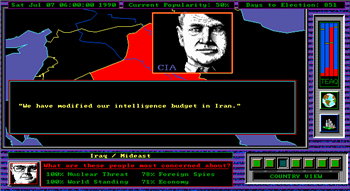 Fifteen years ago, there were so many cool games I wanted to play but couldn’t. We didn’t have internet access yet, and the occasional game my brother and I could get our dad to buy (like the awesome F15 Strike Eagle III) were pretty expensive. I remember that one of his work buddies gave us copies of Doom and Wolfenstein 3D, along with X-Wing (with a trainer on the last disk!) but otherwise we were pretty limited in our choice of games to play on the ol’ 486.
Now we’re living in the future, you may expect me to have forgotten my love for Imperialism II and Wonderboy In Monster World… what do you think I am, fickle? Luckily, the games I loved (and the ones I longed for) can nearly all be found at Abandonware sites like Abandonia. Abandonware exists on somewhat shaky legal ground given that much of it remains under copyright (even though it may no longer be available for purchase).
While I’m not going to condone breaking the law I will say that I support the idea of keeping games alive by enjoying them long after their developers have abandoned them. There is actually a larger point to be made about the validity of the 70-year copyright longevity for software, something which is updated and superseded so quickly. But I’ll leave that argument for the dry legal experts of Wikipedia.
My first Abandonware Classic is the remarkable Shadow President. This impressive game puts you in the most powerful seat in the world: that of US President. The aim of the game is to handle your economy and your relations with every single country in the world. From a world map, you can click any country and then decide on all sorts of policy and aid issues such as trading partner status, intelligence operations, military and humanitarian aid and diplomatic coercion. You soon realise that the top job is a lot harder than just shaking hands and delivering speeches articulately. Hmm, that’s kind of worrying. Anyway, check out Abandonia’s great review of the game here and keep your eyes peeled for more classics.
Learn all of Gmail’s secrets
 Gmail is probably one of the most popular email clients, not only among online services, but also among desktop applications. It’s fast, easy, reliable and provides more than 2 GB of space for your messages. But there’s more to Gmail than just reading and forwarding emails. This excellent tool has some hidden tricks that you may not be aware of which will definitely improve your Gmail experience. In any case, if you know any other great tip that should be included in this list, don’t hesitate to share it with us in a comment!
- If you want to select multiple conversations simultaneously, check the first one, then press Shift and check the last one.
- Press Shift while clicking on “Compose Mail” and it will open the new message in a different window. This is especially comfortable when you want to review several emails while writing your answer.
- Use advanced search features to obtain better results. You can search only messages from a given sender by adding “from: name” to your keywords, for example. See the complete list of search operators.
- You can use Gmail chat to reply a friend’s mail as soon as you see them online. If they go offline, just keep on messaging, as they’ll receive the whole chat in their inbox. Both chat messages and mails are saved in the same thread.
- If you receive an attached document or spreadsheet, you can open it with Google Docs. If it’s a presentation, Gmail lets you view it as a slideshow. And if there are several photos, you can tell Gmail to zip them all and download a single file.
- When replying or forwarding a message, change the subject field and you’ll immediately start a new thread. This is very convenient when conversations change topic and you want to keep your inbox as organized as possible.
- Gmail Contact List is more than a name and an email address. Click on Contacts and you’ll be able to create a complete entry for each contact, including a photo, phone number and personal notes.