Time waster: get in the artistic mood

I’m sure you all remember good ol’ Mr. Potato Head from your far-away (maybe not that far) childhood days. Today’s pastime is quite a special version of this popular toy, only this time it comes in a digital web-based format and is inspired by one of the greatest painters of all time, Pablo Picasso.

Mr Picassohead

Mr. Picassohead allows you to unleash your artistic side and create Picasso-style headshots using a handful of abstract shapes you can customize in color, shape and orientation after sticking them onto your digital canvas. You may try to “paint” a self-portrait or simply let inspiration take the reins while randomly choosing shapes.

Once you consider your creation to be finished, you can save it or even email it straight away to your friends. Just make sure you add your signature in case they have trouble in identifying the author of such an impressive piece of art!

Firefox 3 memory leak caused by Gchat

gchat-in-gmail.pngSince upgrading to Firefox 3 a few months ago, I’ve been pretty impressed by the performance of Mozilla’s latest browser. Generally, page loading times seem slightly quicker, although several of my add-ons are still not supported by it, which is something you have to unfortunately resign yourself to every time you upgrade Firefox.

However, one major problem that I was experiencing was a severe memory leak when Firefox would suddenly hog my RAM and CPU for about a minute causing the browser to hang, or even crash. Although memory leaks have been an ongoing problem with Firefox, this was far more serious and persistent that usual. The simple solution, it seems, was to sign out of the Gchat module in Gmail. Simply by being signed in, Gchat could suddenly conflict with Firefox for no apparent reason. A quick Google search revealed that I wasn’t alone either with desperate users flocking to Mozilla’s forum to find a solution.

It seems incredible that Mozilla didn’t even notice that one of the Internet’s most widely used web based e-mail clients was causing this problem when they developed Firefox 3. In fact, it’s not the only basic glitch I’ve noticed with Firefox 3. Some JavaScripts, that worked fine in Firefox 2, don’t seem to work for me in the latest version of the browser.

Let’s hope that this is not a sign of things to come with future releases of Firefox. The add-ons incompatibility issue is already annoying enough but incompatibility with basic components such as JavaScript or IM clients is not really acceptable (unless of course you’re Microsoft).

Today’s downloads for Windows, Mac and Mobile

Download UltimateDefragWindows: Defragmenting is something you need to do from time to time if you want to keep your hard drive in good shape, so you’d better count on a reliable tool like UltimateDefrag. This efficient, flexible defrag tool will help you defragmenting your hard drive and improving its performance. It’s easy to use, fast and lets you choose which areas to defrag.

CaminoMac: Among with Firefox and Safari, Camino makes for an excellent browser for Mac users. Built on the same rendering engine as Firefox, Camino is very lightweight yet at the same time highly secure. It offers a sleek interface, seamless Keychain support and a fully customizable search box. The browser has been getting more regular updates recently, making it a safe choice as your main browser.

Perform translations on the goPocket PC: If you’ve ever used Babylon on your desktop PC, then you’ll know exactly how powerful it is for translating text and web pages. Now the app is available in pocket format in the shape of Babylon Mobile Edition. The program supports translations between more than 20 languages and boasts a very simple interface.

Windows or Mac OS – does it really matter anymore?

Mac or WindowsOne of the major reasons Windows users are converting to Mac is that Macs are regularly held up as quite simply “a better machine”. More reliable, more intuitive, more stable and basically much nicer to use according to many who have made the switch. However, internet browsers are becoming increasingly functional – allowing you to do everything from, of course, browsing the internet (probably the number one reason why any home user purchases a computer) to editing documents and using FTP clients. Add this to the huge number of Web 2.0 based apps that are developing thick and fast such as those based on Adobe Air, and it raises the question, does it really matter whether you’re using Windows or Mac OS anymore?

Of course, if you’re a designer or if you use several powerful programs apart from your internet browser, then the question is pretty straightforward. It will be Mac OS or Windows depending on what you prefer or are used to. Design professionals will usually cite Macs as their machine of choice.

However, if like the majority of computer users, you use your PC mainly for web based activities, the answer is not so clear cut. For example, having recently switched to Mac, I personally realised that my world hadn’t really been revolutionised in the way I expected. I used the same Firefox browser, with the same bookmarks, the same plugins, and in fact, rarely had to resort to using Mac OS at all. The most important thing to me is that Firefox is stable whether I’m using a PC or Mac. A quick look at some of my Firefox add-ons (below) reveals how much more important the browser is to me than my OS.

My add-ons

As you can see, whether it’s downloading, synchronising my bookmarks or reading offline, I do it all via Firefox plugins. So much for all the hype over Google’s new browser Chrome being a “Windows killer” – in my case Firefox has already largely killed it off.

However, we’re all attached (or at least highly versed) in one operating system or another and it can be hard to change no matter how important the browser and web apps become. Lifehacker recently took a poll on this subject and found that almost half of readers thought that it still “kind of” matters what OS you use selecting the option, “I don’t love the idea of using another OS but it wouldn’t be a tragedy if I had to.” Almost 20% however declared that they felt things had already come to the stage where the browser they were using really didn’t mattter anymore selecting, “They all basically do the same things, and the most important thing they do is connect you to the internet.”

Joe Nocera writing in the New York Times is definitely of the opinion that OS’s are already irrelevant:

Think about it: do you really care anymore which operating system you use? I don’t. For years, I owned both a PC and a Mac. I could use Microsoft’s Internet Explorer, Apple’s Safari or Mozilla’s Firefox, more or less interchangeably, to access the Internet. I could write an article on one computer, send it via an email message to the other one, and it worked just fine. Ditto for PowerPoint, spreadsheets, and many of the other applications most people use — including Apple’s iTunes.

Continue reading “Windows or Mac OS – does it really matter anymore?”

Back to school – Art

Learn to draw on your computerIf you’re struggling with the ‘proper’ subjects at school you’ve always got art class to fall back on. Here you can forget all about algorithms, algebra and Archimedes and mess about with paints instead. If you really want to make the most of the subject though, you need to get kitted out for the world of digital art. There is such a broad range of graphics software out there that it can be tricky to know where to look. I’ve picked out a few of the best ones for each level of academia.


Primary: All the great masters started their careers by doing coloring, and it’s important to get a grip on how to stay within the lines from a young age. If you don’t want to upset Mum by spilling paint on the carpet or getting felt pen all over the table then why not do all your coloring on the computer? I know it sounds crazy, but computer programs such as Kea Coloring Book or Connected Kids Coloring Book let you learn the craft without making a mess. Once you’ve perfected the art of coloring why not expand your talents to making writing look pretty? textArt allows you to apply various cool typography effects to text, simply by selecting an effect from a drop-down menu and choosing colors.

Secondary: High school is the place where your abstract blobs are transformed into works that actually look like something else from real life. There are some quality drawing tools around that can be picked up with just a bit of practice. Corel Painter might be a good place to start as it allows you to take real photos and very easily change them into paintings though its Photo Painting palettes. OpenCanvas is another good quality art app with a gentle learning curve. There are loads of different brushes, pens and pencils, so you can really get creative. However, perhaps my favorite of all is ArtRage, which I feel gets just the right balance between user friendliness and powerful artistic tools.

College: If you choose to pursue art after leaving school, either in further education or as part of your career, then you’ll probably need to add to your arsenal of software. The weapon of choice for most in the graphic art industry is Adobe Illustrator, which provides a wide range of advanced tools and integrates nicely with that other bastion of the image editing world, Photoshop. If you’re looking for a creative new tangent to explore then perhaps you could also try Context Free Art, an app that allows you to generate images by entering code. No matter how good you are technically though, you will always have periods where your ideas dry up. When this happens, you can always get some inspiration by customizing your computer around the works of Rembrandt, Van Gogh, or Cezanne.

Time waster: save the golden idol from destruction

Have you ever played Jenga? It’s a challenging puzzle where you have to remove wooden blocks from a tower without making it fall into pieces. Totem Destroyer is based on the same principle, only that this time you play it with your mouse instead of wooden pieces.

Play Totem Destroyer

Your aim in Totem Destroyer consists on bringing a little golden idol down to ground level by destroying the blocks underneath. There are three kinds of blocks: brown, green and black. The brown ones are the standard blocks, the green ones are a bit bouncier and more slippery, and the black ones are the only blocks that can’t be destroyed.

You’ll notice that the first few levels in Totem Destroyer are quite easy to complete, but wait until you reach further in the game and you’ll find yourself planning strategies to make that darn idol reach ground in a safe way.

Customise the look of programs and apps with Stylish

Paint palletIf you love using a certain application or program but wish you could just tweak the interface in a few minor (and even some major) ways, then usually there’s not much you can do beyond the options presented in the program preferences. However, while tinkering with the look of Google Reader the other day, I came across a superb Firefox plugin called Stylish which basically rearranges the CSS (Cascading Style Sheets) of hundreds of web-app interfaces to your liking. As the developers say, “Stylish is to CSS what Greasemonkey is to JavaScript.” Stylish is not dangerous because doesn’t make any fundamental changes to a program’s structure – it merely changes the cosmetics of the program by tinkering with the CSS.
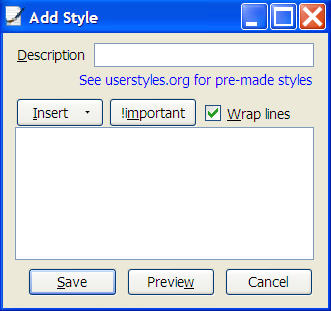
Once you’ve installed the Stylish plugin into Firefox, you’ve opened the world to a whole range of user created interfaces and application interface tweaks on the Stylish directory that would simply be impossible to do otherwise (unless it’s an open source app and you’ve got some coding knowledge).

Stylish - Add Style dialog box

Don’t like the look of your sidebar in Google Reader? Then simply download one of the many “styles” that users have created for that particular application and the look is instantly altered. When you download a style, there is an option to preview how it will make your application look although this didn’t work for me. However, installing and removing styles is so quick and easy that you don’t really need this option – style changes are instantaneous.

The only drawback of stylish is the way that some users label and annotate their different styles. Some of them don’t really explain (or show a screenshot) of how the application will look when you’ve altered it which means the only way to find out is to download it. I was actually looking for a way to extend the subscription sidebar in Google Reader so that I could see all my subscriptions without having to scroll down but despite trying several styles, drew a blank. Currently popular styles include a dark grey interface for YouTube, an improved Add Bookmark dialogue and an alternative look for Gmail.

However, the sheer number and range of applications and programs you can change with Stylish is truly impressive – chances are, if you want to change the look of an app or program, you can with Stylish.

Back to school – Music

Learn the piano on your computerMusic was always one of my favorite subjects at school. However, I invariably ended up just banging two blocks of wood together during our orchestral performances. Perhaps if I’d had some computer software at my disposal in those days, I would have been able to master some of the proper instruments. In the latest in our Back to school series I’ll outline some programs that may be useful for training your ears.

Primary: A good way to introduce yourself to music is to learn the notes on a scale. Note Attack makes this an easy process, helping you to read music by blasting notes into submission in a fun game. Once you’ve got the basics of what the notes are and where they appear on the scale then get hold of Electronic Piano. This free program offers the perfect way to learn the basics of the piano by hammering the corresponding keys on your keyboard.

Secondary: You may wish to start your secondary music education by consolidating what you already know and building on this knowledge a bid. Install GNU Solfege and you’ll be able to test your existing music skills through a series of quizzes, based on the recognition of notes, scales, chords and the like. You’ve already had a stab at the piano, and if you’ve mastered that you may want to switch to the guitar. Fret Fun and 100 Chords Method make for excellent training aids for learning guitar chords. To help you keep time you should also install a decent digital metronome, such as Fast&Soft Metronome.

College: If you’re musical ambitions stretch further than being able to strum a few chords, you’re probably thinking about composing your own works. MagicScore Maestro and Encore are both excellent music notation applications for professional composers. Of course, you should make sure your ear is trained to perfection first, which you can achieve by installing Absolute Pitch onto your PC.

Free utilities to keep your laptop cool

ThermometerIf there’s one thing that surely defeats the object of being a laptop it’s overheating that prevents you from being able to use it on your lap. It seems this is becoming an increasing problem for manufacturers such as Sony who recently announced the recall of almost half a million Vaio laptops due to an overheating problem. OK, this was mainly because of a manufacturing fault but the pressure to pack laptops with bigger and better processors and graphics cards is quite literally raising the temperature of laptop users everywhere. But this problem isn’t confined to the PC world. Having recently used a MacBook Pro, I can safely say it’s the hottest laptop I’ve ever used and this is a problem that’s causing considerable concern for all those who feel that for the money they’ve paid, they should at least be able to use it on their lap without suffering third degree burns. So if your laptop has burnt a hole in your lap as well as your packet, here are a few free tools to help you keep your cool:

SpeedFan – Warns you when your CPU and hard drive reach a critical temperature

smcFanControl
– Specifically designed to keep the heat down on the MacBook range

CoolBook – Another MacBook fan app for those that are losing their cool

I8kfanGUI – An easy to use utility designed specifically for Dell laptops

tpfancontrol
– Designed specifically for controlling the fans of Thinkpad laptops

Notebook Hardware Control
– Controls all hardware components including fan speed

Back to school – Science

Study science on your PCLike it or not there’s no escaping from science, so you might as well learn about it. I think these were the words of Einstein, who if he were around today would no doubt be a big fan of using the PC as a tool for education. Of course, science comes in a variety of flavours, namely physic, chemistry and biology. Thankfully, there are computer programs that can help with all these facets, and which are aimed at all levels of education. Here are some to try:

Primary: If you’re under the age of 10 then you probably don’t want to be hearing about Newton’s laws of motion or the density of lead. In fact you probably just want to mess around and play games. Luckily for you, science and games do go together. For instance, you could play Diego’s Dinosaur Adventure, in which you will learn about the anatomy of prehistoric creatures by playing a series of cartoon puzzles. Likewise you could try installing 3D Mad Scientist Penguins, where you’ll be able to watch some hilarious science experiments involving aliens, ghosts, keys and a hat made of fruit. Just don’t try them at home kids.

Secondary: Like it or not, at some point during your high school education you’ll have to learn the periodic table of elements. Get Periodic Table installed on your computer and you’ll be able to learn the table off by heart in next to no time, as well as picking up points for learning some interesting stuff about each element’s properties. Finding out what happens when chemical elements are mixed can be a dangerous task if you don’t know what you’re doing. Fear not though, because you can always install ModelChemLab, an interactive chemistry set for Windows. If you’re more interested in what’s above us than what’s around us then check out an astronomy application such as Starry Night or Worldwide Telescope and get a glimpse of the celestial world beyond.

College: For those boffins out there who decided to further their science studies after leaving school, there’s still a bevy of software apps to help you in your quest for knowledge. For instance, Populus is perfect for examining evolutionary ecology; WinIQSM is superb for studying sound signals, and RPN Engineering Calculator provides you with instant solutions to complex engineering calculations.