Pimp your music library with fresh album covers

One of the most eye-catching features in Apple’s iPhone and iPod Touch is the implementation of Cover Flow, the iTunes file user interface that enables you to browse the music library by simply flipping album covers. It really looks nice both on your computer and your device… that is, provided you have all the covers for your music collection, because as soon as there are some of them missing, Cover Flow suddenly loses all of its attractive.

Pimp your music library with fresh album covers

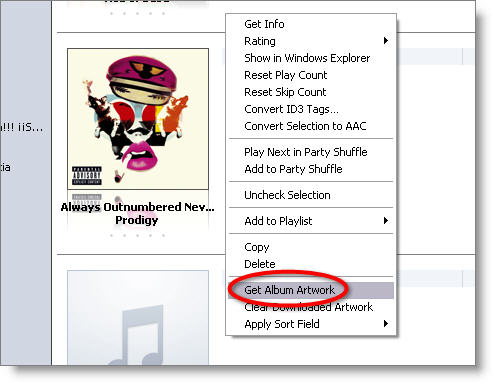
Luckily for you, finding those lost album covers is quite easy. I’m sure there a few ways to retrieve them, but I’ll explain a couple of tricks I’ve used on my personal music library and have worked fine for me. The first one requires an iTunes Store account, which you can create straight from iTunes. Once you’re logged in, all you have to do is right click on the file you want to search the album cover for and select the Get Album Artwork option. iTunes will find and download the cover for you, as long as the file’s tags are properly filled in. Continue reading “Pimp your music library with fresh album covers”

How to: add a dot effect to your photos

Have you ever seen one of those images that seem to be made of little colored dots? It’s a technique that’s been widely used in pop art and, more recently, advertising. Now, guess what? You can apply that same dot effect to your photos in no time. Simply launch Photoshop and follow these easy steps.

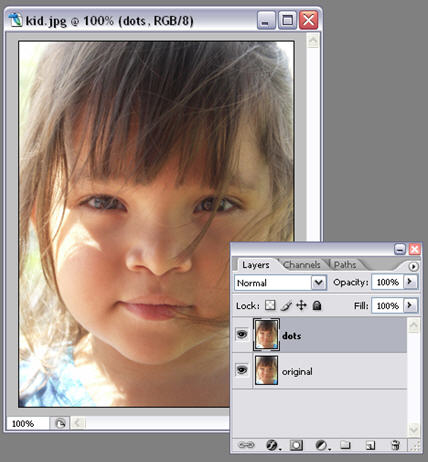
1. Open up your photo and duplicate the background layer. Name the first layer as “original” and the one you just duplicated as “dots”.

Add a dot effect to your photos

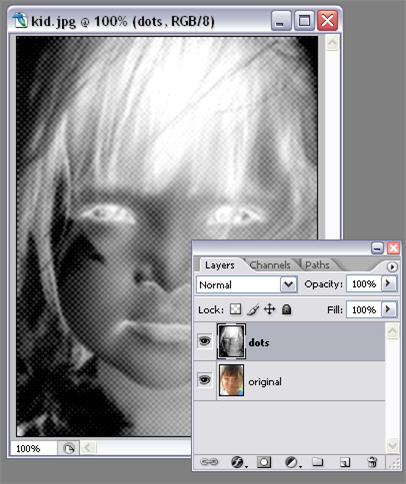
2. Now make sure your background color is black and your foreground color is white, and click on Filter > Sketch > Halftone Pattern. Set Size to 1, Contrast to 5 and Pattern Type to Dot, and click on OK. You’ll get something like this:

Add a dot effect to your photos

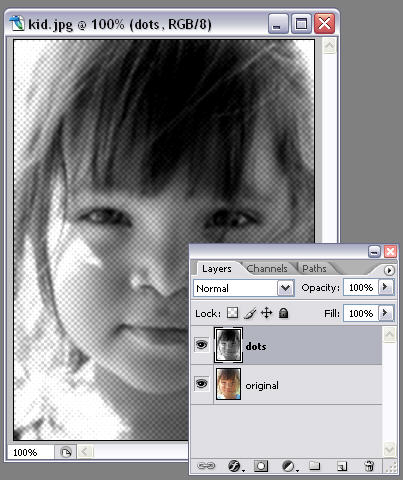
3. Now it’s time to invert colors. Press Ctrl+I and your image will become something like this:

Add a dot effect to your photos

4. Finally change the “dots” layer blending mode to Linear Light and you’re done! You may also try different opacity values and see how they affect the final result.

Add a dot effect to your photos

Today’s downloads for Windows, Mac and Mobile

Download Koyote Free Video ConverterWindows: so you just got an iPhone and you’re desperately looking for a video? Koyote Free Video Converter is what you need: a free, easy video converter with support for all multimedia portable devices (PSP, Zune, iPod, iPhone…) so that you can enjoy your favorite movies on the go without struggling with a complicated converting tool.

TogetherMac: You may have gotten used to Spotlight and set up your Dock with your favorite apps and folders, but are you still finding it hard to keep your Mac organized? Together quickly and easily stores anything and lets you keep files organized thanks to smart lists, labels, groups and notes. You can drag and drop elements between folders and make use of Spotlight at any time. Use it too much and you might not need the Finder ever again!

Create your own ringtonesSymbian/Java phones: Bored of the same old default ringtones on your mobile phone? Then do something about it by using Create-Ringtone to make your own melodies. The software lets you change any of your WMA, MP3, WAV or Ogg files into a tone for your phone. You can make unlimited ringtones using Create-Ringtone!

Top tips, tricks and hacks for RapidShare

RapidshareRapidShare is a phenomenally successful file sharing site that consistently ranks in one of the top 20 most used websites on the web according to Alexa. The secret of its success is incredibly fast upload and download rates that make sending files bigger than 200MB a breeze. Well, that’s the official reason. The unofficial reason is that it’s made sharing movies and music even quicker and easier than huge P2P networks such as eMule. How does it get away with this? Basically, by operating out of Switzerland and charging a subscription fee.

Although RapidShare also offers a free service, for large files you’ll probably want to upgrade to the Premium version. The reason being is that if you want to upload files bigger than 200MB, the premium version will make them much faster and easier to download whereas the free version makes downloading each 200MB segment a bit tedious. However, here are some tips, tricks and hacks to get the most out of RapidShare whether you’re a free or premium user:

1. Use RapidFind – RapidFind calls itself “the first RapidShare forum” and is by far the best way to find files that have been uploaded by users. You’ll be astonished at the amount of material on there.

2. Install the ShareMiner searchbar – Alternatively, if for some reason you can’t find what you’re looking for with RapidFine, ShareMiner searches not only RapidShare but also other storage sites such as Megaupload for your files.

3. Install RapidCheck for a free Premium Account – Occasionally, RapidShare gives away free Premium Accounts. RapidCheck will alert you when such offers are made so that you can be one of the first in the queue.

4. Use Linkrr to download multiple links – If you haven’t upgraded to premium, Linkrr is an essential tool which downloads all of your separate links in one go – much quicker and more convenient than downloading them one by one.

5. Download files simultaneously with SwitchProxy – Using SwitchProxy, a simple plugin for Firefox, you can “trick” RapidShare into thinking that you are two separate users and thus download more than one file at a time. Just follow this excellent tutorial.

Don’t forget, though: OnSoftware never condones illegal file sharing. Keep it legal, guys & gals.

Head to Head – VMware Player vs VirtualBox

VMware Player vs VirtualBoxWorking as software reviewer means that you have to install at least twenty new apps every week and uninstall them again as soon as you’re done with your analysis. However we all know how unhealthy this habit is for Windows, so using a virtual environment is almost compulsory. Virtual operating systems provide you with a safe sandbox where you can test as many programs without affecting the host system. What’s more, they usually feature an easy way to rid of a slow, app-ridden Windows and get a fresh, brand-new installation in a couple of clicks.

Among the several virtualization apps available today, I’ve tried VMware Player and VirtualBox. Though I’ve used the latter only for a few weeks now, I already found some interesting similarities – and its corresponding differences – between both programs that I thought would be worth pointing out.
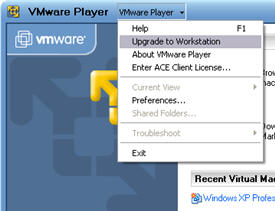
VMware Player vs VirtualBoxBoth VMware Player and VirtualBox are free apps, which is always a good point for a start. However VMware Player is more limited, because it doesn’t allow you to create new images (i.e. virtual operating systems) while VirtualBox does. If you want to create new images for VMware Player, you’ll have to upgrade to the more pricey Workstation version.

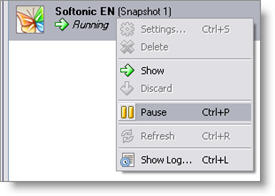
As for general performance, I find VMware Player to be more stable than VirtualBox. The first one usually runs very smoothly – except for the odd blue screen of death – while the second one has often shown a blank screen on my virtual machine, which means the system is frozen and you need to restart. Besides this stability issue, the truth is that VirtualBox is lighter on resources than VMware Player, making it easier to work with the host and guest systems in parallel. Relating to this, VirtualBox also features a really handy tool you don’t find in VMware Player: the possibility to “pause” the virtual machine, so that a good percentage of processor power and memory are released and you can then run heavy apps like Photoshop with no further hassle.
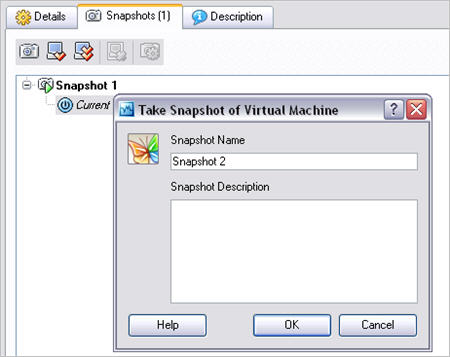
VMware Player vs VirtualBoxRegarding usability, both programs have their own pros and cons. On the one hand, VMware Player supports shared folders and also lets you directly drag and drop files between both the guest and host systems, while VirtualBox only works with shared folders that you need to configure before running the program. Keyboard and mouse swapping between the guest and host machines is generally more intuitive in VMware Player, whereas VirtualBox requires you to press a hotkey. Also, copying and pasting between the two operating systems works for VMware Player, but not for VirtualBox. On the other hand, VirtualBox enables you to create the so called snapshots, which let you restore the system to a previous state at any time. This comes in really handy when the image is not working properly and you can’t bother to create a new one: simply restore it to a previous fully working snapshot and you’re done.
VMware Player vs VirtualBox

In general terms, I’d say VMware Player is more intended to heavy users who need a reliable, powerful virtual environment to test software or try new operating systems, while VirtualBox seems to be more focused on not so techie people, who only want to test new apps in a safe environment without compromising the integrity of their computers. Now it’s your turn to try them and make up your mind.
Is Google trying to redraw the world map?

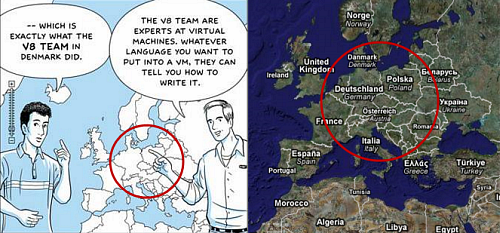
Much has been made of the cool comic book that Google used to inform the world about Chrome. But something spotted by our German colleagues is perhaps much more sinister than Google merely trying to control the Internet. It looks like they’re redrawing the world map!

google-world-map-2.png

Seriously: Denmark (which they even mention in the frame in question), Switzerland, Austria, Hungary and Slovenia have either disappeared or had some of their territory… redistributed by the search giant. The question is: how long before Google apply these changes to Maps?

Back to school – Languages

Learn languages on your PCSchool would be pretty impossible without the ability to read, write and speak. So after already regaling you with details about top Maths and Geography software this week, I suddenly realised you may not be have been able to understand what I wrote if, for example, you’re very young or are a non-English speaker. Luckily, I’ve come up with a collection of language apps for all levels to help improve your understanding of words and their meanings.
Primary: The comprehension of a language is always formed at a very early age and primary schoolers must master the basics of reading, speaking and writing before they can go on and do anything else. A good place for a kid to start is Make Me Smart, a PC application that aims to do just that. It features a series of games designed to help little ones put names to the things they see. It boasts more than 400 pictures with pronunciation and labels, interactive typing games, plus 17 animal noises for the slower ones. For those who have already mastered the basics of reading and want to improve their speeds, try AceReader Pro. The application is designed to help you pace your reading to become more efficient.

Secondary: By the time you reach high school you should have pretty much mastered your mother tongue. However, it’s always wise to boost your vocab somewhat so you can construct witty and intelligent retorts to would-be bullies. WordPal is perfect for this, using a series of quizzes to help you learn new words. To achieve knowledge integration, the program uses six different quiz types, which are antonyms, definitions, odd man out, sentence completion, synonyms, and word order. By now, you should be thinking about learning a new language altogether. Amigos Spanish Puzzles and Conjuga are great tools for learning Spanish, while Recite French Words and easy French Dialogs offer a prefect introduction to French.

College: There are plenty of ways you can further your language knowledge after secondary education. Perhaps you want to learn about the history of words, in which case I can recommend Diogenes. This translation assistant allows you to look up words in classical Latin or Greek, providing very detailed answers including meaning, example of usage and other important informative elements that can be very useful when translating classical writers. If you’re studying Chinese at a higher level then check out the H&H English-Chinese Talking Dictionary. On the other hand, if you want to start getting creative with the English language then get hold of Rhymesaurus, which helps you construct poetry by offering a vast database of rhyming words.

Mozilla responds to Google Chrome: “It’s an experiment”

Google ChromeAs you will probably know by now, last night saw the launch of Google’s new web browser, Chrome. Somewhat confusingly trumpeted by Michael Arrington as a ‘Windows killer’, Google Chrome is clearly designed to take on not only Microsoft’s Internet Explorer but also Mozilla’s Firefox. We spoke to Mozilla Europe board member Zbigniew Braniecki, to get the open-source giant’s first reactions to the new kid on the block.

Talking about the launch, Braniecki told us:

I am happy that a new browser has entered the market: Google has very talented developers. They are creating a browser according to our (Mozilla’s) values – openness, standards, security and privacy. What the final result will be is hard to say.

But Google is a very different organisation to Mozilla, so their aims differ too:

We believe that the key for Mozilla is to stay in the role of the non-profit organization that aims to provide innovation and choice on the Internet. In short: Google is just a company, like Apple, Flock and so on. Whereas the Mozilla Foundation has a special position and responsibility in the development of the Internet.

Regarding the new browser and its features (much has been made, by Google and by other commentators of Chrome’s use of individual processes for each open tab):

Parts of [Chrome] are already implemented in Firefox, Safari, Opera or IE8. Some bits are really innovative and we’ll look at these with great interest. But for example, tabs as independent processes are very greedy when it comes to memory. Every Gmail tab loads everything. In Firefox we can optimize memory in such cases, but independent processes in Chrome do not offer such flexibility.

Much has been made of the fact that Google provides up to 70% of Mozilla’s funding. Is Mozilla going to take action against Google to protect Firefox’s market share?

Regarding business, it won’t be possible for us to erase Google Chrome ads from Google results that are shown to Firefox users. But for sure it is too early to say that Chrome is real competitor. It is an experiment, and not as professional a product as it looks in the press. There’s a long way to go before this is a product that can be responsibly offered to large groups of users. Firefox is an established, complete browser that works for millions of users every day. We have just extended agreement with Google for next 3 years.

We do not have any “silent deals” with Google, just partner agreements similar to what Opera has. Google does not prefer Mozilla in any way.

So perhaps some of the predictions about what will happen at the end of this new three year deal are correct? Only time will tell whether Googleis really happy to keep funding what is now a competitor.

Google Chrome: Full review

After having successfully launched their own webmail service, RSS reader, online suite and many other apps, having a Google web browser was only a question of time.

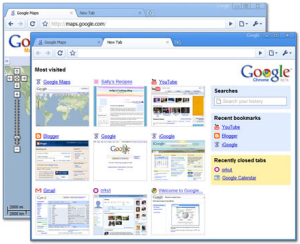
Google Chrome has joined the so called web browser battle with a neatly designed web browser which, in spite of being still at a development stage, already shows a lot of potential.

3_chrome-02.jpg

The first thing that caught my attention when launching Google Chrome for the first time was its minimalist design. Besides a couple of bars and a couple of buttons, there’s nothing else on the interface to steal screen space from the websites you visit – not even a status bar, as it automatically shows and hides whenever it’s necessary. Continue reading “Google Chrome: Full review”

Back to school – Geography

Improve your knowledge of the WorldAfter yesterday’s maths lesson, today I thought I’d show you the World. Unfortunately for you, that doesn’t mean I’m taking you on holiday with me, rather I’m going to tell you about a bunch of computer programs that will help you learn about geography. The applications cover aspects of both physical and political geography, and again, I’ve categorised them based on level of education.

Primary – If you’re a six year-old kid you don’t want to start learning about stuff like rock formations or gross national product. No, your journey to geographical enlightenment should begin with a general understanding of how our planet looks. Install World of Where (or get your Mum to do it) on your computer and you’ll be able to play a guessing game that will help you learn the position of cities and countries on the World map. Likewise, Seterra and The National Geographic’s online game, GeoSpy, will help you put names to those blobs you see on the globe.

Secondary – As amazing as it may sound to you youngsters, we didn’t have Google Earth when I was at school, and had to rely on ancient tomes known as Atlases to figure out the lay of the land. Of course, Google’s product is excellent for studying the location of countries, topography and the oceans, and installing it on your home computer will instantly boost your grades. Earth’s Core is a lesser-known geographical application, that lets you find out what’s beneath our feet. It’s a comprehensive encyclopedia and research base offering just about everything there is to know about rocks, minerals and gems in an easy to search format with in depth descriptions and attractive image. If it’s meteorology that floats your boat then have a look at Earth3D. The program lets you view the planet in a real-time 3D perspective, so you can track changes in the weather.

College – Now to those of you who are studying geography at a higher level. By this stage I’m sure you’ve got to the stage where you’re creating maps of your own. If you’re on the look out for a decent tool to do help with this then try MapCreator. It’s a free application that allows you to create high quality physical maps to emphasize natural features of the Earth’s surface, such as mountains, valleys, vegetation, water, etc. QuikGrid is perhaps an even more advanced software, allowing you to render 3D surfaces based on a series of scattered data points, making it perfect for plotting land formations.