Why does the games industry insist on making the consumer suffer?

Used games shock!Alongside fighting piracy, games companies are widening their targets to include the rental, and second-hand game markets.

In an interview with Gamesindustry.biz, Epic Games’ (makers of Gears of War)President Michael Caps complains that piracy has stopped them making PC games altogether, and the second hand market is pushing developers towards solutions that stop it. Recently, and organization representing the games industry in Belguim managed to change the law to make game rental there illegal.

I can totally understand companies being worried about piracy, although their response has often been to punish the consumer, but stopping rental and second hand purchases is ridiculous. I’m yet to hear the motor industry make similar complaints about second hand cars, and video rental has been the norm for years.

It is especially painful to hear this kind of mean spirited stuff from an industry that is in such good health – still growing quickly, and predicted to outsell video and music this year in Britain alone. With a generally young demographic, this is impressive. The idea that sales will improve if gamers can’t try out games, as people often do with rental, or sell their old games to buy new ones, is pretty bad.

Video chats enabled in Google Talk

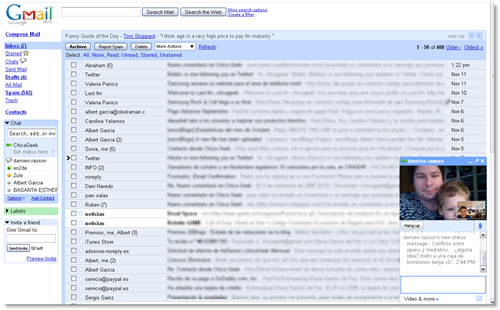
Video chats enabled in Google TalkGoogle Talk started out as a minimalist chat client that was soon successful among people precisely due to its simplicity in functions and design. It grew in popularity together with Gmail, to the extent that it was later on embedded into the webmail interface and also began offering support for voice chats. The next logical step was video, which Google Talk just added today and is slowly rolling out to all Gmail accounts – including mine!

After checking that I already had video chats enabled on my Gmail account, I downloaded the necessary plug-in and grabbed hold of my webcam. There was no lengthy configuration process required: simply plug your cam, select a contact in the Gmail box and click on “Start video chat”. However if you want to check video chat settings or need troubleshooting, there’s a new area in the Gmail configuration menu where you can check the video, audio and microphone settings: click on Settings and then on the Chat tab and you’ll be right there.

Google Talk video chat offers an impressive sound and image quality. Even in full-screen mode (which you can enable by clicking on the small square on the top left corner of the video window) image remains clear enough and, above all, is never bumpy or clunky. Streaming is in fact smooth and continuous, and so is sound: even with the mic far away from us we had clear-cut audio during the whole chat.

Video chats enabled in Google Talk

The video window is minimized on the bottom right corner and cannot be moved – something I found a bit annoying. Of course, you can always pop the window out but that means you have two windows instead of one, which is not that useful anymore. The standard text chat takes place right under the video window, with the usual format and tools.

Google Talk has left a very good taste in my mouth after testing it for a while. I wouldn’t be surprised if it started gaining users quickly and was – in the long run – a serious competitor for other popular voIP tools. It does have one requirement though (a Gmail account) but I’m not sure if a free 7-GB Google-powered webmail account can exactly be called a requirement. It’s simply something everyone should have.

Add features from other browsers to Firefox

A while ago, when Google Chrome came out, we found a way to add Chrome’s best features to Firefox by using certain add-ons that mimic Chrome’s new tab page, download manager and Incognito mode . But the truth is that this trick can be extended to other web browsers as well. That is, you can use Firefox extensions to get features from the competition without having to switch to a different browser.

The following extensions will enable you to have the best from each web browser (Opera, Google Chrome, Internet Explorer, Safari) while sticking with your dear old Firefox. Choose the ones you like best and tailor Firefox to your taste.

Opera

This is by far the browser with most features included by default, so you’ll need a bunch of extensions to put Firefox on the same level.

Add features from other browsers to FirefoxFast Dial

This is Opera’s homepage, where you can set your favorite websites for quick access. You can have the same in Firefox with the Fast Dial or Speed Dial extensions, and also with online services such as Homepage Startup.
Add features from other browsers to FirefoxSidebar

Firefox has already a sidebar where you can load Bookmarks and History, but the Opera Sidebar is much more functional. This difference can easily be solved with the All-in-One Sidebar extension.

Add features from other browsers to FirefoxTab preview

Would you like to have a sneak preview of any opened tab just by hovering your mouse over it? You can have that in Opera… or install the correspondent Firefox extension, such as Tab Scope or Tab Popup.

Add features from other browsers to FirefoxDownload Manager

You can have something similar to Opera’s download manager by gathering all your downloads under a single tab with Custom Download Manager or even transforming Firefox into a BitTorrent client with FoxTorrent.

Other features

Google Chrome

The most recent newcomer to the so-called battle of the web browsers. You can now take advantage of all its features by adding the following extensions to Firefox.

Add features from other browsers to FirefoxGoogle Chrome Theme

Having a Chrome-based Firefox theme will grant you much more space for web browsing. The basic features are included in Chromifox, but if you want further functionality you can use Chrome Package (experimental).

Add features from other browsers to FirefoxNew page

Unlike Opera’s Fast Dial, Chrome’s new page includes the most visited websites, not the ones you select by yourself. If you want to have this in Firefox too, simply download Auto Dial.
Add features from other browsers to FirefoxDownload bar

Chrome’s download bar may seem an innovative feature, but the truth is that you could already have it in Firefox ages ago, just by installing the DownloadStatusbar extension.

Other features

Continue reading “Add features from other browsers to Firefox”

The dangers of mobile app stores

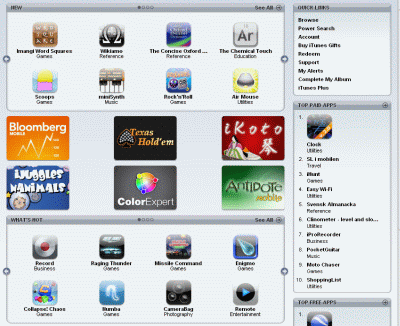
Developer frustration mounts over the App StoreFew would be foolish enough to say that Apple’s iPhone App Store hasn’t been a roaring success. Users have flocked to the store in their millions and there are now thousands of applications available for users to download. Virtually all the other mobile systems operators have now wised up to this closed-market approach too. Google released its Android Market a couple of weeks back, and work on similar download platforms from Windows Mobile and Blackberry devices.

On the surface the benefits of these app stores for mobile software developers are obvious: your product is instantly available to the entire user-base of that platform, users can buy software with a single click, it cuts down on time spent creating web pages and eStores, among lots of other advantages. In reality though, the App Store isn’t quite the dream ticket developers had hoped for, and some are already getting ticked off with it, most notably Opera, which has just been told that it can’t release its Mini web browser on the iPhone. The fact that Apple has appointed itself as the God-like figure who decides whether apps are worthy enough to go on the site has enraged many developers, including Chuqui who feels that its tactics may put smaller developers off even bothering to develop apps for the iPhone.

I’m sorry, Apple, but I just don’t get it. It’s not even the NDA, it’s the lack of any significant communication about how things are being decided. People could live with it (not be happy, but live with it) if they just could find out before committing development time whether something would be approved. but they can’t. That’s a serious inhibitor to the developer ecosphere – but is that perhaps what Apple wants, to shift the iPhone world and the app store towards fewer, larger developers, without actually admitting it.

It’s not just the issue of approval that’s bugging software authors either. As developer Steven Frank notes, there are lots of freedoms that app makers traditionally enjoy that are being compromised by the app store model. While he recognises the merits of the App Store, he argues that his list of basic rights as a developer are being “used as toilet paper” by Apple. Here you can see how his list of “inviolable principles” for developers are rendered redundant by the App Store platform. Continue reading “The dangers of mobile app stores”

Time waster: How much do you know about Geography?

Geography was a hard nut to crack for me when I was at school. I had lots of trouble to memorize all those capital cities, monuments and famous places all over the world, together with their correspondent location on a map. I’m sure everything would have been much easier if I had known this game back then!

How much do you know about Geography?

The Traveler IQ Challenge tests your general knowledge of Geography by challenging you to place world capital cities and famous landmarks on a world map. The game starts off with really easy spots but it becomes increasingly difficult as you progress through the game. Plus you need to be quick, as the final score is not only based on how near the actual location is from your mark, but also on how fast you clicked on the map.

The good thing about Traveler IQ Challenge is that it can be customized to play with certain world areas only (Europe, America, Asia, Oceania, etc.), with special locations (UNESCO World Heritage sites) or even with other elements such as country flags or geotagged images that you must locate on the map.

How much do you know about Geography?

Want to give it a try? Head over to the Traveler IQ Challenge website and check how much you know about our planet! By the way, I’m glad to announce I reached level 8. My Geography teacher at school would be proud of me.

Late adopter: Twitter

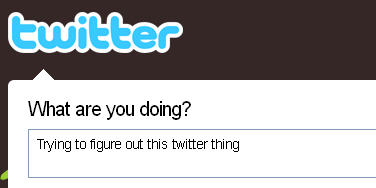
I like to think I’m pretty web-savvy; I have blogs, exist on Facebook, MySpace, Last.fm and so on, but have never really understood what the big deal about Twitter was. I imagined it was like Facebook status updates, without the rest of Facebook, and mostly used by people for whom the next big thing is already out of fashion

This is the first of a series of posts where we’ll write about the techy things that for some reason or another we’ve never done.

So, after signing up I let Twitter search through my Gmail address book (I never feel comfortable doing this, but it’s so easy!) and it found a whole one of my contacts there! Still, you have to start somewhere…

While one friend is better than none, it isn’t enough to get a feel for what Twitter can do. The annoyingly twee introduction video told me I could stay close to my friends and family by telling them ‘I was having a coffee’. As my family and friends weren’t there, and invites could take a while to come to fruition, I headed back out into the internet for some advice.

On makeuseof.com, I found an article recommending some sites to improve your Twitter experience. The first ones to catch my eye were Twitter search and monitter. These are nice ways to keep up with what’s happening on Twitter. Stick in a search word, and you’ll see what people are Twittering about that subject. Some of the Twitters aren’t interesting, some have links to cool stuff I hadn’t seen. Monitter is much better in this respect (and you don’t even have to join Twitter), as it feeds you live results, on three simultaneous search terms, it’s like an online internet ticker.

There are lots of Firefox add-ons for Twitter, to allow you to post and receive messages without opening it in the browser. One of them is called Twitbin, and I can’t bring myself to use something called that!

I really wasn’t expecting to like Twitter, but I quickly found myself being drawn in. I can see how you’d get addicted to it (‘Confessions of a Twitter addict’ will be written soon), and was really surprised to discover it might even be useful. But I guess I’ve come too late to Twitter to be cool.

3 free ways to open Word documents without Office

Yesterday my father rang me wanting some help with opening a Microsoft Word document. He didn’t have Microsoft Office installed, there was no way he was going to pay up to $229 to buy it and to cap it all, he’d never even used a word processor before. I shuddered at the challenge that lay ahead of me but to my pleasant surprise, within 10 minutes I’d taught him how to open, edit, save and even send the document by e-mail – and all without having to have Microsoft Office or Word installed on his computer. If my dad can do it, anyone can and so here’s 3 ways that you can do the same:

1. Google Docs

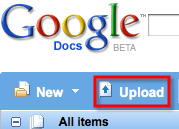
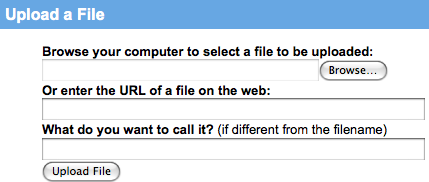
If you’ve received the document by e-mail, download it, go to Google Docs and upload it. Note that you’ll need to sign-up for a Google Account first.

google-docs-upload.png

Simply browse to the file you want to upload and it will open automatically in Google Docs.

google-docs-upload-2.png

From there you can edit it in much the same way as you can in Word and send it by e-mail directly from your Gmail account. Continue reading “3 free ways to open Word documents without Office”

Photo montages the easy way

When you see photo effects like the one accompanying this post you probably think it’s too complicated for you. But I bet you’ll be surprised to see how easy it was to apply this effect and,  by extension, all the effects offered in an amazing website called Photofunia.com

Easy photo effects

Whether you’re a skilled Photoshop user or you can’t draw a straight line with your mouse, this online tool will surely get you out of trouble more than once. You can choose between more than 50 different photo effects, some of them with a special face recognition technology, and apply it to your favorite photo in a couple of clicks.

Photofunia does it all: you only have to worry about selecing the one effect you like and then choosing the right picture in order to obtain the best results. Once the effect is applied you can save it directly to your hard drive, save it as avatar (which automatically crops and resizes the photo to a 100×100 pixels thumbnail) or publish it straight away to ImageShack.

However if you don’t like the way your photo montage comes out or you simply prefer to control the effect’s settings by yourself, you can also try any of these software tools. They’ve all been especially developed to assist you in the creation of funny photo montages and other effects, such as warping or morphing, in a very easy way

  • Zeallsoft FunPhotor – Blend family portraits into funny templates
  • FaceOnBody -Hilarious photo collages in a few easy steps
  • ArcSoft FunHouse – Customizable photo montages with more than 150 templates
  • FotoMorph – Create an amazing morphing effect between two pictures
  • DeformerPro – Quick and easy warping effects for your photos

Time waster: Minesweeper strikes back

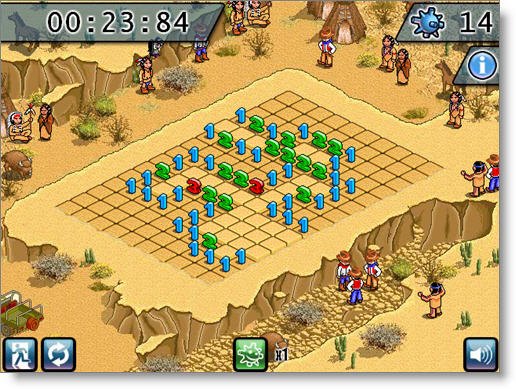
When it comes to Windows classic time wasters, two titles come to mind: Minesweeper and Solitaire. I must admit I was more on the Solitaire side, mainly because I was hardly able to complete a single level in those darn mine fields. The clock’s unstoppable ticking and the anxiety of being treading over explosives always got on my nerves and made me click on the wrong square. Oh well, maybe I’ll improve my skills in this new online version of MineSweeper.

Time waster: Minesweeper strikes back

The classic time waster is now presented in an eye-catching Flash 3D design and follows exactly the same rules: guess where all the mines are hidden without being blown up by any of them. Use field numbers as a hint to the possible amount of mines around you and mark each potential mine spot with Ctrl+Left-click.

The game’s setting and decoration change as you progress through it, which enables you to enjoy highly detailed pixel-art designs with each new level.

Synchronize Firefox bookmarks across computers

Foxmarks Bookmark SynchronizerIt wouldn’t be too daring to say that many Internet users have at least two computers. The most usual combinations are desktop and laptop, or home and school/office computer. With Firefox installed on each of these systems, how are we supposed to manage bookmarks across them?

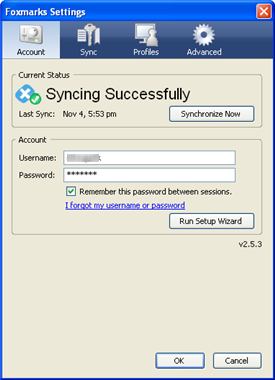
The answer is Foxmarks Bookmark Synchronizer, a Firefox extension that syncs bookmarks between all your computers so that you can always have them at hand, whether you’re working with your laptop at home or you’re using your desktop PC at the office.

Foxmarks requires two important things: first, a free user account that can be created right after installation; second, it has to be installed on each computer where you want to have synced bookmarks. Once you meet these two simple requirements, you’re ready to create the first copy of your bookmarks and sync it later on with your other computers.

The best thing about this extension is that it keeps an eye on your bookmark collection, so that whenever you add a new link it automatically updates its copy with the changes and synchronizes all bookmarks across all your Firefox installations.

Oh, and for those concerned about privacy, don’t worry: Foxmarks Bookmark Synchronizer encrypts your bookmarks and also allows you to upload them to your own server for more security.