Save Game

A few months back, a National Videogame Archive was launched in Britain, aiming to preserve videogames that might otherwise be lost. I’ve been playing games of one sort or another since I was a little kid, and I have no idea what’s happened to most of them. Games are an important part of our social fabric, and it would be a great loss if elements of gaming history disappeared.

With that in mind, I thought I’d ask our team what games they would like to see preserved for future generations to enjoy:

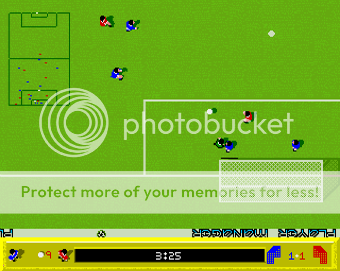
Nick and James both proposed early 90s football games, Kick Off 2 and Sensible Soccer respectively (both on the Commodore Amiga). At the time people argued over which was best, though the years have been kinder to Sensible Soccer, which is currently available on XBox Live Arcade.

Nick also asked for Amiga games Speedball 2, the ultraviolent sport of the future, and Stunt Car Racer, a futuristic racing game that can be seen as a gentle precursor to PlayStation´s Wipeout series.

Elena took us even further back into gaming history, requesting Atic Atac, a ZX Spectrum game from 1983, which she says she remembers playing most as a child. Apparently it was voted 79th best ever Spectrum game in 1990! High praise indeed. She also suggested the daddy of first person shooters, Wolfenstein 3D from 1992. This can now be found as an online flash game, and having looked at it again, I’m glad I’m around to play modern first person shooters! Continue reading “Save Game”

Test your cooking skills against Gordon Ramsay

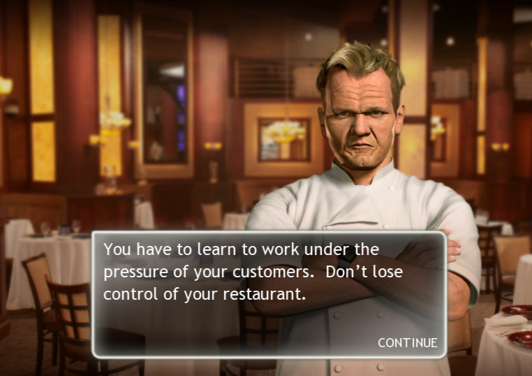
Hell's Kitchen logoI’ve only seen TV show Hell’s Kitchen a few times but I know what Gordon Ramsay is famous for – cooking and swearing. His foul mouthed cooking-swearathon is one of the most popular TV shows on both sides of the Atlantic and so it was only a matter of time before someone brought it to the Mac. In the end, the result is a beautifully animated game although one distinctly lacking in realistic culinary skills and swearing.

Hell’s Kitchen sees you progress through the ranks of chef via a series of increasingly challenging dishes while Ramsay stands in the top left hand corner of your screen scowling at you like he’s going to beat you up any second. In an effort by the developers to appeal to the whole family however, he doesn’t utter a single foul word even if you make a pigs ear of a boiled egg. In fact, he doesn’t say a great deal during the game until the end of the levels when he either congratulates you or tells you something along the lines that you’re a disgrace.

Hell's Kitchen screenshot

In the full version, there are two modes. In Career Mode you have to build your way up from a single-star restaurant to a five-star one. As you progress, your rating depends on how satisfied both your customers and Ramsay are with your dishes. In Arcade Mode, which is what you get with the 60 minute demo, time is of the essence because you have to deal with increasing numbers of customers, while keeping both them and Ramsay happy. Failure to do so results in Ramsay shutting down the kitchen and kicking you out. Continue reading “Test your cooking skills against Gordon Ramsay”

How to: run Linux from a USB stick

How to: run Linux from a USB memory stickI’ve always been curious about testing other operating systems. I currently run Windows XP on the office computer, and also have two virtual machines with Vista and Windows 7 respectively. My home computer is a MacBook with Mac OS X. And I’m even planning on acquiring an HTC Magic to be able to fiddle with Android.

The one OS missing in this list is obviously Linux. I tried a few distributions in the 90s and I must say I didn’t have a very positive experience. Linux wasn’t that user-friendly back then and I had problems with sound configuration and with network settings, not to mention the effort I had to make to find new software and keep my system updated.

But things have changed a lot since then. Hundreds of developers have been working hard on improving usability in Linux, and all major distributions are now easier to set up and run. There are even some that can be run from a CD or a USB stick, meaning you can have a sneaky peak at the OS without actually having to erase, format or reinstall anything. It’s the perfect way to take your first steps in a completely new environment while leaving a backdoor open: in case something goes wrong or you’re not sure about the switch yet, you can simply restart the computer and go back to Windows. Given that it’s that easy, I couldn’t help it: I decided to give Linux a second chance, this time from my USB pendrive. Continue reading “How to: run Linux from a USB stick”

World Mobile Congress – Highlights from day three

dstl.jpgThe theme of the day at the World Mobile Congress today has been mobile Internet. Accessing the Net from a mobile device has always been rather awkward, if not even a little scary, thanks to slow connections, high data charges and unusable software. Today there was a noticeable sense of optimism from within the mobile industry over the future of mobile Internet. Discussions at the keynotes centred around how to make the Internet easier, faster and cheaper on a mobile, and we saw plenty of Net-enabled apps that are impressive enough to get mobile users connecting. Here are some of the things that we saw today:

Improving mobile Internet: Today’s keynote presentation saw the top minds from Skype, Google and Telstra outline their ideas for how mobile Internet can really take off. Each of the speakers was coming at the issue from a different angle, but all made valid and interesting points. Sol Trujillo, CEO of Australian mobile operator Telstra, explained how the Aussies are now benefitting from 99% mobile Internet coverage at speed of up to 42mbps. He sees the mobile Internet being used on a wider scale than just for Web browsing and entertainment, and pointed out examples of how 3G technology is being used in Oz to improve healthcare, education, farming and the environment.
Vic Gundotra, VP of Engineering of Google, said there were three key drivers for the mobile Internet: cheaper and clearer data plans, improvements in browsers, and software innovation. He went on to give some impressive demos of Google’s new Latitude and voice search apps.
Josh Silverman, CEO of Skype, reiterated the importance of the role software developers play in driving forward the mobile Internet. Buoyed by yesterday’s announcement that Skype will be pre-loaded onto the N97 and other Nokia N-Series phones, Silverman delivered a strong message to mobile operators that cheap data plans are central to increasing mobile Internet use. Continue reading “World Mobile Congress – Highlights from day three”

5 free ways to stop your Mac sleeping

One of the very few things that annoys me about my Mac is the way the screen dims, blacks-out or goes to sleep when left idle for a few minutes. Of course, I understand it’s done by Apple in order to preserve the life of the Mac but it’s rather annoying when you’re watching a YouTube clip and suddenly the screen dims or when you’re trying to watch a film and the screen goes to sleep. Some users also make the point that they don’t necessarily want their Macbook to go to sleep when they close the lid such as when they’re downloading. Therefore, here are five of the very best apps to kick your Mac’s ass:

Caffeine logoCaffeine – Simple and effective, Caffeine installs a coffee bean in your top menu bar that you click once to activate and prevent any kind of sleep mode on your Mac. Click again to turn it off – simple as that! It doesn’t however stop your Mac from going to sleep when you close your Macbook which leads me onto the next app…

InsomniaX logoInsomniaX –  Stops your Mac going to sleep under any circumstances, even when the lid is closed on your Macbook. Note that with the latest generation of Macbooks, you can run them with the lid closed as long as you have an external mouse and keyboard attached. Use it with caution though – it’s obviously not a good idea to leave a Macbook running with a closed lid for very long periods of time – Macs need a rest too sometimes!

Sleepless logoSleepless – Prevents your Mac from going to sleep without changing the system settings manually. You can schedule hibernation and sleeping times on Sleepless and its also been recently updated to prevent sleeping when closing Macbooks. Again, the developers warn that it should be used with care in order to avoid frying your Mac!

iWannaSleep logoiWannaSleep – Takes control of when your Mac goes to sleep. Great for if you like to listen to music as you go to sleep but don’t want your Mac to also fall asleep. You can set the time after which iTunes is stopped, the computer is put to sleep, shut down or when a custom AppleScript is run.

Midnight logoMidnight – Great widget that gives you sleep control from your dashboard. Midnight can either put your Mac into its standard sleep mode or into hibernation mode. Standard sleep is where your Mac reduces its power consumption to a minimum by stopping its processor but preserving RAM while Hibernation copies RAM to your hard drive.

Top secret HTC Touch Diamond with WM 6.5 gets stolen – it wasn’t us!

sol-trujillo_softonic01.jpgThere’s been a bit of trouble for Microsoft at the World Mobile Congress in Barcelona. It seems like Telstra CEO Sol Trujillo (right) was a bit careless as he roamed around Barcelona last night and managed to lose his prototype HTC Touch with the yet-to-be-released Windows Mobile 6.5 running on it.

Luckily, this happened after OnSoftware had already taken a sneaky peak at the device and grab a video of the new operating system in action. Coincidentally, we were also in the same room as Sol Trujillo yesterday, when he delivered his keynote address at the conference. I know it might seem like the evidence is stacking up against us but I can assure you that it’s purely circumstantial and we can confirm we went nowhere near Sol’s pocket at any point during the day.

Besides, Microsoft Steve Ballmer had said earlier this week that because the new Windows Mobile service backs up all your personal data “it doesn’t matter if it gets stolen”. So what’s all the fuss about then?

Exclusive videos of Palm Pre in action

Straight from the GSMA Mobile World Congress in Barcelona, here’s some video of Palm giving us a first look at their new device, the Palm Pre. The first video features the phone’s search feature and web browser. The second highlights the address book and image viewer included with the brand new WebOS operating system.

[youtube]http://www.youtube.com/watch?v=3Ji4qkZsXAo[/youtube]

[youtube]http://www.youtube.com/watch?v=U4R1J4m5Cn4[/youtube]

Create self-executable screencasts in two steps

Create self-executable screencasts in two stepsWhen you think about creating a screencast you probably regard it as a lengthy and difficult process that takes a lot of time and requires quite high technical skills. Well, professional screencasts do, but if all you want to do is record a simple action on your screen to demo a given program or show somebody how to use a certain application, you don’t need to go that far. Simply use Screen2Exe, an easy tool that lets you record screen activity in two steps, add some basic edition and finally save the result as an standalone EXE file that even your Mum will be able to play.

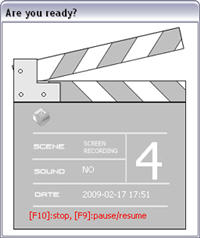
So how does Screen2Exe works? The first step is selecting the area you want to record. It may be the whole screen, an active window or a user-selected area. You can also configure Screen2Exe to record sound.

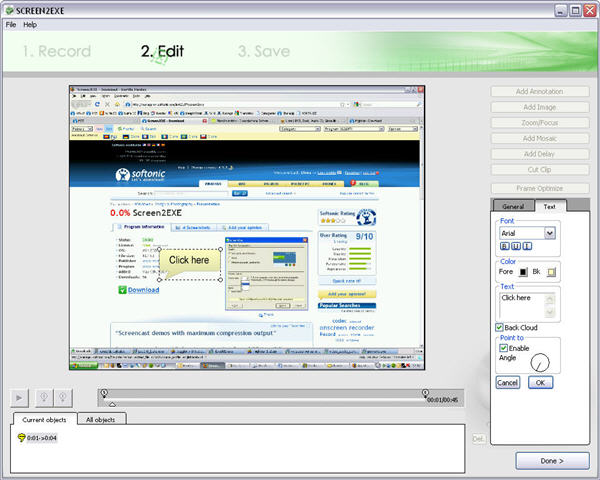
When the recording is finished, you can directly save the file to your hard drive or do some basic editing within the program. Screen2Exe includes tools to add annotations, zoom in and out, add a mosaic effect and insert an image, among others. Of course, this is no serious video editor, meaning you won’t have a timeline or transition effects like you do in other more professional tools. Screen2Exe however is very easy to use and you’ll soon get the knack of it.

Create self-executable screencasts in two steps

Once you’re done with editing, it’s time to save. Screen2Exe saves the screencast as a self-executable file that doesn’t require any third-party application, plug-in or codec to be played. It’s just the perfect way to show the main features of your brand-new application, or teach your Mum how to create gorgeous DVD slideshows with her favorite pics.

World Mobile Congress – Highlights from day two

OnSoftware returned to the World Mobile Congress today to find the mobile industry in more subdued and relaxed mood than yesterday’s frenzied first day. As the excitement from the first look at the Palm Pre and the unveiling of Windows Mobile 6.5 wore off, day two offered us more time to explore some of the most interesting mobile applications unveiled at the event. Here’s a round-up of what caught our eye:
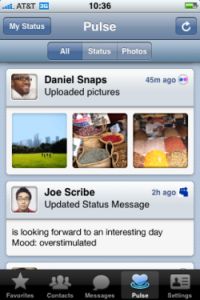
yahoomobile.jpgYahoo! Mobile: Perhaps the biggest-profile launch of the day in terms of apps was the new Yahoo! Mobile service. The new app is basically a front-end for the Web on your mobile. The software includes oneSearch, which facilitates quicker access by second guessing the user to provide the most current and relevant search results. But what really caught our eye was the oneConnect tool in Yahoo! Mobile, which pulls email, social network updates and instant messaging into one place. An added boon is that the smartphone version of application comes bundled with Opera Mini 4.2, arguably the best mobile browser in the World. Yahoo! Mobile will be released later this year in a range of guises, on devices such as the iPhone, Windows Mobile handsets, and smartphones from Nokia, Samsung, BlackBerry and Sony Ericsson.

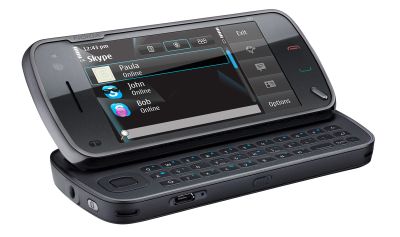
Skype: Last night we managed to take a sneaky peak at the new Skype 3.0 for Windows Mobile Beta. Chatting with the Skype team at the event, the company seems to be really focused on bringing its mobile product in-line with the desktop version as soon as possible. Version 3.0 goes someway to doing this, adding file transfer support, and offering users the ability to send text messages to each other via the software. The company also announced that version 2.5 of Skype for Windows Mobile is now out of beta and available to download as a Gold release. Today, Skype also revealed that the product will be pre-installed on Nokia N-series devices, starting with the N97, and also released a lite version of Skype for Android.
skypeonnokia.jpg

Flash for mobile: Adobe has announced that a fully-fledged version of Flash will be coming to a whole range of smartphones, including Windows Mobile, Android, Nokia S60, and the new Palm OS. The product managers on the Adobe stand seemed genuinely interested in making it as easy as possible for mobile software developers to get their apps out to as many platforms as possible with the minimum of fuss. That said, they wouldn’t be drawn on if/when Flash will come to the iPhone. There was more good news for developers though, as Adobe announced an SDK for its Reader software, allowing third parties to develop mobile apps supporting the PDF format.

Opening doors: The theme for today’s second keynote was “towards an open mobile ecosystem”, where the top brass from Nokia, Microsoft and AT&T delivered their views on how the industry should work together to improve mobile experiences. The main gist of the talks centred around the idea that by sharing ideas, resources and technology, mobile companies can still move forward in a time of global economic downturn. It sounds all nice and rosy in theory but things are never that simple in the dog-eat-dog world of business.
Use your Mac to improve your guitar playing

Jimi HendrixFor anyone who owns a guitar and a Mac, these are good times to be living in. The release of iLife 09 saw GarageBand upgraded to include guitar lessons from the stars and there are other apps around such as Guitar Guru which is probably the slickest and most effective guitar learning software I’ve used on Mac or PC. Of course, no amount of computer genius can turn you into Slash, but for many, using a computer tutorial can be more effective – and cheaper – than spending hours learning to play Baa Baa Black Sheep with some long bearded instructor with bad breath or messing around printing badly tabbed tablature from the net. Here are a few tips and links to get you strumming:

Tuna Pitch The first thing you need to get right before you do anything is the tuning of your guitar. Most Mac guitar tuners however will only play you the tone of what your strings should sound like. The problem with that is, if you’re tone deaf like me, you still can’t tune your guitar. Tuna Pitch uses your Mac’s microphone to detect the tone of your strings so your Mac does the hard work for you. Just tune your string until the small dot hits the middle of the reading scale. Continue reading “Use your Mac to improve your guitar playing”