Live: GSMA keynote – Moving towards an open mobile ecosystem

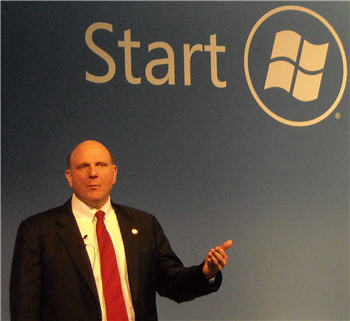
worlg.jpgWe’re live at the GSMA World Mobile Congress where we’re about to see what Microsoft CEO Steve Ballmer and Nokia chief Olli-Pekka Kallasvuo have to say about the future of mobile development. President of AT&T Ralph de la Vega will also be speaking at the event, which will examine how the World’s most advanced companies can open up the mobile ecosystem.

12:30 – Again Steve talks about Windows as an open platform, highlighting the fact that the company has needed to create many partnerships to address the issues of security, usability and interoperability. He sites the current example of the new Windows Mobile 6.5 and Windows Phones that were announced yesterday as an example of how Microsoft is working with devices and operators to achieve innovation. He concludes by reassuring the congress that “no matter what goes on with the global economy, technology is on a forward, upward, and exciting curve.”

12:23 – Steve echoes Olli-Pekka’s comment that no single company can create everything that’s needed to achieve mobile innovation. He stresses the need for tech companies to work together to assemble powerful solutions for customers. The companies that succeed will be open companies, whether that’s in terms of open source, open platform or open standards. Steve’s really keen to make Microsoft sound open. He points out that MS has benefitted 100,000s of companies in the software and hardware world. According to him, for every dollar that Microsoft makes, other tech companies will make $18 as a direct result.

12:15 – According tio Steve consumers now want their work lives and their home lives to be converged. PCs, phones and TVs will be the key factors in ensuring that users are always in touch with all their data. We’re seeing the development of more natural user interfaces and technologies such as touchscreen, speech recognition and handwriting input. Pretty soon the need for a personal secretary will go, and you PC or mobile device will be able to respond to your voice commands and take care of all your tasks and schedules for you.

12:13 – Steve says that “optimism should not be scaled back” despite the global financial downturn. He believes that the power of ideas and innovation should be used to drive the industry forward. More than 3 billion people now use a mobile phone and the number of these people who are using smartphones will increase drastically in the coming years.

12:10 – Steve Ballmer is up now and the tension hots up. Ballmer begins by charting the incredible changes that have happened in technology in the last 25 years and how PCs, the Internet and phones have changed the way people do things. He brings up the subject of the financial crisis, which he calls the ‘economic reset’. He says that this must not, and will not stop the growth of innovation, and that openness is needed in order to deliver greater value to customers in these times.

12:08 – The Nokia chief admits that times will be tough during the current financial climate, but that the mobile industry is in a strong position. He points to mobility as a “positive factor for change in people’s lives”. He calls on the mobile community to nurture an ecosystem that will be long and prosperous, pointing out that no one company is big enough to do this on its own. Partnering will be crucial and companies must have the courage to break from convention. Continue reading “Live: GSMA keynote – Moving towards an open mobile ecosystem”
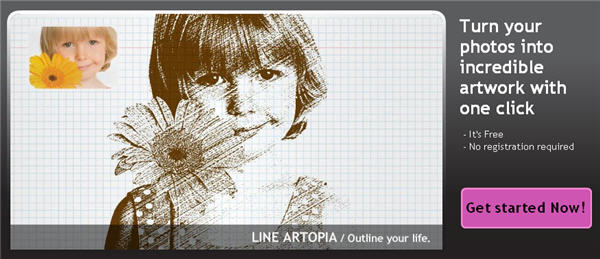
Spice up your photos in a snap with befunky.com

The most boring photo can look gorgeous with just a simple effect. The drawback to it is that you need to know how to use a graphic editor properly… or simply open up befunky.com on your browser to apply eye-catching effects to your photos in a snap.

Spice up your photos in a snap with befunky.com

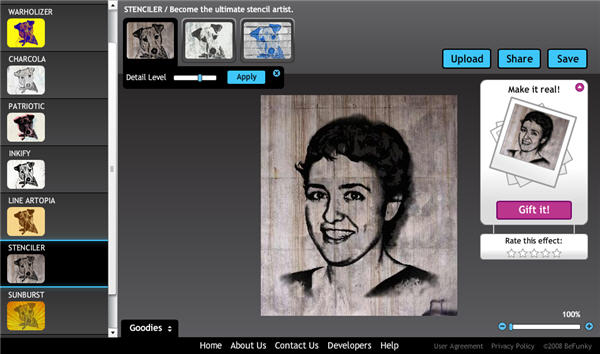
With this online photo editor you can spice up your images in a very easy way, even if you have no technical knowledge at all. Simply select the effect you want to apply (there are nine available) and upload the photo, either from your hard drive, another website or even a snapshot you just took with your webcam.

After applying the effect, Befunky.com lets you tweak the final picture with some basic adjustments, which vary depending on the effect you’ve tried. There is no instant preview though, meaning you’ll have to apply the adjustments before being able to see how they look on the image. When you’re happy with the result, save the photo to your hard drive – or share it by email – and try another effect!

Spice up your photos in a snap with befunky.com

Befunky.com is completely free and doesn’t require registration. You can create as many effects as you like, and share them by email or save them to your hard drive You’re required to create a user account only if you want to use the site’s gallery to upload your effects

Mobile World Congress – Highlights from Day One

Steve Ballmer at Mobile World Congress BarcelonaToday saw the start of the GSMA Mobile World Congress here in OnSoftware’s home town of Barcelona. The first day of the biggest event in the mobile technology calendar has not disappointed. We’ve spent the day checking out the latest innovation in mobile hardware and software as well as listening to eminent speakers from the industry. Here are some of our software highlights from the first day of the event:

Windows Mobile 6.5: Microsoft’s Steve Ballmer paid a visit to the conference to make three announcements: Windows Mobile 6.5, Microsoft My Phone, and Windows Marketplace. The new Windows Mobile 6.5 OS was demoed at the show and it certainly looks like an improvement on the previous release. There is a new log-in screen which gives you an at-a-glance view of your missed calls, chat messages and emails. What’s more, MS has revamped the homescreen with a rather strange-looking, text-based interface where you can select features such as email, calendar, pictures, music and fast access to Internet favorites. The apps menu also gets an overhaul, this time with a series of icons arranged in a kind-of honeycomb structure. The most significant change to the applications is the inclusion of the full current version of Internet Explorer on the device (i.e. with the same browsing engine as IE), along with Flash Player Lite.

Continue reading “Mobile World Congress – Highlights from Day One”

First look at the Palm Pre WebOS

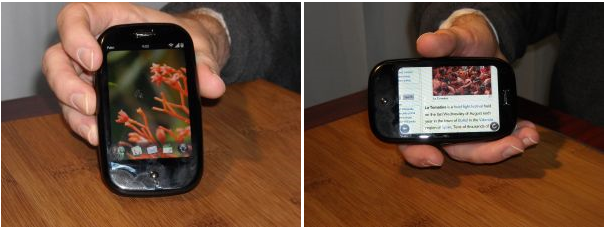
Palm has shown its gorgeous new device, the Palm Pre, at the Mobile World Congress in Barcelona. OnSoftware were the first journalists to get a look at the new handset and its WebOS operating system. As you can see from our exclusive pictures, the device combines both a touchscreen interface and a small, curved, slide-out keyboard. We were impressed by the lightweight and compact form of the Palm Pre, which features an on-board 3 megapixel camera.

But it was the user interface and software in the Pre that really blew us away. The touchscreen interface features a dock for quick access to favourite applications, and a separate area beneath the main interface for finger control gestures such as moving back or closing applications. The feature that really put the Palm Pre above the iPhone in my estimation was the easy way it lets you manage applications. Based around the theme of a deck of cards, each app is given its own ‘card’ which can be opened, zoomed into, minimized and closed using the touchscreen. Cycling through applications is a breeze, and it’s just like shuffling a deck of cards.

First look at the Palm Pre WebOS

Another impressive feature of the Palm Pre is its ‘synergies’, whereby you can assimilate all of your email accounts into one place, and import contacts from Facebook, GMail and the like, directly onto the device. The Web browser inside the Pre is much like Safari for iPhone, with the ability to rotate the aspect of the screen and quickly zoom into pages using finger gestures. The advantage of the Pre browser is that managing multiple pages is much easier thanks to the deck of cards system, which is extended to the browser.

Expect a video of the Pre in action later, as well as all the latest news and developments from the Mobile World Congress. More pics after the jump.

Continue reading “First look at the Palm Pre WebOS”

Make the Internet safer for your kids

Make Internet safer for your kidsEarlier this week a group of 17 Internet companies, including popular communities and social networks such as Bebo, Dailymotion, Facebook, Youtube, MySpace and Habbo Hotel among others, signed a five-point plan to protect children online. The plan includes a series of measures aimed at keeping the youngest members of these communities safe from online abuse and cyber-bullying, which will be implemented in April.

Having such important companies involved in a campaign to protect children on the Web is certainly positive, but this is not only their responsibility. Parents should be the first ones to control how and when their kids use the Internet to avoid any potential threats. Just like they’re taught basic manners for everyday life, children need to learn how to use the Internet properly, so that they can play, learn and have fun, away from online abusers.

Fortunately, there are a bunch of tools that can help worried parents control what their kids do when they’re in front on the PC. You can start by installing a Firefox add-on that creates a children-safe environment on your browser, like Glubble and KidZui. If you prefer your kids to use their own browser, you can then download KidSurf or KidRocket, two children web browsers that make Internet browsing completely safe. Another option is using content filters such as CyberSitter and Net Nanny, and prevent the child from accessing unsafe material. Finally, there are also tools to control the time your kids spend online or use the computer at all, like Child Protector Pro and Kids PC Time Administrator.

While these tools can by very helpful when protecting your kid on the Web, the most important point is trying to share those Internet browsing sessions with them, and teach them some basic rules:

  • Don’t trust everything you’re told on the Web
  • Never give away your personal data: name, address, phone number, passwords
  • Don’t meet in real life with someone you’ve only met online; tell your parents first
  • If someone sends you unpleasant material, tell your parents right away
  • Don’t spend too much time on the Web, and don’t let it take up time from other activities like homework, playing or doing sport
  • Mark your profile on web communities social and networks as private

Time Waster (for when you’re alone in the dark): Closure

While winter still has some legs, Closure is a fantastic way to while away dark evenings. This browser-based black and white puzzle game cleverly utilizes the movement of light sources to help guide your silent character to the exit of each level. Control is from the keyboard, and the start of the game is a comprehensive tutorial, so you’ll have no problem picking it up. You can only stand on what you can see, so for example if the ground you are on loses its light source, you’ll fall to your doom (and begin the level again).

The hand drawn flickering graphics alongside the spooky sound effects make this a really atmospheric little game. It’s not scary, just spooky, with the light occasionally revealing strange messages scrawled on the background as your stooped protagonist travels silently onward. There are 30 levels to complete, and it’s a nice challenge worth completing. There are very few games with this ethereal and quiet atmosphere, and I highly recommend you waste some of your time getting to know Closure.

Bear in mind you need to have Flash 10 installed to run this, which is available here for Firefox, Safari and Opera users, and here for IE users.

How to: create a Valentine’s card in Photoshop

Valentine’s Day is often accused of being just a Hallmark holiday, a tradition made up by department stores to sell more stuff on a certain date. Whether you fall into the consumer trend or not, you also have the possibility to come up with a personal gift instead of the traditional flowers and chocolates. And a gift made by you is always more valuable than anything you can buy! So how about creating your own Valentine’s card with Photoshop? Here’s how:

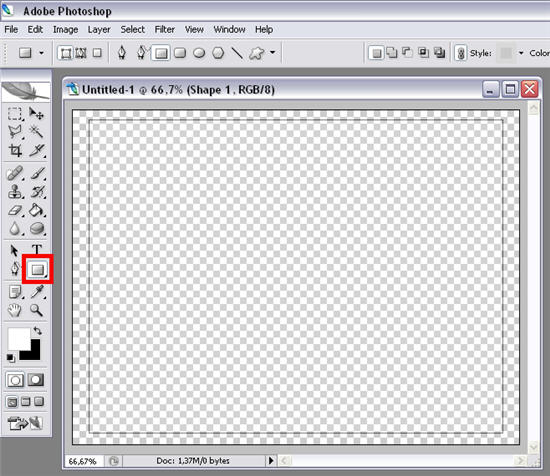
1. Open up a blank document and draw a rectangle about the size you want your card to be.

Create a Valentine’s card in Photoshop

2. Apply a Gradient Overlay to this rectangle with four different shades of red. You’re free to use your personal settings and choices of color, but here are my settings in case you need some inspiration. Continue reading “How to: create a Valentine’s card in Photoshop”

Today’s downloads for Windows, Mac and Mobile

Download ACE OnlineWindows: If you’ve always wanted to be a pilot, this is your chance! Download ACE Online and control a futuristic ship in a massive multiplayer space shooter with RPG elements. You’ll have to complete missions and engage in battles against other players, while trying to upgrade and improve your personal skills and your own ship as you progress through the game.

Guide your ball out of the mazeiPhone: There was a time when the pinnacle of home entertainment was guiding a ball out of a wooden maze without it falling down any of the holes. Labyrinth Lite Edition recreates this fascinating challenge on your iPhone and actually proves to be one of the more enjoyable games on the platform. There are ten free courses included in Labyrinth Lite Edition, each offering a unique challenge.

Messenger for Mac logoMac: Say what you want about Microsoft but there’s no denying that Microsoft Live Messenger has been one of the software giant’s huge success stories being used by millions across the globe. This doesn’t make Microsoft Messenger for Mac the best chat client out there, but by virtue of the fact that Hotmail (now Windows Live Mail) was so popular, it took off while other IM clients were struggling to make their way. If you’re a Windows Live Mail user, then get more out of it with Microsoft Messenger for Mac.

Time waster: Physics laws can also be fun

I don’t remember regarding Physics as something fun when I was at school. Maybe if I had known this game back then I would have thought differently!

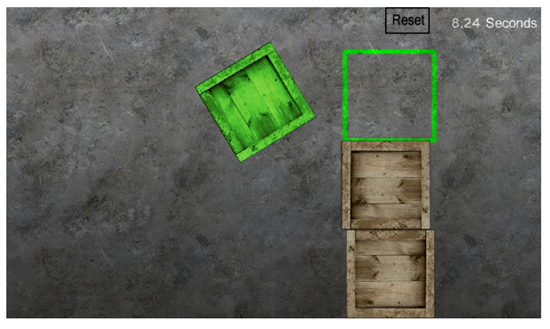
Assembler challenges you to build structures with wooden boxes, pillars, boards and other elements, so that the green box (also known as key shapes) fits in the green square-shaped area – and all this, of course, in the shortest time possible. The game’s controls are dead simple: use the mouse to grab and place figures on the playing area.

Download Assembler

You’ll see that the first few levels in Assembler are very easy and fun to complete. You’ll start playing around with wooden boxes and seeing how they react to different movements like moving fast, picking them up from different places or throwing them away. But as you progress through the game, you’ll face new challenges and obstacles that will make the game increasingly difficult and incredible addictive. Just remember what the Assembler website says: “Don’t play too much or you’ll dream of dirty green crates flying around”.

iLife 09 full review

iLife 09 BoxLast month I took a cursory look at some initial impressions of iLife o9 at now I’ve had chance to try it out properly myself, I can give it my own verdict. There are simply too many minor tweaks to cover absolutely everything so I’ve only covered the highlights here.

The first thing to note is that although there are some definite improvements on iLife 08, there’s nothing particularly revolutionary in iLife 09 that should have you desperate to shell out $80 for the upgrade. In a nutshell, the highlights are (dodgy) facial recognition and geo-tagging in iPhoto, music lessons in GarageBand (guitar lessons with Sting anyone?) and a few tweaks to iMovie to give you more precise control over editing. I’m going to go through each iLife 09 component separately but before you go ahead with installation, remember you’ll need about 15-20 minutes to complete the entire upgrade.

iPhoto 09

iPhoto has probably received the most attention in iLife 09 although as I’ve already argued, since Picasa came along I personally don’t use iPhoto much anymore. The three new additions are Faces (facial recognition), Places (geo-tagging) and better integration with social networking sites. Faces means that iPhoto can now organise your photos simply by recognising the faces of the people in them. Places means that your photos are automatically tagged with the precise location of where they were taken and better social networking integration means that you can can upload photos directly to Facebook and Flickr from iPhoto.

Faces is the most exciting feature although the reality is its effectiveness is less than perfect. iPhoto starts by taking a photo and asking you to tag it with the name of the person much in the same way as you do in Facebook. It then goes through your entire collection looking for photos of that person. The problem is that this is not an exact science. Unless the photo is a perfect mugshot of that person, iPhoto will struggle to recognise them. In addition, objects can throw it off kilt. For example, if both your grandma and your best friend wear glasses, then iPhoto will probably automatically tag that photo as the same person. And sometimes, it simply tags objects as people. Faces is definitely an exciting feature but it’s going to need a lot of work before Apple get it right. Continue reading “iLife 09 full review”