Get Aurora photo editing app for free!

aurora-logoAurora is definitely one of the best photo optimization and sharing apps I’ve tried and the great news is, the developers are currently offering a 24 hour free offer. Normally the app would set you back $20. All you have to do is click on the “Buy Now” links for either Mac or Windows and enter the promotional code “FREE24” when checking-out your copy. The offer is valid until 9:15 a.m. EST. Don’t be put-off by the Paypal or Verfied by Visa logos either – the download link and validation code will be sent to your e-mail address. [Er… it looks like we published this post at the exact moment that the offer ended. D’oh! – Tom]

The special offer is Lightcraft’s way of celebrating their newly upgraded Mac version which I’ve been very impressed with. The app packs a lot of powerful optimization tools into an interface that’s elegant and easy to use. Aurora is all about retouching, organizing and sharing photos. It’s mainly designed to bring the best out of light or color imbalanced photos via an easy to use GUI.

The photo editor features a pop-up image selector that lets you preview and tinker with your photo until the desired results are achieved. Amongst the tasks you can perform are re-touch, straighten, adjust color strength, crispness and warmth, crop, zoom and adjust red-eye. The most useful feature is probably the relight tool which seems to magically add new life to photos and bring out colors and details that weren’t as clearly visible before.
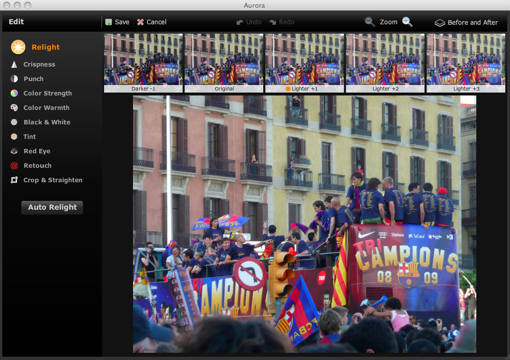
fullscreen.png

All the folders containing photos on your computer are listed down the left hand side of the main grid. Selecting any one of them will reveal the photos contained in them on the photo grid. I found that the photos took a while to load into the grid compared to iPhoto or Picasa but it’s no big problem bearing in mind this is not a photo editing rather than a photo viewing app. Continue reading “Get Aurora photo editing app for free!”
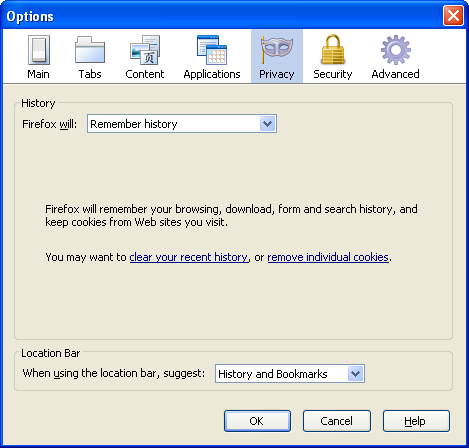

Privacy options in Firefox 3.5

One of the most talked-about improvements to Firefox version 3.5 is its overhauled privacy system. The guys at Mozilla have really outdone themselves this time, offering us more privacy options than even a CIA agent would know what to do with. In an attempt to untangle the confusion that these options present, I’m going to lay out the basics so that hopefully those of you with a scandalous internet secret to hide will know exactly how to go about it.

Three of the new features – private browsing, clear recent history and forget about this site – have already been covered elsewhere and discussed in our recent video on the release. There are more options, however, that will definitely help you find the perfect level of privacy for your needs. The privacy settings under “Options” are worth a little investigation. By default, Firefox is set to remember browsing history, so when you open the “Privacy” tab, it will look like this:

ff3505.png

Now, you could be forgiven for thinking that this doesn’t look very customizable, but think again. Just scroll down to “use custom settings for history”, and suddenly a whole world of options will appear. Continue reading “Privacy options in Firefox 3.5”

What your mobile OS says about you

Believe it or not, your choice of mobile phone says a lot about who you are. You only need to look at which mobile operating systems celebrities use to see that certain platforms favor certain types of person. Have a look at our mobile OS psychological profiling guide and find out what type of phone user you are and which stars you are most like.

Windows Mobile

Famous users: Jon Voight, Bono, Ozzie Osborne,Vin Rock (Naughty by Nature), Shaquille O’Neal

Windows MobileLet’s face it, the Windows Mobile platform is not as cool as it used to be, and the same can be said of its users. If you’re using Microsoft’s mobile OS, you probably think you’re still hip and down with the kids. But you can’t live off your former glories forever. You’re an aging dinosaur who needs to realize that there are younger, faster and better looking rivals out there.

BlackBerry

Famous users: Lindsey Lohan, Paris Hilton, Jessica Simpson, Pamela Anderson, Eva Longoria

BlackBerryYou’re a whirling socialite who demands attention wherever you go, and the BlackBerry OS is perfect for you. Thanks to its famed email and Internet functionality, you can keep abreast of who’s talking about you today and arrange all your therapy sessions of the fly. You’re the kind of person who would turn up to the opening of a bag of chips, so the great appointment scheduling features of BlackBerry are perfect for you.

iPhone

Famous users: Stephen Fry, Demi Moore, Madonna, Jon Stewart, Ben Stiller, Jenny McCarthy

AppleYou’re intelligent, witty, a little ‘off the wall’ at times, but, like the iPhone’s manufacturer, you are still pretty cool even after all these years. You’re young at heart, but unlike Windows Mobile users, you seem to get better and more popular with age. You embrace new technologies and have the wherewithal to reinvent yourself to move with the times.

Symbian

Famous users: Shah Rukh Khan (Bollywood actor), Hu Yan Bing (Chinese signer) , Billy Piper (British actress), Lily Allen (British singer), Taysha S. Valez (young pretend-billionaire)

SymbianYou are massively popular in your own country, but no one from America has ever heard of you. Celebrity Symbian users have mass appeal because they know what people want. You’re reliable and good looking, but without the fancy bells and whistles that your more glamorous peers have. You better up your game though, because your popularity won’t last forever.

Android

Famous users: Jessica Alba, Rosario Dawson, Seal, Ashton Kutcher, Tom Brady

AndroidYou’re great looking, trendy, and plenty of people think you’re the bee’s knees. Don’t get too cocky though, because when you really think about it, you haven’t actually achieved anything of note yet. It’s time to stop going on about how great you are and go out and prove to people that you have some substance to go with all that style.

Palm

Famous users: Anyone?

Technically, you’re braindead.

How to: Create photo mosaics with your computer

How to: Create photo mosaics with your computerMosaics are one of the most visually appealing photo effects you can create, but they also require a lot of work: thinking about the right design, gathering all the necessary pictures, laying them out so that colors and lights match… these are all tasks you obviously need help with. Luckily there are a bunch of software tools out there that can help you create a mosaic with your photos in almost no time. They hardly require any user intervention, and some of them even include a collection of ready-made images, in case you don’t have enough for your own mosaic! Let’s take a look at three popular examples of photo mosaic software: Mazaika, Andreamosaic and Foto-Mosaik.
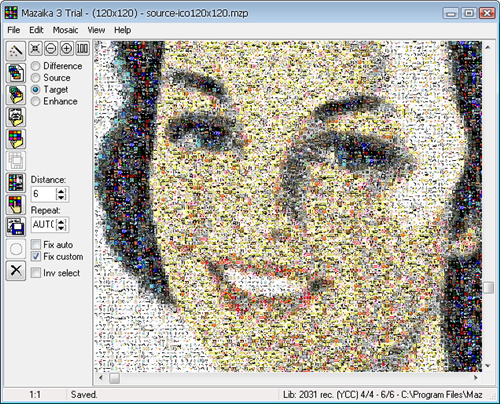

Mazaika is a shareware app that enables you to create photo mosaics in a snap. It lets you use any sort of images, from 32×32 icon files to large photos from your digital camera. In case your personal collection isn’t big enough, you can download special mosaic-ready image collections from the developer’s website. Also, Mazaika is the only mosaic application that lets you adjust each tile individually, once the mosaic is finished – which may come handy to tweak the final result or place a specific image in a specific location as your personal signature. Mazaika has a 30-day trial version you can download here.

How to: Create photo mosaics with your computer

Andreamosaic is a freeware tool with which you can create mosaics in a very easy way. The program itself features a rather dull interface – a gray window with all the options you can select for your mosaic – but the results can be pretty impressive. Of course, you need to have an extensive collection of photos to obtain a better looking mosaic. Andreamosaic features a pre-loaded collection of 500 images just in case. The program is thoroughly documented, so it won’t take you long to get the hang of it. You can download it from here. Continue reading “How to: Create photo mosaics with your computer”

Stream live video from your Android phone with Qik

qik-logo-1.pngA few weeks back, mobile video streaming wizard Qik announced an alpha version of its software for Android devices. The app allows you to capture live video images and stream them on the Qik website, as well as recording and sharing clips via Twitter and Facebook.

I’m embarrassed that I only got around to testing Qik today because, while it’s still obviously not quite a ‘final’ product yet, this is exactly the sort of application that reminds me just how fun mobile software can be.

Once you’ve installed the app and set up a Qik account, you’re ready to go. Qik uses your normal camera view with a handful of overlays and buttons for controlling streaming and recording. There are two key controls: Online/Offline (indicating whether you’re simply recording a clip or recording and streaming live at the same time) and the main stop/start button for controlling recording. There are additional options for sharing, location, title and making your videos public or private.

qik-android-alpha-1.png

While streaming live to the Qik website, we noticed an obvious lag (confirmed by the lag monitor displayed on screen). This seemed to get worse as the battery on my HTC Magic (MyTouch 3G) – and believe me, the battery ran down pretty quickly. I haven’t had time to do a test from full charge to nothing but I suspect you’d find it difficult to stream for much more than 20 minutes continuously without connecting a charger. Which is actually not too bad at all, when you think about it. Continue reading “Stream live video from your Android phone with Qik”

Microsoft to emulate Spotify?

According to the UK’s Telegraph, Microsoft is planning to launch a music streaming service similar to Spotify and Pandora. Like Spotify, they are planning ad supported streaming for free listening, with a premium model without ads. The Telegraph adds that this may help bolster the basically failed Zune player.

It’s difficult to know what to think about this, but I’m skeptical they can pull it off. While Windows 7 looks like a much better effort than Vista, Microsoft has an unfortunate habit of making applications with too much fat like Windows Media Player, and they are world beating experts at being shockingly uncool.

Spotify and Pandora’s main problem is getting global licensing rights, and perhaps Microsoft with all its clout could overcome that. But would the product be as effortlessly intuitive as Spotify? There just isn’t anything in Microsoft’s portfolio that suggests it isn’t going to be a big mess compared to what’s on the market already. What’s likely in my mind, is that we’ll see a Windows spin off of a streaming service designed for the Xbox 360. I just don’t think it will have the “I want one!” cool factor.

Whatever happens, there’s a lot to win in terms of music streaming, as some people think it’s a big part of the future of the music industry. I don’t think it’s necessary for Microsoft to be the biggest player in that service – having a near monopoly with operating systems is enough! Although maybe this is a way of finding new revenue if they are killed by Google…

A look at what’s new in Silverlight 3.0

silverlight-logoAlthough Microsoft’s Silverlight was originally conceived as a competitor to Adobe Flash, it now finds itself competing with Abobe’s web 2.0 platform, Adobe Air. The harsh truth is however, only 2 years on from its original release and Silverlight has already fallen woefully behind Adobe Air. In typical Microsoft style, the software giant surely missed the boat by aiming at a competitor for Adobe Flash when the web world was already looking towards interactive Web 2.0 platforms such as Adobe Air. It says a lot that the New York Times recently dumped Silverlight for Adobe Air to re-launch their Times Reader application.

Silverlight 3.0 has recently been released as an attempt to bridge the ever increasing chasm although it’s developers rather than end-users who will notice the most new innovations.

Silverlight is a lightweight plugin that allows you to watch video content in your browser in much the same way as Adobe Flash does on sites like YouTube. It works with most major browsers including Firefox, Safari and Chrome and plays WMV, WMA and MP3 content. Although there is no prompt to restart the browser after installation, I recommend you do so as the first Silverlight content I accessed after installation simply crashed Firefox.

For end users, the most important improvements to the latest version are smoother streaming, DRM management, and an external content player. The pop-out player however is dependent on developers embracing it and as yet, there are few examples available. The smooth streaming feature will iron out many of the streaming programs that have plagued Silverlight in the past. If your bandwidth drops below 3Mbps, smooth streaming will kick-in so that your video isn’t affected.

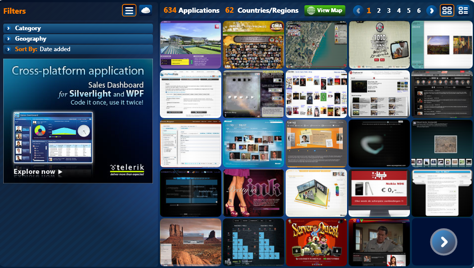
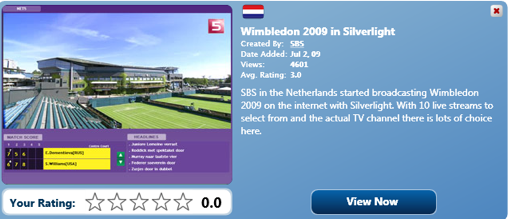
silverlight screenshot 1

Silverlight 3 finally supports AAC audio decoding as well as hardware-accelerated H.264 video decoding which were big omissions in the previous release. Microsoft have also finally decided to open up the “native multimedia pipeline” so that other formats can be supported if the codecs are installed. Microsoft Silverlight 3.0 still maintains the ability to stream high resolution video and supports HD quality videos.

silverlight screenshot 2

If you want to create content for Silverlight, you’ll need Expression Studio and Visual Studio. In fact, this latest release is is of particular interest to developers because it adds 60 customizable controls, new layout containers, “deep linking” for page bookmarking, search engine optimization and enhanced data support. Animators are also now far better supported with “Perspective 3D” which enables transformation of 2D elements to 3D.

The signs are however that Microsoft has already realized that the battle for web content is already being won by the much slicker and stable Adobe Air platform and is therefore aiming Silverlight at business users. The Silverlight homepage boasts “Learn how Silverlight is right for your business” and companies such as Continental Airlines have adopted it for use in their reservation system indicating that Microsoft knows which side its bread is buttered on.

Silverlight 3.0 is no Adobe Flash and certainly no Adobe Air. However, there’s probably no way you can avoid needing it at some point because there will always be some websites and developers that choose to base their content on Silverlight. Mobile devices are expected to be supported by 2010 although yet again, it may be a case of too little, too late for Microsoft.

Microsoft Office 2010 introduced today

Microsoft Office 2010 announced todaySummer is traditionally not a good season for the software business. Sunny days lure people away from computers – including developers, bloggers and tech geeks in general – which means there isn’t much news about software and technology. Maybe this is why Microsoft decided to introduce the all new Office 2010 just today, in the company’s Worldwide Partners Conference, so they could get everyone’s attention.
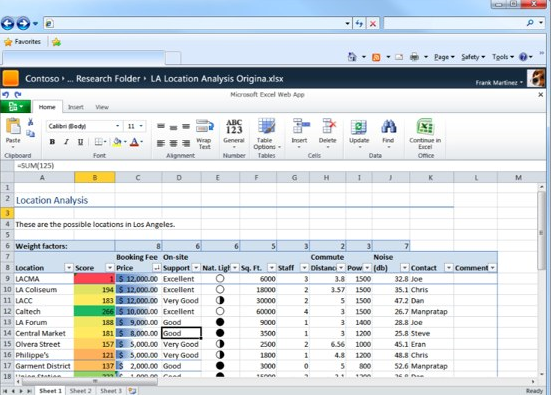
Microsoft Office 2010 is meant to represent quite a revolution in comparison to previous versions of Office. While still keeping the same ribbon-style interface, some Office applications will feature important improvements, such as the possibility for multiple users to to edit a document in Word 2010 simultaneously, enhanced photo editing tools and new transitions for PowerPoint 2010, and the much awaited improved search function in Outlook 2010 (I’m particularly looking forward to this one).

However the most important new feature in Microsoft Office 2010 will undoubtedly be the new online versions of Word,  PowerPoint, Excel and OneNote. After a few years of delay, it seems that Microsoft have finally decided to launch their own alternative to Zoho,Google Docs, OpenGoo, ThinkFree and many other online productivity suites. The online Office 2010 will probably be a light version of the suite, but it will enable you to work anytime, anywhere.

Microsoft Office 2010 announced today

We’ll surely learn a lot more about Microsoft Office 2010 in the next few days. Meanwhile, you can take a look at the videos (published on the Microsoft website by mistake, and now kindly hosted by istartedsomething), check out the detailed guide written by Leena Rao at TechCrunch and subscribe to the Microsoft Technical Preview waiting list which, with a bit of luck, might grant you access to a pre-release version of Office 2010.

Friday Timewaster: Swordless Ninja

Swordless Ninja is a cute platform game, which is accessible but hard enough to require some effort to beat. You are the Swordless Ninja – and why are you swordless? Because you evil nemesis has stolen your sword and your girl, that’s why! A video game where you have to save a girl from the clutches of evil? It’s an interesting proposition.

The game has great, cheerful style and some amusing sound effects. The only irritations are the same that have plagued platform games forever (unfair falling, one hit and you’re dead etc). Otherwise, Swordless Ninja is a really enjoyable platformer. Requires Flash.

Forum creation WordPress style with bbPress

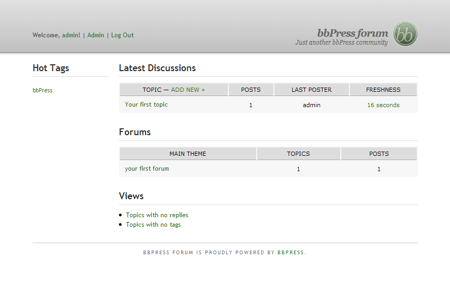
bbPress logoWordPress is the undisputed king of blogging platforms in my opinion. So I was very interested to hear that the developers Automattic had brought out a similar platform for creating forums. Like WordPress, bbPress is plain and simple to use and yet creates elegant results in a matter of minutes. No more stressing about forum database admin – bbPress makes it as easy as managing comments on a WordPress blog.

Just like WordPress, bbPress versions are codenamed after well-known jazz musicians (no prizes for guessing who bbPress is named after). The good news is that keeping bbPress open source and free is Automattic’s number one priority, so there’s little fear of nasty charges creeping in once you’ve got your forum up and running. bbPress works on a template system very similar to that of WordPress. You can switch between themes in a few clicks. Of course, if you have any CSS knowledge, you can change the code and styles to your liking. If you’ve got a WordPress blog, bbPress forums integrate instantly, meaning you can add a forum to your blog very easily.

bbPress screenshot

The other great thing about bbPress is that like WordPress, it’s customizable with plugins. Unfortunately however, at the moment the platform is still quite limited by the lack of plugins and themes available. It reminds me of the early versions of WordPress, although judging by how far that’s come, it won’t be long before bbPress has a thriving community of users creating plug-ins. There’s no hosted version of bbPress available yet – so you’ll need to have your own web hosting to use it – but hopefully, as with WordPress, that will be launched when it has established itself.

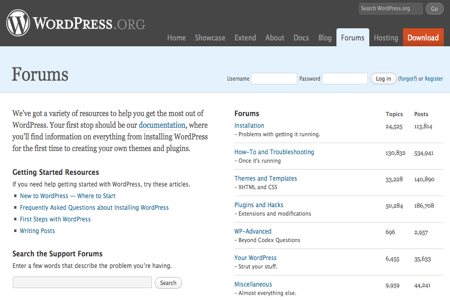
At the moment, there’s no way to integrate bbPress templates with your default WordPress blogs either, though this will be addressed in future releases. If you want to see a bbPress forum in action, check out the WordPress and Technorati support forums, which are based on it.

wordpress forum screenshot

You’d expect nothing but a quality product from the makers of WordPress and bbPress certainly doesn’t disappoint. Despite being limited, like early releases of the blogging platform, bbPress is only going to get better.