Explore the Moon and beyond with Celestia

celstial logoThe world may be celebrating 40 years of the Moon landings but there’s more to the universe than Lunar landscapes. Celestia is a great application which gives you a superb overview of the bigger picture out there by allowing you to explore the universe from the comfort of your armchair. It’s a great learning tool for kids and even adults will find themselves curiously exploring the final frontier.

Celestia works by allowing you to navigate your way around the universe using your mouse and when you discover something of interest, you can zoom in and out.
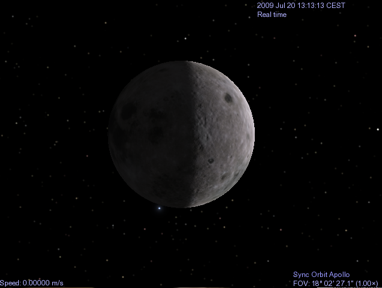
moon screenshot

You can zoom out far enough to see the entire Milky Way. Obviously, there’s no A to Z map of finding your way around Outer Space and so fortunately Celestia has a ‘Go To Object‘ tool found under the ‘Location‘ bar. Type the name of the planet or solar constellation you want to see and Celestia magically whisks you there a la Google Earth. I’d recommend running the demo for starters (found in Celestial and ‘Run Demo‘) because it takes you on a quick guided tour of everything Celestia can do. Continue reading “Explore the Moon and beyond with Celestia”
See the Apollo landings on Earth!

mooning2.png

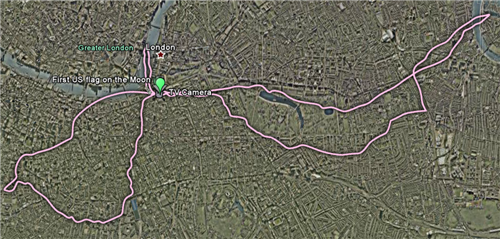
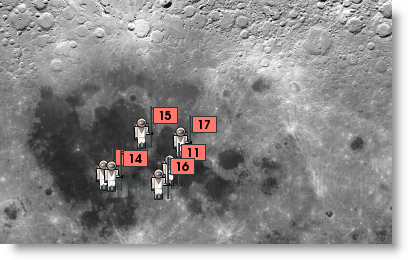
Looking at the moon landings on Earth might seem like a silly idea, but New Scientist have put together a collection of downloadable layers for Google Earth, which allow you to see how far the astronauts went on their moon explorations. They put the routes taken by the Apollo explorers, and add them to major cities. If you know any of the cities included – London, New York, Los Angeles, Boston and Sydney – these give you an excellent feel for the scale of their investigations, from the small first steps of Apollo 11, to the much larger distances covered in later missions with the Lunar Rover.

mooning.png

If moon landings on Earth are too earthy for you, check out Google’s 2D Moon here. Google are announcing “something special” at an event later today featuring none other than Buzz Aldrin. If they don’t announce Google Moon in 3D, I’ll eat my space suit.

In the unlikely event that the moon isn’t added to Google Earth, you can download NASA’s World Wind, which is free and features 3D models of Earth, the moon, Mars, Venus and Jupiter too.

Download the Google Earth moon landing layers here, and Google Earth here. If you have Google Earth installed, download the layers you want, and just open them with Google Earth. The moon landing images will then appear automatically.

Ask OnSoftware: Updating PortableApps

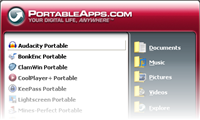
We have had a three part question from a user on Twitter (@softonic_en) about the PortableApps Suite. That’s a really useful collection of applications you can keep on a pen drive, and use on any PC you happen to be in front of.
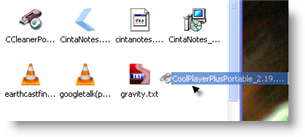
The first question asks how to update applications in PortableApps. To do this, first you have to download the new file. Then, open your USB drive, and drag the downloaded application into that window. If it’s a ZIP file, double click it to unzip it so you can run the installer. The next stage is just double clicking the application’s EXE file, and following the installation wizard. The old version will be removed, although your settings will be kept.

The second and third parts are related to updating the PortableApps suite itself: When you guys update the suite do you guys update the apps in the suite? What programs are taken out of the suite in 6.73 and will they be gone if I update from 6.72 to 6.73?

When PortableApps is open, click Help and choose update. This will take you to a download of the new version if you don’t have it. Then the process is the same as above – drag the downloaded EXE file into your USB file window, and double click it to update. This won’t change any of your applications, just the PortableApps interface, so you won’t lose any applications by updating at all. I must point out the version number for the PortableApps Suite is not as high as 6.73 yet! The current version is 1.5.2.

The PortableApps Suite comes highly recommended, as it’s a fantastic collection of genuinely useful free software, with a really user friendly interface.

Today’s downloads for Windows, Mac and Mobile

Download FirefoxWindows: After launching version 3.5 a few weeks ago, Firefox was reported to have a serious Javascript vulnerability. This new version of the popular web browser, Firefox 3.5.1, fixes that critical bug, as well as other stability problems and an issue that was making Firefox take too long to load on some Windows systems.

Become a virtual sorcereriPhone: If you’re a fan of the Harry Potter series of movies/books then you’re going to love Magic Wars. This inventive game gives you the chance to become an all-conquering wizard or witch. In order to do this you’ll need to pick the right wand, learn spells and charms, train yourself in wizard skills, chant incantations, and take on other sorcerers in duels.

Transmission logoMac: If you’ve still never found a P2P client on Mac you’re truly impressed with, then take a look at Transmission. This P2P file sharing app has an elegant interface and a simple set of intuitive features. This new version brings many more improvements to an already solid release including “Inspector” and “Add Torrent” buttons for iPhone/iPod Touch.

Get SweetFM for Mac absolutely free!

sweetfm2 logoFancy a $29 iTunes/Last.fm Mac app absolutely free? Well you can have exactly that with SweetFM which the developer has decided to make completely free and open source. If you regularly use iTunes and LastFM then you’re going to love it. The tiny app allows you to combine the best of both applications under one controller and much more. It used to sell for almost $29 but right now it’s completely free and open source.
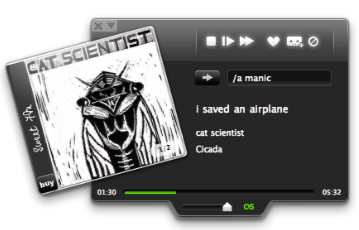
SweetFM switches seamlessly between Last.fm and iTunes. If you get bored of listening to either application at any point, you can just switch in a click. You can configure hotkeys to control most tasks and even use your Apple Remote – useful for parties or just kicking back and relaxing.

sweetfm screenshotBut there’s more to it than that. SweetFM extends Last.fm functionality with things such as tag-station shuffle. Just enter an artist name with some keywords and let Last.fm create the playlist for you. You can see what’s next on your playlist in the dock or the statusbar menu. I like the fact that SweetFM also uses album art covers retrieved from Amazon.com when playing major artists.

One other thing worth bearing in mind about SweetFM is that if you want to export tracks to iTunes, it will automatically check for duplicates although this obviously relies on your music being tagged correctly. There’s lots more to SweetFM than this too including CSS skin design support, Skype moods integration and handy Growl notifications.

There’s little to fault with SweetFM and considering it’s now completely open source and free, the time has never been better to try this sweet app.

Are iPhone users stupid?

What are you all thinking?I only ask because I see Mirror Free is still at the top of the chart in the App Store. Quite why people are so fascinated by this app is completely beyond me. In my opinion, nay, in fact, this is the worst iPhone application of all time. It’s an application so pointless that its functionality can be replicated without even turning your iPhone on.

In case you’ve not heard of it, Mirror Free is a program that places a series of poorly-designed picture frames on your device, allowing you to see your face in the black space in between. It looks terrible and offers no functionality whatsoever. Even the developer of the program has admitted that “this app is a piece of crap”.

Of course, it’s not the first pointless app to become mega popular. There was iFart, which replicated the sound of flatulence; Spin the Coke, which was designed for risqué college party games; and iBeer, which made your iPhone look like it had beer in it. Like Mirror Lite, all of these stupid programs reached the top of the iTunes chart. The logical conclusion, therefore is that most iPhone users are a bunch of vain, vulgar, promiscuous alcoholics. Feel free to disagree with me, but I think you’ll find the evidence speaks for itself.

Friday Timewaster: MoneySeize

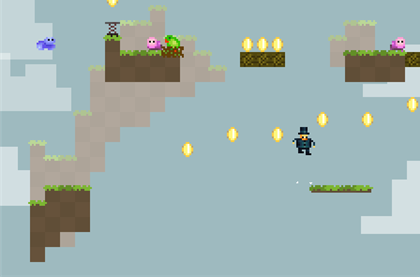
MoneySeize is a great example of retro jumping and collecting. Your hero, of sorts, Sir Reginald MoneySeize II, Esq. needs to collect all the gold coins he can find, to fund construction of the tallest tower in the world! No princesses to rescue here. There are 50 stages, with 1010 coins to find. Stages range from super easy to almost impossibly difficult. It even comes with the disclaimer “this game is very difficult” – platformer professionals will love it. It really is great, though, and our rotund aristocratic hero can do everything an Italian plumber can – while wearing a top hat.

First look at Google Calendar Labs

Just like they did with Gmail, Google have now added a special “Labs” area to their Calendar application, which means we get to test a bunch of cool new experimental features before they’re ready to be added to the main program. For people like me, who are always eager to test new apps and tools, this is way too great a temptation to resist. So if you’d like to see what goodies the new Google Calendar Labs offers, read on….

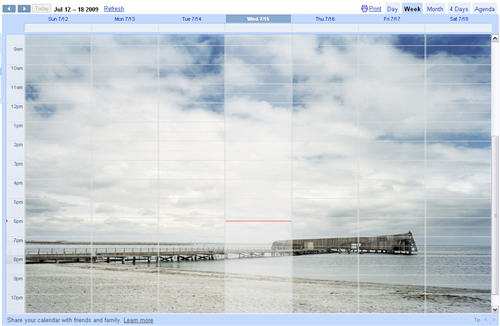
Background image – Lets you add a background image to your calendar. After enabling it, image options are found under the Settings > General tab. You can have the image displayed as tiled, centered or scaled to fit. Unfortunately it only works with online images (you can’t upload a photo from your hard drive) and depending on the image you choose, it can make the calendar really hard to read.

First look at Google Calendar Labs

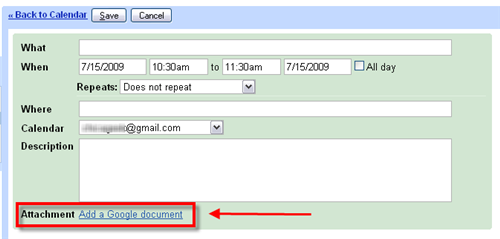
Attach Google Docs – This feature enables you to attach files from Google Docs (either documents, presentations or spreadsheets) to your events. Bear in mind though that if you want your event guests to be able to open the attached files, you will need to share each one of them.

First look at Google Calendar Labs

World Clock – As you can tell from the name, this feature lets you keep track of the time in other parts of the world, which may come in handy for those of you who often work with people on other time zones. The world clock shows up in the top right corner of the calendar, and can be customized with the time zones of your choice. What’s more, when you click an event, you’ll also see the starting time in each selected time zone. Continue reading “First look at Google Calendar Labs”

Today’s downloads for Windows, Mac and Mobile

What’s that tune?iPhone: Ever hear a song you like on the radio, on TV or at a party but don’t know what it’s called? Install Shazam 1.7 on your iPhone and you can find out. Whenever you hear a tune you dig, simply hold your iPhone’s microphone to the speaker. Shortly after, as if by magic details of the song will appear in the Shazam interface, including the name of the song, the singer, and the album it appears on.

quickeys logoMac: If you’ve never used a macro recorder then you might find that one could save you valuable time performing the same old routine tasks on your Mac. QuicKeys allows you to automate common tasks that you do all the time and remember those that you frequently forget. QuicKeys does this via a series of ‘Abbreviations’ and ‘Shortcuts’ that mean you can concentrate on more important things.

Download FavBackupWindows: Switching to a new computer can be a lengthy process, especially when it comes to customizing your web browser. With FavBackup you can create a backup copy of the browser’s settings and restore it in the new system, easy as pie! FavBackup doesn’t require installation and works with Internet Explorer, Firefox, Chrome, Safari and Opera.

Five essential steps to stop spam

Ahh, spam. As old as the Internet itself and probably everybody’s least favorite way to start the day. Although many modern email providers are good at weeding out the rubbish, it is still annoying when a wily email slips in, offering you cut-price Viagra or a mail-order bride. A recent article from PC Advisor reports that 1 in 6 people have actually responded to a spam email, a really worrying thought. Since a significant number of emailers out there still seem to be making rookie mistakes, we thought it was time for a quick reminder of the basic ways of keeping your account safe from spam. Read on…

Gollum The best tips are the simplest. First and foremost, protect your address. Remember how Gollum felt about the ring? Well, you should feel the same way about your email address. Don’t give it out easily, and make sure friends and family know it’s not for passing around. If you aren’t sure that a person will treat your email address with the love and care it deserves – don’t give it to them!

But, I hear you cry, what if we have to give out our email addresses, like when we are signing up for programs and websites? Well, that’s why I recommend creating a dummy account and using it when you need an email address for anything that doesn’t involve close (and therefore trustworthy) friends and family. You’ll probably only use this account from time to time, so if any spam does build up in it, at least you won’t have to look at it every day.

Even the most vigilant emailers, however, will occasionally find themselves with some spam, ranging from the obscene to the ridiculous. If you do find some, make sure to actually report it as spam, because it is only by learning from its mistakes that your service provider can improve in the future. Continue reading “Five essential steps to stop spam”