Our first impressions of Windows 7

W7 - El interroganteTesting a new version of Windows is like getting the keys to your brand new car and ride it for the first time… all shiny outside and spotless inside, with that unmistakable new car scent that only stays for a few days. After the first impression, you make yourself comfortable in the driver’s seat and begin looking at all the buttons, lights and knobs on the dashboard. After adjusting the wheel and buckling up, it’s time to start the engine!

This is when Windows 7, our new car in this short story, leaves the garage and hits the track. That is, it leaves Microsoft’s labs and factories to become part of our daily lives. And it’s our turn, as users of this operating system, to pay attention to every single detail about it: any hardware problems? Is it difficult to get used to? How does it behave under the harshest conditions? An in-depth analysis with one main objective: to get to know an operating system that will become an essential tool in our work.

Test de Windows 7This post gathers our first impressions of Windows 7, the latest version of the Microsoft operating system. Just like each driver has a different driving style, each Softonic editor has also a different personal perspective when it comes to test a new operating system. And this is what Softonic editors from very diverse nationalities and backgrounds think about it.

Vista was not that bad, but Seven is not that good either”Iván Ramírez

I’m a positive person, so my first impression was kind of hopeful. But as soon as the system loads – much faster than in Vista, I must say – this initial hope vanishes. My dear old classic Start menu is gone and UAC is still up to its old tricks. These two things, together with the system’s overall design and behavior, make me think about Seven as Vista in disguise: a new appearance, but no really outstanding new features. Of course, there are also positive elements, like a seamless compatibility with software and drivers. In short, any improvement to Vista is more than welcome, but Windows 7 doesn’t seem to be a truly revolutionary new operating system. It’s just what Vista should have been from the very beginning.

Iván Ramírez (Equipo ES Softonic ES)


I hope Seven doesn’t have as many bugs as Vista”Felipe Pessoa

Windows 7 looks very similar to Vista: there are transparency effects everywhere! It doesn’t seem that different from its predecessor, but at the same time, you can tell usability and performance have been greatly improved. Windows Media Player 12 is very similar to version 11, but includes new functions: now it’s a complete multimedia suite with which you can not only listen to your favorite music, but also browse photos, watch videos, rip CDs, sync data with portable devices and much more. I hope Seven doesn’t have as many problems and bugs as Vista.

Felipe Pessoa (Bandera de BR-PT Softonic BR)

Continue reading “Our first impressions of Windows 7”

NaNoWriMo: unleash the writer within!

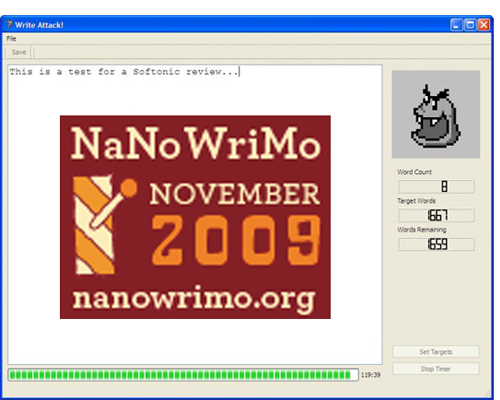
NaNoWriMo – no, it’s not an amazing new Apple product or a delightful beach resort in Italy, it’s National Novel Writing Month, a slightly crazy but totally fun international writing initiative that runs from November 1st – 31st 2009. The general idea is this: you write a novel (50,000 words) in just one month. At the end of it all, you upload your work of art to the NaNoWriMo website to be validated and sit back, basking in the knowledge that you’ve just written a novel!

final1.png

So, why exactly would you want to do this? Well, some people do it for charity, while others really want to set themselves a challenge. Apart from anything though, at the end of it all you’ll be able to tell everyone that you’ve written a novel – how cool would that be?! So why is a software blog telling you all this? Well, we have the perfect program to help you, of course. Write Attack! is the ideal tool, and a very efficient way of dealing with the dreaded writer’s block. What’s more, it has a feature that is specifically designed to overcome the challenges of National Novel Writing Month – the NaNoWriMo function! Just hit the NaNoWriMo button, and the program will automatically set you a target of 1,600 words – precisely what you need to do every day to churn that novel out within the month. Come on, we all know there’s a writer hiding inside you – show us what you’ve got!

7 reasons to upgrade to Windows 7

Windows 7 logo

So it’s almost crunch time for Windows users. Is it really worth paying $120 to upgrade to Windows 7? Here are 7 reasons in favor:

More Speed

By almost all accounts, Windows 7 is considerably faster than Vista (which isn’t hard) but this will be one of the most important draws for most users. No amount of fancy features can make-up for wasted time waiting for Aero graphics to render, applets to load and painfully slow startups. Windows 7 is faster in almost every department.

The ‘Superbar’

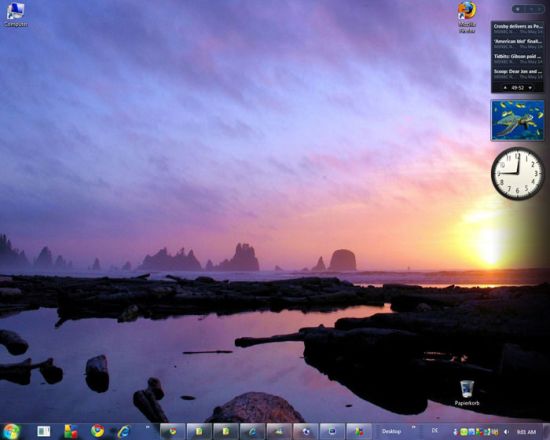
Out goes the old Taskbar and in comes the “Superbar”. Ok, Microsoft have clearly copied the Dock on Apple Macs but there are worse things they could have chosen to pinch. You can preview thumbnail windows of open applications windows using “Peek” simply by clicking on it’s icon. You can also “pin” favorite programs anywhere on the taskbar for easy access and re-arrange them any way you like by clicking and dragging.

Windows 7 Superbar

Manage files with Libraries

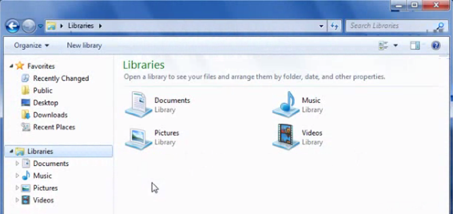
Forget folders, Libraries is the new management concept in Windows 7. Libraries basically eliminate the old faithfuls such as “My Documents” and “My Pictures” and bring everything together under one umbrella. Nothing is actually physically stored in Libraries however which makes it more of a reference point for locating files wherever they are stored. This makes it much easier to locate photos and video stored on an external devices or networks (i.e. virtual folders).

Windows 7 libraries

Enhanced Built-in Search

Windows might still lack something as good Spotlight on Macs but the search improvements in Windows 7 are a darn sight better than Vista. The use of Libraries is largely to do with this as Windows 7 will even search virtual and network folders that aren’t physically stored on your machine. Even better, clicking on a result brings-up a preview of it and searches are much better organized by category. Continue reading “7 reasons to upgrade to Windows 7”

Make XP or Vista look like Windows 7

The good news is that Windows 7 is out this week and it looks awesome. The bad news is there’s a global financial crisis going on, it’s nearly Christmas, and upgrading to the new operating system is expensive. Don’t worry your pretty little head about this, because you can still experience Windows 7 without actually paying any money, by installing themes and apps that will make your copy of XP or Vista look and feel like the new Microsoft OS. Here’s what you need:

Themes and styles

The most obvious place to start is by installing a theme or a style to mimic the Windows 7 GUI. These programs alter things like the Taskbar, Start menu, windows, and fonts, to make XP or Vista behave like Windows 7. The SevenVG RC Theme for XP is one of the better ones, and includes a wallpaper manager, along with a tool for reducing the size of the program window title bar with a single click.

Windows 7 Style

Windows 7 Style for Vista brings the elegance of version 7 to your Vista PC. The small utility changes things like the height of the System Tray and displays icons for running programs in the tray without the text. Windows 7 Style for Vista also alters the look of the Start menu and comes with a whole bunch of smart new Windows 7 icons. The addition also of the Aero transparency effect helps this style to turn Vista into a work of art.

Wallpapers

If you want to truly capture the look of Windows 7 then you need to get the right wallpapers. Try the Aero 7 Windows Seven Series I Wallpapers, a collection that includes the gorgeous Aero and Aurora designs at different resolutions. A meatier collection is to be found in the Windows 7 Wallpaper Pack. The striking designs inside this bundle include landscapes, animals, oceans and abstract structures. If none of these please you then you might want to put up this Windows 7 Wallpaper, which pays homage to the new OS in fine style.

Wallpapers

  Continue reading “Make XP or Vista look like Windows 7”

Windows 7 – not so make or break time for Microsoft

Windows 7 screenshotThis week is only about one thing in the computer world – the release of the Microsoft’s new operating system Windows 7. With the ghosts of the Vista release fiasco still haunting them, some are also questioning whether its success or failure could also mark a historic moment in the evolution of Microsoft. Will it be the operating system that restores some pride to the much maligned company and gets it back on track in the operating system world or could it spell the beginning of the end of Microsoft’s domination of the PC market?

One thing we can say with certainty is that it can’t be worse than Windows Vista. The only way is up for Microsoft in terms of operating systems which isn’t a bad place to start from. Vista was not only delivered two years late but caused all manner of incompatibility problems with third party software and hardware (including even Micrsoft’s own Zune!) and had users flocking back to Windows XP. It says something that one of OnSoftware’s most popular posts ever was a simple list of Vista themes for XP proving that users liked the look of Vista but hated the bloated Aero engine and frustrating functionality.

The timing of the release is also probably better for Microsoft. Apple have recently proved that they’re not immune to new operating system cock-ups with basic incompatibility problems surrounding the release of their latest operating system edition, Snow Leopard. And Microsoft executives must have breathed a sigh of relief when Google announced that its new operating system Chrome OS won’t be launched until mid-2010. However, Google have announced that they will be releasing the code for it later this year which could yet throw a spanner in the works for Windows 7. Continue reading “Windows 7 – not so make or break time for Microsoft”

Poll: How excited are you about Windows 7?

This week will see the release of Windows 7, Microsoft’s latest push for control of your PC. As the launch date approaches, we’ll be posting lots of helpful articles, reviews and videos all about the brand new edition of Windows. To kick things off, here’s our first ever OnSoftware poll. Yeah, I can’t believe it either! So how do you feel about the new OS’s imminent arrival?

Let us know by voting in the poll below – and leave a comment to let us know why!

Windows Presentation Foundation: what, why and where?!

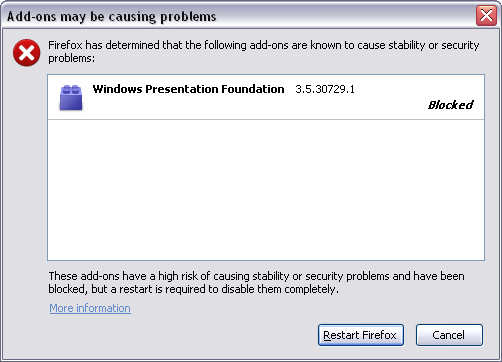
Picture the scene. You’re happily surfing the net over the weekend and suddenly this baby pops up:

wp03.png

Lots of things might be running through your head: What is it? Where did it come from? Why me?! Basically, Windows Presentation Foundation (WPF) is part of the Windows .NET framework. According to Microsoft, WPF combines “application UI, documents, and media content, while exploiting the full power of the computer”. In layman’s terms, it is a graphics plug-in.

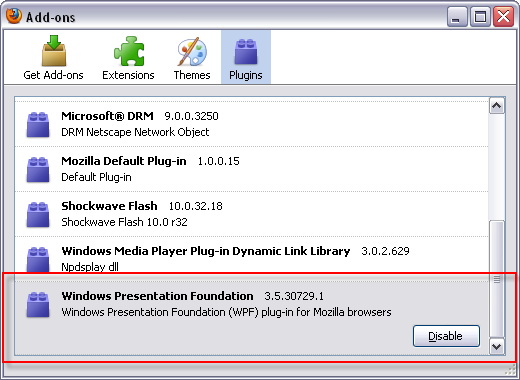
Some people are in a huff because Windows didn’t ask for explicit permission to install the plug-in and instead sneaked it in as part of the NET Framework 3.5 SP1 update. Geeks have been on the case for a while, and claim that it is not the first time Windows has done something similar, having previously installed the Microsoft .NET Framework Assistant. It only came to the attention of most users, however, when Firefox plonked a giant warning on their screens. The plug-in has been automatically disabled, as Mozilla believes it creates a security problem that leaves Firefox open to a ‘remote code execution vulnerability’ – in other words, makes it susceptible to drive-by spyware picked up while browsing.

wp01.png

For the moment, Mozilla has dealt with the problem, but many will be left wondering if Windows should go around installing things without our explicit permission. If you were reading a software review and the reviewer mentioned that the program sneakily installed things without asking, you’d be rightly suspicious. Should the rules be any different for Microsoft?

Friday Timewaster: Lego Star Wars The Quest for R2D2


The Unity plug-in has produced some impressive browser games, but maybe Lego Star Wars the Quest for R2D2 is the best so far.  It’s basically a 3D hack and slash adventure, but has great graphics, is really smooth and of course has everyone’s favorite Star Wars sound effects. Pressing F puts you in full screen mode, and then you won’t even notice it’s a browser based game. Not so long ago, a game like this would have been perfectly acceptable on a home console, and it’s incredible to see this for free running in Firefox! Play Lego Star Wars the Quest for R2D2 here. The Unity plug-in is available for Windows and Mac.

AVG 9: Not such a nice antivirus anymore

AVG Anti-Virus Free has been my antivirus of choice for the past five or six years. I like its ease of use, its moderation in system resources usage and the fact that it hardly shows any window or notification. I’ve installed and tried every single new version, including AVG Anti-Virus Free 9.0, which came out only yesterday and works really well – as usual.

But I have to say that this latest version includes also some annoying little features I didn’t like at all, chiefly regarding my browser configuration. For me, browser settings are untouchable and no program should be allowed to mess with that – not even my dear old AVG Anti-Virus. I hope this is not the beginning of the end for our relationship… well, as long as I have a way to revert those changes, it won’t be.

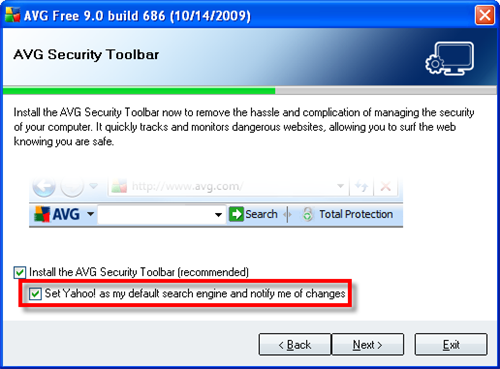
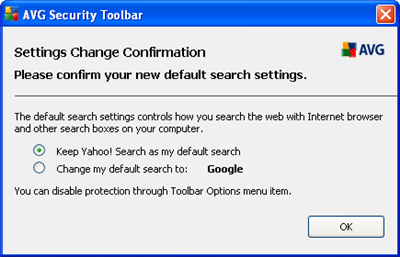
So, what does AVG change in your browser? First, the installer includes the AVG Security toolbar for the browser. There’s nothing wrong with this toolbar; actually, it’s actually a nice security addition for your browser. But if you don’t pay attention, you’ll also let AVG change your default search engine to Yahoo!.

AVG 9: Not that nice antivirus anymore

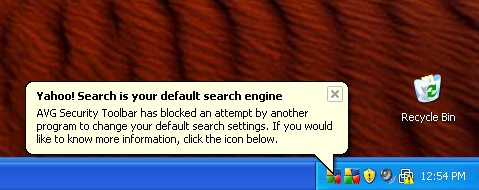
Of course, if you did miss that option and let AVG change the search engine, you can always change it back to Google (or whichever you use) within the web browser. The funny thing is that AVG Anti-Virus will warn you as if it was some piece of malware trying to modify your browser settings!

AVG 9: Not that nice antivirus anymore

All you have to do is click the icon on the system tray and confirm the change in the following dialog window.

AVG 9: Not that nice antivirus anymore

Another thing AVG Anti-Virus changes – and this time, without letting you know – is the New tab page. Once the AVG Toolbar is installed, your New tab page will look like this: Continue reading “AVG 9: Not such a nice antivirus anymore”

Today’s downloads for Windows, Mac and Mobile

Download Echofon - TwitterfoxWindows: Some people need to be constantly twittering about what they do. If you’re among them, this extension is for you! The all new Echofon (previously known as Twitterfox) integrates perfectly in Firefox and lets you check your twitter, send messages and see what your followers are up to, all from within your favorite browser. The new version features a complete redesign and the same great functionality.

Edit your images on the flyiPhone: If you’re a Photoshop addict then why not try out the new iPhone version of the app, Photoshop.com Mobile. It’s by no means a fully-featured editing suite, but what it does do is to allow you to quickly and easily tweak photos on the move, through an excellent interface based around touch gestures. It has some great sharing options, too.

SuperDuper! logoMac: Making backups should be an easy process, and SuperDuper! (new version 2.62) understands that perfectly. SuperDuper! creates perfect clones of your Mac volume so you have a full backup of all your data, including permissions, user profiles and private settings. SuperDuper! is incredibly easy to use: just select the drives to copy from and to and start backing up.