Try the new Android 2.2 OS on your PC

Today I’ve been trying out the new Android FroYo OS, and guess what? It’s delicious. Almost as tasty as an Apple, in fact. Standout features of the new Google Mobile OS include a much faster web browser with support for Flash 10.1, performance enhancements, and an beefed-up Android Market.

[youtube]http://www.youtube.com/watch?v=yAZYSVr2Bhc[/youtube]

As you’ll see from the video, Android 2.2 makes some significant changes over the previous version. But don’t just take Google’s word for it. Why not try out the new operating system yourself on your PC? All you need to do is download the Android SDK and follow this process:

1. Unzip the downloaded file and launch the SDK Setup executable. Highlight the Available Packages option in the left-hand column and expand the list within Sties, Packages and Archives. Check the option to install SDK Platform Android 2.2, API 8, revision 1. Now click Install Selected.

2. After the package has finished downloading, go to the Virtual Devices option and click on the New button. Enter a name for your virtual device and choose the Android 2.2 package from the Target drop-down list. Now click on the Create AVD button.

3. Your new virtual Android device, running 2.2 will be now shown in the main Virtual Devices panel. Highlight it, and click on Start to launch the new operating system in emulation mode.

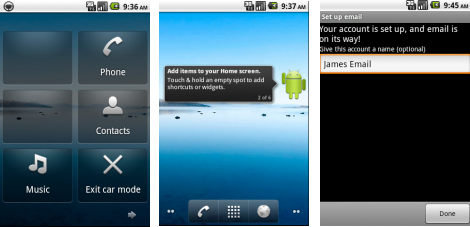
4. It might take a few minutes to start the virtual device, but it’s worth the wait. You’ll get to try out the new helper, which explains how to get around the OS; take a peek at the new Car Mode; integrate your own email using the new Exchange settings, and even try and access Flash content in the web browser.

Not all of the new features of Android 2.2 can be tested, of course. You won’t get an idea of the speed of the new browser, for instance; and the Market isn’t accessible through the virtual device. However, it’s worth checking out while we wait to see the OS actually running on a device.

Android

Today’s downloads for Windows, Mac and Mobile

Download Advanced SystemCareWindows: When your computer starts to work slower than usual, it’s time for some fixes and tweaks. Advanced SystemCare helps you fix the most common computer problems: Registry broken keys, hijacked settings, a fragmented hard drive or junk files taking too much space. The program also includes a bunch of tools to analyze and optimize your system.

TwitteriPhone: The new official Twitter iPhone app aims to give users a complete Twitter experience on the go. There are lots of Twitter apps available, like Echofon but this really is a benchmark release. It’s user friendly and simple for basic users, but also has all the abilities more hardcore users require. Writing a tweet is simple, and a menu can be opened to add hash tags, photos, users, video or even a geotag to your post.

2t_virtualbox_tb.jpgMac: Do you want to run Windows at the same time as OS X on your Mac but don’t want to pay for software like Parallels to do it? With VirtualBox (now updated to version 3.2), you can install any version of Windows – as long as you have the installation CD – Linux, Solaris and just about any other operating system you can think of absolutely free. It’s also extremely easy to setup and use for those new to virtual environments.

How to: extract images from PowerPoint presentations

We all have friends in our email address book that spend half of their lives composing PowerPoint presentations with images and music. Most of them go directly to the Trash folder, but you may find the odd PPT file from which you’d like to extract and save the images or the music. In those cases, the best option is to let PowerPointImageExtractor take care of the job.

Extract images from PowerPoints

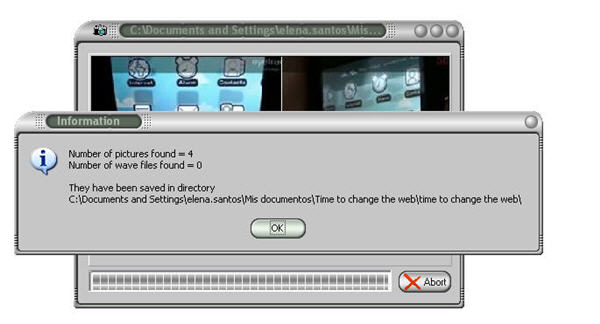
This simple tool extracts all the photos and WAV files in PowerPoint presentations in just a few seconds. All you need to do is load up the file in the program’s interface and wait until the process is over. PowerPointImageExtractor will then display a report with the number of saved images and sound files, together with the full path to the folder where you can find them.

Extract images from PowerPoints

PowerPointImageExtractor works with PPT and PPS files, and as you can see, is really easy to use. So next time you get that presentation with cute kitten images from your aunt Susan, think twice before deleting it straight away!

[Via: OnSoftware FR]

Twitter’s official iPhone app released, and it’s fantastic.

Since Twitter blew up, there’s been a big market for desktop and mobile apps that allow you to use the service outside a browser. Twitter has started to get in on the app act, recently bringing out the popular iPhone app Tweetie.

 Now Tweetie has been removed from the app store and replaced with Twitter. This isn’t just a rebranded app though, the updates and improvements make it a lot better. While some users will miss the old Tweetie logo, no one is likely to complain about the new price: it’s free.

I’ve been playing with Twitter’s iPhone app for a day now, and you can check out my review here. Packed full of options and features most developers hold back for ‘Pro’ versions, I think it’s so good it pretty much makes the unofficial Twitter apps redundant.

Watch British and American TV shows for free on SeeSaw

If you’ve never heard of SeeSaw yet, then you will soon as the TV on demand service has just launched a premium service allowing users access to hundreds of British and American TV shows.

seesaw.png

SeeSaw is only available to UK users and reminds me very much of the BBC iPlayer, the difference being that it hosts content from BBC, Channel 4, Channel 5 and other independent production companies, content isn’t limited by an expiry date and you can watch now entire series including Doctor Who, Lost and Top Gear.

tvseries.png

There is however lots of ad-supported free content for those living in the UK such as Men Behaving Badly, Spaced and Ugly Betty. New content is usually subject to a £1 per episode viewing fee or around £5 for an entire series (although this can rise to as much as £18 depending on the show). You get 30 days to watch an Episode and 90 days to watch a series.

According to Digital Spy, films are in the pipeline too making SeeSaw a competitor to the much hyped Voddler service:

The firm said that “several” other deals are currently in the pipeline with “major Hollywood studios” to offering around 2,000 of premium content in the coming months. The premium service will run in addition to the 3,000 hours of free-to-view, ad-supported content already available on the site from deals with BBC Worldwide, Channel 4, Five and various UK independent production firms.

Since I can’t try the service outside of the UK, it’s hard to gauge how reliable the streaming is or whether the amount of advertising is intrusive or not. However, it looks like an interesting project and with 1 million users since its launch in February already according to the company, its popularity is growing quickly.

Today’s downloads for Windows, Mac and Mobile

Download Hero CoreWindows: Do you miss the traditional 80s shooters? With Hero Core you now have the chance to play a retro shoot ’em up like the ones you played 30 years ago. Though the 8-bit graphics may not be everyone’s cup of tea, a huge map with lots of screens and a varied collection of bosses are sure to provide great fun for all nostalgic gamers!

World CupiPhone: FIFA World Cup is the official game of the World Cup in South Africa. The game challenges you to qualify then go on to the finals and attempt to win the greatest prize in soccer. FIFA World Cup is fully licensed by football’s governing body, meaning that all of the teams and players are real. The format and schedule of the World Cup finals is set up exactly as it will be in real life, and all the stadiums have been realized in the game.

helplogic-01-100x100.pngMac: Creating useful, readable Help manuals and guides is an essential part of designing and authoring programs. HelpLogic allows you to do so easily in a logical and defined way. HelpLogic works via three tools – a Visual Table of Contents (TOC) Builder, Project Workshop, HTML Editor, and Link Manager to quickly generate Web-based Help, Apple Help, Microsoft HTML Help, UniHelp, and PDF files.

Top 5 Facebook games

A quick glance at the top ten games on Facebook is depressing – all variations on the same theme: time wasting clicking games that offer players customization, but no game. Waiting four hours does not make a game in my book.  Café World Pet Society, FishVille? Fishville?? Come on!

Luckily, there are some games which give you a bit of a challenge, and here are my top five:

1: Bejeweled Blitz. Taking one of their classics, with Blitz PopCap really hit on something. A 60 second game is perfect – you can fit a minute in anytime and it’s so short you’ll never get tired of it. Facebook gives it a competitive edge, as you can share your scores and join weekly scoreboards.

2: Word Challenge. Race against the clock to make as many words as you can from different combos of seven letters. It doesn’t sound amazing, but with friend scoreboards and a well designed points system, it’s pretty hard to stop. Anagram lovers will have a field day.

3: Brain Buddies is a a competitive brain trainer, with four 60 second game areas to play through. Each area tests a different type of intelligence, so it’s no use being good just at logic and no good at visual puzzles.

4: Pathwords. More words? Yes, but this is a goody. There’s a grid of letters, and you string them together where possible to make words, then the whole thing drops down, Bejeweled style, opening up new possibilities. It takes a while to get the hang of, but it’s very addictive.

5: Traveller IQ Challenge. More of a quiz maybe, but it’s fast paced at least. Faced with a map of the world, how closely can you pinpoint cities and places of interest? Really exposes your geography skills, but you’ll learn as you play!

The Red Dead Redemption fan kit

Red Dead Redemption fan kitA couple of years ago we were drooling over GTA IV, together with millions of gamers worldwide who also joined Niko Bellic in his adventures in Liberty City. Today we’re counting down the time again for another big Rockstar release: Red Dead Redemption, a new sandbox-style adventure set in the Wild West.

Red Dead Redemption is coming out today in the US and on May 21st in Europe and Australia – which means I still have three more days of painful waiting, That’s why I thought it would be nice to gather a complete fan kit that helps us get into the Western mood and have our revolvers and cowboy hats ready for the big day.

First of all, we should start with a nice pack of wallpapers, which you can download from the game’s official site. There are a few to choose from, featuring the main characters in the game, and they’re all available in a ton of different resolutions – from widescreen 2560×1600 to PSP, iPhone and Blackberry.

Red Dead Redemption fan kit

Other elements you can download from the official site are a collection of buddy icons and avatars, perfect to use in your favorite IM client or social network.

Need an extra element for a perfect RDR-themed computer? Then download People of the West, Red Dead Redemption’s official screensaver including images of some characters and in-game quotes. The screensaver is available for both PC and Mac.

Red Dead Redemption fan kit

But if you prefer actual gameplay images and footage, don’t miss the screenshot gallery in the game’s website and be sure to check out the official Red Dead Redemption trailer as well!

Up for grabs: 10 free licenses for Snagit 10

Released last week, Snagit 10 is the latest version of the greatest screen capture tool on the market. The Softonic editors love Snagit so after testing and reviewing version 10, we thought we’d share this excellent program with a few of our readers.

snagit-10-1.png

Techsmith, creators of Snagit, have given us 10 licenses for the full version of Snagit 10 to give away free. All you need to do is join Softonic’s Facebook group and leave a message on our wall saying why you think you deserve a free copy!

Spotify is now invite free!

spotify-open2.pngWannabe Spotify users rejoice – the company have announced they’ve removed the invitation only restriction and now anyone can sign-up for the groundbreaking music application.

The new service is called Spotify Open but there is a snag though – new sign-ups for Spotify Open will have their listening time limited to 20 hours per month.

Spotify estimate this works out to around 25 albums or 300 tracks per month. The changes don’t affect current users of the free service and new Premium sign-ups still of course have unlimited listening time.

If Spotify Open users want to listen to music after they have reached their 20 hour limit, they have two options:

  • Sign-up for Spotify Premium which allows unlimited listening on both computer and mobile device for €10 a month
  • Sign-up for Spotify Unlimited which allows unlimited listening on computer only for €5 a month

However, it’s worth noting that invitations do still work and those who access the service via an invitation from a current user won’t be subject to a listening time cap every month so there is still an advantage of being invited.

I was completely blown away when I first tried Spotify early last year and if you haven’t been able to get an invite yet, you should definitely sign-up for Spotify Open today to see what you’re missing. Or you could always convince our Editor Tom to give you an invite like these users have. 🙂