Five Android apps to get you through the World Cup

The 2010 World Cup is just days away, meaning now is the time to arm yourself with as much soccer-related paraphernalia as you can get your hands on. I’m already tooled up with sticker albums, replica shirts, and air horns but being a bit of a techie I thought I’d deck my Android phone out with World Cup gadgets too.

Although the Android platform doesn’t have quite as many World Cup apps as the iPhone or Facebook, there’s plenty of football fun to be downloaded from the Market. Here are some of my favorites:

World Cup QuizWorld Cup Quiz will test your knowledge of the tournament. It features a broad range of teasers, covering everything from questions about past World Cups through to jersey identification. All the questions are multiple choice, and even if you’re a big soccer buff, you’ll find World Cup Quiz a tough challenge.

The SunThe Sun Football World Cup app provides you with expert coverage of the whole tournament. As well as the latest news, the app offers photo galleries, videos, polls and in-depth statistics of all the matches. You can even take part in the Sun’s World Cup Dream Team competition via the application.

VuvuzelaLove them or hate them, the vuvuzela will be ringing in your ears for the entire World Cup. If you want to whip up some atmosphere (and annoy your neighbors) with the screech of the horn then install Virtual Vuvuzela on your Android device. Simply shake your phone or tap the screen to bring the noise.

World Cup 2010If you want to stay in touch with everything that’s happening in South Africa during the World Cup, then install World Cup 2010 – FotMob on your phone. World Cup 2010 – FotMob brings you all the latest news, results, scores and standings from the tournament. The free Android app arranges all of this information in an attractive user interface.

Funky FootballIf you’re stuck for things to do in between matches, then install Funky Football on your phone. This Android soccer strategy game  sees you take charge of an international team and try to lead them to glory. The game is very simple to pick up and play, and there are 18 different teams to choose from. You can choose to play one-off matches or compete in tournaments.

Via OnSoftware France

Tumblr clients for Windows, Mac, iPhone and Android

A while ago Jon wrote a post about the wonders of Tumblr and why you should start using it right now. His arguments seemed so convincing that I immediately became a Tumblr user: I signed up for the service, spent some time looking for a nice template and now I publish all sorts of stuff I like.

Tumblr can be easily used on its own website, where you can check the dashboard for new posts from your friends and also post images, videos, links and more. There’s even a bookmarklet that lets you post items directly on your Tumblr, no matter what website you’re currently visiting. But if you still prefer using a client, here are some Tumblr clients for Windows, Mac, iPhone and Android I’ve tested in the last few days:

Tumblweed

Tumblr clients for Windows, Mac, iPhone and Android

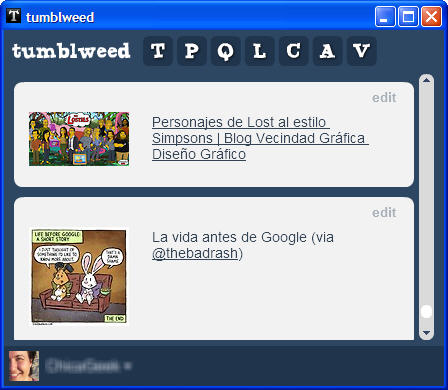
An AIR-based application that works on both Windows and Mac. It features a clear, minimalist interface with a small toolbar. Each button in the toolbar features the initial for each kind of post you can publish on Tumblr: text, photo, quote, link, chat, audio and video. The main interface area lets you switch between the Dashboard and your own Tumblr.

Tumblr

Tumblr clients for Windows, Mac, iPhone and Android

The official Tumblr app for iPhone. It lets you publish all sort of content to your Tumblr, with the option of scheduling posts for later or making them private. There are separate areas for your Tumblr and the Dashboard. It’s fast, intuitive and very well designed.

Tumblenote

Tumblr clients for Windows, Mac, iPhone and Android

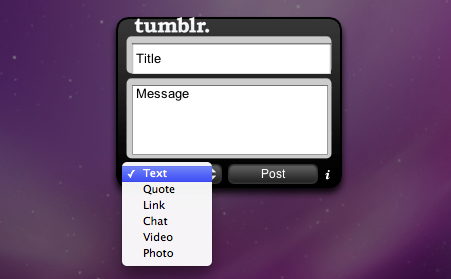
A Mac Dashboard widget with which you can easily publish stuff to your Tumblr. It doesn’t let you check the Dashboard though. It’s made to be really simple to use: open the Dashboard, select the type of post from the drop-down menu, fill in the fields and hit the Post button.

ttTumblr

Tumblr clients for Windows, Mac, iPhone and Android

A free Tumblr client for Android. With ttTumblr you can check the Dashboard and publish posts to your Twitter account, though you can’t publish videos. There’s also an option in Settings to send your Tumblr posts to Twitter.

Why internet ‘privacy’ concerns are wrong

Picture the scene: you go to your local supermarket and buy ten items. As the items are scanned by the shop assistant, each one is logged in a computer database. When you complete your purchase and leave the store, a record of what you bought remains. Although, it’s not actually a record of what you bought at all. It’s a record of what somebody bought.

Next week, you go back to the same store and buy 25 items. Three of these items match three items from last week’s visit. Now the computer knows that you’re likely to buy these three items together. Except that it doesn’t know that: all it knows is that someone might like to buy these three items together.

That same computer receives similar purchase reports from the supermarket chain’s 1,000 stores. Each store serves – say – a thousand shopping visits a day. So each week, one computer receives anonymous market reports on 7 million shopping visits. That data is vital to the supermarket for planning supply and for optimizing its service.

Very few people complain about stores collating this kind of data, and for good reason. The data is anonymous (assuming you eschew loyalty cards). So the focus of collecting this data must be understanding customers’ shopping habits. Not you, singular, but you plural. Continue reading “Why internet ‘privacy’ concerns are wrong”

Timewaster: LARRY – Big Dipper

LARRY – Big Dipper is all about falling! This simple arcade browser game sees your hero, or idiot, depending on how he got into this position, having to avoid falling rocks and debris as he falls down a seemingly endless mineshaft. Larry doesn’t look too happy about things.

Cursor keys move the unlucky Larry around the screen and there are power-ups to pick up on the way, as well as the occasional bird who’ll grab Larry by the hair and slow his fall for a while. Points rack up as you drop, and you’ll get multipliers as long as you don’t touch any falling rocks.

LARRY – Big Dipper is so simple it really shouldn’t work, but it’s pretty fun and has that ‘just one more go’ factor that make casual games a little dangerous! Requires Flash, and is played from your browser.

Add a background image to Google

After finally implementing a tool to rename folders in Google Reader (what took them so long?!), Google has also introduced a new feature: the option to customize the background image in the Google homepage.

Add a background image to Google

The feature is being slowly rolled out, so don’t worry if you don’t see it yet. For those who already have it enabled, you should see a Change background image link in the bottom left corner of Google’s homepage.

Add a background image to Google

Clicking this link brings up Google’s background image menu, with four options: using an image saved on your computer, using an image from your Picasa Web Albums, selecting a wallpaper from public photos featured in Piacasa Web Albums or selecting it from a set of Google recommended wallpapers.

Add a background image to Google

Images you use as Google background must be at least 800×600, preferably in landscape orientation – that is, wider than taller. Several formats are supported, including JPG, BMP, GIF, PSD and even some selected RAW formats. Also, you’ll need one of the following browsers: Google Chrome, Internet Explorer 7 or later, Firefox 3.x and Safari 3 or later.When you want to change the image, or you feel like going back to Google’s original minimalist design, simply click the Remove background image link at the bottom of the page.

Two quick Photoshop tips to create Polaroids

Most people use state-of-the-art digital cameras these days, but some others miss those good old photo cameras you had to use with film rolls. And if there’s one of those old camera models that’s still quite trendy today, that’s Polaroid. Even if you don’t have one anymore, you can still produce Polaroid photos with the help of Photoshop and a couple of easy tricks. Pay attention because they’re really easy to apply and produce very attractive results!

First of all, open the photo you want to transform into a Polaroid, unblock the background layer and add a new layer below.

Photoshop tips to create Polaroids

Make sure the photo layer is selected. Then press Ctrl+T to bring up the Free Transformation tool, and while holding Shift+Alt, grab one of the photo corners inwards to make it smaller. When done, hit Enter.

Photoshop tips to create Polaroids

Now select the new layer you created in the first step, and with the Marquee tool, draw a selection around the image that resembles a Polaroid frame. Go to Edit > Fill and fill the selected area with white. Continue reading “Two quick Photoshop tips to create Polaroids”

Google Reader finally gets folder and tag renaming

If you’re anything like the Softonic team, you’ll have a Google Reader account packed with important, interesting and at times esoteric RSS feeds that you like to stay up to date on. And given that you’ve got so many feeds, you like to be able to organize them with folders and tags. And given that up until now, folders and tags have been uneditable, you’ve been forced to resort to very useful guides like this in order to ‘rename’ folders.

Well, those days are over. At long, long last, Google has added a rename feature for folders and – yes – for tags. At last.

google-reader-rename-1.png

The feature is easy to use: simply select a folder, click the Folder settings menu and select Rename folder. A small dialog box will pop up where you can enter a new folder name. Alternatively, just access this settings page to see all your folders and tags.

And in case you’re wondering, renaming a folder or tag with a name that already exists will merge the two tags/folders in question. Which is also really cool.

Thanks, Google! But don’t take so long next time.

[Via: Google Reader blog]

Análisis de Song of Horror: El primer gran juego de terror de la década

Song of Horror es uno de los mejores juegos de terror de los últimos años. En noviembre de 2019, cuando reseñé las dos primeras entregas, mis impresiones fueron positivas, pero prefería esperar a completar la saga al completo para comprobar si sus novedades se sustentaban. Pues bien, no sólo aguantan sino que ahora me costará volver a otros títulos del género; hacía tiempo que no sufría tanto.

Song of Horror apareció en Halloween del año pasado en forma de aventura episódica, aunque ahora puedes comprar el juego completo si así lo prefieres. Es un juego de terror moderno pero con raíces clásicas, tanto en el mundo de los videojuegos como en el mundo literario. Por un lado, tenemos múltiples personajes controlables (como en Alone in the Dark), cámaras fijas como en Resident Evil, acertijos complicados y una amenaza temible que recuerda un poco a Silent Hill. En el lado literario, tenemos descensos hacia la locura, amenazas primigenias y mansiones encantadas, al más puro estilo Poe, Lovecraft y M.R. James, respectivamente. Con este batiburrillo de influencias, es normal pensar que Song of Horror será 0% original. Al contrario: esta aventura tiene suficientes ingredientes únicos que la convierten en una nueva referencia.

Por ejemplo, aunque puedes elegir personajes y vivir diferentes experiencias, como en los Alone in the Dark de antaño, Song of Horror va más allá e introduce muerte permanente para sus protagonistas. Si el héroe o heroína que estás controlando cae a manos del terror, ya está, despídete del personaje porque no lo verás más, ni a él o a ella ni sus habilidades que podrían haberte ido bien más adelante. Si muere todo el plantel antes del final… se acabó, tendrás que volver a empezar.

Esta mecánica me produjo mucha tensión cuando probé el primer par de episodios. Al principio no me lo tomé en serio. Creí que quizás, siendo muy pesimista, se me moriría el primer personaje y poca cosa más. Pero de repente ya iba por el tercer personaje (de cuatro). Esa valentía ignorante se evaporó y me poseyó un miedo nervioso y tembloroso.

La buena (o mala) noticia es que esta tensión no sólo sigue en siguientes episodios sino que se acumula. Los episodios 2 y 3 añaden suficientes personajes nuevos / vidas extras como para sentirte aliviado al ver tu plantel renovarse. Pero los dos episodios finales hacen algo muy inteligente: añadir muy pocos personajes al plantel. Teniendo en cuenta que la dificultad de estos dos últimos episodios es brutal (el quinto es un no parar de sustos y gritos), el clímax de Song of Horror es lo más cercano a una pesadilla virtual. Tras acabar la aventura, exhalé el mayor suspiro del universo.

Estos personajes no solo son vidas extras. Cada uno tiene su trasfondo, su motivación, sus fortalezas y sus fobias. Añaden mucha rejugabilidad a Song of Horror. Además, conforme avanza la investigación descubres más cosas sobre ellos, te acabas encariñando y jugarás con más precaución para que no mueran por tu culpa.

El segundo gran as bajo la manga de Song of Horror tiene el genial nombre de la Presencia. Se trata de una IA tan dinámica como impredecible que deja en cueros tanto al Mr. X de Resident Evil 2 Remake como al reciente de Némesis de RE 3 Remake. No hay enemigos al uso en Song of Horror sino que te enfrentas a una fuerza extraña, sobrenatural, que bien podría haber salido en algún relato lovecraftiano.

La Presencia se manifiesta de dos formas: con sustos que no afectan a la jugabilidad, pero sí a tu pobre corazón, y con secuencias no-guionizados en donde sí que tienes el control y, si fracasas, reducirá la cordura de tu personaje. Para ambos casos, la IA parece aprender e intentar descubrir cómo asustarte.

Cada personaje tiene su arma, objeto o habilidad para vencer a la Presencia, pero todos comparten un recurso común y básico: los oídos.

Antes de abrir ciertas puertas, podrás pegar tu oreja para tratar de descubrir si la Presencia se oculta al otro lado. Es una mecánica que requiere paciencia y calma. Aunque parezca muy simple de usar, he pecado de olvidarme de ella en momentos que tenía prisa, o en los que temía estar siendo perseguido. Lo he pagado muy caro.

Hace medio año, consideré la Presencia un enemigo aterrador. Ahora, lo he elevado a uno de los mejores monstruos del género. Su letalidad aumenta episodio en episodio. Las estrategias que te funcionaban en el episodio 1 apenas te funcionarán en el episodio 2 y serán historia en el episodio 3. Y lo que aprendas en el episodio 2 casi de nada te servirá en el episodio 4. Por curiosidad, volví a empezar el juego tras acabarlo para comprobar si realmente la Presencia es aleatoria. Confirmo: aunque siempre hará lo mismo en cada partida, el momento, la forma y la intensidad siempre son diferentes.

Pero la Presencia no solo funciona a nivel jugable; es una genial adaptación del terror literario clásico. Es un misterio reptante, imposible de entender, que hace contigo lo que le place. Juega contigo de la misma forma que los Primigenios jugaban con Henry Armitage, Randolph Carter u otros personajes de Lovecraft.

Finalmente, Song of Horror supera la gran prueba de todo juego episódico: la calidad se mantiene hasta el final. Con este tipo de juegos, siempre existe el miedo de que los últimos episodios sean más cortos, o se noten las prisas de la desarrolladora. Song of Horror se ríe de estos miedos. Cada episodio tiene nuevas mecánicas, localizaciones, personajes… y la conclusión, que ocurre en un manicomio genialmente recreado, es memorable y emocionante.

Espero que Song of Horror sea el Amnesia de esta nueva década. Deseo que los próximos juegos de miedo tomen nota de esta tremenda aventura, que exploren o potencien la idea de personajes realmente mortales o amenazas realmente impredecibles. Mi corazón no lo agradecerá, pero mi ansia enfermiza por asustarme estará encantada.

Mac security threat on some screensavers?

Security company Intego today warned that a malicious piece of spyware for Macs has been packaged with some screensavers, mainly from the company 7art Screensavers. The spyware, an application called OSX/Opinionspy is downloaded during the installation of these screensavers, that are listed here.

This is a piece of marketing spyware, that secretly collects and sends data about your online activity, meaning entering your credit card details with it installed could be very dangerous. The Guardian have posted a useful guide to removing the spyware, so head over if you’re worried.

However, we tested two of the listed screensavers, ‘Emerald Clock ScreenSaver‘, and ‘Silver Snow ScreenSaver‘, and found no evidence of any spyware, and nor did Intego’s software detect any. So currently we cannot confirm if this story is true or not. We will update when we’ve figured out what’s going on!

This story does highlight that you should always be careful about what you install on your computer, and don’t blindly agree to everything an installation asks.

Update:  The company 7Art appear to have changed their downloads, and also Intego have removed their blog posts listing dangerous applications. Whether this was a genuine threat or just a piece of marketing is difficult to clear up, but it does seem like 7Art downloads are safe.

[Image via the Intego blog]

Need For Speed World – Open Beta Starts Today!

EA are really getting into online free to play – plus premium extras model, with BattleField Heroes, Tiger Woods, FIFA and now Need for Speed World.

All you need to do is download the client, and then sign in with an EA account if you have one, or register for a free account here.

Like all the games in the franchise, Need For Speed World is fast, with arcade-style handling. This makes it easy to pick up and play, and the relatively low system requirements keep it running smoothly on most PCs. Apparently you can earn experience points all the way up to level ten, which should make for hours of racing! It may not look brand new (it features roads from older Need For Speed games stitched together), but it’s yet another fun and impressive online option from the software giant.