The best iPhone apps for the beach

Best iPhone apps to take on vacation

I’m off on vacation in a couple of weeks and aim to completely disconnect and glue myself to the sun lounger for a week. That means no internet and no phone calls. That’s not to say I’ll leave my iPhone at home though.

As we all know, the thought of sitting on a beach or next to a pool for 7 days is blissful but the reality is that it gets very boring, very quickly. It’s for this reason that my iPhone is coming with me – purely as an entertainment center rather than a connected device.

I’ve already loaded up my iPhone with ten delightful time-wasting apps, none of which require 3G or a WiFi connection. I’ve tried to select stuff that will keep me chilled, rather than just a bunch of super-charged action games or brain-busting puzzle titles. Any other recommendations are most welcome. Oh, and I’m gonna get me one of these babies as well.

Continue reading “The best iPhone apps for the beach”

Alien Swarm – free co-op shooter from Valve

If you’re into the the intense cooperative team play of Left 4 Dead, this top-down shooter Alien Swarm could be just the thing. It’s actually a relic from 2004 that’s been finally finished and released by Valve themselves: just like their acclaimed zombie shooter, this a four player online game, and although the perspective is different, there are similarities between L4D’s zombies and the aliens here.

Choose a class of marine and jump straight into a public game, or set up one with your friends. Aliens have invaded a colony planet, and it’s your job to clean them out, whatever way you can. The action is fast, intense and bloody. You’ll need to work in a team to succeed – not like the idiot who shot me when I was hacking a computer locked door – and things work best when there’s one of each marine type. Officers are pretty well rounded, Medics keep you all alive, Tech can hack computers and weld doors shut quickly, while Special Weapons bring heavy firepower to the team.

It’s really unusual to get a game of this quality for nothing, so go download Steam, and get playing: there are aliens out there that need shooting!

Tab Candy: the tab management revolution

This morning I saw the name Tab Candy on a couple of blogs and I became curious. What was all the fuss about? Wasn’t it just a new Firefox extension? Now after trying it for a while, I can only say I hope this gets implemented in the new version of Firefox!

Tab Candy

Tab Candy helps you manage your tasks in a more efficient way. It transforms the linear, often cluttered tab bar into a visual interface where tabs are represented by thumbnails. You can resize and rearrange these thumbnails on the interface as you wish, keeping all of your tabs visible at a glance, without losing important information. Continue reading “Tab Candy: the tab management revolution”

5 Mac alternatives to OneNote

UPDATE: Microsoft has now released OneNote for Mac. Find our thoughts about the new app here or download here.

onenotelogo.pngMicrosoft OneNote is an information gathering and collaboration application that many Windows users miss when they switch to Mac. For some it may even stop them from switching they rely on it so much. Of course, you can always run it in Parallels instead but this soon becomes annoying if you use it regularly. OneNote doesn’t come with Microsoft Office for Mac but the good news is there are some very good alternatives instead.

Here are 5 of the best Mac alternatives to OneNote you can try.

OmniOutliner

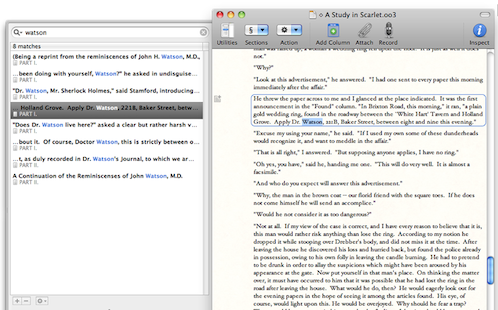
A simple and easy to use note taking application that is flexible for creating, collecting, and organizing information. It’s ideal for student wanting to take-down lecture notes in a clear and organized manner or those who simply want to map their ideas and notes in a convenient way. OmniOutliner allows you to create hierarchies of main headings and sub-points that can be expanded and collapsed. This makes it ideal for brainstorming tasks, drawing-up plan of actions and mapping out ideas. However, OmniOutliner isn’t limited to hierarchies – it also supports multiple columns, smart check boxes and customizable popup lists that make your notes and plans look really professional.

omnioutliner1.png

Continue reading “5 Mac alternatives to OneNote”

Create a Twitter background image with Themeleon

When you create a new Twitter account, the first thing you do is adapt the account’s configuration options to your taste. Name, language,  time zone, geolocation of tweets… and of course, design. Twitter lets you customize the background image and the account colors, so that each user can create a truly unique Twitter profile. The service includes twenty readymade designs to choose from, plus the possibility of uploading your own images, and also create Twitter backgrounds with Themeleon.

Create a Twitter background image with Themeleon

Themeleon is a cool online app that helps you design original and colorful Twitter backgrounds, and combine them with a personal color palette. All the elements in Themeleon are fully customizable, meaning you can combine patterns and color palettes anyway you like, as well as change the pattern’s original colors if you don’t like them. There are more than 900,000 patterns and a million palettes to choose from, so we could pretty much say that the possible combinations are almost endless!

Continue reading “Create a Twitter background image with Themeleon”

Skype adds background VoIP calling to iPhone app

Skype adds background VoIP callingGreat news for iPhone 4 owners: Skype has released an update to its app that enables background VoIP calling. This means that you can now be chatting on Skype and messing around with other apps on your phone at the same time. This will be perfect for playing some Monkey Island 2 while your mom drones on about how expensive bread has got.

The new feature is available for iPhone 4 and iPhone 3GS running iOS 4. Don’t forget that Skype calls over 3G are free until the end of the year. So if you haven’t got the app yet then go scoot off to the App store right now.

Send postcards from your iPhone

PostcardsI’ve just found cool app to pack on your iPhone when you go on holiday. Postcards allows you snap yourself enjoying the time of your life in the sunshine, write a little greeting then get it turned into a postcard and sent to any address in the UK.
As long as you get your image sent before 4pm GMT, the postcard will be printed and dispatched that day. You can select either first class (£1.49) or second class (99p) delivery, and pay via your PayPal account. Because the cards are sent from a depot in Dorset, they should arrive much quicker than if you send them from a far-flung destination.

A word of warning though: probably best to find a WiFi hotspot to upload and send your postcard from. For the amount you’ll spend on roaming data rates, you could probably afford to get a gold plated postcard sent in a private jet flown by Tom Cruise instead.

Bynamite aims to put you in control of internet ads

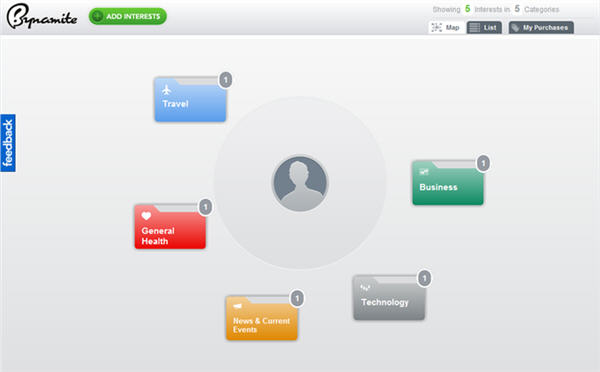
Bynamite is a Chrome and Firefox extension that allows you to edit the information various advertising networks collect from your web browsing, like Google Ads, Yahoo and Lotame.

Until now, there only seemed to be two positions on web advertising – that you didn’t care, or hated it enough to use something like Adblocker. What’s interesting about Bynamite, apart from the odd name, is that it’s trying to offer a middle way.

Personally, I accept that most of the good free stuff I get on the web is payed for by advertising so I’ll put up with it. But sometimes it goes too far, and other times I’ll see the same terrible ad for something I really don’t want over and over again. Bynamite works by collecting together the info that advertisers collect in an attractive and easy to use interface where you can add and remove whatever you want.

So, theoretically you can alter what the advertisers think they know about you, and make the ads they serve more relevant to you.

I think Bynamite is a neat idea, although it does require you to put some work in to benefit properly. Also, after a couple of days testing it out, it’s hard to say how much of an effect it has on the ads I see. Still, I think it’s a good idea to give users back some power over how their browsing habits are used. Bynamite could be the beginning of a new dynamic relationship between advertisers and consumers.

Flipboard: First Look at iPad’s ‘Social Magazine’

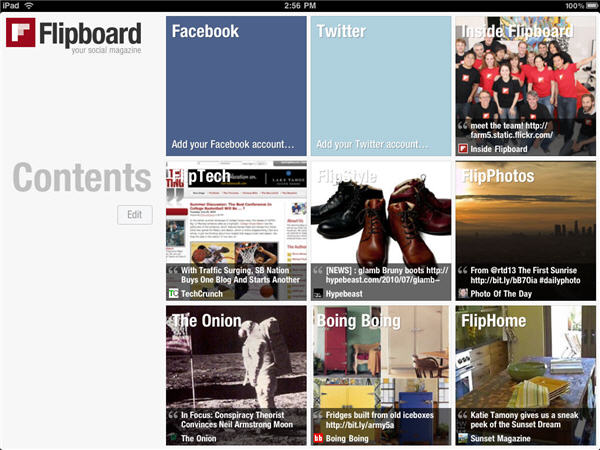
Flipboard is a ‘personalized, social magazine’ for the iPad. Released today, and free, it might just be the first real killer app for Apple’s touchscreen device.

Mixing Twitter, Facebook and websites together may not be brand new, but Flipboard does it beautifully. The interface is gorgeous, and makes reading and navigating a joy. Their servers seem to be struggling at the moment, making it difficult to sign in to Facebook and Twitter, but it’s still worth downloading. I can totally imagine this becoming what I browse over breakfast. We’ll have a full review up soon, but for now here are some screenshots. Continue reading “Flipboard: First Look at iPad’s ‘Social Magazine’”

First look at Microsoft Security Essentials Beta

Since its official launch in September 2009, Microsoft Security Essentials has become a popular choice among free antivirus tools, thanks to its quick scans, ease of use and lightness on system resources. Now Microsoft Security Essentials 2.0 Beta is ready to download and test, so let’s take a look at all the new features and improvements of this new version.

First look at Microsoft Security Essentials Beta

First of all, to grab hold of this beta you’ll need a Microsoft Connect account (you can use your Windows Live ID to create one). Security Essentials 2.0 Beta is available both for 32- and 64-bit systems, and can be downloaded via the Microsoft File Transfer Manager – though as the file is only 7.78 MB, you probably won’t need it.

Continue reading “First look at Microsoft Security Essentials Beta”