Timewaster: Faultline

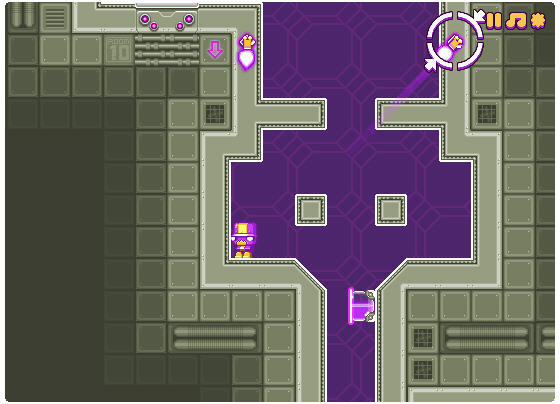
Proving there’s still some life in the puzzle platform genre comes this quiet little number, Faultline. It wouldn’t have looked out of place at the turn of the 90s, but uses an interesting trick to keep the action fresh. It’s free, and available to play right from your browser.

In Faultline, you control a little robot-thing, who can utilize special points in the environment and drag them together with its flying hands, folding space and creating new platforms to navigate. This allows you to scale otherwise impossible heights, create holes to move through and more. The puzzles get harder, and eventually I got stuck… but I’m sure with more persistence I’ll crack it.

Play Faultline here, which requires the Flash plug-in.

Greasemonkey: What is it? How do you use it?

Greasemonkey: What is it? How do you use it?I’ve been trying out a bunch of Facebook-related Greasemonkey scripts lately, and I’ve realized that maybe not everybody knows what a Greasemonkey script is – or even Greasemonkey, for that matter. So here’s a short tutorial on the wonderful world of Greasemonkey, and everything you can do with it.
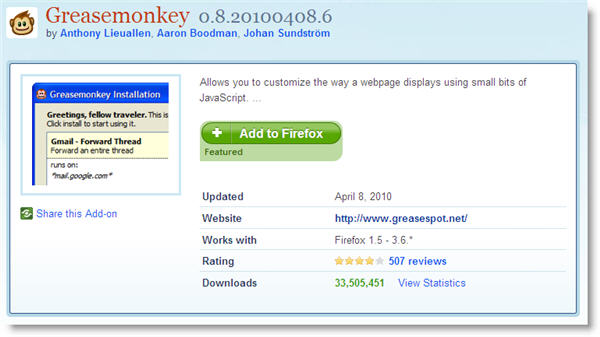

To begin with, Greasemonkey is a Firefox extension that doesn’t do anything by itself. It just allows you to use small bits of JavaScript (the so called Greasemonkeyscripts) on your browser, to customize the way a certain website looks or interacts with you. This means that, in order to use any of those scripts, first you need to install Greasemonkey on Firefox.

Greasemonkey: What is it? How do you use it?

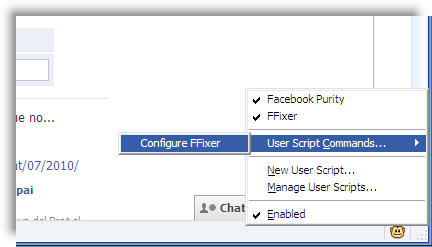
Once installed, Greasemonkey displays a small monkey icon in the bottom right corner of the browser interface. A left click on this icon disables the extension – and all the scripts you’ve installed so far. A right click on the icon shows the extension’s context menu, with access to installed scripts, configuration options and a script manager.

Greasemonkey: What is it? How do you use it?

separator21.jpg

Now, the big question: where do you get scripts from? The answer is userscripts.org, an online script database with thousands of scripts to use with Greasemonkey. You’ll find scripts of all sorts, to customize and enhance hundreds of popular websites, including Gmail, Facebook, Google, Twitter,YouTube and lots more. Continue reading “Greasemonkey: What is it? How do you use it?”

Google testing new image search interface

Google seems to be testing a radically changed image search user interface. Reports on various websites say that it might have been around for up to a week… and that it looks a bit like Bing. I just got the new interface this afternoon. And I don’t use Bing.

The new look page focuses entirely on images, removing all the additional data which was previously displayed under each result. That data isn’t gone completely, though. It now displays when you mouseover an image. The page also automatically loads more results as you scroll, kind of like a Twitter app that loads older messages the further down you go. In all, it’s an attractive new way of presenting image search results.

google-img-1.png

Clicking an image is a different matter, though. This action now loads the source website in an iframe, with a slightly opaque layer on top of it, and the image highlighted and expanded. There’s also a section to the right of the page containing the relevant image’s info. Clicking anywhere in the main part of this page forces the image source page to load. This part of the new UI experience is less positive – it feels like the user is expected to know how it works bef0ore using it.

google-img-2.png

Expect this interface to continue to evolve as Google continues its tests. The second-step page, which displays the image in its original location, is in particular need of work.

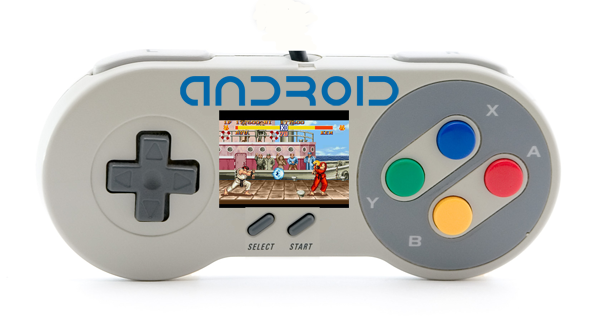
Play Super Nintendo games on your Android phone

The more I think about it, the more I reckon the Android platform could become the next great portable gaming device.

I’ve just been reliving my childhood with SNesroid, an Android emulator that lets you play Super Nintendo games on your phone. You can use the app to install ROMs of old classics such as Street Fighter II, Mario Kart and Super Tennis on your device, and they play exactly like they did all those years ago. The HTC Desire I used coped perfectly well, providing a seamless and smooth playing experience.

Android gaming is definitely getting more interesting, confirmed this week when I played the excellent Quake 2 port. Many game developers are putting all their efforts into iPhone at the moment but the Apple platform will always be restricted to touchscreen controls due to the nature of the hardware.

Hopefully, it won’t be long before we start to see more Android gaming devices, such as Hard Kernel’s ODROID. When that happens, gamers’ eyes might start wandering away from Apple’s App Store.

SNES meets Android

How to: create strong passwords

Despite being a key element in online security, passwords are often taken too lightly. I know lots of people – friends, relatives – who still use weak passwords that can be easily cracked, and they don’t seem to worry about it at all! Today’s technology allows almost anyone to launch brute force attacks – a special procedure that tests all possible character combinations until it finally finds out your password. Hence the need to use stronger passwords that can resist the attacks of any hacker. Here are some tips that can help you create better passwords – while keeping them easy to remember!

Some basic rules regarding passwords

  • Go for long passwords; eight characters should be your minimum.
  • The more variety of characters your password has (lowercase, uppercase, numbers, letters, typographic signs) the harder it’ll be to crack.
  • Avoid using words that appear on dictionaries, as well as obvious words like your name, your location, your family name or your pet’s name.
  • Never write your password down on a sheet of paper. And of course, never leave that sheet besides your computer.
  • Use a unique password for each website, social network or any other online service you subscribe to.
  • Never give your password to anyone.

separator21.jpg

Continue reading “How to: create strong passwords”

How to: Create a photo collage online

Collages are an awesome way to display your photos. They work great as desktop wallpapers, and also look nice printed and framed, on a shelf at home. But collages are always so hard and tedious to create… well, not anymore!

How to: create a photo collage online

With Photovisi’s online tool to create collages, you’ll be enjoying beautiful photo collages in no time – without having to install any software. Just follow these simple steps:

separator21.jpg

1. Load up the Photovisi online collage maker and click the big Click here to start button. Then select the appropriate template for your collage.

How to: create a photo collage online

separator21.jpg Continue reading “How to: Create a photo collage online”

No add-ons work with Mozilla Firefox 4

minefield-icon.pngBefore you jump straight to the comments section, yes I’m aware that Firefox 4 beta doesn’t have to be compatible with pre-existing add-ons. The idea of my experiment was to see how much Firefox’s new add-ons center changes the way browser extensions work. The answer is: a lot!

Hacking Firefox to make it run addons designed to run in previous versions of the browser is hardly an advanced job. Just add a couple of Boolean values to the advanced preferences and you can tell Minefield (the best name for a beta program ever!), not to check add-on compatibility. Generally, this can force compatibility when the version change is minor (e.g. 3.5 to 3.6). It doesn’t usually work for most add-ons across major version updates.

minefield-welcome.png

And 4.0 is no exception! After telling Minefield (4.0b2Pre) to accept all my 3.6 add-ons and restarting, the extensions all appeared to  have loaded satisfactorily. FoxyTunes, Alexa, Google Wave, Tumblr Post, Firebug and Echofon all appear in the status bar where I’d expect to see them. But none of them do anything. Nor does Greasemonkey. In fact, except for the built-in extensions, the only add-on currently seems to function is the classic Tab Mix Plus.

So for those of you asking the question: ‘how do I force an add-on to be compatible with Firefox 4.0?‘, the answer is: You can’t. Be patient, Firefox 4 will be released soon and your favorite add-ons will be updated in no time.

Opera updates its Symbian and Android browsers

There’s certainly been no summer holidays for those diligent developers at Opera. Not content with updating its popular Opera Mini app last week, the company has now released new versions of its mobile web browser for Android and Symbian phones.

Yesterday Opera Mini for Android jumped out of Beta to version 5.1, bringing it in line with last week’s updates on other mobile platforms. The new version includes an enhanced browser skin that allows more pages to be open at the same time. It boasts a refined browser performance, including faster scrolling of pages.

Today, there’s more good news for Opera fans. Symbian S60 phone users can now enjoy built-in geolocation support through the new Opera Mobile 10.1 Beta. This means that web services such as maps and travel applications can offer you tailored, relevant content based on your location.

Other additions to the Opera Mobile browser include the Carakan JavaScript engine and the Vega graphics library. I’m not a huge fan of bizarrely-named proprietary systems in this age of open standards, but if Opera reckons it’ll make looking at the web on a phone much nicer, I guess it’s fine with me.

Opera Mini

Rhythm Racer 2 adds Prodigy song pack

Ravers and adrenaline junkies take note: you can now drive a high speed spaceship to the tunes of The Prodigy thanks to Rhythm Racer 2‘s new song pack.

Rhythm Racer 2 is a kind-of hybrid of Tap Tap Revenge and WipeOut 64, for both the iPhone and the iPad. The aim of the game is to hit the colored beats that appear in time with the music. Steering is done simply by tilting the device left and right. The new Prodigy song pack is downloadable within the game for 99 cents and includes the seminal classic ‘Poison’, from Music for the Jilted Generation, and ‘Omen’, from the dance act’s last album, Invaders Must Die.

As I pointed out in my review, Rhythm Racer 2 is a stunning looking game that’s great fun to play, but it is lacking the killer soundtrack needed to catapult it to gaming greatness. With new song packs from the likes of All American Rejects and Kaiser Chiefs in the pipeline, this game is seriously starting to rock. You can grab Rhythm Racer 2 from the App Store for free.

Rhythm Racer 2 adds Prodigy song pack

Timewaster: pOnd

Here’s a game that’s truly for everyone, a one button piece that only takes a few minutes to play through. Playable in your browser with the Flash plugin, or downloadable, pOnd takes you on a mysterious, relaxed stroll through meadows and forests.

All you have to do for your unnamed protagonist is hold the space bar for him to breath in, and let go to breath out. It’s presented in a lovely pixelated style, which gives the experience tons of atmosphere. Saying too much might spoil it, but this is really worth playing: it’s unlike anything you’ll have played before.

Check out pOnd here.