Get iSkysoft’s FLV converter for Windows free

Until Thursday you can get a full version of iSkysoft’s FLV video converter simply by registering your email with them. Go to their website, and they’ll send you a registration code.

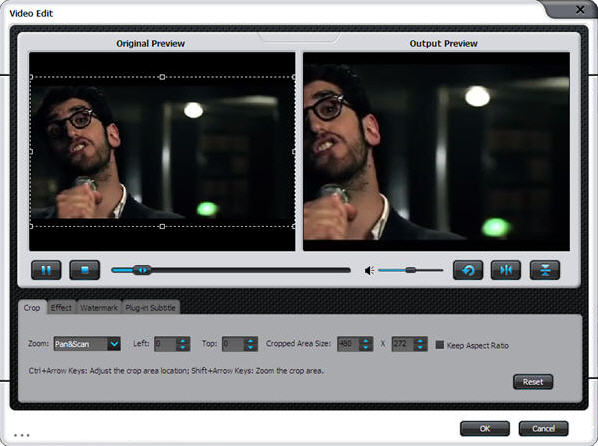
Why would you want to convert FLV files? They’re probably the most common video files on the web, but many devices, like iPods, don’t run them. iSkysoft FLV converter makes it easy to convert videos you download from the web into most common video formats, like MOV, MP4, WMV and MKV. You can also change the resolution, to optimize your video for whatever screen you want to watch it on. It lets you rip the audio from videos and save it in MP3, M4A or WMA too.

With a ton of video converters out there, iSkysoft’s FLV video converter isn’t bad at all so grab it while it’s free!

Grooveshark now available on your iPhone

Grooveshark, the amazing online music sharing service, has finally been approved by Apple and is now available to download from the AppStore. After allowing the release of apps such as Spotify, Rdio or Pandora, letting the last one of the gang in was only a question of time.

Grooveshark now available on your iPhone

The best thing about the Grooveshark app is that you can test it free for 30 days – even if you don’t have a VIP account. All you need is to log in to the service with your current Grooveshark account (or create one on the spot) and start enjoying mobile music streaming anywhere. After the trial period is over, having a VIP user will be a requisite to continue using the app.

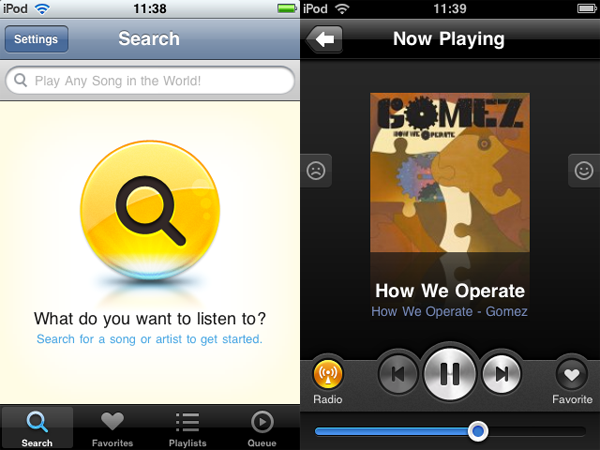
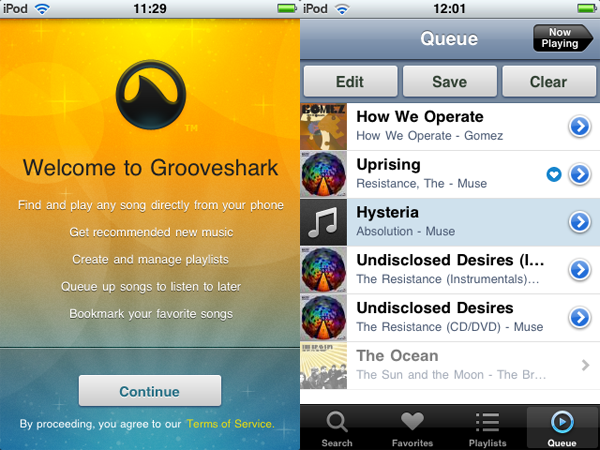
Grooveshark works great on the iPhone. The app is neatly designed and really easy to use. The main screen is Grooveshark’s search engine, where you can start typing your favorite bands and songs right away. At the bottom you have buttons for Favorites, Playlists and Queue, all pretty self-explanatory. The currently playing song screen features a few playback controls, as well as buttons to mark the song as Favorite and turn the Grooveshark radio on or off.

Grooveshark now available on your iPhone

There are many interesting features in Grooveshark, such as being able to make a song available when you’re offline and having a link to buy a specific song directly from iTunes. All of these contribute to make Grooveshark a serious competitor to other similar apps, at a more competitive price (just $3/month for a VIP account) and without the territorial restrictions of Spotify or Pandora, for example. On the downside, Grooveshark doesn’t support multitasking yet, but apparently they’re working on implementing it really soon.

The only question left is then which of all mobile streaming music apps has the best catalog. For me, this is just a question of each user’s musical taste. Mine’s pretty standard, so I’ll probably be happy with Grooveshark. Other people with more refined taste, or who like not so popular bands, will prefer apps with a more extensive catalog. In any case, with Grooveshark being free for 30 days, there’s no reason why you shouldn’t download it and give it a go!

Top 5 free MP3 converters for Mac

MP3 is by far the most common format for audio files. However, there are times when you need to convert MP3 into another format on your Mac. There are also people who enjoy listening to different audio file formats, but iTunes doesn’t have a lot of options for converting other than MP3 or AAC.

If you need to format a MP3 to a different format, you should also be aware that there is a possibility of quality loss because of the compression on MP3 files. So while you are getting a new format, it might sound worse than the original file.

These apps are some options to convert MP3 to different formats.

ffmpegxffmpegX is probably the fastest and flexible video and audio encoder for Mac. It can convert just about anything and also includes a rather basic but useful media player so you can preview your converted audio.

If you delve into the settings you’ll see you can perform all sorts of advanced functions like joining, fixing or authoring audio as well as set bitrate.

HandbrakeHandBrake is another hugely popular video and audio converter and includes a very handy bitrate calculator so that you can control the quality of your converted MP3s.

It’s mainly used for video conversions but it’s just as suitable for audio including MP3. The only drawback you might find is that it can be a bit slow.

SwitchSwitch has the advantage of being dedicated to audio conversions and allows you to quickly batch convert audio tracks. It has a huge number of output formats including MP3, WMA and AAC.

You can also set the bitrate and there’s also a handy “error protection” feature which ensures conversions are error free.

All2MP3All2MP3 is dedicated specifically to MP3 conversions and uses AppleScript to perform fast and efficient conversions. It’s easy to use thanks to a simple drag and drop interface and all you have to do is click on the All2MP3 button to start converting.

The program converts conversion from MP3 to MPC, APE, WV, FLAC, OGG, WMA, AIFF, and WAV.

Kigo Video ConverterKigo Video Converter is designed mainly for video conversion but is also suitable for MP3 needs. It’s especially designed with the needs of iPods, iPhones, Archos and other major portable audio devices in mind.

The pre-defined settings for each device are one of the stand-out features of Kigo Video Converter because it saves so much hassle setting bitrates.

Remember that you can improve quality by converting into a different format. In most cases the quality will suffer. But if quality isn’t a big concern, then any of these apps will work.
Timewaster: deviantArt’s Muro

Artistic online community deviantArt may be well known for pretentious black and white portraits and drawings of emo-fairies, but there has always been some interesting stuff there and it’s a really well-made website. Adding to this is their new drawing app, Muro, a great artistic tool you can use in your browser.

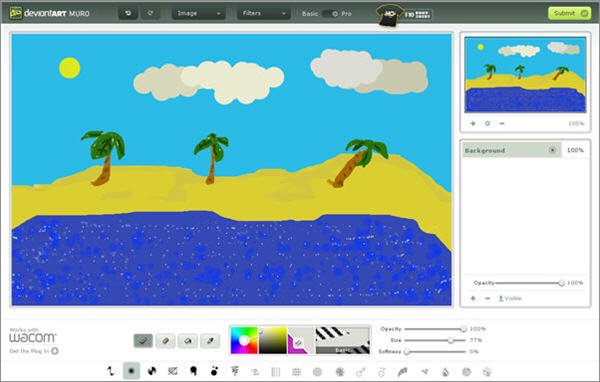
You could spend hours creating pictures in Muro. It’s unlike most simple drawing tools, in that it has a range of cool brushes with interesting effects and also supports layers like Photoshop.

Muro has two main settings, basic and pro, which just flips between having layer options activated or not. Anyone can make a pretty nice image after just a little practice. Most importantly, it’s a great timewaster, as it’s relaxing, constructive, and can waste a hell of a lot of time if you’re not careful!

What’s even more interesting about Muro is that it’s been made in HTML 5,  so you can use it from things like Apple’s iPad too! Check it out at deviantArt.

GooReader, a better interface for Google Books

Google Books may be a good source for ebooks, but the browser window is definitely not the best interface to read them. It’s uncomfortable, requires a lot of mouse scrolling and includes distracting elements such as links and ads. Luckily you can now use an alternative tool to read Google ebooks: it’s called GooReader and lets you search, browse and read Google ebooks in a much nicer, more comfortable way.

GooReader, a better interface for Google Books

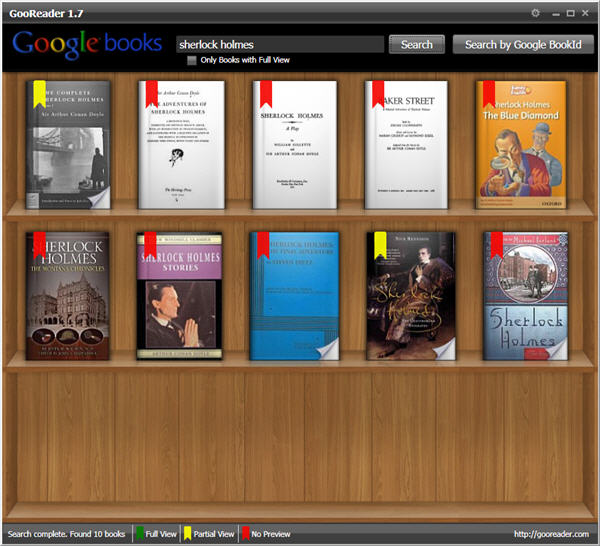
GooReader reminds a me lot of iBooks,  mainly due to its wooden bookshelf background and the way books are displayed – shaped as ‘real’ books, with covers and bookmarks. You can use GooReader to search Google Books by title, author or Google Book_ID. Results are shown on the bookshelf like real-life books, with color-coded bookmarks: green means you can read the whole book, yellow grants a partial preview and red means the book is not available to read.

Continue reading “GooReader, a better interface for Google Books”

android2cloud – Phone to Browser in a Single Step

Even with a fast internet connection and a great mobile device, some websites are just better viewed on a full size computer screen. That’s fine in theory, but what if you’re browsing with your phone and you see something interesting that you would prefer to read later on your computer? Well, Android/Chrome users are in luck. android2cloud is an application that you’ll need to install on your phone and your computer, on the phone in the form of a simple Android app, and on your computer in the form of a Chrome extension.

6.png

If anything catches your attention while you are browsing, just hit options > share > android2cloud. Next time you fire up Chrome, the article or page will be waiting for you to read. You’ll also see a little green Android logo on the Chrome interface after installing android2cloud – click on it, and the last article you pushed will appear.

Unfortunately, android2cloud has a major flaw – it only pushes the very last article you send to Chrome. That means that even though you might notice and send 4 articles, when you open Chrome, only the last article will appear. Presumably the developer knows this and is working on the problem (it’s mentioned in the comments section of his website) and a solution will be forthcoming. When it is, android2cloud will be a formidable Android app.

Google-Verizon: The end of the net as we know it

googleev.jpg

Google, a company that I’ve long admired and currently hold thousands of dollars of stock in, just ‘went evil.’ Adam Green, co-founder of the Progressive Change Campaign Committee, via the Huffington Post.

Wikileaks is great isn’t it? A humble internet project which manages to deal a large blow to concentrated centers of power thus promoting greater openness and democracy. Well you can forget about Wikileaks, and perhaps many of the blogs, websites and applications you use, if Google and Verizon get their way.

Google and Verizon’s recently announced plan for an “Open Internet” is an effort that will open the floodgates to much greater corporate and government control over internet content. Although “Open Internet” sounds very nice, it smacks of doublespeak that would have George Orwell turning in his grave. The plan outlines seven proposals which Google and Verizon claim will ensure that certain internet traffic is prioritized over others by Internet Service Providers (ISPs).

Firstly, it should be made clear that the plan only applies to “internet anywhere” wireless networks (that Verizon conveniently owns huge parts of). It doesn’t apply to fixed-line networks which Google maintain they are still in favor of keeping equal access to, safe in the knowledge that there’s no further money to be made from it because the fixed-line networks and bandwidths have reached their limits. It does not apply to mobile networks as yet either. The big money is now in “internet anywhere” wireless networks – which is why Google and Verizon are trying to shore it up – and what happens with it will undoubtedly have a huge knock-on the freedom of both fixed-line and mobile internet.

What it means for wireless consumers is that they will have to pay more for certain content than others. So for example, if you want to watch video which requires more bandwidth than just surfing pages on the net, you’ll have to pay your ISP more in order to do so. So you can kiss YouTube goodbye if you can’t afford what your ISP are charging for a video enabled service. Or, let’s say you really like using Spotify. Well forget that too unless you’re willing to pay for a streaming enabled account.

Continue reading “Google-Verizon: The end of the net as we know it”

iOS 4.02 update fixes security issues

Plug your iPhone into iTunes today and you’ll be able to update your phone to iOS 4.02. The main purpose of the update is to fix a security flaw with PDF files – it had been discovered that downloading a PDF file in Safari could have allowed potentially malicious files access to your phone.

The secondary purpose is to stop jailbreaking. Jailbreakme offered one click iPhone jailbreaking that used the PDF security flaw. So upgrading to 4.02 will kill your jailbreak, but make the phone more secure.

Surprisingly, the update is over 500mb, a lot for an supposed security fix. I wonder if there are some stability fixes in there too, as iOS4 has definitely been more buggy than 3 (at least on my 3GS).

Check out Apple’s info on the update, where you can also see the iOS 3.2.2 update for the iPad that fixes the same problem.

Android Phone Virus – Do You Need To Worry?

4.pngAs a recent convert to the joys of smartphones, I keep a close eye on the top Android news. I was pretty surprised to read two pieces of scary news in a single day recently. Over in the UK, veteran broadcasters the BBC have apparently created their own malicious smartphone app to see how easy it would be to track users and steal data. It was deliberately a very simple code masquerading as a game and, unfortunately for us, it worked pretty well.

Meanwhile on the other side of the old continent, Kaspersky Labs claims to have discovered the first Trojan specifically targeted at Android in Russia. The malicious code is apparently disguised as a media player and, once downloaded, sends text messages to a premium number without the owner’s knowledge.

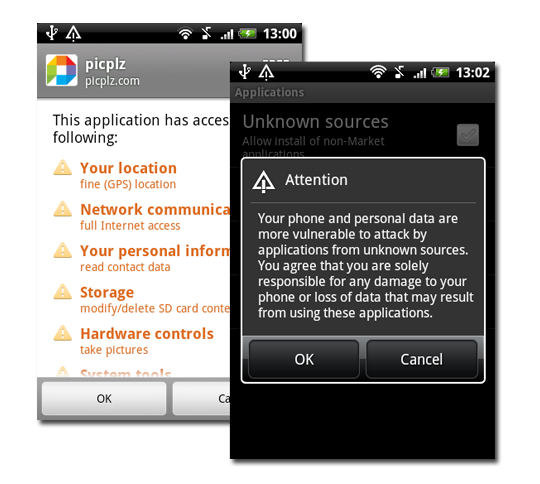
Even though we always take virus warnings from anti-virus manufactures with a pinch of salt, the concept of new risks for smartphones isn’t surprising – if there’s a new device out there that hasn’t been infected with something nasty, it’s just a matter of time until it is. Even so, all you Android users out there need to be aware of two things in the midst of all this hysteria: firstly, anybody who was infected with the trojan installed the software willingly. Secondly- and most crucially –  they also had to give it explicit access to the features it misused.

3.png

Google, Android’s developer, reminds users that any software downloaded in their Market has built-in protection against this, in the form of a stopscreen that explains exactly what items an application from the Market will be able to access. Third-party apps don’t have that extra layer. Viruses suck, but I think that in this particular case, we can safely conclude that the infected users pretty much brought the problems on themselves. Being OnSoftware, however, we’re not going to leave the paranoid among you without any options. If you really do think you’re running a risk, check out Antivirus. We don’t though, so rest easy, responsible Android users, you’re safe!

What’s new in Gmail’s interface

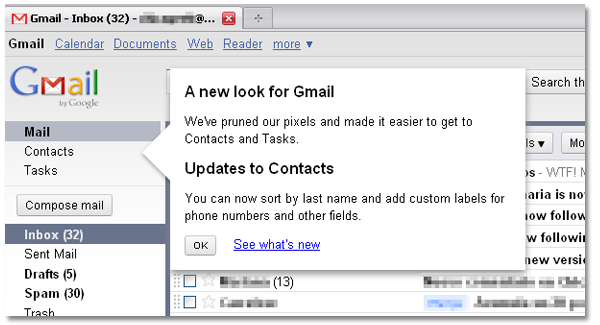
This morning I logged in to my Gmail account, like I do everyday, but I noticed something different. Yeah, Gmail’s interface has been slightly redesigned to make it a bit friendlier and easier to use.

What’s new in Gmail interface

The first thing that caught my eye is that now Mail, Contacts and Tasks have been separated from the rest of links on the left sidebar, and moved upwards. The Compose mail function is now a button, rather than just a text link that was sometimes hard to find.  Also, the different options to select messages (All, None, Read, Unread, Starred and Unstarred) are now neatly organized in a drop-down men, besides the Archive button. Continue reading “What’s new in Gmail’s interface”