Interview: Dofus, the MMORPG that dares to be different

Dofus is an MMORPG from French developers Ankama. It comes in a free-to-play version, and a premium which is much larger. Massively popular in France, it has beautiful cartoon art and an original fantasy setting (yes that is allowed, World of Warcraft!).

Of all the bigger MMORPGs, Dofus is one of the more unusual. We talked to English Content and Community Manager Izmar and Marketing Manager Ingrid about the game, follow up title Wakfu, and its adaption from French into English.

Dofus is very humorous. Was it difficult translating jokes into English? How did you deal with cultural references?

Localization is always a challenge, but our translation team has that great combination of cleverness and creativity that keeps the game text lively and relevant, just like the French version. The translators always try to maintain cultural references when it’s possible for our English-speaking players to enjoy. If the French contains a reference that simply can’t cross the language barrier for whatever reason, they’re not ashamed to draw on American, British, or Canadian sources to make the players smile.

Continue reading “Interview: Dofus, the MMORPG that dares to be different”

Three ways to open DOC files without Word

Whether you like it or not, DOC files are a standard for sharing documents online these days. The problem comes when someone emails you a DOC file and you don’t have Microsoft Office installed on that computer. Don’t worry: even if you don’t have Word on your system, there are other ways to open DOC files without Word – and all three of them for free:

1. Google Docs

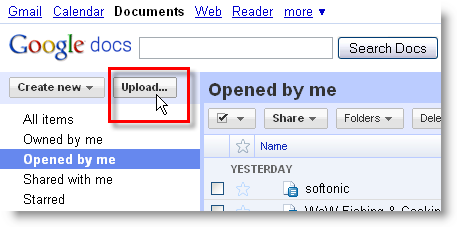
Google’s online suite not only creates and saves documents as DOC, but also works with DOC files imported from your hard drive. So if you ever find yourself with a DOC file on a Word-less computer, head to Google Docs in a web browser and click the Upload button. You’ll be able to import files from your hard drive, up to 1024 MB – 500 KB per DOC file.

Three ways to open DOC files without Word

Continue reading “Three ways to open DOC files without Word”

Mafia II PC demo out now

2K Games has released a demo on Steam for their mob sequel Mafia II. Set in a New York-influenced city named Empire Bay, it features the well worn mix of narrative and open-world sandbox game that has made the GTA series so popular.

The original game was much drier than Rockstar’s OTT gangster series, and I’m interested to see whether Mafia II can compete with the histrionics of Niko Bellic and the other GTA protagonists.

Download the demo via Steam, and check out my Mafia II demo review here.

How to: Create a tilt-shift effect in two clicks

A while ago I wrote a tutorial about how to create a tilt-shift effect with Photoshop. It was quite simple – as simple as a Photoshop tutorial can get – and the results were very eye-catching. But today I found an online application that can achieve the same effect in a much easier way: TiltShiftMaker.

Create a tilt-shift effect in two clicks

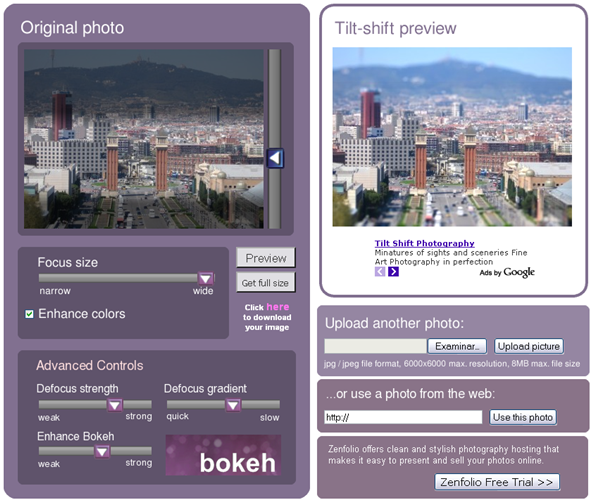
With TiltShiftMaker you can create awesome tilt-shift effects in under five minutes, without the hassle of having to deal with a big photo editor like Photoshop. All you need to do is load the image from your hard drive – or point to its URL if it’s online – and adjust the focus size. There are also a few advanced settings to fine tune the result, which you’ll find explained at the bottom of the page.

Create a tilt-shift effect in two clicks

TiltShift includes hints and tips on how to create better tilt-shift effects, as well as links to the app’s Photobucket group album and Flickr group, so that you can share your best shots with other people.

Top 5 applications for free music

As the major music labels slowly continue to wake-up to the fact that the future of music lies online, more and more services are offering music streaming. Rdio, from the makers of Skype, is the latest offering and enables users in the USA to listen to a catalog of 7 million songs for around $9.99 a month on their desktop and mobile device. However, there are still plenty of applications out there that deliver music for free. Here are 5 of the best – note that all of the basic versions of these applications are free but most have a premium version which offers ad-free listening or other enhancements:

spotify.jpgSpotify (Europe only) The moment I tried Spotify, I was blown away by its ease of use, elegant interface and most importantly, enormous back catalog of music. That’s not to mention the excellent streaming quality, mobile integration and most recently, social networking features that make sharing music on Twitter, Facebook and via e-mail easier than ever.

lastfm.pngLast.fm Last.fm was one of the first free music applications on the net and its still going strong. Last.fm is a radio application that delivers songs to you based on your own music interests. It’s similar to the Radio function in Spotify which was clearly inspired by the Last.fm concept. You can also use it to listen to your own music and as it “scrobbles” what you’re listening to its server, it suggests other songs and artists you might like.

pandora.pngPandora (USA only) Pandora was another early innovator in free online music distribution and offers listeners free music from their favorite artists as well as suggesting other music you might like. Started as part of the Music Genome Project back in 2000, it works via a series of “channels” which you can refine and modify according to your music tastes.

gshark.pngGrooveshark With still only around 400,000 users, Grooveshark is often overlooked by music fans but its popularity is still growing as more people prefer the concept of a web application to a desktop one. Grooveshark Radio is one of the things that continues to attract users by allowing them to find music that other like minded users are listening to using a “thumbs up” and “thumbs down” feature.

hypem.pngHypem An MP3 aggregator rather than an application, Hypem (full name The Hype Machine) is one of the best ways to find the latest cutting edge music that you won’t see heavily featured in any of the above apps. The reason is because Hypem monitors music blogs and those writing about music that have uploaded music online and brings them all together so you can listen to what’s hot.

Calculate taxi fares using Bing Maps

I’m really starting to fall in love with Bing Maps. Last week, I was blown away by the preview of the slick new Street Slide feature in Microsoft’s online mapping tool. This week, Microsoft has added another great feature to Bing Maps – a taxi fare calculator.

The Taxi Fare Calculator is available now on the Bing Maps web site, appearing in the sidebar of the map page. All you need to do is select a city and  enter your start and destination points. The app will calculate how much the total fare will be, factoring in initial charges, waiting time fees and the price per mile for taxis in that particular city.

Bing Maps

Luckily, my city is one of the 48 in the World covered by the Taxi Fare Calculator, and I’ve been finding the Bing app very useful. Results aren’t always completely accurate, but they’re not far out. It’s perfect for figuring out if it’s worth being lazy by not walking somewhere.

It’s a bit clunky to use at the moment, but Taxi Fare Calculator is the exactly the kind of simple, useful innovation that Bing Maps needs in order to compete with Google Maps. However, I would love to see the app added as a feature to the Bing Mobile app too, because it would really come into its own out on the sidewalk.

Get the best bargains online!

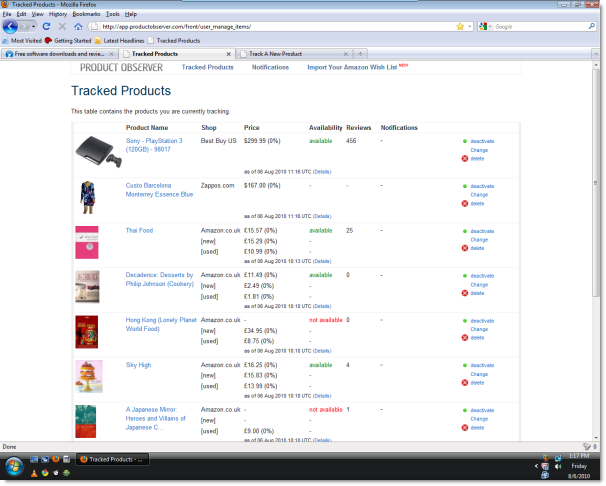
If you like online shopping, you’re going to love Product Observer, a new Firefox add-on that monitors your favorite products and alerts you when the price has dropped below a certain level.

large.png

Product Observer doesn’t limit itself to price, however. You can also choose to be notified if an unavailable product becomes available or, in the case of certain websites, if the number of product reviews reaches a certain level. Currently, the add-on supports Amazon (.com/.ca/.co.uk/.fr/.co.jp/.de), BestBuy.com, Newegg.com, Zappos.com, Borders.com, Overstock.com and Argos.co.uk.

Amazon users will be doubly pleased to find out that Product Observer also supports Wish Lists. Just fill in the URL of the wish list, and Product Observer will automatically fetch the list and allow you to tweak notification criteria for each and every item.

You don’t need to register for Product Observer – instead you’ll be given a randomly-generated ID that you can use to identify yourself. If there are lots of products you are interested in, setting up the notifications can be a bit of a chore, but once it’s done, it makes chasing a bargain easier than ever. Obviously we’ll need to give the add-on a longer trial run to see how it really performs, but I definitely like the look of it and will be installing it on my laptop as soon as I get home.

Happy Shopping!

How to search contacts in Adium

adium.pngAdium is the Instant Messenger client of choice for hundreds of thousands of Mac users. It’s simple, lightweight, easy to use and supports almost any IM network. However, it is severely lacking in certain areas. The lack of webcam support is one of the most glaringly obvious but perhaps most basic of all is the lack of a contacts search tool.

A search function has been slated to be added in a future release of Adium but as yet, we’re still waiting. Therefore, the only way I’ve found of searching contacts is to improvise.

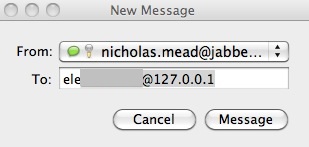
If you press CMD and the N key when Adium is active, a new chat window will open:

adium2.jpg

Start typing the name of the person you want to contact in the To: field and Adium will automatically predict the rest of the name of the contact.This is fine if your contacts all use their real names. However, if you’ve got hundreds of contacts with aliases such as “*STEVE25!***Helloall!***” it doesn’t make things much easier!

Let’s hope Adium introduce a decent powerful search tool that the client surely deserves.

Timewaster: Tower of Heaven

This little game was originally a Windows-only download that I really liked and finally it’s been ported over to Flash so we can all enjoy it. Presented in glorious Gameboy-like green monochrome, along with a great chip tune soundtrack, Tower of Heaven sees you attempting to reach the top of a tower. Your journey is made more challenging by the malevolent god who is watching your progress. You’ll be given a ‘Book of Laws’, which adds more and more rules to the game, vastly increasing your chances of dying!

It might be tough, but Tower of Heaven is great fun, and the retro touches are just perfect. Head over to Newgrounds to check it out.

New features of BlackBerry OS 6 explained

BlackBerry Torch 9800This week, RIM showcased BlackBerry OS 6 running on its gorgeous new Torch 9800 touch/QWERTY smartphone. The new operating system was described by RIM President Mike Lazaridis as “not only fresh and exciting but also familiar”.

Familiarity is something that we’ve seen a lot of from recent BlackBerry OS updates and it often gets interpreted as a failure to innovate. However, there are enough changes in BlackBerry 6 to back up Lazaridis’ promise of something a little more different this time out.

The new operating system features a WebKit browser, designed to provide a quicker and more reliable web browsing experience. It will also support tabbed browsing for the first time, making it easier to flick between pages on the web. The browser will include an auto-wrap text zoom feature that reformats articles to fit the size of the screen.

Other features of OS 6 that Lazaridis highlights in his presentation of the Torch include the new Universal search and Universal inbox. The new search system will allow you to search feeds, email, contacts and settings all from one place, simply by typing keywords. Continuing the theme of integration, Universal inbox pulls together both email and feeds from social networks such as Twitter and Facebook into one place. Open a piece of communication and it will open instantly in its native environment. Click on the Back button and you’ll be taken straight back to your inbox. Continue reading “New features of BlackBerry OS 6 explained”