Google provides more details of Chrome OS

One of the most anticipated releases of the year is Google Chrome OS and Google have provided a few more tantalizing details of what to expect.

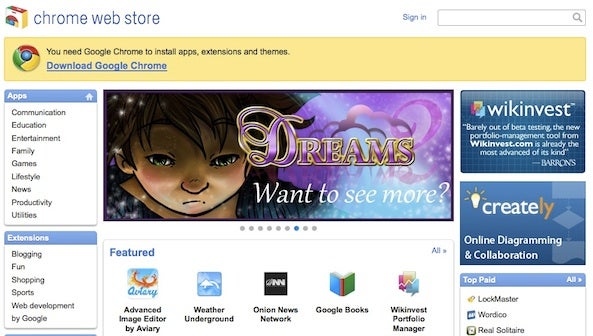
The Google Chrome Press Conference in San Francisco last week revealed some interesting features including a Chrome OS Web Store where users will be able to download software and applications.

Netbooks running Chrome OS will also be available early next year from manufacturers Acer and Samsung.

Larry Magid of Mercury News saw the OS in action at the conference and reports that users can expect super quick installation times based on your Google account info that will put Windows and even OS X to shame:

When you first get the machine, you enter your Google account information, which is all the operating system needs to configure your machine. And if you change machines or use someone else’s, you can log on with your credentials and have immediate access to your data, which is stored in the “cloud” on Google servers.

The other good news is that some applications, including Google Docs and Spreadsheets and even some games, will also run when the machine is not connected to the net and then sync data when you reconnect.

Best of all, Google Chrome OS will be completely free. All we need now is an official release date but judging by the increasing amount of information Google are teasing us with, it looks imminent with early 2011 a good bet. Until then, don’t forget to check out our video review of the source code version of Google OS.

Delete, import and manage iPhone photos on Mac

Image Capture is a little application in OS X that allows you to easily and quickly manage your iPhone or iPod’s camera roll.

Your iPhone photo library can quickly become enormous, and deleting unwanted pictures one-by-one soon becomes an unpleasantly laborious task you’ll simply ignore. You can import your images to iPhoto, and use that as a way of managing your images, but it’s still pretty unwieldy.

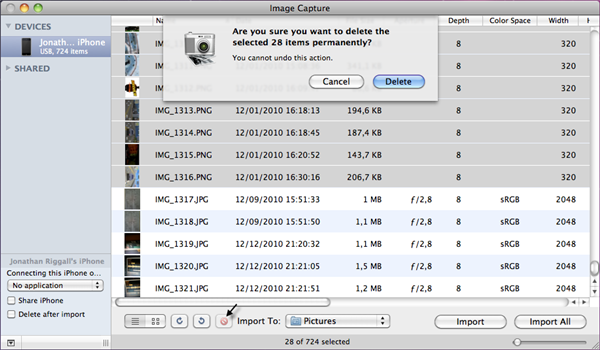
The quick solution for Mac users is Image Capture,  a little application hidden away in OS X that many users are unaware of. To find it, simply tap it into the search in Finder. Connect your iPhone, open Image Capture and you’ll be able to browse the photos on your iPhone.

From here it’s easy to import any you want, drag and drop them onto your desktop, and rotate them. Better still, you can select images in bulk and delete them! Image Capture is a faster and lighter way to manage your iPhone camera roll, without the hassle of iPhoto.

Share web content lightning fast with Cortex for Chrome

Google’s Chrome browser just got a little cooler. In recent months, lots of hype has surrounded browsers like Rock Melt and Flock that integrate social networking sites into side bars. In an apparent move to keep pace, Google just introduced Cortex, an extension for Chrome.

Google claims that Cortex is the fastest way to share content on the internet with friends and family. After a quick test run of the extension, I’m inclined to agree. This is saying something indeed, as browsers like Rock Melt have made it especially easy to share content without ever having to actually log into sites like Twitter or Facebook by browser.

After installation, the Cortex extension requires just one simple click to begin sharing content. From there, a click wheel will appear, allowing you to share the web page you’re viewing on Twitter, Facebook, Tumblr, or Instapaper. You can even pick specific Facebook friends with whom to share the content and add a personalized message on any of the interfaces. And as claimed, sharing on Cortex is super fast. What’s not to like?

Best iPhone apps for Christmas shopping

Haven’t done any Christmas shopping yet? Getting annoyed that your peers gloating that they’ve already finished all of theirs? Don’t worry, you can get that horrible knot out of your stomach simply by installing a handful of applications on your iPhone. These apps will help you to get all of your Christmas shopping done without even getting up out of your seat.

Amazon Mobile

Amazon MobileAmazon is a foolproof destination for anyone stuck for gift inspiration. This pocket-sized version of the site makes it easy to browse through the huge catalog of products and order instantly from your phone using the 1-Click ordering feature. The application even allows you to search for people’s wish lists, meaning that you don’t have to worry about getting friends and family the wrong presents again!

eBay Mobile

eBay Always great for finding bargain basement gifts, and it’s app provides a slick way to search, bid and monitor auction activity from wherever you are. Because you can access it anywhere, you can make sure you never miss out on an item because you weren’t around to monitor the bidding. There’s also an iPad version of eBay, which makes looking for cheap deals all the more pleasurable.

Apple Store

Appl Store AppIf you’ve got a bit of cash to throw around, you might like to treat your geeky loved ones to some Apple goodies. The Apple Store app offers a wonderful way to browse the company’s highly desirable product line. You can purchase Apple products and accessories directly from the app, and even add engraving or gift wrapping to items to make for a more personalized present.

TheFind: Shopping

TheFindThe perfect anti-crisis Christmas app, TheFind: Shopping helps to ensure you get the best possible deal on every gift you buy this season. It allows you to search for any product, then get price comparisons from a wide range of retailers, before showing you where to buy, through a link to the online store or a map showing where the nearest outlet is. TheFind: Shopping even includes a barcode scanner for finding better deals while you’re actually out shopping!

CheckPoints

CheckPointsOffering a more enjoyable way to do your Christmas shopping, CheckPoints instantly rewards you for buying stuff in stores.  Scan products using your phone and you’ll get CheckPoints, which can be redeemed to get all sorts of goodies for free. The app and the service are free to use, and CheckPoints will even throw in 200 points to get you started when you install the application.

Toys “R” Us

Toys R UsA trip to the Toys “R” Us store at this time of year is about as advisable as taking a picnic in wartorn Afghanistan. It’s got some great stuff for the kids though, so install the official Toys “R” Us app on your iPhone and use it to browse and purchase products without setting foot near the store. Features of the app include deals and special offers, customer ratings and reviews, and detailed item views.

Target

TargetSniff out the best Target Christmas offers with the store’s official iOS application. The app allows you to search for a specific product or peruse by category, before completing your purchase through the integrated cart and checkout. The Target app includes a barcode scanner for finding instant details, reviews and availability of products that you find in the store.
Spotify not coming to the US in 2010

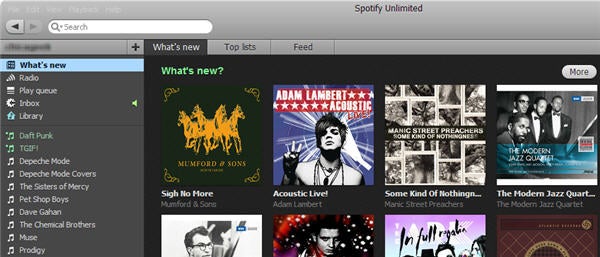
Spotify is one of the most popular music streaming services in Europe these days, but US residents are unfortunately still blocked from using it. Though the Swedish-based company had promised to launch in the US before the end of 2010, it seems Americans will still have to wait for a while before they can enjoy the wonders of Spotify.

According to a recent interview with Spotify CEO Daniel EK, the problem is that they haven’t been able to reach consensus with US record labels yet. The negotiation is taking longer than expected, and in turn delaying the launch of this awesome music service in the United States, which was scheduled for this year. Now, three weeks before 2010 ends, it’s highly unlikely that Spotify will reach an agreement with record labels in time to keep their promise. In Ek’s words, “we are definitely going to do the U.S., but I can’t commit to a specific date.”

On the other side, Spotify is doing great, with 750,000 Premium subscribers and a fast growing rate, thanks mainly to the convenience and accessibility of Spotify Mobile and Spotify’s integration with social networks.

Google’s Nexus S to be released with Android 2.3

One of the most universally cited frustrations of Android users is the slow pace at which mobile service carriers release updates. Unlike the iPhone, it is generally up to cell phone providers to determine when their customers receive Android updates. Without much incentive to provide updates immediately, many cell phone users who have Android phones are consequently left waiting indefinitely.

This will change when Google’s Nexus S is released next week in the U.S. and shortly thereafter in the United Kingdom. The predecessor to the Nexus One, the Nexus S is manufactured by Samsung Electronics. A service contract can be purchased in the U.S. starting on December 16 through T-Mobile.

The Nexus S will come with all the advanced features you would expect from a smartphone of its caliber. Its biggest draw though is probably that it comes pre-installed with the latest Android release: Gingerbread (2.3).

Since Google is also Android’s primary developer, the company promises to release Android updates to the Nexus S more quickly than other phones will likely receive it. This is just one part of what the company is calling the “pure Google experience” new Nexus S owners will be able to take advantage of. This additionally means that the third-party software that burdens other Android phones will not be a problem for users of the Nexus S.

For smartphone users who want the latest Android technology as quickly as it’s available, then, the Nexus S seems like a good bet.

Tips to optimize your next video call

The holidays are fast approaching. Unfortunately, not everyone has the option to visit their loved ones during this time. Long-distance calls can get expensive, especially if you have a lot of people with whom to connect. As a consequence, people are increasingly turning to free video chat programs like Skype to call their loved ones on special occasions.

For those who are new to video calling, here are some simple tips you can implement to improve the quality of your call.

Sound Quality:

If you hear your voice echoing or repeating what you’ve already said over the feed, there’s an easy way to fix this. Usually what’s happening is the receiving computer on your loved one’s end is bouncing your voice back to your own PC. Wearing headphones during your call is a quick and easy way to fix any echo or voice repetition difficulties you’re having. Virtually any set of headphones will do, so there’s no need to go out and spend lots of money on a professional headset, by any means.

Continue reading “Tips to optimize your next video call”

Google launches its own ebook store

Google has announced eBookstore, the new online ebook store powered by the giant, just in time for the holiday season. It’s not just another website where you can buy ebooks; the Google eBookstore is already one of the largest ebook collections in the world, with more than three million titles available since day 1 – including the latest bestsellers from the NY Times and the classics we all should read at some point in our lives.

The Google eBookstore has been launched with quite a different perspective than similar businesses like Apple iBooks or Amazon Kindle books. “We designed Google eBooks to be open,” says Abraham Murray, Google Books Product Manager. And certainly they are. These ebooks are bought online and stored in the cloud, in a private personal library with unlimited ebook storage accessed with a password, just like you use Gmail.

Google eBooks can be read on multiple devices and synced across them, from desktop computers to netbooks, including tablets, smartphones, and ereaders. The files are downloaded in ePub/PDF format, which makes them compatible with a large number of devices – but leaves others , like the Kindle, out of the list.

You can buy new ebooks from the Google eBookstore itself or from any other of Google’s independent bookseller partners. There’s no official statement about the price, as Google will let editors decide that for themselves – together with the use of DRM in their titles.

The Google eBookstore is currently only available in the US, which leaves Europeans looking forward to the day when it works on the other side of the pond. It’s certainly an interesting third competitor in the ebook market (besides Apple and Amazon), taking a different approach and launched at a perfect time: just in the middle of the holiday shopping frenzy.

Cataclysm hits WoW players around the globe

The wait is over. World of Warcraft Cataclysm, the new expansion set for the most popular MMORPG game in the world, is finally here. Several retail stores in the US, Canada and many European countries held special launch events to celebrate the release of the expansion, which brings more characters, more land to explore and more levels to achieve.

Cataclysm is the third World of Warcraft expansion set, after Burning Crusade (2007) and Wrath of the Lich King (2008). Besides increasing the top character level to 85 and the top profession level to 525, Cataclysm also brings all sorts of new stuff for WoW players: two new races (worgens and goblins), a new secondary profession (archeology), new zones (Hyjal, Vashj’ir, Uldum, Deepholm, and Twilight Highlands), new dungeons (Blackrock Caverns, Grim Batol, Halls of Origination, Lost City of the Tol’vir, The Stonecore, Throne of the Tides, The Vortex Pinnacle) and four new raids, among other features. It’ll also be the first time that players can fly over the game’s entire world, including the oldest areas of Azeroth.

That’s certainly a lot of new stuff, but let us not forget that this game was launched for the first time in November 2004 – yes, that’s six years ago – and Blizzard want to make sure long-term WoW players have new challenges from time to time to keep their interest in the game.

To start playing in World of Warcraft Cataclysm, you only need to buy the expansion DVD (or download it via Battle.net) and install it on your computer. No additional patching is needed. If you’re in-game when Cataclysm goes live, you’ll get a notification asking you to log out of the game and log in again in order to have full access to the new content. Bear in mind though that there have been login issues on the European servers for a few hours, so it might take you a while before you can actually take a peek at the new Azeroth.

World of Warcraft will run on Android

Calling all Android phone owners: start warning your friends and family that you’ll soon stop all contact with them – World of Warcraft is coming to Android! Or at least, so it seems from this video, which demonstrates the addictive MMORPG running on an Android device, via GameString.

GameString is a new service that will allow you to play 3D games from your PC remotely through your browser. As pocketnow.com reveals, GameString  will also enable a “streamlined UI overlay” optimized for touchscreens, to allow gamers to play games from a host machine on their phone.

Other interesting features of the new GameString platform include the ability to broadcast live gameplay from your PC to streaming services such as Justin.tv. It will also let you invite other users to play your games remotely. According to its site, there are still 44 days left until the Beta launch of GameString, but you can sign up to use the service for free as soon as it becomes available.