How to: Back up your Gmail account

If you use Gmail as your primary email, you might have been worried by last night’s glitch that left almost 0.08% of accounts empty. Fortunately, it’s really easy to back up a Gmail account!

Here are the three most practical ways to do it:

1: Enable Offline Mail

Click the Gear tab on the top right of the Gmail interface, choose mail settings and you’ll see a tab called Offline. To turn on Gmail Offline you have to install the Gears Plugin (standard in Chrome), but you are taken through this simple process as soon as you click Enable.
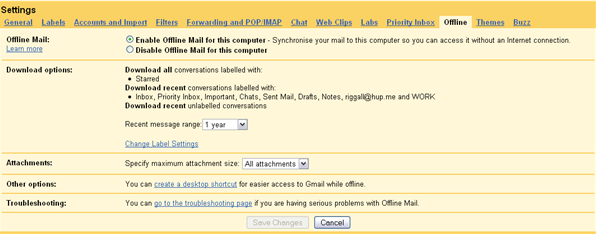
You can configure how much and what of your email you want to download, and which folders. Once it’s all downloaded you’ll have offline access from your desktop.

2: Use a desktop email client.

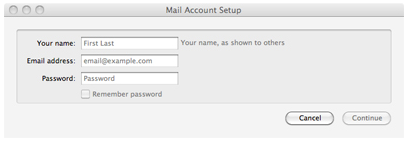
Download Mozilla’s excellent Thunderbird desktop email client, then go to Gmail settings again and check Enable POP for all mail. Run the Thunderbird installer, and it will ask you for your email address (add your Gmail address here) the first time you start the program – and unless you want to get into any complicated set-up you can then just let Thunderbird download your entire Gmail account. Easy!
3: Backup with Hotmail

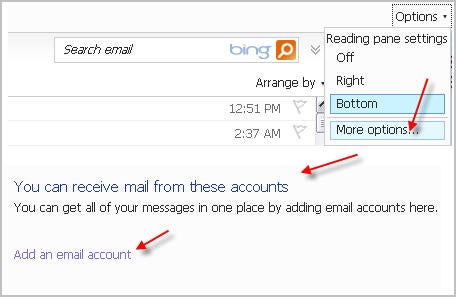
It might be crushingly uncool, but Hotmail is a useful space-saving way to back up your Gmail. Simply create an account, sign in and click the options question mark on the top right then choose more options. Here you’ll see a link saying Sending/receiving email from other accounts. This will allow you to add your Gmail account really easily, with no technical knowledge needed, and won’t use any of your hard disk space!
There are other apps and methods of backing up your Gmail account, but I think these are the best and simplest solutions.

Access your PC or Mac from your iPad with GoToMyPC

An iPad version of GoToMyPC has been released today, allowing users to access and control any Mac or PC using their Apple tablet.

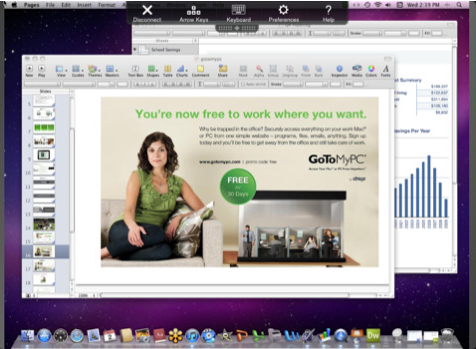
The new app gives you instant access to your files, programs and network from your iPad, allowing you to control your computer through intuitive touch and gesture controls. GoToMyPC for iPad features full keyboard functionality, including special keys, along with a preview text mode for faster typing.

GoToMyPC for iPad

GoToMyPC can work through existing firewalls and boasts 128-bit AES encryption and end-to-end user authentication to keep everything nice and tight.

You can download the iPad version of GoToMyPC for free, from the App Store. However, a subscription is required in order to use the program, with prices starting at $9.95 per month per computer. A free 30-day trial is available, but you still need to give away your credit card details in order to get this.

Create your very own Oscar pool for free online

This coming Sunday February 27 ushers in the 83rd Annual Academy Awards, otherwise known as the Oscars. If you’re a huge film buff, you’ve probably already seen all the nominated movies and RSVPed for your Oscar night party of choice. If you want to obtain true movie expert bragging rights however, you’ll need to step it up a level this year and create an Oscar pool for friends and family online.

Here are three free web apps that’ll help you do just that:

Picktainment Oscar Pools: Create a public or private group with as many members as you want for free with this useful online tool. Members can cast their ballot choices any time before the Oscars actually start on Sunday. In the interim, anyone who’s a part of your group can also post on the group’s wall in a way similar to Facebook. Picktainment also offers pools for American Idol, Dancing with the Stars, Celebrity Apprentice, and the X Factor, among other popular televised reality and awards shows.

RocketPool.com: One of the most enjoyable aspects of participating in pools for some people is placing bets with their friends and gambling to win a prize for having the most correct guesses. RocketPool gives you that option, without actually putting a dent in your bank account. The site offers you the option to bet $nollars, the site’s own version of Monopoly money. Place your bets using this fake money system to make the stakes seem a little higher. Then, breathe a sigh of relief if you end up losing when you remember you weren’t playing for actual money.

FunOfficePools.com: This web app is also completely free and allows you to set up Oscar pools with friends and family. Much like Picktainment, you can choose whether to make your group public or private for your next Oscar predictions contest. There are also other pools related to reality television and sporting events available.

Five great free mobile cricket games

If you can’t get enough of the action from the Cricket World Cup then why not install some free cricket games to play on your phone in between matches? Here’s a selection of some of our favorites:

Cricket3D (Java), Free

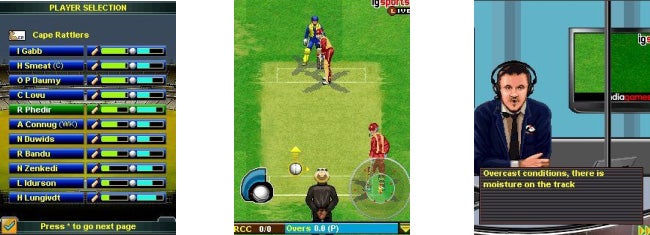
With its precise, detailed control system, Cricket3D really tests your cricketing skills (or at least your ability to read the game). Games in Crciket3D are limited to just two overs, and the object is to score more runs than your opponent with these 12 balls. The graphics won’t bowl you over, but the Aussie commentary in the game is great.

Cricket3D

Cricket League of Champions (Java), Demo

Cricket League of Champions is a challenging Twenty20 mobile cricket game where you get to go for cricketing glory. The demo version of Cricket League of Champions allows you to play a one-off ‘quick dual’ match of five overs. You can pick from a range of international teams, and get total control over your bowling and batting line-ups.

League of champions
Continue reading “Five great free mobile cricket games”

Instagram releases official public API

The photo-sharing mobile app Instagram, launched only a few months ago has just released its official real-time API. Instagram is not the first of its kind to open a public API – its direct competitor PicPlz already took this step – but in any case this is great news for the two million people who are sharing pictures and comments on the popular photo sharing network.

Thanks to the Instagram API, third-party developers will be able to create new apps and tools based on the photos that are being published to Instagram. The API is read-only at the moment, and enables developers to grab images according to tags, locations and geographies as they’re posted to the network.

The Instagram API is an important stage in the spreading of this app – currently only available for the iPhone – to other platforms and applications. You can already see it in action in Foodspotting, a food-sharing app, and Dropbox, a file-storage service. The first one will display all your Instagram photos tagged with #food or #foodspotting, while the second one will create an automatic backup copy of your Instagram images in the cloud. Other apps and services that plan to make use of Instagram’s API soon are Flipboard and About.me.

According to Instagram CEO Kevin Systrom:

“We really wanted to push our API to the next level to support a new kind of interaction around photos — one that supported the real-time nature of the content that people create on Instagram. We’re really excited about creating a more open platform. We will continue to focus on building our own application for Android, but we see the API as a way to reach more users on more platforms right now”.

Google launches recipe search engine

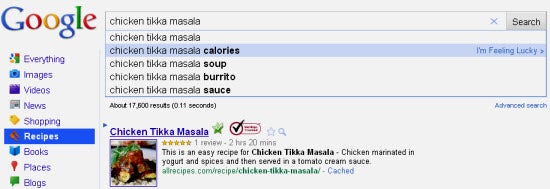
Today the search engine giant Google announced the launch of a search engine dedicated to finding recipes for all your cooking-related endeavors. Currently located in the More tab of your Google search immediately under the Shopping view, all you have to do is type in a favorite dish, and Google has you covered.

This might seem like a relatively small niche area to be diving into, but Google claims its popular search engine receives about 10 million recipe searches a day. This is a mere one percent of Google’s entire daily search volume, but it was apparently enough to give the topic some attention and development.

This is a great service for anyone who just wants some great recipe suggestions and those who are more health-conscious alike. Users can now search recipes for a variety of different factors such as calorie counts, individual included or omitted ingredients, cook time, and recipes from particular online cooking publications. It’s even possible to search recipes based on holidays and get some great results.

Move over, web and phone apps like Foodily and Epicurious. There’s definitely a new recipe finder in town, and its scope is undeniably impressive.

New Features in OSX Lion

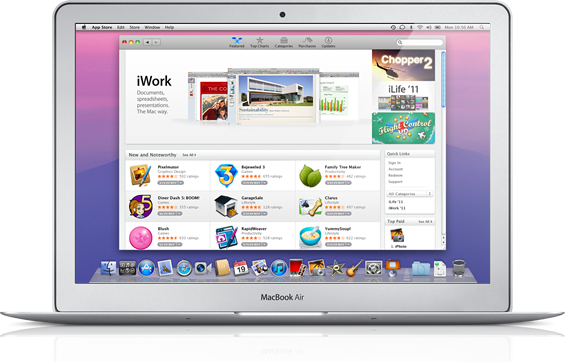
Apple today released the Developer Preview of Mac OS X Lion. This gives us a better look at features coming to OS X that were first announced last autumn. Apple are billing Lion as a meeting of the best of OS X with the lessons learned from the iPad.

Obvious imports from the iPad are the gestures, like pinch zooming and so on, and the introduction of iOS-like app displays. You’ll be able to browse your installed apps just like you do on the iPhone, and navigate them with gestures via the touchpad.



Document-based applications will now auto-save, which should eliminate one of computing’s most common gripes –  ‘I lost all my work’! There’s also a new way of copying files between Macs called Air Drop, which apparently requires no setup and makes the process much simpler.

There are also some neat visual touches, like overlay scrollbars brought in from iOS. The most interesting change I saw, though, was how apps will be handled…

A new system that manages your applications called Resume has been introduced. The state of an app will be saved when closed, so you can reopen it just as it was. That’s interesting enough, but more so is that Resume will automatically close apps you aren’t using, saving their states and therefore using less system resources. This will reduce energy use without inconveniencing users. For all of you that like to run ten applications at once, you’ll now be able to do that with a clear conscience (and a cooler computer)!

OS X Lion is due for commercial release this summer.

How to Unlock the HOP Easter Egg in Doodle Jump

Here’s an early Easter present for you: a trick to unlock a new character in Doodle Jump. The latest version of the mega popular iOS game includes a hidden ‘Easter egg’ that lets you play as rabbit E.B., the star of upcoming movie, HOP. The trick also adds a candy-filled Easter theme to Doodle Jump.

To get this new look and play as the mysterious bunny, you need to change your name to either “E.B.” or “HOP”  at the Game Over screen. E.B. will then replace the little green alien when you restart the game!

HOP Easter egg in Doodle Jump

Interview: Angry Birds’ Ville Heijari

We were convinced we had a hit!

At last week’s World Mobile Congress, our OnSoftware France colleague, Alexandre Carlier, caught up with Rovio’s head of marketing, Ville Heijari, to ask him all about their hit phenomenon, Angry Birds.

How did you come up with the idea for Angry birds?

In 2009, we were looking into developing something for the iPhone. We were seeing that the iPhone was getting a good market share and apps were selling more and more all the time. Everybody was talking about the ‘hockey stick’ –  that just around the corner the market would really explode. Samsung said here on Sunday that their smartphone sales grew 60% in 2010. So when we released the game in December 2009, we got in at precisely the right moment.
In early 2009 we were looking at how to make the best possible smartphone game for as large an audience as possible. Our designer, Jakko Iisalo, came up with the one concept that had angry birds in it and the game was then polished over the year; it took about 8 months from start to finish. The original concept always had the birds in it. We were looking at what was out there in the market, what people were playing, what feels natural, what feels good and so on. We came up with the parameters that it has to be ‘physics based’, have really good direct touchscreen controls that feel nice and then, most importantly, to differentiate from the competition and have really unique characters. Those were the main ingredients that we put together.

How did you manage the launch of the game?

It took us three months to get featured in a major iTunes store, in the UK in February 2010. But before that really it was just word of mouth. As there are relatively few downloads in Finland, we were in the charts there and being number one generates interest. From there came Sweden and Denmark, so small local markets, but then we were number one in several countries and they (Apple) started to take notice and then we got featured in the UK. From there the game started getting some media in the English speaking press, so the leap to the US wasn’t that big or difficult.

How did the cost of developing the game compare to your revenues?

We don’t have all our figures from last year yet, but on iOS alone we’ve sold over 20 million downloads. The game cost around €100,000 to make and with all the updates and improvements since its release, I’d say it has cost many times that. It’s a big investment to get moving and keep the ball rolling.

With all the new users we are getting, however, it’s definitely worth that investment. There are over 20 million Android users too, and by the end of last year that was generating a million euro in ad revenue per month. We are now looking at investing in growth, to branch out to into merchandising and entertainment and to do other things with the brand.
Continue reading “Interview: Angry Birds’ Ville Heijari”

Display your portfolio online with Carbonmade

Aspiring artists, take note. The best way to get your work noticed and to be taken seriously in the professional world is to have a portfolio available online. This allows potential clients to view projects you’ve done in the past and get an idea of your specific skill set.

Not skilled at web design? No worries.  Carbonmade has you covered. A tool to help you manage your portfolio online, Carbonmade’s primary goal is to keep your images, videos, and writing at the forefront. There are a variety of different portfolio design styles from which to choose, as well as examples you can take a look at to give you ideas for your own page.

There are both paid and free portfolio options. Depending on how much work you want to display, the free option that allows you to display five projects and up to 35 pictures will get you started. With numerous different available layouts for you to choose from and a short URL of your choosing, it’s simple enough to add your portfolio to your resume or cover letter and show off your creative work.

For those still on the fence about signing up, Carbonmade offers a free demo of how the service works as well. Convinced yet? If so, check out some of our design and photography software programs to get your creative projects looking their very best.