Twitter for iOS updated

The official Twitter app for iOS has been updated to 3.2.2, and although it contains various bug fixes it doesn’t bring in the fix many users have been calling for.

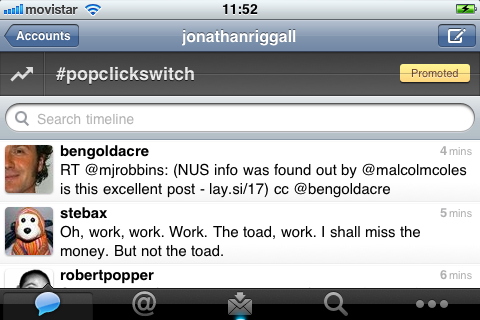
Since the beginning of March, Twitter’s new  ‘Quick Bar‘ has been annoying users. The Quick Bar adds trends to your Twitter feed, so you can always see what’s trending, and includes one promoted trend. A promoted trend seems to be a bit of an oxymoron – if it’s promoted then it’s an advert, and not really a trend, is it?

While this trend bar no longer floats around the Twitter app like a bad smell, it still can’t be switched off, meaning you are forced to see whatever trends are happening in the region you choose. As many people have pointed out, what’s trending is not always what you want to see, and can also sometimes be offensive.

Hopefully the Quick Bar will quietly disappear soon. It’s no longer mentioned in the iTunes store description, so we can still hope it will be retired! Otherwise, if you really want to be rid of this annoying ‘feature’, either switch app (I like Echofon), or switch to an Android device, where the official app is free of the Quick Bar!

New features in Firefox 4

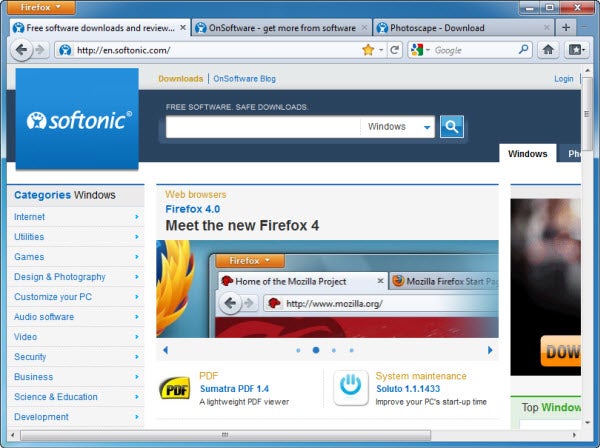
Shortly after the launch of Internet Explorer 9, the rival Mozilla Firefox has also been updated. Firefox 4 has a bunch of improvements, better website loading times, a more pleasant user experience and safer browsing sessions.

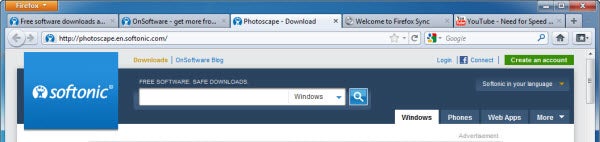
The first thing you’ll see is the totally revamped interface. Tabs are now on top of the address bar and the old menu bar has been replaced by a bright orange single button – though only in Windows 7 and Windows Vista. With buttons and menus so reduced now, Firefox 4 devotes more screen space to websites – something netbook users will be particularly happy about.


Continue reading “New features in Firefox 4”

Get your taxes finished quickly this year

There are a lot of ways to file your taxes online that can substantially simplify the process though. Here are some of the programs we’ve found that will help you get your taxes filed quickly this year, broken up by the types of forms that need filing.

Basic W-2 forms (1040, 1040A or 1040EZ):

H&R Block Online: H&R Block is a trusted name in tax preparation that’s been around for decades. Its web-based tax filing program is also well put together as a result. One of the main things that stands out for this web app is its detailed documentation that’s easy to turn to if you run into any troubles filling out your return. The information is thorough and sure to set you back on course in short order.

TaxACT Online: If reading through help documentation isn’t your thing, consider trying out TaxACT online. Instead of written documentation, this web app provides video documentation, narrated clearly and informatively, which is available whenever something gets confusing during the filing process.

TurboTax: TurboTax is also a well-known name in online tax filing tools. What makes this service really stand out is the personalized experience the company boasts that it provides. TurboTax has a list of links to frequently asked tax questions that changes the further you progress through the filing process. There’s no need to waste a lot of time wading through irrelevant FAQs with this web app; the answers are literally just one click away.

TaxACT: Afraid your browser might crash and you’ll lose your progress if you choose to file with a web app? The free desktop version of TaxACT’s filing software might be more appropriate for you. It includes video answers and tutorials to the most common tax filing issues, just like the company’s web app version, but it comes to you entirely from your desktop.

Note: Even though each of the tax programs above is technically free to use, be aware that there may be an added cost to actually  e-file your taxes. Both the federal IRS and the state in which you reside may charge an additional fee to actually submit your tax forms.  Be sure to read the fine print at each website in order to make the best choice for your own personal circumstances.

For 1099 contract work and other less common tax forms:

H&R Block At Home Deluxe: While not free, H&R Block’s desktop program for PCs is the  next step up in tax filing software. It’s incredibly simple to use and walks you through every step of the process. By asking leading questions, the program will make sure to go through all relevant forms you need to fill out to ensure you are able to take advantage of every conceivable deduction possible. Once you’re done, the program double checks your work and points out potential errors before ultimately letting you submit to both the federal and state IRS through separate processes.

Schedule C guidance and other advanced features:

H&R Block At Home Premium: If you need Schedule C guidance, or are just someone who wants more information on tax laws and planning resources, the available of an advanced tax calculator, or rental assistance, the Premium edition of H&R Block’s desktop program might be the best way to go. It’s about as thorough as tax filing tools come, and even offers 24 hour live help support.
Skype 5 for Mac updated but major issues remain

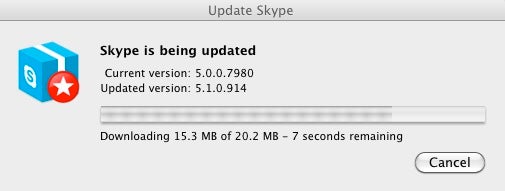
Skype for Mac has been updated to version 5.1.0.914 adding support for external iSight cameras connected by Firewire, the ability to focus on specific speakers in conference calls, quick dialing, contact groupings on the right and call quality ratings. However, it’s disappointing that more important issues haven’t been addressed yet. In particular:

  • The new wider interface hasn’t been slimmed down despite widespread complaints from Mac users

The new larger interface introduced in version 5 has probably caused the most controversy. Its arguable that Skype has now become one of those rare applications where the Windows interface is actually more user friendly than the Mac version. In fact, some users have reverted back to the slimmer version 2.8 for Mac (there was no version 3 or 4 for Mac by the way). To their credit, the developers have minimized it a little bit in recent updates but its still got a long way to go before Skype feels like the slimline application it once was. If the developers really can’t slim down the interface any further, maybe they could just include a version 2.8 skin that users can revert to if they choose.

Update: It seems that since this post was written and to at least improve the chat interface, Skype have launched a new “design your own chat template” competition for Mac Skype users. Prizes include an iPad 2 and a MacBook Air.

  • Group video calling is still a premium feature

The removal of group video calling from the free version of Skype was one of the biggest disappointments in Skype 5. When applications such as iChat allow this for free, there seems little justification for Skype making this a premium feature. Even more annoyingly, during the beta testing period, group video calling was a free feature. Now that Skype for Mac has “gone Gold”, it costs $4.99 per day or $8.99 per month just to have group video chats.

  • Some features are still only available in the Windows version such as Facebook integration

Of course its nothing new that Macs are often treated as an afterthought by developers as Jon has argued but would it really be that hard to add Facebook integration or a snapshot feature to the Mac version of an application as popular as Skype?

Skype is one of the truly great web innovations but it now has serious competition on the Mac now in the form of Facetime. It would be a shame to see it go downhill just because the developers have decided to bloat and reduce the functionality of a perfectly good app.

Best Formula One apps for your phone

Sparks will fly this weekend, as the first Grand Prix of the Formula One season roars under way in Australia. I can’t tell you who will be atop the podium come Sunday, but I’ll let you know my top three F1 apps for following the race – and indeed the rest of the season – from the comfort of your mobile phone.

1. ESPNF1 (iPhone, Android, Nokia)

ESPNArguably the most comprehensive Formula One application of them all, ESPNF1 provides you with up-to-the-minute quality news, as well as full live coverage from every Grand Prix. Besides its news and feature articles, you can get the lowdown on all of the drivers and teams in the F1 Championship 2011, with plenty of interesting background information about each. ESPNF1includes maps and guides to every circuit on the race calendar.

Read the full review of ESPNF1 here

2. F1 2011 Live24 (iPhone, Android, BlackBerry (coming soon))

F1 LiveThis great looking app helps you keep your finger on the pulse of the Formula One season. Not only does F1 2011 Live24 provide news, driver information, circuit data and photos, it also lets you track what’s happening live in the practice, qualifying and races. You can get live text commentary of every race, and argue about who is the best out of Ferrari and Mercedes in the thriving Fans Forum community section.

Read the full review of F1 2011 Live24 here

3. Formula1.com 2011 (iPhone, Android, BlackBerry)

Official F1 appFollowing everything that’s happening in an F1 race can be a confusing  experience – even if you’re watching it on TV. Download Formula1.com 2011 and you’ll get a remarkable insight into all that’s going out there on the track. This official F1 app shows current positions, lap and sector times, and speeds, with charts and graphs to help you analyze the performance of every driver. It will even give you detailed real time weather conditions from the circuit.
Read the full review of Formula1.com 2011 here

Honorable mentions

If that’s not satisfied your need for speed, there are plenty of other Formula One apps lurking in the various app stores. For instance, F1 2011 Live delivers live F1 commentary, with comment from journalists and pundits from around the world.

For hardcore F1 geeks, the official F1 2011 Timing App is a dream come true. The program delivers real time track positioning on a fully interactive 3D, allowing you to focus closely on the performance of individual drivers. The downside is that the application will set you back 33 bucks.

The official Australian Grand Prix app is also worth downloading to follow the events of this weekend. It’s especially interesting if you’re lucky enough to have a ticket to the GP, because it has lots of information about the course, how to get there, and the program of events for the weekend.

Mac OS X turns 10

Ten years ago today Apple released the first desktop version of its renowned operating system Mac OS X. Mac OS X 10.0 was the first Mac operating system named after a big cat (Cheetah) and it brought many changes to Apple computers.

Unlike the desktop OS used by Apple until that moment – versions 9 and earlier – Mac OS X is a Unix-like operating system based entirely on the OpenStep technology developed by NeXT, the computer company founded by Steve Jobs after he was forced to resign from Apple. Mac OS X had a completely new codebase, design, file system and hardware support.

After version 10.0 launched in March 24th 2001, succeeding releases of Apple’s operating system continued with the original cat-based naming pattern: Puma, Jaguar, Panther, Tiger, Leopard, Snow Leopard and soon, Lion.

Happy birthday, OS X!

5 essential apps for your new Android phone

If you’ve taken the plunge and decided to splash out on an Android phone then you’re probably wondering what apps you should install first. Load up the Android Market or visit the new Amazon Appstore and you’ll be confronted with a dazzling array of different apps – and choosing from these seems like a daunting prospect at first.

To help ease you in to the world of Android apps, we’ve put together a small guide below to the first five apps you should install on your new device. You should find them all useful, entertaining and above all, easy to use, showcasing exactly how cool your new Android phone can be!

Astro File Manager

This is a good one to install first because it will help you manage all of the content that you’re going to install on your new device. Astro File Manager lets you organize documents, files and folders; manage tasks and processes, and perform backups. It comes with a handy application manager, which gives you a clear view of all your installed apps and lets you save them to your SD card if you like.

Twitter

Twitter for AndroidHaving an Android phone with a data plan is great for social networking – and if you haven’t got into Twitter yet it’s a good excuse to get yourself out there. The official Twitter client provides a clear and easy way to post tweets from your phone. Other features include simple controls for viewing tweets, mentions, retweets, lists and direct messages, options for managing your profile, and on-the-fly trending info.

Facebook

Facebook for AndroidStaying on top of Facebook is going to get much easier now you’ve got an Android device. The excellent Facebook app for Android offers an effortless way of checking the network on the go. Besides posting status updates, you can easily grab pictures with your phone and add them to Facebook, view upcoming events, and quickly exchange messages with your contacts.

TuneIn Radio

TuneIn Radio for AndroidPerhaps the perfect app for a long journey, TuneIn Radio lets you listen to radio stations and podcasts from around the World on your Android phone. You can pick from a choice of more than 40,000 stations, searching by keyword, category, or genre. Reception is near perfect when listening via 3G or WiFi, and battery usage isn’t too excessive.

Angry Birds

Angry Birds for AndroidAnother great time-killer for the bus-stop or an airport waiting lounge, Angry Birds is a fun, addictive mobile game. The object of this mega popular game is to catapult birds into structures in order to smash the evil pigs that live inside them. With cute, colorful graphics and absorbing gameplay, this is one of those games that’s virtually impossible to put down.

Shazam adds ‘Friends’ feature to its iOS and Android apps

Shazam is updating its iOS and Android apps with a new feature that lets you share new music with your Facebook friends.

Shazam Friends

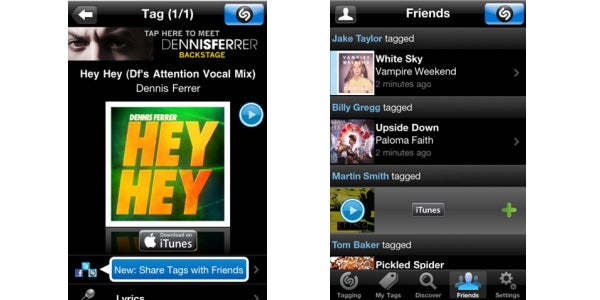
The new Shazam Friends feature in the popular music discovery app allows you see a real time feed of songs that your friends are tagging. This ever-updating list of tags is designed to help Shazam users discover even more new music, based on what peers are listening to.

Once you’ve updated the app, the new ‘Friends’ tab will let you: browse all your friends’ tags, add buddies to your Shazam history, use stream services to play songs from their playlists, post tags to Facebook and Twitter, and invite pals to use Shazam Friends.

The new feature is already available in the updated Shazam for iOS, and Shazam says it will hit Android devices in the coming weeks.

Microsoft releases Windows Phone 7 update – ‘NoDo’

An update has arrived for Windows Phone 7 that adds a host of new features to the mobile operating system, including copy and paste.

There are plenty of other goodies in the new Microsoft OS, dubbed ‘NoDo‘. These include faster game and application performance, a slicker Marketplace search, improved WiFi connectivity, Outlook and MMS enhancements, plus tweaks to the Facebook account sync. Check this neat little video from WinRumors, which demonstrates some of the new features.

[youtube]http://www.youtube.com/watch?v=JxGKW5BaTB0[/youtube]

The update, which was announced by Steve Ballmer at last month’s GSMA Mobile World Congress, will be available to all Windows Phone 7 users through the Zune software. The rollout of updates is being done in phases, so have a little patience if you haven’t been invited to upgrade your Windows Phone 7 device yet.

Opera Mini and Mobile update – but which do you need?

Opera has just announced that it has updated Opera Mobile to 11 and Opera Mini to 6. James has already shown us that it’s his browser of choice on Android, and a hot favorite on Symbian, so it’s clear that Opera is an app to be reckoned with. With this double dose of innovation, however, it’s even harder to know which to pick – is Mobile or Mini the best browser for you?

As you might have guessed from the name, Opera Mobile is the version of the browser optimized for use on mobile devices and tablets. It’s got everything that you would expect from a regular browser, even using the same engine as the desktop version. In other words, Opera Mobile is as close as you can get to standard desktop browsing on a mobile device.

Opera Mini is the version Opera has released to make mobile browsing the fastest, lightest experience possible, saving you money in the process, especially if you pay for your mobile internet as you go. It does this by shrinking webpages down to a tenth of their size before sending them, which obviously makes for a much smaller, quicker experience.

[Image courtesy of Opera]

Although Opera Mobile and Mini are on very different version numbers, this update has brought the same changes to both. Both include improvements to make scrolling and zooming much smoother, something that really enhances mobile browsing. Added to this is new pinch-to-zoom functionality, something that users of other browsers missed when using Opera.

Also added is a Twitter, Facebook and blogging share button, which is pretty essential for anyone with even a passing interest in social browsing. Finally, for all you lucky tablet users, Opera Mini and Mobile have also been optimized for tablet use. Opera isn’t shy when it comes to mobile platforms, so there are quite a few to choose from. Have a look here to make sure you get the perfect one for you.