Angry Birds goes green for St. Patrick’s Day!

When it came to snakes, St. Patrick was pretty handy. How’s it going to turn out when he puts his skills to Angry Birds? Makers of Angry Birds, Rovio, have announced that there we can expect a special version of their hit game just in time for St. Patrick’s Day, the global celebration of all things Irish. As you can see from the teaser video, it’s sure to be just as fun as other special versions, like Halloween and Valentine’s Day.

A few weeks ago, Rovio also announced a special tie-in with upcoming film Rio, also due to be released in March. From São Paulo to Dublin, the Angry Birds  franchise is getting pretty international – watch this space because as as soon as they appear, you’ll find them on Softonic!

Head to Head: Online file sharing services

Downloading directly from the web has become a great alternative to other more “traditional” downloading protocols such as P2P and BitTorrent. The increasing popularity of these direct downloads has contributed to the launch of software like Mipony and jDownloader, and to the spread of dozens of online services for storing and sharing files on the Web. The question then is, which one of these services should you be using?

Most online file hosting websites look almost identical. They seem to offer the same tools and options, but a deeper look soon reveals small differences in what you get when using one or another. After comparing the ten most popular file hosting services, we’ve come up with two tables that sum up the features included in their Free and Premium accounts, respectively. A quick glance at the data will surely help you decide which hosting service is best for you.

Before moving on to the tables, let’s explain the criteria we used to compare the services:

Storage Capacity: Maximum size allowed for each file you upload. If there are two figures, the second one refers to the amount of total space available for your account.

Transfer limit: Maximum amount of data you can transfer within a certain period of time.

Expiration date: This applies mainly to free accounts, and refers to the number of days the uploaded file will be available online. It’s usually calculated from the time it was last downloaded.

File management: Is there a special tool to manage your files, and organize them in groups or folders?

Simultaneous downloads: Does the file hosting service allow multiple file downloads at the same time?

Waiting time: The amount of time you usually have to wait in free accounts before you can actually download the file.

Price: The monthly fee you have to pay for a premium account in each of these services.

Free account

Storage capacity
Transfer limit
Expiration date
File management Simultaneous downloads
Waiting time
500 MB No 30d/90d Members only No Variable
500 MB/200 GB 1 GB/24h 21d/90d Members only No 45s/25s
200 MB No Upon warning Members only Yes No
2,000 MB 30 min. 90d Yes, FTP No 15s
* 200 MB/10GB No 30d Yes No Variable
300MB/2GB 10 files/8h 20d/45d Members only No 60s
2,000 MB/
500 GB
150 MB/h 90d Members only No +30s
1 GB No 60d Yes, and FTP too No 20s
2 GB No No No No 100s
* 2 to 8 GB No No Yes Yes No

*Requires registration
Continue reading “Head to Head: Online file sharing services”

iPad 2 offers lots of great software options

Today in San Francisco Apple unveiled its latest version of the iPad, to be shipped starting in the US on March 11. Some improvements like two built-in cameras and the sleeker, thinner tablet body were expected. It was the software demonstrations that really shined though. When Apple starts shipping the new iPad next Friday there will be a lot of great tools that have been reworked specifically for the popular tablet, as well as an update to Apple’s mobile operating system that the iPad runs on.Aggressively touted at the press conference were the multi-faceted movie editing program iMovie and GarageBand, Apple’s own music creation tool. Both are already available on Macs through the iLife suite but will now also be available for purchase on the iPad on the day it’s released. iMovie seems particularly impressive and will boast more than fifty different sound effects, as well as music that auto-switches based on the chosen theme of your video.

In addition, Apple also introduced Photo Booth and demonstrated how new iPad users could snap pictures and edit them for the first time on the new and improved tablet now that it has two built-in cameras. The cameras, of course, lead to another great development: the ability to make video calls with Face Time. Video calls can now be made between the iPhone 4 or a Mac computer and the new iPad, something that a lot of iPad users have been hoping for.

Lastly, Apple described some of the improvements that will come with the iOS 4.3 update, which is purported to include improved Safari performance, as well as iTunes home sharing options by way of wireless media streaming. Overall, this seems to be a big step forward for the popular tablet. With over 65,000 iPad-compatible apps available for purchase and download, there seems to be no end in sight for Apple’s innovations and success in the tablet market.

How to watch live World Cup cricket matches free

Looking for a way to stay in touch with the World Cup Cricket ? Fear not, because it’s possible to watch live games from the Cricket World Cup 2011, thanks to the wonders of modern technology.

Whether it’s in your web browser, on your desktop or from your mobile phone, there are lots of apps that make it easy to follow your team’s fortunes at the World’s biggest one-day cricket tournament. Here’s a selection of some of our favorites.

P2P clients

TVU PlayerP2P streaming clients are the traditional go-to medium for watching live sports. The likes of TV Ants, SopCast and TVU Player can be used to connect to live Cricket World Cup feeds to watch from your desktop.  I would recommend the latter two over TV Ants because both SopCast and TVU Player have dedicated sports sections with a huge selection of sports channels from across the world.

Justin.tv

Justin TVStreaming World Cup cricket matches via Justin.tv is much simpler than it is with a P2P desktop client. Just load up the site, then head for the Sports section of the Live Channels. From here you should be able to find at least a few different live cricket streams to try out. If you have a smartphone, you should  check out the iOS or Android versions of Justin.tv, which let you watch live games on the move.

ICC Cricket World Cup 2011 app

World Cup appThe official iPhone app of the Cricket World Cup offers a unique way to follow matches live. The live match screen gives you the latest scorecard, stats, text commentary , audio commentary and video highlights from all the games. When the action is finished there’s still plenty to do in the app, such as reading the latest news and headlines, looking at the standings, viewing photos from the tournament, and checking upcoming fixtures.

Twitter

TwitterTwitter has created a completely new medium for following live sport. Using the social network to follow the Cricket World Cup live is not a bad idea. Not only can you find live text commentary but it’s possible to follow the views of respected cricket commentators, players and pundits. You can also use Twitter to find links to live streams of matches. Be careful though, because there’s a lot of spam/inappropriate content lurking behind some of these links.

Streams

ESPNThere are lots of web sites offering live streams of world cup cricket matches, some broadcasting legally, others illegally. ESPNstar.asia is showing live matches across Asia, Crictime.com has four servers all broadcasting live matches, and ESPN3.com is streaming matches within the States. You could also try extracover.net for more live coverage.


Transfer Tumblr posts to a WordPress blog

Avid bloggers know WordPress can’t be beat when it comes to features and reliability. Having self-hosted my own blog for years now, I’m a huge fan of this blogging software. I’ve also recently discovered Tumblr though. I have to say it’s got me a little torn in terms of where on the web my blog should be hosted.

Tumblr’s largest problem is WordPress’ greatest strength: reliability. While I’ve never experienced downtime on my blog with my WordPress software, Tumblr seems to have server issues on a daily basis. Yet Tumblr really can’t be beat when it comes to ease of posting different multimedia content and gaining a following. What’s a long-time blogger to do?

Enter: commercial WordPress theme shop WooThemes. With a brand new service at Tumblr2WP.com, current Tumblr users can easily create an XML file and import posts from Tumblr to a self-hosted WordPress.org site. With the creation of WordPress 3.1, you can also have an even more Tumblr-esque experience by organizing your blog posts by the type of content being published: text, links, quotes, photographs, and more.

The only catch is that self-hosted blogs cost money. You have to purchase the domain and hosting service, and sometimes even your blog’s layout theme. While the latter isn’t necessarily a concept with which Tumblr users are entirely unfamiliar since Tumblr has paid themes as well, there is definitely added cost involved with hosting your own blog. If the benefits outweigh the costs for you – and you want to create an experience similar to what Tumblr offers without fear of site downtime – Tumblr2WP is a fantastic resource for die-hard bloggers.

Don’t like GIMP for Mac? Try SeaShore

The GIMP is one of those programs that’s either loved or hated by Mac users. Loved by many because it provides the power and functionality of Photoshop for free but hated by others because they find it difficult and awkward to use compared to Photoshop. I’ve already looked at one way of making The GIMP feel more like using Photoshop but what about if you just want something GIMP-like but simpler?

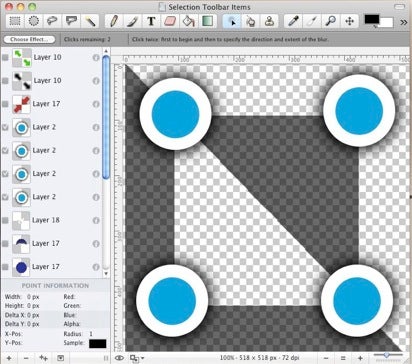
SeaShore has been developed as a simpler, easier to use photo editor based on GIMP. It’s still free to use and features gradients, textures and anti-aliasing for both text and brush strokes. It also supports multiple layers, alpha channel editing and uses the same native file format as GIMP. And due to Cocoa, it sports a much slicker OS X friendly user interface that definitely looks better than The GIMP for Mac.


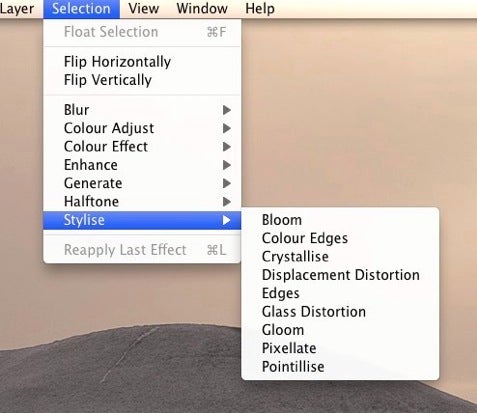
The main beauty of SeaShore is that it’s a lot simpler than The GIMP and feels closer to Photoshop in the way the menus are laid out:

The downside of this however is that its not as powerful as GIMP and lacks certain advanced editing features. In fact, even basic features such as Color Balance and Levels are missing from SeaShore. Stability can also occasionally be an issue as the SeaShore forum illustrates but it usually manages to carry out most functions without any problems.

SeaShore feels a lot less intimidating than GIMP though and both the slick Cocoa interface and simple functionality will make it popular with anyone who has struggled with GIMP.

Crysis 2 Multiplayer PC Demo Released

Since the original came out three years ago, Crysis has come to be a defining PC gaming experience, with incredible graphics and almost unreasonable hardware requirements!

Today saw the release of the Crysis 2 Multiplayer demo, which you can download here. Sadly, developer Crytek’s servers appeared to be struggling under the weight of all the excited PC gamers this morning. Login problems seem to have been solved now, and while it’s certainly busy, it is possible to join games again.

From March 1st to 13th you can play multiplayer games over two maps and two game modes. Team Instant Action is basically a team death match, while Crash Site is a kind of capture the flag match, although the location of the ‘flags’ changes throughout the game.

You can level up in the demo, gaining XP through kills, protecting crash sites and so on. This will allow you access to more classes of soldier and more varied weaponry.

Whichever mode you choose, the action is fast-paced, intense and more in line with Halo than Modern Combat, thanks to your Nanosuit’s exaggerated jump ability. Any newbie will find their first few games dispiriting, as they get torn to pieces by experienced players, but this helps you learn how to not get killed, and you’ll soon be racking up kills yourself!

The menu system and method for joining multiplayer games still lags behind console titles like Battlefield 1943. Instead of letting players try and fail to join full servers, it would be much better if server choice was made by the game and you could just jump in. Nevertheless, this demo shows that Crytek have created a formidable multiplayer experience,  which will help build up hype for the full game, coming on March 19th (25th in Europe).

Android 2.3.3. Gingerbread to allow screenshots without rooting

As a former Android user, I could never understand why I couldn’t take screenshots on my phone as easily as I could on my iPod Touch. Taking screenshots on Android phone required having root access on your device, or using the SDK for Android – which wasn’t the best solution either. Luckily it seems that this issue will finally be sorted out in the upcoming Android version 2.3.3, also known as Gingerbread.

According to Androidcentral, the root-free screenshot feature will be implemented in this new version of Android, meaning that applications created by third-party developers will be allowed to grab whatever is being displayed on the screen. Of course, it’ll still take some time before Gingerbread is spread to all Android terminals and we start seeing screenshot-capable Android apps in the Market, but in any case it is a long-awaited feature that’s finally come true.

Image by dichohecho

Free Browser Game: Second Person Shooter Zato

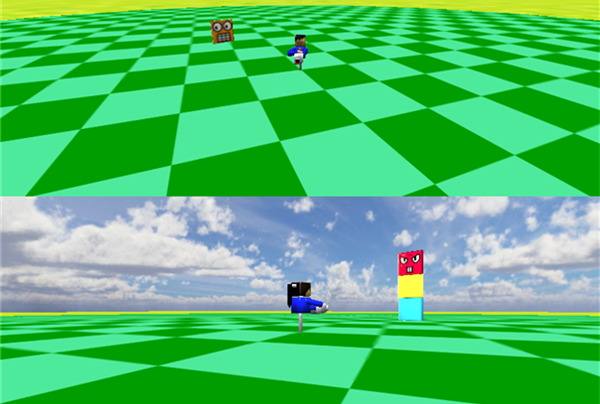
This is a free 3D shoot ’em up with an interesting perspective. Using the Unity plugin, Second Person Shooter Zato puts you in the shoes of a blind hero, who has the power to see through the eyes of his enemies.


Set in stylish blocky arenas, you’ll see up to four enemies’ viewpoints at once, circling and approaching Zato. You can rotate the blind hero and have limited missiles and laser shots to get the baddies. In later levels you’ll be able to walk around too.

It sounds strange until you play it, but it’s really easy to get into and, like the best arcade games, is intense and addictive. As the developer says, just shoot at the cameras. When enemies start flying in from above, circling and approaching on stacks, you really have a lot to manage! Using this unusual viewpoint is a great idea that makes Second Person Shooter Zato a great little game. Play it over at Kongregate now!

Why I’m supporting Adobe Digital Editions

It can be immensely frustrating sometimes being locked into a device or platform as Charlie Brooker argues today in The Guardian. Brooker initially hated Macs before relenting and finally buying an iPhone and eventually a MacBook but now finds himself frustrated at the way Apple locks him into using iTunes to transfer music to any laptop. While his rant is aimed mainly at music transfers, he touches on another increasingly ferocious battleground, eBooks:

Apple’s own iBook reader app may be nauseatingly pretty, but it’s not a patch on Amazon’s Kindle, which, far from being just a standalone machine, is a surprisingly nifty cross-platform “cloud” system that lets you read books on a variety of devices, including the iPhone and iPad. It even remembers what page you were on, regardless of whichever machine you were reading it on last.

Although Brooker sings the praises of Amazon here, they’re hardly fighting the good fight. Both Amazon and Apple are in a war to lock users into either the Amazon Kindle or Apple iPad. eBooks bought from Amazon can only be used on the Kindle while eBooks compatible for the iPad can only be bought from Apple’s iBookstore.

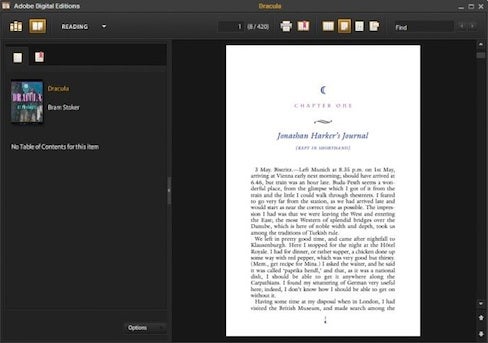
There is another alternative. It’s not often that Adobe are the ones offering a fairer alternative, but in the world of eBook reading, they are in the form of Adobe Digital Editions. PDFs and Adobe ePubs can be viewed on all laptops, netbooks, and non-Amazon/non-Apple eBook readers, tablets and phones. Of course, this has nothing to do with a benevolent spirit of openness by Adobe. It’s simply that they have no Kindle or iPad style reading device to flog us and thus have less of a vested interest in locking us into a particular device.

Adobe Digital Editions is free to use, works on any PC or Mac and provides an elegant and straightforward reading experience. Why would you want to spend over $300 on a Kindle for example when you can buy a cheap Netbook, which can do much more than a Kindle can, and use Adobe Digital Editions to read books on?

Most importantly, we should be supporting anything that tries to break the growing stranglehold of Amazon and Apple on the eBook market. This is not only an issue of encouraging more openness when it comes to formats, but also more competition in the pricing of eBooks.

Download Adobe Digital Editions for Windows and Mac.