Firefox 23 arrives with new logo, share button

The popular web browser, Firefox, has been updated to version 23. While none of the updates are groundbreaking, it’s nice to see that Mozilla is consistently updating the browser with security and usability features.

The biggest change in Firefox 23 is the new share button. Users can now click on the button to quickly share to Facebook, from any tab.

Also new to version 23 of Firefox is the content blocker. Previously, Firefox 22 already blocked third-party cookies by default, which upset many advertisers who rely on cookies for offering targeted ads. With Firefox 23, the browser now blocks “mixed content,” which means the browser can block anything not protected by https. Some sites use a mixture of HTTPS and unsecured HTTP, which leaves the non-encrypted information vulnerable to sniffing.

Last but not least, there’s a new Network Monitor button in the address bar of the browser. This lets users know how long each component of the website takes to load.

On the Android side of things, users will get a new personalized home page called the “Awesome Screen,” which auto-completes URLs as you type. Firefox for Android also supports full screen browsing, hiding the address bar when you scroll down.

For the complete changelogs for the desktop and Android versions of Firefox 23, visit the source links below.

Download Firefox 23 for Windows, Mac, and Android.

Source: Desktop changelog | Android changelog

Google now highlights in-depth results

Google announced today that it would be changing its search results by highlighting in-depth articles about a broad topic. The company hopes that this will help users searching for broad topics like “Earth” or “English.”

This move isn’t too surprising as Google already does something similar with its Knowledge Graph where search results display what it thinks is relevant to your search. These results show up on the right side of search results, which resemble Google Now cards.

Google will pull in-depth results from renown sites The New Yorker and The Guardian. Critics may be wary as Google owns a lot of products and services that it could potentially prioritize over other contents. There’s no information about how exactly Google’s algorithm works to define what results are considered “in-depth.”

For now, the in-depth results will only show up for US users starting today. The search giant did not comment about when this feature will show up overseas.

Source: Google Search blog

Facebook updates News Feed to resurface old, but relevant stories

Facebook announced a change in its ranking algorithm for its News Feed that should resurface relevant stories that users may not have seen. One of the problems with the News Feed is that content gets pushed down as more and more updates are posted. A post may still be getting a lot of interaction from users but other users won’t get to see it since it’s buried under new updates.

With the changed algorithm, Facebook’s algorithm is looking at which posts are popular and will resurface them from time to time. The company provided early data from tests of the updated News Feed and cites a 5% to  8% increase in likes, comments, and shares.

This news is great for companies and users with Facebook Pages to promote their work. Facebook hopes to push older content up the News Feed to create an organic way of bringing back popular content.

To find out more about the algorithm change for News Feed, check out the source link below.

Source: Facebook

Twitter app for iOS and Android updated with two-step verification

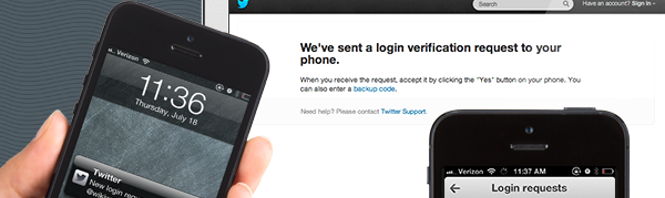
Mobile handset security is a major issue nowadays with cellphone chargers that take over your phone and massive data breaches. Twitter is hoping to help users secure their information by integrating two-step verification into their mobile apps for Android and iOS.

The updated apps will be hitting their respective app stores today with two-step verification. The way this works is that logging into Twitter will require two forms of authentication: one password and one randomly generated code. This random code is now generated by the Twitter app, instead of relying on a user’s phone number to send a SMS (though SMS verification still works).

But what if you lose your phone and can’t get to the code generator? Twitter provides users with backup codes, which should be stored in a secure location. You will use these backup codes as a last resort to get into your account.

You can download the latest Twitter apps at the links below. If you want to learn more about setting up two-step verification for your other accounts, check out our handy guide.

Download Twitter: Android | iOS

Source: Twitter

WhatsApp for PC – a popular Facebook scam in Spain

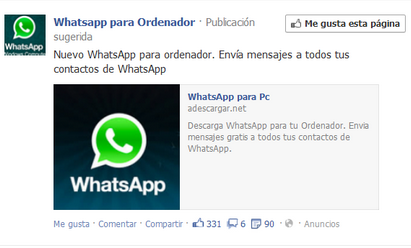
Facebook ads are still allowing scams, at least in some languages. Ads have been appearing in Spanish users feeds that offer ‘WhatsApp for PC’. It’s a popular search term and a program that many people would like, but WhatsApp for PC doesn’t exist.

The ‘suggested post’ that’s appearing in Spanish news feeds.

Unlike similar apps Viber and LINE, WhatsApp uses your phone number as your account. It only works with phones, and there’s no tablet or desktop version. It’s possible to run WhatsApp for Android on your PC using the Bluestacks emulator, but you still need a phone number to associate with it.

The scam, that is advertised on Facebook as WhatsApp for Computer (WhatsApp para Ordenador), requires you to enter your ‘phone number and reply to a premium SMS that charges 1.5 euros for activation and a further 1.45 euros for each message you receive. That’s an expensive way to use Bluestacks, which is completely free (and you can download it from Softonic).

Various similar pages exist on Facebook, like WhatsApp for iPad, and WhatsApp for PC, and they all lead to scam pages that ask for money for an app that doesn’t exist. It’s important to be wary on Facebook that there are scams out there, and people who want to take advantage of wishful thinking (like ‘I wish I had WhatsApp on my PC’).

It’s not clear that Facebook deals with these scam artists unless there are complaints logged against them.

[UPDATE: WhatsApp for PC has finally been released in 2016!]

[Source: adslzone]

How to sync your Android apps with a PC

You’ve bought a brand new Android phone and you’ve begun taking pictures, making videos, sending messages, and more. When your phone runs out of memory, what do you do?

The best way to free up space on your device is to back up your data. To do this, you need to have installed an application that syncs between your phone and a PC. For Android phones, this is no simple matter due to the variety of models and phone manufacturers.

Below is a list of popular applications for syncing between a PC and an Android phone:

Which flavor of Android?

Not all Android phones run the same operating system version. In addition, each phone manufacturer has its own application that allows the “phone to talk to the PC”. As a result, it’s really important to know what brand your device is.

If your phone is a less well-known brand, such as an LG, locate your installation CD or browse the manufacturer’s web site for the sync application – assuming the manufacturer has a web site, that is!

Samsung Kies

Samsung Kies is the official Samsung synchronization application. It works with all Samsung Galaxy S, Galaxy S2, S3, S4, Galaxy Ace and Galaxy Mini phones.

You download and install the Samsung Kies app on your PC and connect your phone using a USB cable. The application lets you transfer music, photos, videos and other files from your mobile phone.

You can also back up copies of your most important data such as your calendar, SMS messages, notes, and more.

In addition, some phones let you update your Android version using Samsung Kies.

Kies Air

Kies Air is an app for your Android phone or tablet. Basically, Kies Air copies files between any Samsung devices you own.

To synchronize data with your PC, just use a Wi-Fi connection, launch the Kies Air app and copy the code generated by the app into your PC browser.

From there, from there you can very easily copy images, videos, music and more.

LG PC Suite

LG PC Suite is the official LG application for managing and synchronizing the contents of your mobile device. The program is very straightforward and lets you easily copy everything you want from your LG device to the PC.

The cool thing about LG PC Suite is that the first time you run the program and connect your phone, a step-by-step wizard teaches you how to carry out the most important tasks.

All your content appears in an organized way that makes sense and is easy to manage.

HTC Sync

Although HTC phones are not as popular as some, HTC Sync works with HTC Sensation, Evo, Wildfire, Desire, Desire S, Z and other models of HTC phones.

The HTC Sync interface is very intuitive and makes it easy to synchronize data between your phone and your PC.

All content to be synchronized is divided into categories: contacts, notes, calendar, photos and music. Select one or more categories and the items are copied. It’s that simple!

Which application do you use to sync your Android data with your PC?

Original article written by Felipe Pessoa on Softonic BR.

Don Bradman Cricket 14 announced, release later this year

Big Ant Studios have announced its game Don Bradman Cricket 14 will be released later this year. Cricket games on PC have been thin on the ground since Codemasters’ Brian Lara and EA’s Cricket series were retired back in 2007. The only well known game that’s still around is International Cricket Captain, which is a management-only game.

Don Bradman is possibly the best batsman of all time, and Australian studio Big Ant Studios says it has been working for four years to make this the best game possible. It claims it will be ‘far superior to any cricket game in the market.’ However, that’s a pretty low bar to set, as there is almost no competition at the moment!

Here’s the full list of features in Don Bradman Cricket 14:

  • Career Mode, allowing you to take control of an aspiring young cricketer and take him through the ranks to International glory.
  • Unique Batting and Bowling Controls, giving full 360 Shot control and Line and Length delivery without pitch markers.
  • A fully featured fielding system that allows you to run down the ball and slide to prevent a Four, catch a high ball on the boundary rope, or knock down the stumps to take a vital run out. You are always involved in the play at every stage of the game!
  • Ball Physics giving realistic Edges, bat pad catches and movement off the pitch.
  • A complete player physics system with individual attributes including weight and height – imagine running in a 2 meter bowler to delivery that perfect bouncer!
  • Appeal and Electronic Review system allowing for the first time challenges of the umpires decision.
  • Practice Nets, Hone your skills to perfection before taking to the field.
  • Dynamic time of day, Weather System and Pitch Degradation that are based on real world data with effects occurring in real-time throughout a days’ play.
  • The Cricket Academy, allowing for unparalleled customization of your Cricket experience, creating Teams, players, Tours, Competitions, Match Types and even Umpires.
  • More than 4000 Community created Players and teams ready to download and use in game.
  • An online Save system that lets you continue your match whenever you want with online opponents.

Are you excited about a new cricket game for PCs?

Read more about the best cricket games for PC here.

Kaspersky Internet Security 2014 and Anti-Virus 2014 released

Kaspersky has released Kaspersky Internet Security 2014 and Anti-Virus 2014, which have been made available first on their Indian store.

Both Kaspersky Internet Security 2014 and Anti-Virus 2014 use the security firm’s own Zeta Shield antivirus technology, which it claims is more effective at stopping targeted attacks on your PC. Kaspersky has also improved its Automatic Exploit Prevention, that checks programs for strange behavior associated with exploits while keeping a close eye on programs that are often exploited like Java.

Another new feature of Kaspersky Internet Security 2014 and Anti-Virus 2014 is the Trusted Applications Mode. This is a dynamic whitelist of apps that Kaspersky deems safe, and in Trusted Applications mode you will only be able to use these programs, in theory guaranteeing that you are safe.

Soon we will publish our comparison of this year’s security software, but for now you can still see which anti-virus suite was best last year.

[Source: Kaspersky]

Cookies: What they are and what they do

When you hear the word “cookie,”, the first thing that usually comes to mind is chocolate chip. But web cookies are another thing completely.

In this short article I’ll answer the usual questions that Softonic users have about these mysterious – yet sadly inedible – cookies.

What is a cookie?

A cookie is a small piece of data that a web site stores in your web browser. It looks like a small text file.

A browser can store thousands of them, and they can only be read by the web sites that created them, except when it comes to tracking cookies used by web advertising companies.

Who invented the cookie and why?

Cookies were created in 1994 by Lou Montulli, a Netscape employee, to avoid the limitations the internet had for identifying a computer when connected.

Since web sites have no way of knowing if two requests come from the same computer, they need to assign labels to be able to differentiate. This is where cookies come into play.

What are cookies for?

Cookies let a web site remember who you are and what you like. Cookies are required for a web site to function effectively for the user.

Some examples of things you can do with cookies:

  • Fill a virtual shopping cart
  • Change search preferences
  • Access a web site without having to enter a password
  • Customize the look of a web site
  • View ads relevant to your interests

Where are cookies stored?

A cookie is created when you browse a web site that requires information about you. It’s stored on your hard disk or in the computer’s memory. Cookies take up very little space, a maximum of 4KB per cookie (255 characters). Most are deleted after a period of time (they “expire”).

Do cookies pose a security risk?

No. Cookies don’t contain any executable code and therefore can’t do any harm to your data. By themselves, cookies are completely harmless.

Cookies do have privacy implications, however, so some antivirus applications mark them as suspicious, especially if your browser is set to a high sensitivity level.

What does a cookie know about me?

A cookie can only store information that you provide voluntarily or that is stored in your browser options. For example:

  • Usernames, email addresses and passwords are data you provide
  • Browser type, version and operating system are data the browser provides

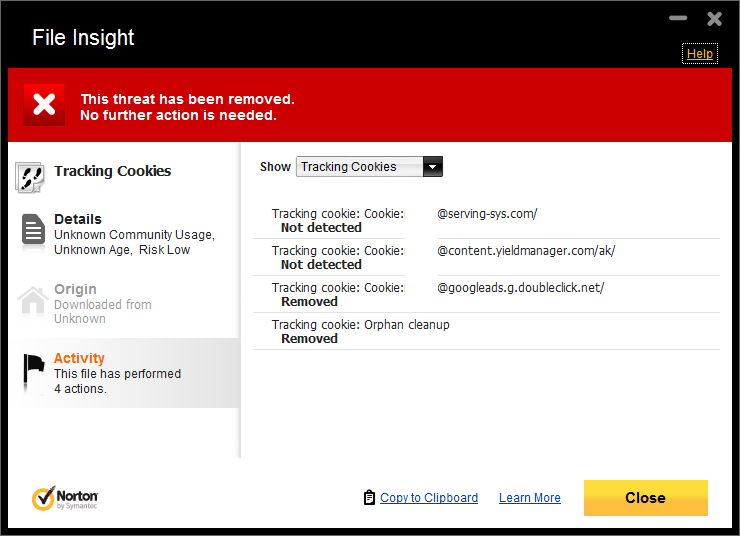
There is a special type of cookie called a tracking or third-party cookie, that stores web sites you have browsed. These cookies are used by advertisers to display content targeted to your interests.

Should I delete my cookies?

No. It’s best not to delete all your cookies. If you do, many of your favorite web sites won’t function as before and you’ll have to log in again and reset your preferences.

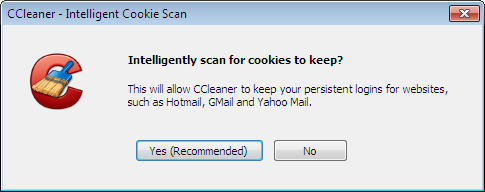
Cookies that can be safely deleted are tracking or third-party cookies. You can delete them using the options interface found in all web browsers.

How do I know which pages have created cookies?

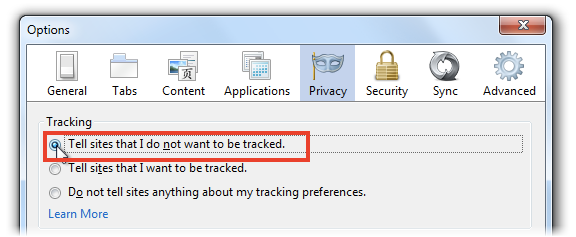
A simple way to know what cookies were created and what information is contained in them is to activate the Do Not Track option present in most browsers.

Do Not Track not only tells you what cookies are created by a page, but also lets you block the tracking action, making your browsing more private.

Can I browse without using cookies?

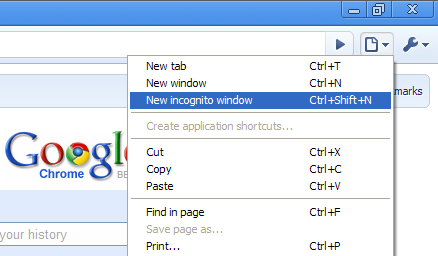
Using private or anonymous browsing, you can navigate without a trace. All modern browsers have a private browsing mode.

With private browsing enabled, web pages you visit and files you download are not stored on your computer in your browsing and download histories.

What other questions do you have about cookies?

Original article written by Fabrizio Ferri-Benedetti on Softonic ES.

Photo suggests Left 4 Dead 3 is on the way

A gallery of photos posted on Reddit, taken at a tour of Valve‘s studios has revealed evidence that Left 4 Dead 3 is in development. It also shows that there is a next generation game engine, Source 2 also on the way.

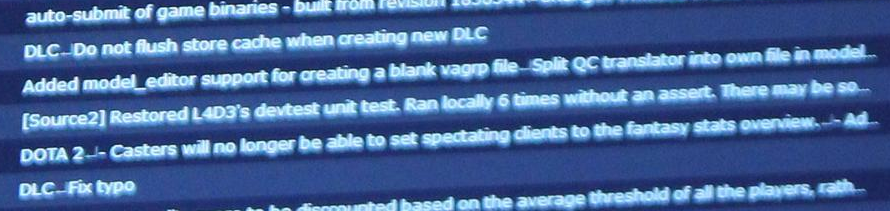
The photo in question is of a monitor with a list of actions on it, and partway down a line says:

[Source 2] Restored L4D3’s devtest unit test. Ran locally 6 times without an assert. There may be so…

The success of the multiplayer zombie Left 4 Dead series makes a sequel very likely, although Valve have not confirmed it is happening. Valve’s Source engine has been around since 2004, and has brought us many classic games, like Half-life 2, the Portal and Left 4 Dead games and much more.

While many people will be excited about the possibility of a new Left 4 Dead title, it’s not the 3 that Valve fans are waiting for. The question that haunts any mention of Valve is ‘when will Half-life 3 happen?‘ There is still no news about that, but one commenter on Reddit (GAMEchief) posted the interesting idea that Half-life games have always been released alongside new game engines. Half-Life was built on the GoldSrc engine, Half-Life 2 showcased the Source engine – so could Half-Life 3 be coming with Source 2?

That is very speculative at the moment, and it has been so long since Half-Life 2, it could be that a sequel never happens.

[Source: Reddit]