How to stream US video content while abroad

Last year, we told you about some of the best alternatives to HotSpot Shield for streaming media that may be blocked in your geographic location, including Cyberghost VPN, UltraSurf, TunnelBear, and ExPat Shield.

Whether for business or pleasure, if you frequently travel out of the country and can’t stomach missing your favorite TV shows or just want a quiet night in with a movie via Netflix or Hulu, we’ve got a few more great (and free) tools which make it easier than ever to stream geo-restricted video content while away from home.

Hola Unblocker

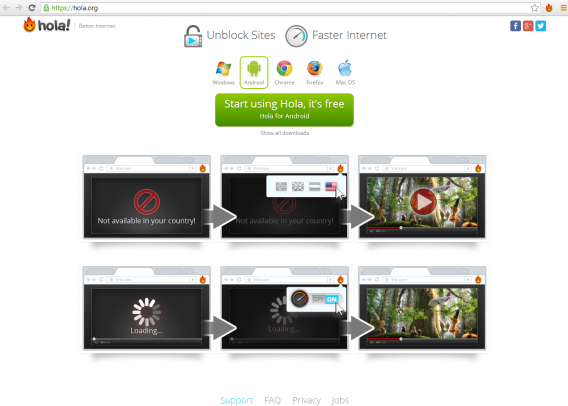
Hola Unblocker is a simple and quick add-on for Chrome and Firefox browsers which unblocks access to restricted content by creating a VPN (Virtual Private Network). It’s a really quick installation (it works in seconds) and allows you to unblock websites like Hulu, Netflix, CBS and Fox for streaming movies and TV as if you were in the US.

Hola, the parent software for Hola Unblocker, is also a great addition for quicker streaming, less buffering and faster downloads. The more people that are using Hola, the quicker the internet connection will be. Hola works by reducing bottlenecks and excess noise caused by surfing the web, specifically by how it caches content, as well as compressing communication between users, to make your internet connection much faster. You can download Hola for Windows and Android (it even reduces mobile data usage!).
Hola Unblocker

Media Hint

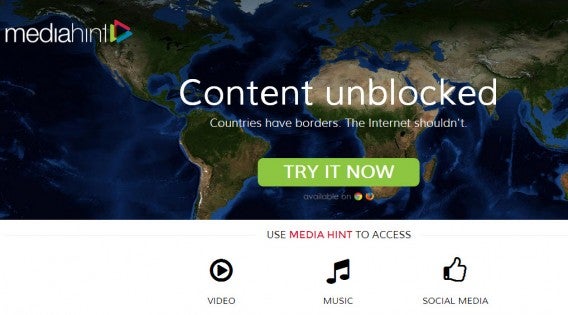
Media Hint is similar to Hola Unblocker in that it’s a Chrome and Firefox add on that installs in seconds and requires no manual set-up. For Google Chrome, you simply download the extension, go to your settings, and drag and drop the file into your extensions. Firefox set-up is even easier – just download the add on and that’s it. It automatically installs in your browser and viola – instant access to restricted content from the US or UK. The current version offers a free 7 day trial before you commit to any monthly or yearly plans.
MediaHint

Tor

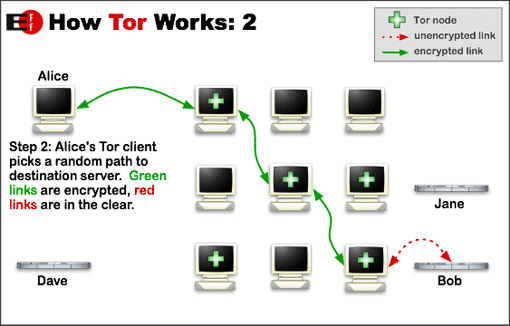
Unlike Hola Unblocker and Media Hint, Tor isn’t specifically for streaming geo-restricted content, but it can definitely be of use if you want to access it. Tor protects your privacy when browsing the web by bouncing around your traffic through a distributed network of servers, called ‘onion routers’, helping you surf anonymously. It takes a bit more set-up and configuration to access the blocked sites you want to use, so it may not be the quickest option available, but Tor has the additional benefit of providing you with safe and private web browsing.
Tor

Whether you’re on vacation trying to watch your favorite shows back home, or are dying to see that geo-restricted YouTube video, these tools will help you access online content, wherever you are.

Check out some of these other great tools for creating a VPN and accessing geo-restricted content.
How to create a Restricted Profile in Android 4.3

Restricted Profiles were a part of the Android 4.3 announcement by Google. The feature allows the primary user to lock out content for secondary users.

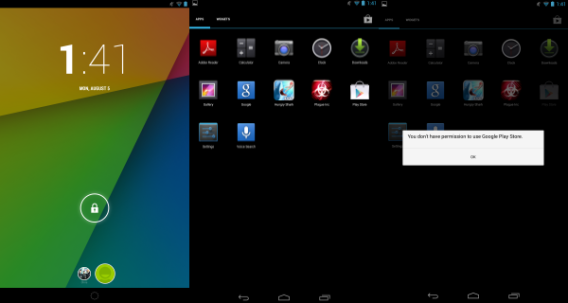
The main example of a use for this is parents setting up a device (currently only for tablets because Google is still testing how to implement this for smartphones) for their children to use while simultaneously restricting access to sensitive content like email, connected Google accounts, and access to purchases through Google Play.

An interesting discovery about Restricted Profiles is that screenshots are stored per account, so the primary user cannot directly access screenshots.

Parents give children their tablets a lot as a way to keep them occupied while the parents do other tasks. With Restricted Profiles, you can ensure that the apps and content the person is accessing is what you have defined.

Go to Settings

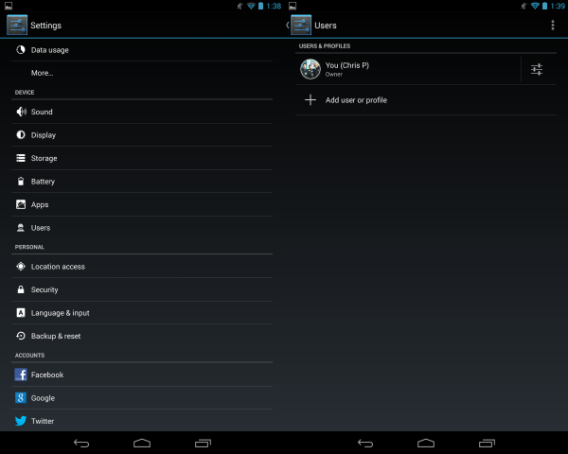
Access the Settings menu and find Users. Users contains the option to create a Restricted Profile. Before you can setup a Restricted User account, you need screen lock set up so the secondary user can’t access your account.

After you setup the screen lock, return to Settings – User and create the Restricted Profile.

Enable access

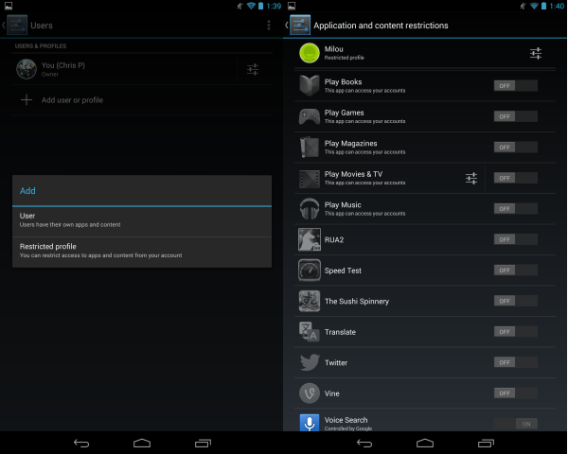
Inside the profile, you can choose which apps to allow access for. Major Google account apps are not supported for Restricted Profiles: apps like Calendar, Gmail, and Hangouts are disabled. This is different from a standard User account which sets up an account for a second user containing normal permissions.

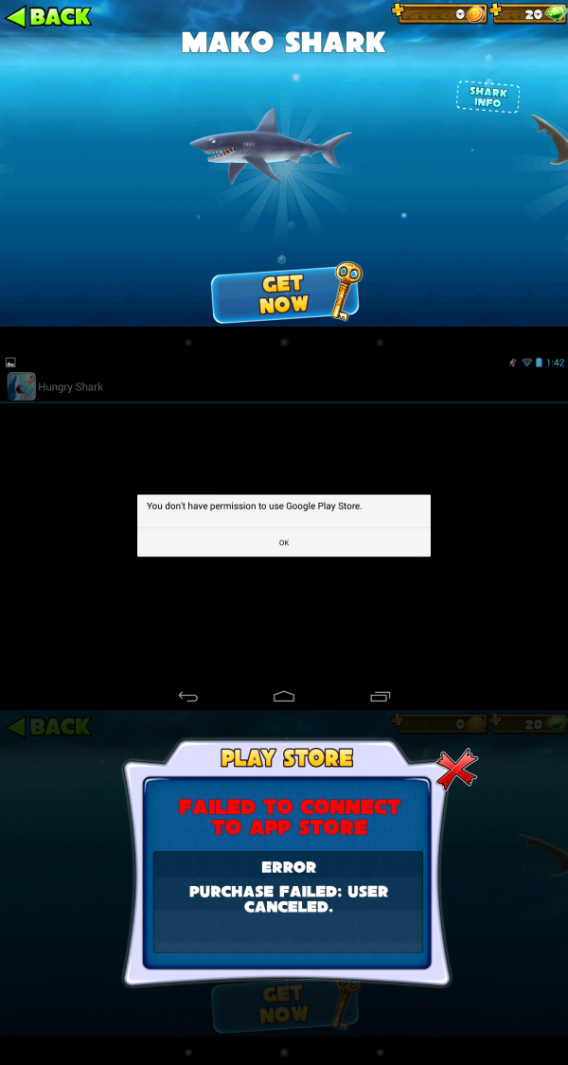
For parents, this app-by-app restriction is perfect because you can disable any app that’s previously been downloaded. The Google Play Store is also disabled, so new apps can’t be installed and in-app purchases are unavailable.

Perfect for parents

Setup of Restricted Profiles is very easy and gives you control of what can get accessed. With the Google Play Store disabled, this ensures that children aren’t downloading inappropriate apps and can’t spend money on in-app purchases.

Restricted Profiles in Android 4.3 is a broad tool to provide or deny access to apps. Developers will have to include app APIs to really specify what content can or can’t be accessed through a Restricted Profile.

Android is taking a great step in providing the tools for parents and developers to control specific content and hopefully it can be implemented into earlier versions of Jelly Bean sometime soon.

SimCity lands on OS X August 29th

The world simulator, SimCity, is coming to Mac on August 29th. Originally released for PC in March of this year but was plagued with issues like the inability to function offline.

If you’ve been playing SimCity on the PC, you’ll also be able to play it on the Mac, free of charge. Electronic Arts’ Origin game distribution platform allows you to buy the game once, and play on both Mac and PC. Players from either operating system will be able to play together also.

SimCity for OS X was originally supposed to be released on June 11th but EA decided the game needed more work, pushing back the release date by two months. “We want to ensure the Mac is a great experience for our players and that is why we are taking more time,” says the game’s senior producer, Kip Katsarelis.

Source: Twitter

YouTube adds playing icon, helps you track down currently playing video

Have you ever tried to find that one tab playing audio in a sea of open tabs? Sometimes it’s impossible to track down which tab it is without having to cycle through all of them. Google is making it just a bit easier today by adding a “playing” icon to the tab of currently playing YouTube videos.

youtube playing icon

The playing icon is very subtle, as it’s just a small black triangle but it’s better than nothing to find out which video is playing. Other sites and services are incorporating this as well such as Spotify and Soundcloud, which is useful if you have tons of open tabs.

This new icon can be seen from any modern browser, including Chrome, Firefox, and Internet Explorer. While this change is very minor, it can save you minutes of searching.

Via: The Next Web

Wake up to Justin Bieber with ‘The Key’ alarm clock app

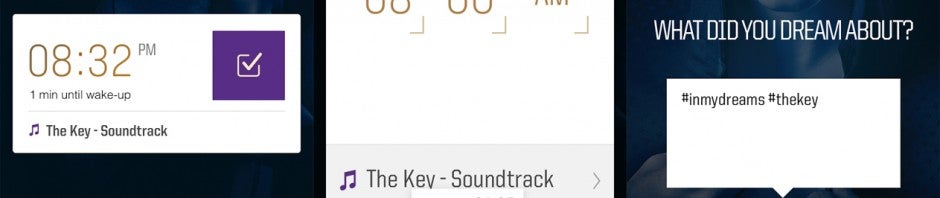
Mega pop star, Justin Bieber, has released an alarm clock application for Android and iOS called “The Key” to promote his new fragrance. The app, which is available for free, lets users  pick Bieber tracks to wake up to, then share their dreams on Twitter using the hashtag, #unlockthedream.

Users can create multiple alarms easily with a swipe up gesture. Select a time and a track to wake you, though you’ll be restricted to one song, “The Key” (obviously). If you have other Bieber tracks on your phone, the app will allow you to turn those into alarm sounds as well. Users can let “Enter the dream mode,” which really just means snoozing. Tapping the screen will let you snooze, while sliding will stop the alarm. Immediately after the alarms stops, a Twitter dialog appears where you can tweet what you dreamed.

The app is a pretty obvious marketing stunt used to promote Justin Bieber’s new fragrance. It’s nothing more and nothing less than what you’d expect. Beliebers will likely install this app or you can install it on your friend’s phone to give him or her a scare in the morning.

You can download The Key for Android and iOS here.

Feedly Pro brings article search, Evernote support, and more

Feedly, one of the most popular replacements for Google Reader, is coming out with a Pro version, which brings Evernote support, article search, https, and premium support. Article search has been one of the most requested features of Feedly users. The ability to search for any article you’ve read can be a life saver if you’re looking for a particular story you didn’t save.

Those who love Evernote will also want to check out Feedly Pro as it will allow you to save any story to Evernote with a single click. For non-pro users, you’re limited to sharing to social networks like Google+, Facebook, Twitter, and LinkedIn. There’s also an option to save stories for later but you can only access them within the Feedly web app or mobile apps. It would be nice if Feedly could include support for Pocket and Instapaper in a future update.

Last but not least, Pro users can rest easy knowing transmissions are encrypted with https. Pro users also get the perk of being put first in line for support issues.

Feedly Pro will debut sometime in the fall for $5 per month or $45 for a year. The company released an early “limited edition” purchase, which gave users a lifetime subscription to Feedly Pro for $99. The limited edition has since sold out so users will have to wait until Feedly Pro launches.

Source: Feedly

Iconical will let you change iOS icons with no jailbreak

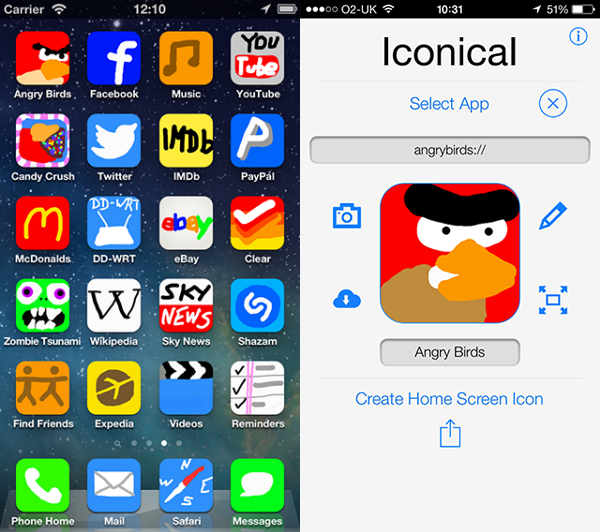
Iconical is an app that will let you change and edit app icons on your iOS device. As unlikely as it sounds, the developers have found a way to do this without requiring you to jailbreak your device. It will be released on the App Store on August 6th 2013.

If you want to change an icon on iOS, Iconical will let you draw a new one, or download an image from the web to use instead. It will also allow you to use your own photos as icons, and upload your creations to the cloud for other users to use.

According to the developers, Iconical supports over 14,000 apps, and will tell you which of your apps are supported on installation. As well as changing app icons, you’ll be able to add ‘additional action’ icons for some 200 supported apps, including things like an icon to call a specific contact.

Iconical’s website shows off exactly how you’ll be able to change your iOS homescreen with homemade icons. It does seem like exactly the kind of customization that Steve Jobs would have railed against in the carefully created iOS eco-system, and we have to wonder whether Iconical will still work by the release of iOS 7 later this year.

[Source: Razorianfly]

DayZ development blog shows off new features, but no release date

DayZ is a zombie survival game that started life as a mod for Arma 2, and is now being made into a full game. The development team have shared the latest improvements they have made, but announced that it is still not ready for a public alpha release.

When it appeared in 2012, the DayZ multiplayer mod for Arma 2 quickly became a phenomenon. Set in the post Soviet sate of Chernarus, it’s essentially a huge sandbox filled with dangerous Zombies, and scarce food and weaponry. Your task is to survive, and other players in the game could be just as hostile as the zombies.

Originally, lead developer Dean Hall wanted the standalone version of DayZ to be out before the end of 2012, and since then an alpha release has apparently been just around the corner, but keeps getting pushed back. While that might be frustrating, it’s clear from the developer blog that the team are trying to make sure they get the game right before lots of people can play it.

Check out the misleadingly titled 17 minute ‘short video’ development blog, where you can see more of how DayZ is coming along.

In the meantime, you can still play the DayZ mod if you already have Arma 2, or buy it.  Download the mod here.

[Source: DayZ blog]

Spotify introducing new Browse and Messages features

Spotify has added a new feature: Browse, which will allow you to check out the best playlists. The music streaming service has been busy adding new features in recent months, with the new web app in November of last year, Radio and Discover.

Browse allows you to look through popular playlists of other users. This represents another move towards intelligent discovery in Spotify, which got streaming right from the start, but wasn’t great at helping you find new music. Alongside Radio and Discover, with Browse there are plenty of ways for you to hear new music that suits your taste.

Another new feature coming to Spotify is a revamped messages service. Your inbox will soon be called Messages, and will bring together all the music you’ve shared with Spotify friends. It should be much easier to find the songs you’ve been talking about in the new version. This is aimed at encouraging Spotify users to talk to each other more, and make new friends based on their music tastes.

Browse will be coming to Android and iOS apps soon, while Messages will first be rolled out to the web app.

[Source: The Verge]

Doom 4 was nowhere to be seen at Quakecon, but is still in development

Doom 4 is definitely still in production, according to developer id software, but the company doesn’t want to get involved in a “long PR cycle” for the game. While some companies thrive on extended campaigns, like Rockstar, id feels it would fuel unreasonable expectations from fans.

id’s last game Rage came out in 2011, and was a solid, but uninspired FPS. Prior to that Doom 3 was a great looking but slightly disappointing title. Doom 4’s lengthy development isn’t as surprising as it might seem – id Software has never rushed out games, and there are often long waits between titles.

Doom was a revelation when it was first released in 1993, but id don’t dominate the first person shooter genre it created any more. Nevertheless, its game engine id Tech 5 is very powerful, and has the potential to make an incredible looking game.

The biggest problem with Rage wasn’t the gameplay or the technology, though. The game’s post apocalyptic world felt generic and uninspired. The biggest worry about Doom 4 is that whenever it appears, it fails to live up to Doom’s past. Futuristic horror games are nothing new today, and ID cannot rely on making yet another bleak, dark shooter. Living up to a 20 year old revolutionary game will be very tough.

[Source: Gameplanet]