WhatsApp site hacked by pro-Palestinian group

WhatsApp has become the latest victim of politically-driven website hackings. The messaging service’s site was taken over earlier today by the KDMS Team, who put up a pro-Palestinian message on the site as well as claiming no amount of security can stop them.

What’s interesting about this attack is how simple it was to take over WhatsApp’s site. It appears that the KDMS Team changed the Domain Name Service (DNS) records for WhatsApp’s site to redirect to another page. It appears that no security breach was actually implemented, instead relying on DNS spoofing to hijack the site’s address. DNS servers basically work to translate written web addresses to IP addresses, which are much harder to memorize and search.

WhatsApp isn’t alone when it comes to having their DNS spoofed. Earlier this year, the New York Times and Twitter both had their home pages hijacked via similar means. The Syrian Electronic Army hacker group claimed responsibility for the attacks.

Domain registrars, who control DNS servers, will have to increase security measures if they want to stop this type of attack from happening in the future. At the moment, it’s too easy for someone to impersonate and steal a domain name.


RELATED STORIES


[Source: CNET | ReadWrite]

Upcoming Android Hangouts update to support SMS/MMS

Hangouts was always supposed to unify Google’s myriad of messaging apps but so far it has only replaced Google Talk and Google Messenger. This could be changing soon as a leaked build of Hangouts 1.3 shows SMS and MMS integration. This will likely get rid of Google’s current Messaging app, which only handles SMS and MMS.

From the leaked photos of the Hangouts update, texting will work similarly to what Apple has with its iMessage app. Texts sent in Hangouts will have a “via SMS” tag next to it so you know exactly which messages were sent with which protocol. Users will also have the ability to request delivery confirmations so make sure an important text has been received and read.

Additionally, Hangouts 1.3 will apparently support sending video via MMS according to Android Police. They found a setting to toggle auto-retrieving messages while roaming as well as an option to opt out of integrating SMS/MMS into Hangouts.

Facebook Messenger for Android already supports texts within the app, marking texts with green chat bubbles instead of blue for Facebook Messages.


RELATED STORIES


There’s no timeline for when Hangouts 1.3 will be released but there’s a good chance Google will release it in conjunction with Android 4.4, which is rumored to debut sometime this month.

[Source: Android Police]

BBC to launch social music service: Playlister

The UK’s BBC has announced a new social music service called Playlister, which will allow you to collect the songs you hear and like on BBC services in personal playlists.

Your playlists will be exportable to Spotify, YouTube or Deezer so you can listen to them whenever you like. More digital music services will be added in the future. Playlister will also give you recommendations based on the tracks you like, but from the expert DJs and presenters on BBC programs instead of algorithms.

Playlister will first launch for PC and mobile browsers, giving you the ability to remember and export the songs you enjoy. It will work both on radio shows and TV shows. BBC has many influential radio DJs who are popular worldwide, so the launch of Playlister will surely be popular with listeners. It could also broaden its influence, and become a way to bring in more listeners and viewers.

Playlister will be launched in the next few days.

iOS 7: Will we really have to pay to upgrade our apps?

Thinking of upgrading to iOS 7? Before you do, keep in mind that, amidst all the excitement of its releaseyou might have to pay to update some of the apps you already own.

Why is this?

Technical reasons. iOS 7 isn’t just a simple update of iOS 6. It was written almost from scratch, and graphically, there have been a lot of changes. This means that for some existing apps to be aesthetically consistent with the new OS, they have to be (almost) completely rewritten. This involves a lot of work on the part of software developers. And this work doesn’t come for free.

In a nutshell, upgrading some of the apps you’ve already purchased on iOS 6 may cost you. The alternative: keep your pre-iOS 7 versions. They’ll work perfectly but, running on the new user interface, they’ll seem outdated and ugly.

Of course, this news has made some users unhappy. It’s not yet clear which and how many developers will choose to ask users to cover the cost of upgrading their apps. The only thing we know for sure is that someone will have to pay for the work.

The developer’s point of view

It’s not fair to blame the developers. Suddenly, for reasons beyond their control, they find themselves having to rewrite all the software they’ve already created. This means an investment of time, effort and money. And then what?

As a developer, you’ll find yourself at a crossroads: infuriate users by asking them to pay money for something they’ve already bought, or don’t ask them for anything, which is the equivalent of agreeing to do a lot of work for free. This is bad news, whether it’s one single developer or a company that has to pay the salaries of its programmers.

The third option is to not to release an update. This leaves your app with an older UI running on iOS 7, which isn’t the best result for the end user. The old app graphics and icon, running in the new environment, would seem out of place, and the program could end up going unused, gathering dust in some corner of your iPhone.

Apple’s point of view

Apple shouldn’t be blamed for having evolved its mobile operating system. Continuous innovation is a characteristic of the technological world, which generates, consumes, and regenerates products at great speed.

It’s also worth noting that paying for application updates is not a new concept. We’re used to doing that, for example, for desktop applications. When a new version of Photoshop or Word is released, a fee is involved to upgrade to the latest version. This fee almost buys a new program, though, with lots of additional features.

In the case of an updated iOS 7 app, we’re really just talking about a graphic adaptation rather than a substantial set of new features.

The user’s point of view

You have to consider the psychological aspect. Although there would be valid reasons in support of paying to update some apps, users have come to expect free updates.

If, all of a sudden, a user had to pay for something they’d used many times for free, the reaction would inevitably be negative. And that reaction would be multiplied many times over for users who have a lot of apps, or a very expensive app such as a TomTom navigator.

And the story gets a little more complicated. The new iOS includes an automatic update feature. How would that work for paid updates? The risk would be that users might end up paying without even knowing until they received an invoice. This would obviously trigger outrage among users.

The situation gets even trickier when put in a broader context. While Apple is “forcing” their developers to rewrite existing apps, Chrome Apps allow you to write a program once, and then turn on additional platforms for free via the browser. That’s a big competitive difference.

What should Apple do?

This situation could have unpleasant consequences for the nice folks in Cupertino. An army of angry developers and users isn’t good for business.

Perhaps Apple should pay developers who are updating their apps, using a formula that would make them all reasonably happy.

Unhappy customers could cause an exodus away from iOS to other platforms (Android would be the top choice), but they might also undermine the perception of the iOS operating system as “perfect”.

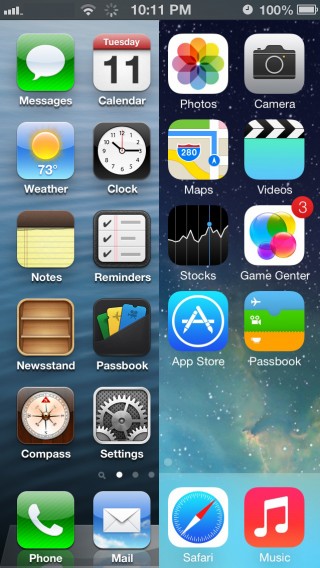
For a company that has made aesthetics their flagship feature, they can’t run the risk of being left with millions of iPhone applications that are graphically inconsistent. The home screen for a user who has decided not to pay to upgrade their apps would be a funky patchwork of old- and new-style icons, a situation that would surely cause Steve Jobs to turn in his grave.

Other solutions that could help dissatisfied users: jailbreaking (which in iOS 7, makes it impossible to lock the phone remotely in case of theft), or a pirated version of iTunes, which now exists only in China (but that could one day be accessible from other countries) but which allows you to illegally download programs onto your iPhone without jailbreaking. None of these are great options for Apple.

What do you think? Are you willing to pay to upgrade your apps, or do you think the cost should be borne by the developers, or even Apple itself?

GTA V: What’s in the shack?

We’ve made it to the GTA V shack and know what’s inside! In this article we’ve got a video walkthrough that will tell you exactly how to get there. The question that’s plagued fans of GTA V since the gameplay video is What's in the shack?! For some reason the hut on top of the mountain has attracted the curiosity of hundreds of users on Reddit and the speculation has got out of control!

On top of Mount Chiliad it’s easy to confirm Reddit user Scadilla's theory: it's all a matter of perspective! What looks like a shack is actually a shed, namely the cable car station. Inside the shed, we found a parachute and one of the 50 fragments of a letter that need to be collected. Just outside there's also a motorcycle and a ramp from where you can launch yourself into the air to enjoy the best view of GTA V. In this video we show you how to get to the shed and take flight with the parachute!

Default player


brightcove.createExperiences();

Stick with us and you won't miss a thing about Rockstar’s newest game! Read up everything there is to know about GTA V.

Clash of Clans arrives on Android

Clash of Clans, the popular free to play combat strategy game for iOS has been released for Android. The game syncs across platforms, so you can continue your game on either.

Clash of Clans makes you build a village, and make sure it has everything you might need for fighting goblins and other clans, and defending yours. Construction, resource management and fighting and the basis of the game. You can join clans online, and share troops and resources.


You can purchase in game items, but the freemium model is really well implemented and doesn’t get in the way of your fun. It is also possible to disable in app purchases, which is great news for parents nervous about kids racking up huge bills!

Clash of Clans requires Android 4.0.3 or above.

Download Clash of Clans for Android or iOS

Passwords: a necessary evil, but not forever

Passwords seem like the be-all and end-all in our current lives, logging us into our computers at work, unlocking our cell phones, or letting us withdraw money from our bank accounts. We’re then left with the unfortunate task of remembering all of these passwords and, on top of that, they’re sometimes not even as secure as we think they are. Are there alternatives? Yes, but they’re still a work in progress.

Our society is based on property, privacy, and confidentiality, and identification is a basic security principle: if you’re not who you say you are, your access should be restricted. Our life is full of keys and objects that certify our identity and access to property. It’s neither good nor bad: it’s just the way things are. How did it all begin?

Passwords: a legacy of the past

In computer science, the problem of identification and belonging to a virtual group first appeared with multiuser computers, large machines to which dozens of people were hooked up to at the same time. Passwords were invented to keep a user from impersonating another user and accessing data that didn’t belong to them.

The invention of computer passwords is attributed to Fernando Corbató (source)

The fact that, historically, computer systems were accessed almost exclusively through keyboards is the basis for the clear text passwords in use today: a password could only be a string, but not too long, since available resources were very limited when passwords were invented. The proliferation of UNIX systems for accessing the internet in university environments solidified the use of this security mechanism in the early nineties.

Passwords: economical, yet problematic

Passwords are a very convenient identification system for any type of computer, since text input via a keyboard is available everywhere: there are very few computers without a keyboard, and it’s easy for operating systems to store and manipulate text strings like the ones used for passwords. The technology behind text passwords is simple, reliable, and available for use by any operating system and user, well meaning or not.
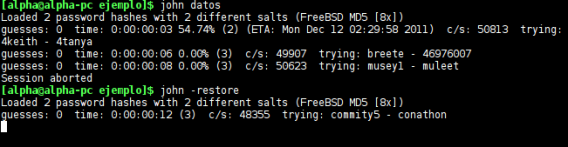
John the Ripper can easily process thousands of potential passwords per second (source)

This also means that text-based passwords are inherently weak. This isn’t due to the systems that manage them, but rather to human beings: our brains have difficulty remembering long strings of letters and numbers. As a result, we tend to generate weak passwords that are easy to remember or that are associated with things we already know. So we use passwords such as “foo”, “123456” or even “password”. Why is this a problem? Decoding short, obvious, easy-to-guess passwords is a simple matter for the many programs available for this purpose. Since these passwords allow access to accounts such as Facebook and Twitter, we’re opening ourselves up to trouble.

Many attempts to raise public awareness

Years of awareness about the importance of strong passwords hasn’t made much of a difference. Weak passwords continue to be used, even though we know we’re courting disaster. And when a web page or application forces us to follow minimum standards of length and variety (uppercase, numbers, and special characters), we repeat the use of the same “safe” password we’ve used in other places, which allows a hacker to gain access to many accounts at once. That’s all because we put convenience before security. Unfortunately, that’s pretty standard human behavior, so it’s not likely to change anytime soon.
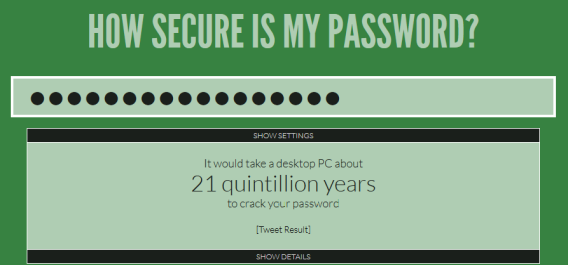
The web site How Secure is My Password tells you how long (seconds, minutes, etc.) it would take to guess your password.

Security experts and psychologists recommend using mnemonic techniques to make it easier to remember your password, associating a character with a word or using phrases of songs or poems as a long password. Another way to avoid problems is to use a password manager like Dashlane. In addition to remembering your passwords in exchange for creating a master key, it can instantly generate very strong passwords and associate them with the accounts you use.

Alternatives exist, but haven’t taken off

The problems associated with text passwords were soon discovered and alternative identification systems were developed. Today there are a variety of systems that are used as substitutes for, or that complement, passwords. They’re divided into four broad categories: things you know, things you have (tokens), things you are (biometrics), and things you do.

Keys you know (“things you know”)

Passwords are a basic type of cognitive key: they’re something we know by heart. But our memory is not limited to words. We can recall faces, geometric patterns, pictures, and life events with equal or greater ease, By associating passwords with memories and emotions, those keys are remembered almost effortlessly.

In Windows 8, you can easily create a picture password

Android security patterns and Windows 8 pictures are two examples of cognitive keys that are easier to remember than traditional passwords, and are more impervious to attempted theft. However, the classic personal questions (“What was the name of your first pet?”) are strong only to the extent that your answer is not obvious or used too often.

Keys you possess (“things you have”)
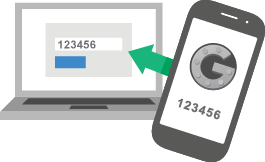
The key to your home is a physical password that you carry with you at all times. Your debit card PIN is also a key, as it gives you access to your cash. The advantage of such an identification system means you don’t need to remember a complex password, since the key in your possession is enough to secure your property, whether it’s your data or a physical object.

In computer science, physical keys (such as USB dongles), have traditionally been used as copy protection systems, but now, thanks to mobile phones, they’re now used to supplement security systems in what’s known as “two-step verification“, i.e. the joint use of a traditional password along with a code sent to the phone.

Biometric keys (“things you are”)
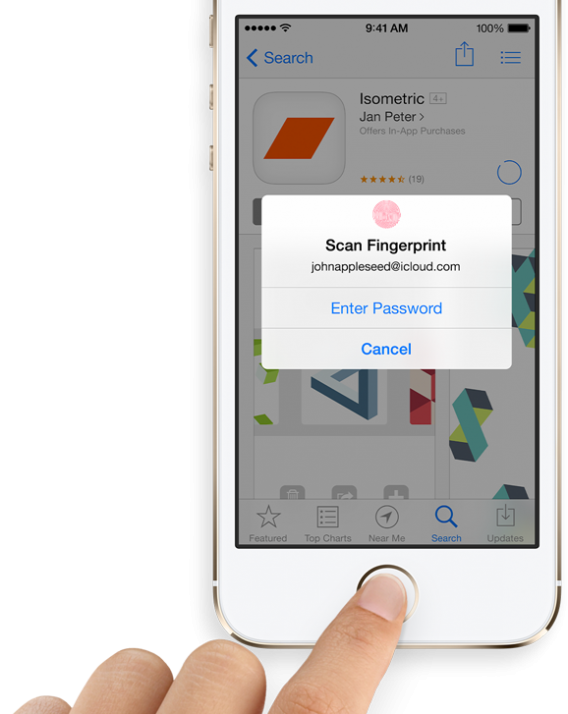
Your body is unique. Your fingerprints, eyes, voice, and face can only belong to you, and nobody can take them (at least not with the same ease that a key can be stolen). What makes you recognizable to others can also make you recognizable to any computer properly equipped with biometric sensors. Android’s facial recognition and iOS 7 with its fingerprint reader are two prominent examples.

On paper, biometric identification systems seem to have everything needed to replace passwords: you don’t have to remember anything, they can’t be stolen (easily), and there are no complex passwords… In practice, however, these systems can also be less reliable.

Codes of conduct (“things you do”)

Your location, what you’re doing, and your usual behavior are pieces of information that can be used to complement traditional identification systems. Many of these mechanisms are automatic: for example, a page can prevent password access if it detects that it’s being accessed from an unusual place or from an insecure environment.
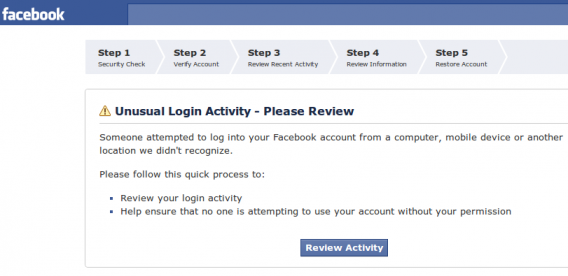
The use of this kind of identification, however, isn’t common, perhaps because of the limited control a user has over it. And it’s a psychological disadvantage: if we don’t “have” a key, we feel less secure.

What’s the ideal security system? Combining key types.

No single system is foolproof. Using more than one identification system is the best way to increase the security of your data. Even if one of your security systems is compromised, you’re still protected.

Multi-step identification systems still have implementation problems that will be difficult to overcome in the short term. Only large software and web service companies can afford to implement such systems, especially if they involve the use of biometric sensors or physical keys. And users are used to dealing with only one system…until now.

The popularity of two-step verification systems such as those used by Google, Facebook and Twitter, as well as Apple’s recent introduction of biometric screening, are, however, very promising signs for moving beyond traditional password identification systems. In the future, it’s likely we’ll witness an explosion in the use of multi-step identification systems. We can only hope.

Do you think passwords will be around forever?

Original article written by Fabrizio Ferri-Benedetti on Softonic ES.

Eric Schmidt says Android is more secure than iOS

Perhaps unsurprisingly, Executive Chairman of Google Eric Schmidt has said Android is more secure than iOS. He made the claim at the Gartner Symposium/ITxpo, which apparently elicited laughs from the audience.

Why does Schmidt think Android is more secure than iOS? He didn’t give a direct answer. He pointed out it has over a billion users, that Android will be around for a long time and has a huge amount of real-world security testing.

But is it really more secure? The Google Play Store, as we saw with the stalled launch of BlackBerry Messenger, has lots of misleading or unofficial apps designed to take advantage of unwary users. While there is plenty of rubbish on the App Store too, Apple’s more rigorous system for allowing apps
on their store means it’s more or less impossible for malware to get in.

Security holes were found in iOS 7 when it was launched, although Apple has an advantage in that it can roll out fixes to all devices without relying on mobile network carriers.

Schmidt’s point about Android’s user base is surprising. On desktop PCs, you find much more Windows viruses and attacks simply because it has a bigger user base. From a malicious point of view, if you want to cause disruption to the most people, you would target the most popular platform.

Our Lead Mobile Expert James Thornton says,

‘there are far more threats for Android devices than a closed platform like iOS. That’s not to say the platform itself is more or less secure, it’s just that there’s far more malware written for Android (much like Windows vs OS X). If users are careful and wise though, they can minimize this threat.’

The fraction of Android apps that are able to attempt to evade Android’s security is tiny on devices that use Google Play Services. Most malware on Android comes from apps downloaded outside of Google Play, and side-loaded onto devices.

Side-loading on Android, like jailbreaking iOS is altogether riskier than using the official stores, but that it’s easier on Android means more users are likely to try.

[Source: ZDnet]

Windows Phone YouTube app updated back to web app

Google and Microsoft have been in a war with the Windows Phone YouTube app. Microsoft has updated the app for users, but unfortunately the “update” is actually a big step back.

Instead of a standalone app, the Windows Phone YouTube app is no more than a glorified web app, opening the mobile web version of YouTube. Users who click on links sent by friends will be redirected into the barebones mobile experience.

Google wants the Windows Phone YouTube app to be developed with HTML5, which is different from the native code iOS and Android apps.

It doesn’t look like Window Phone users will ever get a full-fledged app as Google and Microsoft can’t agree with app standards.

Source: WPCentral

Skype for Android 4.4 updates tablet UI

Skype revealed upcoming chat synchronization across devices and it has also announced an update for user interfaces in Skype for Android 4.4.

The update includes a new UI that is coming to Android tablets as well as Amazon’s Kindle Fire HD and HDX. The 4.4 update presents a focus on conversations and displays recent calls and chats. Tablet users will also get an increase in quality and performance.

Other fixes in the update include:

  • Accessibility improvements with full support for TalkBack screen reader
  • Updates that address incoming call issues, including one that was causing phones to reboot
  • Additional changes to audio routing
  • Display and UX enhancements when switching orientation

The update for Android starts today while the Kindle Fire update is releases later in the month.

Source: Skype

Download: Skype for Android