First image of VLC media player for Windows Phone 8 released

We knew that VLC media player for Windows Phone was coming, but until today we didn’t know what it was going to look like. Now one of the developers has posted an image of the app in action on Twitter.

The app only runs on Windows Phone 8.1, which will probably be released after the Microsoft Build conference which runs from April 2nd – 4th. However, the VideoLAN team has not announced when it expects the app to be released, but it won’t be before Windows Phone 8.1 is released.

VLC for Windows 8 was released only a couple of weeks ago, and looks very similar, so we’re hoping the Windows Phone version has the same features as that. Read our in-depth analysis of VLC for Windows 8 here.

Source: Twitter

RELATED STORIES

Video: Switch from XP to Windows 7 or 8 using PCmover

With the end of Windows XP support quickly approaching, Microsoft has released PCmover, software that helps you transfer your files and settings from a computer running Windows XP, to a new computer running Windows 7 or 8. In the video below, we’ll give you a quick overview of the process so that your move from XP to Windows 7 or 8 is as smooth as possible.

Default player


brightcove.createExperiences();

While PCmover helps you transfer files, folders, user accounts and other personal data from one PC to another, it doesn’t help you transfer applications or existing programs. If you want to transfer programs too, you can use PCmover Professional, a paid-version which helps you transfer software and applications.

If you have further questions about transferring from Windows XP to Windows 7 or 8, be sure to check out the rest of our tips and tutorials to help you with the process.

Euro Truck Simulator 2 version 1.9 features new AI and more

SCS Software’s Massively popular Euro Truck Simulator 2 has been updated to version 1.9, with improved gameplay and trucks.

1.9 is the biggest single update for Euro Truck Simulator 2 so far, with the biggest change being a brand new traffic artificial intelligence (AI) system. This new AI will allow SCS to add new behavior to traffic in the future, including bringing ‘country-specific behavior at traffic lights’ to the simulator. Traffic in Euro Truck Simulator 2 has always felt a bit lifeless, so new AI can only be a good thing.

There are more changes in 1.9 which you can see below, including support for Facebook’s latest purchase Oculus Rift:

  • Oculus Rift support (with the – oculus launch option – this will be improved in the future), now also in the retail version;
  • Early support for gamepad-controlled mouse cursor;
  • Improved handling of automatic gearbox (more gears, interaction with cruise control);
  • Improved compatibility with semi-broken prefabs used in mods;
  • Improved error handling in radio playback;
  • Updated defaults for the Xbox 360 controller in the input wizard to provide a better initial experience.
  • Models:

  • Scania Streamline improvements (model, textures, paint jobs, new parts and accessories) – you may need visit truck dealer and re-purchase some parts;
  • Volvo FH16 improvements (interior, wipers, shadows);
  • Iveco Hi-way improvements (dashboard computer, shadows);
  • Paintjobs are properly applied on add-ons in interior views;
  • Map improvements.
  • Sound:

  • V8 engine sounds for Scania R and Scania Streamline.
  • Download Euro Truck Simulator 2

    Source: SCS Blog

    RELATED STORIES

    Telltale’s Game of Thrones will not be a prequel

    In an interview with Digital Trends, Telltale CEO Dan Connors revealed that the upcoming Game of Thrones game will not be a prequel, and that the TV show provides the timeline it will follow.

    Don’t worry that Telltale’s Game of Thrones will simply follow the story and characters of the show. Conners explained how its world is huge, and there is plenty of space for the developer to tell an original story concurrent with the TV show.

    He didn’t provide any concrete details, saying this ‘might be the most information anyone has’ about the game, which leaves plenty of room for speculation about where it might take place or which characters might appear. Our own Maria Baeta thinks King’s Landing could be a good place to start, with all its brutal political intrigue, and it would be interesting to find out more about life beyond the Wall with the wildings and White Walkers.

    Whatever does appear in the game, Telltale’s excellent pedigree with The Walking Dead series makes us excited at the prospect, as it won’t be the first game based on George R. R. Martin’s fantasy novels.

    There was a role playing game back in 2006 called ‘A Game of Thrones’, another in 2012, a 2011 strategy title ‘Game of Thrones: Genesis and yet another online browser effort called Game of Thrones Ascent. None of these really did the series justice, so it’s good to see a great developer taking the reigns this year.

    Hopefully, 2014 can be the year of great tie-in games, as we already have the excellent Obsidian-developed South Park: The Stick of Truth.

    Source: DigitalTrends

    RELATED STORIES

    Minecraft for Oculus Rift canceled because Facebook is creepy

    Markus Persson (aka Notch) announced on Twitter that he canceled plans for an Oculus Rift version of Minecraft because Facebook “creeps” him out. This news comes shortly after Facebook announced its plans to buy the company who makes the Rift, Oculus VR.

    Persson was apparently in talks with Oculus to bring a version of the popular game Minecraft to the virtual reality headset. Some unofficial ports of the game already exist for the Oculus but none created by Persson’s studio, Mojang.

    Other game developers may have the same reaction if Facebook’s purchase of Oculus VR is successful. For now, Oculus will continue to act independently from Facebook. That could change in the future as Facebook looks to expand of new platforms like virtual reality.

    Source: Markus Persson (Twitter)

    Via: TechCrunch

    Image: 1will2000will1 (Deviant Art)

    RELATED STORIES

    Virtual reality Facebook now closer with Oculus VR purchase

    After purchasing WhatsApp for $16 billion, Facebook still has money to burn. Today, the social network announced it will buy Oculus VR for $2 billion.

    If you’re not familiar with Oculus VR, they’re responsible for making the popular Rift virtual reality headset. The company debuted its second development headset, DK2, at the Game Developers Conference last week. The Oculus Rift is expected to go on sale sometime this year.

    “Mobile is the platform of today, and now we’re also getting ready for the platforms of tomorrow.”

    So why did Facebook buy Oculus VR, a gaming company?

    “Mobile is the platform of today, and now we’re also getting ready for the platforms of tomorrow. Oculus has the chance to create the most social platform ever, and change the way we work, play and communicate,” said Facebook CEO Mark Zuckerberg.

    The value of Oculus is a platform for Facebook in the future. Online games like Second Life would change completely with virtual reality, creating a more immerse experience. Imagine massive online multiplayer games like World of Warcraft with virtual reality. And all with Facebook ads, of course.

    Social networking could also change with virtual reality. If Facebook can combine 3D cameras with the Oculus, it could represent users as 3D avatars within the Oculus version of Facebook for video chat.

    Facebook will purchase Oculus VR for $400 million in cash with around $1.6 billion in stock. Although $2 billion seems like a lot, it pales in comparison to Facebook’s $16 billion WhatsApp purchase. The deal is expected to close Q2 of this year.

    Source: PR Newswire

    RELATED STORIES

    Kernel Panic on Mac? Don’t panic!

    Although Kernel Panic doesn’t sound very reassuring if you know what it is and how to handle it, there’s a good chance your Mac will emerge unharmed.

    Kernel Panic (KP) is the equivalent of the Windows Blue Screen of Death for Unix-based operating systems, such as OS X and Linux.

    Technically, Kernel Panic is a kind of emergency procedure that the operating system enables when it comes across a system error from which it cannot safely recover. Specifically, the OS will shut down automatically, and to use the computer again you’ll have to restart it manually.

    Kernel Panic is very rare, and isn’t necessarily a symptom of a major problem. It can also be caused, for example, by a malfunction of a defective data package.

    So, our first tip: if you only get one KP and, after the reboot, it doesn’t happen again (or at least it doesn’t happen again for a long time) and everything seems to work normally, then you can relax and ignore what happened.

    If the Kernel Panic starts to become more frequent (for example, a couple every month), you should identify the problem and fix it.

    In this article, we’ll tackle the problem from a software point of view, but remember that sometimes the KP could have been caused by hardware.

    What can cause Kernel Panic?

    Mac triste

    The most common cause is a hardware failure  – either the Mac itself, or an external device or application. Some of these problems are only temporary and will disappear after a reboot, as we have already mentioned. Others are more complicated, and will stop you using your computer.

    Badly-written drivers or plugins could cause a KP or even the random presence of specific conditions. In these cases, the Mac should work properly again after the reboot.

    There are other, more complex problems that need to be identified and fixed. Let’s start with the ones that are easier to spot.

    How to recognize Kernel Panic

    The easiest symptom to recognize is the classic screen with the start button image in the background, and the multilingual message that tells you: “You need to restart your computer.”

    The classic Kernel Panic message

    Sometimes, however, you don’t get this default message, and your Mac could spontaneously restart, turn off, or stop responding to commands, forcing you to shut down the computer forcibly.

    In these cases, to be certain that it was a Kernel Panic, just go to /Library/Logs/DiagnosticReports (in Mavericks). There, if the problem was really a KP, you’ll find a log with the details of the incident .

    Sometimes, however, this file could be missing, even if it was a Kernel Panic. In this case (even though it’s hard to tell), the problem is probably in your Mac’s hardware, such as a faulty RAM or hard drive.

    We’ll see later how to deal with the problem if that’s the case.

    When applications fail

    Sometimes a badly-written program could be behind a Kernel Panic.

    OS X 10.8 onwards, after a reboot your Mac will automatically give you the choice to open the programs that you were using just before the KP.

    Reopen applications

    The best thing to do is to say yes, clicking on Open. If one of the applications is the cause of the Kernel Panic, it will occur again. If the computer crashes again, now you know you shouldn’t open those applications in the second reboot.

    Instead, reopen the applications one by one until you find the one that’s behind the KP. Uninstall it and the problem should be resolved.

    Keep your system updated

    By keeping your OS, programs and firmware up-to-date , you’ll decrease the likelihood of conflict and therefore of a Kernel Panic.

    • Open Software Updates in the Apple > Update menu and update all programs (operating system, firmware and software downloaded the Mac App Store).

    Update the software on your Mac

    • Check that the versions of the programs you downloaded from the store are the most recent. You can, for example, check the Mac section on Softonic, or use the built-in function in the applications, if they have one.

    Sometimes it’s a startup issue

    To check if startup items are responsible for the Kernel Panic, follow these steps:

    • Disable all the login items (System Preferences> Users and Groups, then select your user, go to the Login Items tab, select all the items and click on the ‘minus’ sign)
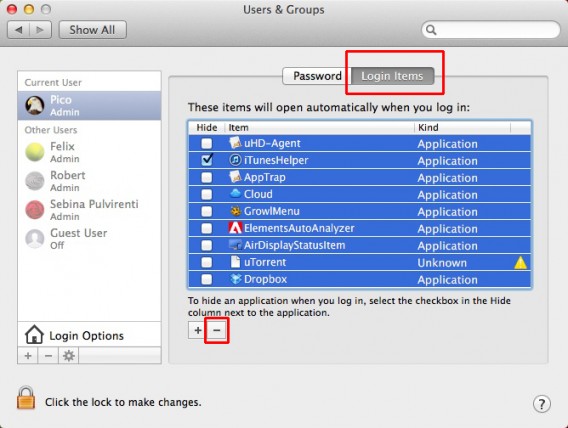
    Disable the login items

    • Restart your Mac in Safe Boot Mode (hold down the Shift key during startup).
    • Now you need to disable all login items for all accounts and groups, using the same method described above.
    • Some applications install items that start automatically with the operating system, before you even log in. You must also disable those. To do this, go to Library/StartupItems.

    Startup Items

    There you’ll find folders with the names of applications. Select them all and drag them into any other folder (you’ll need the administrator password). When the Kernel Panic problem is solved you can put them back into the same folder.

    • Now you can restart your Mac. If there’s no Kernel Panic this time, then one of the login or startup items was responsible for it. Put the items back into the folder one by one, restarting the computer each time, until you find the cause.

    Find the drivers that your Mac doesn’t like

    If you recently installed drivers, for example for a new printer, and as soon as you tried to use it you got a Kernel Panic, it could be the printer’s fault: incorrect drivers can make your OS crash.

    Check carefully that you have the latest drivers for that specific device (and not a similar model), and that they are compatible with your OS X version. If you don’t know what version you are using, go to the Apple menu in the upper left corner and click on About This Mac.

    Your Mac's info

    Kernel Panic can also be caused by the hardware itself, which for some reason your Mac doesn’t like. If you’re sure that the installed drivers are the right ones, and every time you turn on the device your system crashes, the only solution is to stop using it.

    Get your hard disk in shape

    The hard disk must have free space and be in good condition. To do this, get rid of things you don’t need or use. We all have files that are no longer useful or applications we never use. You can use OmniDiskSweeper, which creates an index of all the contents on your Mac and sorts them according to their size.
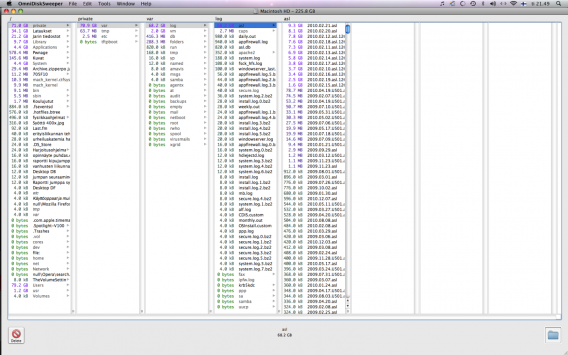
    OmniDiskSweeper

    This will help you find files that are heavy but useless, and could free up space equal to about 5 times the amount of RAM installed, giving your computer a little room to breathe.

    Something else you can do is a little hard disk maintenance. To do so, start the Mac from the OS installation disk (insert the DVD into the drive and restart your Mac while holding the C key) or the recovery partition for OS Lion (restart while holding down Command and R).

    Now run Disk Utility Applications > Utilities > Disk Utility, select the HD in the left column and just click on Repair Disk.

    Repair disk

    Nothing works? Reinstall OS X

    If you’ve tried everything and nothing seems to work, try reinstalling the operating system. If you have OS X 10.9 Mavericks, this is the procedure according to Apple:

    • Make sure your power adapter is plugged in
    • Restart your Mac holding down the Command and R keys
    • Choose a network from the Wi-Fi menu or connect an Ethernet cable
    • Select Disk Utility, then click Continue
    • Select your startup disk on the left, then click the Erase tab
    • Choose Mac OS Extended the Format menu, enter a name, then click Erase
    • After the disk is erased, choose Disk Utility > Quit Disk Utility
    • Select Reinstall OS X, click Continue, then follow the onscreen instructions

    Relinquish control, and just bring it back to the store

    Now that we have explored even the most unpleasant of the possible consequences of a Kernel Panic, the initial message is worth repeating: this is a very rare problem, and can be fixed in almost every case.

    OS X is a Unix-based operating system, an OS backed by 45 years of development (the first release was in 1969!), that is why it has a very solid architecture and these problems are rare.

    And if you’re a thorough Mac user, and use Time Machine as a backup, even in the worst case scenario you’ll be able to recover most of your digital data.

    One last piece of advice: Kernel Panic can also be caused by internal hardware components (such as RAM or HD). If you believe that’s the case because, for example, the problem started after replacing the original hard drive or after adding memory to your computer, we recommend you take it to an Apple Store.

    If you’re new to the Mac world, check out our Moving to Mac Guide.

    XP users mistaking end of support warning as malware

    Some Windows XP users have been alarmed to see warnings from Microsoft Security Essentials that support for the aging operating system is coming to an end. The warning is correct, but some people believe the popup warning is actually a virus or malware.

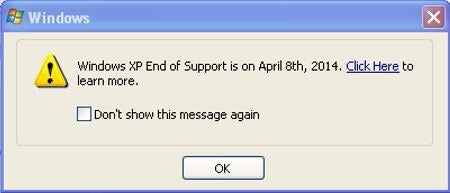
    The popup message is no virus, but a genuine warning that support for XP is coming to an end on April 8th 2014. This means Microsoft will no longer issue security updates, putting you at risk if you continue to use the operating system. Microsoft will patch ‘critical’ security holes for another year, but as the best way to stay safe is to have a modern operating system, the company is making sure users are aware they need to update.

    Windows XP update warning

    Microsoft has made updating easier by offering PCmover Express for free, to help you move your files across from XP to Windows 7 or 8.1. Find out how here.

    Nevertheless, the persistent warning sign has worried many users, and it may not be the best tactic for Microsoft. UK site CRN wrote that in the future criminals might try to copy the style of the Microsoft popup to trick users still using Windows XP. On the other hand, Microsoft has offered years of support to an operating system that is really outdated, and there has to be a time when this stops.

    Source: CRN, Microsoft

    RELATED STORIES

    Malicious RTF files could gain access to your PC via Microsoft Word

    Microsoft has released a warning about a security hole in Microsoft Word 2010, in which a malicious RTF (rich text format) file could grant an attacker user rights in Windows. Users with ‘administrator rights’ are more at risk, as an attacker who gains that ability would have complete access to that Windows system.

    This security exploit could also be activated via Outlook as it uses Microsoft Word to preview RTF files. Word is used as the email reader for Outlook 2007, 2010 and 2013. Mac users running Microsoft Office 2011 for OS X are also at risk.

    Microsoft is investigating the vulnerability and will ‘take appropriate action’ depending on what it requires, according to its Security Advisory article. There are two simple workarounds to protect you from this potential threat:

    As always, this story highlights how you should always be careful when opening files from unknown sources.

    Source: Microsoft Security Advisory

    RELATED STORIES

    Ello: a Social Network that wants to be the anti-Facebook

    Ello is a new social network that promises not to use its users as the product. Where Facebook is free and uses your data to sell advertisements, Ello will be funded by its users, and have no need for ads.

    You can request to join on the Ello homepage, and the site will send out invitations soon when the developers are ready for to an influx of new users. Co-creator Paul Budnitz thinks Ello could change the world, offering a different model to Facebook. Instead of your data being what you pay for a free product, like Facebook, Gmail or Pinterest, Ello will be funded by its users, and free of the clutter of advertising and ‘sponsored posts’.

    At the moment few actual details have been released, but the creators’ focus is on a social network that’s easy to use, clean and with a minimalist design.

    Ello isn’t the first attempt at an ad-free social network – in 2010 an open source site was launched called Diaspora, but by 2012 the founders had handed it over to the community. It continues to exist, but has so far failed to capture a broad user base.

    Ello is trying to inspire users with a simple manifesto, that can (ironically?) be shared on social networks. The problem Ello faces is that it’s been teenagers who have popularized recent social networking successes like Snapchat and Instagram. A minimalist, quiet and premium network might struggle to bring them in, and in general teenagers seem less concerned about privacy and data security than others.

    Source: Ello

    RELATED STORIES