Share your Chrome browser with guests in the latest beta

The latest Chrome beta adds a couple useful new features. Users can keep their identities separate, which is useful for families with multiple users.

Chrome currently allows multiple users but isn’t nearly as well thought out compared to what Chrome beta has to offer. You can switch users by clicking on the You button at the top right of the screen and then selecting Switch person.
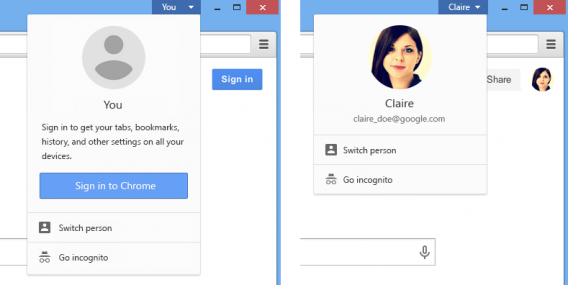
Google Chrome beta 38 user switching

This keeps your data separate from everyone else’s. No one else can see your bookmarks, extensions, saved passwords or browsing history without having to log back in. Each person’s browser data is completely separated.

The Chrome beta also ads a new Guest mode, which lets your friends use your browser without them saving anything. This protects your friend from forgetting they’re logged in on Facebook. Chrome will delete guest session data once the browser is closed.

To check it out yourself, download the Google Chrome beta below.

Google Chrome beta for Mac and Windows

Source: Google Chrome Blog

Related Stories

How to fix Chrome 64-bit Japanese & Korean unicode error

Microsoft fixes August patch that caused ‘blue screens of death’

Microsoft responds to Windows Store fake app problem

16 must-have apps for every teacher

Follow Lewis on Twitter: @lewisleong

Ubisoft pushes back Assassin’s Creed Unity to November

Fans of Ubisoft’s Assassin’s Creed franchise will have to wait just a little bit longer to get their hands on the next game in the series. Assassin’s Creed Unity, originally slated to arrive in October, has been pushed back to November 11th for the US (Nov. 13 for Europe).

If November 11th sounds familiar to you, that’s because it’s the same release date as Assassin’s Creed Rogue, Ubisoft’s console-only release for the franchise. Assassin’s Creed Rogue is only available for the PlayStation 3 and Xbox 360. However, Unity will be purely for next-gen consoles and PC.

The reason for the delay, according to Ubisoft, is to allow time for minor adjustments “that can make a big difference — and ultimately help Ubisoft deliver on the promise of the game.”

Source: Ubisoft

Related Stories

Assassin’s Creed Unity 11 minute gameplay includes interior of Notre Dame

Gamescom 2014 – New Assassin’s Creed: Unity trailer

Revealed: The huge map for Assassin’s Creed: Unity

Assassin’s Creed Unity trailer introduces Templar Elise

Follow Lewis on Twitter: @lewisleong
How to fix Chrome 64-bit Japanese & Korean unicode error

The release of Chrome 64-bit brought support for modern hardware and promises “fewer crashes, better performance, and security.” But with such a dramatic update, some things got broken, one of which is displaying unicode characters for Asian languages.

There is a bug within Chrome 64-bit Version 37.0.2062.94 that can change font settings and remove the ability to display Japanese and Korean text. This also affected some Chinese text, but is not as widespread. The bug isn’t easily reproduced on every computer, but you’ll know if you have it. I have Chrome 64-bit installed on different computers and I have the display error on one install of Chrome but not the other.

chrome facebook korean error

The major sites where people reported the problem is Facebook and popular Asian language sites. If you’re experiencing this bug, the steps below should get Japanese and Korean to display again in Chrome.

Auto detect encoding in Chrome

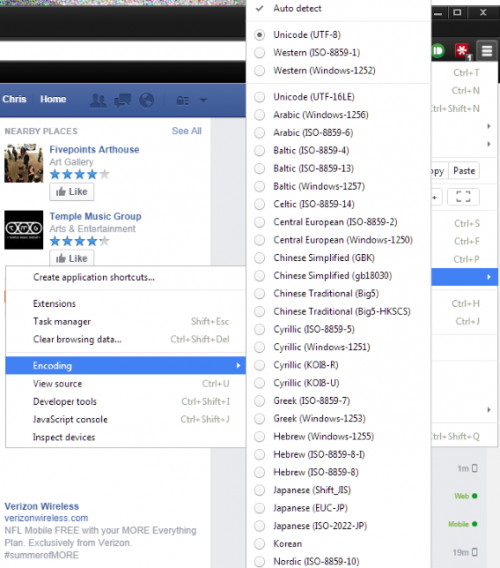
Open the Chrome menu (three bars) and locate Tools. In the menu, find Encoding and make sure that Auto detect is selected. This option will automatically check to make sure the page has the right encoding.

chrome tools encoding auto-detect

Font settings in Chrome

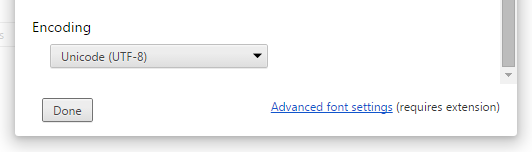
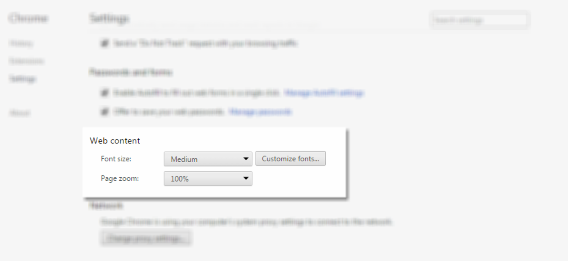
Another place to check is in Web content and the Customize fonts menu. Open the Chrome menu (three bars) and open the Settings menu. Web content is found by clicking on Show advanced settings. Open the menu and scroll to the bottom and make sure that Unicode (UTF-8) is selected. UTF-8 is the most common setting for websites.

chrome settings web contentchrome settings web content encoding

Disable DirectWrite

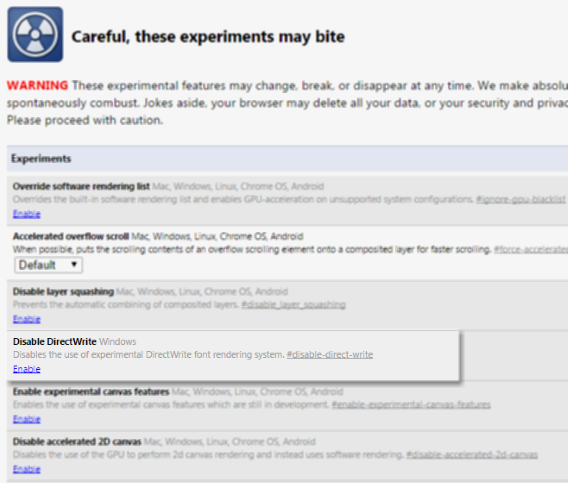
If the above options didn’t work or text is hit-or-miss, the best fix is to disable DirectWrite. To access this option, in the address bar type in chrome://flags. This will bring you to the experimental features within Chrome. It’s recommended you don’t mess with these options, but in this case, this is the best fix.

Click on Enable to disable DirectWrite in Chrome. To apply changes, click the Relaunch Now button at the bottom of the tab. Chrome will relaunch with all the same tabs that were previously open.

chrome disable directwrite

Disabling DirectWrite should solve any problems with displaying text. Now you can browse sites that contain a lot of Asian text without missing any important information.

chrome facebook korean

On the Chrome product forums, the development team is aware of the issue and there should be a fix coming soon, but there isn’t a release date. For right now, this is the only way to have a more permanent fix for the display error for unicode text.

Related Articles

Chrome update brings 64-bit for Windows, offers security and speed

16 must-have apps for every teacher

Stop ignoring Android app permissions

Follow me on Twitter: @chrislikesrobot

Microsoft fixes August patch that caused ‘blue screens of death’

A week and a half after pulling an update that caused some users to experience a “blue screen of death,” Microsoft has fixed and rereleased the patch. The update wreaked havoc on user’s computers, making them unable to boot or get into Safe Mode. The problem was so bad Microsoft advised users to uninstall the patch.

Microsoft claims only a “small number of customers experienced problems” but found the issue serious enough to pull the update to fix it. The blue screen of death problem affected mostly Windows 7 64-bit users. The update fixes critical security bugs with the core Windows operating system.

Now that the patch is safe to download again, check Windows Update to check if you have the update waiting for you. Search “Windows Update” in the Start Menu or look in the Control Panel.

Source: Microsoft

Via: The Hacker News

Related Stories

Windows August updates causing ‘blue screen of death’

Incoming: Unofficial Windows XP ‘SP4’ in development

Chrome update brings 64-bit for Windows, offers security and speed

Stop ignoring Android app permissions

Follow Lewis on Twitter: @lewisleong
App of the Week: Twitch

Softonic’s App of the Week highlights some of the coolest, most unique, and biggest app releases for Android, iOS, Windows, and Mac. This week, get all your favorite live gameplay videos at your fingertips with Twitch for iOS and Android.

Twitch is the web streaming video platform spin-off from the now defunct Justin.tv. Having gained enough popularity to attract the likes of Google and Amazon, the latter recently bought the company for a hefty sum. Check out the video below to see how the mobile app compares to the web version.

Default player


brightcove.createExperiences();


Like the web version, the mobile version lets you search for videos by genre, user, and channel. Unlike the web version, you can only watch live games: there’s no playback or highlights function. Still, if you want Twitch.tv at your fingertips, the Twitch app will be perfect for you.

Download Twitch for: Android | iOS

Make sure to check out some of our past App of the Week features:

App of the Week: DU Speed Booster

App of the Week: Angry Birds Epic

App of the Week: Yet Another Cleaner

Incoming: Unofficial Windows XP ‘SP4’ in development

A Greek Windows XP fan and developer is working on his own ‘Service Pack‘ (SP) for XP, in the hope of extending the aging operating system’s life. Microsoft stopped supporting Windows XP on April 8th of this year.

The unofficial Windows XP SP4 features updates for ‘most XP components’, according to developer Harkaz. It is currently in a ‘Beta 3’ phase, and can be downloaded from his Google Drive here. Of course, this SP4 is in no way supported or condoned by Microsoft, and there are no guarantees that it is safe to install. Nevertheless, it’s an interesting development, and while Microsoft is very unlikely to support it, it will be interesting to see if the company actively tries to stop it. Users are advised that they install this unofficial Windows XP SP4 entirely at their own risk.

XP, according to StatCounter, still has over 14% of the global desktop operating system share, which translates into a huge user base. Many XP users are running it on very old PCs, which are unable to cope with newer operating systems. There is perhaps a moral case for giving these millions of PCs more years of service, if they are still in use.

Source: ryanvm.net

Related Stories

Windows 9 to get simple, single-click updates?

Windows August updates causing ‘blue screen of death’

Microsoft responds to Windows Store fake app problem

Follow Jonathan on Twitter: @jonathanriggall

Office Tip: use tabs in Word, Excel and PowerPoint

Over the years, I’ve learned a few simple tricks using Office, and none have come in handy as much as Office Tab. I can’t count the number of times I’ve dreamed of being able to use tabs with Microsoft Office. I was convinced that it was impossible to open multiple files in one window. Then, I discovered Office Tab.

How does it works? Once installed, if you double-click on a Word document while another one is already open, the program adds a tab to the Word interface instead of creating a new window.

The demo version is free for 30 days, and it comes in two versions: Office Tab, which is compatible with Word, Excel, and PowerPoint, and Office Tab Enterprise, which works with all Microsoft Office software packages.

1. Download and set-up

Download Office Tab and follow the installation process. In the Select products window, if you use an older version of Microsoft Office, check the first box only. If you’ve already purchased Office 2013, choose the second option, then confirm by clicking Next.

Office Tabs 2010 2013

2. Select destination

Select the destination path, then select the components you need: Office Tab for Word, Excel, or PowerPoint. I advise you all to install all of them since the files are small.

Office Tabs programs

3. Close and install

Close all windows in Word, Excel, and any other program in Microsoft Office before proceeding with the installation.

4. Customize

Finally, after installation is finished, Office Tab takes you directly to the Office Tab options control panel.

In this panel, you can customize how you’d like these plug-ins to behave. If you explore a little bit, you’ll find a few interesting features.

Office Tabs options

5. Access tabs

Below is a screenshot of Word 2013 before and after you install Office Tab. The second image shows the same thing, but with Excel 2013.

In any case, notice that the ribbon interface has been changed. A new section, located at the top right, appears on the screen. Tabs that allow you to juggle between documents are placed just below the ribbon.

Word with or without Office Tabs

Excel before and after having installed Office Tabs

Now, you can comfortably navigate Office with multiple documents in a single window using tabs.

Although the free trial lasts only 30 days, if you’re a big user of Office products (which let’s face it, many of us are), then it’s a great solution.

Related Articles

Office Tip: Restore or minimize the Ribbon interface in Word and Excel

How to restart Windows Explorer if it isn’t responding

The top 5 Skype voice changers

Follow me on Twitter: @bbrassart

Windows 8 usage finally exceeds XP

During July and August, Windows 8 and 8.1 usage finally superseded Windows XP in worldwide operating system market share, according to statistics from StatCounter.

Persuading users to upgrade to Windows 8, and to at least stop using XP, has been an uphill struggle for Microsoft. Windows 8’s radical new design may have been off-putting to some, while XP is running on millions of old PCs around the world. It’s an important milestone for Windows 8 to have a bigger market share than its 14 year old predecessor.

XP still commands 14.7% of the OS market, but Windows 8 and 8.1 usage has now reached 15.22%. All of these are far behind Windows 7, which is the most popular operating system by far at 55%.

With Windows 9 expected in 2015, it looks like Windows 8/8.1 will be consigned to being one of Microsoft’s least successful releases. Rumors surrounding the development of Windows 9 suggest it will answer many of the criticisms of 8. Like Windows 7, which followed the disaster that was Vista, perhaps Windows 9 will have greater success.

Source: StatCounter

Related Stories

Rumor: ‘Modern UI’ disabled by default on Windows 9

Windows 9 to get simple, single-click updates?

Windows August updates causing ‘blue screen of death’

Microsoft responds to Windows Store fake app problem

Follow Jonathan on Twitter: @jonathanriggall

Call of Duty: Advanced Warfare made with advice from Pentagon adviser

In an interview with The Guardian, Sledgehammer Games has explained how it talked to a Pentagon adviser while making Call of Duty: Advanced Warfare.

This fall’s Call of Duty: Advanced Warfare is set 45 years in the future, but that doesn’t mean ‘realism’ has been thrown out the window. The plot is dystopian, seeing a private military corporation, Atlas, superseding the national military to fight a global terrorist threat. Warfare is highly technological, with soldiers being equipped with exo-skeletons.

Sledghammer games talked to military advisers, futurologists, and a ‘scenario planner’ from the US Department of Defense to get advice about the likely conflicts of the future and technology. Atlas, the private military organization takes clear inspiration from Blackwater, the real defense company that became famous and notorious during the Iraq conflict of the 2000s.

It’s not unusual for game developers to get advice from ‘real world’ experts, and that in itself is no guarantee of a good game. The last Medal of Honor game, ‘Warfighter’ was made with the help of members from the ‘Naval Special Warfare Development Group’, but it got a very poor critical reception, and possibly resulted in the long running series being shelved.

Call of Duty: Advanced Warfare will be released for PC, PlayStation and Xbox on November 4th 2014.

Source: The Guardian

Related Stories

Call of Duty: Advanced Warfare evolves through competition

Gamescom 2014 – Call of Duty: Advanced Warfare Multiplayer revealed (video)

Battlefield Hardline delayed until 2015

Call of Duty: Advanced Warfare trailer warns of PMC Atlas

Follow Jonathan on Twitter: @jonathanriggall

Microsoft responds to Windows Store fake app problem

As our own Lewis Leong wrote last week, the Windows Store has lots of fake apps in it, designed to trick users and scam them out of money. Now, Microsoft has responded, admitting that users found it hard to find the app they were looking for among all the misleading and confusingly named titles.

In a blog post, Microsoft’s Todd Brixx explains how Microsoft are dealing with the problem. Firstly, the store’s app certification requirements have been tightened up to ensure that: app names ‘clearly and accurately reflect the functionality of the app’; that apps are in the correct category; and that their icons are not overly similar to others.

Microsoft is also revising the Windows Store catalog, identifying apps that are misleading or don’t comply with its new certification requirements. It says over 1500 apps have already been removed as part of this process. It has also promised to refund any victims of scam apps.

Microsoft has been playing catchup with its Windows Store in terms of sheer numbers of apps, and this may have contributed to poor quality apps being allowed in. The company says that while its store review is continuing, users can help by reporting malicious apps with Microsoft’s online tools or via email.

Source: Microsoft

Related Stories

The Windows Store is full of fraudulent apps and Microsoft doesn’t care

Rumor: ‘Modern UI’ disabled by default on Windows 9 Enterprise and Server editions

Report: Microsoft planning Windows 9 event for September 30

How to automatically update drivers in Windows 7 and 8

Follow Jonathan on Twitter: @jonathanriggall