Now you can control your music in-game with Steam

If you like listening to your own music while gaming, you should update to the latest version of Steam now. Beyond getting a refreshed home page with customized recommendations, the Steam update includes a music player that allows you to control your own tunes from inside any game.

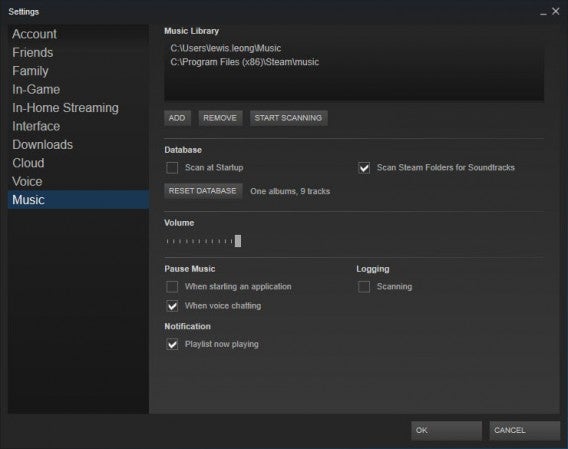
Steam Music Player will automatically find music in your Music folder but you can specify other folders if you keep your music elsewhere. To do this, head over to the settings and Music section on the left navigation column. You can add or remove folders and adjust options like scanning your library on startup and looking for soundtracks purchased using Steam.

Steam Music Player settings

To pull up the Steam Music Player in game, use the same shortcut (Shift + Tab) as the Steam overlay and you’ll see it. You can queue up tracks or create playlists, all without leaving your game.

Your music will automatically pause when voice chat is activated so you don’t miss out on your conversation.

Download Steam for Windows and Mac

Source: Steam

Related Stories

11 ways to up your FIFA 15 game

EA SPORTS™ FIFA 15 Companion launched for iOS, Android and Windows Phone

Angry Birds Transformers coming to iOS and Android this October

Gameloft ruins Asphalt Overdrive by turning it into a free-to-play endless runner

Follow me on Twitter: @lewisleong

Why the Shellshock Bash bug is even scarier than Heartbleed

A newly discovered vulnerability within the command line which runs in the background of Mac OS X, Linux and many Unix based system lets hackers remotely execute commands to computers and websites. Bash has been around for twenty-five years but this vulnerability was just recently discovered and has the potential to exploit computers, devices, websites and more. We will likely continue seeing damage from the Shellshock Bash bug for years to come.

What is Bash and why are so many things using it?

Without getting too technical, Bash is basically an interpreter for computers, allowing users to execute commands on Unix and Linux systems. It is used on a variety of devices because the software is open source and is the industry standard for web servers.

Netcraft web server OS breakdownImage credit: Netcraft

Over half of all web servers in the world are running Apache, which is a web server application responsible for HTTP, or hypertext transfer protocol. Apache is credited for the huge growth of the internet.

How is Bash being exploited?

Bash is allowing attackers to execute arbitrary code on affected systems without any form of authentication. This type of attack is called “code injection,” and there are many environmental variables for hackers to exploit.

As mentioned previously, many websites run on web servers that are vulnerable to the Shellshock Bash bug. This means entire websites could theoretically be taken down by it. Worse, there are tons of devices that support Bash like web cameras and routers. Home automation tools like networked lightbulbs and thermostats could be affected as well.

Good thing I’m using Windows.

While the Windows operating system isn’t directly affected, the devices you connect to your computer may still use Bash. The router you use to connect your Windows computer to the internet is most likely running an operating system that’s vulnerable.

Is this as bad as Heartbleed?

The Shellshock Bash bug is drawing many comparisons to the Heartbleed vulnerability discovered a couple months ago. While the vulnerabilities are completely different, the widespread effects of both attacks are comparable. We’ll be seeing the effects of both vulnerabilities for many years to come.

The difference is, Heartbleed only affected websites and services. The Shellshock Bash bug can affect sites, computers and many other devices.

Attackers know about the exploit and are already using it. Someone created an internet scanning tool to probe websites that are vulnerable to the Shellshock Bash bug. Ars Technica found over 2 billion sites that “fit the profile for the Shellshock exploit.”

We don’t know how far hackers will go. These hackers could possibly creating worms that can pass through firewalls and self-replicate, infecting a wide array of machines on a network without users noticing. Hackers could even snoop on your personal data once your machine is compromised using the bug.

For now, we’re waiting to see what attackers are going to do with the exploit.

What can I do to protect myself?

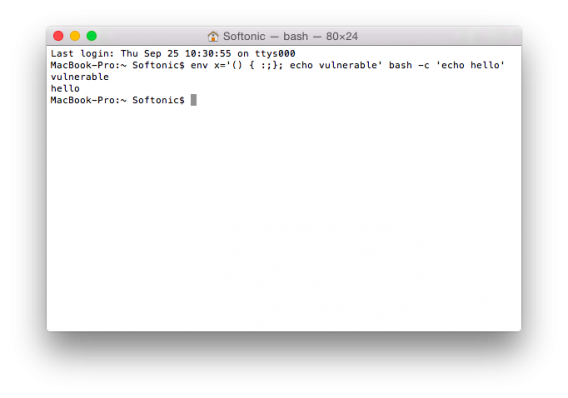
If you’re a Mac user and want to find out if you’re vulnerable, you can run the following script in the Terminal application (located in your Utilities folder).

$ env x='() { :;}; echo vulnerable’ bash -c ‘echo hello’

If the command reads “vulnerable” and “hello” then your machine is susceptible to the Shellshock bug. There’s a way to patch the vulnerability yourself by recompiling Bash but that’s extremely technical and not for the faint of heart. If you feel comfortable with the command line, head over to Stack Exchange for details about how to patch the bug. Mere mortals will want to watch closely for an update from Apple.

Mac terminal shellshock bash bug

For most users, the best thing you can do now is to make sure you are running the latest software on all your devices. And I mean all of them. Check for firmware updates on your router, which most users tend to forget about. Consult the manual for your particular router to see how to update the firmware as each model has different steps.

Users will also want to watch out for any suspicious sites or emails that want you to install software. With this bug causing a huge stir, you can be sure hackers will be looking to capitalize on people’s fears by offering fake software solutions to “patch” your computer.

Beyond keeping your devices up to date and being careful online, control over this bug is largely out of your hands. You’ll have to wait for sites to patch the vulnerability on their web servers.

Sources: Red Hat | Troy Hunt

Related Stories

Why does a keyboard app need ‘Full Access’ to my iPhone?

Firefox and Thunderbird get ‘critical’ security updates

The next version of Android will encrypt your data by default

Updates for Adobe Reader and Acrobat fix security vulnerability

Follow me on Twitter: @lewisleong

App of the Week: My Wi-Fi Router

Softonic’s App of the Week highlights some of the coolest, most unique, and biggest app releases for Android, iOS, Windows, and Mac. This week, create your own personal Wi-Fi hotspot via Windows with My Wi-Fi Router.

My Wi-Fi Router is built for Windows devices, turning your device into a virtual Wi-Fi hotspot that you can share with any of your other devices, whether they’re running Windows or not. All you need is an initial 3G, Wi-Fi, or Ethernet connection, and you’ll be able to set up your device, creating a Wi-Fi network with its own name and password. Check out the video below to see exactly how it works.

Default player


brightcove.createExperiences();

If you’re in a crunch and need your very own Wi-Fi network, then grab your Windows device and check out My Wi-Fi Router.

Download My Wi-Fi Router for Windows.

Make sure to check out some of our past App of the Week features:

App of the Week: Duet

App of the Week: Pixlr

App of the Week: DU Speed Booster

Angry Birds Transformers coming to iOS and Android this October

Rovio has released the first trailer for its upcoming Angry Birds Transformers game, which is quite a radical departure from its other games, as you can see in the video below.

Default player


brightcove.createExperiences();

Angry Birds Transformers looks more like a 2.5D side scrolling shooter than it does an Angry Birds game. Featuring the ‘Autobirds‘ and ‘Deceptihogs‘, you run sideways while shooting targets in the background of the game. It’s a game of futuristic weaponry – there’s none of Angry Birds’ traditional catapult here. Players will switch between robot and vehicle too, as they attempt to get through the levels.

Angry Birds Transformers looks really polished, with lots of effects, and excellent character models that seem surprisingly expressive. The game comes out on iOS October 15th, and is followed up with an Android release on October 30th.

Related Stories

Angry Birds Transformers features Autobirds vs Deceptihogs

Read our early review of Angry Birds Epic

Angry Birds Stella out now for Android and iOS

Follow Jonathan on Twitter: @jonathanriggall

Firefox and Thunderbird get ‘critical’ security updates

The third update for Firefox 32 has arrived, version 32.0.3, and it fixes a critical security vulnerability in the browser. The same is true of Mozilla’s email client, Thunderbird, which also gets a security update to version 31.1.2.

Mozilla’s description of the security threat is pretty complicated, but essentially, in its network security services (NSS), there’s a hole that could allow attackers to counterfeit security certificates, which makes browsing the web much less safe. French security researcher Antoine Delignat-Lavaud discovered the problem, and it was independently found by ‘The Advanced Threat Research team at Intel Security’.

If you use either program, you should update it as soon as possible. Mozilla’s ‘Security Advisories‘ are color coded for severity, and this one gets a red-colored ‘Critical’ rating. Links are below for Windows and Mac.

Download Firefox for Windows and Mac

Download Thunderbird for Windows and Mac

Source: Mozilla

Related Stories

Firefox for Android updated with more customization

WhatsApp beta for Android gets new image features

Mozilla: Firefox will not become a mess of sponsored content

Follow Jonathan on Twitter: @jonathanriggall

11 ways to up your FIFA 15 game

With the release of FIFA 15, advanced graphics and gameplay mean everyone’s trying to get a leg up on the competition, proving that their favorite team can be as good in the virtual world as it can be in the real world.

Here, I’ll give you some tips that can help your team reach victory in FIFA 15 (although the game is so realistic, you could probably use these tips in the real world too).

Use the offside trap

A classic soccer tactic: setting up your opponent in an offside position. This technique requires a little practice, and the first few times you try it, you’ll probably leave the opposing striker with more open field ahead of him than you meant to, but once you’ve mastered it, it can be a really useful tactic.

Not only does the the offside trap stop the play, it also wears down the morale of your opponent, especially if you’re playing against another person.

Aim for corners near the post

FIFA 15 lets you choose from four tactics when taking corners: run far post, run near post, crowd the keeper, and edge of box run.

None of these tactics are foolproof, but if I had to stick with one, I would choose run near post and try to get a header from a tight angle. Don’t make the cross too powerful or the ball might go too far.

Clear the ball

Playing soccer as a kid, my coach would always say, “clear the ball, don’t pass it around in the area.” This also applies to FIFA 15.

If your opponent’s harassing you and things are starting to heat up, hit Shoot or launch a powerful long pass to relieve the pressure and reorganize your team.

FIFA 15

Parking the bus

One of the new features in FIFA 15 is the addition of two new in-game tactics. One is “parking the bus,” which is basically planting your entire defense in the area and preventing your opponent from scoring at all costs.

If you’re winning by a goal and you only have a few minutes left, park the bus and try to withstand you opponents attack .

Mount swarming attacks

The other in-game tactic introduced this year is the all-out attack. This tactic, unlike parking the bus, works best when you’re losing and don’t have much time left to score. Your players will advance their lines and rush towards the opponent’s net in search of a goal.

A bit of advice: if you’re using this tactic and the game goes into extra time, remember to deselect it, or you could get a nasty shock in the early stages of extra time.

Get your strikers to pressure the ball

Wannabe coaches take great enjoyment in giving instructions to FIFA 15 players. Each player, depending on their skills and their position on the field, can receive custom instructions that the AI incorporates during the game. In order to access them, you need to go to the Team Management menu and then to the Instructions tab.

One instruction that’s particularly effective is getting your strikers to pressure the ball. Using this tactic, you can make it more difficult for your opponent to build up moves from their defense.

FIFA 15 instructions

Switch wings

If you play with two attacking wingers, like Pedro and Neymar for FC Barcelona, this tactic may come in handy during the match, helping you disorientate defenders. You can activate it using the quick select for in-game tactics (D-pad on consoles). Just remember that until you reapply the tactic, wingers will remain switched.

Tell your center back to go forward

We have seen it done by Terry, Pique, Ramos, Vidic, and Javi Martinez. When all seems lost, you can choose to move your center back up the field and have him act as another striker so that they can get on the end of crosses coming into the area.

To do this, you need to access the instructions menu, select the player in question, and edit the option.

Find a balance with your full backs

Having two offensive full backs can be very useful for providing depth to the team and creating situations that lead to attacks. On the other hand, it can also leave you very vulnerable when you have to defend.

Thanks to custom instructions, you can tell one full back to push up whenever possible while the other stays back; that way, you always have someone available to help out in defense.

FIFA 15 roles

Run in behind the defense

Imagine you’re playing as Real Madrid and you have a couple of aces up your sleeve like Cristiano Ronaldo and Gareth Bale. In the custom instructions, you can tell players to constantly run in behind the defense. Cristiano sets off, Kroos picks him out, defenders are caught out of position, and goal!

Look for shots

Another custom instruction you can give certain players is to get them to move into a good shooting position whenever there’s the possibility of a cross coming in (when you’re racing down the wing with the ball, for example). It’s very useful if you have good finishers on your team.

If you’re fascination with soccer is limited to video games, these tips should help you get a better grip of the game.

If you want to see how FIFA 15 stacks up to this year’s PES 2015, check out our definitive comparison.

Related Articles

FIFA 15 vs. PES 2015: the definitive comparison

FIFA 15 FIFA Ultimate Team web app is now live

EA releases top 20 player list for major European leagues

Follow me on Twitter: @cifu

Original article written in Spanish by Alberto Cifuentes via Softonic ES.
WhatsApp for iOS updated with returning support for iCloud backups

As soon as iOS 8 was released, WhatsApp‘s chat backup feature stopped working. The latest update to the communication app, however, restores iCloud chat backups, along with some other fixes.

WhatsApp got in early with an iOS 8 compatible update, but its backup was disabled. It wasn’t clear if this was a problem with WhatsApp, or iOS 8. Luckily, the latest update for WhatsApp, version 2.11.12, fixes that, once again giving you the security of a backed- up chat history, if you choose the option.

To do so, go to Settings > Chat Settings > Chat Backup, where you can choose how often to backup your chats. WhatsApp backups do not include videos you’ve shared or received, but all other media can be saved if you choose.

WhatsApp has yet to take advantage of iOS 8’s interactive notification system, like Skype already has.

Download WhatsApp for iOS.

Related Stories

WhatsApp chat backups are broken in iOS 8

WhatsApp beta for Android gets new image features

WhatsApp bug is resetting some users’ privacy settings

Follow Jonathan on Twitter: @jonathanriggall

EA SPORTS™ FIFA 15 Companion launched for iOS, Android and Windows Phone

If you’re playing FIFA 15 on PC or consoles, you can download the new EA SPORTS™ FIFA 15 Companion and manage your FIFA Ultimate Team from your smartphone.

Confusingly, EA’s mobile version of FIFA 15 is called FIFA 15 Ultimate Team, but that’s not the app that supports the Ultimate Team feature in the PC and console release;  this FIFA 15 Companion does that job.

The FIFA 15 Companion requires an Origin account linked to FIFA 15 on Xbox One, Xbox 360, PlayStation 4, PlayStation 3, or PC. Then, just like the web app, you can plan your squad, manage your team, search for, bid on and sell players in the transfer market, as well as buy packs from the FIFA Ultimate Team store.

Download EA SPORTS™ FIFA 15 Companion for: Android | iOS | Windows Phone

Related Stories

FIFA 15 FUT web app is now live

FIFA 15 ‘FIFA Ultimate Team’ web app launch delayed

E3 2014: FIFA 15 Ultimate Team’s new features

Follow Jonathan on Twitter: @jonathanriggall

iOS 8.0.2 coming in a few days after disastrous 8.0.1 launch

After a torrent of complaints following yesterday’s iOS 8.0.1 update, Apple removed it from its servers. It has promised a new update in a few days, and explained to users who did update how they can downgrade.

As we reported, iOS 8.0.1 was released quickly to fix various bugs found in the initial 8.0 release. However, as soon as users began installing it, the complaints started rolling in. iPhone 6/6 plus users especially found that Touch ID no longer worked, and they had lost their cellular data connection.

The 8.0.1 update was stopped, and Apple has published a support page so that iPhone 6 users can downgrade to iOS 8.0 while they wait for the next update, coming ‘in the next few days’. To downgrade, you need to connect to iTunes via your Mac or PC. From the Apple support page:

How to downgrade to iOS 8.

1) Make sure that you’re using the latest version of iTunes.

2)  Connect your iPhone to iTunes.

3) Back up your iPhone in iTunes on your Mac or PC. iCloud backups won’t restore to earlier versions, including iOS 8.0.

4) Download the file below that corresponds to your device:

iPhone 6

iPhone 6 Plus

5) Select the file that you just downloaded by doing one of these in iTunes:

Mac: Press the Option key and click Check for Update.

Windows: Press the Shift key and click Check for Update.

6) Press Update to install iOS 8 on your iPhone.

It was a surprise to see an iOS update released so quickly after the launch of iOS 8, and it’s quite unlike of Apple to get something like this so spectacularly wrong. The company is rightly proud of user adoption rates for its latest updates, but if iOS 8.0.2 doesn’t get things right, people may get nervous about applying future updates so readily.

Source: Apple

Related Stories

Chrome updated with iOS 8 support

7 questions Siri can (and can’t) answer in iOS 8

Facebook for iOS 8 offers more control for sharing your location

Follow Jonathan on Twitter: @jonathanriggall

Gameloft ruins Asphalt Overdrive by turning it into a free-to-play endless runner

Gameloft released another Asphalt game today but it has fans of the series fuming. The Asphalt games have traditionally been arcade style racers with tilt controls but Asphalt Overdrive ditches that for swipe controls. That’s because Asphalt Overdrive isn’t a racing game but an endless runner.

The game is a traditional three-lane endless runners with obstacles for you to dodge. Cars inexplicably jump and land without issue. You’ll also be able to perform stunts for more points.

Default player

<!–
By use of this code snippet, I agree to the Brightcove Publisher T and C
found at https://accounts.brightcove.com/en/terms-and-conditions/.
–>

<!–
This script tag will cause the Brightcove Players defined above it to be created as soon
as the line is read by the browser. If you wish to have the player instantiated only after
the rest of the HTML is processed and the page load is complete, remove the line.
–>
brightcove.createExperiences();

Since the game is free to play, expect to shell out cash if you don’t want to wait for things to get done. There’s “bars of gold” and in-game cash as premium currencies, which is something Gameloft has added to many of their games. The in-game money can be used to fill your “energy meter” or to buy upgrades for your car.

Not all is bad. The game looks great and takes on a 1980s Miami Vice look. There’s a mix of modern cars and classic ’80s super cars like the Lamborghini Countach and Ferrari 348.

The game is currently only available for Android in the Play Store but other platforms are coming soon. We’ll update the links as soon as they’re available.

Download Asphalt Overdrive: Android | iOS (coming soon) | Windows Phone (coming soon) | Windows 8 (coming soon)

Related Stories

Major update for Fruit Ninja coming in October (video)

Blizzard cancels Titan MMO after 7 years of development

The Sims 4: Unlock the hidden lot in Oasis Springs

The Sims 4: Unlock the hidden lot in Willow Creek

Follow me on Twitter: @lewisleong