Facebook is testing an automatic Trip Slideshow feature

Facebook is testing a ‘Trip Slideshow‘ feature, which works similarly to the company’s Year in Review feature.

Various people have reported seeing the feature upon returning from a trip. It’s created automatically, requiring no interaction from users. It’s likely to use your location data to tell when you’ve been on holiday, so if you don’t have that feature turned on, Facebook might not be able to tell you’ve been on a trip.

Facebook user Alesandro Simić made a YouTube video of the Trip Slideshow, so you can see it in action below:

Facebook often tests new features with small groups of users, and just because one has been seen ‘in the wild’, doesn’t mean it will eventually come to all users. We recently saw a test regarding scheduled deletion of your posts, but nothing has been seen of that since.

Source: The Next Web

Related Stories

Facebook is testing a feature to let you schedule deleting posts

Facebook punishes sites for click-bait headlines

View count coming to video on Facebook

Follow Jonathan on Twitter: @jonathanriggall

Rumor: Windows 9 will be free for Windows 8 users

More rumors are circulating that Microsoft’s upcoming Windows 9 (or whatever it will be called) will be free, at least for Windows 8 users.

Microsoft has changed the way Windows is updated recently, offering regular monthly updates, instead of the old system of Service Packs that arrived every few years. Getting users to upgrade to Windows 8 has been an uphill struggle, so the company will want to make Windows 9 as painless as it can for as many users as possible. No mention has been made of what Windows 7 or Vista users will be offered– if anything– to encourage them to upgrade.

The latest rumor that the upgrade to Windows 9 will be free comes from an Indonesian site, Detik.com, quoting Microsoft’s Indonesian President Andreas Diantoro at a meeting on September 25th in Jakarta.

We expect to be able to confirm some of this on September 30th, when Microsoft holds an event to present the future of Windows and Enterprise.

Source: Detik.com

Related Stories

Windows 9 Technical Preview may not arrive until October

The Start Menu in Windows 9 will change color

Rumor: Windows Phone 9 developer preview released in January 2015

Follow Jonathan on Twitter: @jonathanriggall

Photo Editing: 5 mobile apps are put to the test

What’s the best photo editing app for Android and iOS? If you had to chose one, which would it be?

Choosing a winner out of the hundreds of photo editing apps available on the App Store and Google Play isn’t easy. When it comes to photos, the end result is important, but the user experience shouldn’t be overlooked.

After rummaging through dozens of apps, I came up with a list of multiplatform solutions to consider:

Instagram: Android | iOS

Snapseed: Android | iOS

VSCO Cam: Android | iOS

Aviary: Android | iOS

Pixlr Express: Android | iOS

These apps will be assessed for four different criteria:

  1. Ease of use
  2. The number and quality of filters
  3. The different editing options
  4. Backup capabilities and exporting the final product

Let’s see which of these popular apps will rank as the best photo editing app for iOS and Android.

Easy to use: An important aspect to consider

Instagram

The app is a long way from being a full mobile photography studio. On the main screen, your feed is displayed with pictures of people you follow. Once a photograph is taken or imported, different filters can be applied. To access more editing options, you need to press on the wrench.

Even though the different operations are conveniently linked together, not everything is optimized for editing photos. The interface is consistent, but it rushes the user into quickly posting photos with a filter.

Snapseed

Snapseed pushes the boundaries by offering unconventional touch gestures. In order to manipulate various editing options, you’ll need to use all your fingers. Swipe up or down to select an option, and left or right to increase or decrease the intensity.

VSCO Cam

VSCO Cam is not an easy app to use. It serves as a social network, editing studio, and photo gallery all at the same time. It’s difficult to understand at first, and you’ll need several days to understand what each button does. “Elitist” is the adjective that best describes VSCO Cam, Although navigating through the app’s menus is not necessarily a bad thing as it generally offer quality options.

Aviary

The process of modifying a photograph taken with a smartphone can be split into three stages: taking photos or importing media, editing, and exporting. The Aviary editors seem to have  understood this, because the app has three main screens, one for each stage. The options are presented in a dropdown menu at the bottom of the screen.

Pixlr Express

To avoid overloading the Pixlr Express interface, the developer opted for small rectangular icons, allowing them to offer a full range of features. Unfortunately, I noticed that despite the small size of the buttons, some transparency effects cover the preview of the final product. Overall, Pixlr Express’ interface isn’t bad, although it certainly isn’t one of the app’s strong points either.

Conclusion

Without compromising on the available features, Aviary offers the most user-friendly experience, regardless of your level of expertise.

Aviary interface

Aviary’s interface is the easiest to use

Filters: one of the main features

Instagram

Instagram popularized vintage photo filters. After capturing a shot, you can chose from 19 different filters. Black and White, Sepia, or Toaster are a few of the more popular ones, although personally, I’m still waiting for a Polaroid filter. You can adjust the intensity of the filter by double tapping the icon.

Instagram’s filters are varied, customizable, and of good quality. They completely fulfill their purpose, which is to improve the rendering of a photo, regardless of its initial quality.

Snapseed

Snapseed is a photo editing app that’s a bit more specialized. It wasn’t designed for people to just add simple filters. In fact, they aren’t even classified as such.

There are nine effects that can be combined with each other. Vintage, for example, is one of them. Each effect is comprised of several fully customizable options, as opposed to a single adjustable intensity level. With Snapseed, you need to dive into the app a little bit in order to get the best results.

VSCO Cam

The people at VSCO Cam prefer to talk about presets rather than filters. VSCO Cam pays tribute to photography with most of its filters by being inspired by existing film or camera lenses. There are ten default settings available. You can download more, either for free or through in-app purchases.

Once selected, you can adjust the intensity of the filter. VSCO Cam filters are typically more subtle. In some cases, the proposed layers perfectly complement your photo, but you can’t magnify low quality photos with a single preset.

Aviary

This app features 12 very unique filters. All of them can be found in the Effects menu. Some, such as the Dean filter, are particularly pronounced and strongly distort the original shot. They are designed primarily for photos taken with a low-quality cameras.

Fortunately, you’re given the option of adjusting the intensity for all filters. When it comes down to it, only a few of the filters are really useful.

Pixlr Express

In terms of filters, Pixlr Express covers a much wider range than its competitors. It offers over 100 free filters, all with adjustable intensities. How does the app not get overloaded? The filters are downloaded in the form of add-ons. As a result, you get a number of possibilities and some really excellent filters.

Conclusion

It’s very difficult to pick out a clear winner, but it’s important to distinguish between two types of users: beginners who want to customize their photos without too much work, and photophiles that place a lot of importance on photographic composition. The first should opt for Pixlr Express or Instagram, while the latter should try VSCO Cam.
Filters VSCO Cam Instagram Pixlr ExpressVSCO Cam, Pixlr Express, and Instagram filters, respectively

Editing options: one step to a mobile photo studio

Instagram

Filters have always been the backbone of the app, but Instagram has also added some additional editing options. Brightness now has its own button, and other features are can be found by selecting the wrench icon. This is where you can adjust contrast, saturation, image rotation, and more.

Each option is easy to add and has a real effect on the final photo. Unfortunately, the number of tools available is less than what you’d expect. Some of Instagram’s limitations include not being able to add text or stickers to the picture, and the ability to only create images in square format.

Snapseed

If you prefer not to go into detail when it comes to editing your photos, Snapseed offers automatic enhancement of your photos. Photos can be customized even more using touch gestures.

Even though Snapseed isn’t designed for beginners, the app has plenty of options that cater to amateur and semi-professional photographers. The number of settings and sub-options should be enough to satisfy most people.

VSCO Cam

In VSCO Cam, you can find the most common picture editing options. Exposure, temperature, resizing, contrast, or saturation: the range of features is fairly decent. The Shadow tint option is a particularly cool effect that can be finely tuned to produce excellent results.

Unfortunately, a few basic features are missing from the app. VSCO Cam is the only app that doesn’t offer a blur feature. There’s no option to add text either. It’s simply not enough to compete with the likes of Pixlr Express.

Aviary

Frames, stickers, adding text, creating memes: Aviary is rather full of editing options. Add in an easy-to-use interface and you get a great app for turning mediocre photos into social network posts.  In short, Aviary is a fun app that breaks away from the norms of photography.

Pixlr Express

In terms of editing options, Pixlr Express is top of its class. To start off with, all the standard image editing options are available in the Adjustment tab. Pixlr also allows you to edit your photos using overlays with adjustments like lighting effects. These options can be found under the Overlay tab. To complete the picture, you can add text, stickers, and frames.

Conclusion

Pixlr Express succeeds in offering a variety of options without adding unecessary options. Looking for a well made app that can crop your photos, add text, optimize the format, or even radically alter the original shot? Look no further: Pixlr Express is the one for you.

Pixlr Express editing options

Pixlr Express offers a string of original editing features

Export: an option that’s overlooked

Instagram

Instagram offers five different export options: its own social network, Facebook, Twitter, Tumblr, and Flickr. After applying the changes, in order to save a copy on your device, you are required to post the photograph. It’s a serious limitation compared with the alternatives.

Also missing is the option to change the file size of the final product. Like I said earlier: Instagram is designed to quickly post snapshots.

Snapseed

With Snapseed, you’re able to save, post, and upload your shot wherever you want. Everything can be found under the Export tab in the top right hand corner of the screen. By choosing Open With, you’re able to open the photo and then post it in any compatible apps installed on your phone.

VSCO Cam

Once you’ve saved your changes, go back to your photo grid. Then, select the photo or photos you want to export and press the export icon, the square with an arrow in the top right hand corner.

VSCO Cam doesn’t directly export the photos to your smartphone’s album, so don’t forget to select the Save to Camera Roll option. In terms of online sharing, VSCO Cam offers a number of decent options. Instagram and Facebook are available, but so are Twitter and Google+. Tumblr is the only one that’s missing.

Aviary

Aviary is often better than its competitors. Why? The publisher doesn’t feel the need to add their own social network, and so pictures taken have to be be released on other platforms.

In use, the app has some great little features, like automatic backups after you’ve applied changes. You can share your shots wherever you want; the range of possibilities offered by Aviary is great.

Pixlr Express

Pixlr Express offers a somewhat different approach. When you export the photo, you can adjust the quality of the final file. It’s even possible to manually enter the file size before you save or post it. Although this little feature can be useful for gaining a few extra megabytes of memory, Pixlr Express is held back with only letting you share on Facebook and Twitter. This simply isn’t enough for a top-rated photo app.

Conclusion

With no clear winner, it’s once again a toss-up between Aviary and Pixlr Express.

Aviary Pixlr Express export

Resize your photos with Pixlr Express; share them everywhere with Aviary

And our winner is … Pixlr Express!
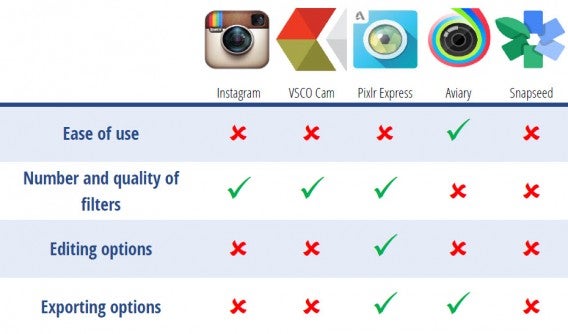
Table

Pixlr Express provides a good balance between advanced editing options, a suitable interface and good-quality final rendering.

Related Articles

Instagram, the complete guide

What you need to know about syncing photos in iCloud

How to protect private pictures on your phone

Originally written on Softonic FR by Baptiste Brassart.

Follow me on Twitter: @bbrassart

35 apps perfect for the iPhone 6 and iPhone 6 Plus

With bigger screens, higher quality cameras, more powerful processors, increased Wi-Fi capabilities, and Touch ID, Apple’s iPhone 6 and iPhone 6 Plus have created a new standard for smartphones. Here are 35 essential apps for the iPhone 6 and iPhone 6 Plus to help you take full advantage of your new larger than life Apple device.

Protection

1Password

1PasswordNo more codes, logins, or forgotten passwords. 1Password is for when your memory fails us. It lets you to keep all of your passwords close at hand in a secure virtual safe. What’s more, future versions of 1Password will be compatible with Touch ID, the fingerprint sensor for iPhone.

Download 1Password

Writing

SwiftKey

SwiftKeySwiftkey is an alternative keyboard which stands out for its customizable themes, personalized predictive text, and integrated emoticons. Among several other interesting features, Swiftkey offers multi-language support, allowing up to three languages at once.

Download SwiftKey

Fleksy

FleksyAccording to its developers, Fleksy is the world’s fastest keyboard. On Android, Fleksy incorporates many clever features that will most likely be present in the iOS 8 version: 600 emoticons, refined themes and support for multiple alphabets.

Download Fleksy

PopKey

popkey PopKey is a keyboard that allows users to communicate through GIFs. Ultimately, the app will even let you use your own animated images. PopKey isn’t available yet, but you’re able to register on the developer’s website so that you’ll be alerted as soon as it’s launched.

Download PopKey

Taking photos

VSCO Cam

VSCO CamVSCO Cam is defined as the new standard of photography on smartphones. This quality app lets you to transform your photos using sharp filters inspired by the most legendary, real life lenses. An ideal app for putting iPhone 6’s new camera to the test.

Download VSCO Cam

Instagram

InstagramNo need to introduce Instagram, the popular photo app with vintage filters. This photo app allows you to apply filters to your photos and videos, then share them on social networks.

Download Instagram

Frontback

FrontBackFrontback invites you to create original photo montages by taking pictures with the front and back camera of your smartphone simultaneously. An app that will definitely benefit from the new cameras on iPhone 6 and iPhone 6 Plus.

Download Frontback

CamMe

CamMeCAMME is is a photo app that will delight those who love taking selfies. To take a picture with this app, you just have to open your hand and make a fist. It’s perfect for creating high quality self-portraits using the back camera of your iPhone 6.
Download CamMe

Making videos

Vine

vineVine is a free application that allows you to make short 6 second videos. These films can then be shared on social networks. A great app to test the new camera on iPhone 6 and iPhone 6 Plus.

Download Vine

Replay

replayWith Replay, you can capture your most cherished moments by creating beautiful montages from your photos and videos. This easy to use app is perfect for enhancing pictures taken with your smartphone.

Download Replay

Hyperlapse

 HyperlapseBrought to you by Instagram, Hyperlapse can stabilize videos taken with your iPhone and allows you to turn them into time-lapse movies. Together with the new optical stabilization system present in iPhone 6 and iPhone 6 Plus, Hyperlapse allows you to make great quality videos.

Download Hyperlapse

Drawing

Tayasui Sketches

Tayasui SketchesAccording to the creator of Tayasui Sketches, “good tools make good artists.” Do you have any artistic talent? Perfect. Why not take advantage of your phone’s large screen with this app that incorporates accurate and easy-to-use drawing tools.
Download Tayasui Sketches

Work

Wunderlist

wunderlistWunderlist is a free task manager that stands out with ease of use and a well-designed interface. This simple, powerful app is easily one of the best task managers available on iOS 8.

Download Wunderlist

Cal

CalCal is the perfect alternative to the default iOS 8 calender. As well as being compatible with Google Calendar and Microsoft Exchange, Cal presents your schedule in a clear, elegant, and uncluttered interface that will look great on your new smartphone’s screen .

Download Cal

Microsoft Office Mobile

officeMicrosoft Office Mobile is designed as a complement to Office 365. By subscribing to Microsoft Office, you can take full advantage of the iPhone 6 Plus’s large screen to view and edit Word, Excel and PowerPoint documents.

Download Microsoft Office Mobile

Evernote

evernoteWith Evernote, you can record everything and anything that comes to mind, regardless of what they are: texts, photographs, sound recordings, drawings, videos, contacts, and lists.

Download Evernote

Exercise

Nike+ Running

nike-runningThe iPhone 6 and iPhone 6 Plus are equipped with processors and new sensors that have been specifically designed to monitor your physical activity. Nike + Running is able to test your limits using your new smartphone.

Download Nike+ Running

Watching videos

VLC

vlc-for-iosVLC for iOS is a video player that lets you watch videos on the large screen of your iPhone 6. This app compensates for the limitations of iOS 8 by supporting a wide range of video and audio formats.


Download VLC

Pluto.tv

pluto.tvPluto.tv is the future of television on your iPhone 6. This app provides over 100 premium channels for all you TV addicts out there. You’ll be able to find the most popular online videos, various music channels, and even channels dedicated to animals!

Download Pluto.tv

5by

5by

With 5BY, you’ll always have an interesting video to watch on your iPhone. This app scours online videos every day to bring you a customized selection tailored to your preferences.

Download 5by

Youtube

youtubeOn iOS, YouTube lets you to view the entire library of videos available from your smartphone. Just what you need to enjoy the high-speed data connections and the large screen of the iPhone 6 and iPhone 6 Plus.

Download YouTube

Vimeo

vimeoNo need to beat around the bush. Vimeo is a video site that displays the best playback quality. Incidentally, this is also the best way to watch free stunning high definition videos on your iPhone 6 or iPhone 6 Plus.

Download Vimeo

Communication

Snapchat

SnapchatSince its last update, Snapchat is equipped with text and video chat features which are seemingly quite pleasant. With just one click, you can start a video chat with others using the app at the same time. Otherwise, the app still excels when it comes to photos, videos, and self-destructing messages.

Download Snapchat

Hangouts

HangoutsHangouts specializes in group video chats. Within moments you can create a video conference with up to 10 participants: perfect for talking with several friends at once or saying hello to family members living across the globe.

Download Hangouts

Rounds

RoundsRounds is a video chat app that’s ahead of its time. In addition to free unlimited video calls, Rounds allows you to share activities with other users: games, videos, photos, drawings, or visiting web pages.

Download Rounds

Glide

GlideRather than organizing video conferences, Glide provides the ability to record video messages that other users can watch and then reply to whenever they want.

Download Glide

Gaming

Infinity Blade III

Infinity BladeInfinity Blade III is the latest installment in the trilogy of action games. Like its predecessors before it, Infinity Blade III stands out for its high-quality graphics and gameplay that’s adapted for mobile.

Download Infinity Blade III

Monument Valley

Monument ValleyMore than just a video game, Monument Valley is a work of art. However don’t be fooled by its Escheresque appearance. Monument Valley will get your brain working with puzzles that are more complex than they seem.

Download Monument Valley

Asphalt 8

asphalt-8With Asphalt 8, sporty driving and dizzying speeds are back on iOS. This time, you can get behind the wheel of up to 47 licensed vehicles, including Ferrari, Lamborghini, and Corvette.

Download Asphalt 8

Oceanhorn

oceanhornSet sail and embark on an epic adventure in this action adventure game reminiscent of Zelda. You wake up one morning and discover that your father is missing. What could have happened to him?

Download Oceanhorn

Reading

Flipboard

flipboardFlipboard pulls content from social networks and your favorite websites to combine all the things you love into one very smooth and well presented interface. Once installed, your iPhone 6 will quickly turn into a fully personalized digital magazine.

Download Flipboard

Feedly

FeedlyFeedly is a mix between an RSS reader and a digital magazine. This app allows you to discover interesting articles through a powerful search engine and a stylish, easy-to-use interface.

Download Feedly

Sharing

PushBullet

PushBulletThis small app is able to connect your iPhone with up to six other devices. PushBullet can share links and documents from one platform to another in just a few clicks. It’s a must-have!

Download PushBullet

Instashare

InstashareDo you not have a Mac that runs OS X Yosemite? Do you simply just want to send files from your iPhone 6? If so then Instashare is the app for you.

Download Instashare

Personal interest

Pinterest

pinterestPinterest is one the apps that will benefit most from the large screens on the iPhone 6 and iPhone 6 Plus. These new smartphones will make perfect frames for your pictures, personalized pages where you can pin your favorite things and share your interests.

Download Pinterest

With these 35 apps, you can push your new iPhone 6 or iPhone 6 Plus to its limit and really make the most of everything Apple’s newest piece of hardware has to offer.

More about iOS 8:

What’s changed in iOS 8?

7 questions Siri can (and can’t) answer in iOS 8

The best keyboards for iOS 8

Article translated from French via Softonic FR.

Follow me on Twitter: @Samsoftonic

Social network Ello is for people who hate Facebook

Facebook haters have no shortage of alternatives from the nonprofit DIASPORA* to Google+. But there’s a new social network called Ello that’s been getting a ton of buzz lately. We covered Ello back in March of this year but recently, over 31,000 people an hour are trying to join Ello. Why? Because it’s not Facebook.

People who hate Facebook will be quick to mention the social network’s muddled privacy settings and policies. Ello does away with all of that. In fact, it doesn’t even have any privacy settings but that feature is coming soon, according to CEO Paul Budnitz. But perhaps the most compelling difference between Ello and Facebook is that Ello doesn’t require you to use your real name.

Ello example profile

While many users have no issue using real names, political dissidents and members of the LGBTQ community have a real need for anonymity. Facebook has been getting bad press because of its decision to shut down profiles of drag queens and transgender users because they did not comply with Facebook’s real name policy.

Facebook’s real name policy states that users should use their “real name, as it would be listed on your credit card, driver’s license or student ID.” You can’t use nicknames, offensive words, symbols, numbers, unusual capitalization and titles. For Facebook’s full real name policy, click here.

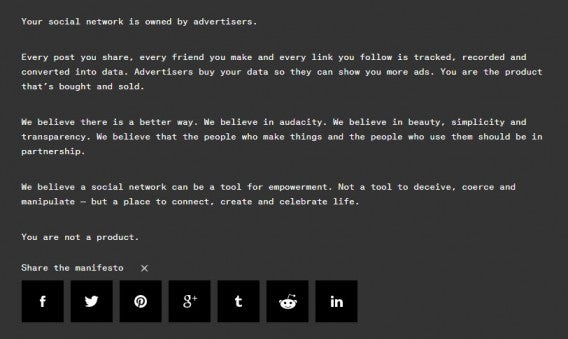
Ello has no real name policy, which has many in the LGBTQ community flocking to experimental social network. Beyond allowing users to use aliases, Ello doesn’t sell advertisements. The site offers a manifesto (which it really wants you to share) that takes the company to a moral high ground above Facebook. “You are not a product,” it reads.

Ello anti-Facebook manifesto

The arguments for using real names has weakened throughout the years. Google itself has removed its real name policy from the company’s Google+ social network after intense user backlash.

But is Ello any good? The social network is currently invite-only, so you’ll have to request an invite or get hooked up with an invite from a current user. Using Ello is extremely simple and features a design focus. Its profile pages immediately reminded me of the Visual Supply Company’s website and apps. Each user’s profile page features a large cover photo and a circular profile picture. Below is a user’s stream of updates. And yes, animated GIFs are supported.

Ello also combines parts of Facebook and Twitter by dividing people you follow into a list for “Friends” and “Noise.” People you’re close to are filed under Friends and users who you don’t personally know, but want to receive updates for are listed under Noise.

Anyone can follow anyone else without restriction and that’s a little scary. Ello is completely public at the moment, but privacy settings are coming. Budnitz wants to put your fears at ease by promising to enforce the company’s “zero-tolerance policy” for hate, trolls, stalking and other hurtful behavior.

We’re not trying to rule the world. We don’t need or want to be a $30 billion company.

Should Facebook and other social networks be scared? No, not really. Ello doesn’t try and replace Facebook, but it does offer users who don’t want to join Facebook somewhere to go.

“Ello isn’t designed to be perfect for everyone, and it’ll never be perfect for everyone,” said Ello designer Todd Berger.

“We’re not trying to rule the world. We don’t need or want to be a $30 billion company. We just want to build a great business,” said Budnitz.

For now, Ello’s appeal is undeniable. It’s ad and hate free environment already has users signing up in droves. Being invite-only also helps building hype for the social network.

Ello may become a successful alternative to Facebook eventually. Or it could disappear into obscurity like all the other companies that tried to take down the social networking giant like Path, App.net, Google+ and DIASPORA*. We’ll have to wait to see if Ello’s success continues when it goes public and when its venture capital funding dries up.

Sources: Ello | Engadget | Vox

Related Stories

Now you can sign up for Gmail without getting a Google+ profile

Facebook making its News Feed more time sensitive

Twitter updates iPhone app with beautiful user profiles

Facebook for iOS 8 offers more control for sharing your location

Follow me on Twitter: @lewisleong

The Softonic Minute: Windows 7, Angry Birds, iOS 8 and FIFA 15

The future of Windows 7 is ominous, Angry Birds get a little robotic, iOS 8 update fixes major problems, and FIFA 15 is finally released. Check out all of this week’s hottest software news in the Softonic Minute.

Default player


brightcove.createExperiences();

Windows 7 is slowly disappearing

Microsoft has announced that it’ll stop selling Windows 7 to manufacturers after October 31st. This means that new equipment you purchase won’t have the OS either. Will it be Windows 8, or Windows 9? We’ll have to wait and see, but in the meantime, we’re still waiting for Windows 9.

Angry Birds Transformers coming to iOS and Android this October

Rovio has released the first trailer for its upcoming Angry Birds Transformers game, which is quite a radical departure from its other games. Watch the trailer here to see just how different it is.

Apple releases iOS 8.0.2 to fix Touch ID and connectivity problems

Apple has released a new update for iOS 8, which fixes problems caused by the last update (8.0.1) and some bugs from the original release. Keep reading…

EA SPORTS™ FIFA 15 Companion launched for iOS, Android and Windows Phone

If you’re playing FIFA 15 on PC or consoles, you can download the new EA SPORTS™ FIFA 15 Companion and manage your FIFA Ultimate Team from your smartphone. Also, make sure to check out our definitive FIFA 15 vs PES 2015 comparison.

Make sure to check out all of our past Softonic Minutes.

Total War: Attila announced. Coming to PC in 2015

The next game in the strategy game series Total War has been announced: Total War Attila. Set at the start of the Dark Ages in Europe, towards the end of the Roman Empire, it’s a time of great upheaval and turmoil. Watch the reveal trailer below.

Default player


brightcove.createExperiences();

Screenshots of the game make Total War: Attila look pretty apocalyptic, with fire-filled battles and dark, muted tones. You will control the Western Roman Empire, which begins as the dominant power, but is weakened by in-fighting and the threat of enemies, including the fearsome Attila the Hun.

VIDEO INNIT

Developer Creative Assembly is promising ‘overhauled game mechanics’, improving on the previous game ‘Total War: Rome II’. We can of course expect improved graphics too, which will make for an impressive looking game, as 2013’s Rome II already looked great.

Total War: Attila will be available for PC in 2015, and probably OS X sometime later.

Related Stories

Vain Glory battle game announced for iOS 8

Yaeger’s Dreadnought is all-out spaceship combat

Age of Empires: Castle Siege coming to Windows 8 and Windows Phone

Follow Jonathan on Twitter: @jonathanriggall

Dragon City: 7 strategies to become the next Daenerys Targaryen

Dragon City (Android | iOS | Facebook) is a fun game where you build a world full of dragons that grow, reproduce, and fight in exciting battles. The game has a lot to offer and with so many different options that it can be quite overwhelming, especially when you’re first starting out.

Here, I’ll go through some tips that’ll help you get started on the right foot in Dragon City.

Farms are the basis of everything

Crops sustain your dragons: if you feed them, they grow, and increase levels to become stronger and more powerful creatures. Also, the more dragons you farm, the more resources you gain, like gold.

Invest in farms: focus your initial resources on building as many farms as possible, and when you level up, you can build bigger farms or improve existing ones. Always make sure your active farms keep generating resources.

Clear out all the land

Aside from performing standard actions inside your area, you should also clear unoccupied land. Just click on any item (bushes, trees, or rocks) and you’ll be able to clear it. It costs money, but it’s worth the investment because of all the experience you gain with minimal effort.

Clearing areas that don’t belong to you will prep them for construction when you do eventually get them.

Evaluate each type of habitat before you start building

Habitats are the areas where you keep your dragons. Each one has its pros and cons, so analyze them carefully before you start building. You should also bear in mind that each type of dragon has to be kept in a certain type of habitat.

Displayed below is a chart showing the different types of habitat, the level needed to build them, cost in gold, the amount of experience they can provide, the number of dragons they can sustain, the maximum amount of gold they can produce, and building time/friends.

Image obtained from Dragon City wikia

In short, when you’re in the early stages, it’s better to focus your efforts on building more Flame, Sea, and Nature habitats as opposed to Terra habitats.

Experiment with breeding dragons

One of the main features of Dragon City is cross breeding different dragon species. Combining two specific kinds of dragon should be done more than once, as the resulting species can vary. For example, breeding a Terra dragon with a Flame dragon can produce either a Volcano dragon or a Flaming Rock dragon.

You can also combine the different hybrid dragons (ones that possess more than one element) which can sometimes generate a new and unusual species. If not, it’ll just repeat the same species.

In any case, don’t give up and keep trying to get all the different types of dragons. Remember that the aim is not to rack up as many dragons as possible (especially if you have limited habitats), but you can sell them, earning you gold ingots that will come in handy.

Master the fighting mechanics

Farming and constructing your city is one of Dragon City’s main features; another is the Pokémon style fighting.

In this mode, try to create a balanced team, comprised of different types of dragon.

You can change dragons during combat, but be aware that it will cost you a turn.

Look at the different types of attack your dragons can do: each has different uses depending on the dragon you’re fighting. Again, thanks to the Dragon City wikia, there’s a useful chart that helps you choose which dragon to use.

Let’s say that you’re the Attacker and you’re opponent is the Defender. Look at what kind of dragon your opponent has (the little flags next to the photo, at the top of the screen) then look at what types of attacks you have to see which one will cause the most damage against your target. Once you’ve played a few games, you’ll know the strategies by heart and won’t need to look at the list.

If you can’t seem to win any battles, don’t worry: it’s only because your dragons’ levels are still too low. Feed them well to level them up and you’ll find yourself winning battles in no time.

Collect gems without spending money

Purple gems are the currency you earn in Dragon City. There are seven ways to get them for free:

– Get a gem every time you level up.

– Claim your daily bonus. You can get a lot of gems this way.

– On Mondays, there is a special reward which also allows you to get gems.

– Participate in the promotions or surveys offered in the game.

Invite friends to play Dragon City: you get five jewels for every contact that accepts.

–  Participate in Dragon League Tournaments. If you win a tournament, you get two gems as well as gold. You can fight up to three times a day, so take advantage.

– Build a Dragon Stadium and make your creatures do battle. For every tournament you hold, you earn two gems and some money.

Needless to say that getting free gems can be quite costly, as you can see. Save them up and use them to unlock special items; don’t waste time speeding up construction and hatching eggs.

Make sure you collect all your rewards before you stop playing

One last bit of advice: before closing your game in Dragon City, set up your farms to generate crops for the maximum amount of time and collect the gold from all habitats, even if you can’t see the icon. To do this, all you need to do is go to each habitat and select the option that says Collect.

Move over Daenerys Targaryen: You are the new mother of dragons

Now that you know Dragon City’s most basic strategies, you can carry on with your game confidently, knowing how to maximize your time and resources. Experiment with the different aspects of the game like dragon breeding, fighting, and constructions, and you’ll see that in no time at all, you will have created an authentic Dragon Empire.

Related Articles

The Simpson Springfield: 7 basic tips to grow your town faster

Bubble Witch 2 Saga: 7 tips to level up

Candy Crush Soda Saga: 5 to beat any level

Originally written on Softonic ES by Maria Baeta.

Follow me on Twitter: @mariabaeta

Most OS X users unaffected by Shellshock bash exploit says Apple

Apple has made a statement about the Shellshock bash exploit, widely reported to be a threat to most Unix/Linux systems, which would include OS X.

“The vast majority of OS X users are not at risk to recently reported bash vulnerabilities”, according to Apple, which was speaking to iMore. Very advanced OS X users who have configured advanced UNIX services on their computers may be at risk, but the vast majority of users cannot be attacked through the Shellshock bash vulnerability.

While there could be attacks that use this exploit, for example, to spread worms, so far, this is all theoretical. People who run servers or manage networks should be aware of this risk, but regular users are very unlikely to be attacked by anyone using the Shellshock bash exploit.

If you are an advanced user, you can follow Lewis’ advice on how to check if you’re at risk here. But for most people, the message is don’t worry. As long as you keep your software and device firmware up to date, you should be okay. While some security experts are saying this could be ‘worse than Heartbleed’, most people will not be affected.

Related Stories

Why the Shellshock Bash bug is even scarier than Heartbleed

Why does a keyboard app need ‘Full Access’ to my iPhone?

Firefox and Thunderbird get ‘critical’ security updates

Follow Jonathan on Twitter: @jonathanriggall

Apple releases iOS 8.0.2 to fix Touch ID and connectivity problems

Apple has released a new update for iOS 8, which fixes problems caused by the last update (8.0.1) and some bugs from the original release. Early responses online indicate Touch ID and connectivity problems have been fixed.

As well as those bugs, iOS 8.0.2 fixes these problems:

HealthKit apps can now be made available on the App Store
– 3rd part keyboards should no longer be deselected after entering your passcode
– Fixes an issue where some apps failed to access photos from the Photo Library
– Reachability’s reliability on iPhone 6/6Plus has been improved
– Fixes a problem of ‘unexpected data usage’ when receiving SMS/MMS messages
– Improved support for Ask To Buy for Family Sharing for in-app purchases
– All ringtones should now be restored from iCloud backups
– Bug fixed that prevented uploading photo and video from Safari

You can update your iPhone, iPad or iPod Touch ‘over the air’ when connected to Wi-Fi, or by connecting your device to iTunes on your PC or Mac. The latter means that you can update without making space for the update – useful if your device is full of photos and music, for example.

iOS 8.0.1’s over-the-air update was only available for about an hour before it was stopped by Apple, but that was time enough for lots of users to report the problems it caused. Apple apologized and said that it was working ‘around the clock’ to fix everything. So far, it seems iOS 8.0.2 lives up to that promise.

Related Stories

iOS 8.0.2 coming in a few days after disastrous 8.0.1 launch

7 questions Siri can (and can’t) answer in iOS 8

Facebook for iOS 8 offers more control for sharing your location

Follow Jonathan on Twitter: @jonathanriggall