Why does a keyboard app need ‘Full Access’ to my iPhone?

Apple’s iOS 8 finally supports third party keyboards but installing them has some users spooked. A warning after installing keyboard apps like SwiftKey asks users for “Full Access” to their phone.

The entire warning message reads, “Full access allows the developer of this keyboard to transmit anything you type, including things you have previously typed with this keyboard. This could include sensitive information such as your credit card number or street address.”

Why do keyboards require Full Access permissions?

SwiftKey explains in a blog post that Full Access is required for the main app (the one on your home screen)to power the keyboard with services like autocorrect, auto-capitalize, predictions and other keyboard languages. SwiftKey decided to keep core features of the keyboard in the main app for performance reasons, as  it “helps ensure the keyboard extension’s memory footprint is manageable.” So SwiftKey can work within other apps without Full Access permissions but you’ll want to switch on Full Access so that the keyboard can work with all its intended features.

But why does a keyboard need to collect what you type?

With SwiftKey, opting into Full Access actually provides some pretty great benefits. The keyboard will analyze your typing behavior and learn how you use words. You can opt into sharing your Facebook, Twitter, Gmail, Evernote, and contacts with the app so it can learn the words you use and how you use them. This includes your address and the names of your contacts. All of this information is synced between your devices running SwiftKey, including Android. Again, this feature is entirely opt-in.
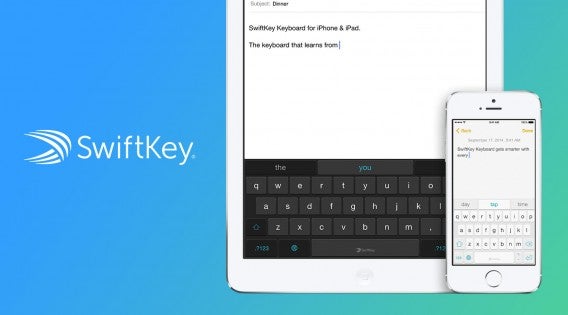
SwiftKey stock banner

As for tracking your credit card and address, SwiftKey purposely omits saving any payment information, but does save your address. This makes entering your address easier but does require you to trust SwiftKey to keep that information safe.

What about other keyboard apps?

Another popular third-party keyboard for iOS 8 is Fleksy. It does not require Full Access because it takes a different approach than SwiftKey. While SwiftKey puts its prediction engine inside its main app, Fleksy puts its engine in the extension. This means Fleksy doesn’t need access to the internet to offer predictions.

But installing Fleksy in iOS 8 still gives users the “Full Access” warning. The warning is standard across all third-party keyboards, regardless if the keyboard actually tracks user data or not.
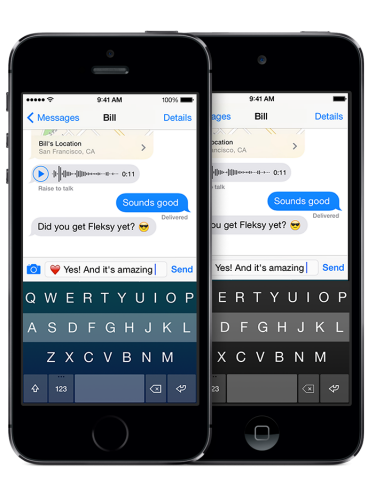
Fleksy

“We don’t collect people’s keystrokes, typing data, credit card numbers, etc, regardless of whether you enable Full access or not,” said Fleksy COO Ioannis Verdelis speaking with MacRumors.

However, Fleksy users can opt-in to personalization options which require Full Access. The feature works similarly to the personalization options found in SwiftKey.

Another popular keyboard app for iOS 8 is Swype, which is currently one of the most popular paid apps in the App Store. The company does not require Full Access to work and doesn’t support integrating with other services to personalize your typing. This simplicity prevents Swype from having to ask for Full Access on a user’s device.

Should I use a third-party keyboard?

For most people, the included keyboard is good enough. But if you find the default iPhone or iPad keyboard too basic, you should definitely use a third-party keyboard. What you have to be aware of is that you are trusting the developers of these keyboards to safeguard your information. You can choose to not use the more advanced features if you want your data to stay absolutely safe.
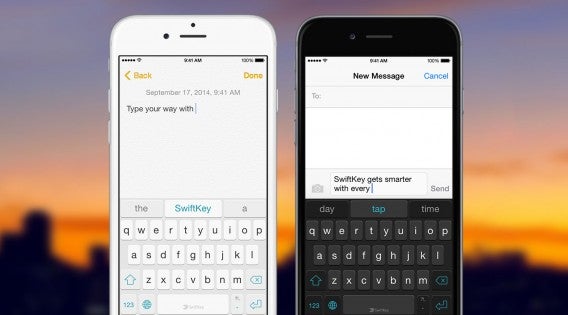
SwiftKey for iPhone sunset

SwiftKey has been transparent so far, explaining its privacy policies and what it’s doing with customer data. They, and other keyboard developers, offer easy ways to delete your data from their servers instantly if you choose.

For me, SwiftKey’s cloud syncing feature makes my life so much easier that I take the risk of giving them my data. Having my settings and personalizations sync between my iPad and my Android phone is extremely useful and creates a seamless typing experience no matter what device I’m using. If this is something you want, then you have to trust them with your information.

For more information, check out Suzie’s picks for the best iOS 8 keyboards.

UPDATE: The post has been updated to clarify why SwiftKey requires Full Access permissions. The post previously stated incorrectly that Full Access was required for SwiftKey to interact with other apps.

Related Stories

PSA: iOS 8.0.1 out now, fixes various bugs (update: Apple stops update)

Smartphone app detects when you are depressed

Manual camera app for iPhone is for pro photographers

Major update for Fruit Ninja coming in October (video)

Follow me on Twitter: @lewisleong

PSA: iOS 8.0.1 out now, fixes various bugs (update: Apple stops update)

Yesterday we reported Apple would be releasing iOS 8.0.1 soon to fix bugs with the keyboard, dialer and other bugs. Apparently “soon” meant 24 hours as the company is beginning to push the update to iOS 8 devices.

If you’ve experienced issues any of the following issues, the iOS 8.0.1 update will fix them:

– Fixes a bug so HealthKit apps can now be made available on the App Store

– Addresses an issue where 3rd party keyboards could become deselectected when a user enters their passcode

– Fixes an issue that prevented some apps from accessing photos from the Photo Library

– Improves reliability of the Reachability feature on iPhone 6 and iPhone 6 Plus

– Fixes an issue that could cause unexpected cellular data usage when receiving SMS/MMS messages

– Better support of Ask To Buy for Family Sharing for In-App Purchases

– Fixes an issue where ringtones were sometimes not restored from iCloud backups

– Fixes a bug that prevented uploading photos and videos from Safari

There have also been other reports of users have Wi-Fi connection issues and unusual battery drain. Apple doesn’t state whether these issues are fixed in this update so these fixes for these problems may come at a later date.

UPDATE 9/24/14 10:32AM PT: According to many users on Twitter, the iOS 8.0.1 update is causing a slew of new problems. Some users report TouchID not working and, more worryingly, the inability to connect to the cellular network. I would hold off on updating to iOS 8.0.1 until Apple responds to these issues.

UPDATE 9/24/14 11:56AM PT: Mashable reports Apple has pulled the iOS 8.0.1 update following reports that the update was breaking TouchID and preventing users from accessing cellular data.

Related Stories

Smartphone app detects when you are depressed

Manual camera app for iPhone is for pro photographers

Major update for Fruit Ninja coming in October (video)

Chrome updated with iOS 8 support

Follow me on Twitter: @lewisleong
The Sims 4: Unlock the hidden lot in Oasis Springs

Neighborhoods in The Sims 4 are bigger than you may realize: there are hidden lots that are tucked away and can only be accessed after reaching certain levels.

Oasis Springs, the desert-like area in The Sims 4, has a variety of community residential lots that you probably know all too well. But, there’s one hidden away you probably don’t know about: the Forgotten Grotto. See this tutorial if you want to find the hidden lot in Willow Creek.

To discover the Forgotten Grotto, you have to completed a series of steps, which you can see in the video below.

Note that to perform these actions, your Sim will need to be at level 10 character in the Skill Manual. Here’s how to level up your skills quickly if you’re not there yet.

Default player


brightcove.createExperiences();

First, choose one of your Sims and send it to the Dessert Bloom Park. Once there, do the following:

1) Go to the mountain area and look for the entrance to the mine.

2) Once you find the entrance, select Break.

3) Once your Sim has broken the barrier, select the Explore option.

4) Next, a dialog box will appear. Select the following options: Take the wide road, Climb the ladder and Skip the ledge.

Congratulations! You’ve just unlocked the Forbidden Grotto!

If you want to explore this lot again, go to the entrance of the mine; you’ll automatically have access to it.

An abundance of supplies

Besides being a beautiful place, Forbidden Grotto is a great lot where you can collect minerals, fruits and even an exclusive animal: the bat fish.

More about The Sims 4:

The Sims 4: Unlock the hidden lot in Willow Creek

The Sims 4: How to level up your skills quickly

The Sims 4: Create A Sim demo

Article translated via Softonic ES.

Follow me on Twitter: @mariabaeta

The Sims 4: Unlock the hidden lot in Willow Creek

Neighborhoods in The Sims 4 are bigger than you may realize: there are hidden lots that are tucked away and can only be accessed after reaching certain levels.

Willow Creek, the greenest neighborhood in The Sims 4, has several residential and community lots that anyone can access, but they aren’t the only ones: an additional lot is hidden away, where you can explore and collect different items: Sylvan Glades. See this tutorial if you want to find the hidden lot in Oasis Springs.

To discover Sylvan Glades, you have to completed a series of steps, which you can see in the video below.

Default player


brightcove.createExperiences();

First, choose one of your Sims and send it to the Crick Cabana lot. Once there, do the following:

1) Make your Sim go to the big tree next to the lot.

2) Select View twice in a row.

3) Choose to Water the tree three three times in a row.

4) Choose Discuss Nature to talk to the tree.

5) A secret door will appear in the tree. Go inside and Chat about roots.

6) Next, a dialog box will open. Select these options: Follow the sound, Follow downstream, and Enter the mist.

Congratulations, you’ve just unlocked Sylvan Glades!

Enjoy the views and discover its riches

Sylvan Glades is more than just a pretty lot where you can take your Sims for a walk; it’s an inexhaustible source of resources. In Sylvan Glades, you can fish, collect frogs, gather various types of fruits, and even find an exclusive animal: the treefish.

More about The Sims 4:

The Sims 4: Unlock the hidden lot in Oasis Springs

The Sims 4: How to level up your skills quickly

The Sims 4: Create A Sim demo

Article translated via Softonic ES.

Follow me on Twitter: @mariabaeta

Adobe updates Photoshop and Premiere Elements, making editing photos and videos even faster

Adobe released a major update today for its Photoshop and Premiere Elements programs. They make it easier than ever for you to edit their photos and edit your photos.

While the updates aren’t revolutionary, they do make Photoshop and Premiere Elements one of the best simple media editing tools around.

Here’s what has been added in each program.

Photoshop Elements

Beginners can still use Photoshop Elements 13 without having to learn the complexities of Photoshop. The app still has three modes: Quick, Guided and Expert. Quick mode offers simple tweaks like brightness, color and a magic Smart Fix button.

The Guided view offers more in-depth editing features broken up into subcategories to make finding what you want to do easier. This view is great for photographers looking to do more advanced editing as it walks them through each step. Want to know how to cut a person out of one photo and put him in another? Photoshop Elements 13 will teach you how.

And of course, Expert view allows you to use the full power of Photoshop Elements without any guidance.

Adobe Photoshop Elements 13 default view

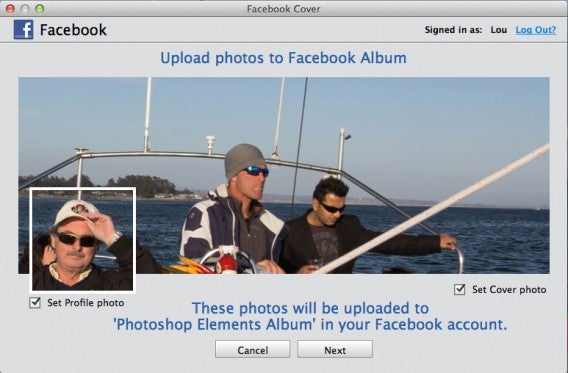
New to Photoshop Elements 13 is the ability to edit and upload your Facebook Cover Photo. This feature allows you to see how your profile picture will work with your Cover Photo so you can get creative with your profile. You can easily add text and stickers to your Cover Photo and upload your completed work directly to Facebook.

The only downside is that you’ll need to set the uploaded pictures as your Cover Photo and profile picture. Photoshop Elements does not have permission to change that for you in Facebook.

Facebook Cover Photo preview Adobe Photoshop Elements 13

Cropping is now even easier with the update. Now the app can analyze your photo and offer a suggested crops. “Cropping is the number one thing people do with their photos,” said Adobe Product Manager for Photoshop Elements Bob Gager, so it’s nice to see the feature automated.

Another popular feature that’s been added is black & white effects and color isolation. You can turn any photo into gorgeous black & white. You can tweak the highlights and contrast until you’re satisfied with how the effect looks. With color isolation, you can make your photo black & white with color highlights around your subject. You can manually control which part of the photo you want color to show.

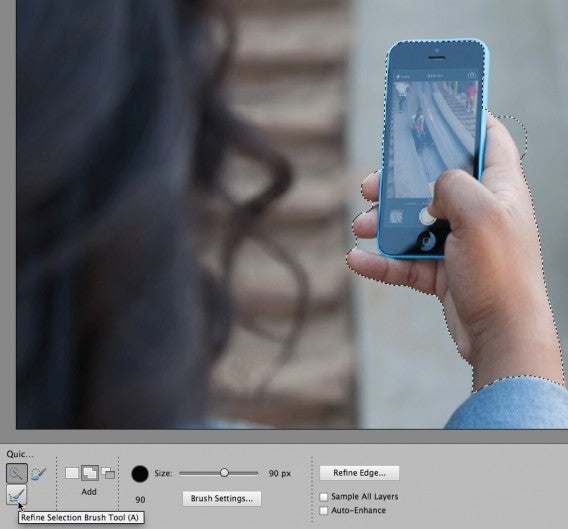
Photoshop’s refine selection brush is smarter than ever in this updated version but sometimes it still misses what you’re trying to select. Now you can add or subtract edge detection with a simple brush that you use to “push” and “pull” the edge detection one way or another. Gager showed off how edge detection failed to form around a person’s fingers but how easy it is to correct it with the new tool.

Adobe Photoshop Elements 13 Refine Selection Brush

Last but not least, Adobe added an Elements Live feature where the company will curate news, articles and guides. The content will be a mix of Adobe created articles and guides from users. The Elements Live section is still pretty sparse in the demo version I tried, only offering a handful of guides and one news article. Obviously this will change as Adobe updates the app with more content.

Want to take your photos on the go? Photoshop Elements 13 integrates with Adobe’s Revel app (Android | iOS) so you can sync your photos to your phone.

Adobe Revel for iPhone

Premiere Elements

For the film makers out there, Premiere Elements makes trimming down that long footage simpler than ever. Adobe shifted its philosophy of trimming “bad” footage from video to highlighting good footage. With the Favorite Moments feature, you can mark a moment that you want to include in the final version. When you’re done selection all your moments, Premiere Elements 13 will put them all together with your default transitions between each clip. You can cut down an hour of video in just minutes. You can of course fine tune your transitions and adjust the beginning and ends of each of your moments.

Adobe Premiere Elements 13 Favorite Moments

GoPro and other action camera users will we happy to see the enhanced Shake Stabilizer feature in Premiere Elements 13. The software smooths everything out, and makes it so your video looks like it was captured with a Steadicam. You can see the feature in action in the video below.

Default player

<!–

By use of this code snippet, I agree to the Brightcove Publisher T and C

found at https://accounts.brightcove.com/en/terms-and-conditions/.

–>

<!–

This script tag will cause the Brightcove Players defined above it to be created as soon

as the line is read by the browser. If you wish to have the player instantiated only after

the rest of the HTML is processed and the page load is complete, remove the line.

–>

brightcove.createExperiences();

The new Instant Movie feature automates editing your footage, which is perfect for beginners. The feature will sync music, titles and effects with your footage so everything just flows. If you want to make changes to the Instant Movie clip, you can do so with the full power of Premiere.

Both Photoshop and Premiere Elements will be available on Mac and PC in Q4 of 2014. Pricing remains the same, with each program costing $99 or $149 if you buy them as a bundle. You can upgrade from previous versions for $80 for each program or $120 to upgrade both.

If you want to try the programs before you buy them, you can download them below.

Download Adobe Photoshop Elements 13: Mac | Windows

Download Adobe Premiere Elements 13: Mac | Windows

Follow me on Twitter: @lewisleong
Smartphone app detects when you are depressed

Why do some students do better than others? Why do students burnout, drop classes or out of college altogether? These are the questions Dartmouth University researched are trying to figure out using a smartphone app, called StudentLife, that can detect when someone is depressed.

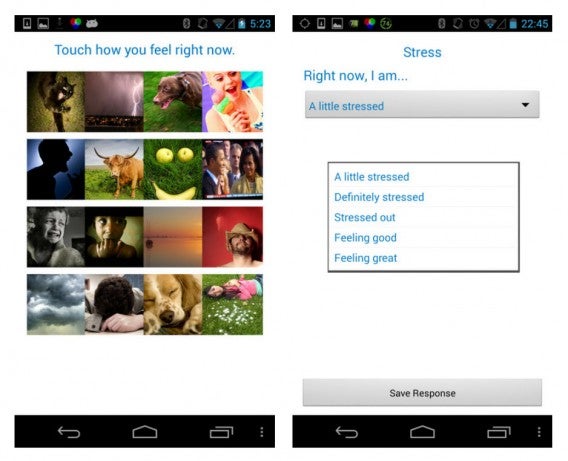
StudentLife works by collecting data from various sensors from a smartphone like GPS and accelerometer. These sensors let researchers know where the students were and if they were active. The app also administered up to eight mood and stress surveys per day. Participants were kept in the dark about the true use of the app and were only told it was to track how long students were staying on campus.

StudentLife emotional and stress surveys

The app takes all this collected data and detects anything that’s out of the ordinary. What they found was that more sleep and in-person interactions resulted in less depressed students. They also found that more physical activity resulted in students that felt less lonely, since the app could detect when students visited the gym. Most interestingly, the study found that social interactions had a stronger correlation with good grades than attendance.

The study took place over one quarter (ten weeks) at Dartmouth University. Forty-eight students participated and completed the study, so the sample size is quite small. The researchers are currently working with the University of Texas Austin to test a larger number of remote students.

Her movie staring at a computerImage credit: her the movie

While StudentLife is in its infancy, it could potentially benefit more users by analyzing abnormal behavior. Imagine if this technology was integrated into voice assistant like Siri to check up on you when you’re feeling down. Maybe this will lead to a dystopia where humans have relationships with their phone’s artificial intelligence like in the movie Her.

Source: Dartmouth University [PDF]

Via: CNET

Related Stories

Students and teachers: check if you qualify for free Microsoft Office

Checky finds out how addicted you are to your phone

iOS 8.0.1 will fix phone, keyboard and other bugs

Office Tip: type faster by replacing one word with another

Follow me on Twitter: @lewisleong

Blizzard cancels Titan MMO after 7 years of development

Blizzard dropped a bombshell today, announcing the company is scrapping development of Titan, its massively multiplayer online game. The company is no stranger to making great MMOs (see World of Warcraft) but felt Titan wasn’t good enough to make it out the door.

“We didn’t find the fun. We didn’t find the passion. We talked about how we put it through a reevaluation period, and actually, what we reevaluated is whether that’s the game we really wanted to be making. The answer is no,” said Blizzard CEO Mike Morhaime speaking to Polygon.

This decision to kill the Titan project shows that Blizzard is dedicated to quality. The game just wasn’t good enough and even after seven years of work, the company was brave enough to abandon it instead of releasing a less-than-perfect game.

“Are we the MMORPG company? We don’t want to identify ourselves with a particular genre. We just want to make great games every time,” said Blizzard senior vice present of story and franchise development Chris Metzen.

While World of Warcraft has definitely defined Blizzard, the company wants to be known for making great games, no matter the genre. Hearthstone, the company’s latest release, is a multiplayer card game and is doing very well.

Titan isn’t the first game Blizzard cancelled. The company has a long history of cancelling games it doesn’t think are good enough. For a full list, check out Polygon’s breakdown.

Related Stories

FIFA 15 vs. PES 2015: the definitive comparison

Major update for Fruit Ninja coming in October (video)

Steam gets a new personlized Home Page

FIFA 15 Ultimate team available for iOS, Android and Windows Phone

Follow me on Twitter: @lewisleong

Manual camera app for iPhone is for pro photographers

The iPhone 6 and 6 Plus have powerful cameras and now there’s a camera app that’s designed to take advantage of all that power. Manual for iPhone lets photographers manually control every aspect of their shots from ISO to exposure bracketing.

Manual looks and feels like a traditional photo app but you’ll notice advanced features once you start digging into the app. Professional and amateur photographers will notice the live histogram to help correctly set up your shot.

The controls are small, making Manual harder to use than it should, but helps prevent controls from taking over your live view. If you know what each control in Manual does, you can get some really great shots. Those who don’t know what they’re doing will actually get worse shots.

Those who want to experiment with photography but don’t want to deal with complicated controls should give VSCO Cam a try. It’s a nice medium between beginner and professional camera apps. VSCO features a ton of editing tools so you can spice up your photos after you’ve taken them.

Manual is available for iOS 8 and is currently on sale for $1.99.

Download Manual for iOS 8

Source: Manual

Via: The Verge

Related Stories

How to protect private pictures on your phone

WhatsApp beta for Android gets new image features

App of the Week: Pixlr

iOS 8 released today

Follow me on Twitter: @lewisleong

iOS 8.0.1 will fix phone, keyboard and other bugs

The first update for iOS 8 (8.0.1) could be coming soon, and should address some of the bugs found since Apple‘s latest mobile operating system was released last week.

iOS 8.0.1 does exist, but little is known about it. According to MacRumors, the update will fix bugs that were found in the Golden Master release of iOS 8, including:

– Call forwarding and freezing problems when using visual voicemail
– Keypad sometimes doesn’t appear for entering iCloud Keychain verification codes
– Safari occasionally fails to play video
– Airport support for passbook passes broken
– Problems with installing VPN profiles

Users have found other problems, like Wi-Fi connectivity and various apps apparently struggling to download data. Some users are also reporting significant battery drain too. We don’t know if these bugs will be fixed in the first iOS 8 update.

The iOS 8.0.1 update may also introduce Apple Pay support and other features that are currently missing.

Source: MacRumors

Related Stories

Chrome updated with iOS 8 support

7 questions Siri can (and can’t) answer in iOS 8

Facebook for iOS 8 offers more control for sharing your location

Follow Jonathan on Twitter: @jonathanriggall

Major update for Fruit Ninja coming in October (video)

Fruit Ninja, the massively popular iOS, Android and Windows Phone game, is getting a major update this October. Developer Halfbrick announced the news alongside the first of five ‘Ninjas in Training’ trailers launched on YouTube.

This isn’t the typical app update. Halfbrick says it has rebuilt the game from scratch to include a new menu system, new graphical effects for weapons, and new locations. There will be leaderboards in the new Fruit Ninja, so you can compare your skills with your friends.

Default player


brightcove.createExperiences();

Fruit Ninja was released in 2010 and has gone on to be downloaded over 500 million times, making it one of the most successful mobile games ever. Available in free and premium versions, it’s unusual in that it doesn’t have a stream of sequels to cash in on its success, like Angry Birds or Temple Run.

Download Fruit Ninja for iOS

Download Fruit Ninja for Android

Download Fruit Ninja for Windows Phone

Related Stories

Steam gets a new personlized Home Page

FIFA 15 Ultimate team available for iOS, Android and Windows Phone

Rumor: First person view mode coming to GTA V for PC and next gen

Follow Jonathan on Twitter: @jonathanriggall