Everything you need to know about Windows 10

Microsoft just finished announcing Windows 10, the next version of the Windows operating system. Besides the shocking name, Windows 10 will be the most ambitious operating system Microsoft has ever created. The company’s vision of unifying all of its different devices and platforms under one version of Windows is finally coming to fruition. Windows 10 won’t be out for quite a while (late next year) but you can get your hands on it tomorrow with an early Technical Preview. Here’s everything you need to know about Windows 10.

Navigation:

Which Windows 10 version should I get?

Windows 10 will fight piracy by giving it away this summer

Microsoft skips Windows 9, jumps to Windows 10

Windows 10 gets mid-2015 release date

Windows 10 will be free for Windows 7 and 8.1 users for one year

Windows 10 ‘Continuum’ feature detects whether you’re using keyboard or touch

Windows 10 makes organizing windows easy with multiple desktops

Windows 10 will feature a hybrid Start Menu

How to get Windows 10’s best features right now

The Windows 10 preview expires April 15, 2015

You can update to the Windows 10 Technical Preview from Windows 7

Windows 10 Technical Preview gets a share button for File Explorer

First update for Windows 10 Technical Preview rolling out now

Windows 10: the 10 most requested features

Microsoft expands on Windows 10 security features

Windows 10 trackpad gestures finally make sense

Leak: Windows 10 to get Xbox app and Cortana

Which Windows 10 version should I get?
Windows 10 is due out this summer and the big news is that it’s going to be free for Windows 7 and 8 users for a limited time. Today, Microsoft released more information about the upcoming operating system, detailing the six (yes, SIX) different versions of Windows 10 that will be available. So much for Microsoft simplifying Windows.

Continue reading…

Jump to top

Windows 10 will fight piracy by giving it away this summer
Windows 10 Tencent

Today, the company surprised us even more by announcing the free Windows 10 update will be available to both “genuine and non-genuine” copies of Windows 7 and 8.1. Piracy has been a long standing problem with Windows and Microsoft has tried many things to prevent piracy, none of which have worked.

Continue reading…

Jump to top

Microsoft skips Windows 9, jumps to Windows 10

Default player

<!–

By use of this code snippet, I agree to the Brightcove Publisher T and C

found at https://accounts.brightcove.com/en/terms-and-conditions/.

–>

brightcove.createExperiences();

Microsoft just announced that the next version of Windows will not be called Windows 9, but Windows 10 instead. “It wouldn’t be right to call it Windows 9. But unfortunately, Windows 1 has been done,” said Windows chief Terry Myerson. Windows 10 will run on a large array of devices from phones, tablets and desktop computers. Microsoft is finally going through with its vision of one version of Windows on all platforms, including the Xbox One.

Continue reading…

Jump to top

Windows 10 up close

Windows 10 available late 2015, preview out tomorrow
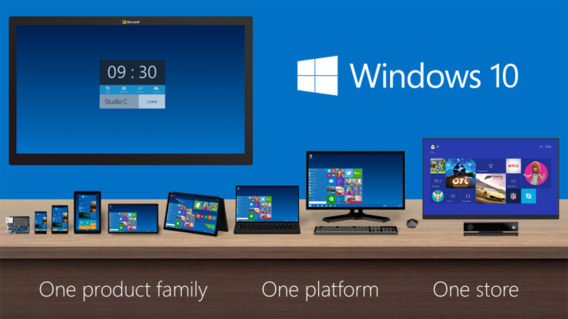
Windows 10 products The next version of Windows, Windows 10, will be available late next year. Microsoft just finished wrapping up its announcement of Windows 10, showing off all its new features like a hybrid Start Menu and multiple desktops. Windows 10 is Microsoft’s most ambitious version of Windows, unifying the company’s products under one operating system. Phones, tablets, laptops, desktops and even the Xbox One will run Windows 10.

Continue reading…

Jump to top

Windows 10 will be free for Windows 7 and 8.1 users for one year
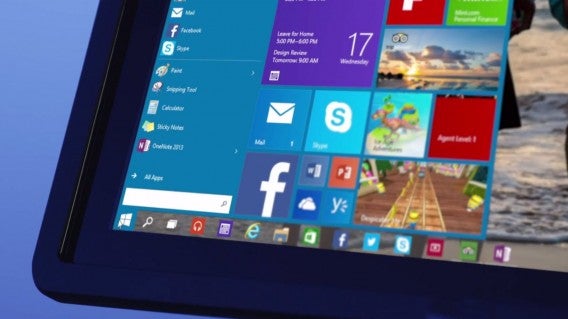
Windows 10 up close

Microsoft will be following in Apple’s footsteps by offering its upcoming operating system for free for one year after launch. OS X users received a free update to OS X Yosemite last year and Microsoft promises to give away Windows 10 when it launches later this year.

So why is Microsoft doing this? Windows is less of a product now than it is a platform. What that means is that Windows has evolved into an operating system that attracts users with its ecosystem and services, rather than just features.

Continue reading…

Jump to top

Windows 10 ‘Continuum’ feature detects whether you’re using keyboard or touch
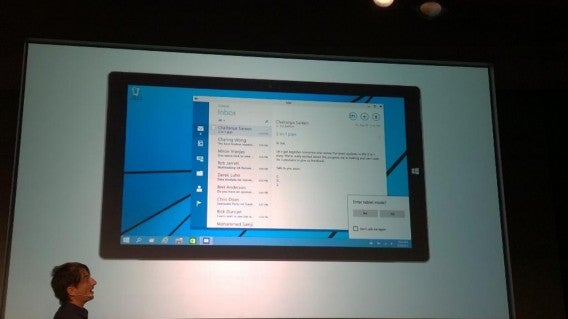
Windows 10 Continuum featur

Image credit: Paul Thurrott

Microsoft is finally fixing Windows 8’s confusing mouse and keyboard controls. The company tried jumping into the tablet space with Windows 8 but ended up confusing desktop users. With Windows 10, the operating system will be smart enough to detect when you’re using a mouse and keyboard or when you’re using touch and will offer two modes to choose from.

Continue reading…

Jump to top

Windows 10 makes organizing windows easy with multiple desktops
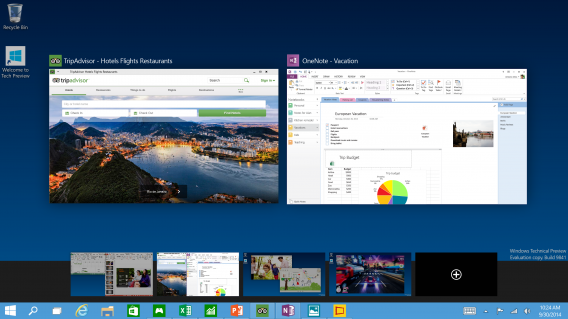
Windows 10 virtual desktops Windows 10 was just announced and we’re just learning about its new features. We reported rumors that the operating system would feature multiple desktops and now it has been confirmed by Microsoft. The company is making it easy for Windows 10 users to keep track of all their open windows with multiple desktops. Mac users will be instantly familiar with this feature as it mimics Mission Control. Your virtual desktops are shown at the bottom of the screen with your open windows up top.

Continue reading…

Jump to top

Windows 10 will feature a hybrid Start Menu
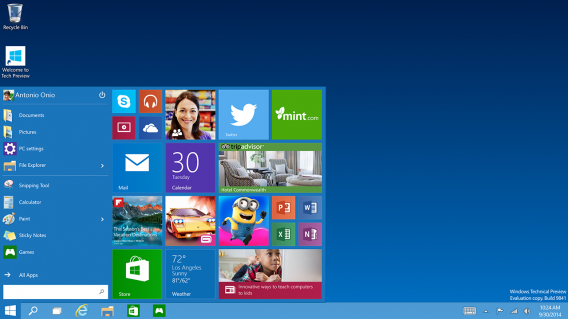
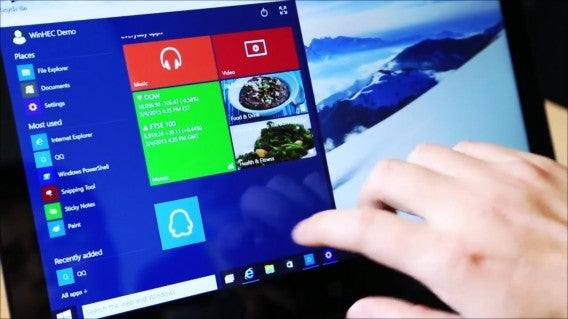
Windows 10 hybrid start menu Windows 10 was just announced and one of the biggest features is its hybrid Start Menu. Many users moving from Windows 7 to Windows 8 found the full screen Start Menu too confusing. Microsoft resolved this by combining the best features of both the Windows 7 and Windows 8 Start Menus. On the left, you’ll have your most recently used apps listed as they are in Windows 7. To the right, you can pin Windows 8 apps, which features animated Live Tiles that give you up-to-date information as it happens.

Continue reading…

Jump to top

How to get Windows 10’s best features right now
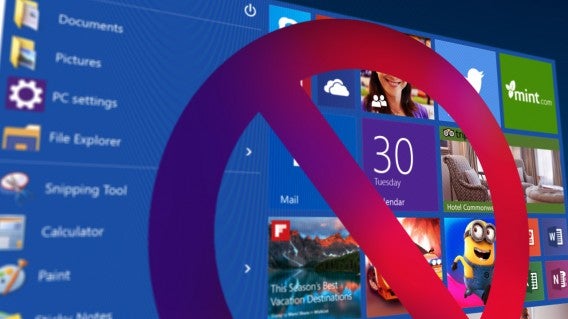
Windows 8 wasn’t as successful as Microsoft had hoped, but with Windows 10 it will try to correct its mistakes. Windows 10 contains a lot of new features, but many of these improvements are already available on Windows 8.1 with some useful third-party apps.

Continue reading…

Jump to top

The Windows 10 preview expires April 15, 2015
Windows 10 preview

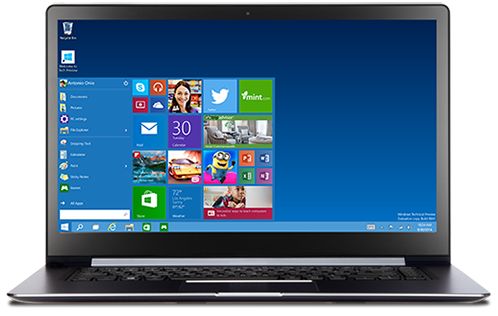
Microsoft announced Windows 10 yesterday, but it won’t be ready until 2015. Today, the company released a preview of the operating system for all users to try out. Users noticed that the preview is set to expire on April 15, 2015, which coincides with Microsoft’s target of a mid-2015 launch.

Continue reading…

Jump to top

You can update to the Windows 10 Technical Preview from Windows 7

Last week Microsoft made the Windows 10 Technical Preview available for download. Now it’s possible to install it like an update directly from Windows 7.

To get the Windows 10 Technical Preview, you have to sign up to the Insider Program. After downloading and running the file, it will launch Windows Update. This is easier than the Windows 8 Technical Preview, which came as an ISO file, requiring a manual install.

Continue reading…

Jump to top

Windows 10 Technical Preview gets a share button for File Explorer
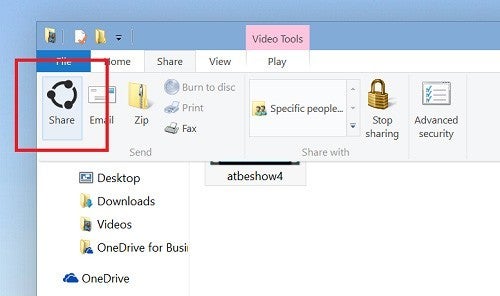
In the Windows 10 Technical Preview, which you can read all about here, there’s a new Share button in File Explorer.

The Share button allows you to easily share selected files, like photos, with other apps you have installed. You can share photos directly to Facebook or Twitter for example, if you have those apps. The share feature exists in Windows 8.1 now, but isn’t available from File Explorer.

Continue reading…

Jump to top

First update for Windows 10 Technical Preview rolling out now
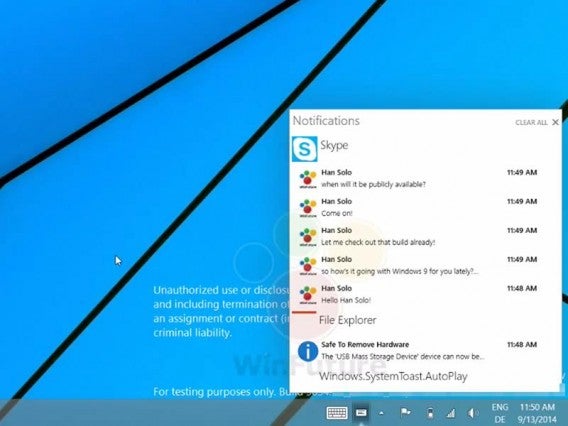
Windows-9-Notification-Center

If you’re testing the Windows 10 Technical Preview, the first new build is now being rolled out. It’s snappily titled build 9860.

You’ll get the build automatically, and it will be downloaded with no input from you if your PC is plugged in, on or sleeping. To get it manually, open PC Settings > Update > Preview Builds, then click the Check Now button to get the new build. The download will be between 2 and 2.74 GB, depending on your PC specs. Once your PC has installed the build and rebooted, eventually you’ll see Windows 10 as you left it, with all the apps and everything else you’ve installed.

Continue reading…

Jump to top

Windows 10: the 10 most requested features

Windows 10 up close

Microsoft launched a Windows Features Suggestion box to collect the feedback of Windows users and find out what they wanted from the next version of the operating system. You can visit the suggestion box and vote for your 20 favorites.

Continue reading…

Jump to top

Microsoft expands on Windows 10 security features

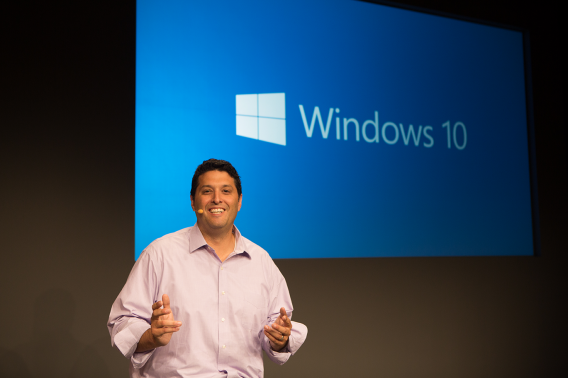
Windows 10 will have two-factor authentication by default, replacing the normal single password system that is no longer seriously secure.
Windows 10 Terry Myerson

Two Factor authentication means as well as a password, you need a second piece of information to get into an account. Typically, this is a code sent to your mobile device – it’s much less likely that a hacker can get your password and access to your second device.

Continue reading…

Jump to top

Windows 10 trackpad gestures finally make sense
Windows 10 gestures

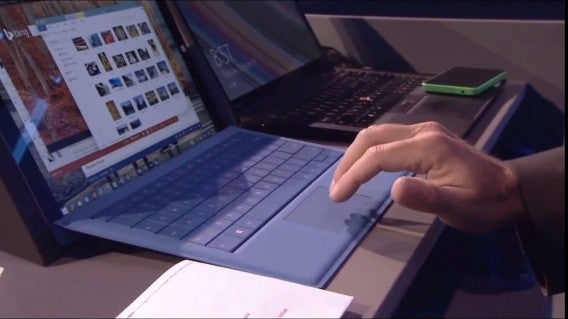
For far too long, Windows reacted unpredictably to different trackpads from different manufacturers. That’s because each manufacturer creates their own software for gestures and scrolling. With Windows 10, that changes.

Continue reading…

Jump to top

<a name="leakxboxapp"

Leak: Windows 10 to get Xbox app and Cortana
Xbox app for Windows 10 header

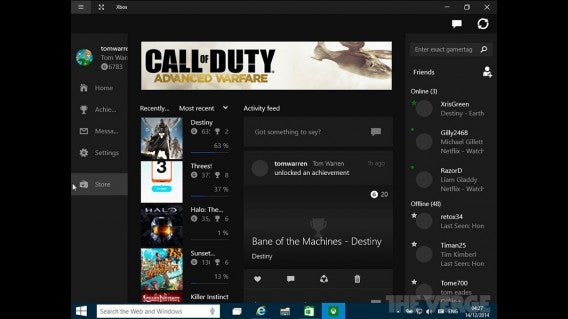
A leaked version of Windows 10 shows Microsoft is working on an Xbox app and integrating Cortana into the operating system. The inclusion of Cortana shouldn’t come as a surprise since we’ve already seen leaks in the past.

It’s logical for Microsoft to build an Xbox app since it wants to unify its operating systems. The Xbox app for Windows 10 will serve as a hub for all things Xbox, including your friends list, achievements, activity feeds, and the digital store to buy games for your console.

Continue reading…

Jump to top

Google Fit helps you track all your health and fitness data

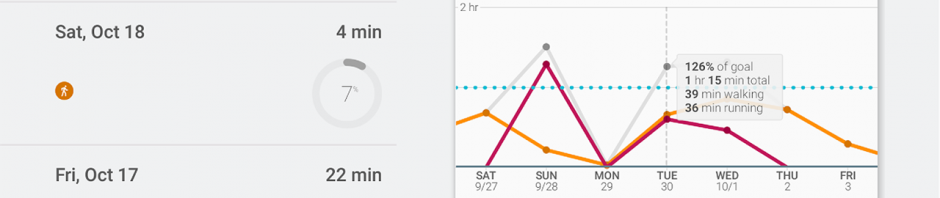
We all knew Google Fit was coming and now the app is finally here. Google Fit will compete with Apple’s Health app as a hub for all your fitness and health data.

The app allows third-party app developers and devices to send and organize data so you’re not limited to using specific Google products and apps. For example, Fitbit can send your steps and calorie data to Google Fit so you get all your data in one app. If you use multiple fitness apps and wearable devices, you won’t have to use specific apps for each device.

Google Fit combined

Android Wear, Google’s smartwatch platform, is also supported. Fit will display everything from walking running, cycling and more. Data is broken down into easy to read charts and graphs to help you visualize your goals. Note: activating Google Fit will reset your step count on your Android Wear smartwatch.

You’ll need to log into Fit with your Google account but you will be in control of your data. If you don’t want tracking on all the time, you can input data manually.

Google Fit is still a new application so expect some bugs. Try it for your self by downloading it at the link below.

Download Google Fit for Android

Related Stories

Hands on with Inbox, Google’s radical take on email

The 7 scariest cyber security breaches of 2014

The Softonic Minute: Windows 10, Google Inbox, Retry, and Avast 2015

Amazon sneaks its Android Appstore into its main app

Follow me on Twitter: @lewisleong

Surviving Five Nights At Freddy’s

With Halloween arriving on Friday, it’s time to jump into games that offer more than mindless action and carnage. Gaming’s horror genre offers a lot of variety, from the survival horror of Resident Evil to more psychological scares of Slender: The Arrival. We decided to take some of our favorite horror games and play them in celebration of Halloween.

Our editor James decided to play Five Nights At Freddy’s, a game that’s all about anticipation and attempting to survive six hours while being hunted by the animatronic characters at Freddy Fazbear’s Pizza restaurant who want to kill you by stuffing you inside a costume.

Default player


brightcove.createExperiences();

Download Five Nights At Freddy’s: Android | iOS | Windows

Related Articles

This War of Mine beta overview

I am Bread – the next game from Surgeon Simulator creators

The 7 scariest cyber security breaches of 2014

Follow me on Twitter: @chrislikesrobot

New screenshots of GTA V for PC and extra content coming for returning players

Rockstar has announced new content coming to the PC and next gen versions of GTA V, especially for players of the Xbox 360 and PlayStation 3. Along with this, we have some new screenshots of the game.

There will be new activities, missions, weapons and vehicles. Michael will get ‘murder mystery’, where you can follow clues to a murder which will unlock ‘noir style filters’, giving GTA V the look of an old fashioned crime movie. There’s a new high powered rail-gun and brutal hatchet melee weapon, but if you’re looking for something more peaceful, you’ll also find a ‘Kraken Sub’, ideal for underwater photography.

Rockstar is promising the return of many ‘classic GTA vehicles’ that players will be left to discover for themselves. Will your favorite old GTA vehicle be hidden somewhere around the new San Andreas?

GTA V on PC will be released on January 27th 2015, while PlayStation 4 and Xbox One will get the game on November 18th.

Source: Rockstar

Related Stories

Rumor: First person view mode coming to GTA V for PC and next gen

GTA V for PC release date: 27th January 2015 (video)

Rumor: details leaked about GTA V next-gen remaster

Follow Jonathan on Twitter: @jonathanriggall

Watch the Farming Simulator trailer series

With the launch only days away, Giants Software has released its final trailer, showcasing all the action from the ‘new generation’ Farming Simulator 15.

Unlike previous ones, the launch trailer does not deal with a specific part of the game. The five trailers running up to the launch covered Garage, Bale Handling, Woodcutting, Harvesting Crops and Growing Crops. Watch them all after the launch trailer below.

Default player


brightcove.createExperiences();

Farming Simulator 15 lets you manage your own farm, with the aim of building it up to invest in bigger and better machinery. This time around, you can play the sim with friends in multiplayer mode so that you can work together to run your farm even more efficiently (or not).

Farming Simulator is out on PC on October 30th, with console releases following in early 2015.

Default player


brightcove.createExperiences();

Default player


brightcove.createExperiences();

Default player


brightcove.createExperiences();

Default player


brightcove.createExperiences();

Default player


brightcove.createExperiences();

Related Stories

Watch a new Farming Simulator 15 trailer

Farming Simulator out on PC October 30th

Watch the Farming Simulator 15 – A Day on the Farm trailer

Follow Jonathan on Twitter: @jonathanriggall

Leaked screenshots show the next version of Outlook for Mac

Microsoft Office for Mac has long lagged behind its Windows counterpart. There have been doubts whether Microsoft wants to continue its productivity push on Mac but you can put those doubts to rest. Leaked images of the next version of Outlook for Mac show Microsoft is readying a new version of Office for Mac.

The changes seen in the leaked screenshots show a conservative refresh. Outlook for Mac 16 looks to bring the app up to par with the Outlook 2013 on Windows.

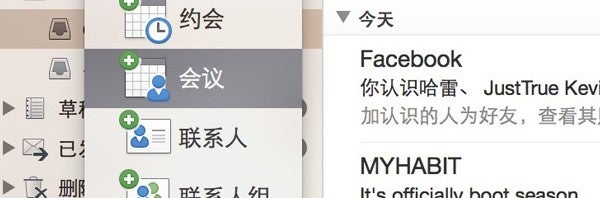
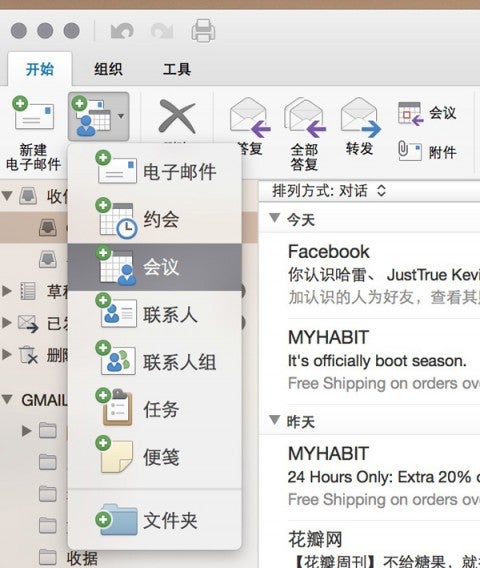
The interface is the same but incorporates OS X Yosemite’s use of translucency. Outlook for Mac 16 is also Retina Display ready with huge icons that look crisp on high resolution displays.

Outlook for Mac 16 ribbon Retina Display icons

There will also be support for the Notification Center in OS X Yosemite where you can view all your alerts at once.

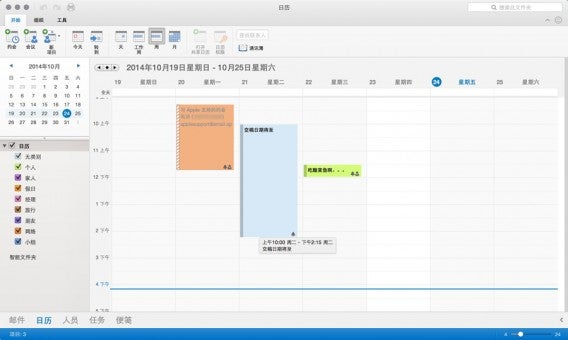
Sections for mail, calendar, people, tasks and more are located at the bottom. Office for Mac 2011 introduced Mac users to the ribbon interface and it carries over to the new version as well.

Outlook for Mac 16 calendar

Microsoft’s productivity suite for Mac is playing catch-up to the company’s Windows version. It’s not a reinvention of email like Google’s Inbox, but it doesn’t have to be. For businesses users, Office is still one of the best productivity tools around.

Office for Mac 2016 is rumored to be arriving some time this year.

Source: cnBeta

Related Stories

Hands on with Inbox, Google’s radical take on email

Office Tip: how to create a PowerPoint presentation from a Word document

The 7 scariest cyber security breaches of 2014

Social network Ello promises to never sell your data or serve ads

Follow me on Twitter: @lewisleong

Video: Check out the cool maps from Minecraft Realms

Mojang has blogged about how the multiplayer part of Minecraft, ‘Realms’, has developed. There are mini-games and maps, made by the Minecraft community and chosen by Mojang to be included by default in Realms. Check them out below.

Minecraft Realms is Mojang’s official online subscription service that lets you easily create your own Minecraft server. Why would you want to do that? So what you can have a persistent map that lives online that you can share and play in with your family or friends. You can create your own maps, or use some of the ready made templates and adventure maps.

The adventure maps are particularly nice. Winter Stronghold, for example, spawns you in a big castle, where you can stock up on items before going out and exploring the world outside.
Download Minecraft for Windows and Mac.

Source: Mojang

Related Stories

What would Minecraft look like in Microsoft Excel?
Minecraft for Parents: 7 tips to help you get involved
Mojang and Minecraft bought by Microsoft for $2.5 billion

Follow Jonathan on Twitter: @jonathanriggall

Call of Duty: Advanced Warfare details leaked

A long list of details about Call of Duty: Advanced Warfare has leaked, supposedly from a stream of the game someone put on Ustream this weekend. The stream has since been taken down for copyright reasons.
All of the information should be taken with a grain of salt though- it’s not from official channels. There’s a huge list of available weaponry, attachments, camouflage and more. If you think these are spoilers, stop reading now!
Call of Duty: Advanced Warfare will be released on November 4th, and the gameplay has been shaken up with the introduction of futuristic exo-skeleton-clad soldiers, with abilities much like those of Titanfall.

Here’s the list of details taken from the stream:
Gun camouflage list:

Multi Cam

MultiCam Black

Urban

Stranden

Woodland

Kryptek Raid

Digital Classic

Kryptek Highlander

Kryptek Yeti

Digital Urban

Concrete

Urban Jet

Kryptak Neptune

Carbon Fiber

Gold

Diamond

Royalty

Weapons list:

Assault Rifle:

– Bal-27

– AK12

– ARX-160

– HBRa3

– IMR

– MK14

SMG:

– KF5

– MP11

– ASM1

– SN6

– SAC

– AMR9

Snipers:

– Lynx

– MORS

– NA-45

– Atlas 20mm

Shotguns:

– Tac-19

– S-12

– Bulldog

LMG:

– EM1

– Pytaek

– XMG

– EPM3

– Ameli

Attachments:

Red Dot Sight

Hybrid Sight

Auto Focus Sight

Target Enhancer

Thermal

ACOG Scope

Laser Sight

Foregrip

Stock

Tracker

Extended Mags

Suppressor

Parabolic Microphone

Quickdraw Grip

Grenade Launcher

Exo abilities list:

Exo Shield

Exo Overclock

Exo Mute Device

Exo Stim

Exo Cloak

Exo Hover

Exo Ping

Exo Trophy System

Scorestreaks:

Aerial Recon Drone – 350

UAV – 400

Aerial Assault Drone – 450

Oribital Care Package – 500

Remote Turret – 550

System Hack – 600

XS1 Vulcan – 600

Missile Strike – 650

Bombing Run – 725

XS1 Goliath – 775

Warbird – 850

Paladin – 950

Maps:

Ascend

Bio lab

Comeback

Defender

Detroit

Greenband

Horizon

Instinct

Recovery

Retreat

Riot

Solar

Terrace

Source: VG247

Related Stories

Call of Duty: Advanced Warfare minimum PC requirements released
Watch the reveal trailer for Battlefield 4: Final Stand
Watch 7 minutes of Call of Duty: Advanced Warfare gameplay (video)

Follow Jonathan on Twitter: @jonathanriggall

Office Tip: how to create a PowerPoint presentation from a Word document

If you need to make a presentation based off of something you’ve written, why not kill two birds with one stone and turn your Word document into a PowerPoint presentation?

When it comes to making a public presentation, PowerPoint remains the industry standard. Luckily, Word does the same for word processing software. Here, I’ll show you a little trick that’ll help you take advantage of two of Microsoft’s most used programs in its Office suite: converting a PowerPoint into a Word document (and vice versa).

1. Open a new PowerPoint presentation

Open a new PowerPoint presentation and then go to the Insert tab. On the left you’ll find the New Slide icon. Click on it.

Insert New Slide

2. Choose Slides from Outline

In the drop-down menu that appears, select Slides from Outline to import the contents of a Word document as slides.

Slides from Outline

You can also change the theme of the presentation using the default themes provided.

3. Select document

Select the Word document you want. PowerPoint will then import the different headings within the text, which have been formatted using the Heading styles. The images and the text of the document will not be automatically added to the presentation.

4. Copy & Paste

To finish importing the document, all that’s left to do is copy and paste the images and text from the Word document to the presentation. How? The easiest way is to have the two documents open side by side, and manually copy and paste the contents.

Word PowerPoint

5. Save as PowerPoint

All that’s left to do now is save the presentation in pptx format, PowerPoint’s default format. To do this go to File, then click Save as and then finally Computer. And there you have it, your PowerPoint document is finished and ready to be presented to your audience.

One last tip: To do this operation in reverse, that is to say, quickly turn your PowerPoint presentation into a Word document, click on File and then Save As. Change the output format and choose Outline / RTF. Once it’s saved on your PC, you can simply reopen the document and edit it in Word.

Check out some more Office tips:

Office Tip: add page numbers to your Word document

Office Tip: how to type multiple lines in an Excel cell

Office Tip: type faster by replacing one word with another

Office Tip: access your Word, PowerPoint and Excel documents online

Office Tip: use tabs in Word, Excel and PowerPoint

Office Tip: restore or minimize the Ribbon interface in Word and Excel

Originally published in French on Softonic FR.

Follow me on Twitter: bbrassart

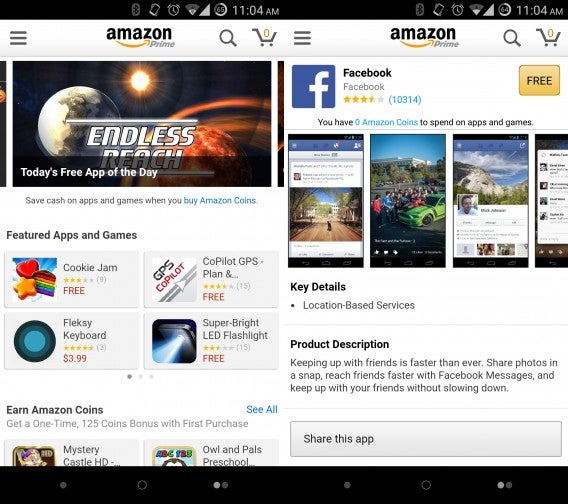
Amazon sneaks its Android Appstore into its main app

Six weeks ago, Amazon quietly snuck its entire Android app catalog into its main app. Users no longer have to hunt for a separate Amazon Appstore download. This move is interesting as Amazon basically inserted a Trojan Horse into Google’s own app store and operating system.

It’s in Google’s best interest to keep competing app stores like Amazon’s out of Google Play. This way, Google gets its 30% cut from app sales. In the past, Amazon got around this restriction by having Android users download and install a separate Appstore app, which could be found by navigating to Amazon’s website on an Android device.

Amazon Appstore

Now with its app store integrated directly into the Amazon app, users won’t need to install another app. However, users will still need to enable installing apps from outside sources to use the Amazon Appstore. This circumvents a key layer in Android’s security, which may scare some users.

In my testing, apps installed without issue but Google Play still offers a better experience, requiring fewer steps.

Amazon’s AppStore may gain traction since 50 to 100 million users already have its Amazon app installed. The store also offers one free app everyday and often discounts apps, which will attract frugal shoppers.

It’ll be interesting to see how Google reacts to Amazon’s brazen push of its own app store.

Download Amazon for Android

Source: TechCrunch

Related Stories

The Softonic Minute: Windows 10, Google Inbox, Retry, and Avast 2015

The 7 scariest cyber security breaches of 2014

Hands on with Inbox, Google’s radical take on email

Android 5.0 Lollipop starts rolling out November 3rd (update)

Follow me on Twitter: @lewisleong