Telegram for iOS and Android gets new privacy features

As we saw when WhatsApp introduced its now infamous blue check marks, some people really value privacy and control in their communication apps. Now Telegram, a competitor, has been updated with what it calls ‘Privacy 2.0‘, which aims to give you more control over who sees what information.

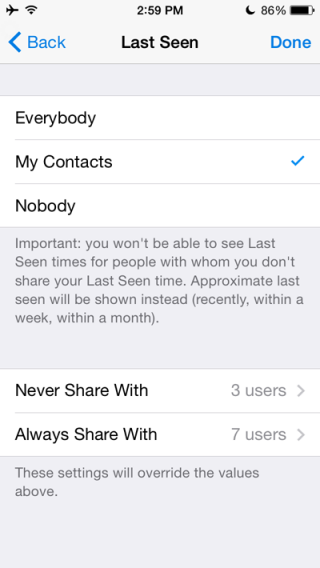
Telegram on iOS and Android now gives you the ability to control exactly who sees your ‘last seen‘ time stamp. In WhatsApp, you can turn it on and off, but now with Telegram you can choose who sees it. There are three simple options – share it with everybody, my contacts and no one.

There are also two new options – Always Share With and Never Share With. This means that you can add exceptions like ‘only share with my contacts and these people’, or ‘never share with my contacts except these people’.

The second part of Telegram’s new privacy drive is ‘Self-destructing Accounts’. By default, if you don¡t use your account for six months, Telegram will delete your account along with all messages and data it holds. You can change the self-destruct period from one month up to a year. Telegram says it is doing this so users feel safer that the app isn’t hanging on to your data indefinitely.

Related Stories

Best free messaging apps

WhatsApp, Facebook Messenger, Skype? What are the most and least secure messaging services?

Telegram deleted private chats now removed from both devices

Follow Jonathan on Twitter: @jonathanriggall

Viber updated with full iOS 8 support

Popular free messaging app Viber has been updated and now takes advantage of the new features in iOS 8.

With Viber 5.1, you now get interactive notifications. This means that you can reply to Viber messages from the notification you receive on your lock screen by swiping and choosing one of the options you are given.

The second development is Viber’s use of Share Extensions. This is less obvious, but it means that you can add Viber to the list of apps that appear whenever you tap a share button in another app in iOS.

To add Viber as a share option, tap share. Then in the second row, where you see Message, Mail and other icons, swipe left. Tap More, and you’ll see Viber in the list. Switching it to green means you’ll see Viber in the list of default apps for sharing from now on.

Download Viber for iOS

Viber is also available on Android, Windows Phone, Blackberry, Symbian, Windows desktop and Mac OS X.

Related Stories

Best free messaging apps

WhatsApp, Facebook Messenger, Skype? What are the most and least secure messaging services?

What’s changed in iOS 8?

Follow Jonathan on Twitter: @jonathanriggall

Malware being spread through Steam chat

Right before Black Friday, traditionally a big day for gaming service Steam, it’s suffering from malware being spread through links shared in Steam Chat. The malware is in a .SCR file, which looks like a screensaver.

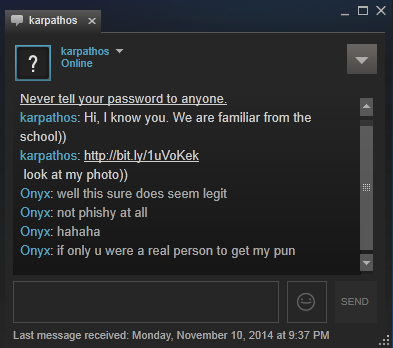
The file is being shared by chat phishing – see the image below. A steam user claiming to know you shares a bit.ly link, which leads to a file with an .SCR extension, but installs malware that is able to steal items from your Steam inventory.

Panda Security employee Bart Blaze explains on his blog what to do if you download the malware:

– Exit Steam immediately

– Open up Task Manager and find a process called temp.exe, wrrrrrrrrrrrr.exe, vv.exe or a process with a random name, for example 340943.exe

– Launch a scan with your installed antivirus

– Launch a scan with another, online antivirus

– When the malware has been disinfected or deleted, change your Steam password – if you use the same password for other sites, change those as well

– Verify none of your Steam items are missing

As the malware is being spread by phishing methods – essentially users trying to trick you into clicking links, the advice is simple: do not click on links or accept friend requests from people you don’t know at all, and certainly don’t install files from sources you don’t trust.

Download Steam for Windows and Mac OS X

Source: Escapist Magazine, Blaze’s Security Blog

Related Stories

Now you can control your music in-game with Steam

Steam gets a new personalized Home Page

Steam beta client now allows simultaneous installations

Follow Jonathan on Twitter: @jonathanriggall

Facebook releases new Groups app for collaboration

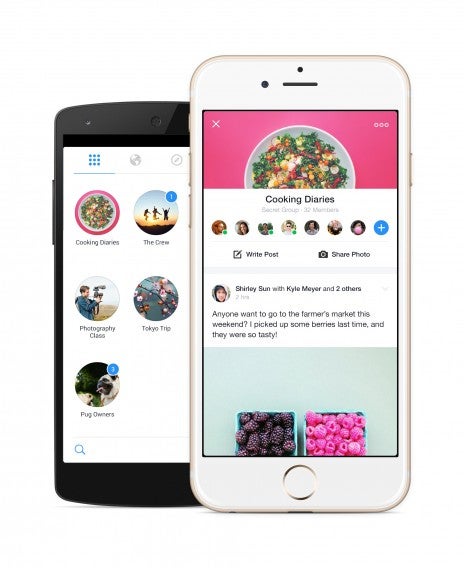
Facebook is concentrating on bringing your closest friends and families together by releasing its new Groups app. Groups has always been a part of Facebook but was hidden away in the side menu of the Facebook mobile app. With the new Groups app, you can have a dedicated place to keep in touch with friends or to share things with people with the same hobbies.

Groups looks like a hybrid of Messenger (Android | iOS) and the Facebook app (Android | iOS). Your various groups are displayed at the home page in a grid with circular icons. Tapping on them will bring up a “wall” for you to post to that group.

Facebook Groups

While Messenger is still great for group chats, the Groups app will be better for sharing content that doesn’t require immediate attention. It also serves to stop shared content from being buried under a barrage of chats.

You can still use Groups on the Facebook website, and the company promises to improve that experience as well, though no solid plans were announced.

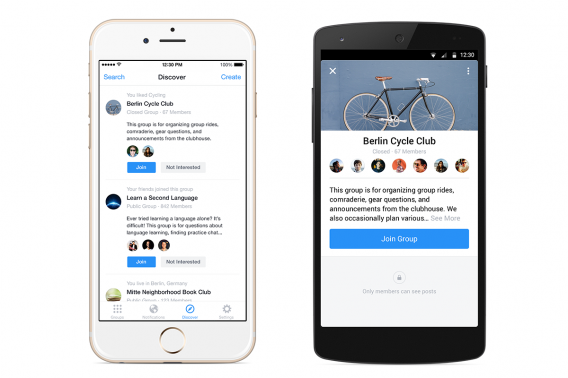
Facebook Groups for Android discover tab

Facebook Groups is available in all countries on Android and iOS today. Even though this is a new app, it already looks way more useful than Facebook Rooms.

Download Facebook Groups: Android | iOS

Source: Facebook

Related Stories

End to end user encryption coming to WhatsApp

Beam Messenger lets you watch what your friends type in real-time

Snapchat now lets you send money to friends with Snapcash

iOS 8.1.1 will speed up your iPad 2 and iPhone 4s

Follow me on Twitter: @lewisleong

End to end user encryption coming to WhatsApp

WhatsApp is taking an important step for user privacy by applying the Open Whisper Systems’ encryption– the TextSecure protocol– used in its own apps like Signal.

End to End encryption means that in theory, WhatsApp will not be able to see what is being sent by its users. Only the people at the end of a conversation will be able to read it, so WhatsApp will not be able to hand over details of conversations to law enforcement agencies.

The rollout of the TextSecure protocol to WhatsApp will be incremental, according to Whisper Systems. The company has been working with WhatsApp for six months already, but it’s by far the biggest users base TextSecure has ever been applied to, so it’s a big job.

WhatsApp for Android now has end to end encryption for normal conversations, but not for group chat or media yet. This is coming next, and then Whisper Systems will begin rolling out encryption to other platforms (like iOS).

This is good news for Whatsapp users. The Electronic Frontier Foundation recently published an overview of messaging apps and their security. WhatsApp only managed to confirm two out of seven of the EFF’s security criteria. With open TestSecure source encryption implemented, that should give it a much more respectable five out of seven.

Download WhatsApp for Android, iOS and Windows Phone

Source: Whisper Systems

Related Stories

Deactivate the WhatsApp blue checks now with the Android beta APK

Exclusive: WhatsApp update will bring ability to deactivate read receipts

WhatsApp is testing a ‘message read’ blue double tick (Update)

Follow Jonathan on Twitter: @jonathanriggall

Beam Messenger lets you watch what your friends type in real-time

Are WhatsApp’s blue ‘message read’ confirmation checks too much for you? Then Android-only Beam Messenger will terrify you!

Much like Google Wave (remember that?), instead of telling you when someone is typing a message, with Beam you can actually see the other person typing (and deleting, correcting, etcetera) their message. While this could be seen as next level messaging-voyeurism, it could just teach you to think before you type instead, much like we do when we talk! Of course, it also means that you can see when someone has stopped typing partway through a reply.

The developers say Beam is a ‘real time’ conversation app. As well as seeing what others are writing, you can interrupt, and even take back what you said. This is literal – you can delete a message and it will be removed from both devices in a conversation. They also say messages on Beam are ‘inherently secure’, as no message is ever delivered: “letters simply arrive on your phone in an organized fashion”. This is hardly a convincing message for the security conscious, however. The company doesn’t mention what is kept on its own servers, or whether anything in encrypted.

Beam’s growth has meant that the company has temporarily stopped new signups for the service while it upgrades its infrastructure. You can apply for an account at getbeammessenger.com. The app is still available to download as usual, but you can’t use it until you’ve been granted an account.

Download Beam for Android.

Source: Buzzfeed

Related Stories

Deactivate the WhatsApp blue checks now with the Android beta APK

Exclusive: WhatsApp update will bring ability to deactivate read receipts

WhatsApp is testing a ‘message read’ blue double tick (Update)

Follow Jonathan on Twitter: @jonathanriggall

GTA V’s first person mode makes it more controversial

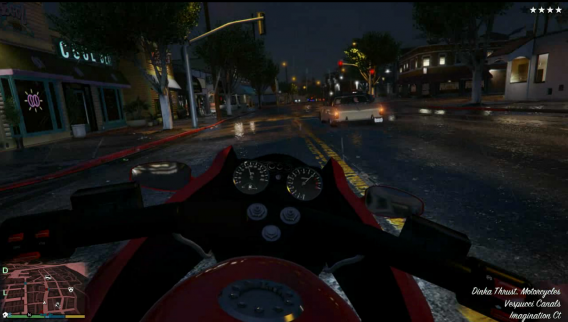
GTA V for PC comes out next January, but we can already see the game’s new features in the next gen console version, which is released today. Of all the new features, it seems that the new first person mode could be the most controversial.

To begin with, it seemed that an FPS mode in GTA V was just something different that fans wanted – mods were created for earlier games in the series that gave players that ability. But the reality of first person mode makes the sometimes violent world of San Andreas much more visceral and personal than the traditional third person view.

The Verge reports the more innocently exciting parts – you can now look around vehicle interiors, and they’re all different, and motorbikes and skydiving feel much much faster than before.

However, the violence and sex in the game does look more shocking in first person perspective (see source below). Players have noted how the violence is more affecting in first person. One of the most controversial parts of the game is a torture scene – while this may be a commentary over torture methods used by the US government after 9/11, actually doing it in a game makes many people uncomfortable, and doing the same in first person mode would be even more gratuitous.

First person mode may make GTA V more shocking than before, but it’s worth remembering that this games is not for children – it’s rated for adults only, and for very good reason.

GTA V for PC is released on January 28th 2015.

The game’s companion app, Grand Theft Auto: iFruit has also just been updated for the release of the next gen console version. Download it for iOS, Android or Windows Phone

Source: NeoGaf forums, The Verge

Related Stories

Remastered GTA V will get a first person mode

New screenshots of GTA V for PC and extra content coming for returning

GTA V for PC release date: 27th January 2015 (video)

Follow Jonathan on Twitter: @jonathanriggall

OS X 10.10.1 update fixes Wi-Fi connection issues

Apple released a minor update for iOS 8 today and now it has an update for OS X Yosemite as well. OS X 10.10.1 brings major improvements for users suffering from Wi-Fi connection woes. All other users will see minor improvements with the Mail app and connections with Microsoft Exchange Servers.

The major Wi-Fi connection issues were reported by users complaining about slow connections and continual disconnections from the network. The problems weren’t isolated to any one line of Mac or router. Many users found methods of relieving the bug but none worked for all users consistently.

Apple recommends updating to OS X 10.10.1 for all Yosemite users, but only those experiencing the Wi-Fi bug will likely notice a difference.

To get the update, open the Mac App Store app and click on the Software Update tab to download it.

Via: MacRumors

Related Stories

Microsoft launches ‘Skype for Web’ beta

How to use Google Play Music

Facebook launches Places, a potential Foursquare and Yelp competitor

Follow me on Twitter: @lewisleong

Snapchat now lets you send money to friends with Snapcash

Snapchat and electronic payments company Square have partnered up to let Snapchat users send money in the app. The service is extremely easy to use. Type in a dollar amount into the subject line of a message and the send button will turn into a picture of a dollar. Tap on the dollar and money will be sent directly to your friend’s bank account.

Users worried about Snapchat’s history of poor security can rest a little as all sensitive banking and payment information is handled by Square. Millions of people and businesses already use Square so there’s little reason to doubt the company’s ability to keep your info safe.

To start using Snapcash, you’ll need to enter your debit card and be 18 years or older. Snapchat faces tough competition from Google Wallet, PayPal, Venmo and more when it comes to online payment methods. The company will have to gain back the trust of users after this year’s massive data breach and leaked images.

Android users will get a Snapchat update with Snapcash enabled starting today. iOS users will have to wait a little longer according to Re/code, though no official timeline was announced.

Source: Snapchat

Related Stories

iOS 8.1.1 will speed up your iPad 2 and iPhone 4s

Facebook brings Messenger back to its Android app

The best keyboards for iOS 8

Deactivate the WhatsApp blue checks now with the Android beta APK

Follow me on Twitter: @lewisleong

Best free iPad games

Finding good, free iPad games can be a chore. There are tons of free iPad games in the App Store making it difficult to find good ones. Many free games also have in-app purchases so the game requires you to buy something before you can even play.

However, there are many good free iPad games that you should try. The following list feature some of my favorite free iPad games, with everything from arcade racers to zombie shooters.

Here are my top picks of the best free iPad games in no particular order.

Plants vs. Zombies 2
Plants vs Zombies 2

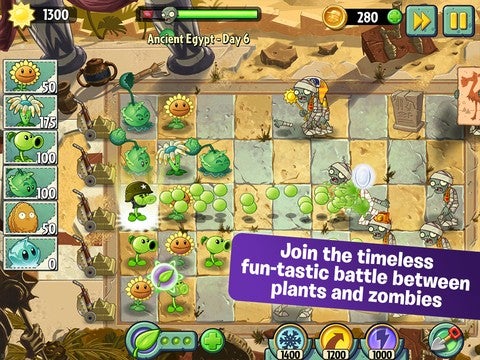
The first Plants vs. Zombies game was so good, I was worried that making the sequel free-to-play would ruin the game. Fortunately, that was not the case and Plants vs. Zombies 2 is actually a very well balanced game, even if you don’t want to pay money.

There are still in-app purchases to buy to make things easier. There are just a handful of plants and upgrades that can only be purchased, not earned. But if you’re decent at the game, you’ll never have to spend a dollar.

There’s a ton of free content available and a ton of variation between levels to keep you coming back for more over and over again.

Download Plants vs. Zombies 2 for iPad

Smash Hit

Smash Hit for iPad

The concept of Smash Hit is extremely simple: break glass objects by throwing metal balls at them. The gameplay, however, is not as simple as you’ll have to adapt to constantly moving environments and changing gravitational forces. The game is challenging but rewarding since you need to maintain your combo to keep your upgraded balls.

The game is free-to-play but you’ll have to purchase the premium version to unlock checkpoints. If you don’t mind playing the game over from the beginning every time you die, then the free version will be enough. However, if you want to unlock endless mode or want to reach the harder levels, you’ll have to pony up for the premium version.

Warning: older iPads may find Smash Hit running with noticeable lag. The game is very graphically intensive, especially when there are a lot of balls and shards of glass flying everywhere.

For more on Smash Hit, check out my interview with the developers at GDC.

Download Smash Hit for iPad

Punch Quest
Punch Quest

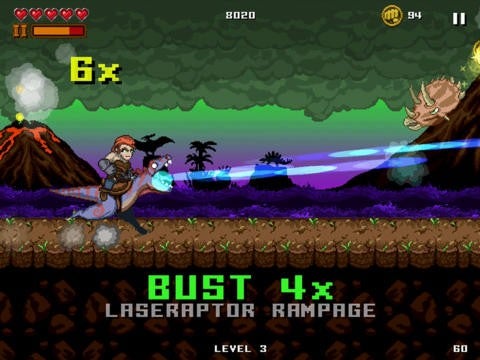
If you need to kill a few minutes, the quick gameplay of Punch Quest is perfect. You play as a guy or girl punching his or her way through a monster-filled dungeon. There are only two buttons to control your character: punch and uppercut. There are no movement buttons because throwing punches or uppercutting will propel you forward naturally. This makes it difficult to have precise control over movement but keeps the gameplay moving.

There’s a ton of content for you to unlock like new abilities and cosmetic items like hats. The premium currency inside the game is called “Punchos” and you can purchase them with real money.

But if you’re patient and skilled, you can earn upgrades without spending money. The game is addictive and you’ll keep coming back trying to keep your combo meter going for as long as possible. It may be frustrating to control at times but its difficulty is what keeps me coming back for more.

Download Punch Quest for iPad

Jetpack Joyride
Jetpack Joyride

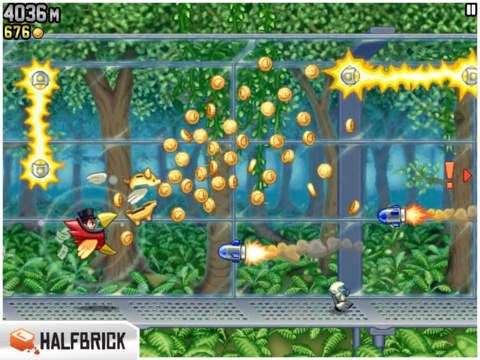
Jetpack Joyride is a classic from Halfbrick Studios, developers of Fruit Ninja. You play as an unnamed man trying to break out of an evil lair with a jetpack. Not just any ordinary jetpack though. It shoots bullets and you can upgrade it to shoot other things as well like cash or rainbows.

There’s a ton of achievements and upgrades for you to unlock. You collect coins throughout the level which you can use to purchase these upgrades. If you’re impatient, you can spend real money to unlock them.

What makes Jetpack Joyride fun is the increased speed gameplay (speed is increased the higher the distance)) and the inventive upgrades. I found myself saving up all my coins just to see what that next jetpack would feel like.

Download Jetpack Joyride for iPad

Angry Birds HD Free
Angry Birds HD Free

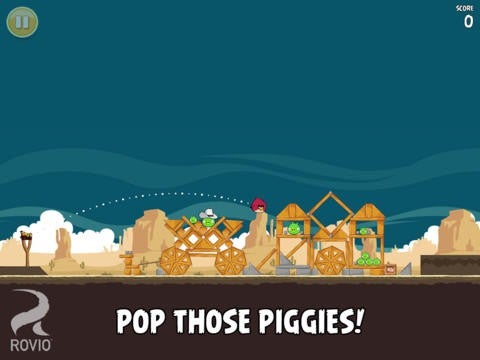
You can’t have a list of best free mobile games without including Angry Birds. The game has been around for years and there are dozens of variations out but the original is still fun.

Slingshot birds at pigs and the structures they’re hiding in to score stars. There are a ton of levels in Angry Birds HD Free and absolutely no in-app purchases. However, you’ll have to put up with ads throughout the game. If you get sick of the advertisements, you can buy the paid version to get rid of them.

Developer Rovio has been adding new levels to the game since its launch so new players will be treated to an insane amount of content. There’s enough variation in gameplay from the differing environments to the types of birds to keep you playing for hours.

Download Angry Birds HD Free for iPad

Candy Crush Saga

Candy Crush iPad

This deceptively simple Bejeweled clone will consume your life if you’re not too careful. The game starts off easy enough with a tutorial about combing three or more of the same candy type to eliminate them. Combining four of more of the same candy will create a “special” candy, when combined with other candies has various effects like exploding the surrounding area or eliminating candies in a horizontal or vertical line.

While the game is free-to-play, there are microtransactions in the game. You start off with five lives and will lose a life for every level you fail. It takes thirty minutes to gain back one life so you’ll be waiting for hours to play again if you run out of lives. You can speed up the process by buying in-game currency (no surprise here). Like a good drug dealer, Candy Crush gives you your first 50 gold bars, the game’s currency, for free after passing level 10. You can also buy special candy boosters to help you pass challenging levels.

The gameplay gets challenging very quickly and you’ll find it difficult to win without boosters. It’s frustrating and that’s what developer King hopes will fuel your purchase of in-game currency and special items.

This game is addicting and you’ll either give into the microtransactions or rage quit and uninstall it.

Download Candy Crush Saga for iPad

Dumb Ways To Die
Dumb Ways To Die

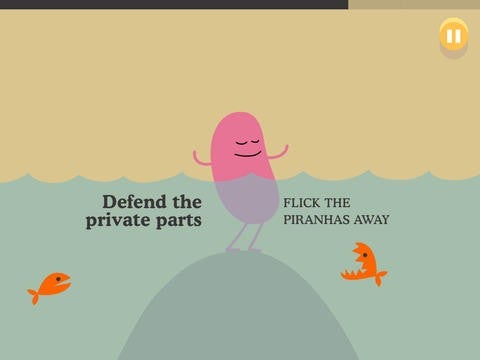
Dumb Ways To Die is a dark, but hilarious game where you’ll die repeatedly but you won’t want to stop playing. You’re tasked with random challenges like swatting wasps away or tilting an astronaut to retrieve his helmet. The game gets progressively quicker until you inevitably die a gruesome death.

There’s no goal to the game except to chase your highest score. You can share your score with your friends for bragging rights.

Gameplay is quick and fun, but may get repetitive after a while since you’ll repeat challenges over and over again. There are different characters you can unlock to keep you coming back for more abuse.

Download Dumb Ways To Die for iPad

TwoDots

TwoDots

TwoDots is the sequel to the popular Dots game. While the first game was a simple high score chase, TwoDots adds objectives and a whole ton of new challenges. It’s a much better game than the first and its challenging puzzle kept me coming back for more.

It’s free-to-play but you can pay for more lives or power ups. If you run out of lives, you’ll have to wait a while before your lives automatically replenish.

The puzzles get increasingly harder with objectives to eliminate a certain number of colors or to sink anchors all the way to the bottom. It’s this varying gameplay that keeps the game fresh, but it may take several tries to get through some of the harder levels.

Download TwoDots for iPad

The Simpsons: Tapped Out

Simpsons Tapped Out

EA’s town-builder is fun on a phone but even better on a tablet. Moving around Springfield feels so much better on a bigger screen.

The Simpsons: Tapped Out has been out for a long time, but remains fun because of the constant updates. There are also special events going on in-game and tons of content for you to unlock. They even spoofed Clash of Clans in one update.

Tapped Out is a free-to-play game so there are a ton of in-app purchases to help you speed up tasks or to purchase items. If you’re patient, you don’t need to spend any money but the gameplay might get grating if you’re stuck waiting around.

Still, there’s just so much content in the game that it’s worth checking out.

Download The Simpsons: Tapped Out for iPad

Asphalt 8: Airborne

Asphalt 8 Airborne for iPad

Let’s be honest for a second. You’re not playing a racing simulator on your iPad because touch and accelerometer controls aren’t that accurate. There are a ton of fun arcade-style racing games for the iPad and the best free one is Asphalt 8: Airborne. Even though the game is free-to-play, you can race an indefinite amount of times without waiting for a silly gas gauge to fill up.

There are still plenty of in-app purchases and playing for free means you’ll be working hard to unlock cars, upgrades, and powerups. Still, Airborne is fun due to its varied gameplay modes like Infection, which turns one car into a “zombie” that gets points for infecting other players. Speaking of other players, you can go online to race in multiplayer challenges and there’s a global leader board to see how you compare to other racers around the world.

Download Asphalt 8: Airborne for iPad

Zombie Catchers
Zombie Catchers

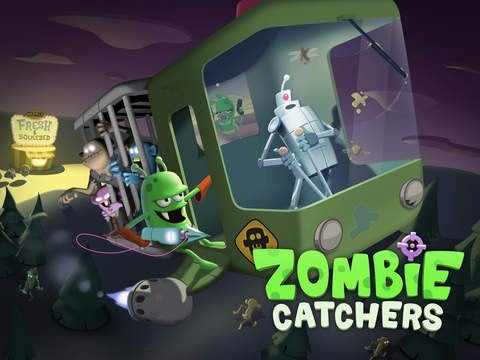
Zombie Catchers is a goofy game about an alien who comes to Earth to catch zombies to turn them into delicious desserts to sell to humans. The story is ridiculous, but its artwork and gameplay kept me coming back for more.

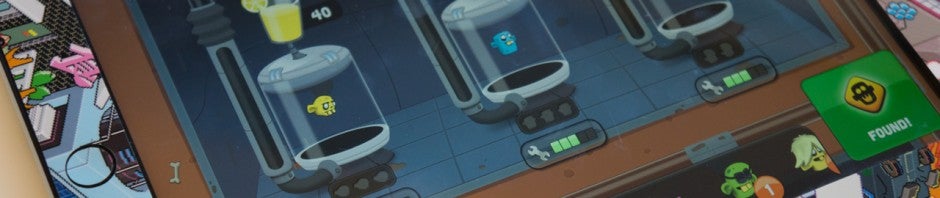
The game is part platformer and part restaurant manager. You send out robot drones to scan the surrounding areas for zombies to catch. Once zombies are found, you jump around the level luring zombies out of their hiding places with brains. You bring back the ones you catch to turn into various juices, ice creams, and other snacks.

The game is free-to-play so everything is time-based. It takes time to juice a zombie and time for your drones to find more zombies. You can speed things up by using the game’s premium currency, plutonium. You earn plutonium by leveling up and catching zombie so you don’t need to pay, but you’ll be waiting around for a long time if you run out of plutonium.

Download Zombie Catchers for iPad

Despicable Me: Minion Rush
Minion Rush

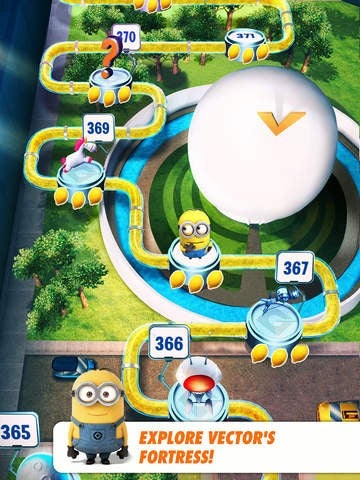
Minion Rush may be just another endless running game, but its beautiful level design and frequent updates make it the one you should be playing. You play as one of Gru’s minions from the movie Despicable Me. Your objective is to complete tasks like boss fights or running a required distance. Completing objectives helps you level up and collecting bananas in the levels help you purchase new costumes.

There’s a ton of content in the game and Gameloft frequently updates Minion Rush with seasonal levels and events. They’re constantly adding more levels, minions, and challenges to the game so there’s a lot to see.

The game is free and there’s no limit on how many times you can play, which is nice. You’ll have to spend real money to get some costumes but they don’t impact the gameplay that much.

Download Despicable Me: Minion Rush for  iPad

FIFA 14

FIFA 14

Soccer fans already know that FIFA is a great game on consoles but the iPad game isn’t bad either. It’s free-to-play but you’ll have to spend money to unlock all the game modes.

There are some limitations in the control scheme, but the game is polished and remains fun after playing for hours. Tap to pass, swipe to shoot, and hold and drag a player to move. There are over 500 licensed teams, 30 leagues, and real soccer players for you to add to your team.

The graphics are good for a mobile but console players will be unimpressed. Still, FIFA 14 is a great way to play a few matches on the go.

Download FIFA 14 for iPad

Fairway Solitare HD

Fairway Solitaire

There’s no better way to waste some time than playing solitaire. The centuries old game has taken many forms over the years and there are quite a few to choose from.

Fairway Solitare HD doesn’t play like your traditional solitaire game. Instead of just having a stack of cards you have organize, you’re not playing on a golf course and you need to meet par by getting rid of all your cards as efficiently as possible.

You can stack cards that are one number lower or higher, making you rethink what you know about solitaire. The game is challenging and I like that Big Fish Games put a golfing spin on it. The only bad thing is that the game isn’t Retina Display optimized and looks fuzzy on high resolution iPads.

Download Fairway Solitaire HD for iPad

Pocket Trains

Pocket Trains

Live out your fantasies about being a train conductor in Pocket Trains. Developed by NimbleBit, the creators of Tiny Tower, Pocket Trains takes the same style of gameplay and transplants it into the world of trains. You start off with a couple of trains, delivering resources and people from destinations around Europe. You’ll soon unlock more trains and different types of freighters to make your job more efficient.

The gameplay of Pocket Trains is nuanced and layered, so you’ll keep trying to make your train empire more and more efficient. As your empire grows, you’ll expand across Europe and you can unlock different parts of the world by purchasing a license with in-game money.

Although Pocket Trains is free-to-play, you’re not pressured into buying the game’s premium currency called “Bux.” In fact, NimbleBit randomly throws premium currency at players who watch their trains roll through the countryside. Without using any Bux, you’ll be waiting around for things like refueling but it’s bearable. You can also increase the capacity of each city’s train station with Bux.

Download Pocket Trains for iPad