Telegram abandons privacy above all: Bad news for criminals

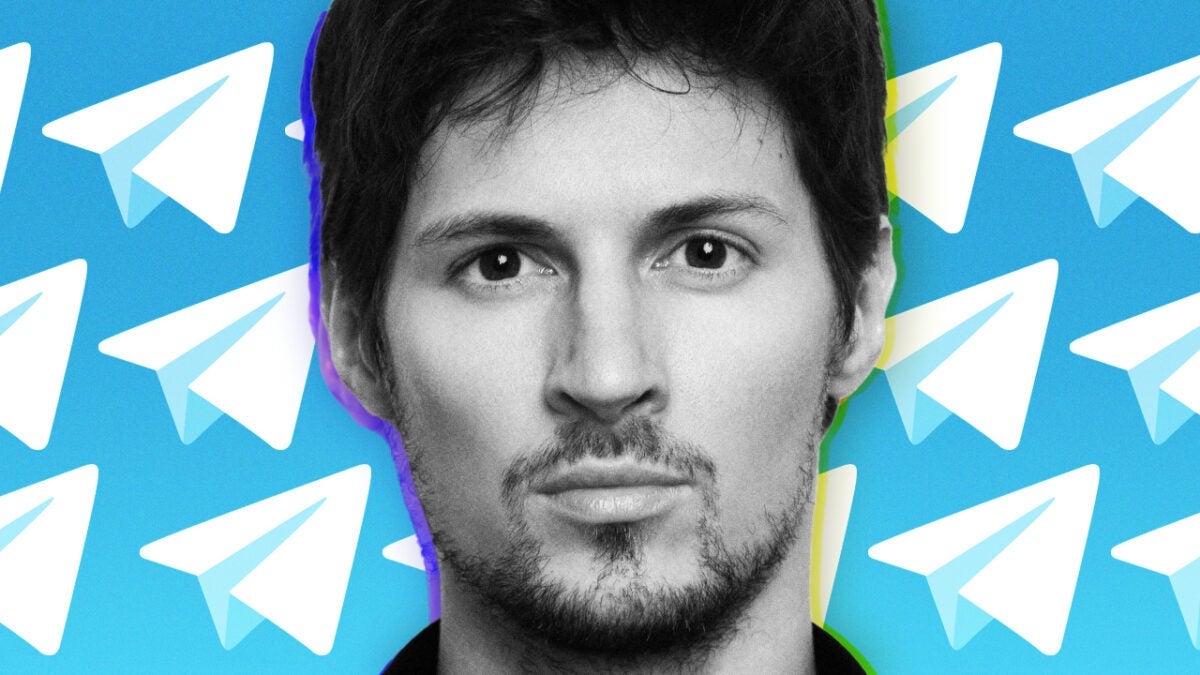
It seems that the arrest of Pavel Durov by the French authorities has achieved what many of us thought was impossible: that Telegram would cooperate in police operations and stop hosting illegal content without consequences. For those wondering, before Pavel Durov’s arrest by the French police last month, the Telegram app had stated that it did not process requests from law enforcement and/or judges. Now, the tables seem to have turned. A month after the French authorities accused him of allowing drug trafficking and the […]

It seems that the arrest of Pavel Durov by the French authorities has achieved what many of us thought was impossible: that Telegram collaborates in police operations and stops hosting illegal content without consequences.

Telegram DOWNLOAD

If you’re wondering, before the arrest of Pavel Durov by French police last month, the Telegram application had said that it did not process requests from law enforcement and/or judges. Now the tables seem to have turned.

A month after French authorities accused him of allowing drug trafficking and child abuse on his platform, Telegram CEO Pavel Durov announced on Monday that the popular messaging app has taken several measures to remove illegal material.

Changes in Telegram’s policies to assist police and judges

In a significant change, the company has modified its policies and will now provide the IP addresses and phone numbers of Telegram users to law enforcement in response to valid legal requests.

Before Durov’s arrest, the company’s FAQ page stated: “All Telegram chats and chat groups are private between their participants. We do not process any requests related to them.”

In a post on Telegram, first reported by Bloomberg, Durov said that a team of moderators has spent the past few weeks removing unsafe and illegal content. Telegram has also updated the platform’s search function to make it less likely for such material to appear.

“These measures should deter criminals,” wrote Durov. “The search on Telegram is meant to find friends and discover news, not to promote illegal products. We will not let bad actors jeopardize the integrity of our platform for nearly a billion users.”

Durov, a French national, was detained on August 28 after landing in his private jet at an airport on the outskirts of Paris following a trip to Azerbaijan. French prosecutors accused him of facilitating the distribution of child sexual abuse material, organized fraud, and association with criminals to commit offenses.

Telegram DOWNLOAD

The prosecutor’s press release also alleged that Telegram did not share information with the police about illegal activities on the platform.

In the weeks since Durov’s arrest, Telegram has introduced several changes to the platform, in addition to the new policy governing law enforcement requests.
For the first time, Telegram apologizes and will remove content

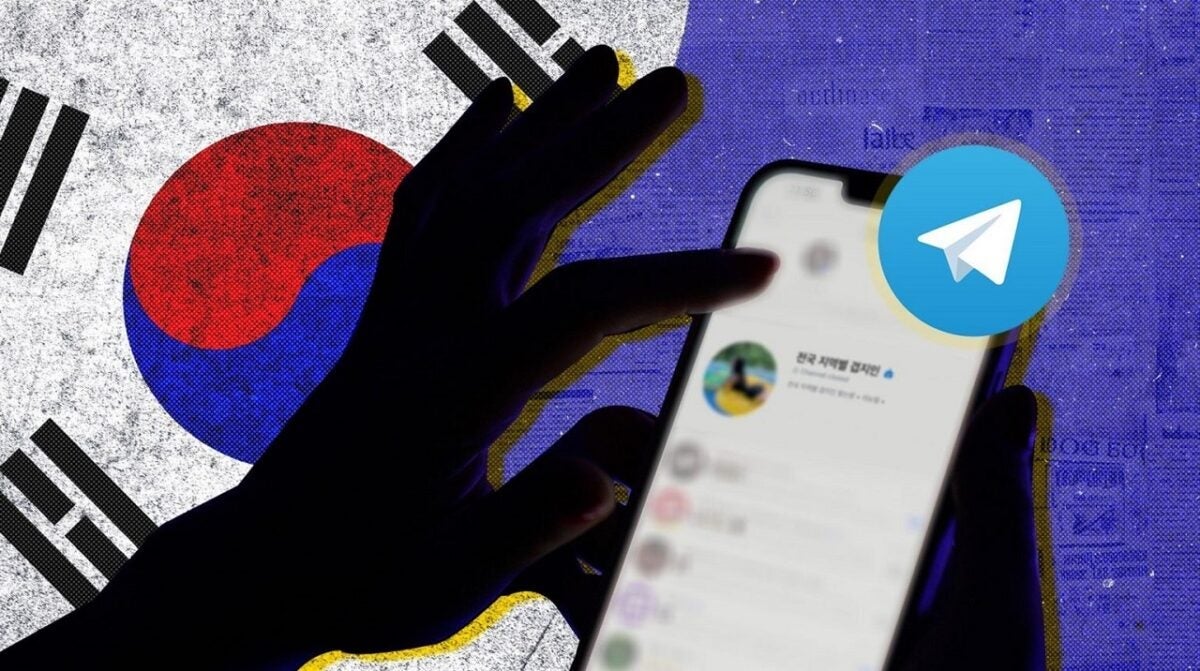
Telegram, the second-largest instant messaging service in the world after WhatsApp, has cooperated with South Korean authorities and has removed 25 videos showing sexual crimes.

Telegram DOWNLOAD

The Communication Standards Commission of South Korea yesterday published the news about Telegram’s actions, and reported that the platform had apologized for the presence of illegal content.

The Commission expressed its hope that the incident will be a first step towards a productive relationship, which includes providing Telegram with a direct email line to facilitate the quick withdrawal of requests.

“Telegram’s statement, which countries around the world have requested, is very forward-looking, and it is assessed that by recognizing the seriousness of the recent incident in our country and clearly showing a willingness to cooperate in the future, it will largely pave the way to resolve the current situation,” says the Commission’s statement after automatic translation.

The current situation of Telegram is the result of two countries: France and South Korea

On one hand, French authorities arrested Telegram CEO Pavel Durov last week and subsequently charged him for the content disseminated on the platform, and the rebel network’s lack of response to requests for help in investigating the origin of that content.

The other one is that South Korean President Yoon Suk Yeol took advantage of last week’s cabinet meeting to declare that the country is facing a deepfake crisis. As Human Rights Watch details, “South Korea is facing an epidemic of digital sexual crimes, with hundreds of women and girls being targeted by deepfake sexual images that are shared online.”

The president tried to mobilize local authorities to fight against the repugnant material, which apparently is consumed by a group with over 220,000 members.

One of the tactics consisted of the Communication Standards Commission writing to the French authorities to ask for help with the cooperation of Telegram.

Telegram DOWNLOAD

The letter mentioned the “serious social damages recently occurred in Korea due to Telegram’s deepfake sexual crime videos.”

The Telegram blog and social media do not mention their actions in South Korea, so it is difficult to know if the apologies and help offered represent an actual change of direction after Durov’s arrest.

Telegram is going to reach this historic milestone very soon

The CEO of Telegram stated, “We will probably surpass one billion monthly active users within a year.”

The messaging app Telegram will surpass one billion monthly active users in a year, according to its founder, Pavel Durov, during an interview with the controversial Tucker Carlson.

Telegram DOWNLOAD

“We will probably surpass one billion monthly active users within a year,” Telegram CEO told American journalist Tucker Carlson in an interview published on Carlson’s Twitter account a few hours ago.

The well-known social media platform, based in Dubai, was created by the Russian billionaire. He left Russia in 2014 after refusing to close opposition groups on his VK social media platform, which he later sold.

An app that wanted to be WhatsApp, but better

Telegram was designed to compete with WhatsApp’s dominance. Unlike WhatsApp, it allows users to access their accounts from multiple devices. And it positions itself as the opposite of Facebook, focusing on stronger encryption and less restrictive regulations.

Telegram, especially popular in the former Soviet Union republics, ranks among the top social media platforms, after Facebook, YouTube, WhatsApp, Instagram, TikTok, and WeChat.

The former owner of VK claims that two and a half million users have been signing up daily on the platform. Hence, with currently 900 million users, they will soon reach the magical number.

Telegram DOWNLOAD

The CEO says he chose the United Arab Emirates as a base because it is a “neutral country” that aims to maintain friendly relations with everyone and is not aligned with any superpower, making it an ideal place for a “neutral platform”. Surely the lax regulation and low taxes also have something to do with his choice.

Sticker lovers are in luck: this is the latest addition to Telegram

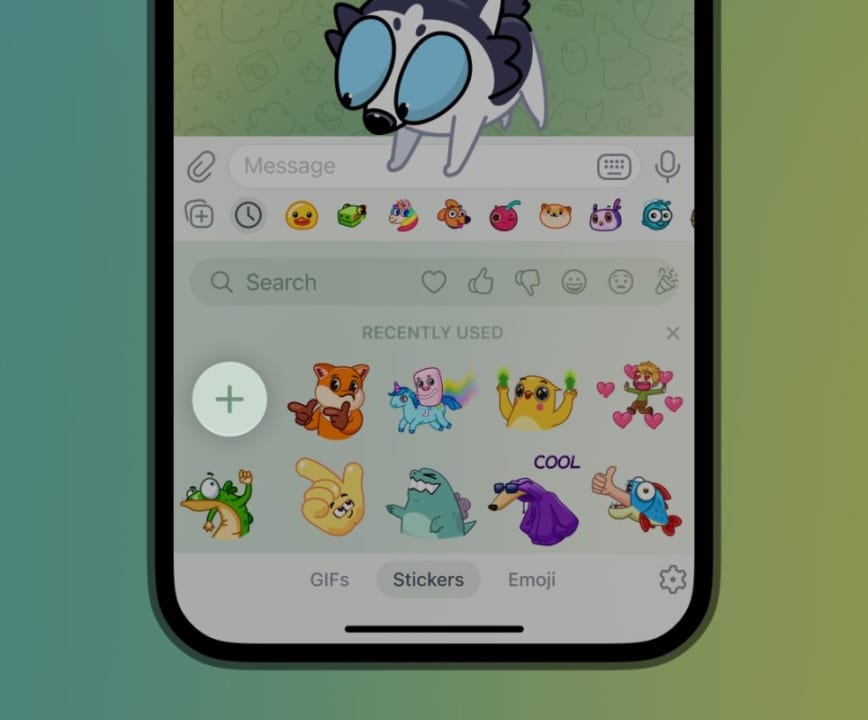
Telegram has launched an in-app sticker editor that allows you to take a photo, crop the background, and add other elements like text and drawings. This new sticker editor is available for Premium users and also for those who do not pay the subscription (that is, the majority of users).

Telegram DOWNLOAD

To start using the new sticker editor, you just have to make sure you have the app updated by going to the App Store (iOS) or the Play Store (Android). With the updated app, go to a Telegram chat, tap the sticker button to the left of the message box, and then look for a plus button (+) at the beginning of your stickers to add new ones.

Creating stickers on Telegram is very simple, and you can even automatically remove the backgrounds of the images you upload, without the need to use a third-party application. After editing your sticker, you can associate it with an emoji to easily access it, send it directly to your contacts, add it to your favorites, or include it in a sticker pack.

Another new change in this Telegram update is that you can add any existing sticker to your custom packs, gathering all your favorite stickers in one place and making it easier for you to access them (especially if you accumulate dozens of them, like me). You can also share your sticker packs with other users by tapping the three-dot menu on the sticker pack and copying the link, which you can then share with your friends and family.

But that’s not all, as the latest update of Telegram also adds link previews for all sticker packs and emojis. In addition, the company has announced that 16 new features will be introduced this month, but they will arrive later.

Telegram DOWNLOAD

Free premium Telegram subscriptions? Yes, but it could cost you a lot

Telegram is offering a new way to get a free premium subscription in exchange for voluntarily providing your phone number to transmit one-time passwords (OTP) to other users. While many may see it as a good way to get a premium subscription without paying a penny, the option poses significant privacy risks.

Telegram DOWNLOAD

Discovered by the Telegram channel TGInfoEn, the feature is being implemented in some countries for Telegram for Android users. If you agree to let Telegram use your number as an OTP relay, the company will send you a transferable code for Telegram Premium.

The terms and conditions of service for this peer-to-peer (P2PL) login program state that the company will send a maximum of 150 OTP messages per month. Participating users, who may also be charged for the use of local and international SMS, will have to reach a certain quota in order to use the free subscription. Well, your phone bill could end up being more expensive than the base cost of the Premium subscription.

“Secure” and “private”… except when it’s not

But, in addition to the monetary issue, there is also the enormous problem of privacy, which allows strangers to search for your phone number and use it to send spam and scam messages. Telegram allows users to hide their phone numbers from strangers, but using your number as a relay could allow them to find your Telegram account.

The terms and conditions state that individuals participating in the program will not hold Telegram responsible for any damages and grant the company absolute indemnity for all claims related to P2PL: “You acknowledge and agree that Telegram shall not be liable for any costs, expenses, damages, or any other adverse or unforeseen consequences that you may incur as a direct or indirect result of your present or past participation in the P2PL Program.”

Telegram DOWNLOAD

How to use VPN with Telegram to avoid blocks and what options does the app give you via Proxy

Telegram has recently been suspended in Iraq, and previously in Brazil, Iran, Pakistan, Russia, and more countries. And in Spain, we have been on the verge of being blocked.

Telegram is a well-known platform that offers instant messaging (IM) and voice over IP services to over 500 million monthly active users. Today, it is the second most used service in the world after WhatsApp. Here’s a complete guide on how to use it.

ExpressVPN DOWNLOAD

However, although users appreciate the fact that Telegram offers AES encryption, you may find that several countries have blocked the platform. Telegram has recently been suspended in Iraq, and previously in Brazil, Iran, Pakistan, Russia, and more countries. And in Spain, we have been close to being in the same position as them.

Fortunately, you can access Telegram using a VPN. It will change your location and assign you a new IP address. Additionally, a VPN will help you with data encryption, ad blocking, and avoiding geographical restrictions on streaming platforms.

Keep reading to find out exactly how to access Telegram using a VPN and discover what options the app offers through its internal proxies.

NordVPN DOWNLOAD

What is a Telegram Proxy?

Telegram supports proxies such as SOCKS5 and MTProto in its application. These proxies allow users to mask their IP address and increase their level of privacy.

These proxy servers help you stay safe on Telegram, as your chats are encrypted and your IP is hidden. In addition, these proxy servers can also be used to unblock Telegram if it is not available in your country.

Proxy servers work similarly to a VPN. However, they are not as secure as a VPN, as they are better optimized for high speed.

Why do you need a VPN for Telegram

Telegram offers a lot of privacy-focused features, such as secret chats with end-to-end encryption and self-destructing messages. This ensures that the data you send/receive through Telegram cannot be decrypted by third parties, including governments.

Unfortunately, this high level of privacy has led to government censorship of the platform in several countries, such as Iraq, Iran, Pakistan, and Russia. So if you are in these countries, you will not be able to access the platform.

Fortunately, you can unblock Telegram with a VPN, as it allows you to connect to a remote server and also provides you with a new IP address to make it appear that you are outside the country where Telegram is blocked. This way, you won’t have any problems accessing the platform.

Beyond that, VPNs are useful for cybersecurity reasons. Firstly, they can encrypt all your traffic, protecting it from hackers, scammers, and even snooping authorities. Additionally, they also help bypass geographical restrictions on streaming sites to provide access to more content.

Urban VPN DOWNLOAD

If you already have the app installed on your mobile device:

Open your trusted VPN app, you have many options and here are the best ones. Remember that not all free VPNs are reliable, in this case it is always better to have a paid and trusted one.

  • Select a server from a country where Telegram is available. We suggest choosing a server that is geographically closer to you, for example, Portugal or Italy, as this will ensure a faster connection speed.
  • Connect to a VPN server.
  • Now you can open the Telegram application on your device, as it should be available.
VPN - Super Unlimited Proxy DOWNLOAD

If you don’t have Telegram on your smartphone:

Telegram is likely to be removed from AppStore/Google Play for users in Spain, so you will need to download the app from an alternative source:

  • As an alternative, you can try changing your location in the AppStore/Google Play and after connecting to a VPN server where Telegram is available, try downloading it.
  • Once the Telegram application is installed, connect to a VPN server where the instant messaging app is available and open the application.
  • Telegram is also available in your preferred browser or its desktop application; however, if the instant messaging app is banned in Spain, the page may no longer be available.
  • Again, connect to a VPN server where Telegram is available and go to the website, which should now be available.
ExpressVPN DOWNLOAD

Quantum computer-proof encryption: Apple completely changes the security of iMessage

Although quantum computers are still primarily in the realm of theory, preparing against their potential threats is a prudent maneuver. One with which Apple, in addition to securing the present of iMessage, also fortifies its future, marking a milestone in the evolution of security in our communications.

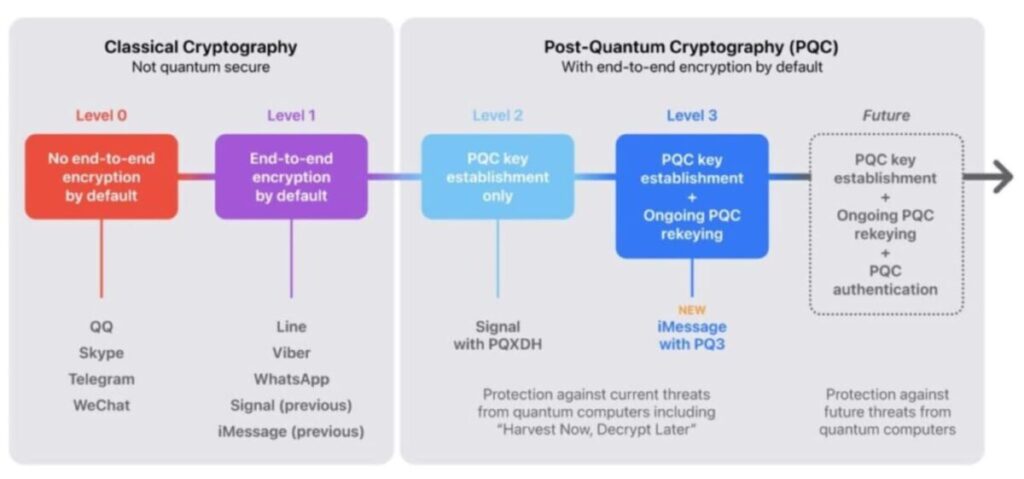
Apple has made a before and after in the history of cybersecurity with the announcement of PQ3, its new post-quantum cryptography protocol specifically designed for iMessage. A significant breakthrough in the protection of digital communications that sets a new security standard, surpassing by far all other existing protocols in commercial messaging applications.

iOS 17 Download

A leap towards future security

With the slow but inexorable arrival of the enormous potential of quantum computers, conventional cryptographic protocols based on complex mathematical problems could be compromised. These future computers promise exponentially greater computing power than even supercomputers can currently provide, making them capable of breaking cryptographic measures that are considered practically indestructible with current machines.

This is where Apple’s PQ3 protocol comes into play. Designed to be resistant to attacks from future quantum computers, PQ3 anticipates and protects iMessage communications against the attack known as “Harvest now, decrypt later.” This type of attack is based on the collection and storage of large volumes of encrypted data, currently inaccessible, with the hope of decrypting it in the future, once quantum computers become available. According to Apple, given the reduction in data storage costs, this threat is more real than we might imagine.

Apple describes PQ3 as the messaging protocol with the most robust security properties in the world, capable of guaranteeing security both in the initial key establishment and in the continuous exchange of messages. With it, iMessage will not only be invulnerable to current attacks, but also to future ones.

The implementation of PQ3 will gradually begin in March, with the updates of iOS 17.4, iPadOS 17.4, macOS 14.4, and watchOS 10.4, and it is already present in the latest beta versions of these updates. Apple plans to completely replace the current cryptographic protocol of iMessage with PQ3 in all compatible conversations throughout the year. However, this requires that all devices in the conversation are updated, at least, to the mentioned software versions.

iOS 17 Download

Apple’s move towards post-quantum cryptography with PQ3 is undoubtedly great news. At a time when privacy and security of digital communications are becoming increasingly critical, initiatives like these – partly made possible by the fact that DMA will not affect iMessage – are essential to protect personal and corporate information that passes through these services. Although quantum computers are still mainly in the theoretical realm, preparing against their potential threats is a prudent maneuver. One that not only secures the present of iMessage, but also safeguards its future, marking a milestone in the evolution of security in our communications.

The EU is backtracking and the DMA will not affect iMessage: what does it mean?

An objective that doesn’t come from regulation imposition but from the natural evolution of standards, which we will all soon enjoy.

Recently, the European Union has decided, after its initial attempt, not to include iMessage, Apple’s messaging service, in the strict regulations of the Digital Markets Act (DMA). As Apple responded to the EU after its inclusion in an initial draft list, the Cupertino company’s service does not have enough users to be affected by this new law.

iOS 17 Download

Without regulation, but with the same result

The DMA is a legislation that seeks to regulate tech giants, which it calls “digital gatekeepers,” forcing them to open their platforms to third parties and ensure the interoperability of their services. One aspect of this DMA is to require services like iMessage to implement interoperability with other messaging platforms, such as WhatsApp or Messenger, both owned by Facebook.

However, after a five-month investigation, the European Commission concluded that iMessage does not hold a dominant position in the market, especially regarding its use by businesses, and therefore, it will not be subject to interoperability regulations under the DMA. This decision has been welcomed by both Apple and Microsoft (owner of Bing, which was also excluded from certain regulations under the same logic), who have expressed their satisfaction with not being affected by the DMA.

The most important thing here is to make a clear distinction. iMessage as a protocol is one thing, and the Messages app on our iPhone, iPad, or Mac is another thing. And this is an important distinction to keep in mind because, while iMessage won’t have to integrate third-party services and can continue to maintain Apple’s service security standards, the Messages app presents other changes.

By its own decision, Apple announced that the Messages app will adopt the RCS protocol in the coming months. This will mean that through Messages we will be able to send photos, videos, audio messages, stickers, and other types of content typical of iMessage to anyone. RCS replaces traditional SMS and already has support on Android. Thus, we will be able to communicate with anyone through the Messages app just like we would already do on Telegram or WhatsApp, for example.

iOS 17 Download

Ultimately, we are facing a truly interesting scenario. While we will continue to enjoy maximum privacy and security when sending messages between Apple devices, thanks to RCS we will be able to communicate much more freely than before when talking to Android users. This is not achieved through regulation but through the natural evolution of standards, and soon we will all enjoy it.

The new feature of Telegram will make you relive one of the worst moments of Marvel

Exciting things are coming to Telegram. The messaging app has released a new update that introduces improvements in calls with a new design that consumes less battery. The update also includes new animations, improvements in the app’s bot platform, and many more innovations.

Telegram DOWNLOAD

In a blog post, Telegram says that it has redesigned calls and added dynamically changing backgrounds based on the call status: ringing, active, or ended. The new interface requires fewer resources than before, which means it saves battery and works better on older devices. The update also improves call quality; Telegram says it plans to release further improvements in connection quality and audio in 2024.

The messaging app has also taken the opportunity to update its bot platform, which allows developers to integrate services into the Telegram ecosystem. Now, bots can react to messages and manage reactions, quotes, and links, send responses to other chats or topics, and much more. Bots can also get information about gifts and promotions in the channels where they are administrators.

In addition, Telegram is bringing its “Thanos snap effect” to both iOS and Android users after testing it previously with selected users. The new effect plays every time you delete a message and simulates the vaporization suffered by the victims of Thanos’ snap in Avengers: Infinity War.

The release of the new features comes one month after Telegram announced improvements in channels, customization of emoji for reactions, and story statistics to better compete with WhatsApp, which launched its broadcast channels feature to all users a few months ago. Although Telegram has had channels for a long time, the app must continue to innovate to compete with WhatsApp, the market leader.

Telegram DOWNLOAD

How to use Telegram Download Manager in 5 simple steps

The Telegram messaging app has grown increasingly popular over the last few years. This messaging platform is serious about user privacy with enhanced privacy measures, powerful encryptions, and features like secret chats. However, it isn’t only these enhanced privacy features that make the messaging app so popular.

Telegram DOWNLOAD

It also has many other features that make it a worthy contender to other popular apps like WhatsApp. One of these features is sending and receiving files up to 2GB with unlimited cloud storage. Monitoring these downloads is also possible with a new native download manager. Let’s take a look at how to use Telegram Download Manager.

How can I use Telegram to download?

The Telegram Download Manager is a new feature that was released in March 2022. Many users are still unaware that it’s available since it is hidden quite well. However, for those that want more control over their downloads, having a download manager available directly in the app is very useful. 

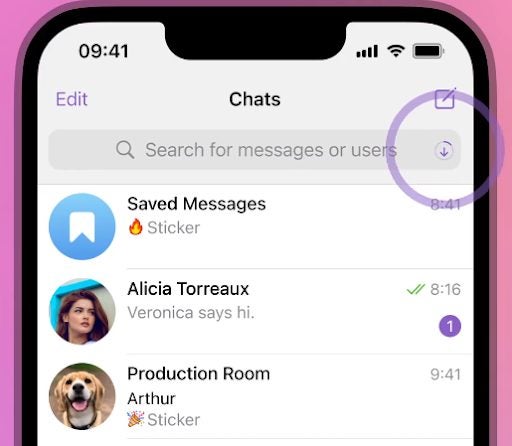
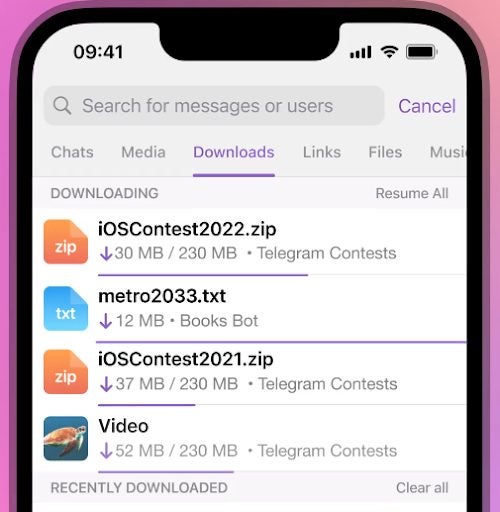
You can use the Telegram Download Manager to monitor the status of downloads, set the priority to ensure what’s downloaded first, and more. You may notice that while you’re downloading a file on Telegram, a download icon progress bar will appear in your search bar showing how far the file has been downloaded. Once the download has been completed, this progress bar switches to the next download file in the queue or vanishes completely if there’s nothing left to download.

How to use Telegram Download Manager

Let’s take a look at how to use Telegram Download Manager to monitor and manage your downloads.

  1. Launch Telegram

    How to use Telegram Download Manager

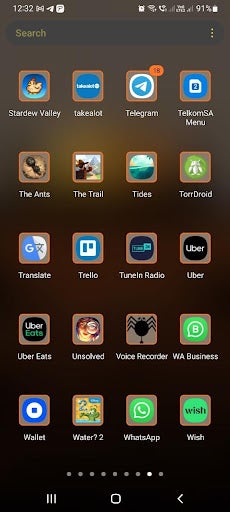
    Launch the Telegram app on your smartphone by tapping on the app icon found in your app tray.

    Tip: For easier access, add Telegram to your home screen.

  2. Tap on the search bar

    How to use Telegram Download Manager

    You first need to access your tabs on Telegram to get to your downloads. To do this, tap on the search button in the screen’s upper-right corner.

    Tip: This step is different on the Telegram desktop client. Instead of clicking on the search button, you need to go into your settings by clicking on the four vertical stripes. Then click on ‘Establishment,’ next click on ‘Advanced,’ and you’ll access the download manager.

  3. Navigate to ‘Downloads’

    How to use Telegram Download Manager

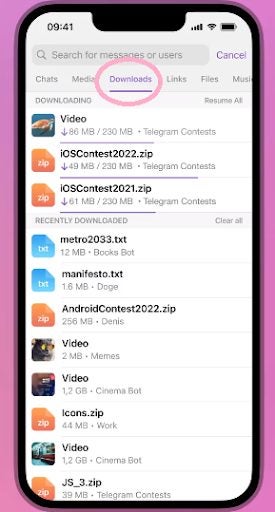
    Once you’ve tapped on the search button in the mobile app, you’ll see different tabs appear. You can move to other tabs by swiping the screen. First is the ‘Contacts’ tab. By swiping right, you’ll go to the ‘Media’ tab. By swiping right once more, you’ll reach the ‘Downloads’ tab.

    Tip: By clicking on the download icon in the search bar while a file is downloading, you’ll be taken straight to the download manager. However, this is only available while a file is downloading.

  4. Monitor and manage downloads

    How to use Telegram Download Manager

    In the ‘Downloads’ tab, you’ll be able to see all of your past downloads, with the most recent ones at the top. Any downloads that are in progress will also be visible here, along with how far they’ve progressed.

  5. Change download priority

    How to use Telegram Download Manager

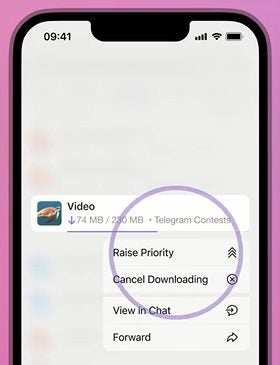
    You can also rearrange the download lineup to download certain files first. To do this, simply tap on the file in the lineup and choose ‘Raise Priority’ to move that file up the list and get it downloaded sooner.

Benefits of using Telegram Download Manager

You may be wondering why it’s even worthwhile to have a download manager. Well, there are quite a few benefits. In the past, downloads were done in each individual group or chat with no central system to manage them. While this isn’t a problem for some users, others found it extremely difficult to find certain files. The download files are extremely difficult to find as new messages come in, obscuring where the files were originally located. 

The download manager makes it possible to conveniently find all the downloads from any of your chats or groups in one place. It also makes it possible to remove sensitive downloads from this general list. Or you can change the order of your current downloads to complete important ones first.

Have more control over your downloads

Telegram is a very privacy-conscious messaging platform, and now with an easier way to manage your downloads, it’s even more useful. Use the above instructions to learn how to access and use the Telegram Download Manager easily.

You can also check out our on how to kick inactive members in Telegram groups.