YouTube gets an animated GIF creator

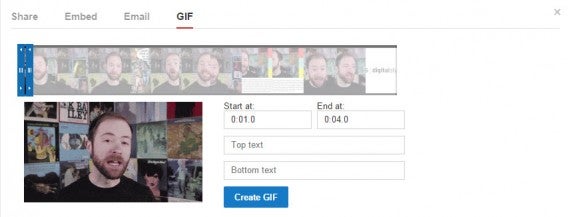
Ever wanted to make an animated GIF from a YouTube video? Now you can easily do it with YouTube’s built in tool. Sure, there are dozens of sites that can turn YouTube videos into GIFs but now you can do it quickly without leaving YouTube.

YouTube GIF creator

However, not all videos support this feature just yet. For videos that do have the GIF creator enabled, all you have to do is click on the Share button and you’ll see an option for GIF. Clicking on that takes you to the tool, which is super simple to use. Chose your start and end points by dragging the sliders or entering a the time. You also have the option to add text to the top and bottom of the GIF for instant meme-ification.

Softonic Clinic

If you want to give it a try, check out the videos from PBS’ Idea Channel where you can turn host Mike Rugnetta into a hilarious GIF. After you’re done creating the GIF, you’re given a direct link and an embed code for your website. It’s super simple and takes seconds.

Want to turn a YouTube video into a GIF but it’s not supported yet? All you have to do is change the URL. This should tide you over until YouTube decides to roll out the feature across all its videos.

Source: TechCrunch

Related Stories

Google’s most popular apps and games of 2014

Facebook for Android now tells you what’s trending

Best free iPhone games

Best free Android apps

Follow me on Twitter: @lewisleong

App of the Week: Call of Duty Advanced Warfare

Softonic’s App of the Week highlights some of the coolest, most unique, and biggest app releases for Android, iOS, Windows, and Mac. This week, a classic shooter returns for its second foray into next gen, with Call of Duty: Advanced Warfare.

Call of Duty: Advanced Warfare stands out for its story, like that of a typical action movie, something that the CoD series does very well. As a former US Marine, you join Atlas, the biggest private military company in the world. Armed with an exoskeleton that gives you extra abilities like boost jump or enhanced strength, you’re ready for combat with technologically futuristic weapons at your disposal. Check out the video below for everything you need to know about Call of Duty: Advanced Warfare.

Default player


brightcove.createExperiences();

Even though we did expect a bit more from the game, Advanced Warfare is definitely the best Call of Duty to date.

Download Call of Duty: Advanced Warfare for PC.

Check out some of our past App of the Week features:

App of the Week: Modern Combat 5

App of the Week: NBA 2K15

App of the Week: FIFA 15 Ultimate Team

The best travel and transport apps of 2014

Rounding out the year, our editors here at Softonic decided to take a look at some of the best apps of the year for our Best apps of 2014 series. Our panel of our expert app reviewers discussed, at length, the best mobile apps of the year in 8 different categories, voting and finally agreeing on the top 5 apps in each category.

When it comes to travel and transport, one thing is clear: people want convenience. With that in mind, our review editors were able to whittle down their extensive list of favorite travel and transport apps of 2014. Not only did they consider apps that were released in 2014, they also considered apps that got huge updates this year, or made big news for one reason or another.

At the end of the day, one app came out on top as the best travel and transport app of 2014: CityMapper. Read on to find out why, and see the other 4 apps that rounded out our top 5 list of the best travel and transport apps of 2014.

Default player


brightcove.createExperiences();

CityMapper

The completely integrated public transport app from London made big waves this year, winning Best Overall Mobile App during February’s Mobile World Congress. And for good reason. The app provides an almost flawless public transport experience, giving you multiple options to get from point A to be B with real-time updates using data fed from each city’s public transport data centers. Once you’ve used it, it’s almost impossible to imagine life without it.

CityMapper added over 10 new cities to the app just this year. The full list of cities now includes the San Francisco Bay Area, Boston, New York, Washington DC, Chicago, London, Barcelona, Madrid, Milan, Paris, Rome, Berlin, Mexico City, and Tokyo. The way CityMapper chooses cities isn’t arbitrary either- users have the opportunity to vote for the city they want to see within the app and choose based on highest demand. If you want to see your city on CityMapper, you can vote for it on their website.

Download CityMapper for Android | iOS

Maps.ME

Bringing back the tradition of old school paper maps to your smartphone, Maps.ME was a top contender for our favorite transport and travel app this year. It’s downloadable, offline maps saw huge success this year, with users going crazy over maps that let them once again traverse unknown cities without having to rely on Wi-Fi or expensive data usage.

What makes the app standout from other offline map apps is not only how many apps are available (everywhere in the world), but also its speed and detail.

Download Maps.ME for Android | Blackberry | iOS

Google Maps

The good old classic Google Maps again got a huge mobile face lift this year for both it’s iOS and Android versions, adding a ton of new features. ‘Explore’ was added to take on apps like Yelp and Foursqaure, showing you different places around your area to eat, drink, and be merry. It also integrated apps like Open Table to let you make a reservation, and Uber, to order a taxi, directly within the app, making Google Maps more robust than ever.

Download Google Maps for Android | iOS

Uber

The personal taxi app expanded a lot this year since its humble beginnings. With a presence in over 100 cities ranging 40 countries, Uber become almost synonymous with the word ‘taxi’ this year. Touted as the ‘afforadable alternative’ to taxis, Uber got a lot of flack this year for it’s surge pricing model (sending rates sky high), as well as more drama over taking jobs and a lack of regulation from regular taxi drivers in cities where Uber is still fighting ‘the system’. Regardless, the app has continued along its road to success this year, making improvements like adding real-time ETA, and a new feature called UberPool for carpooling.

Download Uber for Android | iOS | Windows Phone

Airbnb

Much like Uber, Airbnb got a lot of publicity this year for a few reasons. The travel booking service that lets people rent out their apartments or homes to adventure-seeking travelers has gotten a lot of criticism in various cities for circumventing tax laws, and as the service continued to expand this year, so too did its prominence in the news. Still, the service has seen unprecedented growth this year despite all the controversy.

On top of that, the app got a fresh redesign with a brand new logo, another point of contention in the media. Despite all the media buzz, the app and service were updated to make it more user-friendly and safer for renters and guests, including verified IDs, both on and offline, and anonymous email verification.

Download Airbnb for Android | iOS | Windows Phone

Immediacy is key for 2015

Convenience and immediacy is the absolute key to success for a travel and transport app. People want something that’s easy to use, without having to put much thought into it, and they want it now. Want a taxi? Get one with Uber. Want to get home? Get there even easier with CityMapper. For both apps, all it takes is the push of a button to get you where you need to go.

For a travel and transport app to be able to compete with the ones on this list in 2015, it’ll have to offer nothing short of an amazing and immediate service that not only thinks of every alternative, but can get you there, ASAP.

Check out the rest of our Best apps of 2014 series.

Follow me on Twitter: @suzieblaszQwicz

Microsoft turns MSN mobile in a big way

Today, Microsoft release a half dozen MSN apps to the App Store and Google Play. The apps include MSN-branded apps for News, Weather, Sports, Food & Drink, Money, and Health & Fitness. These apps are basically redesigned version of the Bing apps, a brand label Microsoft is abandoning in favor of the more universally known MSN.

MSN users can look forward to all the apps being connected to your MSN account. This means you can sync all your favorite stocks, sports teams, and news sources between the apps for a curated experience.

The most interesting app from today’s announcement is MSN Health & Fitness, which works with Apple’s HealthKit platform to serve step counts, runs, and dieting information into Apple’s Health app.

Strangely, Microsoft didn’t think to release an MSN Weather app for iPhone. Yahoo, one of Microsoft’s biggest competitors, has a beautiful (and useful) weather app for both Android and iOS.

These MSN apps help bring Microsoft’s aging MSN portal into the modern era. Still, it’ll be an uphill battle against Yahoo, which also features similar apps and a popular online web portal.

Microsoft is slowly becoming less about Windows and Office and more about getting its services onto as many platforms as possible. Office is now free to use for everyone, even on Android and iOS.

Download MSN apps for Android: News| Weather | Sports |Money | Health &  Fitness | Food & Drink

Download MSN apps for iPhone:  News| Sports |Money | Health &  Fitness | Food & Drink

Source: MSN

Related Stories

Google’s most popular apps and games of 2014

Facebook for Android now tells you what’s trending

Best free iPhone games

The best entertainment apps of 2014

Follow me on Twitter: @lewisleong

Google’s most popular apps and games of 2014

Apple released its Best of 2014 list of apps, games, movies and TV shows this week and now it’s Google’s turn. The two lists are very different since Apple curated their list while Google just looked at the download numbers for its apps, movies, and shows.

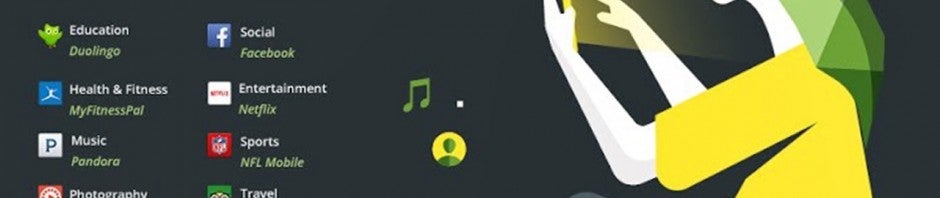
Google split its top apps of 2014 into eight categories so there’s an eclectic group. Duolingo wins for the education category. Facebook, of course, wins for the Social category. Pandora remains victorious over the hugely popular Spotify app because of its intelligent radio stations. Netflix is also unsurprisingly the most downloaded entertainment app of the year. TripAdvisor wins for the most downloaded Travel app.

There were a couple of surprising apps that I haven’t heard about before in this list. Flipagram wins in the Photography category. The app lets you create short videos and send photos and music to your friends. The app looks like an Instagram clone but with more features. MyFitnessPal wins in the Health & Fitness category for its in-depth fitness tracking features. It’s free but ad supported.

For games, King’s Candy Crush Saga was the most downloaded. Don’t Tap The White Tile, an addictive game where you tap only black tiles as quickly as possible takes runner up. More free-to-play titles like Farm Heroes Saga, Subway Surfers, and Clash of Clans made the list. Apparently Android users don’t like paying for games since these are all free titles with in-app purchases.

For a full list of winners, check out Google’s massive infographic below.

Google 2014 apps of the year infographic

Source: Android Official Blog

Related Stories

Facebook for Android now tells you what’s trending

Best free Android apps

Best free iPhone games

The best entertainment apps of 2014

Follow me on Twitter: @lewisleong

Facebook for Android now tells you what’s trending

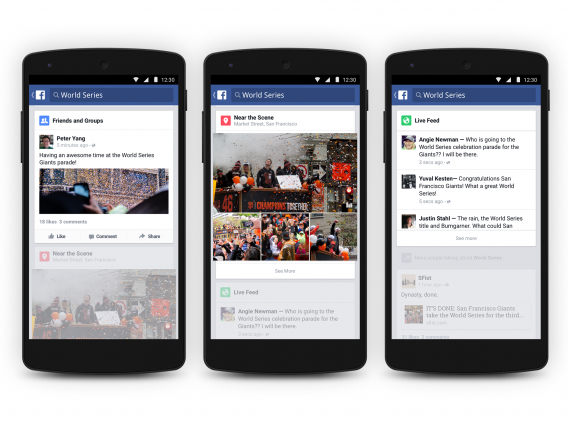
The Trending feature that’s been on the Facebook website for ages finally makes it to the Facebook for Android and the mobile web. Now you’ll be able to see a trending section when you tap on the search feature.

Tapping on a trending story will take you to its section where it will recommend more stories for you to read. It’s a good way to see what’s trending around the world for each topic. Each section reacts just like your News Feed where you can scroll quickly through headlines. Tapping on a story will take you to that page.

Facebook Trending for Android

There’s also a new Live Feed feature that will show you real-time reactions to an ongoing event around the world. You can also filter stories that are shared from your friends and groups.

Facebook has always aimed to curate news that’s most relevant to you and the new Trending feature is the company’s realization of that goal. It hopes you’ll spend more time within Facebook instead of using news apps like BBC, CNN, or even Flipboard.

The Facebook update will begin rolling out to Android and mobile web users in the US today. Support for iOS and non-US countries is “coming soon.”

Source: Facebook

Related Stories

Best free iPhone games

Best free Android apps

VLC for Android is now stable

Apple picks the best apps and games of 2014

Follow me on Twitter: @lewisleong

The best entertainment apps of 2014

Probably one of the most essential functions you can use your smartphone or tablet for is entertainment. Naturally, with our Best apps of 2014 series and our jury of 11 editors, we decided to tackle the best entertainment app of the year.

From music, to movies, to games, smartphones and tablets have replaced radio, TV and computers to become the central hub of entertainment. In 2014, that trend grew even further: we saw the arrival of Beats Music and the expansion of Netflix into five new countries, while in Europe, Spotify will have paid back more royalties than iTunes by the end of 2014.

In 2014, not only where there a ton of new apps, there were also some massive updates to already existing ones. Our top pick of 2014? Spotify. Watch the video below to see why, and read on for the rest of our top 5 entertainment apps of the year.

Default player


brightcove.createExperiences();

Spotify

In 2014, Spotify introduced all new apps for iOS, Android, and Windows Phone. Along with its radical redesign, the music streaming app has integrated a new feature called My Music. This new option lets you better organize your playlists and save them in a gallery that’s both accessible and intuitive.

Download Spotify for Android | iOS |Mac | WindowsWindows Phone |Web

Djay 2

djay 2In May 2014, Djay surprised everyone by announcing a partnership with Spotify. With version 2.5 of the dj’ing app, users can now mix with the 20 million songs available on the music streaming service. To top it all off, 2014 also saw the arrival of the Android version of the app.

Download Djay 2 on AndroidiOS |Mac

Wakie

wakie

You couldn’t miss Wakie in 2014. The app, which is available for free on Windows Phone and Android, wakes you up by inviting other users to call you directly on your phone. In 2014, the app ventured out of its native Russia and made itself available to users in the USA, Canada, the UK, Singapore, and Hong Kong.

Download Wakie for AndroidWindows Phone

Duolingo

 Duolingo - Apprenez l'anglaisDuolingo, the easiet way to learn a language, needs no introduction. In 2014, the app added more ammo to its arsenal by launching Duolingo Test Center, a service that allows you to take online exams and receive a certificate confirming your language level.

Download Duolingo for AndroidiOSWeb

Shazam

shazamIn 2014, the music recognition app was updated, introducing the ability to play entire songs through an agreement with the audio streaming service Rdio. Shaazam also decided to make a major update to its interface this year; the new version puts more focus on television by giving you the option to search by TV show title.

Download Shazam for AndroidBlackBerryiOSMacWindows Phone | Windows

The year ahead

From music to language, there seems to be every indication of smartphones and tablets continuing to transform into entertainment hubs in 2015.

The names Viggle, Yidio, Pacemaker, and YouTube Music Key might not mean anything to you right now, but these entertainment apps, new in 2014, are the ones to watch in 2015.

Check out the rest of the best apps of the year in our Best apps of 2014 series.

Follow me on Twitter: @SamSoftonic

Fix your driver problems with a driver scanner

Your music isn’t playing, your printer refuses to work, and your wireless keyboard ignores whatever you type. All of these problems can often be attributed to a simple problem: you have driver issues. Luckily, they can easily be fixed.

Many common computer problems are caused by faulty device drivers, programs that allow Windows to communicate with your PC’s components. If drivers are missing or out of date, you may find that you won’t be able to use your devices properly or you may be missing out on new features added by the manufacturer. In some cases, the resulting conflicts may even trigger the dreaded Blue Screen of Death.
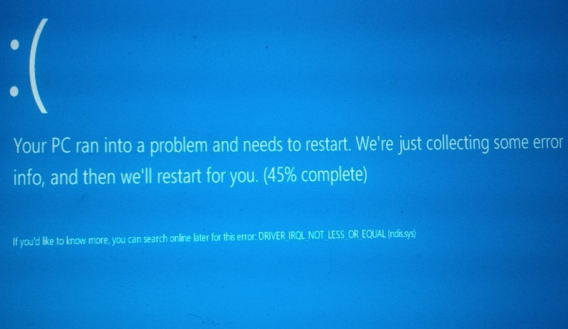
Windows Blue Screen of Death

The BSOD (Blue Screen of Death) in Windows 8, triggered by a defective driver (source)

Drivers can also be responsible for some of the performance issues you encounter with your machine, especially when it comes to graphics and sound. More often than not, only the most recent drivers will be able to harness all of the power of your graphics card; especially if PC gaming is your thing.

Consider the case when you install a new graphics card only to have your display move at a snail’s pace. This happens a lot, and the most likely cause is the fact that you haven’t installed the latest (and best) device driver. When Windows is forced to resort to using a generic driver, your devices won’t be able to function at full speed.
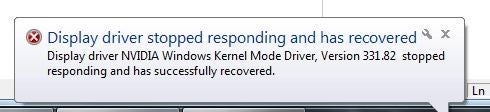
Windows pop up

Unstable or incompatible drivers will slow down every operation

Another common problem after reinstalling Windows is the lack of up-to-date sound (or audio) drivers. The only way to fix this and get the sound back is to find and install a matching device driver. Unfortunately, Windows does not help, and rarely finds good drivers in its database. Determining the “best fit” driver is actually hard to do. In some cases you need the driver from the device manufacturer’s website i.e. Nvidia, Realtek, etc. While in other cases you may actually need the driver from the computer manufacturer’s website instead, i.e. Dell, HP etc. This is because some manufacturers have special OEM builds of the devices in question.
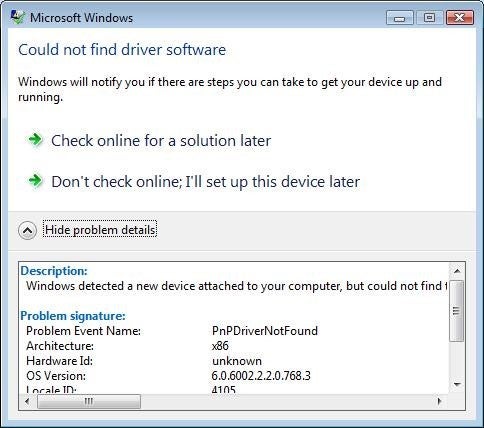
Windows driver error

A common error message: Windows does its best, but it’s not enough

Installing proper drivers is enough to solve these issues but finding them can be a daunting task. Official websites are a pain to browse and Windows’ built-in Device Manager is far from helpful, pointing out what devices are malfunctioning with a yellow icon next to them.
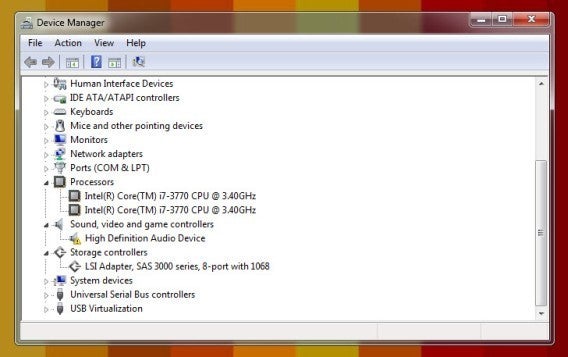
Windows Device Manager

Windows’ Device Manager won’t help you find the required drivers

Here’s where driver scanners come into play. These specialized tools collect data on the installed devices and compare it against their own databases — which are usually bigger than Microsoft’s — in order to find the best available driver. At the same time, they scan the PC for hardware conflicts and other anomalies.

An example of driver scanner: Driver Support

Driver Support is a good choice if you’re considering a driver scanner. The company launched in 1996 and boasts a database of more than 26 million device-associated drivers. Its driver researchers update around 10,000 drivers each month, collecting them from a variety of sources, including directly from manufacturer websites. Each driver is checked before it’s uploaded to make sure the driver installs correctly and has the correct device attributes in place. Driver Support also leverages its cloud data to help match correct drivers to machines and devices, leveraging millions of installs and user feedback to deliver the most accurate and “best” driver for the user. In some cases manufacturers may even release corrupted or inaccurate drivers, Driver Support flags these and keep the user safe from them until the manufacturer is alerted and the driver is fixed.
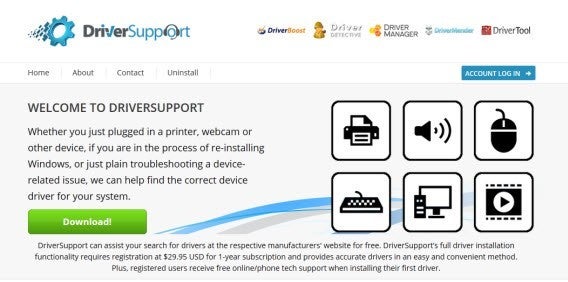
Driver Support website

Driver Support has been around since 1996

Once installed, Driver Support starts with a full system scan. In a matter of minutes, the utility detects all of your connected devices and sends the data to the main servers with the goal of finding the most appropriate drivers for your devices, some of which may be outdated.
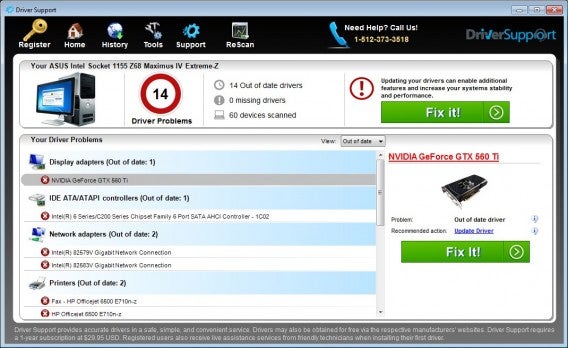
Driver Support interface

Driver Support has more than 6 million registered users contributing to its database

Tip 1: don’t panic

After getting a response, Driver Support presents all hardware issues along with suggested solutions, ranging from unknown devices to obsolete drivers. If Driver Support manages to figure out the brand and model number of your PC, it’ll pick drivers recommended by the manufacturer instead of the more generic ones.

Driver Support interface

Don’t let the number of problems scare you: these problems can be fixed!

Tip 2: try for free, pay when you need it

If you want Driver Support to fix the problems it finds, you can pay $29.95 for a 1-year subscription. Registration gives users access to unlimited driver downloads and technical support options, as well as a first driver installation guided by phone or online chat, which is very nice for beginners.

Before signing up, check the results of the scan. Do they make sense? For instance, if you couldn’t listen to music and Driver Support tells you that the sound card drivers are not installed, that’s probably your problem. Search online for the information to confirm whether the problem is critical or not.
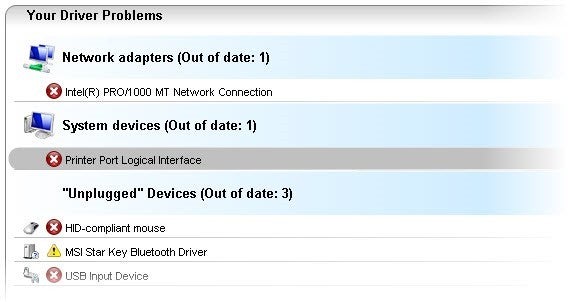
Driver Support detected problems

You can search this information easily to confirm the nature of the problem

If you click on each issue, Driver Support offers an explanation about what the problem is. If the device driver is either missing or obsolete, you can search for the device name plus the suggested version number to find a free download. Then it’s just a matter of grabbing the right file (normally, a ZIP or an EXE) and manually installing the driver.
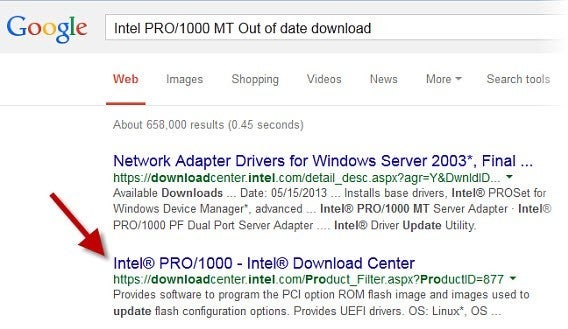
Google results

Device name + Issue: a useful Google search for the tech-savvy

If you don’t want to go through all the hassle of finding the right driver version yourself, consider purchasing a subscription. Driver Support will resolve all the driver issues for you in just a few minutes.

VLC for Android is now stable

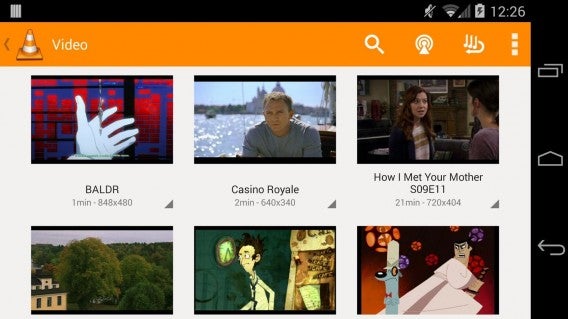
After a lengthy beta, VLC for Android is finally stable. If you’ve been using the beta of VLC for Android there’s nothing new. However, those who don’t have a video player downloaded should definitely give VLC a try.

VLC is one of our favorite media players on Mac and PC since it plays just about every audio and video format under the sun. It’s also simple enough for beginners, yet feature packed enough for advanced features like subtitles and video effects.

VLC for Android

Version 1.0 of VLC fixes a bugs found in the latest version of Android, 5.0 “Lollipop.” VLC for Android is still an early release so it’s not as feature packed as some competitors like MX Player. VLC developer VideoLAN promised to bring Chromecast streaming to the app but it’s not included in this version.

Video players are a bit complicated so VLC might not work on your specific device and version of Android. For an alternative, check out the equally excellent MX Player.

Download VLC for Android

Via: Android Police

Related Stories

Apple picks the best apps and games of 2014

The best productivity apps of 2014

The best messaging and social apps of 2014

App of the Week: Just Dance Now

Follow me on Twitter: @lewisleong

Apple picks the best apps and games of 2014

Apple released its annual list of best apps and games. If you’re not sure what to download with your brand new iPhone 6 or iPhone 6 Plus, this list a great place to start.

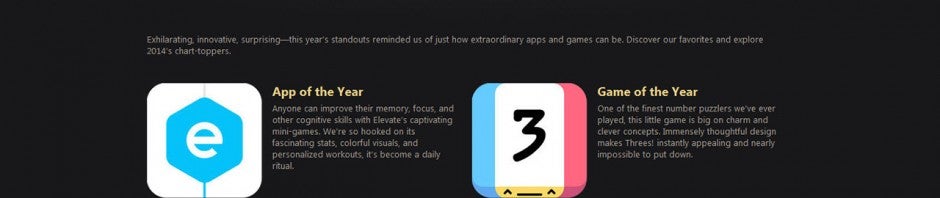
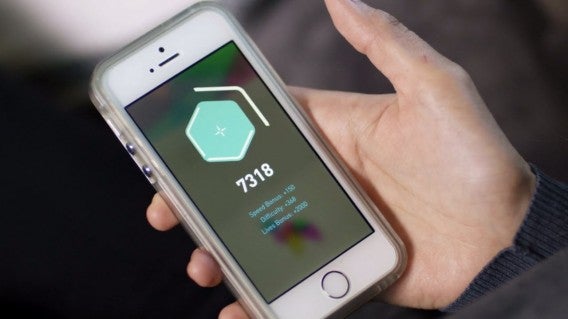
Elevate, a brain training app, takes the coveted “App of the Year” award for 2014 with Hyperlapse as a close runner-up. Yahoo! also got recognition for its News Digest app which gives short summaries of a handful of the day’s biggest stories.

elevate brain training

In terms of games, Threes! takes the “Game of the Year” award for 2014. The game was so successful this year that it spawned a ton of copycats including a version based on the “doge” meme. Leo’s Fortune gets a shout out as a runner-up for game of the year. My personal favorite iOS game of the Year, Monument Valley, is also included in the list. If you haven’t played it, now’s a good time since an expansion was recently released for the game.

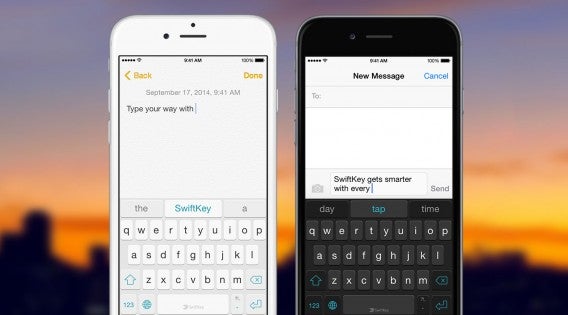
SwiftKey for iPhone sunset

Other notable winners in Apple’s best apps of 2014 include SwiftKey, an intelligent keyboard that learns how you type. Password manager 1Password made the list too. If you’re not sure which password manager you should use, check out our in-depth comparison. Facebook’s Paper app also made the list for its intuitive swipe navigation, helping to distill Facebook into its most important parts.

Indie developer Mediocre made the list as well with its addictive game, Smash Hit. The game also made my list of best free iPad games. I got to interview them during this year’s GDC about Android piracy so check that out. Rovio’s new game, RETRY, also made the list. Be warned, you’ll be cursing at your phone playing this incredibly difficult game.

Softonic also has a list of the best apps of 2014 so stay tuned for our complete list.

Source: iTunes

Related Stories

The best productivity apps of 2014

The best messaging and social apps of 2014

App of the Week: Just Dance Now

Skype co-founder backs Wire, a beautifully modern messaging platform

Follow me on Twitter: @lewisleong