The best productivity apps of 2014

As part of our best apps of the year series, our expert app editors voted for the best apps in 8 different categories. After choosing a top 5, they narrowed it down to one winner in each category. Here, we’ll go through the best productivity apps of the year, those that help bring organization and order into our lives.

Picking the best app was difficult, mostly because we all swear by different apps that help us get our work done and stay organized on a daily basis. After a lengthy discussion, our editors were able to decide on 1Password as the best productivity app of the year. Why? Read on to find out, and check out the other 4 apps that made the top 5 list.

Default player


brightcove.createExperiences();

1Password

1Password LogoPassword manager 1Password emerged as our best productivity app of the year, mostly because there were a ton of security threats in 2014 that using a password manager could have circumvented. Never before were there as many password thefts as in 2014, with over a billion hacked or stolen passwords. This was reason enough to put 1Password at the top of our list.

With 1Password, you can create and save credentials for websites and store an unlimited amount of secure information in an encrypted file. The fact that it’s available for almost every platform makes 1Password seamless across devices. The icing on the cake is an excellent user interface.

Download 1Password for Android | iOS | MacWindows

Microsoft Office Mobile

microsoft office mobile - logoMicrosoft Office is a name familiar to almost everyone. In 2014, however, Microsoft’s flagship suite found its way onto mobiles, for free. With the latest version of Office for iPad, Redmond ensured that things will stay free too. The individual apps bring almost full functionality of the Windows version to tablets. Tablet versions optimized for Android and Windows 10 are just about ready to be released.

Even if all you want to do is have a quick look at working documents in Word, Excel, or PowerPoint, it’s worth having Office for Mobile installed on all of your devices.

Download Microsoft Office Mobile for Android | iOS

OneNote
onenote - logoOneNote is one of the best note-taking apps on the go. With OneNote, you can not only make grocery lists, but do anything from take notes in class, to brainstorm ideas at work.

The Windows classic, after a year long wait, was finally made available for Mac OS X and all other major operating systems this year. OneNote is perfect for group collaboration, and the fact that it’s free means that it trumps any other competition in the category.

Download OneNote for Android | iPhone | iPad | Mac | Windows 8

Inbox by Gmail

inbox by gmail - logoThis year, Google managed to bring a completely new conceptualization of email to the table with Inbox.  Inbox combines e-mail with task management into a single app, letting you reply to mails or edit tasks in one common inbox. Instead of sending yourself email reminders, you can simply add them to Inbox to get notifications.

Swipe gestures help define the usability of Inbox, where almost every movement is attributed to an action. Moving a message to the right marks it as done, while a swipe left lets you save to edit later.

Download Inbox for Android | iOS

Sunrise Calendar

sunrise calendar - logoCalendar apps are far from sparse, but there’s rarely one as well thought out and easy to use as this year’s Sunrise Calendar. By syncing with a ton of services including Google, iCloud, Exchange, and Evernote, you can manage multiple calendars in just one app. Thanks to a uniform interface for iOS and Android, you can use Sunrise Calendar as easily on one device as you can on another.

On Android, the app goes beyond a handy widget for your home screen: you can add contacts from your address book to meetings, and then use a link to Google Maps to find your way there.

Download Sunrise Calendar Android | iOS | Mac | Webapp

More innovation on the horizon

With the proper apps, your smartphone can become a practical working tool. Don’t settle for Whatsapp, pre-installed email managers, and a few lackluster games, when your smartphone can actually bring productivity to your fingertips, on the go.

While 2014 saw some great productivity apps, however, there was nothing really game-changing. In 2015, we expect a whole new trend. With wearables hitting the scene in a big way, we now have a portable control center for productivity, something that’ll surely unleash a whole new set of apps next year.

Check out the rest of the best apps of the year in our Best apps of 2014 series.

Follow me on twitter: @mkasanm

Game of Thrones, Opera 26, Assassin’s Creed and Firefox in the Softonic Minute

The Game of Thrones games finally arrives, Opera 26 lets you share bookmarks, Assassin’s Creed heads to London, and Firefox is finally on its way to iOS. Check out this week’s hottest software news in The Softonic Minute.

Default player


brightcove.createExperiences();

Game of Thrones out, meet the characters in this trailer

The first episode of Game of Thrones: A Telltale Games Series is out now. To mark the occasion, Telltale has released a longer launch trailer that gives more back story about the House Forrester. Click through to see the trailer.

Opera 26 gets shared bookmarks

Version 26 of Opera browser is now available for Windows, Mac and Linux. Its big new feature is the ability to share bookmarks, as easy as copying a link and sharing it with friends.

Download Opera 26 for Windows | Mac

Assassin’s Creed: Victory leaked, takes players to Victorian London

Ubisoft gets a lot of flack for milking its Assassin’s Creed franchise, but that hasn’t deterred the company from already working on next year’s installment. The game will be called Assassin’s Creed: Victory and will take place in Victorian London. Keeping reading to see some screenshots from the new game.

Is Firefox finally coming to iOS?

Great news for iPhone users – Mozilla has (unofficially) said it’s going to bring Firefox to iOS. Keep reading for more details.

Make sure to check out all of our past Softonic Minutes.

The best messaging and social apps of 2014

One of the most highly contested categories in our Best apps of 2014 series was best messaging app. Gathering 8 editors to round out our top 5 picks, we looked at criteria including innovation, functionality, design, everyday use, and multi-platform integration. Which one fit this criteria perfectly? Tinder.

Read on to find out why, and check out our other finalists for the best messaging app of 2014.

Default player


brightcove.createExperiences();

Tinder

Logo Tinder

In 2014, Tinder was everywhere. Launched in 2012, the dating app really took off internationally this year, easily making it the best messaging app of 2014.

There’s more to Tinder than just the hype though. It comes with a sleek design, and is very easy to use; swiping left or right to discard or accept (respectively) a profile has become somewhat of a social phenomenon. Being able to quickly meet people without the usual pressure that dating brings appears to be quite thrilling for single people everywhere.

Looking at all the clones that popped up during the year–none of which have been able to dethrone Tinder– shows just how much the app completely revolutionized the way people see online dating in 2014.

Download Tinder for AndroidiOS |Windows Phone (unofficial client)

WhatsApp

Logo WhatsAppWhatsApp was almost impossible to avoid in 2014. Early in the year, it made headlines when it was purchased by Facebook for a whopping $19 billion, literally showing how valuable the messaging app is. It also caused lots of recent drama with its inclusion of read receipts, a new feature that angered many users.

Despite all the drama, it remains the top mobile messaging app in the world, and in an attempt to remain on top, announced a few new features this year including VOIP calls and message encryption for Android devices (coming soon to iOS).

Download WhatsApp for AndroidBlackBerryiPhoneWindows Phone

Telegram

Logo TelegramAfter the purchase of WhatsApp by Facebook, some users were afraid of the safety of their data now under Facebook’s control. As a result, people started looking elsewhere, and Telegram emerged as a serious and secure alternative.

WhatsApp has since revised its service, implementing end to end message encryption, but some people over at Telegram claim that WhatsApp not so subtly uses their ideas for ‘inspiration’ about upcoming features, showing just how innovative Telegram can be.

Fortunately for Telegram, it does have a few additional tricks up its sleeve, notably, its multi-platform availability, especially on desktop.

Download Telegram for AndroidiOSMacWindowsWindows Phone |Linux |Web

Facebook Messenger

Logo Facebook MessengerHated by some, loved by others; this pretty much sums up Facebook  Messenger’s year. Why all the controversy? This year, Facebook decided to force its mobile users to install a standalone app to use Messenger on mobile, instead of letting them chat through the native Facebook App.

Android users were plagued with privacy concerns, and eventually, Facebook went back on it’s word and started bringing back Messenger in it’s native Android app. It doesn’t say much for Messenger, but it does show just how important the service is to users.

Download Facebook Messenger for AndroidBlackBerryiPhone | Windows 8.1Windows Phone

Google Hangouts

Logo Hangouts

If we’re only considering the quality and variety of messaging options available in a single app, Google Hangouts probably would have come out on top. It’s arguably one of the best VoIP calling services in the world, thanks to the power of Google’s servers.

In 2014, Google managed to simplify its range of mobile apps and services. Whereas before, there was Google Talk and Google Voice (among others), the majority of these services are now grouped under Hangouts for a very powerful messaging tool.

Download Google Hangouts Android | iOSChrome plugin

All about swiping

It looks like the novelty of Tinder, a new way to meet people online, trumped some of the more traditional messaging services we’ve come to know and love. Still, that doesn’t mean that they’ve stopped trying to add new features to entice users.

What can we expect next year? Well, as Tinder’s novelty slowly starts wearing off, expect to see more online dating apps with a bit more depth than a superficial swipe.

Check out the rest of the best apps of the year in our Best apps of 2014 series.

Follow me on Twitter: @bbrassart

Saints Row shows off its musical chops in this Gat Out of Hell trailer

The Saints Row series has always had a good sense of humor about itself, featuring self-deprecating jokes and random dance numbers. Developer Volition went above and beyond this time with a musical trailer for its upcoming expansion, Gat Out of Hell.

Gat Out of Hell tells the story of Satan’s daughter, named Jezebel, who wishes to be freed from Hell to experience love for herself. Her romantic interest is none other than Saints leader Johnny Gat, who we get to hear (for better or worse) singing in this trailer.

Default player


brightcove.createExperiences();

The entire trailer is so well done that I wish the entire game was just one big musical number with breaks of hilarious violence in between songs.

The Saints previously showed off their musical prowess in Saints Row IV with its Biz Markie sing-along and dance off.

The Gat Out of Hell expansion for Saints Row IV will be available January 20, 2015 on PC PlayStation 3, PlayStation 4, Xbox 360, and Xbox One.

Related Stories

App of the Week: Just Dance Now

1997’s Tomb Raider II out now on iOS

Check out our top apps of 2014, starting today

Assassin’s Creed: Victory leaked, takes players to Victorian London (updated)

Follow me on Twitter: @lewisleong

App of the Week: Just Dance Now

Softonic’s App of the Week highlights some of the coolest, most unique, and biggest app releases for Android, iOS, Windows, and Mac. This week, get your dance on with the formerly exclusive to console (but now free for iOS and Android) game from Ubisoft, Just Dance Now.

What used to be a console game for Wii, Ubisoft has brought all the fun of Just Dance to mobile with Just Dance Now. How can you dance with a cell phone, you ask? Well, the concept is pretty simple. With accelerometers now an integral part of all mobile phones (basically like a motion sensor that detects movement), your phone can track your dance moves while you hold it in your hand. By connecting the app with a larger screen that’s connected to the internet– a tablet, laptop, or Smart TV, for example– you’ll be able to see the dance moves you need to complete the choreography. Upgrades will get you more songs and eliminate ads.

Watch the video below to see exactly how Just Dance Now works.

Default player


brightcove.createExperiences();

With single and multiplayer options, the best part of Just Dance Now is being able to compare you scores with friends. Do you think you have what it takes to be the top ranked dancer?

Download Just Dance Now for Android | iOS

Make sure to check out some of our past App of the Week features:

App of the Week: Pixlr

App of the Week: Facetune

App of the Week: Maps.me

Follow me on Twitter: @suzieblaszQwicz

1997’s Tomb Raider II out now on iOS

Square Enix has just released Tomb Raider II for iOS, meaning you can now play Lara Croft’s second adventure on your iPhone, iPad or iPod Touch, as long as you have iOS 7.0 or above.

Originally released in 1997, Tomb Raider II didn’t change much from the original adventure puzzle game, giving players improved graphics and bigger levels to explore. In 2014, the graphics aren’t going to impress anyone, but it’s still a big adventure to play through, and will appeal to anyone nostalgic about the series.

Like many console ports, you’ll have to cope with touchscreen controls which are less than ideal, unless you have an external controller. Square Enix does not mention external controller support, but we can assume it does, as last year’s Tomb Raider iOS port did.

Download Tomb Raider II for iOS

Download Tomb Raider for iOS

Related Stories

Tomb Raider reboot released for Mac

The top 10 games of 2013 – so far!

Tomb Raider: the first 10 minutes

Follow Jonathan on Twitter: @jonathanriggall

Google Device Assist app teaches you and helps you fix your Android phone

Apple is known for its excellent customer service with its Genius Bar but Google doesn’t have physical stores for customers to seek help. Tech support for Android is handled exclusively online but most users end up just searching the web for solutions to their problem.

Google knows this is a problem and has released Device Assist to help Android users troubleshoot issues with their phones. The app also acts like a quick start guide with links to articles about how to use your phone.

Device Assist will also detect common problems with your phone and suggest solutions. The most commonly suggest solution will be to reboot your phone, which is a bit ironic seeing as Android doesn’t have a reboot feature. You’ll have to turn off the phone and turn it back on again.

Only Android One, Google Play Edition, and Nexus phones are supported right now. Google may choose to support phones running stock Android since these are the devices which feature a consistent experience. Other phones from HTC, Samsung, Sony and others will have to seek support from the manufacturer and not Google.

If you have an Android device running Android 5.0 Lollipop, you can download Device Assist from Google Play.

Be sure to read our in-depth guide on how to use Android 5.0 Lollipop.

Related Stories

Android 5.0.1 fixes accidental device reset bug

Skype co-founder backs Wire, a beautifully modern messaging platform

Check out our top apps of 2014, starting today

The best health and fitness app of 2014

Follow me on Twitter: @lewisleong

Android 5.0.1 fixes accidental device reset bug

The first update to Android 5.0 Lollipop is here and it fixes a bizarre bug. The 5.0.1 update doesn’t improve performance but does cut down on the chances of your device accidentally resetting itself, which wipes everything from your phone.

The reset bug is triggered by accidental screen taps, which can occur in your bag or purse. If your phone’s lock screen is triggered and an incorrrect password entered too many times, the device will reset itself. While the bug only occurs under very specific circumstances, Google isn’t taking any chances.

The patched operating system will now require a minimum lock screen pattern of four dots, up from three. This will cut down on the chances on accidental taps from resetting the phone.

Many users are still waiting for Android Lollipop. Nexus and Google Play Edition phones got the update first and many manufacturers are already testing Lollipop on their phones.

In the meantime, check out how to use Android 5.0 Lollipop to see all its features.

Source: CNET

Related Stories

Skype co-founder backs Wire, a beautifully modern messaging platform

Check out our top apps of 2014, starting today

The best health and fitness app of 2014

Is Firefox finally coming to iOS?

Follow me on Twitter: @lewisleong

Skype co-founder backs Wire, a beautifully modern messaging platform

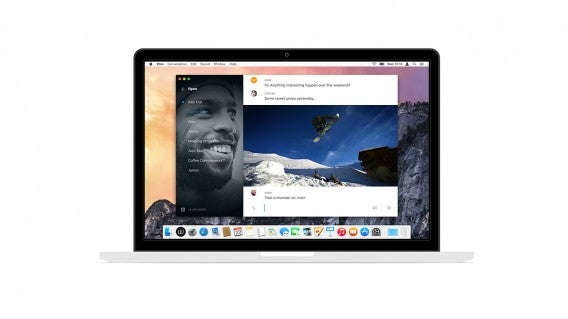
Janus Friis, co-founder of Skype, debuted a new messaging platform called Wire. At first brush, Wire looks just like every other messaging app, albeit more beautiful.

Although Friis helped co-found Skype, he didn’t pull any punches when talking about Skype’s age. “Skype was launched more than a decade ago. A lot has changed since then – we are all used to free calls and texting, and we have taken to carrying our computers in our pockets,” said Friis. “It is time to create the best possible communication tools, as beautiful as they are useful. Wire is just that.”

Wire for OS X Mac

Beyond its design, Wire promises secure messaging with end-to-end encryption and high definition voice calls. Media shared using Wire also shows up in-line with your messages. Instead of simple links that need to be accessed outside of the app, Wire plays YouTube and Soundcloud media inside your chat.

“Skype was launched more than a decade ago. A lot has changed since then.”

Wire also features a “ping” feature to help you get the attention of your friends without ringing them. There’s also group chats which closely resembles Facebook’s recently launched Groups app with its circular icons.

But Wire is missing a major component that built Skype’s success: video chat. In this first release, Wire only supports text and voice messaging. It’s a big oversight but Friis is confident that the Wire team has the ability to build in video chat later. Wire will also offer some premium features (paid) in the future.

Wire is available on Android, iOS, and Mac. The company plans to bring the platform to the web to increase compatibility with as many operating systems as possible.

Source: Wire

Related Stories

FL Studio finally coming to Mac OS X in 2015

Check out our top apps of 2014, starting today

Is Firefox finally coming to iOS?

Pandora prepares major redesign of its mobile apps

Follow me on Twitter: @lewisleong

FL Studio finally coming to Mac OS X in 2015

FL Studio, formerly known as Fruity Loops, is finally coming to Mac OS X next year. FL Studio is a DAW (digital audio workstation), basically a recording studio for your computer.

Originally released for Windows in 1998, Fruity Loops became very popular with music producers, credited for being the choice app for makers of early dubstep in the UK. However, FL Studio has never made it across to Mac OS X, despite Apple computers being the choice for many creative people. According to developer Image-Line software, FL Studio was developed in Delphi, a programming language that lacked a Mac OS X compiler until very recently.

Explaining how laborious bringing FL Studio to Mac is, the Support Team writes that users should be patient, as it may take quite a long time to be released. Until then, you can use the Windows version of FL Studio via Parallels on OS X, or dual booting your Mac with Windows. Alternatively, there are other DAW apps like Ableton and Reason.

Source: Resident Advisor

Related Stories

Apple plans to lower Beats Music subscriptions to $5 to take on Spotify

New iTunes design upsets some users

How to add your own MP3s to Spotify

Follow Jonathan on Twitter: @jonathanriggall