It’s that time of year again: we’re publishing our top apps of the year, starting today. See below for the complete list of apps, as they get published.
We start with the best apps for Health and Fitness, like RunKeeper and Apple Health. Later this month you’ll be able to read about the top messaging, productivity, entertainment, travel, and photo apps, as well as the best PC and mobile games.
As part of our best apps of 2014 series, we asked our expert app reviewers here at Softonic to help us determine the best health and fitness apps of 2014. As one of 8 different categories, our editors narrowed down the choices to 5 before voting on the best app of the year.
With wearables hitting the scene in a big way this year, 2014 was the year of activity trackers and fitness apps. Not surprisingly, major platforms like Google and Apple created their own ecosystems for monitoring health and fitness, while others got huge updates to compete with the growing trend. This year, it looks like physical activity came out on top, and RunKeeper took the top spot as our best health and fitness app of 2014. Keep reading to see the runners up.
Default player
brightcove.createExperiences();
RunKeeper
Although RunKeeper wasn’t new this year, it got a ton of new features and improvements without losing sight of its core function: tracking your run. As one of the original fitness apps, RunKeeper this year reinvented itself, incorporating a modern new interface and some excellent free training programs. The app is available for Android and iOS, and as a web app.
What makes it stand out compared to other similar apps is its integration with fitness trackers like Fitbit, Jawbone, and Garmin, as well as other fitness apps like Sleep Cycle, MyFitnessPal and Zombie Run.
Launched this year with iOS 8, Apple Health has every right to be on this list: it’s one of the first fully integrated apps completely dedicated to managing your health. While most apps focus primarily on collecting data about physical activity, Apple Health collects data about all aspects of your health, including your vitals (blood pressure, heart rate), body measurements, and any nutritional information you track. One of its best features is Medical ID, which give medical info that could be useful in an emergency (and is accessible through the lock screen).
The app integrates with both iOS and Apple Watch apps, as well as iCloud synchronization to let you access your data in OS X.
Apple Health is available for iOS 8 and up as a pre-installed app.
Google Fit
Like rival health app Apple Health, Google Fit is a data collection center that acts as a hub for health and fitness apps, especially useful with Android Wear. Unlike Apple Health, however, you have to download Google Fit from the Play store.
Focusing more on sports and fitness than health, Google Fit collects and syncs data from other activity tracking apps without you having to manually input anything. Steps, miles, and calories burned are all calculated within the app, which automatically detects whether you’re walking, running or biking.
Google Fit can also function as your own personal trainer, setting goals and pushing you to reach them.
A trend this past year was the ‘Seven-Minute Workout’, a condensed daily workout for people that don’t have much time. This, is exactly what the Carrot app does. Taking a more lighthearted approach to losing weight, Carrot offers to “transform your flabby carcass into a Grade A specimen of the human race”.
The app’s hilarious approach and innovative training model, designed for those who want to get maximum results with minimal effort, makes it one of the best health and fitness apps of the year.
Before Apple Health, there was Argus. The app, again, is a data collection center that stores a ton of different health data including steps, sleep patterns, or how much water you’ve had throughout the day, to name a few. What stands out most about Argus is its elegant style, collecting all the information you need on one screen without being too cluttered or confusing.
Although some data needs to be inserted manually or synchronized with other apps, you have the advantage of seeing how many calories you’ve consumed, how active you’ve been, and how many hours you’ve slept throughout the night, all on the app’s home screen.
The best health and fitness apps of 2014 give a clear indication of this year’s trend: more complete apps that feature data collection centers for physical activity, giving an overall picture of your health.
What lies ahead for 2015? Taking this year’s trends into consideration, and with the rise in popularity of wearables, you can expect to see a lot more health and fitness apps on a micro level, with wearable integration.
Check out the rest of our categories and the best apps of the year in our Best apps of 2014 series.
Last but not least… 8fit. We encourage you to read some of their amazing reviews!
Great news for iPhone users – Mozilla has (unofficially) said it’s going to bring Firefox to iOS. It’s quite a surprising move, as the organization has said for a long time that it wouldn’t do so because it didn’t want to develop using Apple’s own Javascript and rendering engines, necessary for browsers on iOS.
In the past, Mozilla has said that it would not develop for iOS unless it could use its own web engine, but this has allowed Google Chrome and Opera to get a foothold in the big iOS market, while discouraging Firefox’s use on other platforms. Firefox Sync, which allows you to easily use your bookmarks and history wherever you want, is basically useless if you can’t use it on your mobile.
The news came from an internal Mozilla event in Portland, reported by Mozilla Release Manager Lukas Blakk on Twitter. He said, “we need to be where our users are so we’re going to get Firefox on iOS,” with the hashtag ‘mozlandia‘ (the meeting is in the home of comedy series Portlandia). There has been no official announcement so far, but it could be that Mozilla’s new CEO has prompted a change in attitude towards iOS.
We’ll update as soon as we know anything about possible release dates or any other information.
If you use iOS and have never tried an alternative browser, there are a number of good alternatives:
Ubisoft gets a lot of flack for milking its Assassin’s Creed franchise but that hasn’t deterred the company from already working on next year’s installment. Kotaku obtained early information about the game in a leak. The game will be called Assassin’s Creed: Victory and will take place in Victorian London.
From the few screenshots posted on Kotaku, the game looks much the same and even uses the same game engine found in Assassin’s Creed: Unity. That’s not a bad thing though, as the graphics are impressive. Hopefully Ubisoft will quality test Victory so that terrifying faceless characters don’t show up in the game again.
Victory will apparently be the only Assassin’s Creed game due for release next year. This year, we saw three separate Assassin’s Creed games: Unity, Rogue, and China.
The game will also ditch the Xbox 360 and PlayStation 3 in favor of the latest generation of consoles. PC players will of course be getting the game too.
What Victory lacks in original story, it makes up with new gameplay dynamics. There will apparently be fights on moving vehicles and a grappling hook, which should mix up the gameplay a little.
Still, for gamers who are sick of the Assassin’s Creed franchise, there’s doesn’t seem much in Victory that will lure them back.
UPDATE: Here’s the official word from Ubisoft about the leak.
“It is always unfortunate when internal assets, not intended for public consumption, are leaked. And, while we certainly welcome anticipation for all of our upcoming titles, we’re disappointed for our fans, and our development team, that this conceptual asset is now public. The team in our Quebec studio has been hard at work on the particular game in question for the past few years, and we’re excited to officially unveil what the studio has been working on at a later date. In the meantime, our number one priority is enhancing the experience of Assassin’s Creed Unity for players.”
Pandora has a sneak peak at its upcoming redesigned mobile apps that focus on personalization. Creating personalized channels has been at the core of Pandora’s service and its new apps make it easier than ever to train the app to learn your tastes.
The iconic thumbs up/down buttons are still there but now you have the ability to “unthumb” songs that you liked before but are sick of hearing. You can do this by accessing your thumb history, which you couldn’t before.
Artist discovery is also improved with more artist information. There are new swipe and tap gestures that reveal more information about songs and artists.
The Pandora apps for phones and tablets are also getting redesigned. Everything looks flatter and there are new transitions to make the app feel fluid. It’s not a huge change but it does look more modern to match the interface of both Android 5.0 Lollipop and iOS 8.
Pandora says only about 3% of Android and iPhone users are getting the redesign as a test before releasing it for everyone. If you’re one of the lucky 3%, let us know what you think.
Valve is jumping on the game streaming train by introducing Steam Broadcasting. The feature is launching today in beta for gamers to try out. Steam Broadcasting will take on Twitch’s monopoly on game streaming.
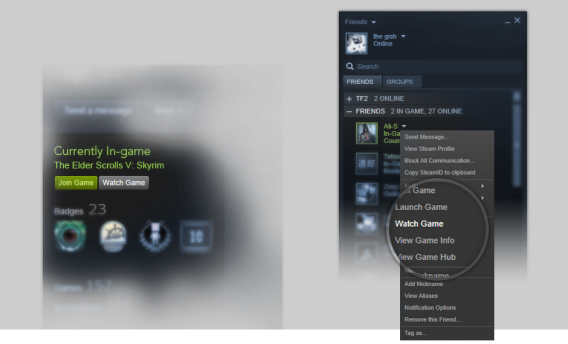
To start broadcasting your game, just click the Stream button and your friends will be able to watch your game session. Steam Broadcasting currently only supports live streaming so you can’t record a game session to stream it later.
Friends can hop onto your live stream by right-clicking on your Steam name in their friends list and clicking Watch Game. They are also given a choice to join your game as usual.
The privacy settings for Steam Broadcasting are very basic at launch. You can decide who can watch your stream by limiting it to requests, friends only, or anyone. If you choose to stream to anyone, your feed will show up on the game’s hub.
Watchers don’t have to have the Steam client downloaded to watch a stream. Chrome (PC | Mac) and Safari (PC | Mac) are supported, but there’s currently no support for Firefox.
Broadcasting is also limited to Windows 7 and 8, though Valve promises to bring the feature to OS X, Linux and Windows Vista in the future.
Google has launched its 2014 Santa Tracker, which has been running since 2007. For the last two years, Google has not had its traditional help from the North American Aeropsace Defense Command (Norad), which took its Santa Tracking services to Bing in 2012.
This means that you have two ways to track Father Christmas around the globe: Norad’s Bing Maps powered tool, and Google’s very own Santa Tracker. Both feature a countdown to the start of Santa’s journey around the globe, but until then, both sites have plenty to explore.
Google’s Santa Tracker works like an Advent Calendar, with a new link to click every day. December 1st gave you a free Android Santa Tracker app. Visit the site to see what more it has in store. Over at ‘NORAD Tracks Santa’, there’s a new game to play every day, plus Christmas songs and a lot more, including video and reading material. If we’re being forced to make a decision, Google’s Santa Tracker is the nicer site, but there’s no reason not to use both.
Ubisoft’s massively multiplayer online racer The Crew is out today, and there’s a brand new trailer to celebrate. Watch it below.
The Crew sees you racing around the United States in seriously customized automobiles, evading the cops and taking out the competition. There’s off-road and city racing, and it looks like an impressive arcade racing game.
Default player
brightcove.createExperiences();
Ubisoft didn’t send review copies early, claiming that multiplayer is so important to The Crew, that it’s unfair to judge the game until it’s being played by lots of people. There may be something to that argument, as there have been plenty of examples of games that were well reviewed before release, only for players to discover multiplayer mode couldn’t stand the stress of huge numbers of players or the game was plagued with bugs.
Nevertheless, that means we’ll have to wait to find out what critics think of The Crew. We’re hoping it turns out well, as alongside Project Cars, there could be two good options for PC racing fans, the latter providing a simulator experience. The Crew, on the ther hand, will give the arcade thrills.
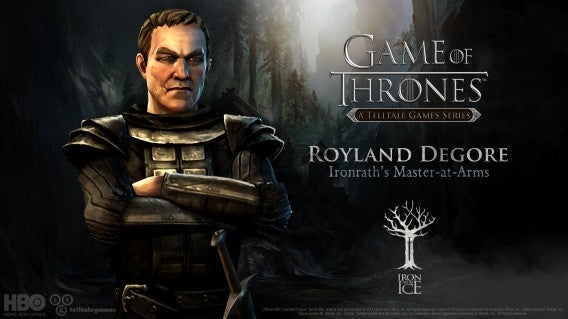
The first episode of Game of Thrones: A Telltale Games Series is out tomorrow. To mark the occasion, Telltale has released a longer launch trailer that gives more back story about the House Forrester.
Default player
brightcove.createExperiences();
Fans of the show should be exicted that some cast members will reprise their roles in the video game. Peter Dinklage, Lena Headey, Natalie Dormer, and Iwan Rheon are all included in the game, which should provide back story about the Game of Thrones universe. Telltale promises to more cast members will appear in the subsequent episodes.
If you haven’t played a Telltale game before, expect a in-depth story with gut-wrenching decisions. Characters will remember every choice you make, which will affect the outcome of your story. Of course the end result must be consistent with the books and the show but your path will be different from other players.
Game of Thrones will be available tomorrow, December 2nd for PC, Mac, PlayStation 4 in North America (PlayStation 3 players will get the game December 9th). Xbox players will have to wait one more day on December 3rd to get the game. You can also wait until Thursday December 4th to play the game on your iPhone or iPad. Android users will get the game later this month.
Firefox 34 is here and the update brings some major changes. First off, Mozilla has ditched Google as its default search engine. The company partnered with Yahoo instead for its search needs, though users can switch back to Google at any time.
Another big change is the way search is handled within Firefox. The new search menu lets you search quickly with multiple search engines like Yahoo, Bing, Amazon, DuckDuckGo, Wikipedia, and more. In the past, you needed to download an add-on or toolbar to get this feature so it’s nice to see Mozilla bake it into the browser.
Last but not least, Firefox 34 includes plugin-free video chat called Firefox Hello by utilizing a web standard called WebRTC. This means you can start a video chat with anyone running a browser that supports the standard, including Chrome (PC | Mac) and Opera (PC | Mac). If you don’t want to bother with installing Skype or a plugin to use Hangouts, then Firefox 34 is your best bet. While no plugins are required, at least one person has to use Firefox to initiate the video call.
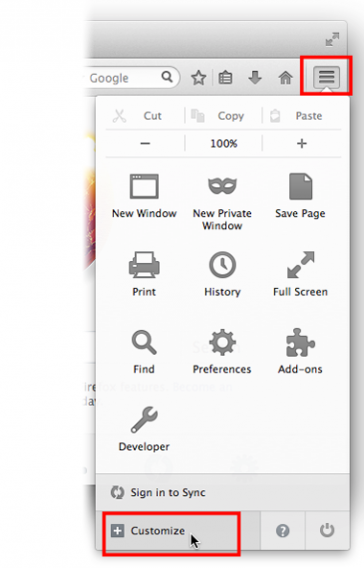
Firefox Hello is still in beta so you might not see it yet. To check if you have Hello, click on the menu button and then Customize at the bottom. If you have Hello, the chat bubble icon will show up in the list to the left. If not, you’ll have to wait a bit longer for Mozilla to finish beta testing the feature.
 RunKeeper