5 Apps to Try This Weekend – March 13th 2015

Default player


brightcove.createExperiences();

Nothing planned for your days off? Then why not check out our 5 recommendations for apps you should try this weekend.

With St. Patrick’s just a handful of days away, we are starting off with an app for beer lovers, Untappd (Android, iOS). It may have been around for a while, but if you are looking for a specific tipple this Tuesday then this craft beer social network should be able to find it near you. And, if you are planning your drinks with friends, we also have Citymaps (Android, iOS) for you to check out – a handy tool to help you plan and share routes to destinations around your local area.

Our games this week are also of a more grown-up nature. Hotline Miami 2: Wrong Number is an interesting blend of ultra-violence and twitch puzzler. Retro fun, but not for the squeamish. Also not for those easily upset is White Night, a creepy black and white survival horror experience. With a fantastic 1930 noire theme, this is a flawed gem that I highly recommend.

Finally this week, once all your fun is over, you can get back to work with the preview version of Office 2016 for Mac, which brings Microsoft’s productivity suite for Mac up to date with its Windows counterpart.

Be sure to subscribe, and check back next week for another five apps to try.

Related Stories

Five Apps to Try This Weekend – March 6th 2015

Five Apps to Try This Weekend – February 27th 2015

Five Apps to Try This Weekend – February 20th 2015

Follow me on Twitter: @DoFuss

Apps for good – the charities embracing smartphones to deliver their message

A quick browse of the top apps in Apple’s App Store and Google Play would suggest that we live in an increasingly self-obsessed world, more interested in sharing pictures of our lunch on Instagram and boasting about our exploits on Facebook. But, while they may not be racing to the top of the charts at the moment, charities and non-profit organizations are increasingly using apps to engage with users, raise awareness, and increase donations.

The methods these companies are using include gamification, messaging services, and video chat, as well as designing some user friendly apps that make both donating money and setting up fundraising campaigns much quicker and easier.

Making it easier to donate

Apps that make it easier to donate money

SnapDonate is an excellent example of making the process of donating money to charity as painless as possible. When you point the app at a logo of a supported charity, it will automatically recognize it and allow you to donate to your chosen organization via the JustGiving platform.

If you’re trying to raise money, Check-in for Good allows you to set up fundraising campaigns and share these with your contacts, as well as set up events and invite your friends. It also works in a similar (but more charitable) way to 4square by donating money to your chosen charity when you check in at participating businesses.

Leading a better life

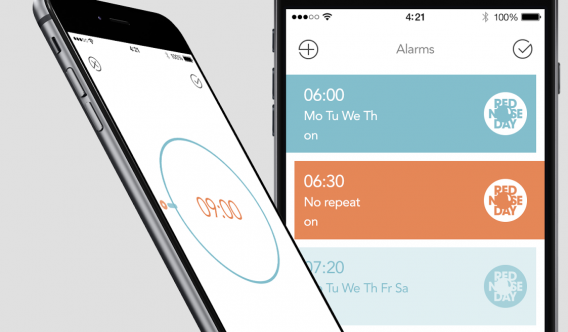
iCukoo Charity Alarm Clock

The usual new years’ resolutions often involve tasks like getting in shape, quitting drinking and smoking, and being more productive. Clever app developers have harnessed this trend to encourage charitable donations.

Targeting those people hoping to get off the couch and get in shape, Charity Miles tracks the distance you walk, run or cycle and allows you to donate accordingly. Then for those who struggle to get out of bed in the morning, iCukoo asks you to assign a set amount to donate to a charity each time you snooze the in-app alarm clock. When this amount adds up to £1, the app will ask you to donate to one of the supported charities by sending an SMS to their donation number.

Time = money

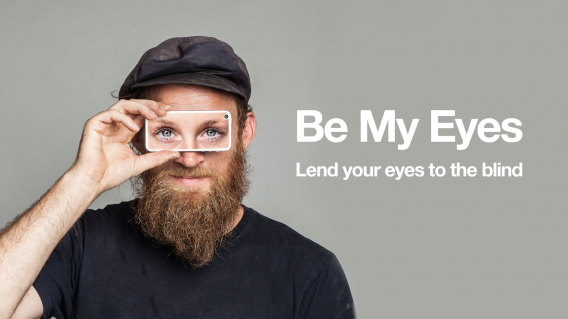
Be My Eyes video chat for the blind app

Volunteering time is just as important as giving money, something which Be My Eyes recognizes. The app provides a way for blind people to ask for help by connecting them to volunteer helpers through video chat. When they ask for help through the app, the volunteer receives a notification and is able to start the video chat to answer the question. Be My Eyes is available in a range of different languages, and volunteers specify what languages they can provide assistance with when they register.

Gamification for charities

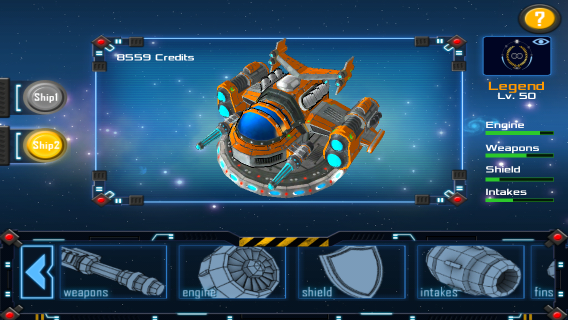
Play to Cure Game from Cancer Research UK

Charities are not just focused on getting people to donate more of their money and time, but also on raising awareness of issues and providing practical help in fighting these problems. One of the most interesting ways organizations are doing this is through gamification, an excellent example of this being Play to Cure: Genes in Space. In the game, which was developed by Cancer Research UK, you must upgrade your spaceship by collecting a substance called Element Alpha so you can avoid the asteroids. By collecting the Element Alpha (which represents genetic cancer data) you are helping scientists find changes in genes that may cause cancer, thus allowing them to develop new treatments tailored to these alterations.

My Life as a Refugee isn’t really a game but it fits into the trend of charitable apps becoming more interactive. With this app, you put yourself in the shoes of a family fleeing from a war or persecution, and you must make decisions based on different scenarios that arise from three separate stories. Developed by the UN refugee agency, its powerful message is effective in raising awareness of the struggle that many refugees across the globe face on a daily basis.

Embracing instant messaging

Savvy charities are realizing the importance of engaging with a younger audience on the platforms they use the most. British charity Tenovus uses a number of social media applications to promote better involvement from the community. In 2014, it ran a campaign through Snapchat, Twitter, and Facebook where users shared photos of themselves carrying out selfless acts for the organization under the hashtag #selflessie.

If you’ve got any more great examples of innovative ways charities are using apps and games to raise money and awareness, let us know in the comments below.

Related Articles

You go girl! Why so many apps for women are just plain sexist

Best mobile games that are safe for kids

The best messaging and social apps of 2014

Follow me on Twitter: @karenmccandless

8 apps you don’t want to explain to your parents

There are just some things that parents don’t understand and all these newfangled apps teenagers are using are downright bizarre to them. Explaining what the internet was and why I had to have AOL to AIM my friends was hard enough back in the ‘90s.

My parents just got used to emailing and texting me, now they’re struggling with all these chat apps. “Why there are so many of them?,” they ask. There are other apps we use everyday but as it turns out, they’re extremely difficult to explain to parents.

Here are 9 apps I don’t want to have to explain to my parents because they just won’t get it.

1. Snapchat (Android | iOS)

I don't like it

“I have to keep holding on to see pictures? Wait, the picture just disappeared? You’re telling me that’s a feature?”

Beyond explaining why people may want photos to disappear, do you really want to explain the indecent ways some people use Snapchat?

2. Twitter (Android | iOS)

Twitter is stupid

My parents barely understand Facebook and now I have to explain what Twitter is? FML.

To parents, Twitter is a silly place where people follow celebrities and broadcast trite things about their own life. Sure they can see what’s trending, but then you’ll also have to explain what those things are. There goes your entire Friday night.

3. Google+ (Android | iOS)

dafuq

Another social network? Why would someone use this over Facebook? Good question, Mom.

On top of that, Google doesn’t even know what Google+ is any more. This is probably why Google’s trying to turn it into a photo service and abandoning the social networking side of it.

4. Yo (Android | iOS)

confused

Hell, I don’t even understand this one. It’s an app that just sends your friends message that says “Yo.” It does nothing else. For more meaningful communication, you’ll have to use another chat app or text them.

“Why don’t you call each other instead,” I can hear my mother asking. Don’t get me started on calling and voicemail, Mom.

5. Tinder/Grinder/Down

let me explain franco

Don’t let your parents catch you furiously swiping left or right. They’ll end up asking to see your “friends” and why they’ve never met them before.

Before long, they’re going to start asking you when you’re going to settle down, get married, and when you’re going to pop out some grandchildren for them. You’re not getting any younger, you know.

6. Watching Cute Girl (iOS)

surprised shocked speechless

This is an app that helps you build “confidence” by staring at cute girls. You’ll spend the rest of the night trying to convince your parents you don’t have Yellow Fever.

7. Whisper (Android | iOS)

stuart i love secrets

Is it a social network? Is it a chat app? Are the things posted true?

Good luck trying to explain why someone would lie on the internet. Also try explaining how grown adults are using Whisper to rant about their lives to complete strangers.

8. Omegle (iOS)

that's a penis

You’re really going to be rolling the dice if your parents ask you to show them Omegle. Cross your fingers as your new chat buddy connects and pray you won’t see penis.

Also don’t tell your parents you’re talking to strangers online. They’re going to tell you they’re all pedophiles. Which is true.

12 creepiest Android apps

There are millions of Android apps but you usually only see the top apps lists. But there are also some really strange and creepy apps that you should know about. While you may think these apps could be useful in some situations, trust us, that’s definitely not the case.

CREEPER

1. Secret Selfie: People take selfies all the time. You may even see people with so-called “selfie sticks.” But now you can be that weirdo who takes a selfie without the camera being visible on your screen. If you have absolutely no self esteem, this is for you.

Watching you2. Spy Camera Phone: Ever wanted to take a picture of someone without them knowing? It’s already hard to do with that shutter noise, but Spy Camera Phone hides the camera behind another app and lets you be a creeper and take pictures of people without them knowing.

We know where you are 3. Mobile Number Spy Location: There’s a lot of information attached to a phone number and Mobile Number Spy Location gives you the tools to track people. It says you can follow a child’s movements, but really you’re going to follow some random person you met at a bar.

Party time
4. Background Check BeenVerified: Met someone special? Want to know if they’ve had run-ins with law enforcement? Background Check BeenVerified gives you one complete background check every month. Don’t go wasting it if they’re not the one.

Hiding in plain sight 5. Stalk App: The official name is s.Talk, but what’s that spell? Stalk lets you chat with friends and family, but really you want to find people that are nearby. Stalk lets you do that. When a screenshot of an app says “I don’t stalk, I investigate,” it’s a winner.

Your location is mine
6. PhoneWatcher: Don’t trust your significant other or your kids? Install PhoneWatcher and get records of all their text messages and phone calls. It’s an excellent way to build trust.

Party Hard
7. PoopLog: If you love statistics, knowing the trends of your poop might be really useful. But if you feel the need to log your poop for the rest of your life, that’s just weird.

Gee Gee Gee Gee Baby Baby
8. Hot Asian Girls Photos: Got yellow fever but haven’t admitted it yet? Keep your fetishes a secret with photo albums of Chinese and Japanese girls. Or go teach English in Asia.

BOOM
9. Pickup Lines & Flirty Jokes: “So we’re friends now, when do the benefits kick in? ;)” Someone please try this in real life.

Working out those muscles
10. Penis Enlargement: From the description: Follow these tips and you will increase your penis size up to 1.5 inches within 3 months. Good luck.

No words to describe
11. Gay-O-Meter Full Version: We can’t even….

So fresh and so clean

12. Butt Analyzer: You take a photo of someone’s butt and it tells you how attractive it is. Rely on technology to make decisions for you.

Diary of a fat man – Daily Yoga

I know myself, and previous attempts to get back in shape after lapses in training have consistently resulted in some form or injury. So, rather than hitting the gym day one and trying to bench press and squat my “default” weight, I wanted to ease myself back in. Starting with a two week regimen of the Daily Yoga app (Android, iOS), I planned to reintroduce myself to the importance of stretching and hopefully add a little extra tone to my out of practice muscles.

Daily Yoga

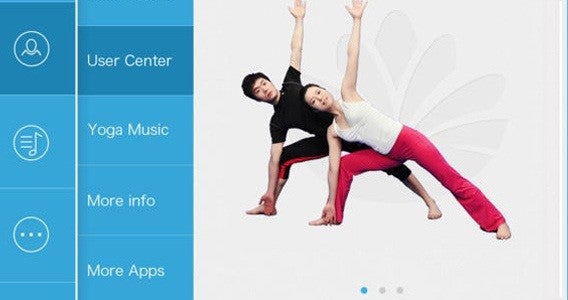
I was incredibly hopeful for my first session. A clear, blue interface offered a selection of tabs providing easy access to all of Daily Yoga’s different options. Skirting over most of these, I jumped straight to Start Training, where I was met by another well-designed interface. Two columns contained all of the exercises on offer and clearly marked which were free and which required a subscription to access – important, as I had no intention of paying.

Poking around the screen I soon discovered a handy drop down menu to filter sessions by type. I looked down the list; all sessions, yoga skills, therapy… weight loss! – we have a winner. Selecting this was introduced seven possible exercise sets, each and every one required a subscription. Downhearted, I flicked around the other options, worried that I would be restricted to a handful of options without paying. Fortunately this was not the case, with multiple session available in all of the other categories for free.

Not even close

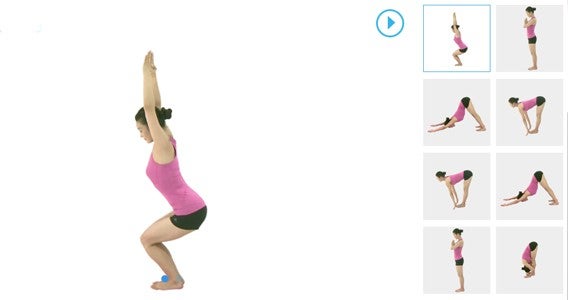
Selecting Sun Salutation, and setting it to a 15 minute session, I assumed the first position. Each action was clearly explained through audio, while a clear picture of the trainer demonstrated the action onscreen. Just a few movements in I discovered the first of my two problems with Daily Yoga: on a phone it is impossible to see the screen while contorting yourself into position. I imagine with a decent sized tablet and stand, this issue could be mitigated, but due to my set up I found myself struggling.

Having to refer back to my phone had me constantly breaking the current stretch and losing time as I rewound to video to see what I’d missed. The upshot was that my 15 minute session ended up taking closer to 25.

Painful Lotus

That said, the actual content of the session was good. As I stated in a previous article, I trade a lot on past fitness, which stood me in good stead for Daily Yoga. If my stomach didn’t get in the way, my head could happily touch my knees, and I can still sit in the lotus position if absolutely necessary (though you would be surprised how infrequently this comes up).

But, while the contortions were comfortable, my surrounds were not. A lack of mats (at home or the office) left me putting my boney knees down on hard floors, and I was unwilling to purchase a mat for this two week experiment. I soon found this discomfort more than distracting while performing the Downward Dog, and fact that saw me finding excuses to skip a day (Not-so-Daily Yoga).

Owchward Dog

When I was in the mood, Daily Yoga was fantastic despite the limitations of my set up. Everything was explained clearly and executed at a good pace, with fitting background music. As with all such fitness apps, I did occasionally question whether I was performing the motions accurately, but at least my mistakes were unlikely to cause lasting harm.

As for my weight it still seems unchanged, though thanks for those following me on Twitter who suggested this could be due to the yoga adding muscle to that 125 kg total. More importantly, I feel better – and stretchier – about myself, which is a good start.

Next week I will be looking at how MyPlate is working out for me, while switching my exercise regime over to Fitivity’s Home Exercise Program (Android, iOS) – which I anticipate will build up more of a sweat (so, less training in the office).

Related Stories

Diary of a fat man – Mango

Diary of a fat man – weight loss and fitness apps

The best health and fitness app of 2014

Follow me on Twitter: @DoFuss

App of the Week: Office 2016 for Mac

Softonic’s App of the Week highlights some of the coolest, most unique, and popular apps that have been released for Android, iOS, Windows, and Mac. This week we are looking at Microsoft’s long awaited update to their productivity suite, Office 2016 for Mac.

The last Office release for Mac was back in 2010, meaning many of the features Windows users take for granted were notable absent on Apple machines. This recent preview release of Office 2016 for Mac redresses this balance, bring Word, PowerPoint, Outlook, and Excel up to date with a new interface, while also adding OneDrive and SharePoint functionality to aid collaborative projects.

Also joining the classic list of apps in the productivity suite is OneNote, the digital notebook that lets you easily take and organize your notes. It may not be a deal breaker, but it is a nice addition to the package nonetheless.

Mac users should definitely give this early build of Office 2016 a try.

Default player


brightcove.createExperiences();

You can sign up for the preview version of Office 2016 for Mac here.

Related Stories

Office 2016 for Mac feels like the Windows version and that’s a good thing

App of the Week: YouTube Kids

App of the Week: Pushbullet

App of the Week: Microsoft Outlook for Mobile

App of the Week: Retrica

King’s Quest: stories like grandpa used to tell

For the uninitiated, King’s Quest is an adventure game created by Sierra Entertainment back in the mid 1980s and which gave birth to an additional seven games in the series (not including ports and spin-offs). Now over three decades later, King’s Quest is coming back this fall.

King’s Quest is a beloved franchise with a storied history so creating a new one for a new generation is understandably nerve wracking. “It definitely keeps me up at night,” said Creative Director Matt Korba.

Default player


brightcove.createExperiences();

To make sure the new King’s Quest stays true to the original series, Korba consulted Roberta and Ken Williams, the original creators of the series. They were excited to help bring King’s Quest to a new generation and provided tips on how to keep original game’s feel that made King’s Quest so popular.

I sat down last week with Korba in a darkened hotel suite to see a pre-alpha build of the game. Although it was far from complete (it was still missing proper voice overs), I came away excited to see the final game.

King's Quest dragon food

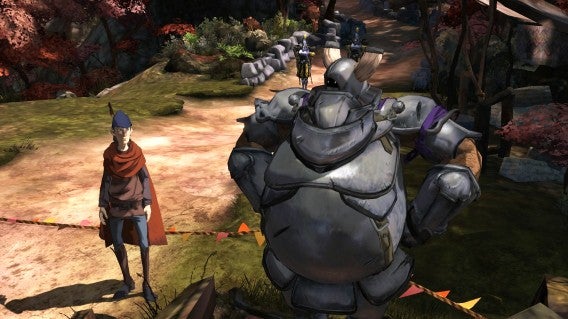
The level I saw featured Sir Graham trying to steal a magic mirror from a slumbering dragon. The character animations are spectacular and the physics on Graham’s cape impressed me with its lighting and motion. Players have to solve puzzles to progress through the level and you’ll likely fail many times. But that’s OK because the game’s narrators, Graham and his granddaughter Gwendolyn, poke fun at how you didn’t really die to give you another chance. The entire story is told by Graham to Gwendolyn, making the game feel very personal.

What grabbed me the most about King’s Quest was the art. Korba told me that all of the art in the game was 3D printed, watercolored, and then scanned into the game. This painstaking process results in environmental textures that look like watercolor paintings straight out of a children’s storybook.

King's Quest balancing act

The gameplay is classic point and click adventure game. The demo I saw was on an Xbox One so there wasn’t actually any pointing and clicking. Instead, context sensitive menus pop up when you approach objects you can interact with and it all felt very intuitive.

Don’t expect any platforming sequences as King’s Quest is purely a story-driven adventure game. There are areas that look like you’ll be platforming but the game helps you automatically jump and climb over obstacles.

Korba compares King’s Quest to movies like The Princess Bride and Big Fish where the narrator tells a grand story. Everything you do affects how the story progresses, but you won’t be able to become an evil version of Sir Graham. I expect decisions to modify the story but not its ending, just like other adventure games like The Wolf Among Us.
If you’ve never played a King’s Quest game before, you won’t feel left out. “King’s Quest is completely reimagined but it’s not a reboot or a sequel,” said Korba. “We wanted to create a family-friendly gaming experience, something everyone can enjoy together.”

King's Quest Graham and knight

Activision resurrected the Sierra brand to bring family-oriented gaming experiences like King’s Quest and puzzle platformer Shiftlings. From the short demo, I think Sierra achieves this and its games will provide a breath of fresh air from Activision’s blockbusters like Call of Duty.

Sierra is aiming for a fall release for the first of five chapters of King’s Quest, though we should hear a more specific release date in the coming weeks. The game will be available on PS4 and PS3, Xbox One and Xbox 360, and PC. No word on pricing just yet.

Related Stories

The best of GDC Play 2015

Activision reboots Sierra brand with Shiftlings puzzle platformer

Knights of Pen and Paper 2 let me play a Hipster Dwarf Paladin

DmC Devil May Cry: Definitive Edition review

Follow me on Twitter: @lewisleong

What we want to see in iOS 9

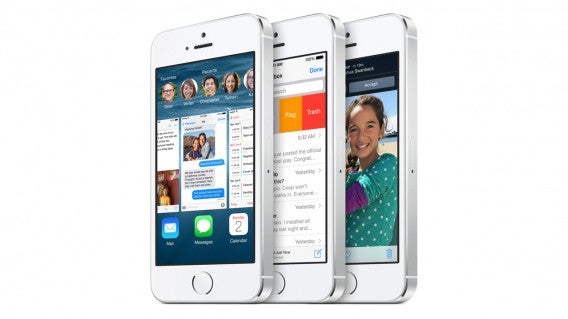
While it may feel like just yesterday that iOS 8 was released (in fact it was September), iOS 9 is expected to be unveiled for the first time at WWDC 2015 in June. The company heralded iOS 8 as the biggest update to its mobile operating system ever (although I’m sure they’d like to forget the debacle that was iOS 8.0.1), so the pressure is on to deliver something special. In order to iron out any of the bugs that blighted iOS 8.0.1, the company is to open up beta testing to the public, a practice that it used with OS X and that Microsoft employs, the most recent examples being with Windows 10 and Windows 10 for phones.

iOS 8 iPhone header

The company recently released iOS 8.2, which brought support for the Apple Watch (only for iPhone 5 and later, but not for iPads or iPods); improvements to its Health app; and various other stability enhancements and bug fixes.

But rather than looking at what we expect Apple to deliver, we’ve asked Softonic iPhone users what they would like to see in the next version of the mobile OS:

Jon: Better “open with” options

I’d rather see optimization and efficiency, over new features that don’t work or slow down older devices. However, currently some apps let you, for example, open links in the browser of your choice, or share links via the app of your choice.

But many only give you the option of opening in Safari or sharing via the native Mail app. This is no longer obligatory for iOS apps, but when big apps like Twitter don’t let you use your chosen browser or mail client, there’s a problem. I’d like iOS 9 to allow you to set defaults for these things, to avoid the problem. Right now I only have mail set up to make life easier, and I only use Safari when I have to. Both are unnecessary!

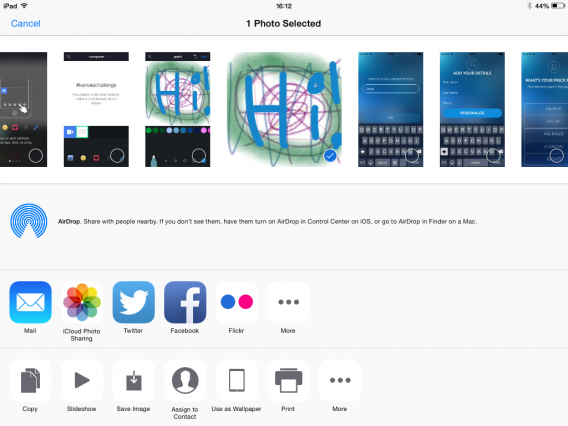
Geert: File sharing

Having moved from Android to iOS a few months back, I really miss decent sharing functionality integration. There’s definitely some room for improvement here. For example, when I’m browsing through photos, I can share them in a limited number of ways, WhatsApp not being one of them. That’s annoying.

A similar story applies to Chrome on iOS, sharing a URL from within the browser is just not an option. Native browser Safari does offer sharing options, but again, only via native iOS apps.

Oh and yeah, I miss a file manager.

Toni: Battery, widgets, and personalization

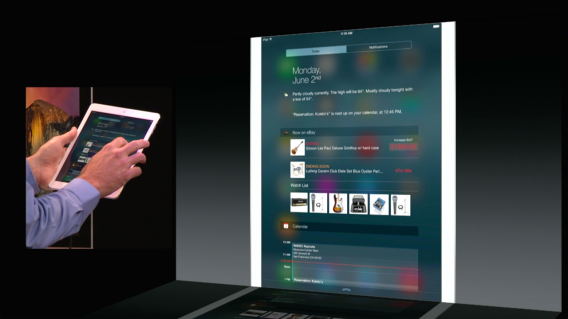
iOS 8 widgets

I would like more information on battery usage (a graphical representation and maybe some tips to improve it), as well as widgets and more personalization. For example, I want to easily pick a song and set it as a ringtone; and chose a dynamic background that has up-to-date information.

Fabrizio

I wish Apple put the notification center and control center together (like in Android!)

The Twittersphere, unsurprisingly, has plenty to say on this matter. Here are some top requests from users.

Let us know in the comments below what you’d like Apple to deliver in iOS 9 – more features, or bug fixes and stability improvements?

Related Articles

5 reasons I won’t get a smartwatch… yet

Best free iPad apps

Best free iPhone games

Follow me on Twitter: @karenmccandless

OlliOlli 2 review

The first OlliOlli brought back memories of Skate. I consider Skate the best skateboarding game ever and OlliOlli was a close second. Roll7’s sequel expands the original by adding much needed tricks like manuals and reverts, but also increases the necessity for precision.

OlliOlli 2 is the best skateboarding game available right now.
olliolli 2

A different look

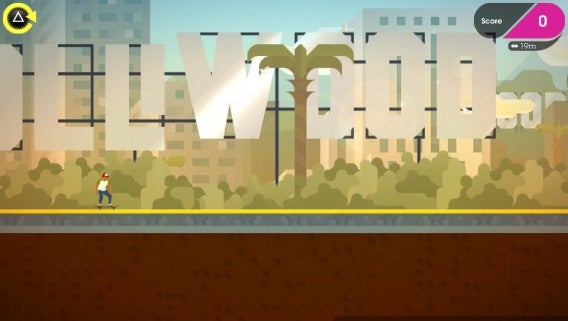
OlliOlli 2 changes the graphics from the first game. Instead of pixel graphics, OlliOlli 2 uses a comic book style. Levels look painted and the skate avatar has a more natural flow when moving. The animations are all still locked to different tricks, but the new visual design looks and feels more fluid.
olliolli 2

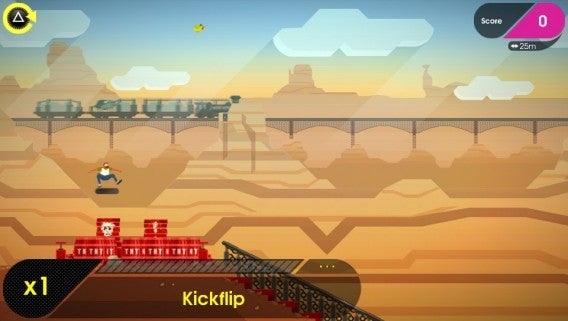
Each world has a distinct look. This can also change the colors of what’s used to grind or skate on. When you start a new level, be prepared to fail as you learn the layout. OlliOlli 2’s level design is great and incredibly frustrating at the same time. The game’s difficulty is tied directly with level design; learn the level and you’ll find it much easier to pull of long combinations.

Learn the basics, master the techniques

There are five worlds in the game, each with five levels. If you complete every objective in a level, you can access the Pro level that presents new challenges. When you complete all the challenges in a world, you unlock RAD mode, which is even more difficult than Pro mode.

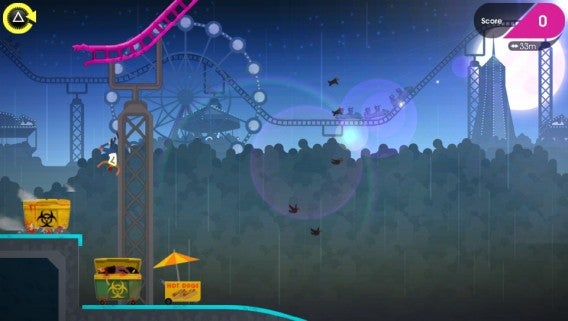
The first world, Olliwood, is the tutorial. It teaches you the general controls and some advanced tricks that are needed in other worlds. As you progress other worlds require more fine-tuned skills. Curse of the Aztec is about grinding, Gunmetal Creek is big on manuals, and Carnival of the Dead focuses on transitions.
olliolli 2

Performing tricks is only a small part of your score. You also have to land the trick. Pressing X right before landing can earn different ratings and the goal is always to have a perfect landing. This extends to landing grinds and manuals. Manuals can extend combos throughout an entire level and become necessary because there are also one combo goals.

OlliOlli 2 scores based on the trick and variety. So you can’t just kickflip through a level and get great scores. The bigger the variety of tricks, the higher your score. Building your combo meter can end in a giant score that could fulfil many different challenges in one run.

Failure is required in Olli Olli 2. There’s a dedicated restart button mapped to the triangle button and it’s something you’ll use a lot. Use the left analog stick to perform tricks. Like Skate, you manipulate the stick in different patterns to perform tricks. The shoulder buttons are also used as modifiers for more advanced tricks.

Grinds are accomplished the same way with standard grinds using the analog stick and advanced grinds using the shoulder buttons. OlliOlli 2 also adds reverts and grind stance changes to add more variety. There are also controls to prep for nollies or fakies and you can spin in the air for added points.

The depth of OlliOlli’s tricks is staggering and takes time to learn the hardest tricks, which require perfect timing. The way OlliOlli 2’s gameplay is setup is repetitive, but demands perfection.

One platform, multiple devices

OlliOlli 2 is a cross-buy, cross-save game. This means if you purchase it on either PlayStation 4 or Playstation Vita, you get the game on the other device for free. Cross-save is great because you can sync your progress and pick up where you left off on either console. This makes it very easy to work on a difficult level during your commute and then sync your progress to play at home on PlayStation 4.

olliolli 2

I’ve used the cross-sync saves every day because some levels are easier on PS4 or PS Vita. OlliOlli 2 is the perfect mobile game and shows the necessity of an analog stick for this type of sports game.

The best skateboarding game out now

There’s hasn’t been a great skateboarding game since Skate was shuttered. OilliOlli 2 picks up the slack with its addictive and challenging gameplay. It’s definitely a focused experience designed to frustrate you, but it’s one of the best games on both the PS4 or PS Vita this year.

Review copy purchased on the PlayStation Store.

Related Articles

DmC Devil May Cry: Definitive Edition review

The best of GDC Play 2015

Watch our video review of the terrifying Five Nights at Freddy’s 3

Follow me on Twitter: @chrislikesrobot

5 reasons I won’t get a smartwatch… yet

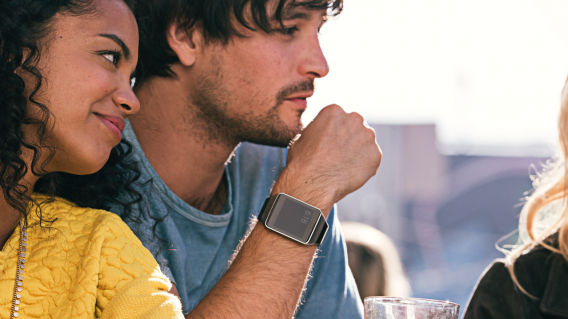
After the Apple Event, and Barcelona’s Mobile World Congress, we’ve seen a lot of wearable technology, and it’s mostly watches. And I won’t be getting one*. Here’s why:

1: No killer apps.

Steve Job’s famous iPhone unveiling made it clear why you’d want one. It was ‘an iPod, a phone, and an internet communicator‘ all in one. The Apple Watch is…a notification center for your wrist, with a bunch of fitness tracking features. And it needs to pair with a phone to work.
Instead of bringing features together, Apple and other manufacturers are saying, ‘you know some of the cool features of your smartphone? We can separate them and put them on your wrist.’ It’s an additional device, and doesn’t seem to save you anything.
There has to be a pretty good reason to convince me to buy and wear more technology, and notifications on my wrist instead of in my pocket aren’t a big deal. So I’m waiting for a developer to come up with a great reason to use a smart watch.

Android Wear... 's the reason to be wearing this?

2: Battery.

Whether it’s a full day or an 18 hour day, a smartwatch currently means something else to charge while you sleep. More stuff on my bedside table. That wouldn’t be so bad, if it wasn’t for the lack of the above.
Apple explained how battery life on the Apple Watch is saved by making your iPhone do much of the heavy lifting – but that will impact your iPhone’s battery life. It can be hard enough to get through the day on a single charge if you’re a heavy user, and a smartwatch is only going to make things worse. I’ve had the occasional day where my phone died before I could find somewhere to charge, and that will surely happen with a smartwatch too. No phone, and no idea what the time is. Great.

3: Style.

Watches have been fashion items for many years. I have watches, plural, and a useful smartwatch would mean retiring all of them. Unless I wanted to tell the time for more than a day without plugging in, of course.

For all its precision engineering, the Apple Watch is a fat little thing, and even the smaller model will make a big impact on small wrists. LG’s Watch Urbane and the Huawei Watch are huge – fine if you’re used to wearing enormous luxury Rolex watches, but not everyone is. Also, as my colleague Lewis Leong pointed out, for the price of an Apple Watch Edition ($10,000), you could get a luxury watch that would last for generations, even if it didn’t track your heartbeat.

Prediction: sometimes people say “cool watch” to me, about my retro Casio. That sounds arrogant, but it’s true (and maybe I am). And for a while they’ll say the same to people with Apple Watches. In a year’s time they won’t, but my watch will still get noticed.

4: Curse of the first generation.

Back to the iPhone. It was amazing when it came out – but not perfect. The second and third generations were tons better. The best smartwatches are not cheap, and we know from experience that the technology will get much better pretty quickly. Having said that, Pebble’s third generation attempt, Pebble Time should arrive in May, and I’m still not at all convinced.
Jumping in now, while smartwatches are underpowered, short on battery life and overweight seems like a mistake.

5: “Like having a coach on your wrist.”

Tim Cook announced this proudly – the Apple Watch will remind you to get up if you’ve been sitting down for a long time. It’ll keep track of your heart rate and movement, learn your activity habits and ‘suggest personalized all-day activity goals’. Android Wear and other smart watches also offer fitness tracking. I suspect that if you lack the motivation to exercise more, you won’t easily fall in love with a product that keeps reminding you of the fact.

Fitness is undoubtedly important for a good life, but it’s not everyone’s number one priority. For those of us who are not overly concerned with fitness, health tracking isn’t a big draw. Maybe our own Alex Beech would love to see how it compares to fitness trackers we already have, but I’m lucky, and cycling to and from work seems to keep me vaguely in shape, and that’s enough for me.
Activity reminders would be the very first thing I’d disable, surely only a small number of people even need that kind of notification?

Waiting for wearables.

I already have the all-in-one communication device that the sci-fi of my childhood promised: smartwatches are going to have to be better than simply an expensive extension of that. A standalone smartwatch might be more attractive, but that still seems a distant thing. At the very least they need to get lighter, and last longer.

*Yet.

Related Stories

Best apps for the Apple Watch (so far)

Best Android Wear smartwatch apps

Best Android Wear watch faces

Follow me on Twitter: @jonathanriggall