Removing the Update to Windows 10 icon from your Windows 7, 8, or 8.1 PC

Windows 10 arrives on July 29. Even better, it will be free for most Windows 7, 8, or 8.1 users. But, while a free upgrade may sound great, the icon that now appears every time you start your PC inviting you to register for Windows 10 is less than perfect. Plus, even if you sign up, the icon will not disappear from your taskbar.

Fortunately, there are ways to remove it and today have a very simple way for you to eliminate it forever.
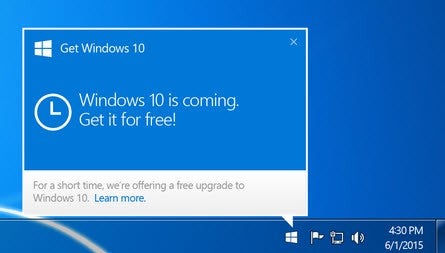
Get rid of Windows 10 icon

1. Uninstall the update KB3035583

First, go to the Control Panel from the Windows startup menu. Click Programs, in its options select View installed updates.

Use the search box in the top right corner of your Window to find KB3035583, which is the name of the update you want to remove.

Once this update is displayed, click on it with the right mouse button and select Uninstall.
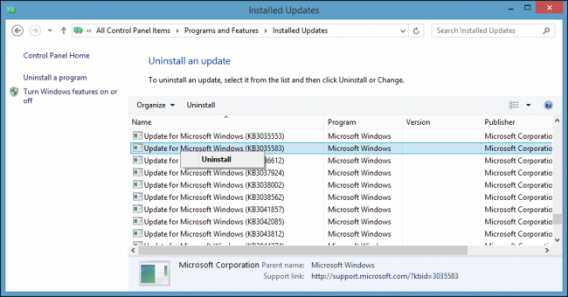
Get rid of Windows 10 icon uninstall

2. Remove the Windows Update

Although you have done away with the update prompt, it could automatically restart later. To avoid this, return to Control Panel and click System and Security, then select Windows Update, and finally Check for Updates.

Wait until it has finished searching updates and click Show all available updates. Again, using the search, find KB3035583 and right click on it with your mouse. From the pop-up menu select the Hide update option.
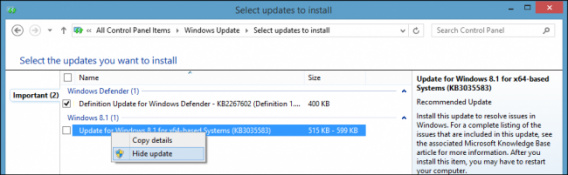
Get rid of Windows 10 icon hide

3. Say goodbye to that annoying icon

And that’s it, if you have followed these steps correctly the Windows 10 icon will no longer appear in your taskbar. Of course, this does mean that when Windows 10 does arrive on PC you will not be notified of the update and will have to manually install it. But don’t panic, when the time comes Softonic will be here to tell you how.

Related articles

Which Windows 10 version should I get?

No free Windows 10 for pirates and more

Windows 10 looks awesome at Build 2015

Follow Maria on Twitter: @mariabaeta

What is Apple Music?

Apple has announced a new product – Apple Music. It’s a streaming music service similar to Spotify or Pandora, but does have some unique features. Launching on June 30th 2015 in 100 countries, let’s see what Apple Music offers.

The basics

Apple Music lets you stream music from your PC, Mac or iPhone, with Android and Apple TV support arriving in fall 2015. When you sign up, you get a free three month trial, and after that it costs $9.99 a month. There is also a family plan, like Netflix offers. That will be $14.99 a month, and allow 6 people to connect to Apple Music.

Apple Music has a library of over 30 million songs, just like Spotify. It will also allow you cloud access to the music you’ve bought in iTunes as well as CDs you have ripped to your collection. You can also add Apple Music content to your iTunes library, and save music for offline listening.

Expert curation

So far, so standard, you might think. Apple is hoping that artists will make Apple Music a service you want. As well as streaming anything from its huge library, you’ll be able to check out curated playlists. Artists and music experts will create playlists, and they will be recommended to you depending on your preferences. The more you listen, the better Apple Music should get at recommending music and playlists to you. You can also browse playlists based on your activity, like running or driving.

24 hour radio

Then there is Apple Music Radio. A 24 hr service, its main station is called Beats 1 and will be broadcasting from LA, New York and London, ‘led by’ ex BBC Radio 1 DJ Zane Lowe, Ebro Darden and Julie Adenuga. There will also be Apple Music stations based on genre, from indie rock to funk, but we don’t know yet how many.
Apple Music Radio will also be available to anyone with an Apple ID – so you can listen without being signed up to the service. Apple Music members will have the advantage of being able to skip through songs they don’t want to hear, as much as they want.

Connect with your favorite artists

The last part of Apple Music is called Connect. This allows artists to share stuff, directly to their fans. It’s a bit like an integrated Twitter or Tumblr – you’ll see photos, videos and songs, status updates or whatever the artist feels like sharing from within Apple Music. Apple say it’s ‘unfiltered (and) unedited’, but knowing the company’s strong family values, we’re pretty sure there won’t be anything too raw allowed in Connect.

Connect’s success of course depends on artists getting involved – they will have profile pages, which include all the content they share via connect, as well as discographies and biographies.

What about Beats Music?

Apple Music is in part based on Beats Music, which Apple bought out in 2014. Existing Beats Music subscribers will be moved over to the new service, keeping their libraries, playlists and so on in tact.

We’ll publish a full review of Apple Music as soon as it’s available.

Related articles

What are Connected Cars?

Apps for women: breaking down gender stereotypes

Grad gift guide: high school grads

Follow me on Twitter @jonathanriggall

Will Apple Music be a success?

Apple Music launches on June 30th 2015, a streaming music service entering an already crowded market. Can Apple make use of its huge iTunes user base and become a success?

We expect Apple Music to be a good listening experience, as Beats Music on which it is based already is. It’s pricing and features puts it on a par with existing streaming services, and Apple is clearly pushing expert and artist curation as its unique selling point.

Do you want to get closer to artists?

Many artists already connect with fans via social media: Facebook pages, Twitter and Tumblr. Will these artists be willing to do the same in Apple Music? This will hinge on whether Apple really does let artists connect in an unfiltered and unedited way, but this seems a little unlikely, as Apple always aims to be a family friendly place. Browse artist’s Tumblr accounts for a few minutes and you’ll quickly find things that are at the very least not safe for work!

Another reason to be a little skeptical is the description of Connect: artist profile pages, with feeds of content they have shared. The first thing that popped into my head was ‘MySpace‘, which tried the same artist curation trick when it was relaunched in 2013, a relaunch that was not a big success. In 2010 Apple launched Ping for iTunes, which was an attempt to combine social networking and recommendations, allowing you to follow artists. It was closed two years later, having failed to ignite users’ interest.

Friends or celebrities?

Spotify seems to have the social part right – having a community of your friends in the service works really well. You can see what friends listen to, share and collaborate on playlists. While Apple Music aims to get you closer to artists, Spotify is a personal and social experience.

I am sure Apple Music will be popular, if nothing else because 800 million people already have iTunes accounts, and signing up will be extremely convenient for all of them. But I can’t see it immediately stealing from Spotify, which many people already love, and have established connections and ties.

We like to think about winners and losers, but the reality is that there is space for more than one streaming music service, and Apple Music looks poised to be a major player. It can exist without beating Spotify, as Spotify can continue to exist even if Apple Music builds a bigger user base.

Related articles

What is Apple Music?

Apps for women: breaking down gender stereotypes

Grad gift guide: high school grads

Follow me on Twitter @jonathanriggall

Diary of a fat man: Runtastic Six Pack Abs Workout (I’ve been doing it wrong)

I have mentioned before that I used to be fit, probably to the point regular readers are starting to get sick of it – but this week’s app has showed me that, even in my prime, I was doing some things wrong.

I am referring, primarily, to abdominal work. I always did it, and core strength was always important. After a few weeks with Runtastic Six Pack Abs Workout, however, it is becoming clear that general enthusiasm for the exercises may not have been the best route to the desired results.

setup

Whether performing planks, leg raises, table tops with a twist, crunches, or just good old sit ups, my old technique was to use speed and momentum to get through my exercises as quickly as possible. What Rutnastic Six Pack forces me to do is slow my execution of each repetition down to a (painful) crawl.

Not only has it altered my speed; it also offers set routines to perform to a daily schedule. This regularity, and more importantly the slowly increasingly difficulty, has completely changed to way I approach my stomach workouts.

It’s a gradual thing. The first day had me performing three sets of three exercise eight times. Each rep was paced, and I had 30 seconds to recover between sets. It was easy, and I began to ponder the value. Day two changed the order of the exercises and added two further reps to each. It was a bit tougher, but it wasn’t until day three, when the reps went up to twelve, when I really began to feel that there may be something to the program.

Crunch

It was phenomenal how the fractional increases to the workouts exponentially increased their difficult. By day five I was actually grateful to see a rest day. Coming back off this break the routines changed, altering from three sets of three exercises to two sets of four, while also changing the exercises. Suddenly I was performing 18 repetitions a total of eight times, and my abs felt like they were burning from the very first set.

To put that in perspective, in my infrequent visits to the gym over the past few years, 20 reps was my standard number of repetitions for any abdominal work. With poor technique, and at a speed of my own choosing, I would regularly repeat this six times with ease. Now I was feeling it after just 18 thanks to improved form and pace.

Curl

A day’s routine lasts around ten minutes for the first couple of weeks – but you feel you are doing something for every minute of that time.

I have currently only completed the first ten day program (Level 1). But I am about the start the second plan, and find myself equal parts excited and scared. I can feel it doing something, albeit under several layers of fat.

So, Runtastic Six Pack is joining Noom and Zombies, Run! on the growing list of apps that I am sticking with – at least until I find something better. Hopefully not to many more will join the list, I am running out of time in my day.

Related Stories

Diary of a fat man – Runtastic Road Bike

Diary of a fat man: MyFitnessPal (the training wheels are off)

Diary of a fat man: Zombies, Run! (the undead are good for you)

Follow me on Twitter: @DoFuss

Five Apps to Try This Weekend: featuring Office Lens, Heroes of the Storm, and Lara Croft: Relic Run

Welcome back to Five Apps to Try This Weekend, our round-up of the week’s best apps, designed to make sure you have no reason to complain about being bored before Monday.

This week we start with Mimechat (Android|iOS), the messaging app that goes one step beyond emoticons and emoji by giving you your very own animated avatar to control. Your digital puppet can hug, kiss, cry, and emote in any other way you may want them too – adding a bit more personality to conversations.

If Mimechat is your kind of thing, we suspect you will enjoy GIFLab too. This app lets you take any video and easily turn it into a brilliant .gif. Currently it is only available on iOS, but Android users who are after something similar may want to try Gif Me Five, which has a far better name.

Microsoft’s Office Lens (Android|iOS|Windows Phone) also makes this week’s list. This app turns your phone into a mobile scanner, letting you take a picture of any document or written text and then converting it into plain text for you to edit.

And finally this week we have two games. Heroes of the Storm (Windows|Mac) is developer Blizzard’s new MOBA (multiplayer online battle arena). This 5v5 fast paced strategy game draws on all of Blizzard’s famous games for its roster of characters – so expect to see familiar faces from World of Warcraft, Diablo, and StarCraft. Unlike other games in the genre, Heroes of the Storm is designed to be more approachable, so gamers of all levels should give it a go.

And we round off our selection with Lara Croft: Relic Run (Android|iOS) – an endless runner based on Tomb Raider. With gameplay that will be instantly recognizable to all Temple Run fans, this three-lane runner is packed with fun action to keep you entertained all weekend.

That’s for this week, we will be back next week with another five apps.

Related Stories

Five Apps to Try this Weekend: featuring Google Photos and My Talking Tom

Five Apps to Try this Weekend: Skype Translator, Ice Age Avalanche, and The Witcher

Five Apps to Try This Weekend: featuring Phind and GoatZ

Follow me on Twitter: @DoFuss

App of the Week: Google Photos

Softonic’s App of the Week highlights some of the coolest and most popular apps. With that in mind, this week we are casting our discerning eye over Google Photos – the new standalone evolution of Google+ Photos.

At its most basic level, Google Photos is a photo gallery viewer – but it is packed full of useful features that make it nearly indispensable.

Take any picture with your phone and it will be uploaded and synced with your Google Photos’ cloud account – best of all, you have unlimited cloud storage, so you can take snap shots until your thumb is sore. You can then view all of your pictures from any Android, iOS, or browser that is connected to your account.

There are also a huge suit of editing features. While these can be accessed manually, it was the automated Assistant that really stunned us. This generates improved photos, stories, and .gifs from your saved images, using similarities in the pictures, and information about the date and location from when the photo was taken. You can then save these suggestions, edit them, or just choose to discard them on those rare occasions Google Photos doesn’t quite hit the mark.

Oh, and of course being Google, sharing all of these creations is simple.

Google Photos is the most complete solution to bring order to your 1000s of photos. It’s not surprising that its our choice for App of the Week.

Related Stories

App of the Week: Tysdo

App of the Week: Phind

App of the Week: Google Handwriting Input

Follow me on Twitter: @DoFuss