Review: Black Mirror

Original article provided by 4players.de

In August, adventure fans got not one, but two reasons to be happy: not only was a remake of the classic Black Mirror announced, the experienced Bremen studio King Art (Book of Unwritten Tales) was tasked with developing the title. Best conditions for psychological horror in a remote Scottish mansion? Or should we expect a shaky quality control by publisher Nordic, as we had with The Ravenan?

Mechanical entry hurdles

After three installments, Black Mirror was not continued, but rather it was decided to “reboot” the tragic story of the Gordon family. As the series’ new protagonist, David Gordon has to deal with the mysterious events taking place in Black Mirror Castle and find out whether a curse is on his family. Already from the intro, the horror unfolds during a hectic escape – but not in the way the developers intended. Three are the scary things here: the wacky controls, the stiff character animations and the strange camera direction, which can be influenced a little bit with the right stick. Wait a minute, with the stick? Exactly, because the multi-platform title is primarily designed for navigation with the controller. There is also a mouse and keyboard version on the PC, but it looks like a makeshift model because you move the cursor with WASD directly rather than clicking on targets, especially since – annoyingly – you can only interact with hotspots near the character.
Therefore, after a short time, I switched back to the controller. But even so, the fiddly handling reminds me of the dark side of an early Resident Evil. In spite of the 3D engine, the perspective changes back and forth while exploring the property – which doesn’t exactly help with the overview. To make matters worse, the slow-moving figures also get stuck on various edges, only to then stumble, stiffly or twitchingly, around corners. Not even the simple mouth movements remind of a finished game. THQ Nordic and King Art have already published another title too early. However, fatal bugs like in The Raven were not to be found this time around. Although the adventure feels like maneuvering a log, the game functions.

Inheritance or curse?

Normally, it wouldn’t, of course, be natural to start the review of an adventure title with such technical intricacies, but here it simply fits the experienced dramaturgy, which in the first few minutes is still too permeated by the anger at the technical shortcomings. As soon as you get halfway settled, the trip to remote Scotland reveals that there are also some entertaining aspects: the inhabitants of the house are not very talkative or behave in a way you wouldn’t expect from someone who just experienced such tragic events. Nevertheless, their private secrets and the mystery around the alleged curse can build up a little tension.
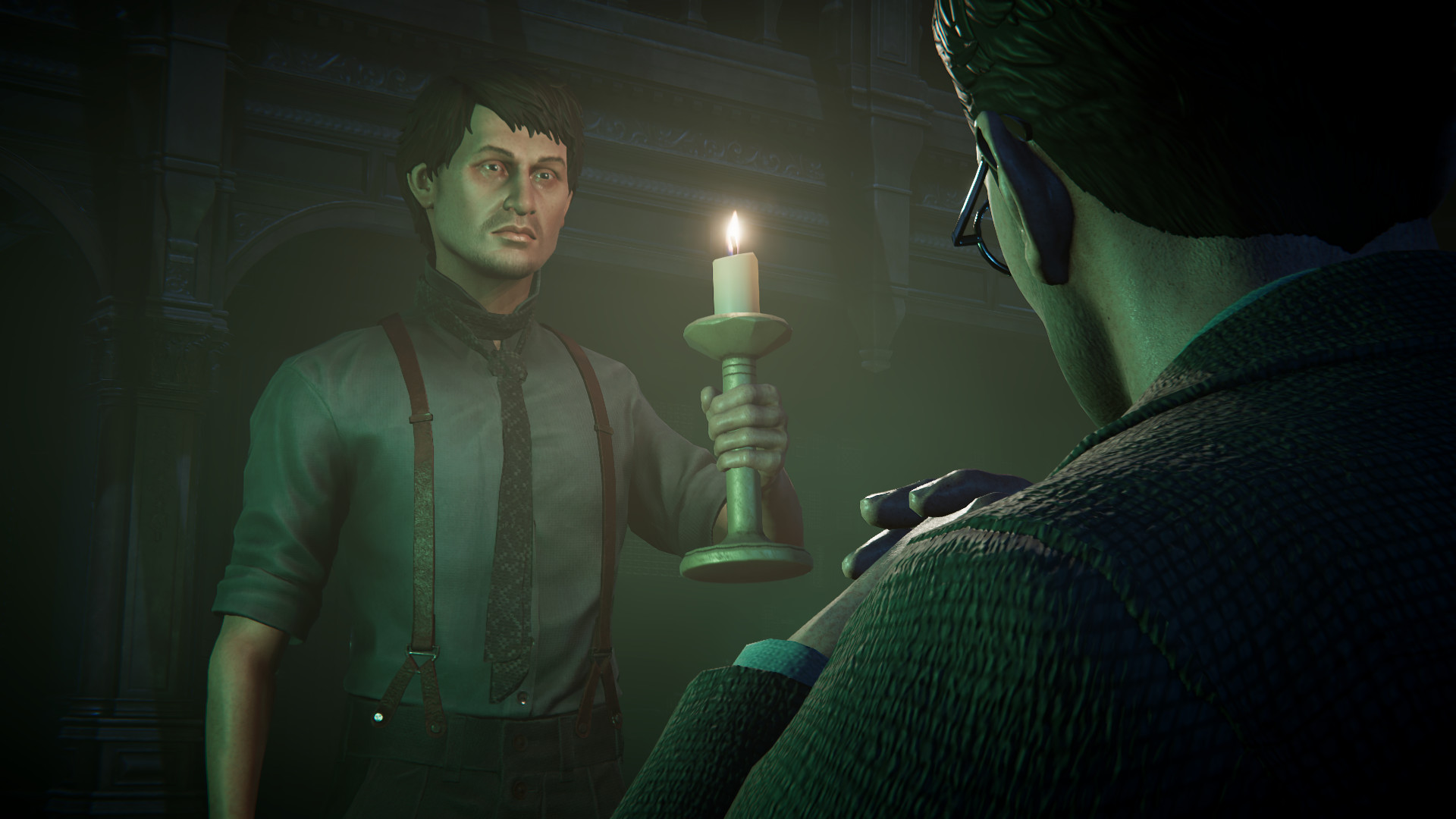
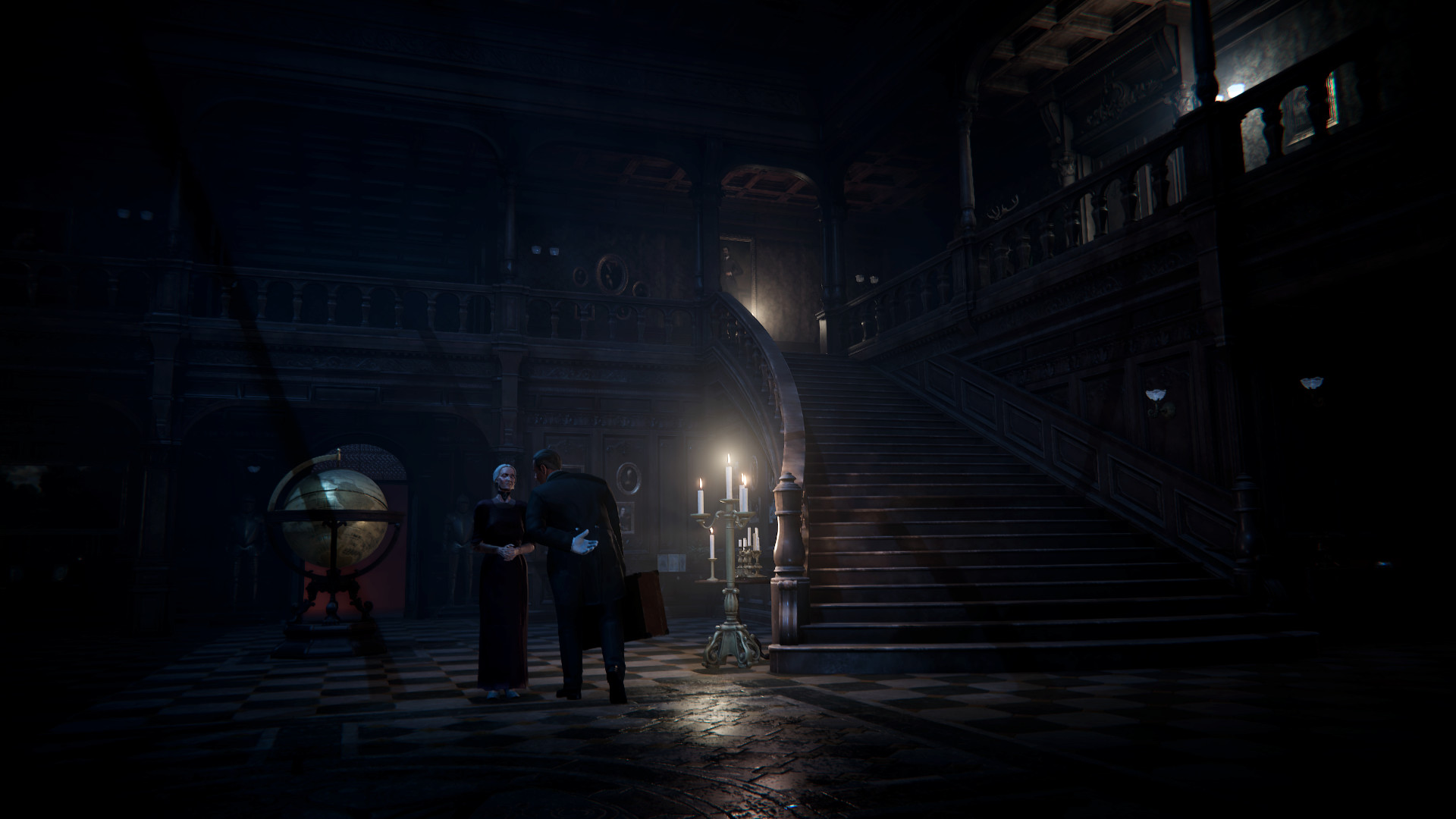
Why does David, who has come from India, suffer from increasingly strong visions in which former inhabitants of the house seem to walk through the corridors? Has he been here before as a child? What clues did his late father want to give him through the encrypted documents? As the presumed heir to the mansion, David not only has to deal with the delusion that apparently struck the late owner shortly before his end but also with the remaining inhabitants of the house. These include Lady Margaret, a lawyer in charge of the estate, the stoic butler and a frightened housekeeper who apparently has secrets to hide. Later, David is joined by a companion, his doctor Leah, who is, however, an NPC. Instead, in the role of the protagonist, one searches through the property, which is visually very well staged.

Secrets between the paneling

Between gnarled wooden pores and the walls, ravaged by the harsh weather, all kinds of detailed desks, models and other nifty details are to be discovered, which are sometimes too dimly lit and also play an important part in the puzzles. For instance, one can presumably imagine what role the broken piece of a miniature of the property plays. A highlight is the mechanisms and secret compartments built into the furniture. Just like in The Room, a cozy puzzling mood really settles in when you take a closer look at all the corners of a chest of drawers to unlock decorations and runes so that you can open a new compartment with a single click. Although there are far less complicated mechanisms at work here, the mathematical tasks or the interpretations of found letters are still motivating.

However, it’s a bit of a pity that you’ll only come across so few puzzles in just over six hours. Compared to older King Art adventures, the density of puzzles has dropped considerably and in this respect, you are also somewhat behind competing titles such as Syberia 3 or Silence. Black Mirror’s “restart” is conceptually located somewhere between the very story-heavy Telltale principle and classic point-and-click adventures. Some puzzles have alternative solutions, e.g., by blackmailing the butler with the knowledge of his illegal hunting practices and thus getting the key to the cellar. The quality of the sound varies during such dialogues: sometimes you are delighted with the professional performance of the voice actors, elsewhere it sounds as if the recording director had been satisfied with the first, badly accentuated take. Musically, the adventure is very reserved: in hectic moments, the orchestral sounds swell dramatically, but apart from that, it is limited to stylistic devices such as soft surfaces, a deep humming or hissing which underline the ominous mood.

Annoying reaction tests

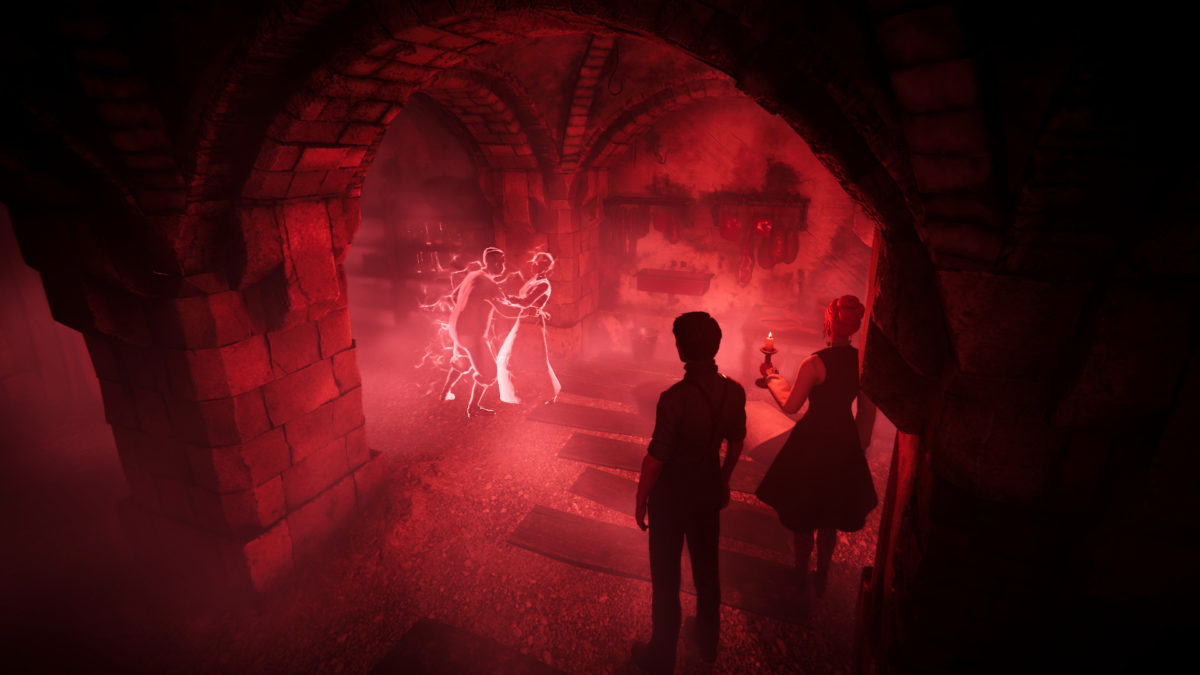
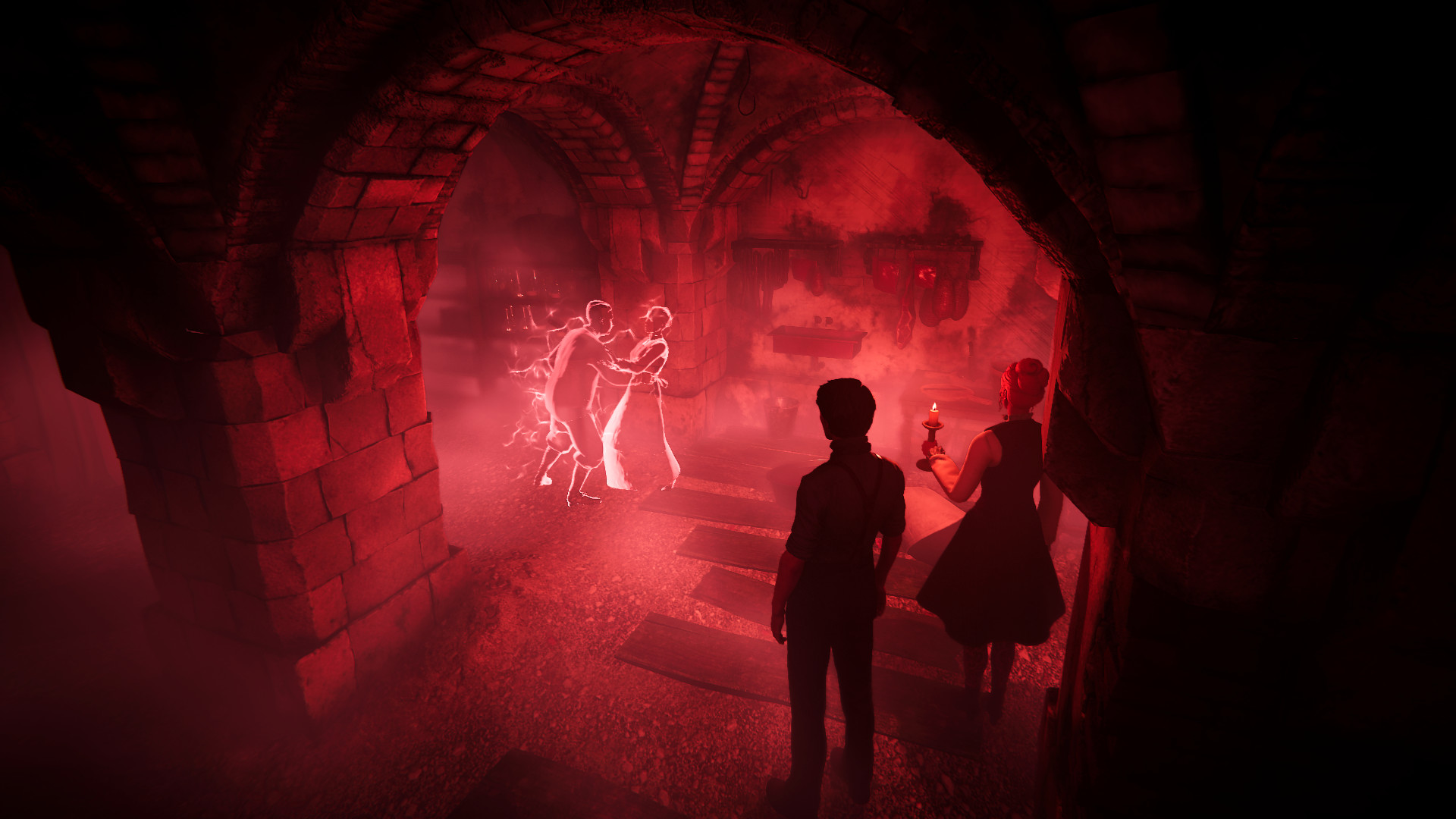
The reaction tests in David’s visions, in which one wanders unaware through the picture at first, also seem rather weak. Once you have recognized the principle, however, it is far too easy to hit the necessary interaction points – unless you get stuck somewhere again and have to go back to the last memory location or to the autosave. During David’s ghostly lapses, the picture distorts surreally and the player can learn more about the family’s and the property’s dark past by observing the shadowy figures.
On the normal PlayStation 4, you only have to live with small compromises compared to the PC, for instance with a slightly lower but stable frame rate. However, on the console’s standard model, the Xbox One implementation seems to be hurriedly thrown together. A lower resolution and lack of edge smoothing produce an ugly, unclean image, but these are the smallest problems. The framerate – which sometimes drops to about 15 fps – and the constant tearing of the picture right down the middle really gets on your nerves. Even if you take an object out of the small inventory to turn it around and examine it, it flickers with few frames. By the way, King Art has saved itself the trouble of offering a help function or a hotspot button. On the other hand, however, hints in dialogues and the quest log, in which the most important current tasks are brought to the point, help with getting started.

VERDICT

In conclusion, the reboot of Black Mirror is a reasonably creepy adventure, which suffers greatly from game mechanics such as the sluggish controls or the confused camera work. As soon as one gets used to the stiff stumbling around the mansion, the legends surrounding an ancient family curse make the player curious, especially as the puzzling with runes, secret doors and manipulated furniture offers some motivation. All in all, the short adventure lacks challenging puzzles. Presumably, King Art wanted to orientate itself more towards Telltale this time and has also implemented some (unsuccessful) reaction tests. In this way, however, it seems unlikely that the fascination of the classic from 2004 can be conveyed to new players.

How to play online games safely

Every day, more people are playing on the internet. In fact, one of the most common debates in the video game industry is whether offline modes – i.e. traditional games where one player goes against the game’s world – are losing out to online modes, where players are pitted against each other.

The unstoppable boom of the second kind is undeniable, and the ultimate proof is the professionalization of what is popularly known as eSports. So, if you regularly play online, this article will definitely interest you: four tips for playing safely.

Set a good password

It may seem really stupid, but it’s not. Major virtual security companies once again confirmed 123456 as the most commonly used password by users around the world. And no, it’s not very safe to have this password for your personal account if you regularly play video games.

Remember to have a password on different platforms that is both easy to remember, as well as complex. How to manage that? Well, it’s as simple as combining uppercase letters, lowercase letters and some numbers (your mother’s maiden name with a few uppercase letters and her date of birth, for example, and you’ve got a magnificent combination). With this access, not only can you play your games online, but you also can enter the title catalog on platforms like Steam and Origin.

A good antivirus

If you think viruses only are prolific on web pages or unusual software, you’re wrong. It’s important to have your antivirus updated with the latest version. This way, you won’t run any unnecessary risk when playing, as nobody can steal your identity and all your data will be safe for the future.

Careful when you shop…

With the proliferation of online games, new business models have also emerged in video games. We’re talking about, of course, extra items and content to boost the main features of multiplayer modes.

Although all this content can be bought legally through official game sites, there are numerous web pages dedicated to commercializing this content. What’s the problem? Well, these sites don’t always meet quality standards and it’s been proven that many codes may even be stolen. Careful when you buy extra content: you get what you pay for.

And careful when giving out your data

This point goes hand-in-hand with the previous one: be very careful when giving out your data. Many hackers recreate web pages exactly like the originals, so the most unsuspecting fall into their traps. When entering a site, if they ask for data like a security code, date of birth or uncommon details beyond the usual username and password, don’t trust that web page (and rightly so).

Companies are reporting more and more cases of users who lose all their cards, items, utensils and an endless string of products after entering web pages that offer unofficial prizes.

How to password protect your USB drive

Times are a-changin’. And more quickly every day. Not even the most visionary person could have predicted a decade ago that the “norm” would be to carry around a USB drive on our keys. Portable storage devices have become essential to our everyday lives, so much so that you may have several USBs, thanks to promotional (and free) campaigns from certain companies.

In turn, this proliferation of USB drives has caused our data to be available with astonishing ease. After all, have you stopped to think that if you lose your storage device, anybody can access what you have on it? What if you have bank info? Or you store info about a project that hasn’t gone public yet?

The possibilities are endless, so we’re going to teach you a little trick you may not know: how to add a password to your USB drive so nobody can access the info you’ve got on it.

4 Tips to Get the Most Out of WinRAR

Free

That’s the magic word. You don’t need expert computer skills or to buy additional software. You can add passwords to your devices completely free, thanks to Windows. In fact, the steps for doing this are really easy and only take a few minutes.

The first thing you have to do is download BitLocker. It generally comes preinstalled on all Windows operating systems, but in case your PC doesn’t have it, just go to this official Microsoft page and download the version that applies to you (32 or 64 bits).

Once you’ve done this, you have to insert the desired drive into your computer’s USB port, but without opening any documents. Close the pop-up window and go to This PC or PC (depending on the Windows version you have, the name may vary). Once here, you’ll see your hard drive, as well as any connected external storage devices. On the USB drive you want to protect, right click and choose Turn on BitLocker.

Windows will take a little time to analyze your USB, so don’t worry. Once it’s finished, your operating system will give you two options: Require a PIN at every startup and Require a Startup key at every startup. Are they the same? Well practically speaking, they are. However, we suggest you select the first option, which is the most common. Enter the password you like best (tip: play with uppercase letters, lowercase letters and numbers for tighter security) and click continue.

The screen that follows may have scared you, right? Don’t worry, the system is simply asking you how you want to save a possible recovery key: to a file or by printing it. Keeping in mind digital convenience, we recommend clicking the first option: Save the recovery key to a file

The following message that appears may vary: on some versions, it simply shows the button Start encryption, which is the name indicating this process; another version lets you choose between two encryption options: one fast and the other slower (the second option doesn’t just encrypt visible data, but also anything that has been deleted from the USB and can still be recovered.) If this latest version pops up, choose the mode you like best, click on the window Compatible mode and wait a few minutes for the process to be completed.

Easy, right? If you remove the drive and insert it back into your computer, the device will ask you for a password to access it. Enter it and you’re good to go. From now on, your data will be a little more protected.

5 tips to prevent security issues with your phone

Every day we browse more and more using our cell phones. Data analytics on how we use the Internet in our day-to-day lives speak for themselves: smartphones and tablets are the preferred tools most of the time, far more than computers. Properly protecting ourselves on these devices is key for browsing worry-free, so here are five tips to prevent potential security issues.

Don’t connect to just any network

We know that data plans are used up at frightening speeds, which can make WiFi networks seem like our big saviors. However, you must be careful with them. More so than you think.

Everybody connected to an open WiFi network is exposed to having their data visible. With that in mind, we recommend you don’t abuse these networks; ideally, you would never connect to them. Better wait a while, than get hacked.

Don’t put your phone number online

Security experts don’t get tired of saying it: we’re putting more and more personal data on forums, social media, websites and a long list of services. Most of the time, this data is protected, but sometimes it isn’t. Their advice is simple and straightforward: don’t post your cell phone number on public and easy-access websites.

Remember that with your personal phone you don’t just call, you can also  recover passwords for a number of services (Google, Twitter, Facebook and even several banking apps). Posting your phone number is exposing yourself to third-party attacks. And that’s no fun, we can assure you…

Don’t browse on questionable websites

This recommendation is the easiest to follow: don’t go on websites that may seem suspicious. Numerous sites are flooded with questionable advertising that may introduce malware onto your smartphone.

In the case of Android, this is extremely important, so pay close attention to all the websites you visit. And remember: it’s better to close a page now than pay the price later (and experience a slower cell phone, though that’s another story.)

Use an antivirus

This fourth tip goes hand-in-hand with the previous one: if you think you’re going to browse websites that may harm your cell phone, our advice is to install an antivirus program as soon as possible.

There are antiviruses of all kinds: free; paid; simple options; complicated options with extensive customization options; etc. Choose the one that best suits your needs, though, in general, the best-known brands for your PC are also the best deals for your cell phone.

Protect your phone with access control

Statistics show that a ton of users don’t even have lock patterns on their devices. This means that with just one motion, your cell phone can be unlocked. In other words, if your smartphone falls into the wrong hands, everything on it can be accessed in an instant. Total catastrophe.

Adding a lock pattern, a numeric password, a fingerprint sensor or even an eye scanner is a security tip that must be followed from the moment you buy a device. Go to settings, privacy/security and set the one you like best. But without fail, do it.

How to add snow to your photos using Photoshop

A beautiful thing about this time of year is the unique images it brings. One of them, for example, is snow. Numerous cities around the world are filled with this magical effect, which transforms streets, nature, architecture, etc. Now, did you know that in about five minutes you can add falling snow to your photos using Photoshop?

We’ll give you a mini-tutorial in case you want to try this curious (and lovely) trick.

The Top 10 Photographers on Instagram

Photoshop for everybody

Though you may think it’s a lot of work to add snow to your snapshots, it’s actually quite simple, much simpler than you can imagine.

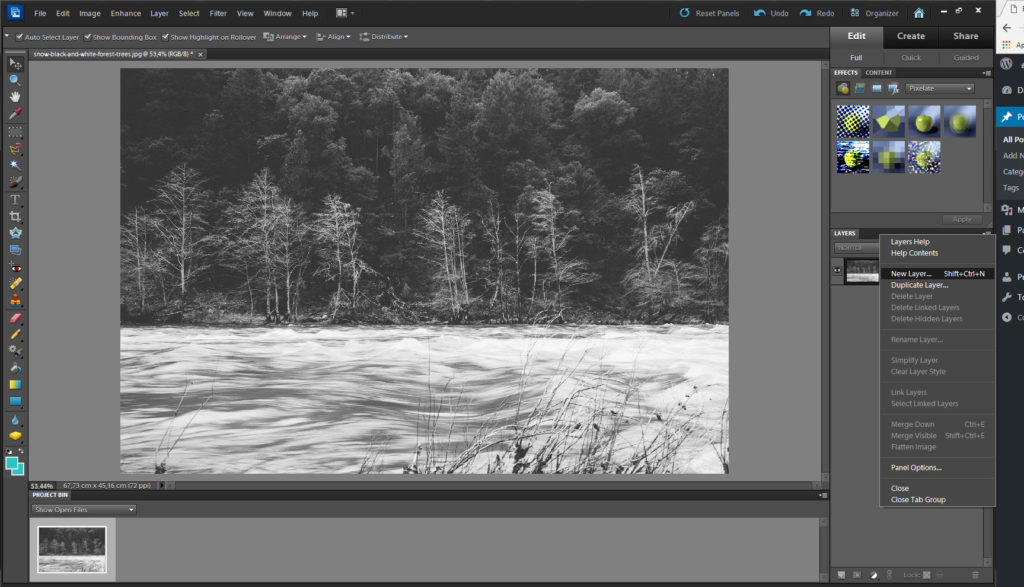
The first thing you must do is take your favorite photo and open it in Photoshop. Once you’ve done this, go to the right-hand side where it says Layers and select the icon below Create new layer (the last or second-to-last option, depending on the version you have).

With this new layer already created, go to the toolbar and look for the Paint bucket. Once you’ve clicked it, select the color black and paint the entire layer (you can do this with just one click, so it’s not too much work.)
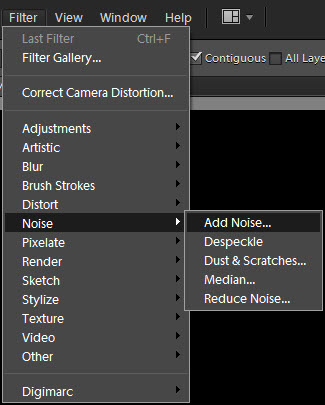
So far, you’re probably a little lost, but now the sure-fire trick begins. Go to the top where it says Filters, the Noise tab and then Add noise. In the new pop-up window, select the value 350%.  Confirm and go back to the photo.
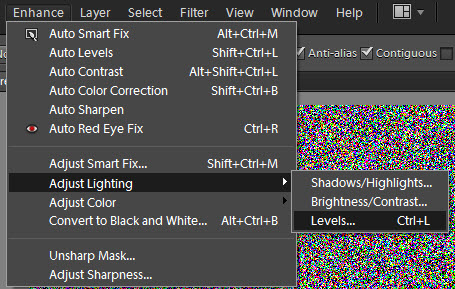
Once again, select the Filters option and then Blur -> Gaussian blur. Here the value should be pretty low, i.e. you only have to put 2%.

Now you have to change the option and go to Image, where you’ll click Settings and then Levels (if using Photoshop Elements, like in the sctreenshot, go to Enhance > Adjust Lighting > Levels). Here you’ll get a graph. Our advice is to mirror what we’ve done in the screenshot below (this way you’ll avoid trouble in the future, since the values are consistent for everything we need right now.)


Confirm this action and then you’ll be approaching the second-to-last step: Filter again -> Blur -> Motion blur. Provide the value you like best (a little lopsided is fine) and accept the changes.

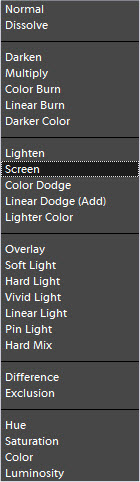
The last step is as simple as going to the right-hand side where the layer is and opening the menu with Normal as a default. Select Screen and the black in the photo will automatically disappear to make way for the created snowflakes.

Easy-peasy, right? That’s what we told you at the beginning of this article and we haven’t let you down. If you want to enhance this optical effect, duplicate the final layer as many times as you want, transforming it in case you’d like to apply more snow in certain parts of the photo (Control + T).

We hope you’ve enjoyed this and now you have this mini-tutorial as a reference for the future. By the way! It works best using photos with dark shades (or night settings) and not lights ones (or daylight settings).

You can now change the Google assistant hot-word on your mobile phone

If you’re somebody who looks like giving voice commands to your Android mobile phone, you might be interested to know that you can now change the Google Assistant activation hot-word from “OK Google.” In line with Google’s new range of smart speakers, you can now change the activation hot-word to “Hey Google”.

Google has been testing “Hey Google” for a couple of months now, but the feature is being rolled out to all eligible devices as we speak. Once the update lands on your phone you’ll have to reconfigure voice activation and train your phone to recognize your voice as you say the new phrase.

If you’re a fan of saying “OK Google,” or if you simply can’t be bothered to go through the rigmarole of changing your hot-word, you can stick with the original setting. There are no plans to discontinue the “OK Google” phrase, so you’ll be able to change your mind later should you make a choice you’re not happy with.

Do you use Google Assistant? What do you think of the activation hot-word “OK Google”? Are you happy that you finally have the option to change it? Let us know in the comments below.

Via: bgr and Android Police

Related Article:

How to Get Google Assistant to Cheer You Up

Follow me on Twitter: @PatrickDevaney_

Lightweight Android Oreo version coming out for phones with less than 1 GB RAM

If you’re running a low-spec mobile phone, that isn’t too powerful, or you’re subject to high data costs or slow download speeds you should be excited to hear about Google’s latest mobile operating system, Android Oreo (Go Edition).


Android Oreo (Go edition) is a lightweight version Android Oreo designed specifically for users with phones with 1 GB RAM or less. Google see this as a way of bringing the power of computing to more people around the world. On their blog they said:

“Android Oreo devices with 512MB to 1GB of memory will come with the all the Go optimizations. This Android Oreo (Go edition) experience is made up of three key components:

1) Operating System: Performance and storage improvements to the OS with data management features and security benefits built-in.

2) Google Apps: A new set of Google apps, designed to be lighter and relevant to the unique needs of people who are coming online for the first time.

3) Google Play Store: A tuned version of the Google Play Store that allows you to download any app, but also highlights the apps designed to work best on your device.”

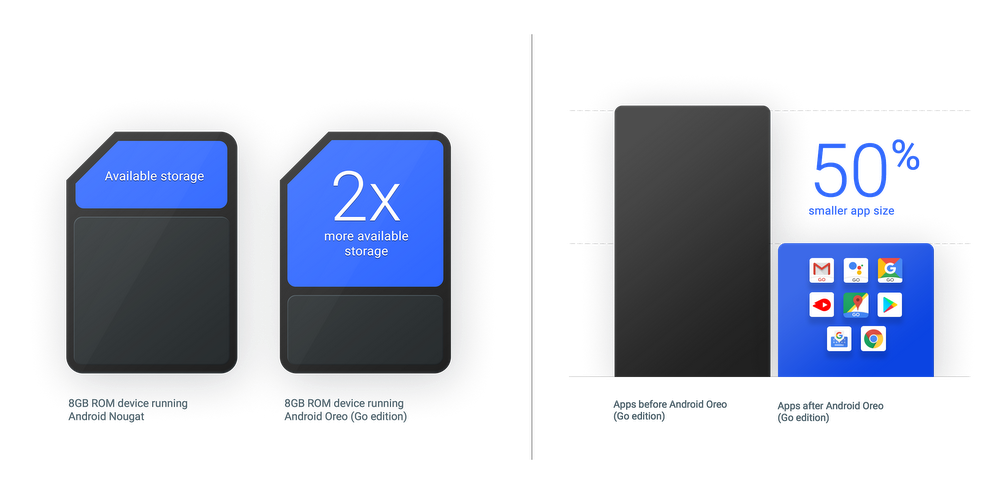
The operating system and the special GO apps will be 50% smaller than on the on the full version of the software, which means users will have access to twice as much storage space, if their phones only have 8GB of space to begin with. Google apps that will be getting Go version include Google Go, Google Assistant Go, YouTube Go, Google Maps Go, Gmail Go, Gboard, Google Play, Chrome, and an app called Files Go, which will be a new file management program.

On top of the smaller versions of the OS and apps, Google’s data saver features will be on by default. Google claim that this feature will save Chrome users more than 600mb of data per year and give them greater control over which background apps can use data.

Will Android Go be of use to you? Let us know in the comments below, if you’re excited about Google’s latest announcement.

All the Best Free Software for your PC

Via: Google

Follow me on Twitter: @PatrickDevaney_

Train and bus journeys easier than ever as Google Maps gets public transport step-by-step instructions

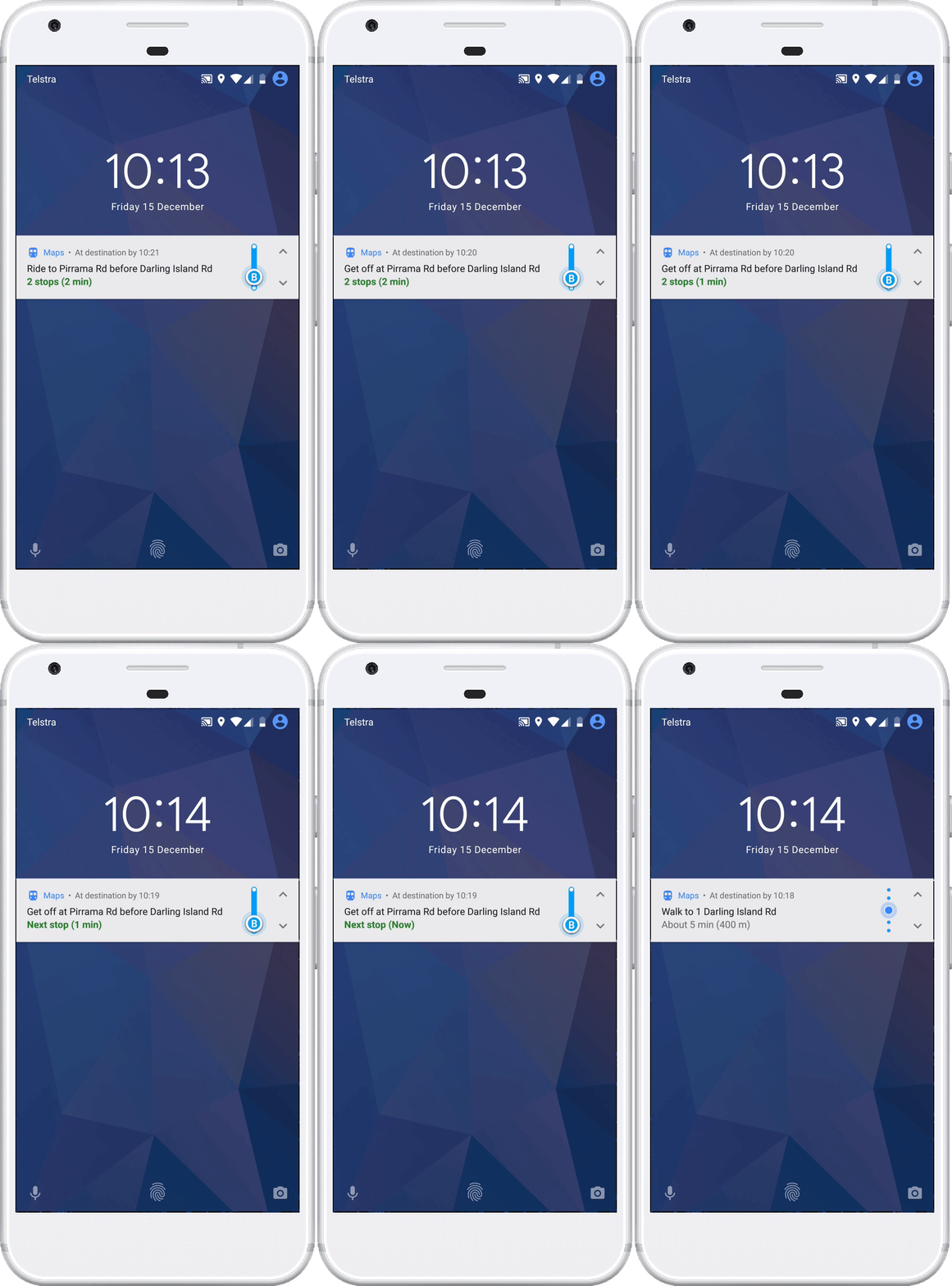
Google Maps has received a convenient update that’ll have apps like Citymapper worried. If you use Google Maps on your Android mobile, you’ll now be able to receive live step-by-step instructions for journeys on public transport. You’ve always been able to plan your route using Google Maps, but this new feature goes one better as the app will keep you updated throughout your journey.

Maps will send you notifications when you need to get off your bus or train and will keep you updated with expected ETAs.

Google hopes that this handy new feature will free up your attention for whatever else you fancy doing while traveling by train or bus. Rather than having to worry about when you’re supposed to get off you can browse through your social media, check the internet or just listen to music.

The new feature is already live on Android phones, and all you have to do activate it is type your destination > select transit directions > choose your preferred route, and then tap the Start button.

Via: Google

Follow me on Twitter: @PatrickDevaney_

Google Maps Download Google Maps
7
Citymapper Download Now
10

Facebook videos are about to become more annoying

The new “Watch” section of Facebook is to start playing adverts on videos before they start. Pre-roll ads are extremely unpopular among users, but Facebook thinks the revenue boost they’ll bring will ultimately be worth the added annoyance they’ll be adding to their user experience.

A Facebook bug put your photos at risk

Facebook believes that the “Watch” is much better suited for pre-roll advertisements, as users are already prepared for video content than when they’re merely scrolling through their news feed. Product manager Maria Angelidou-Smith said,

“While pre-roll ads don’t work well in News Feed, we think they will work well in Watch because it’s a place where people visit and come back to with the intention to watch videos… We’ll start with 6-second pre-roll with the goal of understanding what works best for different types of shows across a range of audiences.”

Facebook will help you find out if you’ve liked or shared Russian content

What do you think about his Facebook development? Will pre-roll ads be less annoying in the “Watch” section than they are in the news feed? Let us know in the comments below.

Via: Facebook

Related Stories:

How to stop Facebook Videos Playing Sound Automatically

Will you be Tuning in to Facebook Watch?

A Facebook bug put your photos at risk

Facebook Instant Videos could help save you Money


Follow me on Twitter: @PatrickDevaney_

Videoblocks by Storyblocks

Sometimes that creative spark isn’t enough. Without the right resources that spark can simply fizzle out without making much of a bang. Whether you’re working on a commercial project or a personal one, an idea will only ever take you so far. What you need to turn that idea into a successful creative project is access to lot of stock content, like the videos and images, and the tools necessary to mold them into your creative vision. For the former, you need look no further than Storyblocks.

By creators for creators

Storyblocks is a marketplace for stock content but it is also so much more. It you’re looking to create something special, it’ll give you access to images, videos and audio files so that your creative sparks get the chances they deserve. Storyblocks is also an artist friendly platform as it is the only platform where the creators of the stock content get 100% of the sale price. If you buy an image, video or audio file from the Storyblocks marketplace, you’ll be directly supporting the artist that created it. Storyblocks therefore is a by artists for artists platform.

Storyblocks Trends give you an idea of what types of stock content will be the most popular in the coming months

Access without limits

There is much more to Storyblocks than the marketplace as it also offers a flat subscription model that works for personal and commercial ventures alike. Membership gives users unlimited downloads from the three Storyblocks libraries; Storyblocks images, Videoblocks and Audioblocks. Having such a wealth of material readily available will revolutionize your creative process.

We’ve had access to all three Storyblocks member’s libraries for over a week now and it has really helped us create more fluid and dynamic videos for our articles. We’re really happy with the results we’ve been getting thanks to the broad range of content available. We try to keep our videos short and sweet but over the last few months we’ve often been frustrated by the lack of available content for us to use to help get our message across. You can see an example of the type of video we usually make in this article. You’ll notice that most of the images are static, some have been used twice, and some are clearly of a lower standard than the others.

One of the main frustrations for us was a severely limited amount of quality video footage we could use in our videos. We were limited to basic videos of mouse clicks or people typing and not much else. The Videoblocks’ library changed this for us overnight. You can see in this article an example of a video we made after gaining access to the Storyblocks images and Videoblocks’ members libraries. The video promotes an article we wrote on naval battle games for PC. I’m sure you’ll agree that this is a pretty niche subject but Storyblocks gave us access to a lot of great images and some fantastic video clips that really made our video pop.

New possibilities

In fact, all of the new material that has been made available to us has left us having to step our game. The Storyblocks Member’s Library has over 400,000 images, including vectors, illustrations, and photos to choose from; the Videoblocks Member’s Library has an incredible 115,000 video clips, including footage, backgrounds, and even after effects templates; and the Audioblocks Member’s Library has 110,000 audio tracks including music, sound effects, and loops. So much new stuff means we’re having to reappraise what is actually possible for us to achieve. We’re confident that as we get used to the new resources Storyblocks puts at our fingertips, our videos will become exponentially better.

The member’s libraries put hundres of thousands of images, videos and audio tracks at your fingertips.

Let your creative juices flow

Overall, we’re really happy with how Storyblocks has affected our creative process and how it has opened up new possibilities for our content department. We look forward to developing our skills to match the significant creative resources that we now have available to us and creating some excellent and engaging content to really grab our user’s attention.

If you’re a professional or if you work on your own personal creative projects Storyblocks is for you. Whether you’re looking to sell your own work on the marketplace or gain access to millions of images, videos and audio clips to help you complete your next project you’ll be happy you gave Storyblocks a try. If you do, make sure to let us know what you’re up to in the comments below because we’d love to see what magic you’re able to create once you’ve got the Storyblocks marketplace and libraries working for you.