The Best Apps and Services for Learning How to Play an Instrument

It’s happened to all of us at least once. After listening to some great song or hearing someone play an instrument like a pro, you get bitten by the music bug. Your next step: run out to a musical instrument shop and purchase a guitar, violin or keyboard. You’re beyond excited… until you realize that you have no idea how to play it, and you’re far too busy with work or school to even think of signing up for classes!

Mujer tocando el violín

This realization probably tempered your enthusiasm, causing you to stash that brand-new instrument away in a closet. But it doesn’t have to be like that. Now you can learn how to play an instrument like a real virtuoso, because you have a hidden ace up your sleeve: apps and online services!

In today’s article, we’re going to share a roundup of our favorite apps and websites for learning how to play an instrument in a simple, convenient way. Getting your start in the world of music has never been easier!

Apps for learning how to play instruments

Now that phones and tablets are so widespread, there’s an extraordinary selection of apps you can use to start learning any instrument. Below are the ones we like most.

Garageband

Garageband

Garageband is known as Apple’s star program that anyone can use to compose music. In fact, Rihanna used this app to compose her hit song “Umbrella.”

But Garageband is far more than a composing program: it’s also an excellent app you can use to learn any instrument. You’ll have access to a veritable orchestra of virtual instruments on it, so you can practice and enjoy all your favorites.

Garageband’s only drawback is that the app doesn’t offer tutorials to teach you how to play. It simply lets you use your selected instrument so you don’t have to go out to a store and buy it. Another potentially disappointing aspect for many users is the fact that it’s only available for devices with macOS and iOS.

You can download Garageband quickly and easily below.

Garageband DOWNLOAD
8

Simply Piano

Do you own a piano? Have you always wanted to learn how to play it like a professional? Then you have to check out Simply Piano! By using this free app, you’ll start to understand the basics of this instrument in just a few hours, and you’ll even start playing your first songs on it.

Simply Piano is easy to use: just place your mobile device beside your piano and follow the different tutorials on the app. It has finger exercises, sheet music categorized by level of difficulty, and of course, everything you need to be able to read music like a pro.

One truly interesting feature of Simply Piano is that the app can listen to you play the piano and give you feedback and tips on how to improve. What’s more, it’s completely free!

You can download Simply Piano quickly and easily below.
Simply Piano DOWNLOAD
9

Yousician


Want to learn how to play the guitar, the bass, or the ukulele? Are you a frustrated singer who has no time to take voice lessons? Then you’ll love Yousician!

This wonderful app will teach you how to master these fantastic string instruments through step-by-step tutorials for levels ranging from beginner to advanced. Furthermore, the app offers more than 1,500 exercises and challenges so you can practice and polish your skills every day.

One of the most interesting aspects of Yousician is that, in addition to tutorials, the app includes musical theory classes. That way you can learn the fundamentals of harmony and compose your own songs. Oh, and don’t forget that it’s completely free. You have no excuse not to play the ukulele the next time you’re at a party with friends!

You can download Yousician quickly and safely below.

Yousician DOWNLOAD
9

Uberchord

Uberchord

Uberchord is an excellent resource for anyone who wants to learn how to play an electric guitar. Many people say it’s like having a real-life guitar teacher on their iPhone.

The app offers tutorials and classes on the chords, the tempo and how to read music. They are categorized by difficulty, making it easy to learn how to play the guitar at your own pace.

One of the most interesting aspects of Uberchord is that the app can listen to you play a song and give instant feedback. That way you can gradually adapt the way you play the guitar, and you’ll improve before you even know it.

You can download Uberchord for free below.

Uberchord DOWNLOAD
8

Perfect Piano

Perfect Piano is an excellent app for learning how to play the piano. It’s capable of displaying all the keys on a piano and even emulating a full keyboard when you put several mobile devices together.

Perfect Piano has several modes designed to help you learn to play this instrument. “Learn to Play” mode features interesting lessons and tutorials you can use to learn the basics of the piano and different songs to practice with.

What’s more, it has Multiplayer Game mode, so you can play different songs alone or, if you prefer, with another aspiring piano virtuoso. There’s no better way of playing an instrument than having a blast with it.

You can download Perfect Piano for free below.

Perfect Piano DOWNLOAD
8

Learn Musical Instruments

Learn Musical Instruments

Learn Musical Instruments is an app designed to teach you how to play musical instruments as fast as possible. Here you’ll find piano, guitar, ukulele, trumpet, drum and violin classes. It has everything you can imagine and more!

One of the strengths of Learn Musical Instruments, aside from its variety, is how easy its tutorials are to follow. They are categorized by level (beginner, intermediate and advanced), so regardless of whether you have previous knowledge, you’ll always learn something new.

Another interesting feature: Learn Musical Instruments can listen to you play your instrument and correct you in real time. That way you’ll feel as if you had a real-life music teacher on your phone.

You can download Learn Musical Instruments for free below.

Learn Musical Instruments DOWNLOAD
8

Online resources to learn a musical instrument

While apps are incredibly versatile, since you can use them anywhere on your mobile device, not everyone will find them useful for learning an instrument. If you’re the kind of person who prefers to sit in front of your desktop monitor, we have a good selection of online resources to learn how to play an instrument.

JustinGuitar

Página de JustinGuitar

JustinGuitar is a comprehensive website for anyone who aspires to master the guitar. You can enjoy more than 900 guitar lessons taught by Justin himself. They range from the most basic concepts (how to read music, identify and play chords, etc.) to the tricks of a true professional.

One really useful aspect of JustinGuitar is that, unlike what we find on other websites, each lesson is  accompanied by a video. That way you won’t get lost during the lesson, you’ll learn quickly, and the subject matter will stick. In addition, the website has a useful mobile app to get the most out of your classes.

You can visit the JustinGuitar website here and download the app below.

JustinGuitar DOWNLOAD
9

Hoffman Academy

Hoffman Academy

Hoffman Academy is a website that offers piano classes for children, and ultimately for anyone who is new on this instrument. Here you’ll find more than 100 free lessons to learn the basics of how to play the piano, starting with how to recognize the keys or understand rhythm.

Once you master all the songs on the website, in theory, you can keep learning on your own. That said, if the method works for you, the site offers a Premium service (paid) that you can use to continue your classes.

You can visit the Hoffman Academy website by clicking here.

Fiddlerman

Página de Fiddlerman

If you want to learn how to play the violin, definitely check out Fiddlerman.com. This comprehensive site offers completely free violin lessons in the form of easy-to-follow videos.

If you’ve never played the violin before, the idea of learning through online lessons might be a bit intimidating. Don’t worry, because the lessons on Fiddlerman start at the absolute beginner level, in other words, they cover topics such as how to hold a violin and how to use the bow correctly.

You can visit the Fiddlerman website by clicking here.

Drum Lessons by Drumeo

Página de Drum Lessons

Drum Lessons is a useful website where you’ll find countless videos to teach you how to play the drums.  They are offered for free by some of the teachers at Drumeo, a prestigious drum school with online classes.

On Drum Lessons, you’ll find basic videos for beginners and ones to help you begin to play the drums with a good rhythm. If you like the results, be sure to check out Drumeo to access the rest of the online classes.

You can visit Drum Lessons by clicking here.

We hope you liked our selection of apps and online resources to help you learn how to play an instrument. What’s your favorite instrument? Tell us about it in the comments section!
The Best Disney+ Series of 2020

Disney+ made its long-awaited debut in the Spanish market earlier this year. After being exclusively in the United States for some time, the platform has reached other countries, and a large part of the world has jumped at the chance to subscribe and enjoy series, movies and documentaries with Disney’s seal of quality. Here at Softonic, as we head towards the end of a strange year marked by COVID-19, we want to share our roundup of the best Disney+ series of 2020, including already-released shows and ones that are coming soon.

Diary of a Future President

One of the first new series of the year, Diary of a Future President premiered on January 17, 2020, when nobody knew what was about to hit us due to the pandemic. The series follows the life of Elena Cañero-Reed, a girl who aspires to be the future president of the United States.

She dreams of holding the highest office in the land, but for now, she’s just a teenager who’s trying to survive her first year of high school in Miami. To do that, she’ll rely on the help of her best friend Sasha, her brother Bobby, her mother Gabi, and her mother’s new boyfriend Sam.

Watch Diary of a Future President

The World According to Jeff Goldblum

Although the first episode premiered in late 2019, season one of The World According to Jeff Goldblum didn’t wrap up until January 2020. Very well-received thanks to Goldblum’s incredible charisma, this is a documentary series that brainy viewers are sure to find entertaining and uplifting.

In each of its 12 episodes, the actor pulls on the thread of a familiar object to unravel a world of astonishing connections and amazing science and history. What’s the story behind a simple pair of sneakers? What about ice cream? Where does the coffee you drink every day come from? The simplest objects have can have incredible and even whimsical back stories, which are told through episodes full of curious facts and wit. Seeing the extraordinary in the ordinary is what The World According to Jeff Goldblum is all about.

Watch The World According to Jeff Goldblum

Pick of the Litter

Similar to The World According to Jeff Goldblum, the series Pick of the Litter first aired on December 20, 2019, but the first season didn’t end until January 24, 2020. That’s why we consider it one of the new series of 2020.

Pick of the Litter is a beautiful series for the whole family to enjoy. Over the course of six episodes, we follow the ups and downs of a group of dogs with a very special job: serving as guide dogs for the blind, one of the most beautiful things a dog can do. Inspired by the documentary of the same name, this series is a bit of a tearjerker, so get your Kleenex ready (just in case).

Watch Pick of the Litter

Star Wars: The Clone Wars

In response to what happened with Star Wars: The Clone Wars, perhaps the best thing we can say is a big THANK YOU! When Star Wars became a part of the Disney franchise, the first thing the company did was to get rid of the expanded Star Wars universe that had already been created. There were decisions that fans liked, but since you can’t please everyone, there were others that hurt, such as the cancellation of the formidable Star Wars: The Clone Wars.

But much to our surprise, Disney then announced that the animated series would return to TV in 2020, and specifically and exclusively to its Disney + platform. That way, the sci-fi series not only picked up right where it left off a long time ago, continuing with a seventh season, but also put an end to that fascinating interim between Episodes 2 and 3 of Star Wars. To top it off, the quality of the last season was very high, impressing both diehard fans and new viewers alike. The experts are already saying it: there is nothing like listening to the people who made you a success in the first place. They are the ones who always lead the way.

Watch Star Wars The Clone Wars

Marvel’s 616

When Disney acquired Marvel’s seal of quality, we all sensed that the maker of Mickey Mouse was going to launch a huge number of products under its umbrella. All the new comics and reissues were accompanied by a major package of films from the Marvel Cinematic Universe that has given us so much joy, as well as a string of series that have reached other streaming platforms… and now Disney +.

The first one to be released on the platform will be Marvel’s 616. Although we had anticipated stories about the characters in the movies (the pandemic has delayed the filming of many of these series), the first show to debut will be a documentary series that deals with specific topics about the House of Ideas. For example, we’ll see how Marvel comics are created, how their authors are inspired, how superheroes are adapted for different countries, collectibles, cosplay, etc.

Scheduled to premiere in a few weeks (the exact date has yet to be announced), the series will consist of the following episodes, each directed by a different director: “Japanese Spider-Man”(David Gelb), “Higher, Further, Faster” (Gillian Jacobs), “Amazing Artisans” (Clay Jeter), “Lost and Found” (Paul Scheer), “Suit Up!” (Andrew Rossi), “Unboxed” (Sarah Ramos), “The Marvel Method” (Bryan Oakes) and “Marvel Spotlight” (Alison Brie).

Website Marvel’s 616

The Mandalorian

This year’s most eagerly awaited premiere on Disney+ by (very, very) far, the one that Star Wars fans have been waiting for since late 2019, is season two of The Mandalorian. Our beloved space adventurer is set to return after causing a sensation last year and keeping us glued to our screens for eight exciting episodes.

Season two of The Mandalorian will also have eight episodes. The first will premiere on October 30, so get ready to have the best Halloween night of your lives. The season finale will air on December 18, right before Christmas.

The second season is expected to pick up right where the first one left off (WARNING: SPOILERS AHEAD!). For example, it will continue to explore Mando’s relationship with The Child. Jon Favreau, creator of this series, has already said he wants to deepen this curious relationship, so we’ll surely see more of it. Likewise, our beloved Giancarlo Esposito, TV’s bad cop, will reprise his role as Moff Gideon, the former officer of the Imperial Security Bureau who is searching for the Mandalorian and Baby Yoda. Of course, there are plenty of unanswered questions, but we’ll have to wait for these eight episodes to satisfy our curiosity.

Watch The Mandalorian

Upcoming series

As we mentioned above, the wretched pandemic has made 2020 a turbulent year for TV series. Disney + had been planning to release series such as Scarlet Witch and Vision for the end of 2020, but it has yet to announce the exact date.

Something similar happened with Falcon and the Winter Soldier, which had to stop filming suddenly due to the COVID-19 outbreak and go into lockdown. Its premiere had been scheduled for 2020, but all signs suggest that we’ll have to wait until 2021, unfortunately, due to the pandemic.

So, that’s our rundown of series that Disney + has brought to us in 2020. Which one is your favorite? We have no doubt about ours (Star Wars theme music sounds).

How to avoid cheaters in Among Us

If there’s one downfall of online multiplayer games, it’s cheaters. Among Us has fallen prey to those nefarious parties that’lll do anything to secure victory. So how can you avoid the cheaters?

The answer has a few components to it. We’ll dive into what kinds of cheating you may encounter in InnerSloth’s social deduction mega hit, how to avoid them if you can, and what, if anything, the developer is planning to do about it.

Here are the most common types of cheating in Among Us:

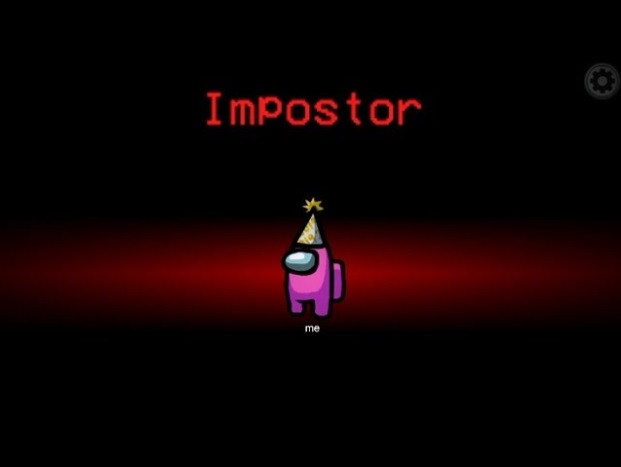
  1. Always Impostor
  2. Read dead chat
  3. Move speed hack
  4. Wall hacking
  5. Voting interference
  6. Backchannel chat

Let’s get right into it.

Among Us DOWNLOAD
9

Types of cheating

Among Us isn’t unique in having cheaters; nearly every major video game has to deal with these kinds of players at some point. However, in other games, the hacking and cheating is usually to get a reward or currency more quickly. In Among Us, though, there isn’t a currency, there aren’t any achievements, and there are no rewards.

It leaves one wondering why players would hack at all.

There are plenty of modpacks and hacks available for the game. Players can download these hacks and have access to a wide range of abilities that they couldn’t use before. It might include an ability to always be the impostor, moving faster than all the other players, and insta-killing the entire lobby.

The cheating can come in a few forms that all have different results. Keep reading to find out how to identify them and what you’ll see when they occur.

Always Impostor

There’s a hack that allows a player to always be the Impostor. It usually takes a few games to figure this out, so if you like to rotate lobbies each match, you won’t notice it right away.

It does exactly what it says. If you noticed that the same player has been the Impostor for more than two matches in a row, they might be hacking

Read dead chat

As players might now, the chat of the dead exists in its own realm. When you’re killed, players that are still alive can’t read your messages, but you can talk to other dead players.

Some hacks allow a player to read the chat of dead players. It could give them an edge in the game if they’re a crewmate. You might see a player directly responding to what you said, which is a pretty good sign they’re hacking.

Move speed hack

This cheating method is pretty easy to spot. By default, all players (crewmates and Impostor) move at the same rate. While there are differences in how the two roles see and interact, movement is a constant for all players.

If you notice a player moving faster than everyone else, then they’re probably hacking.

Wall hacking

If you’ve played the game, you’ll know that you become a ghost when the Impostor kills you. This mode allows you to traverse the map without walls acting as a boundary.

Wall hacking allows the player to circumvent the wall restrictions and move through the map unimpeded. It’s easy to spot; if you can see the player is alive and is walking through walls, they’re definitely hacking.

Voting interference

One of the most important moments of the game is the meeting and vote period. You’ll notice the time allotments to this section before the game starts. There’s an amount of time given to the meeting, and a different amount given to the voting period.

Hackers can completely get around this by ending the voting and discussion period early. If you notice there’s still time on the clock when the meeting ends (and people still haven’t voted), then somebody is probably hacking.

It would be hard to figure out who, though, unless someone confesses in chat.

Mass killing

The Impostor is the only player that has the ability to kill players. However, this ability is usually curtailed through a cooldown. The player has to wait a certain amount of time before they can kill again.

Some hackers are dissatisfied with this mechanic. They can eliminate that cooldown altogether, allowing them to wipe out the entire crew in a matter of seconds.

This function is another hack that’s easy to spot. If you know there’s a kill cooldown and you see the Impostor laying waste to your crewmates, they’re probably hacking.

Discord DOWNLOAD
8

Backchannel chat

This hack is pretty tough to spot. Players may sometimes join public lobbies together. As a result, they all have access to the same information. If one of them goes down, everyone in the Discord knows who it was and how to vote.

Playing this way ruins the spirit of the game. The Impostor’s identity is hidden from everyone for a reason; using a backchannel to upend the mechanics of the game just sours the experience.

If you notice everyone making the right vote the first time with no discussion, you’re probably seeing backchannelling at work.

What to do about cheaters

Without a robust reporting system, anti-cheat tools, and other features in place, there’s little players can do about any cheating they witness. There are a couple of things you can do to take your game experience back into your own hands.

Rotate lobbies

If you’re playing in a public lobby, just back out and find a new one. Try not to leave in the middle of a game, though. You can get punished with a 5-minute wait time for leaving a match intentionally.

This method is your best and only defense against cheaters if you aren’t hosting the game.

Use private lobbies

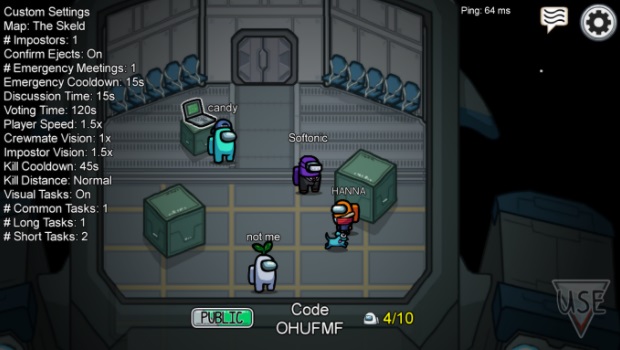
If you want more control over the game experience, put together a few friends, agree on some rules, and start up a private lobby. You can all join by using the code at the bottom of the screen.

This technique might be the best thing to do if you want to play with friends anyway.

Kick players

If you’re the host of the game, you have a nice moderation tool at your disposal: you can kick out any players you want. Take advantage of this function if you notice any of the above cheating behaviors. Removing them from the game is better than starting a new lobby and losing the crew you have.

What will InnerSloth do?

The developer of Among Us is already aware of the issue. Despite the small team, Forest Willard (InnerSloth co-founder and programmer) talked about the need for better multiplayer tools moving forward.

One of those tools includes an account system, which doesn’t currently exist in Among Us. Tying players to accounts will allow InnerSloth to take reports and ban hackers more efficiently, which will improve the overall experience.

Willard also spoke about the desire to implement more anti-hacking tools and features into a future update. This would aim to prevent the hacking altogether.

It’s doubtful that the bad experiences with hackers in Among Us will have any negative impact on the game’s lifecycle. InnerSloth have already announced a total code rework of the game and canceled a sequel, favoring adding content into the base game itself.

Conclusion

The title has seen a massive popularity spike due to the deduction portion of the game. It’s unlikely that hackers will be able to interfere with or take away what made Among Us so popular in the first place.

So what about you? Have you had experiences with hackers? What did you do about it? Let us know in the comments below!

10 Things You Should Never Do In Among Us

With tons of new players jumping into their spacesuits for InnerSloth’s hit game, we thought it would be a good idea to give players some tips on what not to do when playing Among Us.

Keep in mind that this list is by no means exhaustive, and updates to the game could alter how people play.

So, here are 10 things you should never do in Among Us:

  1. Cheat
  2. Travel alone
  3. Make assumptions
  4. Quit mid-game
  5. Fake tasks as crewmate
  6. Vote without reason
  7. Accuse without reason
  8. Ignore a dead body
  9. Skip tasks
  10. Call meetings without reason
Among Us DOWNLOAD
9

Don’t cheat

Many players, especially those on PC, will take advantage of other programs like Discord to communicate and play with friends. The problem is that as soon as one of them is killed, everyone knows who the Impostor is. This aspect kills all of the fun.

Play in the spirit of the game. If you get taken out, don’t ruin the fun for your crewmates. Laugh as they get taken out, oblivious to the killer. Enjoy the ride. The game should be exciting and nerve-wracking, but you eliminate that enjoyment if you use voice chat to cheese the game.

It goes without saying, but don’t use hacks to alter how the game plays. Some cheats allow players always to be the Impostor, or to take control of other crewmates. Keep an eye out for these, and kick those players if you can; they tend to ruin the experience.

Discord DOWNLOAD
8

Don’t travel alone

As a crewmate, you’ll often find that it’s not easy to get tasks done if you’re following somebody else. While you might be tempted to zip off to prime the shields on The Skeld or tend to the plants in the greenhouse on Mira HQ, it’s best if you stick with someone. Ensure they’re doing tasks, and take the time to do a job if they end up in a room where you need to be.

Traveling alone doesn’t just make you a target for the Impostor; it also calls your alibi into question if a body gets found. Travel with a partner, and then check to see who has and hasn’t finished their tasks when the meetings come up. Let people know if you’re finished so you can escort them, or if you still need to do jobs so they can accompany you.

Don’t make assumptions

It’s easy to go along with the crowd and vote out a player; the problem is that this isn’t usually good for the crew. Impostors like to sit back and wait for the team to eat itself up. If you’re busy making assumptions, that usually works in the killer’s favor.

When you assume a player is telling the truth or lying, you almost play into the hand of the Impostor. If it’s a confused crewmate, you’re buying into a falsehood that could lead to a crewmate being ejected. If it’s the Impostor themselves, you’re trusting the one player you actually shouldn’t trust.

Please don’t believe anything until you see it for yourself. You should verify the information before acting on it and always present evidence with the crew’s best interests in mind.

Don’t quit mid-game

This element is a common thing we see when we play Among Us. Someone will make a false accusation and then quit, or players leave the game for one reason or another. It’s frustrating, making it hard to find quality lobbies to play in for extended periods.

While server issues do crop up, always avoid voluntarily leaving in the middle of a game.

When you do that, you pull the balance in favor of the Impostor; there’s one less crewmate to worry about now and fewer people to do tasks. Don’t leave your crew shorthanded and always see a game through to the end, if you can help it.

Don’t fake tasks as a crewmate

While it may be tempting to fake specific tasks (especially visual ones), you can’t lose credibility with your crew. You’re supposed to be on the same side, so you have to be honest with them. Once they realize you lied, a couple of things happen: firstly, you lose credibility, and secondly, you’re now a suspect.

If you didn’t get to a task or aren’t immune, don’t lie to suggest that you should be. You’re only making it harder on your team and easier for the Impostor. Your default mode should be honesty. If you plan on sticking around on the server, you also want to build up that kind of credibility when you’re the Impostor; it makes your lies more believable.

Don’t vote without reason

While it’s tempting to try and get the Impostor as quickly as possible, good Impostors will turn that energy against the crew at the first chance they get. Voting in a frenzy is a bit like shooting a machine gun at a fly. You probably won’t hit the target, and now you’ve made matters worse.

If you vote off a crewmate, that’s one step closer to victory for the Impostor.

This behavior tends to spiral; fewer crewmates remaining means the team is more desperate to find the Impostor. That makes it easier for the killer to pin it on somebody else.

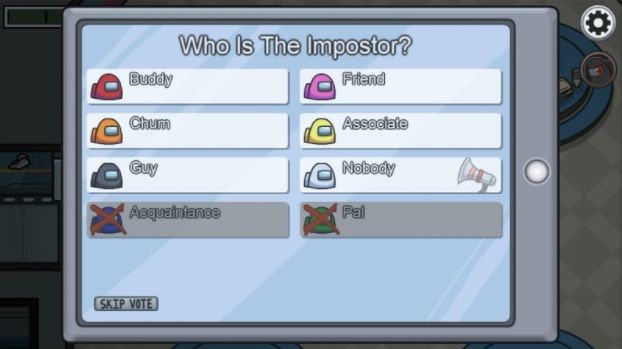
Keep your wits about you and don’t rush to judgment. There’s a ‘skip’ button for voting if you need it, so be sure to use it instead of ejecting the innocent.

Don’t accuse without reason

Don’t make accusations that you can’t back up. You’ll get two people ejected if you’re wrong: the person you’re accusing and then yourself.

There’s a pretty obvious behavior emerging among players. If one accuses another, they’ll eject the accused. If that player isn’t the Impostor, they’ll remove the accuser.

That’s two crewmates down, and the Impostor didn’t have to kill either of them. Don’t make the Impostor’s job any easier. Be measured, be responsive, and get hard evidence.

Never ignore a dead body

If you find someone dead, report it immediately. You need to get the facts and testimony from everyone while it’s fresh in their mind. The longer the game goes on, the muddier the information gets. You need to report it as soon as you see it, so the Impostor doesn’t have a chance to kill again in the same round.

You also don’t want to be seen leaving the area where the body is, for obvious reasons.

Don’t skip tasks

One of the two ways the crew can win is if everyone gets their tasks done. If you take too long to do this, you’re putting your team at risk of losing. Get your tasks done, then keep moving.

Even if you die, you can still move around the ship and get work done while you’re a ghost; in fact, it’s usually easier this way. You’re not restricted by walls or visibility anymore, and you don’t have to worry about being murdered by the Impostor since you’re already dead.

As a Ghost, your only job is to finish up your tasks. Make sure you continue to help out your crew, even in death.

Don’t call meetings without reason

Emergency meetings are a useful tool for the crew to get information without reporting a body. You can use emergency meetings to bring forth any evidence against a player. The problem is, it can be abused, too.

Emergency meetings will interrupt player tasks and bring everyone back to the cafeteria. Not only that, but players only get a limited number of these. You can’t afford to waste them. Stay smart and only call a meeting when it’s absolutely necessary.

Conclusion

With this guide complete, you’ll hopefully become a better crewmate and player. Do you have any ideas on other things you should never do in Among Us? Let us know in the comments down below!

How To Win In Among Us As An Impostor

With the massive spike in popularity of InnerSloth’s social deduction game, many users are left wondering how they could be a better Impostor in Among Us.

It’s no easy feat; you have to manage the distrust and control the game right from the jump. If you’re slacking in any facet of play, you’re leaving an opening through which player suspicion can crawl.

Not to worry, though. We’ve got the best tips and tricks to win in Among Us as an Imposter.

  1. Know the maps and settings
  2. Use sabotage wisely
  3. Kill with discretion
  4. Learn the social half of the game
  5. Create trust
Among Us DOWNLOAD
9

Know the maps and settings

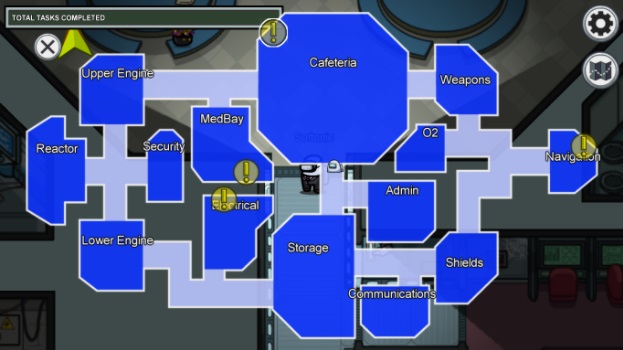
If you don’t understand the map’s layout, you’re going to be at a huge disadvantage. It’s in your interest to take the time to study each of the three locations: The Skeld, Mira HQ, and Polus.

You should have a good idea where the tasks are, how long they take, the value they add to the meter, and which tasks are visual. Don’t try to fake visual tasks; you’ll get caught pretty quickly.

You’ll also want to pay attention to and learn the vent connections. You can’t just hop into a vent and go wherever you want; they’re not all connected. You’ll need to understand which ducts are connected to which so that you can use them most efficiently.

Learn where the cameras are on The Skeld and Polus. Memorize what rooms and areas they observe. If you get caught venting on-camera, you’re going to be outed pretty quickly, so it’s good to know where you should and shouldn’t be doing sneaky Impostor activities.

As for the settings, these are critical. You need to have your cooldown timers memorized and remember what the vision size is for players and the Impostor. By default, there’s a slight difference in visibility. Use this to your advantage and understand how it impacts a player’s ability to see your shenanigans.

Also, take note of the move speed. Higher speeds will render your sabotage little more than an inconvenience, so you’ll need to adjust how you use them. Lower move speeds make a nuclear meltdown more dangerous.

Learn the emergency meeting cooldown time; that’ll come in handy near the end of the game if you’re caught out but can get in the last kill. If the meeting cooldown is longer than your kill cooldown, you won’t be able to snag the final kill if the remaining players have realized you’re the Impostor.

Use sabotage wisely

The Impostor can lock doors and shut off critical systems of the ship or station. Most players use this activity to try and kill everyone else, but there’s more than one use for sabotage.

Firstly, remember that as of now, players reporting a body will fix the deadliest sabotages automatically (reactor meltdown and O2). However, all sabotage, aside from doors, will prevent the emergency meeting button from being pressed. You can use this to buy yourself a bit of time to kill someone who spotted you.

Don’t be afraid to fix your own sabotage to gain trust with players. If you’re faking a task in the reactor room, you can throw the suspicion off you by setting off the reactor and fixing it with a buddy. Make sure you don’t kill that person, though, as they’ll vouch for you in chat if they have to.

Use the communications sabotage to get the cameras off you, clear the door log, and hide vitals signs on Polus. This element gives you a better window to get in a kill if you need to.

When you shut off the lights, you could spend time around a lone player without killing them. It could buy you more trust currency as well, as you could have taken them out if you wanted to.

Always try to find ways to use sabotage to play the long game.

Kill with discretion

You can’t just kill willy-nilly.

Well, you can, but it’s not a good idea. Pick your targets intelligently. Ensure that you take out the right people first and keep certain players alive until near the end of the game. So, how do you make this decision?

Immunity

Players can be declared ‘immune’ by performing visual tasks or otherwise having an airtight alibi. These players should be your first targets.

The reason for this feature is that immune players are like a ‘class’ of crewmates, and they’re aware of anyone who isn’t socially considered ‘immune.’ The Impostor will usually be included in that group, so if only the non-immune players are dying, you’re closing the dragnet in on yourself.

Target the players that everyone agrees can’t possibly be the Impostor. You need to preserve the pool of suspicious players so that you’re not absorbing all of the risk.

Relationship

If you’ve gotten in someone’s good graces, leave them alive unless they’re an immune player; in that case, you still need to keep them alive as long as possible.

The same is true with an enemy. Killing the people that are actively against you is another way to arouse suspicion.

You need to preserve all extreme relationships as long as you can.

Leadership

If you notice one player taking the lead on everything, analyze their leadership style. If they’re calling for random ejections, get rid of them quickly. If they’re more measured and guiding other players to think logically and not jump to conclusions, keep them around. You can manipulate the latter, but not the former.

Opportunity

This aspect should be the lowest consideration. Don’t kill someone just because you have the chance. In fast-paced games, this may seem like the best idea, but windows of opportunity close quickly.

When they do close, a player usually discovers the body, so you won’t have much time to get away. Create good, vast opportunities, and then execute.

Learn the social half of the game

One of the biggest problems with Impostors is how little attention they typically pay to the communication that takes place before voting. This area is where all of your tactics will be informed.

Look for emerging leaders in the game, see who’s not speaking, and see who’s being accused.

If you see one player accuse another but fail to get the votes, kill the accuser as soon as you can, then report the body yourself. You’ll immediately throw suspicion onto the accused player.

If the game moves quickly and everyone votes for the first accused players, your tactics should consist of total silence and hit-and-run play.

The player energy in meetings is the biggest thing that dictates your playstyle, so you need to stay adaptable. Remember how people voted and what the attitudes were; take advantage of that once you get back into the game.

Create Trust

It’s essential that players trust you when you’re the Impostor. It’s the only good way to throw suspicion directly if you ever need to. So, how do you create trust?

Sticking by players without killing them is always an excellent way to do it. Do some tasks with them, ‘protect’ them, and be around them when the body is found.

Take the time to vouch for others during meetings as well; they’ll see you a bit differently. If you catch some people doing visual tasks, vouch for them as quick as you can. Just remember, they’re a target.

Generating trust is the only way to protect yourself in the social setting if anyone gets suspicious. You remove the idea from gamers’ heads before it ever gets there. You also carry more weight when you make assertions, which is always better than catching heat.

Conclusion

Hopefully, this article has been a helpful guide to making you a better Impostor. You should now be better prepared to go out and wreck the crew.

Are there any tips and tricks we missed? Do you have anything to add? Please leave them in the comments below!

The Best Programs for Illustrators of Any Level

Whether you’re an amateur illustrator or a professional in the digital art world, you need the right tools on your PC to create the perfect image.

Adobe Photoshop

But selecting the best software isn’t always easy. There are countless programs for drawing and editing images at your fingertips, and each one promises to deliver everything you need to succeed. Which one should you choose?

Regardless of your drawing style, a good illustration program will turn any sketch you have in mind into a true masterpiece. Today’s article contains a roundup of what we consider to be the best drawing programs on the market today. We hope you find them helpful!

What should good illustration software be like?

Before we start our list, let’s go over a few of the characteristics we look for in good illustration software.

It should be versatile- First, a good drawing program needs to be versatile and give the artist full control over the medium. That is, it must have a number of tools and effects that emulate the real media that the author wants to use to create works of art.

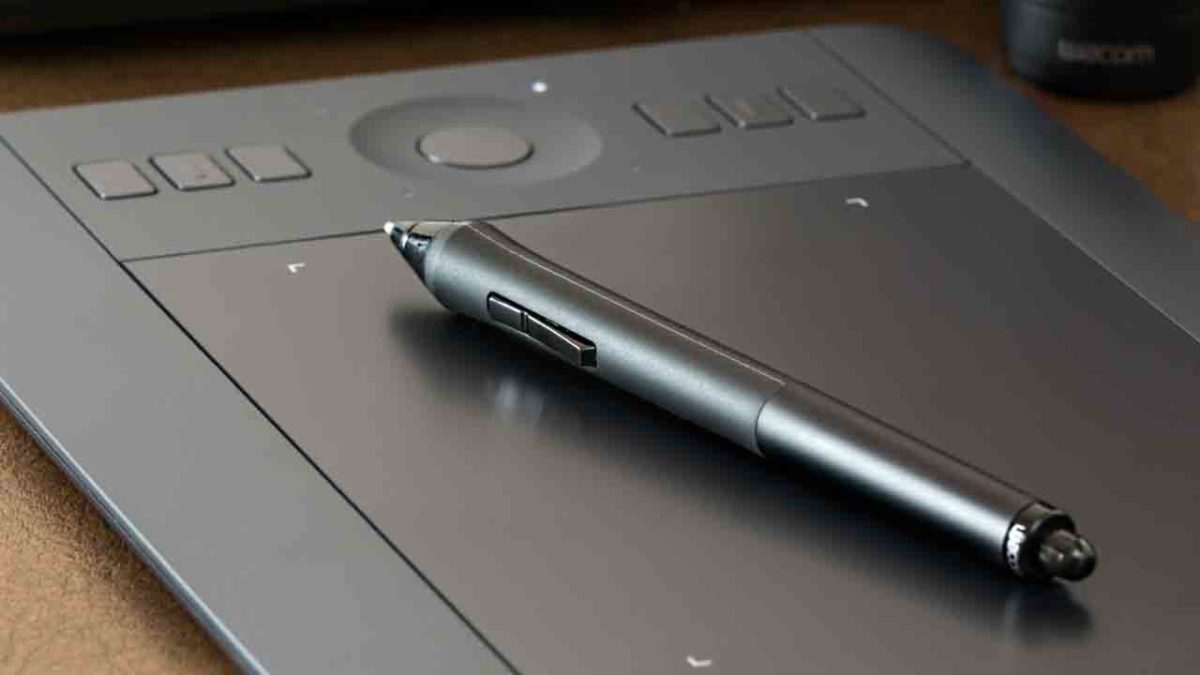
It should be optimized for tablet use- Every self-respecting artist or aspiring illustrator uses a drawing tablet. Although there is a wide range of drawing software on the market, not all programs are optimized for use with a pen and tablet.

It should have tool shortcuts- A good drawing program is so complex that its features can seem overwhelming. To make life easier for the artist, the program needs to include shortcuts for both the keyboard and the tablet buttons to perform tasks such as undo brush strokes, create layers, etc.

The best drawing programs of 2020

Without further ado, here is a selection of what we consider to be today’s best programs for creative minds. All of them are accompanied by a description and corresponding download button.

Adobe Photoshop

Adobe Photoshop

At the top of our list is a classic among illustration and image editing programs: Adobe Photoshop. Many people are unaware that Photoshop is not only an excellent photo editor, but also an amazing drawing program.

Photoshop has all the tools you need to create professional-quality illustrations. What’s more, it offers a wide range of filters you can use to play with your creations and give them a spectacular look. Of course, as everyone knows, Photoshop has a bit of a learning curve. If you want to take full advantage of this software, you’ll need to spend many hours learning how to use it.

You can download Adobe Photoshop quickly and safely below.

Adobe Photoshop CC DOWNLOAD
7

Corel Painter

Página de Corel Painter

While Photoshop is the undisputed king of photo editing software, Corel Painter has the same status when it comes to illustration. With decades of experience, Corel Painter is the quintessential program for professional illustrators.

One of Corel Painter’s strengths is that this program was specifically designed for drawing and creating any illustration you could imagine. That’s why it offers an impressive selection of color palettes, brushes and drawing tools.

Like Photoshop, Corel Painter is not an easy tool for newbies, so you’ll need to spend hours learning about it before you can start drawing. Of course, the results are well worth all the effort you have put in.

Corel Painter DOWNLOAD
8

Rebelle 3

Rebelle 3

Peter Blaskovic is the mind behind Rebelle, a great drawing program that stands out for its versatility and impressive results. Unlike similar programs, Rebelle was created by and for artists specialized in techniques such as watercolor, acrylics, pastels, ink or traditional drawing on paper

Among the strengths of Rebelle, already in its third edition, are its countless tools designed to offer the most realistic results possible. It especially stands out for its color-mixing tools, which you can use to achieve amazing results.

Unlike other programs, Rebelle is very simple and intuitive to use. This program is not only for expert artists, but for anyone who wants to draw. That makes it an excellent option for novice illustrators.

You can download Rebelle quickly and safely below.

Rebelle DOWNLOAD
8

Artweaver

Artweaver

If you’ve been working in the digital art world for years, the name Artweaver will surely ring a bell. This is one of the longest-standing and most widely used drawing programs in the sector. The key reason for its success is that unlike other software, Artweaver is truly easy to use.

Boasting a clear and intuitive interface, Artweaver has a countless number of brushes you can use to create the perfect work of art. What’s more, you can design your own brushes and edit them to your liking

An interesting point about Artweaver is that this software was designed for team projects. That is, if you are used to creating illustrations or paintings with other people, with Artweaver you have the option of drawing at the same time with its online mode.

Artweaver’s only weakness is that it’s not a cross-platform program, and it’s only available to Windows users. If this isn’t a problem for you, we recommend that you download it and check it out. We promise that it’s really worth your while!

Artweaver DOWNLOAD
7

ArtRage

ArtRage

ArtRage is a powerful drawing program that stands out for its ultra-realistic results. This software was designed to turn the screen of your PC or tablet into a real canvas where you can unleash your artistic side.

With many years of experience, ArtRage has finally debuted in its sixth edition, which is loaded with improvements. Among them we find a much larger selection of brushes, an extraordinary system to emulate oil painting, and of course, the possibility of creating your own brushes.

If you have a methodical creative process, you’ll be pleased to know ArtRage has a system to record your actions. This makes it much easier to repeat long processes without wasting time, allowing you to finish your illustration much faster.

Another strong point: unlike programs such as Photoshop or Corel Painter,  ArtRage has a competitive price. Most drawing programs are quite expensive and unaffordable for many. Fortunately you won’t find a triple-digit price tag on ArtRage, so it’s far more accessible to everyone. In addition, there is an even cheaper Lite version!

If you want to try it, you can download the free version of ArtRage quickly and safely below.

ArtRage DOWNLOAD
8

GIMP

Gimp

GIMP is popularly known as free Photoshop, and for good reason! This software for editing images and creating illustrations has no reason to envy to the most expensive programs on the market

GIMP stands out for being a versatile program you can use to create professional illustrations for free. It has all the basic tools of any illustration program, from its wide range of brushes to the possibility of drawing using layers.

GIMP’s only weak point is its complex interface. This program is quite unintuitive, so you’ll have to invest hours learning how it works. If you can get past its steep learning curve, you’ll be able to use an excellent drawing program without spending a dime.

If you want to check it out, you can download GIMP quickly and safely below.

GIMP DOWNLOAD
8

Paint Tool SAI

Paint Tool SAI

Our final recommendation is Paint Tool SAI. Along with GIMP, it is the most widely used free tool for creating digital illustrations and also one of the most popular for novice artists.

Paint Tool SAI is a comprehensive drawing program you can use to create the most beautiful illustrations in the blink of an eye. It includes all the basic tools to create an illustration, but unlike GIMP, it displays them in a very intuitive format. That makes Paint Tool SAI a fantastic choice for novice illustrators or anyone who wants to take their first steps in the digital art world.

Finally, although Paint Tool SAI can be used with a keyboard and mouse, it also has an optimized interface for a graphics tablet. It’s therefore the perfect choice if you want to get used to using one of these devices.

You can download Paint Tool SAI quickly below.

Paint Tool SAI DOWNLOAD
8

We hope you liked our selection of programs for illustrators. Do you use software we didn’t mention in this article? Tell us about it in the comments section!

New Tricks and Features You Didn’t Know Existed on Firefox

Mozilla Firefox is one of the world’s most popular browsers. The eternal rival of Google Chrome has been dazzling users for some time with its extraordinary speed and ability to protect browsing data. In fact, for many, Firefox is the safest way to surf the internet with peace of mind and zero risk of hacker attacks.

Logotipo de Firefox

Aside from consuming few resources, Firefox is known for receiving frequent updates. In fact, it seems like every time we open this browser, we notice a new feature that was previously unavailable. And Firefox hasn’t stopped improving to provide a smoother, stabler experience for all users. But do you know about the coolest new features Mozilla Firefox has added lately?

Today’s article contains a roundup of the best features and tricks you can use on Firefox. We hope you find them helpful!

First of all, make sure Firefox is up to date

To enjoy Firefox with all its new features, you’ll need to make sure you are using the latest version. If you don’t know how to check, don’t worry, we’ll teach you how below.

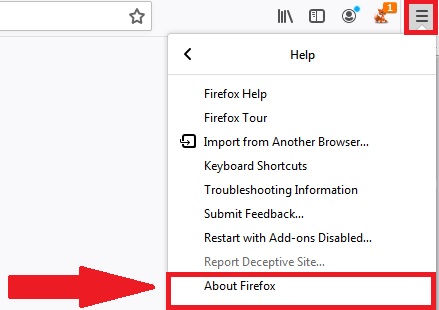
To update Firefox, just open your browser and click “Open menu” (the icon with three horizontal lines in the top right corner of the screen). Then a dropdown menu will open. Click “Help” and then “About Firefox.”

After you follow these steps, a new window will open where you can view which version of the browser you are using. Firefox will automatically check to see if a newer version of the browser exists, and if so, it will download and install it. Then you should restart your browser so the changes take effect.
Alternatively, you can download and install the latest version of Firefox quickly and safely below.

Mozilla Firefox DOWNLOAD
8

The best features and tricks on Mozilla Firefox

Now that you’re certain you have the latest version of Mozilla Firefox installed, it’s time to learn about all the tricks and features you can use with this browser. Let’s have a look!

Primary Password

Master password

Nowadays it’s common to have a vast number of online accounts. Whether you want to read your email, access your bank account, or even make a purchase online, you’ll need to register and choose a password. Since it’s imperative not to use the same password for more than one account, you ultimately end up having hundreds of passwords to remember, which can be a real headache. That’s why most browsers have the option of saving your passwords and entering them automatically when you access the service. However… what if someone besides you uses your computer? Exactly! They’ll also have access to all your passwords.

To fix this major security hole, Firefox has implemented the so-called “Primary Password.” It lets you set a password in Firefox that needs to be entered before the browser autocompletes your passwords on websites. That way, no matter who uses your browser, they won’t have access to your passwords.

To set a Primary Password on Firefox, first click the “Open menu” button in the upper right corner of the screen (it looks like three horizontal lines). Then go to “Options” followed by “Privacy & Security” (in the left side menu). Next simply select the “Use a Primary Password” option, which you’ll find under the “Logins and Passwords” section. It’s that easy.

Customize the toolbar or the overflow menu

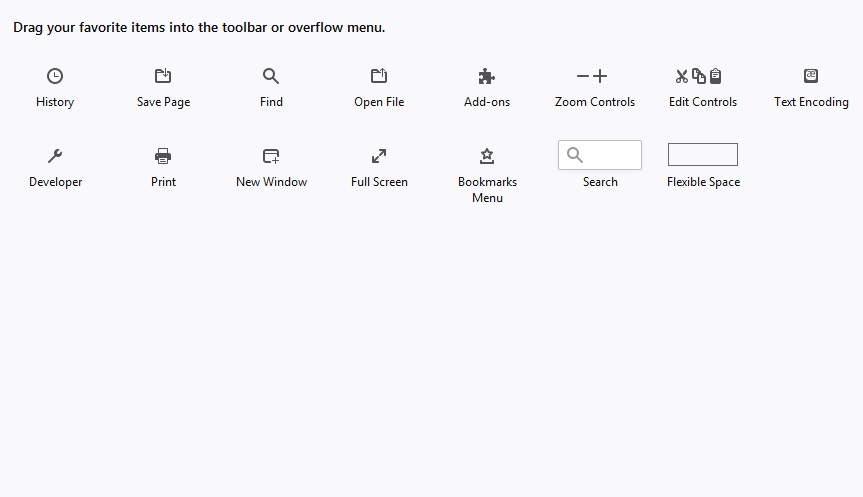
Firefox lets you customize the toolbar or the overflow menu (the menu that appears when you click the “>>” icon, which you’ll find between the user button and “Open menu” button). To do this, just click  “Open menu” (the icon with three horizontal lines in the upper right corner of your browser). Next, click the “Customize” option.

In this new window, you’ll find a selection of items with Firefox’s main features. Just drag your favorite items to whatever location you prefer and enjoy a custom-designed browser.

Navigate between tabs easily

Are you one of those people who always browses the internet with a zillion tabs open? If so, you’ll love this trick. Did you know that when using Firefox, you can switch from one tab to another using keyboard shortcuts? Just use the following commands:

  • Ctrl + Page Up- Move to the tab on the right
  • Ctrl + Page Down-Move to the tab on the left
  • Ctrl + number- Move the number of tabs you have indicated, where 1 is the tab farthest to the left on your browser
  • Ctrl + Tab- Switch to the next tab

Use keyboard shortcuts to watch videos and listen to music

Anyone who likes watching videos and listening to music will love the keyboard shortcuts Firefox has implemented for playing multimedia content. They are as follows:

  • Play- Space bar
  • Increase volume- Up arrow
  • Decrease volume- Down arrow
  • Skip ahead- Right arrow
  • Skip back- Left arrow
  • Start of track- Home key
  • End of track- End key

Porn filter

If you enjoy adult movies or naughty websites, you’ll be glad to know that Firefox has a built-in porn filter. Don’t worry, it won’t keep you from visiting the websites in question, it will simply prevent other people from finding out you have this hobby. Firefox’s porn filter prevents your search history from displaying any adult websites you have visited, even if it’s the last website you were on! This is perfect, for example, if you share your computer with your partner or with your children.

To enable the Firefox porn filter, you don’t have to do anything. It’s enabled by default. However, if for some reason you want to disable it, you need to write “about:config” and change the value “browser.newtabpage.activity-stream.filterAdult” to“false.”

Remove websites from address bar suggestions

Mujer utilizando un portátil

Sometimes it can be annoying to see certain website suggestions appear in the address bar whenever you type a URL. What many people don’t know is that on Firefox you can remove these websites so you never have to see them again. Just scroll through the autocomplete suggestions, highlight the entry and hit “Delete” on your keyboard.

Forget your last searches

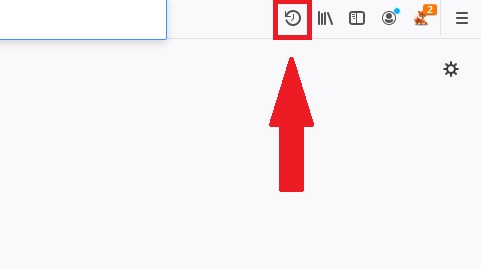
Until now, when you wanted to delete a search, you had to clear your internet history. But rather than deleting your entire history, you probably just want to clear the last five minutes or hours of browsing. For these situations, Firefox has the “Forget” button. This feature lets you clear all the pages you’ve visited in the last five minutes, two hours, or 24 hours.

The “Forget” button doesn’t appear by default on your interface in Firefox, but it’s really easy to add. Just click “Open menu” (the button with the three horizontal bars in the upper right corner of your screen) and then “Customize.” In the new window, find the “Forget” item and drag it to your toolbar. It’s that easy!

Boost performance

Firefox has added an interesting option for anyone who has been noticing that their browser is slower lately. To enable hardware acceleration, just click  the”Open menu” button (in the upper right corner of the screen) and then “Options.” Next, click “General,” which you’ll find on the left side menu, and scroll down to the “Performance” section.

You won’t see a hardware acceleration option, but don’t worry. Uncheck the box labeled “Use recommended performance settings” so that “Use hardware acceleration when available” appears. Restart your browser, and you’ll find that it works faster.

Take screenshots

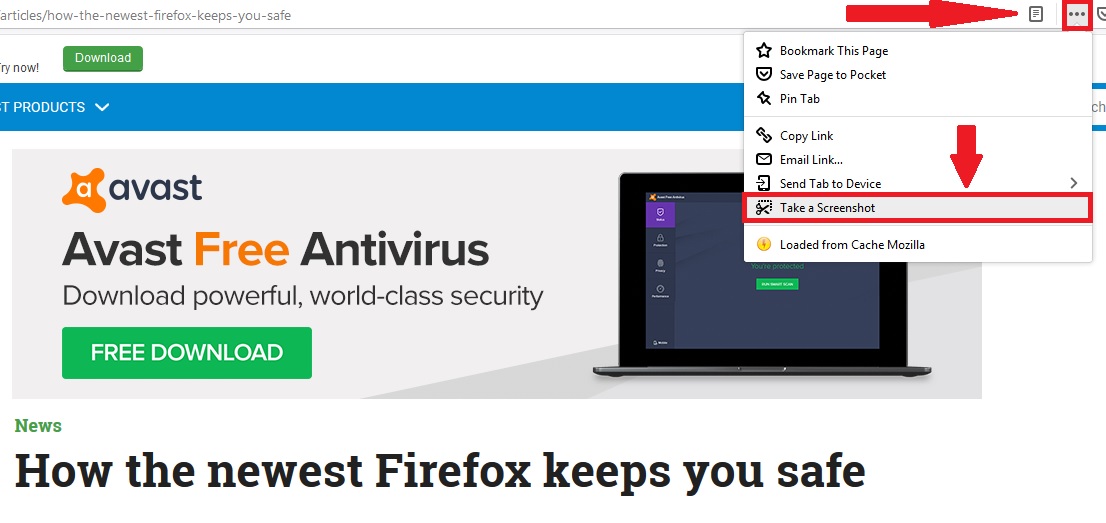
There are a thousand ways to take screenshots, from clicking the “Print Screen” button on your keyboard to using the useful Windows 10 keyboard shortcut that lets you this. But… did you know that Firefox its own way to take screenshots? You just have to click the “Page actions” button in the address bar (it looks like three horizontal dots). This will open a drop-down menu where you should click “Take a screenshot.

Save to Pocket

Pocket has made a name for itself as one of the best bookmark storage services on the internet. Did you know Mozilla owns this service? It therefore comes as no surprise that Firefox has included a button so you can send items directly to Pocket without the need for extensions. Just click the “Save to Pocket” button, which you’ll find in the address bar. If you don’t like Pocket or don’t have an account, you can remove this button by entering “about:config” and then changing the “browser.pocket.enabled” entry to “false.”

We hope you found our selection of tricks and features on Firefox helpful. Do you know of any we didn’t include on our list? Tell us about it in the comments section!

Top 5 Best Impostor Tips for Among Us

As the game has skyrocketed in popularity, players have found themselves searching for answers on how to be the best impostor they can be. Among Us is an interesting game that requires more than just knowing the game’s mechanics; you have to understand how other players think, as well.

Let’s take a quick look at our top 5 Impostor tips, then we’ll get more in-depth on each one.

  1. Observe previous impostors
  2. Memorize the maps
  3. Learn task value and time
  4. Construct an alibi
  5. Pick targets wisely

If you can get a handle on these five ideas, you’ll be well on your way to being a better Impostor. Keep reading to get a detailed look at these concepts.

Among Us DOWNLOAD
9

Observe previous Impostors

You should take note of how other Impostors operate since it can help you see what and what not to do. This aspect is especially true if you’re new to the game.

It’s important to see the ways others fail, not just how they succeed. How did you catch the Impostor last time? Were they too obvious? Was it luck? It’s best that you keep track of what information led to the Impostor’s defeat

Also, be sure to look at how an Impostor won. Who did they target, and when? Where were the bodies found, and how long was that ‘round’? Did the Impostor ever report their own kills? 

These details may seem superfluous, but they matter in the game’s larger context and how the crewmates respond to information. We’ll tackle that a bit more in the next section.

The point of this observation is also to understand how crewmates react to these actions, both in-game and in meeting chats. Do they get suspicious when anyone makes pointless accusations? Do they eject that person right away? What is the impostor doing that makes them either the primary target or completely unsuspected? 

This method is the best way to quickly learn what you should and shouldn’t be doing as an Impostor.

Memorize the maps

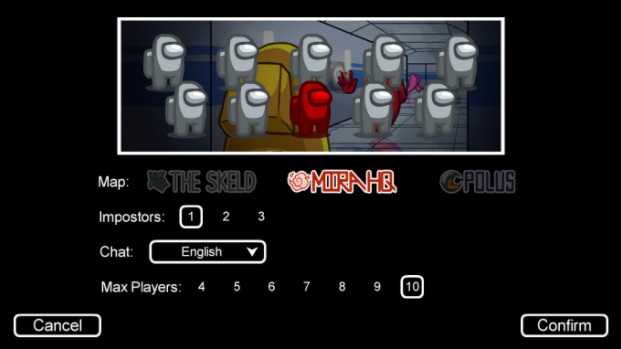
As of this writing, there are three maps in the game: Mira HQ, Polus, and The Skeld. You need to learn them inside out if you want to have the best shot at defeating the crew. 

General layout

Knowing the layout of the maps is important when you want to set off sabotage. For example, Mira HQ has an odd design that makes it hard to get from the cafeteria to the reactor in time. The Skeld, on the other hand, has a very evenly-distributed floor plan that makes it easy to get from one end of the ship to the other.

You should also know where players need to go for their tasks, any isolated areas they could be in, and where the cameras are. 

Vent locations

The ventilation shafts are your key to quick movement around the map. You can quickly make kills and establish alibis, or you can get ahead of a player trying to report you for something. 

Learning where they are and what rooms they connect to is vital. You need to be able to move around at-will and not be hiding in the vents for too long.

Sight lines

The crewmates have limited visibility throughout the ship (even more so if you kill the lights), but the Impostor isn’t affected by this. Use that to your advantage.

Here’s something important to consider: just because you can see a crewmate doesn’t mean they can see you. Crewmate visibility is restricted by the game’s settings and by any ‘blocking’ objects, like walls or closed doors. Learn these angles so that you don’t panic unnecessarily.

Visual tasks

If the lobby has visual tasks enabled, know what those are on the current map. For The Skeld, that includes priming shields, destroying asteroids, and emptying the chute. All three maps have a medbay scan task, which is the one players typically use to declare others immune.

Use those visual tasks to figure out which players are safe. You could even declare those players in the chat, which can help you endear yourself to them. After that, you can focus on killing them first.

Learn task value and time

Impostors can’t actually do tasks. While crewmates are running around, tending to the ship’s systems, you’ll be left standing around, focusing entirely on trying to kill people. In the meantime, a crewmate might have spotted that you’re not doing tasks. 

This aspect is why it’s so important to learn where the tasks are, how much they contribute to the task meter, and how long they typically take. Take advantage of freeplay and understand how much they contribute to the meter.

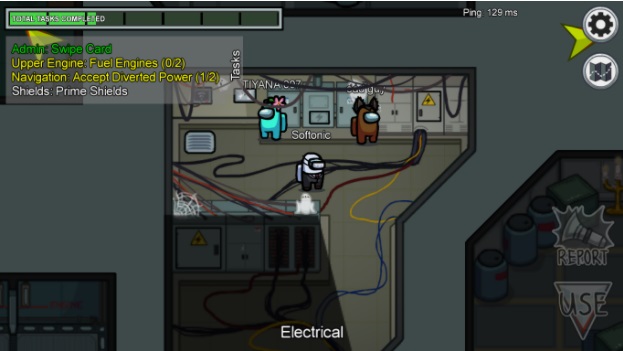
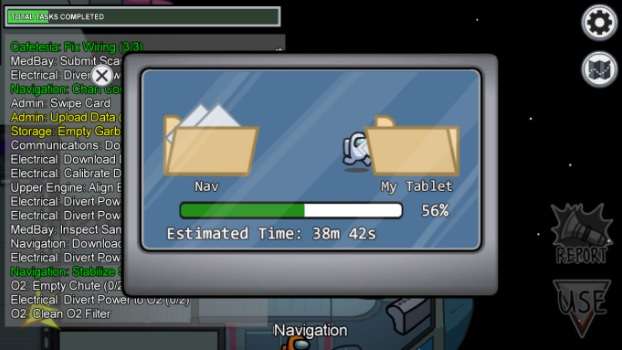
Short tasks are your best bet. You can stand by the card reader in the admin room and wait for the bar to go up a little bit before you move along. The card task is notoriously finicky; people usually don’t get it right the first time. As long as the next taskbar update only fills the bar a little bit, you can move away. It’ll look like you’ve done a task.

However, if someone finishes a long task at the same time, it’s going to look like you faked it. You won’t necessarily be considered safe, and you may have to try again to register yourself as ‘immune’.

Construct an alibi

You can’t forget about the other part of the game: meetings. That’s where your abilities as an Impostor will truly shine. You should always be thinking about how players are going to perceive you, how you’re going to explain actions during discussion time, and how you plan to vote. 

Make sure that you’re very visible to other players. You shouldn’t do it in a passing kind of way; you need to spend time with other players, do ‘tasks’ with them, and ‘protect’ them. Then you can break off and do what you need to do.

It also helps to get back to a group as quickly and cleanly as you can. If you’re able to spend a lot of time with players before a body is discovered, that’s even better. Players typically don’t think about actual time of death when asking where players were; they usually think about the moment of discovery.

Establishing alibis helps connect you to the crewmates and lessens the likelihood of them suspecting you. If you’re constantly on your own and stalking others, you’re going to be more of a target.

Pick targets wisely

While you could end up killing anybody you want, you’ll have greater luck if you’re very picky about who your victims are going to be.

If you’ve made a friend or an enemy, don’t get rid of them just yet. Let them stick around so it doesn’t look like you’re targeting relationships

Focus on people who are considered ‘immune’. These are players who were in someone’s sight the whole time or who were seen doing visual tasks. The lower the number of ‘immune’ players, the better your chances are. 

Figure out which rooms are the best to leave a body in instead of merely walking away. In Mira HQ, the storage closet might be a good place, as well as the greenhouse. They’re one-way accessible and pretty low-traffic. Make sure you utilize that later in the game when people are just waiting on one or two people to complete their tasks.

You also don’t want to kill anyone who still has to do tasks. As a ghost, they have more freedom of movement and can get them all done without restriction. Focus on trying to kill people who are further along in their task list. If anyone announces that they’re done with tasks in meetings, target them.

We hope this list was useful in giving you some tips on being a better Impostor. Are there any tips you’ve come up with? Leave them down in the comments below!

Best Apps to Unblur Pictures on iPhone & Android

Smartphone cameras keep getting better, which is causing the change that analysts have been predicting: traditional cameras are becoming less important to consumers, and nowadays, anyone can be a photographer because we always have a camera on us.

But that’s not to say that all our photos come out well, and people often take pictures that fail to impress. If this happens to you frequently, keep reading for some tips on how to fix blurry photos on iPhone and Android, and for recommendations on the best photo editing software available for each platform.

Why are my photos blurry?

Before we get down to business and explain how to fix a blurry photo, there’s an important question we must answer, one that might keep us from having to fix our pictures in the first place: why are my photos blurry?

There are many factors that can make a photo blurry, so it’s best to address them before you tap the shoot button. The first and perhaps most common issue is a dirty smartphone lens. Yes, you read that correctly. Having your camera lens covered in dust, dirt, etc. is enough to make a photo come out blurry. It’s that simple. To fix it, just clean the lens of your Android device or iPhone before you take a picture. But be careful: make sure to use a chamois cloth (like the kind you use to clean glasses) or a microfiber towel. Camera lenses can also be cleaned with other materials, but take care not to scratch the surface!

Another frequent mistake that leads to blurry photos is shaking the camera. The shakier your hands, the blurrier your images will be. It’s an equation that never fails. To remedy this, use a tripod when taking pictures. If you don’t have one, here’s an easy tip: hold your breath just before you snap your pic.

Finally, there is a series of other photography-related parameters to keep in mind. For example, when objects are in motion (a bird, a car, etc.), it’s harder to capture a still image of them (unless you adjust the camera settings). Likewise, lighting plays an important role: the dimmer the lighting, the likelier that your photo will come out fuzzy. So consider all these factors to determine if there’s a chance you might take blurry photos!

5 Basic Mobile Phone Photography Tips For Beginners | favbulous

How to sharpen photos

To fix a blurry photo, you don’t need a magic class at Hogwarts School of Witchcraft and Wizardry, but a good image editor. These tools, available on PCs for years, didn’t become popular on phones until recently, amid the rise of social media platforms like Instagram and Tik Tok.

Before trying to fix a blurry photo, there’s one truth to keep in mind: if a photo is extremely out of focus, no program in the world can sharpen it. There’s a saying in the audiovisual world that “you can’t polish a turd,” meaning that something inherently bad can’t be fixed. Therefore, if your photo is really blurry… it’s going to be hard to solve the problem. Now that we’ve explained this, let’s get down to brass tacks!

How to Make a Blurry Picture Clear on iPhone and iPad

While you can use iOS’s native photo correctors, the best way to make the picture clear is to use an image editing tool. These have been around for a long time on PC, for example, if you think about Photoshop. However, sometimes you need a quick and easy way to fix blurry photos on your iPhone or iPad. Enter image editing mobile apps. Although these may not be as full-featured as their PC counterparts, they are ideal for those quick fixes and touch-ups. 

Before we get into the apps and how to fix blurry pictures, it is good to remember that the less there is to fix, the easier it will be. Try to keep this in mind while taking photos and take photos that don’t need any fixing.

Best Apps That Make Pictures Clear for iOS

If you want to learn how to unblur a photo on iPhone, this section is for you. We will be looking at a few of the best apps to unblur photos on your iPhone. We will also be sharing how to use these apps step by step so that you can start to fix blurry photos.

Adobe Lightroom

If you like Photoshop, be sure to check out Adobe Lightroom. This “first cousin” of the Adobe suite can also be used to retouch and edit photos. What makes it unique is the fact that it’s oriented towards photography and newbies in the field.

In terms of sharpening photos, Lightroom gets the job done, but we prefer Photoshop. Again, it’s an incredibly competent photo editor, especially since you can apply “filter” packs that make everything easier.

Adobe Photoshop Android DOWNLOAD
8

Step 1: Launch Lightroom and Open Your Image

Launch Adobe Lightroom on your iPhone and choose the image you want to sharpen/unblur from the Library Module.

Step 2: Go to the Develop Module

Next, click on ‘Develop’ in the module picker to start editing your photo.

Step 3: Adjust the Amount/Intensity Slider

With the first available slider, you will be adjusting the intensity of the sharpening. Moving the slider to the left makes it less intense, whereas adjusting to the right increases the sharpness. The easiest way to adjust this is by keeping one finger on the photo and using another finger to adjust the slider. By doing this, you can see a black and white version of your photo that will clearly show the changes made as you drag the slider. The app will also warn you if you over-sharpen your photo by displaying red in the slider. A value around 30 is usually sufficient here, but adjust it to what works best for you. You can always come back and re-adjust if needed.

Step 4: Adjust the Radius Slider

By adjusting the second slider, known as the radius slider, you will be defining how strong (in terms of pixels) the sharpness is applied to the edges. A high value will show thicker edges, whereas a lower value will show finer, more subtle lines. Again, keep one finger on the image while the other toggles the slider to see the details of the changes in black and white. 

Step 5: Adjust the Detail Slider

With the details slider, as the name suggests, you control how many details are sharpened. Keep one finger on the screen and drag the slider left and right until you get the needed detail.

Step 6: Adjust the Masking Slider

The masking slider determines if sharpness will be added to your entire photo or just the subject. The lower the sharpness mask, the more of your image will be sharpened. The higher you go, the more specific the program will get and focus more on the subject of your photo instead of the background. Hold your one finger on the image and use another finger to drag the slider left and right. 

Canva

If you’ve been on social media for a while, the name Canva will surely ring a bell. This app –or web service– stands out for its easy photo editing features. You can also create graphics, prints, presentations, layouts, backgrounds, and a long list of features. 

One of the main characteristics of Canva is that it’s designed for infographics. So, if you want to create a spectacular design without using a more complicated photo editing tool (recommendable if you want a more professional result), this application will surely get you out of a pinch.

Canvas (Android) Download now
8

Step 1: Open Canva

Open the Canva app on your iPhone

Step 2: Upload Image

Upload your image to Canva by tapping on the ‘Uploads’ tab and choosing the photo from your device. Once the image has been uploaded, drag it into the blank canvas.

Step 3: Adjust Image

Now, tap on the image and in the top menu, tap on ‘Adjust’. Once you do this, you will see a ‘Blur’ slider appear. By dragging this slider to the left, you will increase the sharpness of your image and lessen the blur.

How to Make a Blurry Picture Clear on Android

Android also has a native photo corrector that can often be enough to fix minor issues with photos. Most newer Android devices have AI-based editing features in the form of skins and features that can make minor corrections. You might have to use another third-party app with more robust features for photos that cannot be fixed with the native editing tools.

Best Apps That Make Pictures Clear for Android

This section will cover how to fix a blurry picture on Android devices using third-party apps. 

Enhance Photo Quality

Enhance Photo Quality is beneficial if you’re looking for a decent free image editing app that works well on fixing blurry photos. 

Step 1: Open the App

Open the app on your Android phone by tapping on the app icon.

Step 2: Open the Image You Want to Edit

Import the image you want to correct into the app.

Step 3: Tap on ‘Sharpness’

Tap on the ‘Sharpness’ tab at the bottom of the screen.

Step 4: Adjust the Dial

This app doesn’t have the traditional slider. Instead, it has a dial complete with sound effects and vibrations to imitate a real camera. To increase the sharpness, you turn the dial towards the ‘+’. However, we recommend you do this very slowly as this app has a powerful sharpening effect, and if you move too fast, you may miss the perfect spot.

PIXLR

PIXLR is another excellent free photo editing tool that enables users to make various editing changes to their photos. This app comes complete with effects, overlays, filters, collages and even double exposure.

Step 1: Open the App

Open the PIXLR app by tapping on the app icon in your menu.

Step 2: Open Your Photo

On the app’s main menu, choose ‘Photo’ and upload the photo you want to edit from the gallery.

Step 3: Select the Editing Tools

Now, click on the ‘Editing Tools’ represented by a bag icon at the bottom left of your screen.

Step 4: Tap on ‘Sharpen Tool’

With the editing tools open, look for ‘Sharpen’ and tap on it.

Step 5: Adjust the Amount

The first adjustment you can make is the amount of sharpness. Adjust the slider until you reach the ideal sharpness for your image.

Get more clarity!!

Now that you know the best apps to unblur pictures on iPhone & Android, you can make your images clearer. Your followers on Facebook and Instagram will appreciate the effort! We hope these techniques have helped you.

Intro to Among Us for Beginners

Among Us has rocketed in popularity recently, and it seems like everyone’s playing it. If you’re looking for a good time, you might be interested in giving the game a try.

Jumping into a multiplayer game unprepared can be a bit daunting, but don’t worry. We’ll give you the details you need to make your experience better. Let’s dive in.

What is Among Us?

InnerSloth’s Among Us is a top-down social deduction game that forces you to question the motives of all of your teammates. It was originally released in June 2018 and popularized by Twitch stream Sodapoppin in July 2020.

The team initially developed Among Us as a mobile-only title. It also received a wider PC release in November 2018. In August 2020, InnerSloth announced that plans for a sequel were canceled. Instead, all of the new content would be added to the original game.

Among Us DOWNLOAD
9

What are the rules of Among Us?

In order to win, you’ll need to complete all of your tasks, vote out the Impostor, or kill everyone on board, depending on the role you’re assigned.

The game contains two roles that players can receive: Crewmate or Impostor. Let’s take a look at these roles and how it’ll change how you interact with the world.

Crewmate

The crewmate’s job is to complete their tasks before the imposter kills everyone onboard the ship or station. Alternatively, you can win the game as a crewmate by ejecting the Impostor.

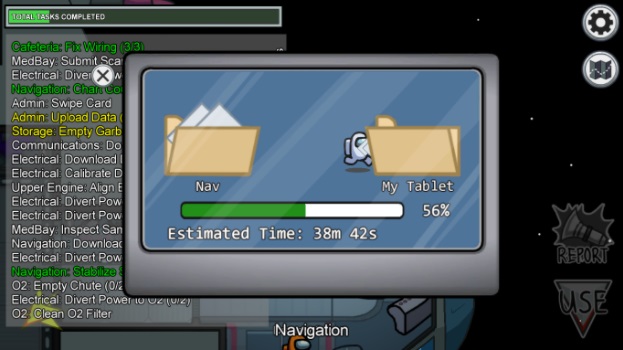
You can see your tasks on-screen, and helpful arrows can also guide you to jobs you have to do. When you complete tasks, the taskbar will fill and show the progress of your entire crew.

If you want to win the game, you’ll need to get everyone on board to do all of their tasks. If a crewmate dies, not to worry! They can still do jobs as a ghost.

Impostor

The Impostor’s job is to kill all of the crewmates, one way or another. You can sabotage systems to force players to move around and create confusion. There’s also the ability to travel through the vents in the ship or station, which lets you move rapidly across the map.

You could throw suspicion onto other crewmates and turn them against each other, but be careful. Making accusations can backfire on you.

Meetings

Meetings will occur if a player hits the ‘emergency meeting’ button in the level’s cafeteria, or if someone reports a dead body.

Meetings are the only time that the in-game chat is accessible. If you want to talk to people, you have to call a meeting. Any players that have been killed can’t communicate with you. They can see your chat, but you can’t see theirs.

During this time, the crew can discuss movement, raise suspicions, and vote to eject a team member if enough people think they’re the Impostor.

As a crewmate, you need to be on the lookout for any unusual behavior during meetings. Players throwing immediate suspicion onto others could be a sign they’re the Impostor; they could also be telling the truth.

As the Impostor, this is a critical time for you. You’ll need to use misdirection and manipulation to convince the crew that you’re on their side. Take the opportunity to endear yourself to the crew or find reasons to raise suspicion against other players. Take note of any tactics that emerge during this period and take advantage of them.

How can I win Among Us?

Winning a game can be difficult. If the Impostor is talented, you may never find them. If the crew are focused and in lock-step, you may only get one kill. Read on for some of our quick tips for how to win in Among Us.

As a Crewmate

Your primary focus should be on completing tasks. Even when you die, your ghost can still finish assignments. If you just get all of the tasks done, you can win the game.

However, it’s rarely that easy. You also need to protest your innocence from time to time in the meetings. You may notice suspicious behavior that you want to make light of, but it could blowback on you.

Here are a few tips:

  • Never travel alone.
  • Get your tasks done.
  • Patrol the map when you’re finished.
  • Address sabotage as quickly as you can.

As an Impostor

We’ve covered how to be a good impostor in another article, but we’ll hit the broad points for now.

You’ll need to know the territory better than anyone if you want to win as the Impostor. You need to know what rooms have vents, where the blind spots are, and what rooms your sabotage will affect.

You also need to know the game setup better than the rest of the players. You can see all that information on the left side of the screen in the game lobby. What are the vision limits? What are the cooldowns? How many emergency meetings do we get? If you have that information in your head, you’ll be a more effective impostor.

Here are a few general tips:

  • Know the map and all its little quirks
  • Know the vent locations
  • Know the game’s settings
  • Use your sabotage wisely

How can I play Among Us online?

The big draw for the game is playing with strangers and testing your deductive skills against unknown foes.

When you boot up the game, you’ll notice a big “online” button on the main menu. You can click that, then decide whether you want to host or join a match. Let’s take a look at both of these options in detail.

Hosting a game

When you decide to host a game, you’ll need to choose the map, number of impostors, and maximum players (up to 10). You can also decide the main language you want game chat to be in, which helps potential players find games that chat in their language.

You can’t change any of these options while in the lobby. If you want more impostors or a different map, you’ll need to exit your lobby and make a new game.

When you first pop into your lobby, your game is set to private. This feature gives you plenty of time to change the gameplay options before other players can jump in.

You can use the computer in the lobby to adjust the options. Feel free to change the view distances and player speeds. There are also options to add more tasks, lengthen cooldowns, and adjust how long meetings take.

Once you’re ready, you can set the game to public by clicking the button on the bottom of the screen. Players will join at their leisure.

Joining a game

If you’d rather jump into a game without dealing with all the settings, use the Join options.

If you want to play with your friends on public matches, they could give you the code at the bottom of the screen. You can use that to join a private game or just join a match directly.

Otherwise, you can look through a browser of currently-active lobbies. You have the option to filter by map, Impostor number, and chat language. The server browser will show you the name of the host and the max player count.

You can also see how many players are active in the lobby. If you want to play right away, it’s best to join a lobby that’s nearly full. If you want a bit of time to customize your character and chat with people, you might want to join an emptier game.

Make sure to have fun!

The most important part of the game is that you play in good spirit and enjoy the ride. It may not be fun to die, but find humor in watching your crewmates struggle with information you already know!

We hope you got plenty of useful information out of this beginner’s guide. Do you have something to add? Was there anything we missed? Be sure to let us know in the comments section down below!