Pokemon GO announced a Lunar New Year event

Niantic has announced a special Lunar New Year event launched in Pokemon GO. For a limited time only, players will have access to unique pokemon, bonuses, raids, field research and more during this event. 

The Lunar New Year event on Pokemon Go is kicking off on February 1 and will remain active for one week, thus finishing on February 7 at 8 pm. This gives players a whole week of chances to collect the new shiny pokemon along with other rare sightings. 

The sixth-generation fire/normal type pokemon, Litleo, will be the event’s main feature, with a shiny version being released for the first time. Other pokemon such as Paras, Meowth, Growlithe, Voltorb, Hisuian Voltorb, Magicarp and Torchic will also appear more often in the wild. You’ll also have an increased chance of spotting an Electabug, Gyarados or Combusken if you’re lucky.

When it comes to raids, you’ll find Magikarp, Shinx, Darumaka, Litleo and Espurr in one-star raids. In three-star raids, you’ll encounter Charizard, Flareon, Shuckle, Delcatty, Absol, and Druddigon. In five-star raids, you’ll come across Regirock, with Mega Houndoom appearing in mega raids.

If you obtain 7km eggs throughout this event, you’ll have a higher chance of hatching a Shuckle, Slugma, Darumaka, Scraggy and Litleo. While doing field research and completing tasks, you can encounter Alolan Meowth, Galarian Meowth, Magikarp, Darumaka, Litleo and Espurr. By completing certain field research tasks, you’ll also earn mega energy for Gyarados.

This event also comes with two timed research challenges, and once these are completed, it will reward you with a Litleo or Espurr.

It’s time to get active and grab your phone and a couple of friends and start collecting these pokemon while earning rewards and bonuses from the Pokemon GO Lunar New Year event. If you have a moment to spare, check out our guide on the top 9 pokemon to get in Pokemon GO.

Prequel app – important notes before downloading the viral app

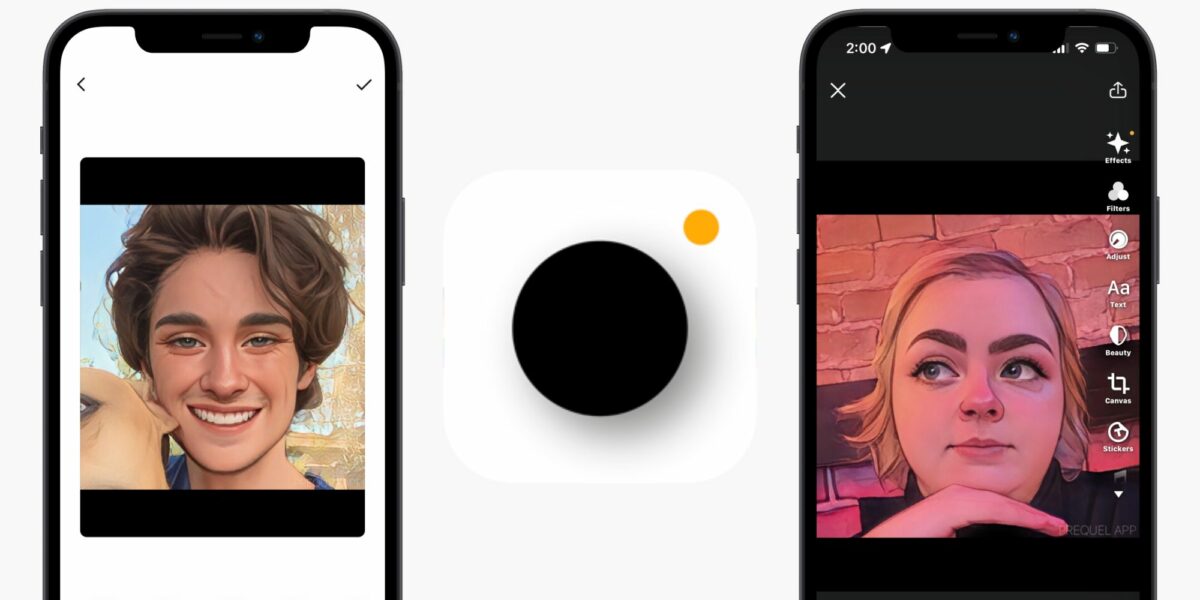
Every so often, a new app comes along that goes viral and takes the world by storm. This time, that app is called Prequel. This popular photo editing app and its cartoon filter have everyone buzzing. However, is this app really free?

New apps come and go all the time, and now and again, an app comes along that creates a big stir. Think back to popular apps from a few years ago, such as Flappy Bird, Vine, and Face App. The latest viral app, Prequel, has everyone excited with its new cartoon filter. However, as with many apps, we can’t help wondering if it’s free.

Unfortunately, many apps are free to download these days, but the moment you want to start using the features or participating in any way, there will be a fee requested. This is especially true for photo and video editing apps that use many specialized tools to create different effects.

The cartoon filter on the Prequel app is a very good one. The app uses AI magic to transform your photo into a hand-drawn, cartoon-style image. The results are beautiful, unique, and very entertaining. And you can use the cartoon filter for free when downloading the Prequel app.

Yes, the cartoon filter is free to use however most other aspects of the Prequel app will require a monthly subscription. This means when you download the free app, you can use the most basic editing tools and the cartoon filter without paying anything. However, you’ll not have access to the advanced editing tools, effects, the ‘Retouch Toolkit,’ or any other filters unless you pay for the subscription. 

It seems there is another app in the app store that lures you in with a fun incentive but prohibits you from using all the app’s features without paying. Despite that initial disappointment, the cartoon filter is still fun, and if you only ever use basic editing tools, this could be a great app for you.

Bungie’s future is not PlayStation exclusive

Sony Interactive Entertainment recently announced plans to acquire game developer Bungie for $3.6 Billion. While the acquisition news ruffled many feathers in the Xbox and Destiny 2 gaming communities and caused moderate panic over Bungie’s future developments, SIE has made it clear that they have no intention of making Bungie PlayStation Exclusive. 

Famous for the Halo and Destiny franchises, Bungie was under the Microsoft banner from the year 2000. In 2007 however, the developer split from Microsoft, losing its intellectual property rights to Halo, which is now developed by another of Microsoft’s acquisitions, 343 Industries. 

Sony Interactive Entertainment CEO, Jim Ryan, says that after the acquisition, Bungie will remain a multi-platform studio with full rights to self-publish their IP and reach players wherever they want to play. He goes further to say that Bungie and SIE have had a strong partnership since the birth of the Destiny franchise and that he is thrilled to welcome the studio into the PlayStation fold. 

The official PlayStation blog posts also went out of their way to quell concerns, reinforcing that Bungie will sit alongside PlayStation Studios and that the two groups would collaborate on future titles and IP. Bungie clarified what the acquisition would mean for them in their own blog post. The developer called Sony Interactive Entertainment a partner who has supported them unconditionally and only hopes to bring Bungie’s vision of entertainment spanning multiple generations to fruition while allowing them to remain the creative, independent force they’ve always strived to be. 

While Destiny 2 is being promoted heavily alongside PlayStation, offering exclusive bonuses to the platform’s players, it’s pertinent to remember how intertwined Bungie has always been with PlayStation, Xbox, and PC. There is no reason at this stage to worry about Bungie’s future offerings being exclusive to Sony’s gaming platform, and all parties involved have been transparent about wanting to preserve Bungie’s independence and supporting them in their quest. 

New malware SysJoker infects Windows, Mac, and Linux OS

It seems like malware threats aren’t resting on their laurels in 2022 as another cybersecurity issue has arisen. Intezer researchers have discovered SysJoker that targets Windows, Mac, and Linux OS. Even if you have Windows 11, it seems your PC may not be safe from being a target.

While Intezer first discovered SysJoker in December 2021, the researchers took their time studying the cybersecurity threat. This new malware comes in the wake of Google warning about new security flaws in Chrome and Purple Fox becoming a trojan virus in fake Telegram downloads. However, the new SysJoker seems to be more potent, finding a way to evade detection by Linux, Windows, and Mac operating systems.

How SysJoker works is by remaining inactive for about two minutes before jumping into action. It creates a directory that looks like it belongs to an Intel graphics interface service while planting the file igfxCUIService.exe. From there, the malware uses Living off the Land (LOtL) functions, quietly gathering information about your device.

In summary, the security threat invades your registry and creates a link to Google Drive where hackers can then drop any payload or malware onto your server or system. If you think your antivirus program will save you, think again. Intezer used 57 anti-malware tools, and SysJoker evaded them all.

It’s not the first malware to show signs of evasion in 2022. MoonBounce has found a way to survive OS reinstalls by infecting the UEFI firmware. If there’s anything we need to learn about cybersecurity this year, it’s that we’ll need to be more vigilant with what we browse, download and install. To that end, please read our guide for easy steps to be safe online this year.

New God of War PC mod restores Kratos’ former glory

Since 2018, God of War fans have been getting used to the ‘new and improved’ Kratos. 2018’s release of the massively popular role-playing game chose to give the protagonist a makeover of sorts with a colossal beard and a body plagued by the visual effects of aging. In a new PC mod by Speclizer, God of War die-hards can see Kratos restored to his original glory to better live out their ‘Kratos: The Early Years’ fantasies.

The model for the Greek hero in this mod differs greatly from the now ‘original’ version that appears in the newer titles, swapping his beard out for the initial goatee and stripping the God of War staple of his iconic armor. 

The God of War mod hasn’t done much else to try and age Old Man Kratos down to his former years, so his skin still looks a little wrinkled, and his tattoos still look faded from age. However, Kratos looks like the picture of youth with his almost clean-shaven face and less armor.

The modding community has always been driven to bring more advanced realism into games. This latest PC mod by Speclizer focuses on a whole new category of modding, bringing back the golden age of console classics like God of War. The game has changed a lot since the PS2 days, and the improvements have all around been widely accepted as the new status quo. But it’s always comforting to be able to return to simpler times, even in a game like God of War that has always been a console staple.

God of War’s recent successful port to PC has introduced a slew of new players to the Greek-inspired odyssey. The best thing is that, now that proper mods are a GoW reality, the developers have even given modders their blessing to change the game as much as they see fit. It’ll be interesting to see how a new breed of mods will change the face of God of War.

New York Times buys Wordle, but at what cost?

If you’re been paying attention to our articles lately, you may recall that we became excited by a free-to-play word puzzle called Wordle. We became so enraptured by it, that we presented the best tips to succeed at Wordle, just before discovering that it was available in different languages. Well, the New York Times has just bought the Wordle game from its creator, Josh Wardle, and social media is abuzz with concerns about the consequences of this acquisition.

Wardle innocently created Wordle in October with hopes to bring back the love for word puzzle games. He wasn’t expecting it to suddenly become trending and famous as it has over the last few weeks, with millions playing the online game and sharing the results on social media. He indicated that the pressure to please the new fans has become unbearable, which is why he accepted a seven-figure amount from the New York Times.

It feels apt that the New York Times took the step to buy Wordle, as it was the online news agency that first introduced it to the world and made it famous. However, Wordlers (our new nickname for Wordle gamers) are taking to social media to express their concerns. Since the NYT is a paid subscription service, does that mean you’ll have to become a paying member before you can access the game?

Another issue is with saved progression on profiles. Will you still have the same stats as before, and should we expect more complicated modes? These are only some of the burning questions we have, and we’ll have to wait and see what the New York Times has in store for Wordle.

How to test the security of an Android application

Before we jump right into how to test the security of your Android applications, it’s important to understand the overall nature of this popular operating system. That information will help to emphasize the importance of testing your apps before you release them into the wild.

Once you have a better understanding of how the Android OS system works, you’ll be able to perform the appropriate security testing for your device. We’ll also list some tools that can assist you.

Understanding the Android OS

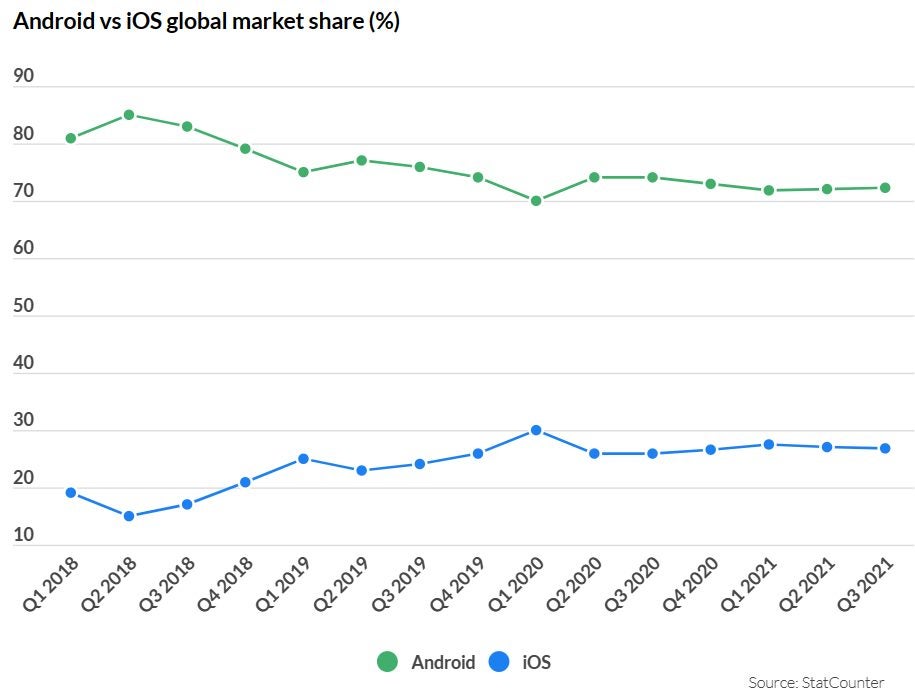
Android is an open-source operating system that was launched in 2007. It’s by far the most popular mobile operating system on the planet: As of January 2022, it enjoyed around 75% market share with approximately 2.8 billion active users. It’s present on a variety of devices in addition to cell phones. It’s in your office on Chromebooks, in your home, powering your smart TV, and even accompanies you on your day-to-day in the form of wearables.

Of course, with such a huge user base, it’s a no-brainer that businesses ensure they’ve got a presence in your pocket, in your lounge, and on your wrist by having their own apps. Unfortunately, it makes Android apps a huge target for cybercriminals. If they’re able to exploit vulnerabilities in your app, there are huge commercial, reputational, and even legal risks to your organization and your users. They’re all good reasons to read on and learn more about security testing your Android applications before you launch them.

How to test the security of an Android application

Android sandbox

By default, Android apps run in a sandbox environment. That simply means they’re unable to access any resources on a user’s device without getting explicit permission.

When a user downloads an app, it displays messages on the device’s screen requesting authorization to access things like the camera, microphone, and contacts to maximize its functionality.

Unfortunately, the sandbox isn’t guaranteed to prevent every threat. Sometimes, malicious components within an app can go undetected during the installation process, only to become active later and cause serious problems. That’s why you have to protect yourself and your end-users by carrying out penetration testing before rolling out your Android app.

Common threats

The following are four of the most common threats to the Android operating system. This is by no means an exhaustive list. It’s merely a quick look at some of the major vulnerabilities on the OS, and how to prevent them. 

Binary Protection 

If you allow your app to run on a rooted or jailbroken device, any kind of malicious code can run on it. At the very least, you should build jailbreak or root detection into your app.

Insufficient Transport Layer Protection

To ensure all sensitive data exchanged between the client and server is encrypted, it’s essential that your app has well-defined confidentiality and integrity rules.

Insufficient authorization/authentication

Make sure your app carries out sufficient authorization using policy-based config files instead of hard-coded checks.

Information leakage

Use threat models to ensure that data isn’t accidentally leaked through things like URL and keyboard press logging.

How to test the security of an Android application

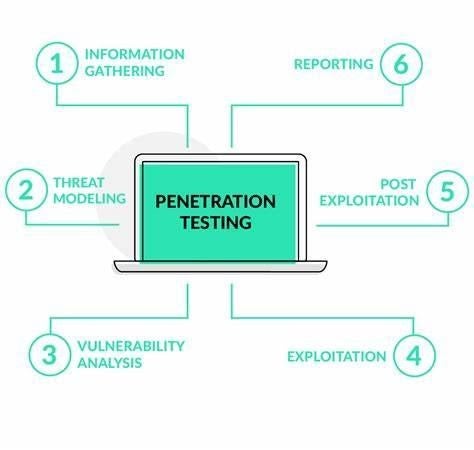
Penetration testing

Penetration testing, or pen-testing, is the process of verifying the integrity of your Android apps. It lets you identify the vulnerabilities within them and indicates the severity of each one.

Carry on reading to learn what tools you need, how to prepare, and what steps to take.

Tools

There are lots of tools you need for testing the various aspects of your Android app’s security. If you wish, you can download and run them individually (manual testing), or you can download an app that contains all you need, which will carry out all relevant tests automatically.

If you want to go down the manual route, you should look out for apps that test things like misconfigurations (e.g. QARK – Quick Android Review Kit), and MITM (man in the middle) vulnerabilities (e.g. Mitproxy).

Either way, you need programs that you can use for a variety of tests, including pen-testing, mobile testing, ROM modding, and more. To save time without sacrificing reliability, programs such as App-Use, Android Debug Bridge (ADB), and Mobile Security Framework (MobSF) contain all the tools you need.

You’ll also need an Android phone emulator (Android SDK). This is essential for simulating your Android phone on your computer screen. You use it to see how your evolving app behaves without risking your real phone and data.

If you’re security testing Android apps on behalf of a third party, you’ll also require a web application proxy (WAP). This allows you to get authentication to work with apps on a company’s private network.

Finally, You should set up a virtual machine (VM) so you can test your app for multiple platforms in one place. This will help you ensure that your app will work securely on diverse variations of the Android OS on other kinds of devices.

Preparation 

Before you start testing, ensure your computer has at least 1GB of RAM (so the Virtual Machine doesn’t lag during your testing), and download the Android SDK and your testing tools of choice.

Vulnerability assessment

Once you’re ready to start the testing process, the first thing to do is check the current security state of your Android app.

This will produce a laundry list of vulnerabilities that needs to be addressed later when you put together your security strategy.

Security Testing

Running the pen-test will give you more detailed information as to the severity of each vulnerability detected in your earlier assessment.

It’s essential that you can strike the right balance in your app between server and client security, and usability. We recommend testing your app on each iteration to ensure you’ve got that balance right.

Mitigation

Your Android emulator is your best friend when it comes to resolving any vulnerabilities. Investigate and test them by activating the exploits, making yourself the ‘victim’. It’ll help you understand from a user’s perspective what happens during an active attack. 

We’ve already given you some pointers about the most common threats associated with Android apps, and here we’ll summarize the three core aspects of tightening up security.

  • Identification: If you overlook this vulnerability, it can allow a malicious app to present itself as an approved one. it leads to the user inadvertently allowing the malware to run on their device, believing it’s the original app they’ve approved
  • Authorization: to provide full functionality, your app may require access to two other components on the user’s device. For example, an app that allows you to upload photographs will need access to the camera. During the installation process, your app should obtain explicit permission from the user to access other apps or information stored within them 
  • Authentication: As well as securing your app server-side, make sure you don’t leave the door open at the client end. The most secure way to secure your app client-side is by enabling biometric authentication. Depending on the hardware your app’s running on, the user can use iris-scanning or fingerprint authentication to open apps on their device and to authorize transactions and changes
How to test the security of an Android application

Ensure the Android app is secure

The main takeaway here is that by constantly testing the security of your Android app during its development, you’re creating a secure, stress-free environment for everyone.

Ultimately, securing your app to the max produces a win-win situation. Not only do you protect your own server and systems, but you also make it as easy as possible for your users to remain secure while using your app.